z16 ICA-SR Structure Service Times

It was recently brought to my attention that CFLEVEL 25, made available with IBM z16, improved ICA-SR links.

(I don’t know why I didn’t spot this before – but it’s documented in several places, including IBM Db2 13 for z/OS Performance Topics, an interesting Redbook. (I actually read this from cover to cover during a recent power outage.)

An ICA-SR link is short distance, and faster than CE-LR (long reach) links. The ICA-SR fanout connects directly to the processor drawer. There are two flavours:

  • ICA-SR (Feature Code 0172)
  • ICA-SR 1.1 (Feature Code 0176)

You can carry both of these forward into a z16. This post, though, is exclusively about ICA-SR 1.1.

Note: ICA-SR links can be up to 150m. Any longer and you’d be using CE-LR links.

What’s Changed

The ICA-SR 1.1 hardware didn’t change between IBM z15 and z16. What changed is the protocol.

To quote from IBM z16 (3931) Technical Guide

On IBM z16, the enhanced ICA-SR coupling link protocol provides up to 10% improvement for read requests and lock requests, and up to 25% for write requests and duplexed write requests, compared to CF service times on IBM z15 systems. The improved CF service times for CF requests can translate into better Parallel Sysplex coupling efficiency; therefore, the software costs can be reduced for the attached z/OS images in the Parallel Sysplex.

The changes that lead to these improvements are:

  1. Removing the memory round trip to retrieve message command blocks.
  2. Removing the cross-fiber handshake to send data for a CF write command.

It almost doesn’t matter what the changes were – except Item 2 probably explains the relatively large improvement for write requests (whether duplexed or not).

Impact Of The Improvement

So, how do we interpret the effect of these improvements? Usually we divide structure service time decreases into two areas of benefit:

  1. Workload response time decreases and throughput improvements.
  2. Coupled CPU reductions for synchronous requests.

(Conversely, an increase in service times leads to the opposite effects. This would typically be a matter of increasing distance.)

On the first point, most applications aren’t overly sensitive to coupling facility request times. Often they’re more sensitive to other aspects, such as obtaining locks or buffer pool invalidations. But one shouldn’t dismiss this out of hand.

On the second point, recall that a coupled (z/OS) processor spins waiting for a synchronous request. So, the faster a synchronous request is serviced the lower the z/OS CPU cost.

It’s worth noting that individual processors are faster on a z16 compared to a z15. So it might be that the z16 ICA-SR 1.1 improvements more or less match the coupled engine speed improvement. You might consider this “running to stand still” but both improvements are net gains for most customers. Further, it makes ICA-SR 1.1 more attractive on a z16 than ICA-SR.

A reduction in request service times over physical links might make using external coupling facilities more feasible. This could open up more architectural choices – such as using external coupling facilities where today you use internal.

Note: A reduction in service times can lead to some formerly asynchronous requests becoming synchronous. This is not a request-level conversion process but rather a consequence of the dynamic conversion heuristic; Now more requests are serviced quicker than the heuristic’s thresholds. If this happens the coupled (z/OS) CPU might well go up. Of course former async requests would probably have even lower service times – because they’d become sync.

Conclusion

It seems appropriate to encourage anyone moving to z16 to ensure their ICA-SR links are 1.1 – whether they brought them forward or perhaps replaced older ICA-SR links. Of course, there might be a cost downside to balance against the upsides.

It also seems to me to make ICA-SR on z16 more attractive, relative to IC links on previous generations. That might increase configuration options, including adding more resilient design possibilities.

Two other RMF-related things to note:

  • RMF doesn’t distinguish between ICA-SR generations; They all have Channel Path Acronym “CS5”. (CE-LR is “CL5” and IC Peer is “ICP” – for completeness.)
  • RMF doesn’t have a fine-grained view of Coupling Facility request types. (It does know about castouts but that’s about all.)

Neither of these is RMF’s fault; It’s able to report only based on the interfaces it’s using.

One final thought: As articulated in A Very Interesting Graph – 4 months ago – there’s much more to request performance than just ICA-SR niceties. But the improvement in z16 ICA-SR 1.1 is surely welcome.
Mainframe Performance Topics Podcast Episode 33 “These Boots Were Made”

I hope you can tell that Marna and I had a lot of fun making this episode.

I can’t recall which of us came up with the cultural reference. But it sort of developed – until the aftershow was sort of inevitable.

Anyhow here are the show notes for Episode 33. The podcast series is here and on all good podcasting services.

Episode 33 “These Boots Were Made” long show notes.

This episode is about our Mainframe Topic.

Since our last episode, Martin was at the Munich Z Resiliency Conference, and IntelliMagic zAcademy Where Are All The Performance Analysts? – A Mainframe Roundtable.

What’s New

  • Preliminary 3.1 upgrade materials can be found in APAR OA63269 . Another APAR will be done closer to GA.

  • Python 3.11 zIIP enablement, for certain modules only, up to 70%. This is available back to z/OS V2.4 with APAR OA63406 and PH52983.

Mainframe – z/OS Validated Boot

  • This function is only on latest hardware and software: z/OS V2.5 or later, IBM z16 A01 or A02 May 2023 microcode level and another follow-on level.

  • The point is to ensure IPLs are from known, unmodified, validated in-scope artefacts, so that you can initiate a system with known objects. This is needed for Common Criteria Evaluation.

  • Good for an organisation concerned about security.

  • Two pieces to the solution: Front end and back end.

  1. Front-End first:

    • Sign in-scope IPL time artefacts, done by the customer with their own private key.

      • You could choose to do this at an initial product install: Eg z/OS 2.5 -> 3.1. Note that z/OSMF workflows delivered with ServerPac can help.

      • Note z/OS V2.5 is requirement for driving system.

      • Also you would need to do this signing post-PTF installation, as applying PTFs leads to artifacts becoming unsigned.

      • You can sign now and validate later, as this portion does not have a requirement on the IBM z16 HW.

      • The Certificate you signed with, needs to be exported (via RACF, for instance), which will have the public key in it.

      • The in-scope artifacts that must be signed for z/OS Validated Boot is: IPL text, nucleus, standalone dump text, LPA.

      • A helpful utility IEAVBPRT can be used to report on what in a data set has been signed or not. Use this as possibly a best practice after applying maintenance, before IPL with Audit.

  2. Now Back-End:

    • Signatures validated during IPL time , and this is when you have the IBM z16 HW requirement. You must import the certificate (from the Front-End) into the IBM z16 HMC.

    • IPL time has additional requirements:

      • IPL with CLPA. CLPA is building the Link Pack Areas in virtual memory. CLPA enforced for Validated Boot IPL.

      • LPAR has to have Virtual Flash Memory. Specific requirement for Validated Boot is to allow PLPA to page to somewhere secure. You might have other users of VFM, so size for both. Probably other users are much larger.

    • You have a choice of IPL type: CCW and List Directed.

      • Channel Command Word (CCW) has been around forever. A CCW IPL is compatible with signed load modules.

      • List Directed (LD) is new. This type of IPL does signature validation in two modes: Audit and Enforce.

        • Audit is used just for reporting.

        • Enforce is used for validation and potential failure. Failure is one of a few wait states with a message. Wait state indicates the first problem.

      • Do an Audit first, fix any problems, then do Enforce. Go round the loop when applying maintenance.

  • You need to revise IPL procedures, in particular deciding when to do Audit versus Enforce. Reminder: Maintenance would bias you towards Audit followed by Enforce. Be careful when selecting mode for an emergency IPL.

Performance – Db2 Open Data Sets

  • Follows on from Episode 32 Performance Topic – which we’ll call Part 1. This time we don’t have Scott Ballentine with us. Recall he’s a z/OS developer and here in Part 2 we’re concentrating on Db2.

  • In Part 1 we were talking about physical Open and Close. That is Open data sets as z/OS would see it.

  • Db2 has an additional notion of logically Open and Closed data sets. We’ll discuss both in this follow up topic. And try to keep them straight.

Physical Open And Close

  • If a data set is needed – for the portion of an index space or table space – the Db2 transaction will experience a delay if the underlying data set is physically closed. To minimise this Db2 uses a deferred close process – keeping data sets open beyond end of use. It also minimises the CPU used for opening and closing data sets by keeping a pool of them open.

  • Of course, as mentioned in Part 1, a lot of this is about managing the virtual storage for the open data sets

  • The DSMAX Db2 subsystem parameter was mentioned in Part 1. It controls the number of physically open data sets for the subsystem. When DSMAX is approached Db2 starts physically closing data sets. First, page sets or objects that are defined with the CLOSE YES option are closed. The least recently used page sets are closed first. When more data sets must be closed, Db2 next closes page sets or partitions for objects that are defined with the CLOSE NO option. The least recently used CLOSE NO data sets are closed first.

  • Db2 Statistics Trace documents the number of open data sets and the open and close activity. So you can see if your DSMAX is set sufficiently high. But, as we saw in Part 1, virtual storage comes into play and ultimately limits what a safe DSMAX value would be.

  • Two recent APARs are of interest: PH33238 and PH27493. In addition to the CLOSE YES vs CLOSE NO distinction, Data sets opened exclusively for Utility access will be pre-emptively closed after 10 minutes and will be at the front of the queue to be closed when DSMAX is approached. Fixes for both APARs are required for this to work right.

Logical Open And Close

  • Usually known as Pseudoclose – is a switch from R/W to R/O. It’s not a physical close at all.

  • Its main role is to manage inter-Db2 read/write interest, for Datasharing efficiency purposes; It’s expensive to go in and out of Group Buffer Pool (GBP) dependency.

  • When there is at least one updater and maybe one reader there is read/write interest and Db2 has to do more work in Datasharing. While flipping in and out of Inter-Db2 read/write is not a great idea there is an efficiency gain in dropping out of this state judiciously.

  • Two Db2 subsystem parameters have traditionally been used to control pseudoclose: PCLOSET and PCLOSEN. “T” for Time and “N” for number of checkpoints. PCLOSEN is gone in V12 with APAR PH28280, as part of a DSNZPARM simplification effort. (DSNZPARM is the general term for subsystem-level parameters.) So PCLOSET would need adjusting down to whatever mimics PCLOSEN – in anticipation of this APAR or V13.

  • Sidebar: Putting Db2 maintenance on is an inevitability. Another example if this is the changed Db2 DDF High Performance DBATs’ behaviour.

Open Data Set Conclusion

  • So we have two different concepts for Db2: Physical open & close. And logical open and close aka Pseudoclose.

  • And you’ll note the interplay – at least for physical open and close – between z/OS and Db2. Hence the Part 1 – primarily z/OS. And this Part 2 – primarily Db2.

Topics – Messing With Digital Electronics

  • Martin had discussed his various Raspberry Pi efforts, mainly for software. But note he uses breadboards for his electronics projects as his soldering has become atrocious.

  • Martin has used various commercial input devices before:

    • Streamdecks (lots of them!). Started off with 6 button Mini. Then 15 button Stream Deck, then 32 button XL.

      • Now Stream Deck Plus, with 4 knobs and only 8 buttons.

      • But he doesn’t have the Stream Deck Pedal – so not playing with a full deck. 😀

    • Xencelabs Quick Keys. This is portable, with only one knob.

  • All rather expensive, but at this point a sunk cost, and is most of what he uses “In Production”.

  • But then there was interest in building his own input devices.

    • Some things he’s not interested in building his own: keyboards, mice, touch screens and voice assistants. (There is a community of people who do like to build their own keyboards.)

    • However, interested in other things that trigger actions. Action which might be simple, or might be complex, automations.

  • At Christmas, got a Pi Hut Maker Advent Calendar, which was pretty cheap.

    • 12 projects, one per day. From very simple to quite complex, driven by Raspberry Pi Pico.

      • Raspberry Pi Pico is not a computer – like Pi. It is a microcontroller

      • Microcontroller has a runtime but no operating system that we’d recognise

      • You load in a Micropython or CircuitPython interpreter or you standalone C program

      • Pico W is a wifi variant – and highly recommended as it’s only slightly more expensive than the non-wifi variant.

    • Lots of digital and analogue inputs and outputs, and under $10.

  • Then Martin bought a Pico W. which was also under $10. It has Wifi, and now has Bluetooth support. Still no soldering required – as he buys the “H” (pre-soldered headers) variant.

  • First actual project – with Pico W

    • RFID cards kick off automations. Tap on RFID detector with credit card sized card. Actual credit cards usually work.

      • On iOS with Shortcuts via Pushcut. Creates a new Drafts draft with a date and time stamp for meeting notes

      • On Mac OS via Keyboard Maestro. This automation opens apps and arranges them on his second screen.

      • Both these are Swiss Army knife affairs for building automations. Above automations were just a proof of concept – but they are used regularly as they have inherent value to Martin.

  • Second project – with Pico W

    • Using Rotary Encoders, otherwise known as twirly knobs, but not the same as a potentiometer or “pot”.

    • They’re good for adjusting things like font sizes – as opposed to push buttons, which aren’t.

    • Difficult to program but there are samples on the web. Martin only did this project to prove it could work.

    • There was a lesson in the importance of physical considerations: He had some trouble fitting into a plastic case he bought – because of the clearance above the Pico W and below the rotary encoders.

  • Third project – with Adafruit Macropad

    • It’s a kit comprising a Pico plus light up keypad plus small status screen plus a twirly knob. It acts as a Human Interface Device (HID). (The USB standard divides devices into mass storage devices and human interface devices, plus more obscure device classes.)

    • Uses CircuitPython – as that has HID support and MicroPython doesn’t yet. (It’s not difficult to convert code between these two python variants.)

    • Automated a bunch of functions of his personal Mac Studio. With his programming each key lights up when pressed, and the small OLED screen says what the function is.

    • At present the twirly knob just moves the text cursor in his text editor. (BBEdit and Sublime Text but any text field would work the same.)

  • Most of the projects were just for fun, and there was a lot of fun in it.

    • Some practical stuff: Text automation, RFID to kick off stuff, e.g. a “good morning” routine.

    • There is lots of potential for practical applications, and as a hobby it’s pretty cheap. So is open source software. And the field is evolving fast. For example, Pico W just got Bluetooth support without new hardware.

Out and about

  • Marna will be at SHARE New Orleans,the week of August 14th, and is waiting to hear about IBM TechXchange week of September 11, 2023.

  • Martin (and Marna) will be at the GSE UK Annual Conference – Oct 30th – Nov 2nd, 2023.

On the blog

So It Goes

Reporting For Duty?

I’m writing this on a flight to Munich, where I’m presenting Parallel Sysplex Resiliency at a customer conference. By the way I wonder what happened to the word “resilience” and what the difference is between that and “resiliency”. But, it’s a trip to a nice city and I expect to run into lots of friends there. And I’m looking forward to presenting.

In this post I want to discuss report classes. In particular the approach one might take to defining them.

Report Classes Are Cheap And Abundant

Unlike with service classes, you can have practically as many as you like. There is no discernible cost to having more. Except for one thing that is, I hope you’ll agree, an upside: Just as RMF will report service class period attainment, so too with report classes. So you get more SMF data written – but it is valuable data.

Most customers are collecting SMF 72-3 so there’s nothing to do to get report class data – except define some report classes. (The mechanics of doing so, whether using z/OSMF or ISPF panels, is beyond the scope of this post.)

One other thing on cheapness: SMF 72-3 is much cheaper to collect and store than SMF 30 address space data. And can in many aspects perform the same role. Which is a key advantage.

So, if they’re so good let’s think about defining some.

Coverage

One thing I like to see is all the work in a system having a report class defined. From an instrumentation point of view it’s a second coverage of the work, alongside report classes. All work has a service class but not all work has to have a report class. But ideally it should. Hence my use of the term “coverage”.

All CPU that can be fairly associated with a service class is. Of course, not all can. Hence the existence of “uncaptured time” from which one can compute a “capture ratio”. This applies to both general purpose CPU (GCP) and zIIP.

A more interesting case, though, is memory. So let’s use it as our measure of coverage – at least for the purposes of this post.

We define memory usage by a report class or service class as SMF 72-3 field R723CPRS divided by the summarisation interval. (If you do this for a period longer than the interval you will need to sum the denominator and the numerator before dividing.) There is some adjustment required to turn the result into MB or GB.

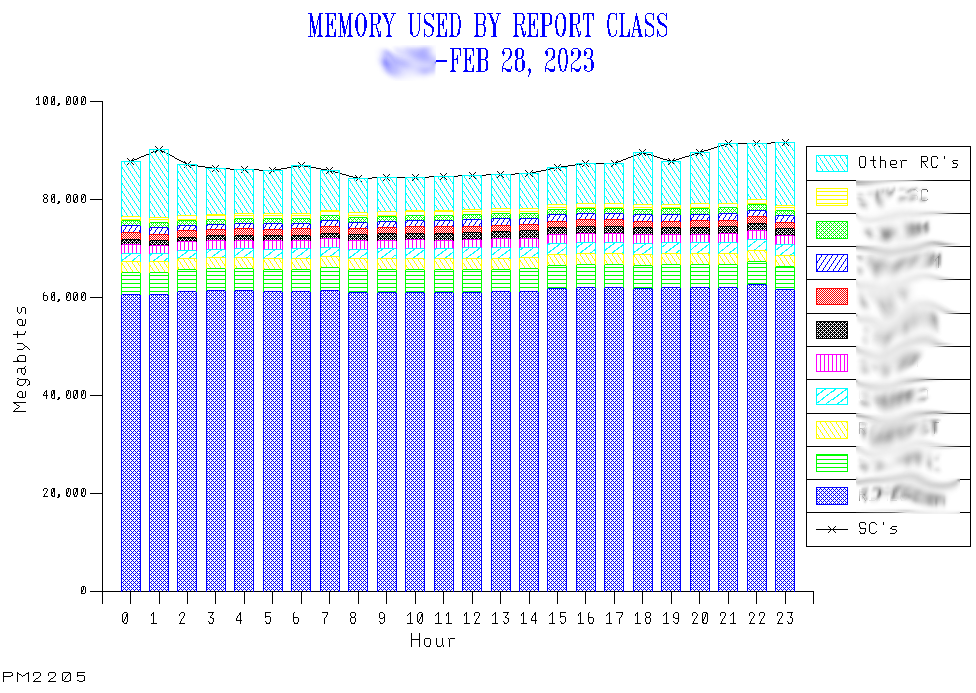
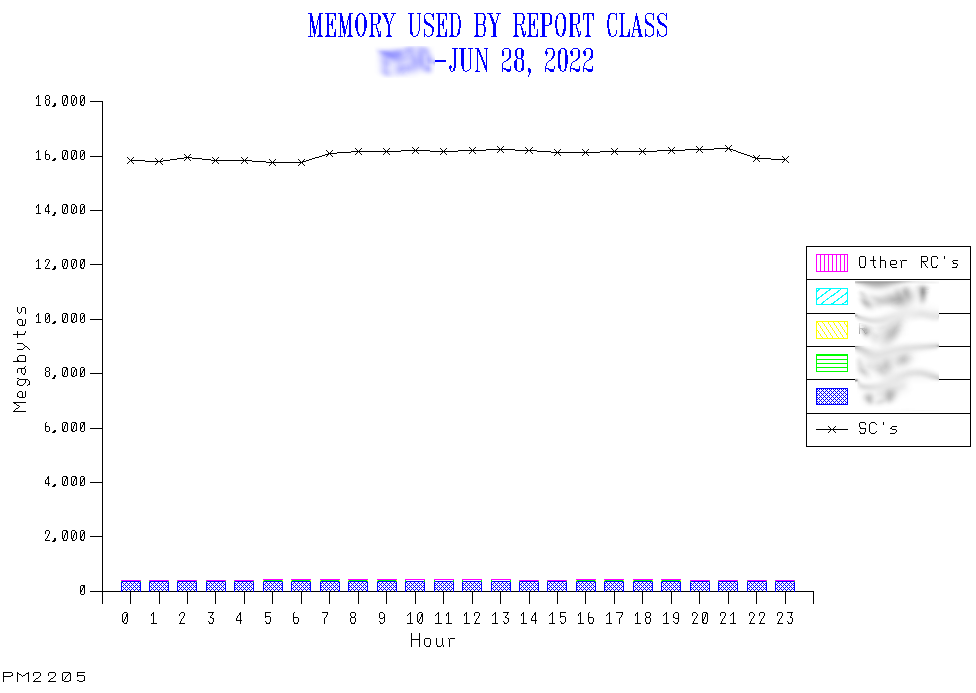
Here are a couple of examples – from different customers.

I’ve graphed two things on the one graph:

  1. The total service class view of memory – as a line.
  2. The report class view of memory – as a stack.

To make the graph readable I only plot the top 15 report classes individually. The remainder I roll up. I’d be surprised if there were much in the “other” category.

So let’s look at an example where there is good agreement between report class memory and service class. Here the service class line overlays the top of the stack.

And here’s an example where the report class coverage is very poor, relative to the service class view.

By the way, I’ve recently come across a customer with no report classes.

Granularity

Suppose you have good coverage by report classes. That can be achieved without yielding much benefit.

If you have very few report classes but between them they sum up to the service class view that doesn’t help much. Sometimes customers define report classes for aggregating service classes. I would hope any reporting tool could do the aggregation for you. I consider this to be a missed opportunity.

I’d rather see report classes used to break down service classes. I think this was the original WLM intention and this is perhaps why the limit is so high.

You could use report classes to keep track of memory used by a bunch of cloned CICS regions, for example. For this to be useful they wouldn’t be all the regions in a specific service class. I suppose you could track individual regions this way, too.

And you might well use report class SMF 72-3 for just such a purpose: The above (R723CPRS) formula is much more accurate than what SMF 30 currently has.

Another example might be to tally all the CPU used by jobs in a particular job class. This is especially useful where multiple job classes share the same service class – as is almost universal.

Equally, you might break out individual address spaces from SYSTEM. Particularly those, such as XCF, that start too early to yield SMF 30 intervals records.

One quite common case is aggregating address spaces for a Db2 subsystem. Here the IRLM address space ought to be in SYSSTC and the other “Db2 Engine” address spaces in a notional “STCHI” service class. You might well combine the two.

A Caution On Memory Reporting

There’s something else worth mentioning: The above are standard graphs we call “PM2205”, relying only on SMF 72-3. I didn’t show you one we call “PM2200”.

As I alluded to above, not all memory is captured for a report (or service) class. For example, common areas and memory for logically swapped address spaces. (The latter mostly affects TSO and Batch – and logically swapped address spaces consume memory but not service.)

So PM2200 has an additional job to do: Working to ensure all allocated memory is in the stack up; PM2205 doesn’t as it would get too busy if it also had eg CSA in. By the way, you get the common area storage from a combination of SMF 71 (Paging Activity) and 78-2 (Virtual Storage Activity) data.

In PM2200 we also subtract the total memory usage – from whatever source – from SMF 71’s total memory usage. Unimaginatively we call it “other” and usually it’s quite small.

One other thing PM2200 does – as it uses SMF 71 – is relate all the above to the amount of memory online to the LPAR. (No RMF data shows anything above activated LPARs., though it does speak to the freshly important Virtual Flash Memory (VFM).)

Conclusion

I would like installations to think about their use of report classes – to make sure they are truly useful. Many of the things you can do with SMF 30 you can do more readily with the right set of report classes. I am keen on customers learning how to get the full value out of SMF 30 but often SMF 72-3 does the job just as well, if not better.

So I’d be keen for customers to collect SMF 30 interval records – which most of them already do. You just don’t always have to process them to get what you want.

And, as this post majored on memory as an example of the value, I’d like us all to continue to evolve our reporting. PM2205 was certainly a recent evolution in our code.

And – the overall message of this post – do think carefully about your report class structure.

CF LPARs In The GCP Pool?

This post is about whether to run coupling facility (CF) LPARs using general purpose processors (GCPs).

It might be in the category of “you can but do you think you should?”

I’d like to tackle this from three angles:

  • Performance
  • Resilience
  • Economics

And the reason I’m writing about this now is the usual one: Recent customer experiences and questions.

Performance

What kind of performance do you need? This is a serious question; “Quam celerrime” is not necessarily the answer. 🙂

A recent customer engagement saw CF structure service times of around 1500μs. This is alarming because I’m used to seeing them in the range 3-100μs. This does, of course, depend on a number of factors. And this was observed from SMF 74 subtype 4 data.

You might be surprised to know I thought this was OK. The reason is that the request rate is extraordinarily low.

So what’s wrong with the inherent performance of CF LPARs in the GCP Pool? Nothing – so long as they are using dedicated engines, or at any rate not getting delayed while other LPARs are using the GCP engines.

But see Economics below.

So just like running on shared CF engines, really.

So the customer with the 1500μs service time was using a CF LPAR in the GCP pool capped with a very low weight. So, basically starved of CPU.

It turns out that the request rate being very low means the applications aren’t seeing delays and there is no discernible effect on the coupled z/OS systems. And that’s what really counts.

Resilience

By the way, the word is “resilience”. (Even the phone I’m writing this on says so.) I’m having to get used to people saying “resiliency” (which my phone is accepting of but not volunteering).

Having the CF LPARs in the same machine as the coupled z/OS LPAR has resilience considerations. Lose the machine and you have recovery issues.

Note the previous paragraph doesn’t mention processor pools. That was deliberate; it doesn’t matter which pool the CF LPAR processors are in, from the resilience point of view.

Economics

The significant question is one of economics: If you’re running on GCP pool engines these, of course, cost more than ICFs.

For modern pricing schemes I don’t think CF LPARs in the GCP pool cost anything in terms of IBM software. But there might well be software pricing schemes where they do.

And then there’s the question of maintenance.

All in all, the economics of placing a CF LPAR in the GCP pool will depend on spare capacity.

Conclusion

Yes you can, and just maybe you should. But only if the performance and economic characteristics are good enough. They might well be.

And you’ll see I’ve deliberately couched this in terms of “this is little different from any Shared CF engine situation”. The main difference being the economics.

One final point: if you need to have a CF LPAR and you’re on sufficiently old hardware you might have little choice but to squeeze it into a GCP pool. But do it with your eyes open. Unless you’d like to consider the benefits of a z16 A02 or z15 T02 – eg for production Sysplex designs .

Like You Know?

Three recent events led to this blog post:

  • I was driving a while back and listening to podcasts. Two in particular by highly experienced podcasters who are very articulate.

  • Meanwhile I’d just completed editing a podcast episode of my own. (This was Episode 32, which you might have listened to already.)

  • And a few weeks before that I was involved in a debate on an online forum about editing podcasts.

The common thread is humanity in the finished product. Versus professionalism, I suppose.

The online debate saw me advocating leaving some “humanity” in recordings, whereas others wanted “clean” recordings.

The podcasts I listened to today had “um”, “er”, “you know”, “like” aplenty. Because of editing and the debate online I was listening out for this. These “verbal tics” did not detract at all. Indeed the speakers sounded informal and human.

Now, it has to be said I’ve met all these podcasters – and would expect to be able to have good, friendly conversations when we meet again.

To bring this to Marna’s and my podcast, we are striking a particular pose. A genuine one but a conscious one: While we both work for IBM neither of us is making formal statements on IBM’s behalf. And, while we might have the tacit encouragement of our management, we’re not directed by them. In short, we don’t consider our podcast a formal production but just two friends having fun making a contribution.

If we were scripted and professionally produced we’d sound a lot different. And I think our episode structure would be different. And so would the content.

Having said that, I have two principal aims when editing:

  • Reduce the incidence of “um” etc to a listenable level.
  • Faithfully reproduce the conversation.

To that end, I generally don’t move stuff around or edit for content. I also try to do the easy edits and, beyond that, leave a few verbal tics in.

So you won’t get clean recordings from us. But you’ll get what we’re thinking, with some humanity left in.

And I’d say this song wouldn’t work without “you know”. 🙂

Mainframe Performance Topics Podcast Episode 32 “Scott Free”

Episode 32 was, as always a slow train coming. I think it’s a fun one – as well as being informative.

It was really good to have Scott back, and we recorded in the Poughkeepsie studio, just after SHARE Atlanta, March 2023.

Talking of which, the aftershow relates to SHARE. It’s a classic example of “today’s crisis is tomorrow’s war story”.

Anyhow, we hope you enjoy the show. We enjoyed making it.

And you can get it from here.

Episode 32 “Scott Free” Long Show Notes

Our guest for two topics was Scott Ballentine of z/OS Development, a veritable “repeat offender”. Hence the “Scott Free” title.

What’s New

Preview of z/OS 3.1

Mainframe – SMFLIMxx Parmlib Member

We discussed SMFLIMxx with Scott.

SMFLIMxx is a parmlib member, as a IEFUSI exit replacement. Its function is related to storage and specifying limits. Functions are delivered as continuous delivery. Two examples are

  • The SAF check
  • Number of shared pages used

In z/OS 3.1 customers will be able to specify Dedicated Real Memory Pools to assign memory to a specific application, like zCX. You will be able to use all frame sizes – 4KB, 1MB, and 2GB.

Performance – Open Data Sets, Part 1

This, the first of two topics on open data sets, was also with Scott. He’s very much the Development expert on this.

The main use for having very many open data sets (think “100s of thousands”“) is for middleware, most notably Db2.

Most of the constraint relief in this area is moving control blocks above the 2GB bar. In ALLOCxx you have to code SWBSTORAGE with a value of ATB to put SWB (Scheduler Work Block) control blocks above the bar. Applications need to exploit the service – or it has no effect.

Monitoring virtual storage is key here, and remains important: Factors such as the number of volumes for a data set affects how much memory is needed, so virtual storage estimation is difficult to do.

You can probably guess what Part 2 will be about.

Topics – Evolution of a Graph

Martin explored the large improvements he’s made with his custom graphing programs. (He already posted about what he sees with one of them here.) But this topic wasn’t about the technical subject of the graph, more the evolution from something “meh” to something much better. The evolution process was:

  • Start with a query that naively graphs database table rows and columns, with labels generated by the database manager and fixed graph titles. Not very nice, not succinct, not very informative.
  • Generating the titles with REXX, giving them more flexibility and allowing additional information to be injected.
  • Using REXX to drive GDDM directly – which enabled a lot of things:
  • REXX was able to generate many more data points and to plot them directly. (In particular the code is able to show what happens at very low traffic rates whereas previously it had had to be restricted to the higher traffic rates.)
  • REXX could generate the series names, making them friendlier and more informative.

The purpose of including this item, apart from it being a fun one, is Martin encourages everybody to evolve their graphs, to tell the story better, to run more efficiently, and to deal with underlying technological change. Don’t put up with the graphing you’ve always had!

Customer Requirement

ZOSI-2195 “Extended GDG causes space issues”, has been satisfied: IGGCATxx’s GDGLIMITMAX with OA62222 on V2.3.

On The Blog

Marna’s NEW blog location is here. There are three new posts:

Martin has quite a few new blog posts here:

So It Goes.

A Very Interesting Graph

They say beauty is in the eye of the beholder. But I hope you’ll agree this is a pretty interesting graph.

It is, in fact, highly evolved – but that evolution is a story for another time and place. I want to talk about what it’s showing me – in the hope your performance kitbag could find room for it. And I don’t want to show you the starting point which so underwhelmed me. 😀

I’m forever searching for better ways to tell the story to the customer – which is why I evolve my reporting. This one is quite succinct. It neatly combines a few things:

  • The effect of load story.
  • The distance story.
  • A little bit of the LPAR design story.
  • The how different coupling facility structure types behave story.

Oh, I didn’t say it was about coupling facility, did I?

I suppose I’d better show you the graph. So here it is:

You can complain about the aesthetics of my graphs. But this is unashamedly REXX driving GDDM Presentation Graphics Facility (PGF). I’m more interested in automatically getting from (SMF) data to pictures that tell the story. (And I emphasised “automatically” because I try to minimise manual picture creation fiddliness. “Picture” because it could be a diagram as much as a graph.)

So let’s move on to what the graph is illustrating.

This is for a(n) XCF (list) structure – where the requests are issued Async and so must stay Async.

Graphing Notes:

  1. Each data series is from a different system / LPAR in the Sysplex.
  2. This is the behaviour across a number of days for these systems making requests to a single coupling facility structure.
  3. Each data point is an RMF interval.

Service Times Might Vary By Load

By “load” I mean “request rate”.

I would be worried if service times increased with request rate. That would indicate a scalability problem. While I can’t predict what would happen if the request rate from a system greatly exceeded the maximum here (about 30,000 a second for PRDA) I am relieved that the service time stays at about 20 microseconds.

Scalability problems could be resolved by, for example, dealing with a path or link issue, or additional coupling facility capacity. Both of these example problem types are diagnosable from RMF SMF 74-4 (which is what this graph is built from).

Distance Matters

You’ll notice the service times split into two main groups:

  • At around 20μs
  • At around 50μs

The former is for systems connected to the coupling facility with 150m links. The latter is for connections of about 1.4km (just under a mile). The difference in signalling latency is about (1.4 – 0.15) * 10 = 12.5μs. (While I might calculate that the difference is service time is around 2.5 round trips I wouldn’t hang anything on that. Interesting, though.)

It should be noted, and I think I’ve said this many times, you get signalling latency for each physical link. A diversity in latencies across the links between an LPAR / machine and a coupling facility tends to suggest multiple routes between the two. That would be a good thing from a residence point of view. I should also note that this is as the infinibird 😀 flies, and not as the crow does. So cables aren’t straight and such measurements represent a (quite coarse) upper bound on the physical distance.

Coupling Technology Matters

(Necessitated by the distance, the technology between the 150m and 1.4km cases is different.)

I’ve taught the code to embed the link technology in the legend entries for each system / series.

You wouldn’t expect CE-LR to perform as well as ICA-SR; Well-chosen, they are for different distances. Similarly, ICA-SR links are very good but aren’t the same as IC links.

LPAR Design Matters

LPAR design might be “just the way it is” but it certainly has an impact on service times.

Consider the two systems I’ve renamed to TSTA and TSTB. They show fairly low request rates and, I’d argue, more erratic service times.

The cliché has it that “the clue is in the name”. I’ve not falsified things by anonymising the names; They really are test systems. What they’re doing in the same sysplex as Production I don’t know – but intend to ask some day.

The point, though, is that they have considerably lower weights and less access to CPU.

Let me explain:

When a request completes the completion needs to be signalled to the requesting z/OS LPAR. This requires a logical processor to be dispatched on a physical. This might not be timely under certain circumstances. Most particularly if it takes a while for the logical processor to be dispatched on a physical.

What’s good, though, is that the PRD∗ LPARs don’t exhibit the same behaviour; Their latency in being dispatched and being notified the request has completed is good.

Different Structures Perform Differently

I’ve seen many installations in my time. So I know enough to say that, for example, a lock structure didn’t ought to behave like the one in the graph. Lock structure requests tend to be much shorter than cache or list or serialised list structures.

What I’m gradually learning is that how structures are used matters. You wouldn’t expect, for instance, a VSAM LSR cache structure to behave and perform the same as a Db2 group buffer pool (GBP) cache structure.

I say “gradually learning” which, no doubt, means I’ll have more to say on this later. Still, the “how they’re used” point is a good one to make.

Another point in this category is that not all requests are the same, even to the same structure. For example, I wouldn’t expect a GBP castout request to have the same service time as a GBP page retrieval. While we might see some information (whether from RMF 74-4 or Db2 Statistics Trace) about this I don’t think the whole story can be told.

Conclusion

This example doesn’t show Internal Coupling (IC) links. It also doesn’t show different coupling facility engine speeds. So it’s not the most general story.

  • The former (IC links) does show up In other sets of data I have. For example a LOCK1 structure at about 4 μs for IC links and about 5 for ICA-SR links.
  • To show different coupling facilities for the same structure name sort of makes sense – but not much for this graph. (That would be the duplexing case, of course.)

Let me return to the “how a structure of a given type is used affects its performance” point. I think there’s mileage in this, as well as the other things I’ve shown you in this post. That says to me a brand new Parallel Sysplex Performance Topics presentation is worth writing.

But, I hope you’ll agree, the graph I’ve shown you is a microcosm of how to think about coupling facility structure performance. So I hope you like it and consider how to recreate it for your own installation. (IBMers can “stop me and buy one”.) 😀

By the way, I wrote this post on a plane on my way to SHARE in Atlanta, March 4, 2023. So you could say it was in honour of SHARE. At least a 9.5 hour plane ride gave me the time to think about it enough to write the post. Such time is precious.

When Good Service Definitions Turn Bad

I was about to comment it’s been a while since I wrote about WLM but, in researching for this post, I discover it isn’t. The last post was WLM-Managed Initiators And zIIP.

I seem to be telling a lot of customers their WLM service definition really needs some maintenance. In fact it’s every customer I’ve worked with over the past few years. You might say “well, it’s your job to analyse WLM for customers”. To some extent that’s true. However, my motivation is customer technical health rather than meeting some Services quota. (I don’t have one, thankfully.) So, if I say it I mean it.

I thought I’d explore why WLM service definition maintenance is important. Also when to do it.

Why Review Your Service Definition?

Service definitions have two main components:

  • Classification rules
  • Goals

Both yield reasons for review.

Classification Rules

I often see work misclassified. Examples include

  • Work in SYSSTC that shouldn’t be – such as Db2 Engine address spaces.
  • Work that should be Importance 1 but isn’t – again Db2 Engine but also MQ Queue Managers.
  • Work that’s new and not adequately classified. Recall, as an example, if you don’t set a default for started tasks the default is to classify them to SYSSTC. For batch that would be SYSOTHER.

So, classification rules are worth examining occasionally.

Goals

Goal values can become out of date for a number of reasons. Common ones are:

  • Transactions have become faster
    • Due to tuning
    • Due to technology improvements
  • Business requirements have changed. For example, orchestrating simple transactions into ever more complex flows.
  • Talking of business requirements, it might become possible to do better than your Service Level Agreement says (or Service Level Expectation, if that’s what you really have.
  • A change from using I/O Priority Management to not.

Goal types can also become inappropriate. A good example of this is recent changes to how Db2 DDF High Performance DBATs are reported to WLM, as I articulate in my 2022 “Db2 and WLM” presentation.

But why would goal values matter? Take the case where you do far better than your goal. I often see this and I explain that if performance deteriorated to the point where the work just met goal people would probably complain. They get used to what you deliver, even if it’s far better than the SLA. And with a goal that is too lax this is almost bound to happen some time.

Conversely, an unrealistically tight goal isn’t helpful; WLM will give up (at least temporarily) on a thoroughly unachievable goal. Again misery.

So, goal values and even types are worth examining occasionally – to make sure they’re appropriate and achievable but not too easy.

Period Durations

When I examine multi-period work (typically DDF or Batch) I often see almost all work ending in Period 1. I would hope to see something more than 90% ending in Period 1, but often it’s well above 99%. This implies, rhetorically, there is no heavy stuff. But I think I would want to protect against heavy stuff – so a higher-than-99%-in-Period-1 scenario is not ideal.

So, occasionally check on period durations for multi-period work. Similarly, think about whether the service class should be multi-period. (CICS transaction service classes, by the way, can’t be multi-period.)

When Should You Review Your Service Definition?

It’s worth some kind of review every year or so, performance data in hand. It’s also worth it whenever a significant technology change happens. It might be when you tune Db2’s buffer pools, or maybe when you get faster disks or upgrade your processor. All of these can change what’s achievable.

In the aftermath of a crisis is another good time. If you establish your service definition didn’t adequately protect what it should have then fixing that could well prevent a future crisis. Or at least ameliorate it. (I’m biased towards crises, by the way, as that’s what often gets me involved – usually in the aftermath and only occasionally while it’s happening.)

And Finally

Since I started writing this post I’ve “desk checked” a customer’s WLM Service Definition. (I’ve used my Open Source sd2html code to examine the XML unloaded from the WLM ISPF Application.)

I didn’t expect to – and usually I’d also have RMF SMF.

I won’t tell you what I told the customer but I will say there were quite a few things I could share (and that I had to write new function in sd2html to do so).

One day I will get the SMF and I’ll be able to do things like check goal appropriateness and period durations.

But, to repeat what I started with, every WLM Service Definition needs periodic maintenance. Yours probably does right now.

And, as a parting shot here’s a graph I generated from a table sd2html produces:

It shows year-level statistics for modifications to a different customer’s WLM Service Definition. As you can see, activity comes in waves. Practically, that’s probably true for most customers. So when’s the next wave due?

Heading Back Into Db2- Architecture Part 1

I loftily talk about “architecture” a lot. What I’m really getting at is gleaning an understanding of an installation’s components – hardware and software – and some appreciation of what they’re for, as well as how they behave.

When I started doing Performance and Capacity – many years ago – I was less sensitive to the uses to which the machines were put. In fact, I’d argue “mainstream” Performance and Capacity doesn’t really encourage much understanding of what I call architecture.

To be fair, the techniques for gleaning architectural insight haven’t been well developed. Much more has been written and spoken about how to tune things.

Don’t get me wrong, I love tuning things. But my origin story is about something else: Perhaps programming, certainly tinkering. Doing stuff with SMF satisfies the former (though I have other projects to scratch that itch). Tinkering, though, takes me closer to use cases.

Why Db2?

What’s this got to do with Db2?

First, I should say I’ve been pretending to know Db2 for almost 30 years. 🙂 I used to tune Db2 – but then we got team mates who actually did tune Db2. And I never lost my affinity for Db2, but I got out of practice. And the tools I was using got rusty, some of them not working at all now.

I’m heading back into Db2 because I know there is an interesting story to tell from an architectural point of view. Essentially, one could morph tuning into asking a simple question: “What is this Db2 infrastructure for and how well suited is the configuration to that purpose?” That question allows us to see the components, their interrelationships, their performance characteristics, and aspects of resilience.

So let me give you two chunks of thinking, and I’ll try to give you a little motivation for each:

  • Buffer pools
  • IDAA

I am, of course, talking mainly about Db2 SMF. I have in the past also taken DSNZPARM and Db2 Catalog from customers. I expect to do so again. (On the DSNZPARM question, Db2 Statistics Trace actually is a better counterpart – so that’s one I probably won’t bother asking customers to send.)

I’m experimenting with the structure in my two examples. For each I think two subsections are helpful:

  • Motivation
  • Technique Outline

If this structure is useful future posts might retain it.

Buffer Pools

He’re we’re talking about both local pools (specific to each Db2 subsystem) and group (shared by the whole datasharing group, but maybe differentially accessed).

Motivation

Some Datasharing environments comprise Db2 subsystems that look identical. If you see one of these you hope the work processed by each Db2 member (subsystem) in the group is meant to be the same. The idea here is that the subsystems together provide resilience for the workload. If the Db2 subsystems don’t look identical you hope it’s because they’re processing different kinds of work (despite sharing the data).

I think that distinction is useful for architectural discussions.

More rarely, whole Datasharing groups might be expected to resemble each other. For example, if a parallel sysplex is a backup for another (or else shares a partitioned portion of the workload). Again, a useful architectural fact to find (or not find).

Technique Outline

Db2 Statistics Trace IFCID 202 data gives a lot of useful information about individual buffer pools – at the subsystem level. In particular QBST section gives:

  • Buffer pool sizes
  • Buffer pool thresholds – whether read or write or for parallelism
  • Page frame sizes

At the moment I’m creating CSV files for each of these. And trialing it with each customer I work with. I’m finding cases where different members are set up differently – often radically. And also some where cloning is evident. From SMF I don’t think I’m going to see what the partitioning scheme is across clones – though some skew in terms of traffic might help tell the story.

Let me give one very recent example, which the customer might recognise but doesn’t expose them: They have two machines and each application group has a pair of LPARs, one on each machine. On each of these LPARs there is a Db2 subsystem. Each LPAR’s Db2 subsystem has identical buffer pool setups – which are different from other applications’ Db2’s.

Db2 Statistics Trace IFCID 230 gives a similar view for whole Datasharing groups. Here, of course, the distinction is between groups, rather than within a group.

IDAA

IDAA is IBM’s hardware accelerator for queries, coming in two flavours:

  • Stand-alone, based on System P.
  • Using System Z IFLs.

Motivation

The purpose of IDAA servers is to speed up SQL queries (and, I suppose, to offload some CPU). Therefore I would like to know if a Db2 subsystem uses an IDAA server. Also whether Db2 subsystems share one.

IDAA is becoming increasingly common so sensitivity to the theme is topical.

Technique Outline

Db2 Statistics Trace IFCID 2 has a section Q8ST which describes the IDAA servers a Db2 subsystem is connected to. (These are variable length sections so, perhaps unhelpfully the SMF triplet that describes them has 0 for length – but there is a technique for navigating them.)

A few notes:

  • The field Q8STTATE describes whether the IDAA server is online to the Db2 subsystem.
  • The field Q8STCORS is said to be core count but really you have to divide by 4 (the SMT threads per core) to get a credible core count – and hence model.
  • There can be multiple servers per physical machine. But we don’t have a machine serial number in Statistics Trace to tie the servers on the same machine together. But some fields behave as if they are one per machine, rather than one per server. So we might be able to deduce which servers are on which machine. For example Q8STDSKA – which also helps distinguish between generations (eg 48TB vs 81TB).

Wrap Up

I’m sure there’s much more I can do with SMF, from a Db2 architecture point of view. So expect more posts eventually. Hence the “Part 1” in the title. And, I think it’s going to be a lot of fun continuing to explore Db2 SMF in this way.

And, of course, I’m going to keep doing the same thing for non-Db2 infrastructure.

One other note: I seem to be biased towards “names in frames” rather than traffic at the moment. The sources of data do indeed allow analysis of eg “major user” rather than “minor user”. This is particularly relevant here in the case of IDAA. One should be conscious of “uses heavily” versus “is connected to but hardly uses at all”. That story can be told from the data.

Making Of

I’m continuing with the idea that the “making of” might be interesting (as I said in Coupling Facility Structure Versions). It occurs to me it might show people that you don’t have to have a perfect period of time and place to write. That might be encouraging for budding writers. But it might be stating “the bleedin’ obvious”. 🙂

This one was largely written on a flight to Toronto, for a customer workshop. Again, it poured out of my head and the structure naturally emerged. There might be a pattern here. 🙂

As an aside, I’m writing this on a 2021 12.9” iPad Pro – using Drafts. I’m in Economy – as always. I’m not finding it difficult to wield the iPad, complete with Magic Keyboard, in Economy Class. I’m certain I would find my 16” MacBook Pro cumbersome in the extreme.

And, of course, there was tinkering after I got home, just before publishing (but after a period of reflection).

Coupling Facility Structure Versions

When I see an 8-byte field in a record I think of three possibilities, but I’m prepared to discover the field in question is none of them. The three prime possibilities are:

  1. A character field
  2. A 64-bit counter
  3. A STCK value

An interesting case occurs in SMF 74 Subtype 4: Two similar fields – R744SVER and R744QVER – are described as structure versions.

Their values are structure-specific. Their description is terse (as is often the case). By the way that’s not much of a criticism; One would need to write War And Peace to properly describe a record. I guess I’m doing that, one blog post at a time. 🙂

Some Detective Work

With such a field the first thing you do is get the hex(adecimal) representations of some sample contents. In my case using REXX’s c2x function. Here’s an example of R744SVER: D95FCC96 70EEB410.

A Character Field?

While not foolproof, it would be hard to mistake an EBCDIC string’s hex values for anything else. And vice versa. (Likewise ASCII, as it happens.) I think you’ll agree very few of the bytes in the above example look like printable EBCDIC characters.

These fields look nothing like EBCDIC.

A Counter?

I would expect most counters to not be close to exhausting the field’s range. So I would expect the top bits to not be set. Our above example is close to wrapping.

While these values tend to have something like ‘2x’ for the top byte they don’t look like “unsaturated” counters.

So they’re not likely to be counters.

A STCK Value?

I put some sample values into a STCK formatter on the web. I got credible values – dates in 2020, 2021, and 2022.

For the example above I get “07-Mar-2021 06:34:00 ” – which is a very believable date.

So this seems like the best guess by far.

How Do We Interpret This Timestamp?

If we accept these fields are timestamps how do we interpret them?

My view is that this timestamp represents when the structure was allocated, possibly for the first time but more likely a reallocation. (And I can’t see which of these it is.)

Why might this happen?

I can think of a few reasons:

  • To move the structure to a different coupling facility. This might be a recovery action.
  • To restart the coupling facility. This might be to upgrade to a later CFLEVEL. Or indeed a new machine generation.
  • To resize the structure. This is a little subtle: I wouldn’t think, in general, you would reallocate to resize unless you were having to raise the structure’s maximum size.

One thing I’m not sure about is whether there is a time zone offset from GMT. I guess we’ll see what appears credible. I will say that hours and minutes are slightly less important in this than dates. I’m definitely seeing what looks like application-oriented changes such as MQ shared message queue structures appearing to pop into existence.

Conclusion

Guessing field formats is fun, though it is far from foolproof.

I’m a little tentative about this. As with many such things I want to see how customers react to me presenting these dates and times. Call it “gaining experience”.

But I do think this is going to be a useful technique – so I’ve built it into my tabular reporting that lists structures.

As always, more on this when I have something to share.

Making Of

I’m experimenting with the idea that somebody might be interested in how this blog post was made.

The original idea came from a perusal of the SMF 74-4 manual section. It was written in chunks, largely on one day. Two short train journeys, two short tube journeys and a theatre interval yielded the material. It seemed to pour out of my head, and the structure very naturally emerged. Then a little bit of finishing was required – including researching links – a couple of weeks later.