Kevin Keller’s Web 2.0 and z/OS Blog

(Originally posted 2008-06-20.)

Take a look at my German colleague Kevin Keller’s new blog in Web 2.0 and z/OS. I think you’ll be pleasantly surprised at what runs on z/OS that the rest of the world would regard as modern. πŸ™‚

I say “modern” rather than “Web 2.0” because I feel the latter term is generally overused. What is really to the point is quite how much stuff could (and in many cases should) be implemented on z/OS, e.g. accessing DB2 (especially with the PureXML support in V9).

I’ve suggested to Kevin he might like to write additional posts on some of the products mention in his first mammoth post. I think some of them are going to prove remarkably easy to implement.

Coupling Facility Structure CPU – An Interesting Test

(Originally posted 2008-06-16.)

I’m not sure if anyone’s done this before. Certainly I’ve not seen any results…

We’re beginning to write up some tests the “A Team” (Alain and Pierre) ran before their return to France. Which provides me with some test data. Fortunately I had a stab at mapping the new fields this data contains. One in particular is Stucture CPU (R744SETM)…

So, I got to plotting CPU per request against request rate (as well as elapsed time against request rate). I did this for two structures:

  • LOCK1 – which has between 750 and 925 requests a second – based on 1 minute RMF intervals.
  • ISGLOCK – which has between 5 and 65 requests a second.

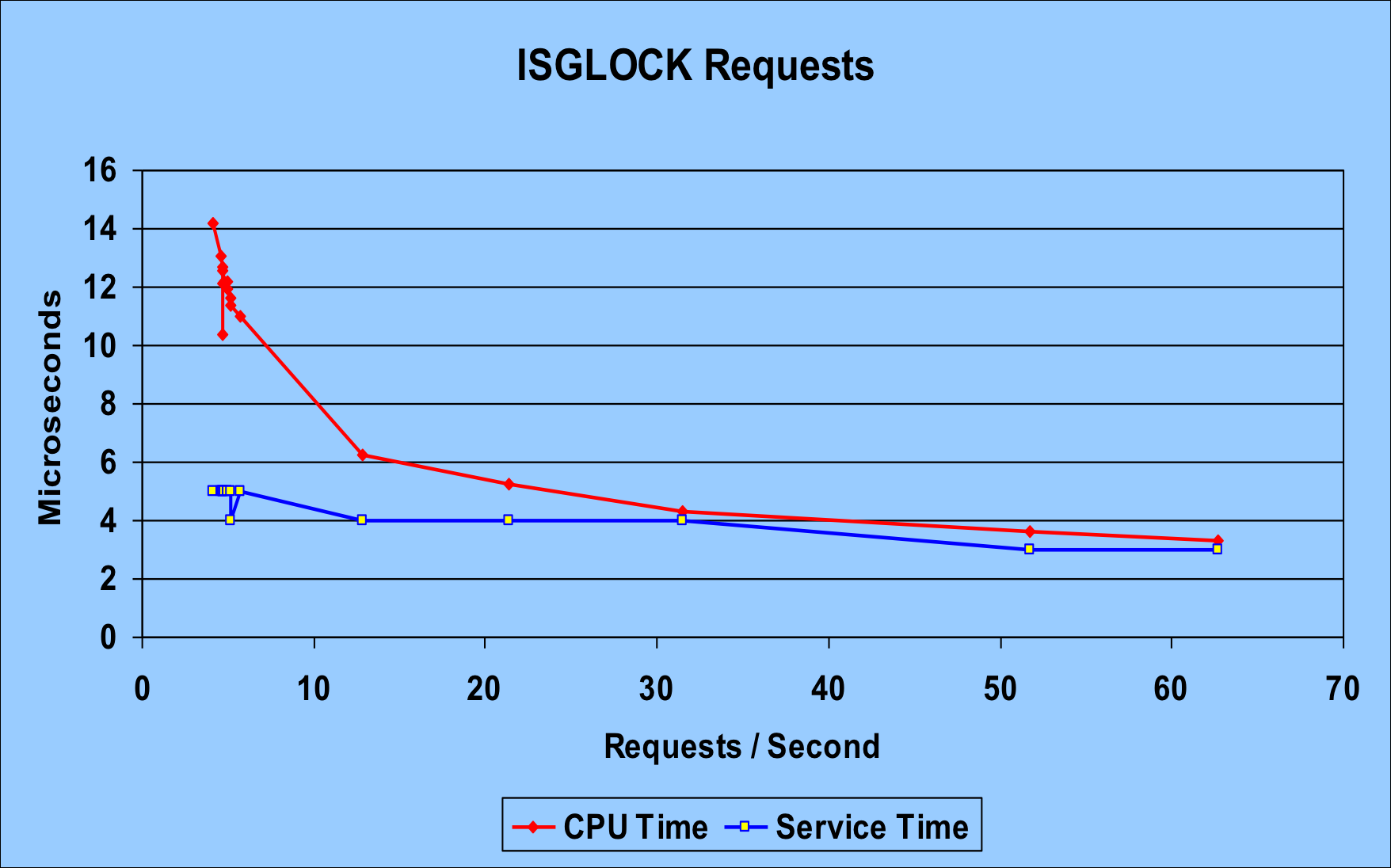
The high request rate LOCK1 case is less interesting for the purposes of this discussion. The chart below is for ISGLOCK. I think it’s revealing.

The red line is the CPU time per request. Most importantly it goes down with the number of requests. That strongly suggests to me that there’s a “zero request rate” cost, which gets amortised over more requests as the rate increases. Now, some of this could just be Coupling Facility internal processes. Or it could be a cache effectiveness thing. And in any case maybe it’s RMF with its 1-minute intervals that’s driving the CPU consumption.

The blue line is the service time per request – which actually drops as the rate increases. This might be a “practice effect” or else some instrumentation effect. At any rate it drops rather less dramatically than the CPU time per request.

What’s also interesting is that the CPU time and the service time converge somewhat. You’d expect the service time to be more than the CPU time – for a request. But, as you can see from this blog entry that isn’t always the case.

So, the net result of this test is that there’s CPU to amortise over the requests and at lowish rates this can be enough to make it longer than the service time.

For ISGLOCK – locking with no record data payload – it’s pretty much all CPU time, so long as nothing else gets in the way. (Such as path / subchannel delays or extreme CPU queuing in the coupling facility. Or, more to the point, link latency.)

For LOCK1, the request rate was much too high to see the amortisation in action and CPU was always about 4μs vs service time of around 10μs per request. LOCK1 does have record data to manipulate.

There’s one other consideration, though: LOCK1 was in a coupling facility with a mixture of ISC and ICB links. ISGLOCK was in a coupling facility accessed using IC links. That probably accounts for some of the 10μs. for LOCK1 vs 3.5μs for ISGLOCK. In fact, the CPU time per request for LOCK1 was about 4μs out of the 10μs. Which suggests quite a bit of link latency.)

It’s a new-found frustration of mine that the instrumentation doesn’t tell me much about traffic by link or link type. (Earlier in the residency I messed around with channel activity and queuing record types. Perhaps I’ll have to mess with it again.)

In “real world” terms bear in mind, however, that the 50 requests per second and upwards cases are much more interesting and common. So typical behaviour is towards the right hand end of the graph and beyond.

Cache Structure Information

(Originally posted 2008-06-12.)

It’s fair to say I’ve written very little in terms of book words these past two days. That’s because I’ve been “doing research” on how the cache structure counters really work. “Doing research” is a euphemism for “finding out how the heck the darned thing works”. Which is in itself a positive thing to do – but it does rather get in the way of writing stuff. 😦

There is a section in the SMF 74 Subtype 4 called the “Cache Data Section”. I thought you got one for each cache structure. It turns out you can get more than one. There are things inside cache structures called storage classes. So I trawled through all the customer data I have gathered over the past year and in only one> structure (not one customer) did I see a count of 2 sections. This for XBM. Even DB2, which uses multiple castout classes per structure, only has one storage class. So I don’t feel bad about my code assuming only one.

The other thing one needs to know – and it’s far more important – is that for every system connecting to a structure the Cache Data Section contains identical values. It’s rather like the Disk Cache statistics in SMF 74 Subtype 5: The controller / coupling facility maintains the stats. So it’s no use summing them.

When it comes to what’s in the section there are umpteen counters: 5 read counters, 5 write counters, 4 cross-invalidation counters and umpteen others. In my code we calculate read hit percentages, read-to-write ratios and lots of other things besides. Figuring out what all these counters mean and which ones are important is what’s euphemistically called “a work in progress”. πŸ™‚

But the real learning point is that each exploiter does it differently. So, two examples:

  • A store-through cache doesn’t do castouts. A store-in one does. And then there’s a “cross invalidation” cache that doesn’t either. But then it doesn’t actually store data to consider the fate of.
  • DB2 Data Sharing with GBPCACHE(CHANGED) doesn’t write unchanged data to the cache structure.

And so it goes on.

I think it would be a noble aim to describe all these counters in terms that are related to exploiters. And also in terms we can all understand. Let’s hope it doesn’t remain just a noble aim. πŸ™‚

Coupling Facility Structure CPU Time – Initial Investigations

(Originally posted 2008-06-10.)

I had to eat a little bit of humble pie today – because I made an elementary mistake. I’m going to share it with you – to save you making it, too. πŸ™‚ And I’m very sure I’m not going to make it in a customer situation. (Residencies are great for making mistakes in a safe environment.) πŸ™‚

In CFLEVEL 15 and z/OS Release 9 RMF you get a new field at the structure level: R744SETM.

This is the CPU used in the Coupling Facility to process requests to an individual structure. When you add the individual R744SETM values – for all the structures in the Coupling Facility – you get the same value as the sum of the R744PBSY times for all the processors. This is because R744PBSY is defined as the time spent processing requests. (You get this by individual coupling facility processor.) If you were to calculate a capture ratio using R744SETM and R744PBSY you’d always get 100% – so it’s probably not worth the bother. πŸ™‚

Normally one calculates Coupling Facility busy using the formula 100*R744PBSY / (R744PBSY + R744PWAI) and summing over the processors. I’m beginning to think that 100*R744PBSY / SMF74INT is a more useful calculation (and it collapses down to the usual formula for dedicated processors).

So now to my mistake…

I wanted to compare the CPU time by structure to request service times. You can do this if you compare R744SETM to R744SSTM+R744SATM. (SSTM is the sum of Sync service times and SATM the same but for Async.) So I did this comparison and carefully noted that R744SETM is a 8-byte floating point number and the other two are 8-byte integers but that all three are in microseconds over the interval. What I failed to do is to realise that you need to add up the service times over all the z/OS systems connecting to the structure…

R744SETM is for all requests to the CF structure. The others are by z/OS system.

Why does this matter? Because I suffered the embarrassment πŸ™‚ for several fraught hours of not knowing why the CPU time was longer than the elapsed time. πŸ™‚

There are in fact a couple of cases where CPU time isn’t included in the service time. I intend to write those up in the book. But basically they are ones where z/OS has been given the “request complete” signal but there is still some processing to do. In these cases we continue to accumulate CPU but not service time. (And, yes, these cases are logically OK.)

So, I don’t feel too bad about my mistake, particularly as it led to some learning. And I look forward to making the same sorts of mistakes with Coupling Facility Cache Statistics – which are also collected at the “all systems” level. πŸ™‚

A Minor Fact About Lock Structures

(Originally posted 2008-06-04.)

Sometimes reading the SMF manual buys you less than you thought. I had completely ignored a nice little field – and the code I inherited to analyse SMF 74 Subtype 4 Coupling Facility data ignored it as well.

R744SLEC in the Request Data Section for a structure is described by the text “Lock structure only: lock table entry characteristic”. Can you guess what it is? πŸ™‚ If I told you it was a one byte integer would that help?

If I had bolded the word “characteristic” would that have helped?

Probably only if you knew something about floating point numbers. I confess to knowing little about them other than the fact there is a “characteristic” and a “mantissa”. One’s the “power of n” thing, and the other’s whatever you multiply it by. But which is which? Anyhow…

So my first guess is that this field is the number of bytes in a lock table entry – plus one. I see values of 1 and 3 in it. So 2-byte entries and 4-byte entries. Right? Wrong! …

My friend “SuperMario” πŸ™‚ points out to me that I’m looking at a GRS Star ISGLOCK) structure when I see the “3” and further that GRS Star always uses 8-byte lock table entries, no matter how few members (systems) connect to it.

The penny drops…

23 is 8, right?

So the “characteristic” is really in this case the power of 2 that turns into the number of bytes in each lock table entry. So “3” means 8 bytes (as I just said) and “1” would mean 2 bytes (which figures for the plexes I see it for, being relatively small). So there’s that word “characteristic” again, and the field description (though terse) seems to make sense. πŸ™‚

Now, why’s this important?

For two reasons:

  • The installation has a choice of how many bytes to make each lock table entry, depending on the maximum number of lock table entries they want to cater for – without a rebuild. So, too wide a lock table entry and you waste lock structure space – potentially massively. Too narrow and you can’t connect all the systems (or e.g. DB2 members) you want to. Usually not a difficult trade off. But now I can wade into the discussion in a customer with evidence. πŸ™‚
  • The almost-neighbouring field R744SLTL gives the maximum number of lock table entries. Multiply the two together and you get the size of the lock table portion of the lock structure. The remainder – R744SSIZ minus the lock table entry size – is for record portion of the lock structure. There are various ways to make a hash (pun intended) of this. Which I won’t bore you with here. The point is you can do this calculation, armed with what the characteristic is.

Well, I thought this was a step forward in our understanding of how lock structures were actually allocated.

On the morrow (otherwise known as “presently”) I’ll write this up in the Redbook.

I’m taking the slightly unusual stance of assuming the readership can get the SMF manual out and follow along. Or at least wave around an SMF field name like it’s their “new best friend”. πŸ™‚ Actually I’m using field names for clarity. There are – as I point out in the Redbook – at least 4 valid size fields for a structure. It’d be nice to be clear which one we’re talking about.

So we’re having fun in Poughkeepsie, going deep into the instrumentation. And we’re having nice discussions about what all the fields mean (and what they don’t mean). Here’s an example of what they don’t mean…

Field R744SSTA sounds like it ought to mean the number of Sync requests converted to Async. But in fact it’s almost always zero, despite the z/OS R.2 Dynamic Request Conversion – which we know goes on all the time. How do we know? I’m not sure really, except that in many situations we see plenty of Async requests where the exploiter is highly likely to have requested Sync. So this field turns out not to be the R.2 algorithm “in play”. It’s the older, possibly best dubbed “Static Conversion” algorithm. So, such things could easily trip you up. Or maybe it’s just me that stands to be tripped up. πŸ™‚

Like I say, we’re having fun here in Poughkeepsie. πŸ™‚ And if you happen to think this sort of thing is fun a residency could be right for you. Now, you might think as a customer (or other non-IBMer) you don’t have the possibility of being selected. In fact the “wall of fame” has photos of quite a few non-IBMers on it. No, I don’t know how it works with non-IBMer nominations. But it seems to be a non-zero-yield process.

Is It The Structure Or The Content That’s Important?

(Originally posted 2008-05-27.)

The other three residents are busy doing extensive setup work – and we hope to have some nice measurements later on. (I’m not sure how much later on there actually is, mind.) πŸ™‚

So I have no RMF or DB2 SMF to play with yet. 😦

>

Meanwhile I’m beginning to come up to speed again after the glorious experience of recovering from moving five time zones to the west. πŸ™‚

So I actually got to writing today. And it’s the first actual content.

So I’ve concentrated on getting the structure of what I’m writing right. While my brain continues to accelerate. πŸ™‚ I wonder whether I should use my brain in its present state to do the important work of defining the structure. After all that sets the tone and affects whether the material is accessible or not. Or whether to write some “disposable” content. After all it’s the content you want to read. But “disposable” in that I’ll probably consider today’s content trite and dull.

So I have written some stuff about the SMF records needed to do performance analysis for Data Sharing. This I consider to be “no brainer stuff”.

I’ve fretted a bit about comprehensibility and UK vs US English and whether I’m saying anything useful at all. :-)And how to get Framemaker to do my bidding (and whether that’s the right bidding). πŸ™‚

In the end the best advice is to just get writing and to accept that much of the early stuff mightn’t survive.

And having recovered from almost hosing my Thinkpad last night I should just be grateful to be able to write at all. πŸ™‚

And, finally, Twitter has proved today to be a useful resource for throwing out DB2 questions and getting them answered (with actual discussion). You can, as always, find me here. And if you do read Twitter you’ll discover the standard is pretty low – if my contributions are anything to go by.

Performance Numbers and the Redbook

(Originally posted 2008-05-23.)

So, I’m about to start writing. At last!

As a team we had a discussion yesterday about how to deal with performance numbers. One of the roles I’m playing on the team is “the guy who writes about performance numbers”. So we came to the following conclusions:

  • We really can’t talk about products made by other people – such as SAS/MXG or TMON for DB2. That’s right out – because of our basic provenance and sponsorship.
  • It’s not very helpful to customers to talk about eg Tivoli Performance Reporter (or whatever it’s called these days) much – as it’s not an assumed given. So it wouldn’t really help a SAS/MXG customer much if we talked about such stuff. Remember: This isn’t a Redbook about reporting tools. It is about how to manage Parallel Sysplex Performance. So we need to do that in a way that’s accessible to all customers.
  • It seems to us reasonable to have one or two examples of RMF Postprocessor reports: We do assume access to RMF or at least the SMF record types that RMF produces – and CMF does do a pretty good job of creating the same records (though there may be some differences). So we don’t think we’re disenfranchising anyone with that.
  • More than one or two RMF reports is unhelpful and makes the book unnecessarily turgid and besides it’s tough to format Postprocessor reports so they fit into a book page.
  • SMF record fields are canonical in that they’re high up the data flow chain. So we think it’s fine to mention them – so long as we do it in a way that makes them comprehensible.

Taking all that into account we propose the following approach:

  • Have a section that talks about performance numbers – including their sources and perhaps provenance. And in this section it’s OK to include a small number of RMF Postprocessor examples and maybe Omegamon XE for DB2 examples.
  • For each test run that we document to use the field name or some alias for it. We’re assuming at this point that you’ve read and understood the “performance numbers” chapter.

The aim at the end of the day is to have a Redbook that works for you. So I hope this structure works for you. If you have thoughts on it feel free to comment below. Or to email me or comment at me via Twitter. My handle there is “MartinPacker”. But you’ll probably have to follow me first and thus nudge me into following you. As I think I’ve said before, I’d like to use the new media – eg Twitter and this blog to make the creation of this Redbook a more interactive and responsive affair.

Goodbye UKCMG, Hello Poughkeepsie

(Originally posted 2008-05-20.)

I feel like I’m on “home turf” at UKCMG… My use of English can be looser πŸ™‚ and it’s so nice to catch up customers with whom I’ve a long and (I hope) fruitful history. I did my (slightly updated) “Memory Matters” and “Much Ado About CPU” presentations – and I really do lose track of how much change there’s been in each of them (though it seems to me I fiddle with them A LOT. πŸ™‚ Actually I sat in a couple of presentations from Glenn Anderson which I HAVE seen before and actually technical topics DO bear repetition. And Glenn did, in my opinion, a GREAT job of the two I saw: One on Websphere Application Server Performance and the other on Unix System Services Performance. (So much so that I’m making sure I read them on the plane(s) tomorrow.)

It was also nice to see an external view of DB2 Version 9.

I’m conscious it may be time to either radically shake up my existing presentations or to do some new ones. I’ve an idea for ONE, sort of inspired by Glenn’s presentations. The working title is “z/OS Application Zoo”. Kinda like the “Particle Zoo” to my perhaps unfocused mind.

And I think there was some value in my Twittering in the sessions. Folks, you can follow my (perhaps marginally useful) Twitterings under my handle: MartinPacker. And I hope some of YOU will sign up to Twitter. I know of at least one customer and two very respected DB2 pundits who have: Willie Favero and Craig Mullins. (And just today a very good friend of mine who left IBM last year signed up – so it’s a great informal way of staying in touch.)

So, onwards:

Tomorrow sees me fly to Poughkeepsie to work on a Redbook on Parallel Sysplex Performance. I hope to try some of the material out here (and to use Twitter to ask questions or toss out odd thoughts that might influence the course of the book).

And I’ve already forewarned many of my Poughkeepsie friends of my imminent arrival… So they can clear out of town. πŸ™‚ Seriously, if there ARE things that need raising with developers in Poughkeepsie feel free to contact me. Face to face there is SO much better for such discussions. But TRY not to abuse the offer. πŸ™‚

System z Technical Conference – Dresden

(Originally posted 2008-05-09.)

I’m going to try something different this year – and composing this using OpenOffice Writer on my new ASUS EEE PC while flying home is certainly different. But what’s new is not documenting all the bits and pieces I learnt. Instead I’m going to give some impressions:

  • On Monday afternoon we had an enforced evacuation from the conference centre and much of the environs – because of a World War II bomb (that the local paper said was dropped by the US Air Force.) I think everybody was forced to tour Dresden Β – which is well worth visiting. It’s a great cultural city.
  • Next time I’m going to ditch the jacket as it made me think I had to drag my backpack on wheels one mile each way each day. Far better to carry it – except in San Antonio last year when it was far too hot and humid.
  • Next time I’m going to follow the conference instructions and book my hotel well in advance so I don’t have to do the long commute on foot each day. Yeah right. πŸ™‚
  • Next time I’m going to be fit enough to go the distance. Yeah right. πŸ™‚
  • It’s handy to sit in sessions you already know a fair amount about – to get you thinking. Example: Peter Enrico’s excellent presentation on WLM samples. (I think my code needs working on as a result of that.) πŸ™‚
  • There is lots going on in the β€œWeb 2.0 and z/OS” space. Thanks to Kevin Keller and Holger Wunderlich for that.
  • Perhaps I shouldn’t assume everyone knows what CFCC Dynamic Dispatch is. I got a question on that.
  • There might be β€œunintended consequences” in z10 HiperDispatch disabling IRD’s Logical CP Management. And there was a good question on that.
  • Colin Paice from Hursley really is a very good speaker.
  • Twitter is useful as a way of raising consciousness about conferences going on -and it’s also good at helping people find each other.
  • It was good to run into Aneel Lakhani in person. He’s in the category of β€œI don’t know precisely why I know him but I know him from BlogCentral and I’m glad I know him” people. (BlogCentral is IBM’s internal blogging site.)
  • To the customer who said she was doing a thesis on Web 2.0 yes we really do encourage all IBMers to dive head first into Web 2.0 and social networking in general. Yes, we have guidelines (which I contributed a little to) but nobody finds them restrictive. I wish more companies were like this.
  • It’s great to have a tour guide who grew up in this part of the world and who went to university in Dresden. Thanks Barbara!
  • My manager is following me on Twitter. But that knowledge doesnt seem to have inhibited me in the slightest. πŸ™‚ I’m still goading him into (hopefully) joining me there.
  • I got a chance to forewarn lots of Poughkeepsie folks I’ll be in town in a couple of weeks. If they scarper, given this amount of notice, I will take it personally. πŸ™‚
  • I found lots of customers considering doing Data Sharing at non-trivial distances. So the Redbook ought to reflect that.
  • People agreed with me that the CF Structure CPU support in CFLEVEL 15 and RMF will make life much easier for Parallel Sysplex customers.

So, roll on UKCMG in only a few days time. When I won’t have to watch my language so carefully. πŸ™‚

And my experience of composing this on the EEE is:

  • The machine is nice and small – so it doesn’t feel cramped on the tray table.
  • The keyboard will take some getting used to as it’s small (but the screen, though small, is just fine).
  • OpenOffice is a new package to me so I’m finding its quirks. (But I have to find them somehow anyway.) πŸ™‚
  • OpenOffice’s β€œExport to HTML” seems to export in a fairly style-rich way when I’d rather have had minimalistic HTML. I expect I can easily fix that.
  • OpenOffice’s β€œExport to PDF” works really nicely (and quickly). I was only messing about when I tried it but I was impressed.

I really do like this EEE. It’s a cheap Linux machine that’s easy to do LAMP stuff on. (On the way to Dresden I learnt a bit of Ruby.) But this has been the first (and I think successful) test of using it to do real work. If you can call blogging real work. πŸ™‚

And the motivation for trying out Linux and OpenOffice is because I expect to be using them on my main machine within the next month or two. I have to start on the learning curve somewhere (or at least some time).

And finally thanks to all the customers and fellow presenters who made this a great conference for me.