Two Of These Are Not Like The Others

They were simpler times back then.

“Back when?” You might ask.

When PR/SM got started – in the mid 1980’s – a machine might have two or three LPARs. Similarly, when Parallel Sysplex got started the number of members was very small.

For reference, a z17 ME1 can have up to 85 LPARs, and a Parallel Sysplex up to 32 members. I rarely see a customer approach 85 on a machine and I’ve never seen a 32-way Parallel Sysplex.

However, I am seeing increasingly complex environments – both from the point of view of machines having more LPARs and Parallel Sysplexes having more members.

And, of course, Db2 was brand new – and now look at how complex many customers’ Db2 estates have become. A dozen or more members in a Datasharing Group is not unheard of, and multiple Datasharing Groups is very common. (And it’s not just Development vs Production.)

So How Do You Handle Such Complexity?

That’s the important question. I’ll admit I’m slowly learning – by doing. I’d like to think I do each study better than the last – especially where the environments are complex.

What I don’t want to do is to say the same thing over and over again for each of the systems or Db2’s. I think I would at the machine level – as that’s relatively few times.

But I want any conversation to flow nicely – for all concerned.

There are a couple of approaches – and I try to do both:

  • Establish Commonality
  • Discern Differences

So let’s talk about them.

Establish Commonality

If you have 10 systems they might well have things in common. For example, they might have Db2 subsystems in the same Datasharing Group. Or cloned CICS regions.

There might be symmetry between LPARs on a pair of machines. This is very common – though asymmetry tends to creep in, particularly with older systems.

By finding commonality and symmetry it’s possible to tell the tale with economy of effort and reduced repetition.

Discern Differences

But symmetry might be broken and often Parallel Sysplexes are pulled together from disparate systems. This was particularly so in the early days – to take advantage of Parallel Sysplex License Charge, as much as anything.

Nowadays I’m seeing a growth in differentiated systems within a Parallel Sysplex. Thankfully I’m seeing pairs or quartets of such systems. Examples include:

  • DDF workloads, with their own Db2 subsystems alongside CICS or IMS systems. (Alongside meaning sharing data.)
  • Different CICS applications. Quite common is the “Banking Channel” model.

So “spot the difference” is a good game to play.

The Importance Of Good Tools

Good tools enable me to see, among other things:

  • Architectural structure
  • Differences in behaviour

This post is not to boast about the quality of my tools – as most of them are in no fit state to sell or give away.

Further, I wouldn’t say my tools are perfect. Which is why I have to maintain a posture of continual improvement. You’ll see an example of that later on.

Architecture

Over the years I’ve taught my tools to produce architectural artefacts, such as which Db2 subsystems on which LPARs are members of which Datasharing Group. Further, a view of each Db2 is accessed by what. Likewise, which LPARs have which Service Classes and Report Classes being used.

Very recently I’ve got interested in the proliferation of TCP/IP stacks – which I see as different address spaces, plus Coupling Facility structures.

Right now my nursery of “interesting address spaces” is growing.

Difference

You probably wondered about the title of this post.

Seeing differences in behaviours between supposedly similar things can be instructive.

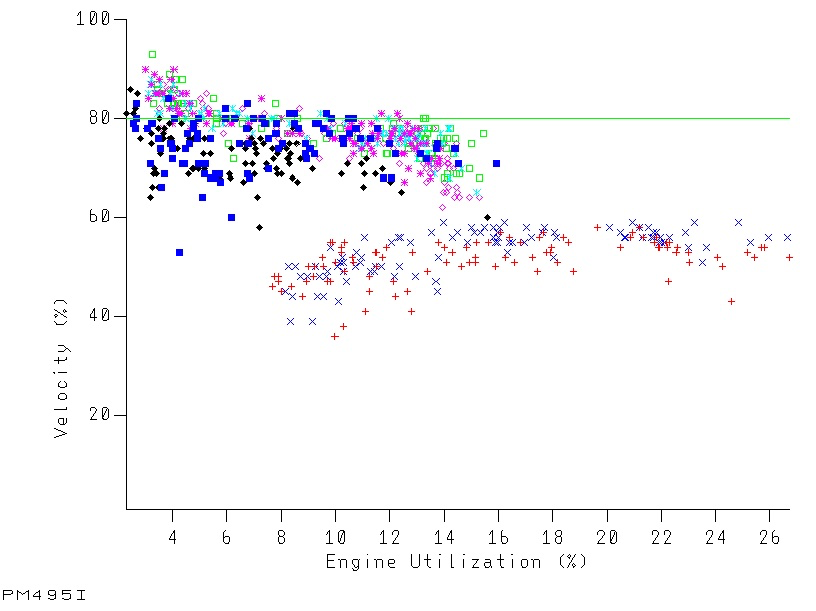
Take this graph. It’s brand new – and the only editing is removing system names and the title.

A few notes on how to read the graph:

  • Each series is for a different system.
  • Each data point is for a different RMF interval.
  • It shows how the velocity of a service class period varies with the GCP CPU used.
  • The green datum line is the goal velocity for the service class period. (If it varies it’s suppressed.)

You might have seen something like this before – but then each series would’ve been for a different day, not a different system. The question I’m solving with this one is “do all the systems behave the same?” rather than “does this system behave the same way every day?”

(The idea of plotting a three-dimensional graph where the two horizontal axes are GCP CPU used and zIIP CPU used had occurred to me – but I consider it problematic both presentationally and technically. Maybe I’ll experiment one day. And I did try out a 3D column chart in a recent engagement.)

But what does it show?

I see a number of things (and you might see others):

  • Two of these systems perform worse than the others. Hence the blog post title.
  • These two systems perform worse for the same sized workload.
  • These two systems have – much of the time – much more CPU consumption.
  • Even the better-performing systems struggle to meet goal.
  • You could argue all the systems scale quite nicely – as their velocity doesn’t drop much with increasing load.

With such a systematic difference you have to wonder why. A couple of thoughts occur:

  • System conditions might be different for these two systems. They are in fact larger LPARs – with lots of other things going on.
  • These two systems might be processing different work in the same service class. (I’m not going to say “period” anymore as these is a single period service class.) This is indeed a “Banking Channel” customer.

I’ve encouraged customers to judiciously reduce the number of service classes. The word “judiciously” is doing a lot of heavy lifting in that sentence. This might be a case where an additional service class is needed.

Still, vive la difference! It certainly shows the value of this graph.

One final point: The graph is for a velocity goal. Doing something similar for response time goals might be a bit more fiddly.

Here we have two subtypes: Average and Percentile variants. Compared to Velocity. So that’s two more graphs to teach my code to construct. If I only want one it’d have to be Performance Index that is plotted – but that’s too abstracted, I feel. Perhaps I’ll experiment with this – probably in early 2026.

Conclusion

It is possible to tell the story of more complex environments in a relatively succinct way – and thus make discussions more consumable. But it takes some thought – and some code.

And my storytelling continues to evolve – which helps me want to keep doing this.

Making Of

This post started out as wanting to show off that graph. While I do like it a lot my thoughts went a lot wider in writing this. And I had the time for them to go wider as I’m on a flight to Istanbul, to meet with a couple of my regular customers.

I was going to try my handwriting out again but somehow I lost the tip of the Apple Pencil on the plane before I got started. I did find it on landing – so all good now.

I still think some automation in my writing tool – Drafts – could help tidy up what I wrote. I’ll have to think about that. That’s probably a good thing to play with on my flight home. Javascript at 35,000 feet.

Modern Machines, Modern Metrics

Modern Machines, Modern Metrics

In z17 Sustainability Metrics – Part 0 I wrote about the new z17 Sustainability Metrics, or “Power Consumption”, if you prefer.

This post isn’t part 1 – as I don’t intend to go into much detail about what I’ve learnt so far. I have learnt things, of course.

During the Summer it occurred to me that there are a number of things that are new in z/OS instrumentation on z16 and z17. Regular readers will know that I like to write about them.

I suggested to my friend John Baker of the IntelliMagic team that we could do a conference presentation about them. He readily accepted. (John has about the same level of interest in such things as I do – and sees different customers soour collective experience base is wider.)

And so Modern Machines, Modern Metrics was born.

As I alluded to “modern” is both z16 and z17. At least for now.

So what does “M4”1 cover?

It starts with a pair of z17 topics:

  • Sustainability Metrics
  • DPU ( Data Processing Unit) or “I/O Engine” as some of us like to call it

Then we talk about a couple of z16 topics.

As l write this, they are:

  • Home Addresses
  • AIU (Artificial Intelligence Unit)

I say “as I write this” because, as with all my presentations, this one will evolve – as we gain experience. We’re expecting the z17 topics to gradually crowd out the z16 ones.

I think it would be ambitious to hope to schedule this as a two parter, but you never know – and we’re still learning things about how z16 metrics behave. In fact older metrics can still spring surprises.

We gave this presentation a few weeks ago at GS UK Annual Conference. It went very well, I think. We’re about to give the first topic in a meeting with the Development team for Sustainability Metrics. I think they’ll find it interesting. We do have some questions to ask them, around data sources and interpretation – but I think you’d expect that.

And I’d like to think we’d evolve this for future machines.

Making Of

I’m writing this on a plane back from Madrid, mostly using an Apple Pencil Pro. I seemed to have it tamed. But then what is euphemistically called “light chop” 😊 intervened. I was doing well, really I was. 😊 The Bay Of Biscay is a harsh mistress.2

This is a new keyboard on the iPad Mini. More expensive than the previous one but it’s well worth the money.

But, again, some exotic (not really in my opinion) keys require strange finger acrobatics.

One cute thing is the keyboard can be made to light up – in different colours. And cycle between them. 😊


  1. M4 is of course the name of a motorway, running west from London. But it’s a handy shorthand. 

  2. Hopefully some of you will get the reference. 😊 

md2pptx 6 Is Another Big Step Forward

If the purpose of Version 5 was to add the ability to use Python in the context of md2pptx the purpose of version 6 is to extend md2pptx’s automation capabilities still further.

This time instead of Python it’s AppleScript. The context is different too:

  • With Version 5 the Python support runs the user-supplied code as part of the main md2pptx run – before the PowerPoint presentation is saved.
  • With Version 6 the AppleScript code is generated by md2pptx, saved, and then run – after the PowerPoint presentation has been saved.

But why do it this way?

The answer is that it enables some things that md2pptx can’t do – because the python-pptx package it builds on can’t enable them. And AppleScript – as a postprocessor – can.

It’s unfortunate that this is AppleScript only – restricting the function to Macs. That’s because I don’t have a Windows machine to test or develop Powershell scripts on. I might stand more of a chance with Linux – and something like Open Office. That’s because I have Raspberry Pi’s galore.

So, what can you do with the new support? As I write this you can – with v6.1:

  • Reopen the presentation in PowerPoint to a specific slide
  • Insert slides from other presentations
  • Run your own arbitrary AppleScript

Each of these has their own motivation:

  • When I rebuild a presentation I often want to reopen it in PowerPoint at a specific slide. So I created a bookmarking capability.
  • Users of python-pptx often want to embed slides from other presentations – so I built this more for them than me. But I actually do have standard educational slides in my workshop presentations – so I might well use it myself. A prime example of this is my WLM presentations: I start by explaining terms such as Performance Index and Velocity. I include some optional topics – which often become live – at the end.
  • As with Python for Version 5, I often want to experiment with AppleScript – so I made that easy to do. I also think some adventurous users will write their own.

As with Python, there is an obvious health warning: Running scripts you didn’t inspect can be dangerous. Any I ship will readable and well commented. If not that’s a defect and can be raised as an issue. As can any coding inefficiencies.

I actually ship an AppleScript file that contains a routine to copy slides from another presentation. I plant calls to it – if the user requests md2pptx to do so.

One other limitation of python-pptx is it can’t emulate the PowerPoint layout engine; By opening a presentation, navigating to a slide (or maybe through all slides), and then saving it, AppleScript could force PowerPoint to lay out the slide, text and all. I don’t know how useful it would be – but people have complained of such things. So I’ll have to experiment with this. And now I can.

The net of this is Version 6 opens up yet more automation possibilities for creating PowerPoint presentations.

One final thought: I prefer to add capabilities in Python rather than AppleScript. Further, I would prefer people not to have to use RunPython but rather use Markdown or metadata semantics. This is more user friendly and more widely applicable.

md2pptx 5 Is A Big Step Forward

A while back I experimented with executing user-provided Python. It seemed a small step at the time, but I had a hunch it would turn out to be a much bigger thing.

Coding it was straightforward but two things delayed releasing it:

  • Documentation is tricky.
  • The python-pptx API is (necessarily) not for the faint of heart.

But why bother in the first place?

While it is possible to inject any Python code you like that isn’t really the point. There are things I want in presentations that can’t be expressed with Markdown. Here are two examples:

  • Graphs
  • Table cell fine tuning

Actually the latter can be done with <span> elements and CSS – but it’s not as flexible as I’d like.

So, if I could expose what Python-pptx is capable of, I could make the run-Python support useful.

So that’s what I set out to do.

How To Invoke The New Function

This is actually pretty straightforward. Here is a simple sample of a slide with a bullet point and a trivial piece of Python.

### My Slide Title

* A bullet point

``` run-python
print("Hello world")
```

This code doesn’t do anything useful. But it makes the point you can embed arbitrary Python code. The real challenge was to teach my code to do something useful.

Making Inline Python Easier To Use

I’ve already mentioned it’s not that easy to drive python-pptx so I thought about how to make it easier. I wrote some helper functions, focused on things hard to express in Markdown which might actually be useful extensions.

I haven’t done any research on what people need; The helper functions just do things that patently made my programming life easier.

I’ve also ensured that useful things are exposed. Two examples of exposed objects are:

  • The current slide
  • The rendering rectangle you can use

I expect many use cases revolve around the slide md2pptx is currently creating. Further, it’s useful to tell the user code a safe area to render into.

My initial expected use cases are twofold:

  1. Adding content to a slide. Initially I worked on this for graphing. And this is where the rendering rectangle idea came from. Of course, you could render outside of this rectangle but you might collide with other shapes on the slide.
  2. Modifying content to a slide. A good example of this might be to filter cells in an existing table.

Both of these examples – graphing and table filtering – caused me to create a helper routine to read an external CSV file into an array:

  • You could run md2pptx every day against the latest version of a CSV file and create the same graphs from it, just with fresh data.
  • You could populate a fresh set of tables every day, perhaps turning some rows red – depending on the data.

So this was what I initially released.

Further Developments

Since the initial release I’ve done a number of things, most notably:

  • Added support for checklists and refined it somewhat. So you can – from a CSV file – create a checklist with (optionally coloured) ticks and crosses.
  • Selective bullet removal – as a sort of between-bullets paragraph function.
  • Tweaked graphing to make it more useful.
  • Added a helper routine for drawing arbitrary PowerPoint shapes.

These might be small things but they do illustrate one point: Version 5 is proving to be a great testbed for experimenting with python-pptx capabilities – and some of these did indeed get “shrink wrapped”.

Documentation

For me documentation isn’t that much fun to write. But it has to be done.

It’s the one thing that delays me releasing new levels of md2pptx most of all.

However, there is a brand new section towards the end of the User Guide – with the function descriptions and some examples.

Wrap Up – With An Important Caveat

My companion app mdpre might be useful here. A couple of examples illustrate why:

  • You could include code inline with =include.
  • You could include data inline with =include, too.

In fact I have been doing this for years – to pull in presentation fragments.

A word of warning: Because you can execute arbitrary Python code you need to be careful about where it came from.

Certainly – because it’s open source – you can inspect my helper routines – in runPython.py. And you might well create your own analogue.

Philosophically you might consider md2pptx is a long way from turning Markdown to slides. I’d say it’s still that. But, more generally, it’s turning textual data into slides.

It just got a lot more flexible and powerful in Version 5. And 5.2.2 is out, with more helper functions. I can’t say I’ll add more functions – or what they’ll be – but I probably will; This experiment got fun and surprisingly useful.

I’ll also say my checklist function is in use “in Production”: When I create the stub presentation files (Markdown, naturally) I now create a tracking presentation. It includes a CSV file that contains the checklist data. It’s easy to tick the database builds and presentations off as they get done. It’s a nice way of showing professionalism at the beginning of the workshop – or indeed leading up to it.

Making Of

I originally wrote this post when I had just released Version 5. I’m completing it on a flight to New York, to begin a visit to IBM Poughkeepsie. This actually allowed me to talk about the things that have happened to md2pptx since Version 5 debuted – which is quite a lot. And to show I really am taking the opportunity to experiment – now that I can.

11 Months On

That flight in January seems like a long time ago; It’s been a busy year – what with the z17 launch and a heavy caseload.

But md2pptx did roll on. Within Version 5 , for instance, the “checklist” function got enhanced with custom graphics – which permitted additional checklist item states (to look reasonable).

And Version 6 has been out for a while, with several tweaks within that version. I suppose I should write about it…

mdpre Comes Of Age

I wondered a while back why I hadn’t got mdpre to 1.0. It turns out there were still some things I felt it needed to have it “graduate”.

I suppose I should explain what mdpre actually is. It’s a tool for preprocessing text into Markdown, This text is “almost Markdown” or “Markdown+” so you can think of it as a tool people who normally write in Markdown could value.

I use it in almost all my writing – so it’s primarily designed to meet my needs. For example I often

  • Want to build materials from several files, linking to them from a master file.
  • Have CSV files that I want to turn into tables.
  • Want to use variables.
  • Want to use “if” statements for including files or pieces of text.

So I built mdpre to enable these things – and more.

But these things are common things for authors to want to do so l open sourced it.

I don’t think I’m ever going to consider it finished but at some point it’s worthwhile considering it to be ready. And that time is upon us.

It took one thing for me to declare 1.0: Allowing filenames to be specified on the command line. Now this isn’t something I wanted myself – but it was something people had asked for – and it felt like a completeness item.

So that was 1.0 a couple of weeks ago. But then I considered one of my “pain” points. Actually that’s rother overstating it: As l mentioned, l do quite a bit of creating tables from CSV.

So l thought about things that would enhance that experience, whether it was doing the same things quicker and better or enabling new functions.

Converting A CSV File To Markdown – =csv And =endcsv

If you have a Comma-Separated Value (CSV) file you want to render as a table in a Markdown document use the =csv statement.

Here is an example:

=csv
"A","1",2
"B","20",30
=endcsv

The table consists of two lines and will render as

A 1 2
B 20 30

The actual Markdown for the table produced is:

|A|1|2|
|:-|:-|:-|
|B|20|30|

You’ll notice an extra line crept in. By default, mdpre creates tables where the first CSV line is the title and all columns are of equal width and left-aligned.

If you have a file which is purely CSV you don’t actually need to code =csv and =endcsv in the input file just to convert it to a Markdown table – if you are happy with default column widths and alignments. Just use the -c command line parameter:

mdpre -c < input.csv > output.md

mdpre uses Python’s built-in csv module. Just coding =csv causes mdpre to treat the data as the “excel” dialect of CSV – with commas as separators. This might not suit your case. So you can specify a different dialect.

For example, to use a tab as the separator, code

=csv excel-tab

“excel-tab” is another built in dialect. Your platform might support other dialects, such as “unix”. If you specify a dialect that is not available mdpre will list the available dialects.

Controlling Table Alignment With =colalign

You can control the alignment with e.g.

=colalign l r r

and the result would be

A 1 2
B 20 30

(This manual uses this very function.)

The actual Markdown for the table produced is:

|A|1|2|
|:-|-:|-:|
|B|20|30|

You can specify one of three alignments: l (for “left”), r (for “right”), or c (for “centre”). The default for a column is l.

If you have a large number of columns you might find it tedious or fiddly to specify them. mdpre has a shorthand that addresses this.

For example, coding

=colalign l rx4 lx2 c

Is the equivalent of

=colalign l r r r r l l c

The first value is the alignment specifier, the second being the count of columns it applies to.

If there aren’t enough column specifiers for the rows in the table additional ones are implicitly added. By default these will contain the value “l”. You can override this by making the last one have “*” as the replication factor. For example rx* would make the unspecified columns right aligned, as well as the last specified one.

Controlling Table Column Widths With =colwidth

You can control the column widths with statements like

=colwidth 1 1 2

Adding that to the above produces the following Markdown

|A|1|2|
|:-|-:|--:|
|B|20|30|

Here the third column is specified as double the width of the others.

If you have a large number of columns you might find it tedious or fiddly to specify them. mdpre has a shorthand that addresses this.

For example, coding

=colwidth 1x4 2x3 1

Is the equivalent of

=colwidth 1 1 1 1 2 2 2 1

The first value is the width specifier, the second being the count of columns it applies to.

If there aren’t enough column specifiers for the rows in the table additional ones are implicitly added. By default these will contain the value “1”. You can override this by making the last one have “*” as the replication factor. For example 3x* would make the unspecified columns have a width specifier of “3”, as well as the last specified one.

Note: Many Markdown processors ignore width directives. The developer’s other Markdown tool doesn’t. 😊

Applying A CSS Class To Whole Rows With =rowspan

You can set the <span> element’s class attribute for the text in each cell in the immediately following row using =rowspan. For example

=rowspan blue

wraps each table cell’s text in the following row with <span class="blue"> and </span>.

Of course this class can apply any styling – through CSS – you like. But typically it would be used for colouring the text. Some basic examples of what you can do with CSS are in Some Useful CSS And Javascript Examples With =rowspan and =csvrule.

Note: This styling only applies to the immediately following row.

Applying A CSS Class To Cells Based On Rules With =csvrule

You can set the <span> element’s class attribute for each cell that meets some criteria. For example:

=csvrule red float(cellText) >= 99

wraps each table cell’s text that meets the criterion with <span class="red"> and </span>.

Each =csvrule statement is followed immediately by a single-word class name and an expression. The expression is passed to Python’s eval function. It should return a truthy value for the class to be applied.

Only code =csvrule outside of a =csv / =endcsv bracket. Each rule will apply to subsequent tables. You can code multiple rules for the same class name, each with their own expression.

Three variables you can use in the expression are:

  • cellText
  • columnNumber – which is 1-indexed
  • rowNumber – which is 1-indexed

Because mdpre imports the built-in re module you can use matching expressions for the text, such as:

=csvrule blue ((re.match(".+a", cellText)) and (columnNumber == 3))

The above example combines a regular expression match with a column number rule.

You can, of course, do strict string matches. For example:

=csvrule green cellText == "Alpha"

For numeric comparisons you need to coerce the cell text into the appropriate type. So the following wouldn’t work:

=csvrule red cellText >= 99

Speaking of mathematics, mdpre also imports the built-in math module.

Some basic examples of what you can do with CSS are in Some Useful CSS And Javascript Examples With =rowspan and =csvrule.

To delete all the rules, affecting future tables code

=csvrule delete

Some Useful CSS And Javascript Examples With =rowspan and =csvrule

=rowspan and =csvrule assign <span> classes.

mdpre passes CSS and other HTML elements through to the output file. A normal Markdown processor would pass these through into the HTML it might create. The full range of CSS (or indeed Javascript query) capabilities are available to the output of mdpre.

Here are some CSS and Javascript ideas, based off <span> classes.

Colouring The Cell’s Text With CSS

This CSS

.red {
    color: #FF0000;
}

colours the text in a cell with the “red” class to red.

Colouring The Cell’s Background With CSS

This CSS

td:has(.grey){
    background-color: #888888; 
}

colours the background of a cell with the “grey” class to grey.

Alerting Based On A Cell’s Class With Javascript

This Javascript

blueElements = document.getElementsByClassName("blue")
for(i = 0; i < blueElements.length ; i++){
    alert(blueElements[i].innerHTML)
}

pops up an alert dialog with the text of each cell whose class is “blue”.

Flowing A Table – To Shorten And Widen It – With =csvflow

You can widen and shorten a table by taking rows towards the end and appending them to prior rows. You might do this to make the table fit better on a (md2pptx-generated) slide.

The syntax is:

=csvflow <dataRows> <gutterColumns>

For example, if a table has 17 data rows (plus heading row) and the value of the <dataRows> parameter is 10, the last 7 data rows will be appended to the first 7. Three more blank sets of cells will “square up” the rectangle.

If a table has 24 data rows and the value of <dataRows> is 10, there will be three columns – with 10, 10, and 10 rows. The final 6 sets of cells in the third row will each contain blank cells.

All rows will be squared up – so the overall effect is to create a rectangular table – with no cells missing. You could use =csvflow to square up a table where the number of rows doesn’t exceed the <dataRows> value.

The <gutterColumns> parameter is optional and defaults to “0”. If you code “1” a single column “gutter” of cells with just a single space in will be added to the table prior to flowing. (The line-terminating gutter cells will be removed after flowing.) If you coded “2” then two gutter columns would be added – as appropriate.

Conclusion

So a lot of what I wrote above was new a few months ago. It’s made working with CSV-originated tables a bit easier and a lot more satisfying in terms of output.

But there is still more to do.

REXX And Python

A long time ago I wrote blog posts about driving Unix System Services from REXX. My motivation at the time was relatively minor. Now, however, I have a stronger motivation: Python.

You might or might not be aware that z/OS has modern Python support – and I expect it to keep up very well as Python evolves.

For reference, here are the three blog posts from long ago. Probably best to read them first – as it’ll make the code explanation a lot easier.

REXX vs Python

In a world where modern languages have become available REXX still has an important place: REXX supports external function packages. I use two of them – SLR and GDDM. I don’t expect to stop using either of them any time soon – as my toolchain relies on them.

Python, however, has a couple of advantages to me:

  1. It enables data structures to be expressed and manipulated more easily. For example, dictionaries.
  2. It has access to other capabilities – such as the CSV package.

I could add a third: People know Python. That’s not hugely relevant to me personally, though I’ve written a lot of Python over recent years and indeed have several open source projects written in it.

REXX Invoking Python

Here is a simple example.

It consists of two parts:

  1. A driving REXX exec.
  2. A driven Python program.

Here’s the REXX.

/* REXX */

python = "/shared/IBM/cyp/v3r12/pyz/bin/python3"

stdin.0 = 1
stdin.1 = python "python/test.py fred"

cmd = "/bin/sh"

call bpxwunix cmd,stdin.,stdout.,stderr.

interpret stdout.1
say "x=" x
say

Here’s the Python

import sys

print(f"x='{sys.argv[1]}'")

Problems Still To Solve

It would be better if my python code were inline – or at least in a member in my REXX library. That would make backing it up easier, for example.

I could go for (“heredoc”) inline code but that would involve storing the program inside a REXX string in the REXX code itself. That would get messy.

When I tried to pass code interactively to Python it complained it wasn’t UTF-8. It isn’t; It’s EBCDIC. A little taming required, I think.

The example uses interpret – which isn’t clever; That’s an easy problem to solve; You just use a sensible stem variable name for stdout.

It also occurs to me this could be structured so it looks more like Python driving REXX than it currently does today.

Anyhow, I’ll keep experimenting – once I find a real use case. I’m not planning on wholesale refactoring my current REXX code just to introduce some Pythonisms. Real world code has to earn its keep.

Meanwhile I’m continuing to write Python at a rate of knots – on my Mac.

Well, That’s Embarrassing

I’ve had a task on my to-do list for some time now to assess the state of my blog and publish some posts I knew I had drafted.

Typically I write posts while in the air – as there’s precious little else to do. So I’d written several – some with more topicality than others.

I think a general state of being extremely busy with customer engagements and conferences has led to me not getting round to posting them. So, on this flight I’m reviewing them, perhaps editing them a little, and preparing to post them at last.

I also have a few more thoughts to add – in new posts. We’ll see.

So, for some of you it’ll be an opportunity to “binge read” – but I doubt I have many completionists in my audience. But most of my hits are from web searches, not least my own. 😊1

By the way, the same paucity of time has limited Marna’s and my ability to record. But we do have a nice episode in the advanced stages of planning.

But here we are…

Making Of

I’m writing this on a flight to Madrid. I’m also testing out a new keyboard for this iPad Mini. It’s better made than the last one – so I’ll see how I get on with it. For instance, it took me a while to find the [ character, but the backtick was easy to find.


  1. Very often when I search the web the top hit is a blog post of mine. I walk a lonely road. 😊 

z17 Sustainability Metrics – Part 0

I call this “Part 0” because I haven’t yet seen any data. However I think it useful to start here, rather than waiting for customer data to appear – for two reasons:

  1. Sharing what data is available is useful.
  2. Showing how “folklore” is built is instructive and useful.

As you might expect, I’ve been down this way many times before.

What Sustainability Metrics Are

With z17 some new instrumentation became available. It appears in SMF 70 Type 1 records – in the CPU Control Section. Here are the fields:

Offsets Name Len Format Description
432 1B0 SMF70_CPUPower 8 binary Accumulated microwatts readings taken for all CPUs of the LPAR during the interval. Divide by SMF70_PowerReadCount to retrieve the average power measurement of the interval.
440 1B8 SMF70_StoragePower 8 binary Accumulated microwatts readings taken for storage of the LPAR during the interval. Divide by SMF70_PowerReadCount to retrieve the average power measurement of the interval.
448 1C0 SMF70_IOPower 8 binary Accumulated microwatts readings for I/O of the LPAR during the interval. Divide by SMF70_PowerReadCount to retrieve the average power measurement of the interval.
456 1C8 SMF70_CPCTotalPower 8 binary Accumulated microwatts readings for all electrical and mechanical components in the CPC. Divide by SMF70_PowerReadCount to retrieve the average power measurement of the interval.
464 1D0 SMF70_CPCUnassResPower 8 binary Accumulated microwatts readings for all types of resources in the standby or reserved state. Divide by SMF70_PowerReadCount to retrieve the average power measurement of the interval.
472 1D8 SMF70_CPCInfraPower 8 binary Accumulated microwatts readings for all subsystems in the CPC which do not provide CPU&comma; storage&comma; or I/O resources to logical partitions. These include service elementse&comma; cooling systemse&comma; power distributione&comma; and network switchese&comma; among others. Divide by SMF70_PowerReadCount to retrieve the average power measurement of the interval.
480 1E0 SMF70_PowerReadCount 2 binary Number of power readings for the LPAR during the interval.
482 1E2 6 Reserved
488 1E8 SMF70_PowerPartitionName 8 EBCDIC The name of the LPAR to which the LPAR-specific power fields apply.

I won’t list them all, but will rather synopsise them:

  • There are fields for this LPAR (the one cutting the 70-1 record). There are also fields for the whole machine.
  • There are fields for CPU, memory, and other things.

I hope this synopsis is easier to consume than the table.

Some Thoughts

The term “Sustainability Metrics” is not mine; It’s part of the whole Sustainability effort for z17, which is genuinely a big leap forwards. In reality the metrics are about power consumption.

In the Marketing material it is suggested you can use this support to break down power consumption to the workload element level. You might do this for such purposes as billing, or to support tuning efforts. There are no power metrics in SMF 72-3, 30, 101, 110 etc. The name of the game is prorating, or ascribing power consumption in proportion to usage.

Prorating

Prorating for CPU is relatively straightforward; All those records have CPU numbers. There is, of course the question of capture ratio. This applies from 70-1 to 72-3 and on down.

Memory is more tricky:

  • from SMF 71 down to 72-3 mostly works, though swappable workloads tend to be under represented in 72-3. This mainly relates to batch, but also TSO. Also, which workloads should things like CSA be ascribed to?
  • SMF 30 real memory numbers are generally unreliable.
  • Often the main user of memory is Db2. How do you apportion this memory usage?

The above is not new. The answer is not to be too pristine about it. However questions of billing and sustainability are ones where the pressure to be accurate or fair is keenly felt.

A Complete Picture?

As I mentioned just now, the data is for this LPAR, and the whole machine. There is no mention of other LPARs. This is clear from the fields being in the CPU Control Section, rather than in the Logical Partition Data Section. This choice relates to the source of the numbers: It comes from a Diagnose instruction that reports to the LPAR in this way.

So how to proceed in getting a LPAR-level view?

  • For z/OS LPARs collect SMF 70-1 from all of them, even the small ones.
  • Subtract the total of these from the machine-level number – for each metric.
  • What’s left has to be viewed as one item: Other LPARs.
  • Some other operating systems, notably z/VM, provide their own metrics. Some, notably Coupling Facility, don’t.

Generally I expect that to get you a good breakdown for z/OS and probably an aggregation for the rest, with power that can’t be attributed to any LPAR on top. That’s going to be a nice pie chart or perhaps stacked bar graph.

The Big Unknown Is How It Behaves

I wrote “a nice pie chart or perhaps stacked bar graph”.

This is real live instrumentation, rather than static estimates. One clue is in the inclusion of a sample count field. (The comments for many of the other fields suggest dividing by it.)

As such I expect power consumption to be shown to vary with time, and not just on configuration changes. I would hazard variation would be greater for CPU than eg memory, but I could be wrong. Hence my hoping for meaningful stacked bar graphs. And a summary for a shift could well be done as a pie chart. I will have to experiment with those – first in a spreadsheet and second in our production code.

Conclusion

It’s very nice to have time-stamped power consumption metrics. But what do I know? I haven’t seen data yet. When I do I’ll be sure to share the continuation of this journey. In the meantime what I’ve written above is the things that are obvious to me already.

This is a classic example of “we never had this data before”. I would expect it to be carried through to future machines. If so we can all see the difference when you upgrade beyond z17. I can see that being fun.

And this data is a salutary reminder of the importance of collecting RMF SMF data from all activated z/OS LPARs, especially 70-1.

Making Of

I’m writing this on a flight to Istanbul to see a customer. Nothing remarkable in that.

What is new is the return to using an iPad Mini. Long ago I had the first one released. It’s a nice size for a tray table in Economy I got a new one, along with keyboard case.

What’s new about this one is it supports a Pencil Pro. The keyboard case has a nice recess to keep the pencil safe. (Normally I world just stick the pencil on top of the iPad Mini – but this is better for travel.

I tried writing with the pencil but:

  • My handwriting isn’t very tidy.
  • Turbulence makes that worse. (I have direct experience of this.)
  • Lots of the terms I’ve used are technical, such as”LPAR” and “SMF”.
  • So it’s been a mixture of typing and writing with the pencil.

So it’s been a challenge – for the kit and for me. The palliatives are twofold:

  • Me to write more tidily, probably more slowly. Good luck with that one. 😀
  • Me to write some automation to fix some of the glitches. That will be fun as I’m writing using Drafts which has great JavaScript-based automation capabilities.

Mainframe Performance Topics Podcast Episode 36 “Telum Like It Is”

We were especially keen to get a podcast episode out on the day z17 was announced, having both worked on the launch project in various capacities. So, for once there was a deadline – which we actually made.

It was a pleasure to record this, with almost every piece of it related to z17.

So here are the long show notes.

Episode 36 “Telum Like It Is”

Where we’ve been

  • Marna has been to SHARE in Washington, DC, February 24-27, and in March 24-28 to a select customer council in Germany to talk about future designs.
  • Martin has been to Berlin (former East Berlin) for new hardware education.

Manual Of The Moment

  • Actually, it’s a section of a Manual of the Moment: Software requirements for running z/OS 3.1.
  • This is because this manual was refreshed when we moved our Java dependency on z/OS 3.1 from Semeru 17 to Semeru 21. Semeru 11 is EOS in November 2025.

Ask MPT

  • Keith Costley of Mastercard has an excellent question about Coupling Facility and utilitization.
  • Summary: My contingency SYSPLEX with shared ICF’s continually shows a utilization of 70-85% although there is not much work on those SYSPLEX’s. I don’t know if the is reporting correct? Is there a way to determine what is using up the ICF capacity if it is?  Also, we have Thin interrupts turned on.
  • Since this is a performance question, Martin answers: “Shared ICFs” is important here.
    • CF Activity Report uses R744PBSY / (R744PBSY + R744PWAI). Works well for Dedicated but not Shared. Particularly Thin Interrupts.
    • Use SMF 70-1 LPAR numbers instead for headline CF util for Shared but not Dedicated.
    • R744SETM records in-CF CPU for the structures. A 100% capture ratio does slightly weird things
    • Check out a blog post on this topic

Mainframe – How to prepare for IBM z17

  • z/OS support will be on V2.4 and higher. Reminder 2.4 supported with an extended service contract.
  • Full exploitation requires z/OS 3.1 + fixes.
  • As usual, there are three important SMP/E FIXCATs:
    • Required: IBM.Device.Server.z17-9175.RequiredService
    • Recommended: IBM.Device.Server.z17-9175.RecommendedService
    • Exploitation: IBM.Device.Server.z17-9175.Exploitation
  • Sysplex hardware co-existence requirements: z15, z16, z17
  • Somple Exploitation highlights:
    • BCPii & HMC Hardened Security: BCPii enhancements to support server-based auth with JSON web token. Allows not previously available operations including asynchronous notifications
    • Workload-Level Sustainability & Power Consumption: Provided by fixes on z/OS 3.1 and higher
    • Workload Classification Pricing: Can collect data which allows you to classify workloads to allow for a price differentiation
    • CE-LR CL6 & ICA-SR 2.0: Note that CL6 can only connect to CL6, and CL6 is for IBM z17. z17 CL5 can also connect to CL5 on older machines. ICA-SR 2.0 can connect to older ICA-SR adapters.
    • CFLevel 26 : Need to run CFSizer. Strongly recommend to use the z/OSMF CFSizer. There will be a PTF to add CFLEVEL 26 support to z/OSMF CFRM Policy Editor.
    • System Recovery Boost: No new recovery boost types at this point.
    • Data Processing Unit is the Integrated I/O Architecture.
    • Network Express feature: New converged I/O card. Enhanced QDIO as well as RoCE.
    • Crypto: Clear Key acceleration using a new CPACF instruction. No new cryptographic algorithms.
  • z/OS handy support matrix for IBM z17:

Mainframe Also – z/OS 3.2

  • z/OS 3.2 Preview timed to coincide with th April 8 IBM z17 announcement. Planned to GA September 2025, as usual.
  • z/OS 3.2 can IPL on IBM z15 and higher.
    • By the way, z15 is the first to do System Recovery Boost, so that means all z/OS 3.2 could use System Recovery Boost.
  • Some of the previewed functions include:
    • Support for the z17 hardware-accelerated AI capabilities.
    • Python EzNoSQL APIs, extending EzNoSQL for this modern language.
    • Communications Server is planned to use AI to provide intelligent network packet batching.
    • PARMLIB syntax validator for selected members through a REST API, for example ALLOCxx. This is for syntax not semantics. You can validate multiple members possible in one run. Returns JSON of parsings, as well as OK / Not OK. Syntax error flagged with valid values.
    • Automate software update installations via a new set of REST APIs added to the z/OSMF Software Update application. Also can be used by Ansible.
    • z/OSMF has user interface for DFSMS Storage Management, including REST APIs.
    • DFSMS support for direct encryption to tape.
    • RACF certificate support for multiple altnames
  • Of course, there will be more to come. Watch for a General Availability announcement.

Performance – IBM z17

  • Discussion about chips:
    • To understand Telum 2 you need to understand Telum.
    • Telum basics: 8 PU cores, DCM, Shared Caches.
    • Telum 2 as an evolution…
      • 7nm to 5nm benefits most notably with real estate for DPU and bigger cache.
      • Clock speed increase from 5.2 to 5.5GHz: energy consumption reduction.
      • Data Processing Unit (DPU). 4-port cards vs 2-port offers space reduction, and energy consumption reduction. DPU is accessible from other chips and DCMs.
      • IBM z Integrated Accelerator for AI (AIU): enhancements include INT8 and FP16. 8-bit integer, for example, datatype gets more throughput.Sharing within the drawer. Both these mean potentially more inferencing while meeting SLA’s.
  • Non-chip discussion:
    • Spyre: More aimed at Generative AI than AIU is. We’ll cover this topic more in another episode.
    • 4 drawer models are Max183 and Max208. 1-drawer, 2, 3. 43 vs 39, 47 vs 43 CPs in a drawer. Max183 closer to Max208 than Max168 was to Max200.
    • Maximum memory increased. 40TB -> 64TB. Per drawer might be more interesting.
    • Instrumentation primer:
      • Sustainability metrics in SMF 70-1, and other places.
      • DPU in SMF 73 in general and for Channel Measurement Group 4 and 5.
      • More on these topics at another time.
  • Like every generation, there’s some nice new functions and handy capacity increases.

Topics – Preparing for z17

  • Marna prepared for z17 by working on the z/OS z17 Upgrade Workflow and preparing customer presentations from that Workflow.
  • Martin participated in Redbook writing.
    • The team was composed of folks from around the world, including a couple of customers.
    • This was Martin’s first processor Redbook, but of course not his first Redbook.
    • The Redbook was written with individual chapters owned by individuals or subteams.
    • The z17 Redbooks were based on z16 Redbooks, picking through what’s new painstakingly. Back in old days was written in Bookmaster, now Framemaker.
    • The goal was to describe what z17 is rather than compare to z16 in Technical Guide, however, there is some need to compare and explain things like Branch Prediction.
    • To some extent it was “Thriving On Chaos”, which is a callout to a famous book by Tom Peters, a management guru.
    • Hot Chips conference was an early solid data point, as well as discussions with z/OS Development in Poughkeepsie in January 2025.
    • Martin’s analysis code will need updating, and he’s looking forward to actual customer data and mappings, understanding how it behaves.
  • We both are looking forward to talking about z17 in the future.

Out and about

  • Martin is going to Istanbul twice in the next few weeks to visit customers,and also is doing the GS UK Virtual Conference 29 April – 1 May.
  • Marna isn’t going anywhere until SHARE in August 18th – 22nd, Cleveland Ohio.

On the blog

So It Goes

Mainframe Performance Topics Podcast Episode 35 “In Search Of EXCELence?”

As usual it’s taken us longer than we would like. The usual problem of finding planning and recording slots we can both make applies. But I think the episode turned out well. It was certainly fun to make.

So here are the show notes.

Episode 35 “In Search Of EXCELence?” long show notes

This episode title is about our Topics Topic.

Since our last episode, Marna was in Kansas City for SHARE, and in Germany for Zeit fur Z. Martin has been to South Africa for a customer.

Take note about the z/OS 3.1 functional dependency moving from Semeru 11 to Semeru 17 before Novemeber 2025.

Manual of the Moment: MVS Extended Addressability Guide

  • All about 64 bit, data spaces, hiperspaces, cross memory.
  • Well written, good introductions and then some.

Mainframe – Looking at ages of fixes you haven’t installed yet

  • This is a tieback to our Episode 34, when we talked about UUID.
    • The UUID for z/OSMF Software Management is the ability to know for certain, when used according to the rules, what SMP/E CSI represents your active system.
  • This episode’s topic is still in the vein of knowing insights on the service level of your system: How long has an IBM PTF been available?
  • Kind of related to Recommended Service Update (RSU), as RSU marking is a set of rules for how a PTF ages before it get recommended.
    • But this discussion will be specifically on being able to know about what date that IBM PTF was available for you to install
    • There are other vendors which make their PTF availability date easily discernable, but now IBM has done that too.
  • How to know when the IBM PTF was available:
    • IBM has started adding a REWORK date to PTFs. The format is yyyyddd, Julian date.
    • Take note, though, that actual REWORK date put on the PTF may be a day or two before the actual date it was made available, but usually that difference of a day or two isn’t important.
    • Marna looked at a considerable sample size and looked at the actual Closed Dates of PTFs, and the REWORK date, and most are one day different.
    • A use case where PTF Close Date can help:
      • Some enterprises have a policy that Security/Integrity (SECINT) PTFs that meet some criteria must be installed within 90 days of availability.
        • So that’s where the “availability” value comes in.
      • It certainly isn’t hard to know, if you’ve RECEIVEd PTFs, when they closed. Add the SECINT SOURCEID to know which PTFs are SECINT.
      • Useful reminder that the SECINT SOURCEID marking is only available to those that have access to the IBM Z and LinuxOne Security Portal.
    • Combine the two pieces of information to know how long a security integrity fix has been available.
      • That way you can see how well you’re doing against your 90 day policy.
      • Also it can give you your action list with a deadline.
    • Also a great time to remind folks that using an automated RECEIVE ORDER for PTFs, gets you all the PTFs that are applicable to your system. And that means the REWORK date is available at your fingertips right away.
      • If you do not automate RECEIVE ORDER, then you are left with a rather long way to manually retrieve them, likely from Shopz.
    • How about viewing rework dates on PTFs that are already installed?
      • We now know the date a PTF was available, and you’ve always known the date and time the PTF was APPLYed.
      • So, you could gather a nice bit a data about how long fixes are available before they are installed in a lovely graph.
    • For another view of the data, customers roll fixes across their systems. And, you could even do comparisons between systems to see ages of fixes as they roll across your enterprise.
      • Don’t forgetto do those comparisons between systems as they are deployed, that UUID comes in very handy.
    • Another interesting side effects of knowing the date an IBM PTF was available:
      • The RSU designation. Now you can see how long it took that PTF to become recommended, if such a thing floats your boat.
      • Another example, is looking at New Function PTFs, which are likely have a HOLD for ENHancement.
        • You could do spiffy things like notice how long a New Function PTF has aged before becoming Recommended.
  • Where to get the REWORK date from:
    • As you would expect you can see the REWORK date within queries today (for instance when you do an SMP/E CSI query of the LIST command).
    • Although you might not see it in all the z/OSMF Software Management and Software Update locations just yet, we are aware that would be another piece where it should be surfaced.
  • The possibilities of knowing more insights just got a lot bigger, now we have this piece of data. Using it in conjunction with the UUID makes it even more powerful.
    • Customers can make better decisions and get more info on how they’re carrying them out.

Performance – Drawers, Of Course

  • This topic is a synopsis of Martin’s 2024 new presentation. This discussion is about z16 primarily.
  • Definition of a drawer:
    • A bunch of processing unit (PU) chips
    • Memory
    • Connectors
      • ICA-SR
      • To other drawers
      • To I/O drawers
    • Buy 1 to 4 drawers in z16 A01.
      • 4 drawer models Factory Build Only
    • Drawers and frames definition:
      • Frames are 19” racks
      • 0-3 PU drawers in a drawer
      • In the A and B frames
  • z16 cache Hierarchy
    • PU Chip definition:
      • 8 cores
      • Each has its own L1 cache
      • Each has its own L2 cache
        • Shared as virtual L3 cache
          • Fair proportion remains as the core’s L2
      • L2 and L3 same distance from the owner
      • Part of a Dual Chip Module (DCM)
  • DCM definition:
    • 2 PU chips
    • Coupled by M bus
    • Connected to other 3 DCMs in drawer by X Bus
    • Virtual Level 4 cacheacross the drawer
    • Drawers inter-connected by A Bus
      • Much further away
      • Remote L4 cache as well as memory
  • LPARs should fit into drawers
    • All of an LPAR’s logical processors and memory should be in the same drawer
    • Important because cross-drawer memory and cache accesses are expensive
      • Often shows up as bad Cycles per Instruction (CPI)
      • This is the reason why, though z/OS V2.5 and higher can support 16TB of memory, you really shouldn’t go above 10TB in a single LPAR.
  • Processor drawer growth…
    • … with each processor generation
      • Higher max core count per drawer
      • Each core faster
      • Max memory increased per drawer most generations
        • Most customers have rather less than the maximum memory per drawer
  • However, z/OS workloads are growing fast
    • Linux also
    • Also Coupling Facilities, especially with z16
  • So it’s a race against time
  • Drawers and LPAR placement
    • z/OS and ICF and IFL LPARs are separated by drawer
      • Until they aren’t
      • z/OS LPARs start in the first drawer and upwards
      • ICFs and IFLs in the last drawer downwards
    • Collisions are possible!
    • More drawers gives more choices for LPAR placement
      • And reduces the chances of LPAR types colliding
    • PR/SM makes the decision on where LPARs are.
      • For both CPU and memory
      • However a sensible LPAR design can help influence the PR/SM decision.
  • Drawers and resilience
    • Drawer failure is a rare event, but you have to design for it
    • More drawers gives more chance of surviving drawers coping with the workload
    • If planned for, LPARs can move to surviving drawers
  • Drawers and sustainability
    • Each drawer has an energy footprint
      • Larger than a core
    • Improved in each generation
    • Depends also on eg memory configuration
  • Drawers and frames
    • Frames might limit the number of processor drawers
      • Frames sometimes limited by floor space considerations
    • Depends also on I/O configuration
  • Instrumentation in SMF records
    • SMF 70
      • Reporting In Partition Data Report
      • CPU Data Section
        • HiperDispatch Parking
      • Logical Partition Data Section
        • Describes LPAR-level characteristics
      • Logical Processor Data Section
        • Core-level utilisation statistics
        • Polar weights and polarities
        • z16 adds core home addresses
        • Online time
      • Logical Core Data Section
        • Relates threads to cores
        • Only for the record-cutting z/OS system
        • Allows Parking analysis
    • SMF 113
      • Effects of LPAR design
        • Sourcing of data in the cache hierarchy
        • Points out remote accesses
          • Including cross-drawer
          • Cycles Per Instruction (CPI)
          • One of the acid tests of LPAR design
      • Record cut by z/OS
      • Granularity is logical processor in an interval
      • Can’t see inside other LPARs
    • SMF 99-14
      • Largely obsoleted by SMF 70-1
      • Uniquely has Affinity Nodes
      • Also has home addresses
        • Only for the record-cutting system
        • Obviously only for z/OS systems
        • So no ICF, IFL, Physical
      • Supports machines prior to z16
    • You can graph cross-drawer memory accesses using John Burg’s formulae
      • L4LP and L4RP for Level 4 Cache
      • Martin splits MEMP into MEMLP and MEMRP
        • But fairly it represents “Percentage of Level 1 Cache Misses”
      • Part of Martin’s standard SMF 113 analysis now
  • In short, there is lots to think about when it comes to drawer design and what you put in them.

Topics – Excel Love It Or Hate It

  • This section is inspired by Martin’s blog posts
    • Sandpapering off the rough corners when using Excel
  • What we have used Excel for:
    • Marna’s use:
      • SMP/E report for HIPERs and PEs – moved to Excel to take notes, tracking data base
      • Doing university expenses. Budget, incomes, expenses, and gaps.
    • Martin’s use:
      • Preparing for and graphing. He does the heavy lifting outside of Excel, creating CSV files for import.
      • Graphic automation. Export graph as a picture for the presentation. Use it as your graph creator. CSV input can be hard – dialog is cumbersome.
      • GSE submission as a tracking data base. Need in a “portable” format for sharing with others.
  • How we use it
    • Macros and formulae
      • Martin tries to avoid them by doing the calculations externally
        • Not really doing “what ifs”
        • Basic formulae
    • Default graphing scheme
      • Martin has to fiddle with any graph automatically generated:
        • Font sizes
        • Graphic sizes
        • Occasionally need a useful colour scheme
          • Eg zIIP series are green and GCPs are blue and offline have no fill colour
      • Marna hasn’t needed it to be consistent
        • Occasional graphing
        • Martin’s average customer engagement involves at least 20 handmade graphs
          • Some graphs need a definite shading and colour scheme
  • What we love about Excel
    • Turning data into graphs
    • Easy for my most basic uses
  • What we hate about it
    • Incredibly fiddly to do most things
    • Wizards don’t work well for me
    • Automation does sand the rough corners off
      • But it’s rather tough to do
        • Obscure syntax
        • Few examples
        • Martin tends to use AppleScript (not unexpected)
          • Hard to automatically inject eg VBA into Excel
    • Over aggressive treating cells as dates and times
  • Martin has several times had a bonding experience with customers where both are swearing at Excel.
Customer requirements
  • z/OSMF REST API for spawning UNIX shells, executing commands
    • To quote from the idea “Motivation: Given that we already have APIs for working with TSO Address Spaces, it seems reasonable that there be a set of APIs that offer much of the same functionality for UNIX address spaces via a shell interface. This would help bring z/OS UNIX on par with TSO, and make it more accessible, especially for modernization efforts.”
  • We think this is a nice idea.
  • You could automate from lots of places
  • Status: Future Consideration
Out and about
  • Marna and Martin will both be at the GSE Annual Conference in UK, November 4-7, 2024.
  • Martin will be in Stockholm for IBM Z Day.
  • Martin will have another customer workshop in South Africa.
On the blog
So It Goes