Utility Window Detection

It seems to me understanding when an installation’s utilities run is important.

Why is this?

It’s because utilities can make systems behave differently from how they usually do. And some of these behaviours can represent a challenge.

It’s often also valuable to reduce the utility window.

What Is A Utility?

There is no formal definition of a utility – and there are plenty of uses of utility programs that you might not think of as part of a utility window. For example, a database unload for further processing. But, then again, you might consider that part of maintenance. (Usually this is faster than an application program.)

Another example might be a VSAM REPRO out. Usually this is to back the dataset up – but not always.

(To my mind REORGs are unambiguously maintenance- but someone probably has a use case where it isn’t, particularly if you can unload as part of the REORG.)

Behavioural Differences

In a utility window a number of things commonly happen:

  • Coupling facilities get busier – driven by structures such as LOCK1 and Group Buffer Pools.
  • zIIPs get busier – as many utilities use zIIPs.
  • Memory usage goes up – generally driven by sorting.

The above, of course, is not an exhaustive list.

You might mitigate some of these by slowing down executions but it’s worthwhile considering that many installations limit or even exclude application processing. So there’s a trade off between application availability and resource consumption.

Obviously utility windows need careful planning – in terms of scheduling and phasing.

And discussions around all this are ones I’d like to have with customers. Which is why detection is important to me.

What I wouldn’t claim the right to do is to try to influence a customer’s utility strategy.

You’ll notice this post doesn’t talk about when utility executions happen in actual customers. That’s deliberate – as I want to get more experience of timing and utility window contents.

Detecting Utility Windows

In this post I am limiting myself to Db2 utilities and IDCAMS, though the “SMF 30” method is more general.

Using SMF 30

SMF 30 records address space activity. Subtypes 2 and 3 are interval records. Subtype 4 is written when steps end. All have program name.

I’m using interval records – as that makes it easier to summarise by the hour. (I could go down to whatever the SMF 30 interval is but hour granularity generally suffices.)

I can – and do – summarise by hour by day by system. I also roll up the days and sometimes groups of systems.

As SMF 30 has program name it’s easy to pick out records with eg “DSNUTILB” or “IDCAMS”.

If I use the Usage Data Section I could relate “DSNUTILB” to a specific Db2 subsystem. I don’t do that today but perhaps I might one day.

In any case I consider this method light weight- which is a good thing

Using Db2 Accounting Trace

This method only applies to online utilities – namely those that interact with a Db2 subsystem.

It’s also heavier weight than the SMF 30 method – as it requires the installation to have turned on Db2 Accounting Trace. While the records that relate to Db2 utilities aren’t all that expensive or numerous all the other records that would be cut in the same timeframe make this expensive.

In particular, records with a field QWHCATYP of value QWHCUTIL denote a utility execution. (The field and this value are defined in member DSNDQWHC of the Db2 macro library SDSNMACS.)

I’m not sure this adds value over the SMF 30 method but it is certainly valid.

One extension of this is to query the Db2 Catalog. Until recently I would’ve recommended querying SYSIBM.SYSCOPY but recently additional tables have appeared. (I used to query these – once JOBNAME was added for me – to help with utility execution tuning. I haven’t had the opportunity to do that for a long time.)

Making Of

I started writing this on a plane to Stockholm, to present “Drawers, Of Course” and “Parallel Sysplex Performance Topics” to a group of Swedish customers. I continued writing it on the way back.

I’m also nearing the end of writing code to detect utility windows from customer data. Writing this helps clarify my thoughts about what the code should do. Of course, the next few times I deploy the code in customer situations will help refine it. I’m looking forward to that.

This code, by the way, extends existing code that detects eg Catalog and DFSMShsm spikes in EXCPs and CPU. It seems a natural fit.

Right now it recognises a very limited number of utility programs. I intend to – with more experience – to add additional programs; The code is written in a way that facilitates that. (I’m thinking IMS and DSN1COPY, as well as third party utilities.)

But anyway, here’s what the output looks like right now:

It does show particular times of day have high activity, especially for DSNUTILB.

Engineering – Part 9 – Perhaps Affinity Nodes Are Interesting After All

I’ve tended to think Affinity Nodes aren’t worthy of study – because there’s little you can do to influence them.

However, that doesn’t mean one shouldn’t understand them.

(In this post I’m going to say “processor” when I mean “logical processor” and “affnode” when I mean “affinity node”. Also “VL” for “Vertical High”, “VM” for “Vertical Medium”, and “VL” for “Vertical Low”. It’s going to get wordy enough as it is.)

What Is An Affinity Node?

While a z/OS LPAR has logical processors in two pools – GCP and zIIP – there is further division into affinity nodes.

Each affnode generally contains a subset of the processors from a given pool. When HiperDispatch was announced that subset was said to be 4 processors.

Work, with the exception of SYSSTC, runs essentially in a single affnode. (SYSSTC work can run anywhere, being generally short running work. And, barring one of my war stories, not at all disruptive.)

So, you could imagine an affnode has queueing characteristics like a smaller LPAR. The payoff – perhaps set against this – is that work tends to be redispatched on the same small set of processors, leading to better cache effectiveness.

There are two mechanisms related to affnodes that are important to understand, at least conceptually:

  • In the short term an overloaded affnode can ask for help from other affnodes. This is the “needs help” mechanism you might’ve heard of.
  • In the longer term work can be redistributed among affnodes – for balancing purposes.

There is in fact a third mechanism:

  • The processors in an affnode can be moved to other affnodes. Indeed affnodes can be formed and dissolved.

How Do I Observe Affinity Nodes?

Prior to z16 SMF 99-14 records were the only SMF way to get processor home addresses. It was also the only SMF way to see affnodes.

In Engineering – Part 7 – RMF Processor Home Address Fields I described how SMF 70-1 support for z16 added home addresses for LPARs’ processors. What I didn’t say was that it added affnode support. That’s because it doesn’t.

So, the source of affnode information is SMF 99-14. For a long time my code that extracted processor home addresses for me also extracted affnodes.

Recently I started enhancing this code (unimaginatively called “XTR9914”).

And taking another look is what got me to this blog post.

It’s important to note that 99-14 doesn’t give me information on what runs in each affnode, nor how busy each processor is. For the latter you need SMF 70-1 or 113. The former isn’t catered for at all.

It’s also important to note that evidence for affnodes helping each other comes from SMF 72-3 at the service class period level. Here you’ll see zIIP-eligible work running on a GCP. What you won’t explicitly see is work not eligible for zIIP running on a helper node. Also, evidence for delay in either getting help or eventually running on the home affnode is in 72-3.

There probably is some other SMF 99 subtype that tells you more – and I’d be delighted if someone pointed me to any such information.

What I’ve Observed

I’ve observed a fair number of things – from SMF 99-14:

  • An affnode contains GCPs or zIIPs – but not both. One obvious corollary of this is that work could run in 2 affnodes – even without “needs help”. (I’ve not seen evidence of this.)
  • Affnodes can be of mixed polarities.
  • Affnodes tend to have fewer processors than 4. If the number is 4 the affnode tends to contain VM or even VL processors.
  • Affnodes in z16 are in a single chip – which makes sense from a Virtual Level 3 Cache perspective.
  • Affnodes do indeed come and go. But it is very infrequent.
  • Similarly, processors can move between affnodes – on a very infrequent basis.

The last two are interesting – and tend to occur when processors change affinity. I know this because I can see the polarities of individual processors and which affinity node they are in.

(Processors changing affinity tends to happen when another LPAR is activated or deactivated, or weights being altered.)

Helper nodes are interesting:

  • I can see that no zIIP affnode helps a GCP affnode. This is to be expected.
  • I can see GCP affnodes help GCP affnodes.
  • I can see each node tends to have multiple helper nodes. And – for a small enough LPAR – some have none.
  • I can see a definite preference list.
    • For an LPAR with enough zIIPs a zIIP affnode has another zIIP affnode first on its list, followed by the GCP nodes.
    • At least for GGP affnodes I can see helper affnode preferences rotating. (Well, sort of but close enough.)
    • I haven’t looked at an LPAR with 3 or more zIIP affnodes so I can only assume their preference lists rotate.

Observing these things brings the whole idea of affnodes to life for me.

Here is an example – before I’ve done anything fancy with the reporting:

In the above Affinity Node 4 is a zIIP node. You can see it has the other three as helper nodes. They are GCP nodes – and help each other.

99-24’s are cut on a 5 minute interval – or when the topology changes. So here’s another one:

  • While it’s possible affnodes change within the interval and then change back again the long term constancy of what 99-14 shows suggests to me this isn’t happening. In other words, affnodes don’t change much – assuming configuration changes or eg IRD Weight Management aren’t a disruptive factor.

Conclusion

While it’s true you can’t do much to influence the formation of affinity nodes, it might influence your LPAR design a little.

Their behaviour is not what I expected – and not quite what the literature would have you believe.

One final point: If you understand which logical processors are in which affinity nodes perhaps it will help you understand any imbalance in utilisation between an LPAR’s logical processors.

In any case, I’ve found this bit of observing and learning most interesting. It’s enough to make me want SMF 99 Subtype 14 records in each engagement, whether the outcome is some “tourist information” or an actually useful insight.

Making Of

Yet again I find myself on a daytime flight that was supposed to be a nighttime flight. Again to Johannesburg. So what does one do with 11 hours when one is unlikely to sleep? So that’s how this one got written.

And it got finished off at 5AM on the return flight.

Engineering – Part 8 – Remote Access Detection

The fact we’re up to “Part 8” illustrates there’s a lot to talk about once you take performance analysis down to the individual logical / physical processor level.

Many people have talked about the need to avoid LPARs crossing processor drawer boundaries. There are good reasons for this – because access to cache or memory in another drawer incurs many penalty cycles – where the core can’t do anything else.1

This post is about verification: Checking whether cross-drawer access is happening.

How Might Cross-Drawer Access Happen?

There are two main reasons why cross-drawer access might happen:

  1. If an LPAR has too many logical cores – say, more than a drawer’s worth – they will be split across two or more drawers.2 When I say this, I’m talking about home addresses, rather than guaranteed dispatch points.

  2. Vertical Low (VL) logical cores – those with zero vertical weight – can be dispatched on any physical core of the corresponding type, including in a different drawer. The trick is to avoid dispatching on VL’s as much as possible.

One mitigating factor is that most work in a z/OS system is restricted to run on a small subset of cores – its Home Affinity Node. These are generally in the same chip so sharing certain levels of cache.

How Might You Detect Cross-Drawer Access?

John Burg has for many years proposed a set of metrics. I will introduce the relevant ones in a minute.

Cache Hierarchy

To understand the metrics you need at least a working knowledge of the cache structure of the processor.

On recent machines it logically goes like this:

  • Every core has its own Level 1 cache
  • Every core has its own Level 2 cache
  • Cores share a Level 3 cache
  • Cores share a Level 4 cache

I’ve left the descriptions a little vague – deliberately: It can vary from generation to generation. Indeed z16’s implementation is very different from that of z14 and z15.

The deeper into the cache structure you go to obtain data the costlier it is in terms of cycles. And memory accesses are costlier even than Level 4 cache.

It is only at the Level 4 cache and memory levels that it’s possible to access remotely – that is data in another drawer.

SMF 113

Long ago – on z10 – SMF 113 was introduced. It documents, among many other things, data accesses by the z/OS system that cuts the record. It does not know about other LPARs.

SMF 113 contains a number of counter sets. Two of these counter sets are relevant here:

  • Basic Counter Set
  • Extended Counter Sets

Basic counters are present on all generations of machines since z10. Such counters follow the naming convention “Bx”. For example, B2.

Extended counters vary from generation to generation. Indeed they follow the cache hierarchy model of the machine generation. As previously mentioned, z14 and z15’s design differs from z16’s. So the extended counters for z14 and z15 differ from those of z16. Indeed counter numbers (“Ex) are sometimes reused. An example of an extended counter is E146.

Using The Counters

Let’s look at the relevant metrics John defines.

  • Level 1 Miss Percentage (“L1MP”) is percentage of accesses that aren’t resolved in the L1 cache.
  • Level 2 Percentage (“L2P”) is the percentage of L1 cache misses resolved in the L2 cache.
  • Level 3 Percentage (“L3P”) is the percentage of L1 cache misses resolved in the L3 cache.
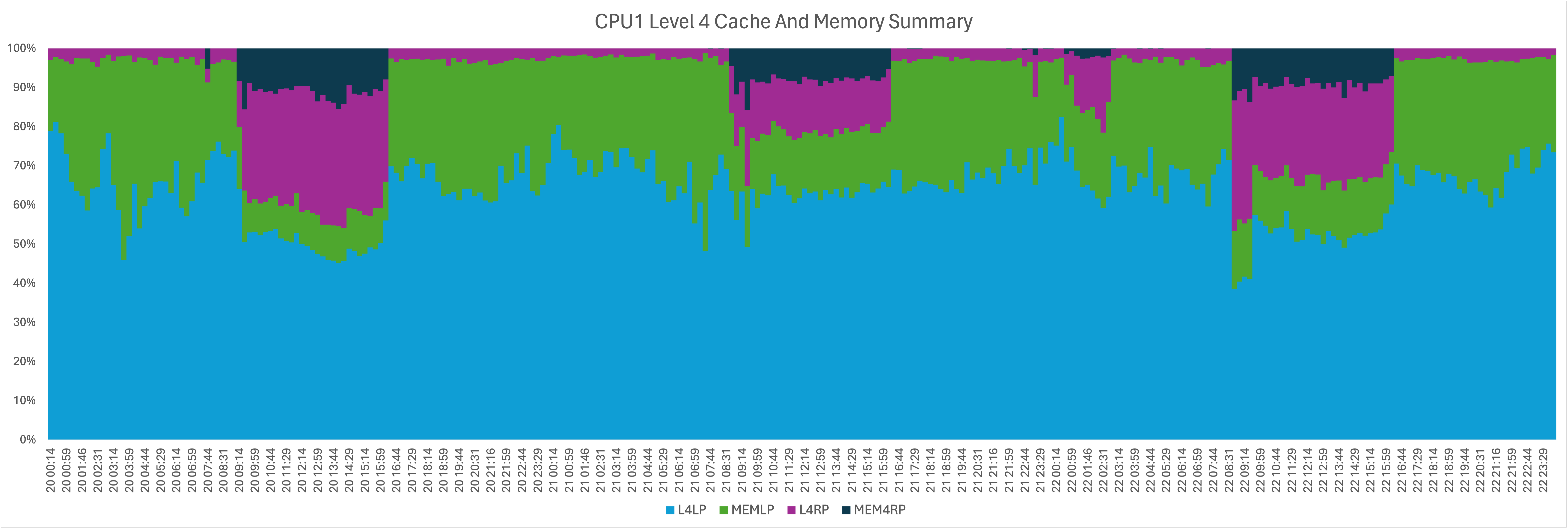
  • Level 4 Local Percentage (“L4LP”) is the percentage of L1 cache misses resolved in the L4 cache in the same drawer.
  • Level 4 Remote Percentage (“L4RP”) is the percentage of L1 cache misses resolved in the L4 cache in a different drawer.
  • Memory Percentage (“MEMP”) is the percentage of L1 cache misses resolved in memory in the same or a different drawer.

These metrics are all composed of multiple counters. So I can split MEMP into two, with a slight renaming:

  • Memory Remote Percentage (“MEMLP”) is the percentage of L1 cache misses resolved in memory in the same drawer.
  • Memory Remote Percentage (“MEMRP”) is the percentage of L1 cache misses resolved in memory in a different drawer.

Obviously MEMP = MEMLP + MEMRP.

L4LP and MEMLP combine to form local accesses where there was the hierarchical possibility of remote accesses. Similarly L4LP and MEMRP combine to form remote accesses.

I don’t think I would necessarily compute a ratio of remote versus local but the following graphs are nice – particularly as they show when remote accesses are prevalent.

It should also be said that L2P, L3P, L4LP, L4RP, MEMP, MEMLP, and MEMRP are all percentages of something quite small – L1MP. Generally L1MP is only a few percent – but we care about it because L1 cache misses are expensive.

Here is a view of all the Level 1 Cache Misses. The total wobbles around 100% a bit. I’ve found this to be typical.

And here is zooming in on the only components where there is potential for cross drawer.

You’ll see from both of these there’s a “time of day” thing going on.

Conclusions

Some LPAR design commonsense is worthwhile:

  • Minimise the risk of LPARs having theire home addresses being split across drawers.
  • Minimise running on vertical lows. (Yes, some might be inevitable.)

The point of this post is to show you can measure cross-drawer access. It’s worth keeping an eye on it, especially if your LPAR design leaves you prone to it.

While the higher the cost the further you go into the cache hierarchy, it would be extreme to have a design criterion that LPARs fit into a single DCM, let alone the same chip; Many customers would find such a constraint difficult. Indeed cross-LPAR communication might well negate the benefits.

Finally, a processor in “the main drawer” could be accessing cache or memory in a remote drawer. Equally, it could be a processor in “the remote drawer”. Not that there is a real concept of “main drawer” or “remote drawer”; It’s a matter of statistics. So “local” and “remote” are relative terms. But they are useful to describe the dynamics.

Making Of

I started writing this on my first attempt to fly to Copenhagen today. The plane was broken but there was a lot of time stuck on the plane before we decamped. A couple of hours later I more or less finished it on the second plane – which did take off.

Then, of course, I fiddled with it… 😃

Who says travel is glamorous? 😃 But, as I like to say, today’s travel bother is tomorrow’s war story…

… And I am finishing this off in my hotel room in Copenhagen after my second trip – to GSE Nordic Region conference. That was a very nice conference.


  1. SMT-2 means that one thread can be usefully employed while the other is waiting for data. But it doesn’t really negate the issue. 

  2. With a sufficiently complex set of LPARs PR/SM might, I guess, have to split more modest LPARs across drawers. If this happens at all I would expect it to be rare. 

Engineering – Part 7 – RMF Processor Home Address Fields

I was recently asked where I was getting the home addresses for logical processors from in RMF SMF 70. I will agree the fields I use are not that easy to interpret – so here’s my go at making them more accessible. Along the way I’ll also talk about SMF 74 Subtype 4 Coupling Facility fields that cover the same ground. But therein lies a problem.

It’s important to note these new fields only became available with z16 and RMF’s support for it; z15 and prior won’t populate the fields. The RMF APARs are OA62064 and OA61041. If you’ve ever tried to read the SMF manual you’ll’ve had one of two reactions:

  1. I’ll take this field description at face value.
  2. What exactly does this field mean?

Both are valid reactions. Most people have Reaction 1. I, like most seasoned Performance people, have Reaction 2. I’d say it’s my job to have Reaction 2.

The names of fields and their descriptions are, of course, obscure. Which is why I advocate playing with data to see how it behaves – on top of attempting to make sense of the SMF manual. But that’s someone with Reaction 2 speaking. 😃

The z/OS 3.1 manual seems to have caught up with this instrumentation. 1

I’ve added links to the two relevant sections below.

SMF 70-1 Logical Processor Data Section

There are newer fields in the Logical Processor Data Section. Some decoding of offset 89 onwards is needed.

The Logical Processor Data Section is documented here. It’s a very nice section but most of its contents aren’t new.

So here is a subset of the section of relevance:

Offset (Decimal) Offsets (Hex) Name Length Format Description
89 59 SMF70MaxNL 1 binary Maximum number of topology nesting levels. The value is model dependent with a maximum of 6.

0 The model does not provide information about the topological nesting levels.

1 There is no actual topological nesting structure.

2 – 6 Topological nesting levels are available, beginning with field SMF70CordL1 up to field SMF70CordLx, where x is the value that defines the maximum number of topology nesting levels.
90 5A SMF70CordL1 1 binary Coordinate of the preferred dispatch location of the logical core at topological nesting level 1. Valid if SMF70MaxNL > 0
91 5B SMF70CordL2 1 binary Coordinate of the preferred dispatch location of the logical core at topological nesting level 2. Valid if SMF70MaxNL > 1
92 5C SMF70CordL3 1 binary Coordinate of the preferred dispatch location of the logical core at topological nesting level 3. Valid if SMF70MaxNL > 2
93 5D SMF70CordL4 1 binary Coordinate of the preferred dispatch location of the logical core at topological nesting level 4. Valid if SMF70MaxNL > 3
94 5E SMF70CordL5 1 binary Coordinate of the preferred dispatch location of the logical core at topological nesting level 5. Valid if SMF70MaxNL > 4
95 5F SMF70CordL6 1 binary Coordinate of the preferred dispatch location of the logical core at topological nesting level 6. Valid if SMF70MaxNL > 5

The way to handle this is to take the first SMF70MaxNL nesting levels and decode them. As the description indicates, the meaning of each level is model dependent. It’s worth noting that I don’t expect to see values of SMF70MaxNL below 2 as this support only came in with z16 – but it might be this RMF support gives it the value 0 or 1 for eg z15.

With z16 SMF70MaxNL is 4 – but I don’t think you should hardcode this as one day it might change. That’s not a heavy hint, by the way.

For z16 the coordinates work the following way:

Field Level Meaning
SMF70CordL1 1 Always 0 (unused)
SMF70CordL2 2 Chip
SMF70CordL3 3 Dual Chip Module (DCM)
SMF70CordL4 4 Drawer
SMF70CordL5 1 Always 0 (unused)
SMF70CordL6 1 Always 0 (unused)

You’ll note we don’t have physical core number.

So you get down to the individual chip in a Dual Chip Module – so which side of the DCM.

What’s really nice is this field is available for all logical processors for all LPARs on the machine. And I conjecture for LPAR “PHYSICAL” this is the address of each characterised physical processor. 2 So far the latter has been credible.

SMF 74-4 Processor Utilization Data Section

The Processor Utilisation Data Section is documented here .

The new field is 16 bytes long at offset 28:

Here is a subset of the section in SMF 74 Subtype 4 that deals with Coupling Facility CPU – at the logical processor level:

Offset (Decimal) Offsets (Hex) Name Length Format Description
0 0 R744PNUM 4 binary CPU number.
4 4 R744PBSY 4 binary Busy time (in microseconds).
8 8 R744PWAI 4 binary Wait time (in microseconds).
14 E R744PWGT 2 binary Shared processor weight. Valid if R744FLVL > 14.
28 1C R744PTLE 16 EBCDIC CPU-type topology list entry, as returned by the STSI instruction SYSIB 15.1.2 (Configuration Topology). See IBM z/Architecture Principles of Operation for the format. Valid if R744FLVL > 24.

RMF gets this new field from XES using mapping macro IXLYAMDA submapping IXLYAMDCFMINFO. I was aware of IXLYAMDA for many years, but not this sub mapping.

The documentation for IXLYAMDCFMINFO describes the field as “CPU-type topology list entry, as returned by the STSI instruction SYSIB 15.1.2. Refer to Principles of Operation for format. (LEVEL25)”

“LEVEL25” refers to Coupling Facility Control Code (CFCC) – which is indeed new with z16.

I’ve tried to examine this mysterious “SYSIB 15.1.2” in a little more detail. But this is where I’m stuck: With numerous sets of customer data I’ve not been able to decipher it. There is a lot written about it in Principles Of Operation but it’s not something I’ve been able to make sense of. I’m sure among my readership there are people who can decipher it. If so please comment below. I’m not the only one who wants to know.

What’s nice about this instrumentation is it describes the addresses of coupling facility images on machines that might not have a z/OS LPAR to cut SMF 70-1 for. So it would be really nice to be able to decipher it. Having said that, SMF 74-4 has for many years told you Plant Number and Serial Number for each coupling facility.

Making Of

I started this blog post a few weeks ago, convinced I’d be able to decipher all the new topology information. Well, I got the most important piece done – as it was pretty trivial. However, it’s annoying not to have got the second piece done.

I’m actually finishing off this blog post sat on a plane at Gate A9 of Heathrow Terminal 5. We’re due to fly to Copenhagen – in my case for a customer workshop tomorrow. And we have a 90 minute delay due to something wrong with the wing of this British Airways Airbus A319. I think the captain made the right call. 😃


  1. You’d be amazed how many web searches still resolve to older z/OS releases. However, it’s easy to get to the 3.1 equivalent from there. 

  2. It certainly behaves that way – in that the home addresses for LPARs consistently fit inside the set of drawers / DCM’s / chips that it suggests. Further, IFLs and ICFs do tend to be in the top drawer. So it’s not garbage. 

Setting Axis Font Sizes In Excel With AppleScript

Just a short post to add another AppleScript snippet some might find useful. (There will be performance-related posts along shortly; I have some in the works.)

As you know from previous posts under the tag topics, I’m automating as much of my Excel use as possible.

So here’s a short snippet of AppleScript to set the x (category) axis font size. It then sets the primary (left) y axis font size to the same. Finally, if there is a secondary (right) y axis it sets its font size.

Generally I find 14 point to be the right size. Obviously you could generalise this with a variable or use another hardcoded size.

The way I use this is to run the AppleScript fragment having selected the chart I want to apply it to.

I think the code is pretty self explanatory:

tell application "Microsoft Excel"
    set c to active chart
    tell c
        set a to (get axis axis type category axis)
        set font size of (font object of tick labels of a) to 14

        set b to (get axis axis type value axis which axis primary axis)
        set font size of (font object of tick labels of b) to 14

        if get has axis axis type value axis axis group secondary axis then
            set c2 to (get axis axis type value axis which axis secondary axis)
            set font size of (font object of tick labels of c2) to 14
        end if

    end tell
end tell

As I’ve said several times, there aren’t many examples of AppleScript driving Excel. My hope is some of my posts get indexed on the wider web and so add to what searches throw up.

Excel – Two Types Of Transpose

In Excel – Sorted With AppleScript I mentioned I might have a go at transposing rows and columns in an Excel spreadsheet with AppleScript.

I said there were two things I could try – each with a different use case:

  • Transposing Rows And Columns In A Spreadsheet
  • Transposing Rows And Columns In A Graph

I – after quite a bit of effort – achieved both. Again, in the spirit of saving others time, I’m posting them here.

Transposing Rows And Columns In A Spreadsheet

The following code transposes the selected cells into cell A1 of a new work sheet. I’m using a new worksheet as it saves worrying about whether the transposed range will overwrite cells you don’t want it to.1 You can always cut and paste from the new worksheet to where you actually want it to go.2

tell application "Microsoft Excel"
    activate
    set r to selection
    copy range r
    tell active workbook
        set tempSheet to (make new worksheet at end)
    end tell
    paste special range "A1" with transpose
end tell

Having ensured Excel is activated the code:

  1. Creates a range r from the selected cells.
  2. Copies the cells to the clipboard.
  3. Creates a new worksheet at the end of the active workbook.
  4. Pastes the copied cells into cell A1 of this new workbook.

One thing I found didn’t work was attempting to paste special with transpose into the original selection; It simply didn’t transpose cells and columns.

Transposing Rows And Columns In A Graph

About half the time Excel decides that each row in the data is a series when I want each column to be a series (and vice versa).

There is a dialog ( “Select Data…”) you can pop up – but it requires taking your hands off the keyboard and clicking a button “Switch Row/Column”. This takes time and gets old really fast when you’re working with graphs all day long.

So I discovered a faster way – which could be automated with a hot key (perhaps with Keyboard Maestro or BetterTouchTool. Here’s the code:

tell application "Microsoft Excel"
    activate
    -- Get the last chart created
    set s to active sheet
    set chartCount to count of charts of chart objects of s
    set c to chart of (last chart object of s)

    -- Get the "plot by" direction for that chart and
    set p to (plot by of c)

    -- Set "plot by" to the opposite orientation
    if p is by columns then
        set plot by of c to by rows
    else
        set plot by of c to by columns
    end if

end tell

Here’s how it works.

  1. Under the Get the last chart created comment are three lines of code which yield the last chart created – in variable c.
  2. Then variable p is set to the value of the plot by attribute of the chart.
  3. Based on whether its value is “by columns” or “by rows” the same attribute is set to the converse value.

The detection of the last chart created is generally what I want: My use case is to create a chart, decide I don’t like it, and then immediately transpose it.3

Conclusion

Once again problems can usefully solved – but with much experimentation. And through extensive use of the excellent Script Debugger. In particular, if you assign an object to a variable you can see its properties.

I hope this has proven useful for somebody; It certainly has for me.

And, having mentioned BetterTouchTool and Keyboard Maestro above, I’ve automated both of these using a Stream Deck. In detail I use a keystroke action that kicks off automation.


  1. Consider the case of a 3 column, 2 row range of cells. Transposing that gives a 2 column, 3 row range of cells. If there were something just below the original then the two cells of that would get overwritten. Conversely, there’d be clean up of 2 cells at the right of the original range needed. 

  2. It’s handy that the just pasted in range remains selected after the code runs. 

  3. I’ve integrated this into one of my other scripts that sets the type of chart. As it runs I can immediately see if the orientation is right – and correct it before the script ends. 

Excel – Sorted With AppleScript

They say necessity is the mother of invention. But so, I’d say, are impatience and frustration.

I find the sorting dialog in Excel on Mac a source of both of these. So I wrote some AppleScript to remove some of the friction.

I’m sharing this because, yet again, I found nothing on the Web to help me. And some of the pieces might be what other people need for other automations.

The Trouble With Excel Sort

It’s easy to invoke the sort dialog from the keyboard – which I’d’ve fixed if I had to. (It’s Cmd+Shift+R.) But after that it gets a bit tedious:

  1. I have to explicitly click to get a drop down of columns to sort on.
  2. The default is to sort ascending and I almost always want to sort descending. So I have to click in a drop down to change that.
  3. It’s very hit and miss whether the “I have headers” is selected – and I always have headers.
  4. There is no tabbing or character navigation; It’s a badly designed dialog.

To be fair the dialog allows sorting in multiple columns – but it’s rare I’d want to do that.

You’ll note the things I’m objecting to require taking my hands off the keyboard, which is another joy / productivity killer.

Tiny violins, perhaps. 😀

The Code

All the above problems are tolerable. But it turns out they’re fixable – with a little AppleScript. So why not?

As I said above, searching the web proved futile. So the following was hard fought – which is why I think it worth sharing with those of you who’ve made it this far.

When you run this code it works on the range (rows and columns) you’ve selected, treating the first row as a headings row.

From the user point of view

  1. You are prompted for which column to sort on.
  2. You are prompted for whether the sort is ascending or descending.
  3. The sort is performed.

First character navigation works.

Here is the complete code.

tell application "Microsoft Excel"
    activate

    set r to selection

    -- Populate list of header cell values
    set headerList to {}

    set headerRow to row 0 of r
    set columnCount to count of columns of r
    set c to cells of headerRow
    set ix to 1
    repeat with theHeaderCell in c
        set headerText to (ix as string) & " " & string value of theHeaderCell
        set ix to ix + 1
        set end of headerList to headerText
    end repeat


    -- Choose which column to sort on
    set selectedHeader to {choose from list headerList}
    set chosenHeaderValue to item 1 of item 1 of selectedHeader

    -- Calculate the column number of the sorting column
    repeat with i from 1 to columnCount
        set columnHeader to item i of headerList
        if columnHeader = chosenHeaderValue then exit repeat
    end repeat
    set sortingColumn to i + (first column index of r) - 1

    set direction to item 1 of item 1 of {choose from list {"Ascending", "Descending"}}

    set sortingCell to cell (first row index of r) of column sortingColumn

    if direction is "Ascending" then
        sort r key1 sortingCell order1 sort ascending header header yes
    else

        sort r key1 sortingCell order1 sort descending header header yes
    end if

end tell

Now let’s look at some of the key elements of the code.

Getting The Currently Selected Cells

You get them as a range object with

set r to selection

A lot of things you wouldn’t think of as ranges in fact are. This is a more obvious case, though.

Populating A List With Header Cell Values

set headerList to {}

set headerRow to row 0 of r
set columnCount to count of columns of r
set c to cells of headerRow
set ix to 1
repeat with theHeaderCell in c
    set headerText to (ix as string) & " " & string value of theHeaderCell
    set ix to ix + 1
    set end of headerList to headerText
end repeat

In the above the code

  1. Extracts the first row of the range into headerRow.
  2. Creates a count of the number of cells in that first row – for later use – columnCount.
  3. Extracts the cells of that first row as a list – c.
  4. Iterates over the list of cells. For each cell it extracts the value and prepends an index to it – with a space in between. The number is needed to create a uniquely identifying string. This string is added to the list headerList. ix is a counter, of course.

The net result is a list of strings with values such as “1 System/Subsystem”.

Choosing Which Column To Sort On

AppleScript allows you to select (potentially multiple) values from a displayed list.

The code to get the text value of such selected values is

set selectedHeader to {choose from list headerList}
set chosenHeaderValue to item 1 of item 1 of selectedHeader

The first line pops up a dialog with the list in (in this case headerList, previously created).

The second line selects the first selected item from the list and sets chosenHeaderValue to it.

You could, of course, pop up any list and handle it this way, including if you allowed multiple values to be selected on.

Calculating The Column Number Of The Sorting Column

Unfortunately choose from list doesn’t return the index(es) of the chosen item(s). So you have to search through the list to find a match. Because there might be duplicate items in the list I had to prepend a unique identifier. Hence the use of the counter ix above.

Here’s the code to search for the selected item

repeat with i from 1 to columnCount
    set columnHeader to item i of headerList
    if columnHeader = chosenHeaderValue then exit repeat
end repeat

It compares the selected item’s text to each item in the list – until it finds a match.

The value of i has to be added to the first column number of the range (and then one taken off) to get the number of the column you want to sort on:

set sortingColumn to i + (first column index of r) - 1

Choosing The Direction To Sort In

Another dialog is used to choose the sorting direction

    set direction to item 1 of item 1 of {choose from list {"Ascending", "Descending"}}

Performing The Sort

First we need to nominate a cell to sort based on. In fact it suffices to choose the first cell of the sorting column:

set sortingCell to cell (first row index of r) of column sortingColumn

The sort itself is quite straightforward. Depending on the value of direction you can sort ascending or descending:

if direction is "Ascending" then
    sort r key1 sortingCell order1 sort ascending header header yes
else
    sort r key1 sortingCell order1 sort descending header header yes
end if

If you had more than one column to sort on you might use key2, key3 etc in the above, nominating a different cell for each.

Conclusion

Again, the struggle is real 😀 when it comes to using AppleScript to automate Excel externally. To some extent VBA can be used internally but it can’t readily be injected and controlled from outside.

And I have a couple more challenges in mind:

  • Transposing rows and columns in a range. Or, equivalently valuably to me, telling graphing which direction defines series. Perhaps both.
  • Folding a range – so that it is wider. So, for example, 2 columns wide and 8 rows tall becomes 4 columns wide and 4 columns tall. This kind of folding is useful to me – when combined with exporting to CSV. (CSV can be input to mdpre / md2pptx to make tables in PowerPoint slides.)

I know transposition can be done – but maybe not without explicitly iterating over cells. We’ll see.

More AppleScript And Excel

In Automating Microsoft Excel I wrote about some basic manipulation of graphs in Excel for Mac OS, using AppleScript.

I’m writing about it again because of the paucity of examples on the web.

Here is an example that shows how to do a number of things in that vein.

tell application "Microsoft Excel"
    set c to active chart
    tell c

        set xAxis to (get axis c axis type category axis)
        tell xAxis
            set has title to true
        end tell
        set tx to axis title of xAxis
        set axis title text of tx to "Drawer / DCM / Chip"
        set font size of (font object of tx) to 14

        set yAxis to (get axis c axis type value axis)
        tell yAxis
            set has title to true
        end tell
        set ty to axis title of yAxis
        set axis title text of ty to "Core Count"
        set font size of (font object of ty) to 14

        set fore color of fill format of chart format of series "VH GCPs" to {0, 0, 255}


        set fore color of fill format of chart format of series "VM GCPs" to {51, 153, 255}

        set fore color of fill format of chart format of series "VL GCPs" to {185, 236, 255}
        set fore color of fill format of chart format of series "VL Unparked GCPs" to {185, 236, 255}
        set fore color of fill format of chart format of series "VL Parked GCPs" to {185, 236, 255}

        chart patterned series "VL Parked GCPs" pattern dark horizontal pattern

        tell series "Offline GCPs"
            set foreground scheme color of chart fill format object to 2
            set line style of its border to continuous
            set weight of its border to border weight medium
            set color of its border to {0, 0, 255}

        end tell

        set fore color of fill format of chart format of series "VH zIIPs" to {0, 255, 0}
        set fore color of fill format of chart format of series "VM zIIPs" to {96, 255, 180}
        set fore color of fill format of chart format of series "VL zIIPs" to {185, 255, 236}
        set fore color of fill format of chart format of series "VL Unparked zIIPs" to {185, 255, 236}
        set fore color of fill format of chart format of series "VL Parked zIIPs" to {185, 255, 236}

        chart patterned series "VL Parked zIIPs" pattern dark vertical pattern


        tell series "Offline zIIPs"
            set foreground scheme color of chart fill format object to 2
            set line style of its border to continuous
            set weight of its border to border weight medium
            set color of its border to {0, 255, 0}
        end tell

    end tell
end tell

The above is the code I use to colour my drawer-level graphs.

Let me extract pieces that you might to use. (My assumption is that anybody reading this far got here because they came for AppleScript / Excel tips.)

Addressing The Active Chart

Everything in this post assumes you have selected a chart (graph) and want to manipulate it. The other snippets will need to be wrapped in this.

tell application "Microsoft Excel"
    set c to active chart
    tell c
        ...
    end tell
end tell

The point is to tell the active chart object what to do.

Manipulating Chart Axis Titles

First let’s manipulate the title of the x axis. Excel calls this the category axis.

The following

  1. Sets xAxis to the category axis of our chart.
  2. Turns on the title for the axis.
  3. Sets tx to the axis title object.
  4. Sets its text to “Drawer / DCM / Chip”
  5. Sets its font size to 14 points
set xAxis to (get axis c axis type category axis)
tell xAxis
    set has title to true
end tell
set tx to axis title of xAxis
set axis title text of tx to "Drawer / DCM / Chip"
set font size of (font object of tx) to 14

Now the y axis title:

set yAxis to (get axis c axis type value axis)
tell yAxis
    set has title to true
end tell
set ty to axis title of yAxis
set axis title text of ty to "Core Count"
set font size of (font object of ty) to 14

The only real difference is we’re setting yAxis to what Excel calls the value axis.

Setting The Foreground Fill Colour For A Series

This one turned out to be quite difficult to figure out.

  1. You address a series in a chart by its legend value: series "VH GCPs.
  2. You get the chart format of the series: chart format.
  3. You get its fill format: fill format.
  4. You set its foreground colour (for color a) using RGB (Red/Green/Blue) values. In this case full-on blue:`

The brackets in that last denote a list of values.

Put it all together and you get this:

set fore color of fill format of chart format of series "VH GCPs" to {0, 0, 255}

The main snippet has several of these.

Setting A Series Pattern

This one took a while to figure out.

chart patterned series "VL Parked GCPs" pattern dark horizontal pattern

It’s actually a command. Again the series is referred to as series "VL Parked GCPs".

I wanted a horizontally striped pattern so I chose pattern dark horizontal pattern. For another series I chose pattern dark vertical pattern.

Setting The Box Surround For A Series

I wanted some empty-looking series. Before I discovered the chart patterned series command I wrote the following.

tell series "Offline zIIPs"
    set foreground scheme color of chart fill format object to 2
    set line style of its border to continuous
    set weight of its border to border weight medium
    set color of its border to {0, 255, 0}
end tell

(The set foreground scheme color incantation uses the current Excel file’s scheme colour 2 – which happened to be white. I discovered this before discovered set for color of fill format.... I wasn’t happy with the colour control scheme colours give, so I persisted with being able to specify RGB values.)

The elements I want to draw your attention to here are around setting the border:

  • You can set the border line style with set line style of its border to ....
  • You can set the weight of its border with set weight of its border to .... I found the standard border width a bit weedy.
  • You can set the colour of its border with set color of its border to and here I’ve specified an RGB value.

Conclusion

It took a lot of experimenting to gain the above techniques – which is why I wanted to share them. I will say Script Debugger (which is a purchasable app) helped a lot, especially with seeing the attributes of objects such as the axis object. It does a nicer job of formatting Excel’s AppleScript dictionary than the built in Script Editor.

No doubt I’ll find more techniques – as I stretch what my code can do. If I do I’ll share them.

And now I’m happy knowing I’ve automated much of the drudgery of making charts in Excel.

Making Of

This is the second blog post I wrote today in a plane coming back from Istanbul. Some of the code was worked on during down time between customer meetings.

I can recommend writing under such circumstances, even if they’re a bit cramped. The one downside is my reluctance to pay for in-flight wifi. But I contend blog posts benefit from “sleep on it” so there’s no urgency to posting.

Relating Parked Time To Cores

In Drawers And More I mentioned Parking with the words

One day I’ll be able to colour VL’s according to whether they are parked or not – or rather fractions of the interval they’re parked. That’s a not very difficult fix for the python code.

Well, that proved as simple as I thought. So, along the way I built on the Parked Time numbers to get a Core-Level view of parking. The point of this post is to tell you how to do it – using SMF 70 Subtype 1. There are two challenges – but they’re not big ones:

  • Relating threads to cores
  • Calculating core level parking and unparking

Relating Cores To Threads

If you don’t have SMT-2 enabled for zIIPs it’s all very simple: The threads map one to one onto cores, in the right order.

SMT-2 is the more interesting case – and as the same techniques can be used for non-SMT as SMT it’s probably best to use the SMT case anyway; You might enable SMT one day.

Parked Time is recorded in the CPU Data Section – with one section per thread (CPU), not per core. The field is SMF70PAT. As I noted in Drawers And More these are only recorded for the record-cutting LPAR.

The Logical Processor Data Section has one section for each core for all LPARs on the machine.

To make sense of how a logical processor behaves – particularly its parking behaviour – you need to relate the two.

Fortunately, when SMT-2 was introduced RMF added a Core Data Section. Again, this is only for the record-cutting LPAR. But that suffices for our purposes.

This section has, among other things, the following information:

  • The Core ID
  • The number of CPU Data Sections to skip over to get to the first one for this core.
  • The number of CPU Data Sections for this core.

My code loops over the Core Data Sections, picking up these three fields. The second field points to the first CPU Data Section for this core.

Whether the number of CPU Data Sections for this core is 1 or 2, the technique for handling Parked Time is the same.

Calculating Core Level Parking

I’m interested in how much of the RMF interval the core is parked and how much it is unparked.

First, I need the RMF Interval Duration. While it usually is 15 minutes (Or 900 seconds) it often isn’t:

  • Some customers choose a different interval, perhaps 10 or even 5 minutes. \ For benchmarking you might even choose 1 minute.
  • There are other sets of circumstances where the interval is cut short, such as starting and ending System Recovery Boost boost periods.

SMF70INT is the field that gives the RMF Interval Duration.

I work in seconds, by the way. Converting SMF70INT to seconds, and STCK values to seconds isn’t difficult in REXX (or Assembler).

Having listed the CPU Data Sections for a core I sum up the Parked Time for each such section and divide by the number of sections. This gives the average parked time for each thread of the core.

I’ve seen very slight differences between the parked times for each thread of a SMT-2 core – though my test data consists entirely of “all parked” or “all unparked” cores. These slight differences make me want to average rather than assuming the two threads have the same parked time. In any case my CSV file records both threads’ parked times.

I divide the parked time by the RMF interval duration to get a parked time fraction. I obviously can subtract that from 1 to get the unparked time fraction.

Conclusion

Plotting Parked Fraction and Unparked Fraction as two series, instead of just counting the Vertical Low (VL) cores did prove useful. It visually confirmed the VL’s off in another drawer were parked for the whole of the interval. So no actual cross-drawer behaviour occurred.

And now I can show it to a customer.

If I do get to open source this code all the above will have been done in the code.

And it does – as SMF70PAT is only available for the record cutting LPAR – reinforce how essential it is to cut SMF 70-1 records on all z/OS LPARs.

Making Of

I started the week writing a blog post on the way to Istanbul. Talking to my Turkish customers reinforced my view this stuff has value – and how lucky we are that z16 introduced it. (It also made me think I need to explain drawers and cache hierarchy better in every engagement where I discuss CPU. So I’m going to inject some educational material into my workshop slides.) So here I am on a plane back from Istanbul writing this follow-on piece – as I was inspired to make further progress on this project.

My open-minded view is my journey with this data will continue…

Drawers And More

Late last year I wrote a blog post: Drawers, Of Course. I’ll admit I’d half forgotten about it. Now that a few months have passed it’s time to write about at least part of it again.

So why write about it again now?

  1. I’ve so much more experience with the instrumentation I described in that post.
  2. My tooling has come on in leaps and bounds.

You’d think the two were related, and I suppose they are. But these two points give me the structure for this post.

Experience

Here I’m primarily concerned with learning how the data behaves – and what it shows us about machines’ behaviour.

My customer set has expanded, of course. Notable new data points are single drawer machines (Max39 for z16) and the other kind of four drawer machine (Max168). Both of these lead to different thoughts:

  • One of the single drawer machines really should become a two-drawer machine when it’s upgraded from z15 to z16. Actually the one huge LPAR should be split before that happens.
  • The Max168 obviously has a lower maximum number of characterisable engines in a drawer, compared to the Max200.

Some of the experience gain, though, is best left to when I talk aboutTooling. I’ve evolved my thinking about storytelling in this area – basically by doing it the hard way i.e. without adequate tools.

Sometimes, though, seeing whether a line of discussion even works in customer engagements is valuable. This time is no exception; This is indeed of value to customers. Even if, as in one case, I told a customer “all your LPARs fit very nicely in one drawer; Indeed most fit in one Dual Chip Module (DCM)”.

And some situations have seen me say “fine with the workload at the level it is but growth could easily take you beyond a drawer so don’t assume future processors will bail you out”.

Tooling

One of the reasons I didn’t show pictures in Drawers, Of Course is I wasn’t happy with the tooling I had. To be fair it was a first go with the new instrumentation so it was

  • Cumbersome to operate
  • Unable to tell a consumable story

In the intervening months I’ve made progress on both of those. So now is the time to share some of the fruits of that development work.

What I had then is some REXX for reading in SMF 70-1 records and writing one line per Logical Processor Data Section – as a CSV. I did at least have a sortable timestamp.

This produces a big file that requires you to cut and paste a given LPAR’s logical processors for a specific RMF interval into another CSV file – for a point-in-time view. And that cutting and pasting required a manual search for the lines you want. And a longitudinal view of a core was a pain to generate.

It also didn’t show offline processors. So, from interval to interval, a logical processor might come and go in its entirety. Not good for graphing. And not good for spotting it going on and offline.

So I wrote a shell script (“filterLogicals”) to process the big CSV file. It uses egrep to do one of two things:

  1. Extract the lines for a given LPAR (or “PHYSICAL”) for a specified RMF interval.
  2. Extract the lines for a given logical engine (for a single LPAR) for all intervals.

These two capabilities unlock some possibilities.

Having got the lines for a given LPAR (or PHYSICAL) there remains the problem of graphing or diagramming.

My current opinion is that you don’t really care which logical processor has its home address on which drawer / Dual Chip Module / chip. Mostly you care about how many of each type and polarity have their home addresses on each drawer / DCM / chip. My experience is that level of summary tells a nice story really quite well.

So I wrote a piece of python (“logicals” – which I shall probably rename) which takes the single interval output and summarises it as a CSV ready for Excel to turn into a graph. It can tell the difference between two cases:

  1. Physical processors (from “PHYSICAL”).
  2. Logical processors – for any other LPAR.

I’m still convinced that the so-called home addresses for “PHYSICAL” are actually where the physical cores are. Here’s an example

You can see

  • The GCPs and zIIPs are in Drawers 1 and 2.
  • The ICFs are in Drawer 4. (If there were IFLs I’d expect them to be in the higher drawers, too.)
  • Drawer 1 has 39 characterised cores (which is the limit on this machine).
  • Drawer 2 has 36 characterised cores.
  • Drawer 3 has 10 – and that is where one of the LPARs sits.
  • Drawer 4 has 16.

I separate the DCMs by a single line and the drawers by three lines in the CSV.

I don’t attempt at this stage to combine all the LPARs for a machine. One day I might; I’d like to.

A design decision I made was to colour the GCPs blue and the zIIPs green. Vertical Highs (VHs) are dark, Vertical Mediums (VMs) medium 😃, Vertical Lows (VLs) light. Offline processors are not filled but the bounding box is the right colour.

Fiddling with colours like that is a pain in the neck. After quite a lot of effort I got AppleScript working to find the series and colour them appropriately. The result is this:

This is a real customer LPAR – from the same machine as the previous diagram. Notice how the offlines have home addresses. I will tell you, from experience, that when those processors are online they are likely to have different home addresses. It’s also interesting that there are 9 offlines on one chip – when there are only 8 cores on the chip; They can’t all be there when they come online.

The result of my effort is four pieces of code that make it very easy to see the home addresses for any LPAR at any instant in time. But I’ll keep fiddling with them. 😃

My REXX code now produces columns with Parked Time – for however many threads there are. But this can only be done for the record-cutting LPAR. Which reinforces the view you should cut SMF 70-1 records for all z/OS LPARs on a machine. HiperDispatch Parking is a z/OS thing, whereas HiperDispatch Polarity is a PR/SM thing.

One day I’ll be able to colour VL’s according to whether they are parked or not – or rather fractions of the interval they’re parked. That’s a not very difficult fix for the python code. That will show me, for instance, that those two VL’s off in another drawer are actually 100% parked (which they in fact are) – wherever in the machine they are dispatched.

Conclusion

There are a number of us looking at the new SMF 70-1 instrumentation. We tend to look at it in different ways, with different ways of diagramming and graphing.

I’ve described my tooling in a bit of detail because it’s actually in the kind of shape I could ship as part of a new open source project. No promises that I’d ever be allowed to do that but I’d be interested to know if this is something that people would find useful.

I should also mention that SMF 113 is a very good companion to SMF 70-1. Again, keep it on for all z/OS LPARs.

I’ve also laid a trap for myself; I wonder if you can spot my “hostage to fortune”. 😀

Making Of

I started writing Drawers, Of Course on a plane to Istanbul. Here I am again, doing exactly the same thing. And I know jolly well the topic of drawers will come up with this other customer’s workshop. It rarely doesn’t these days.

And I think so much of the topic of drawers that “Drawers, Of Course” has grown into a presentation I’ll be giving at GSE UK Virtual Conference, 23-25 April. By the way, we have an exciting stream of presentations on the z Performance & Capacity stream there.

One other point: You might ask “why so many bites at / of the cherry?” It’s my privilege in this blog to write about stuff as I learn. It might be embarrassing if something I write later on contradicted something I earlier said. But that’s a rarity and not that embarrassing. The point is as I learn (through book or experience) I share. Maybe one day I will consolidate it all into an actual book. I just don’t have the time or structure yet. And that might not be the right medium.

If you’ve made it this far you might appreciate that “Drawers, Of Course” could have been better as “Drawers, Of Cores”. 😀 Oh well.