Drawers, Of Course

This post is about processor drawers and how the topic might influence your LPAR design.

Introduction

Once upon a time drawers and books were very simple. If you wanted a certain number of processors – whether GCP, zIIP, zAAP, IFL, or ICF – that determined the number of drawers you had. (I’m still hearing people refer to them as books, even though that went out when we went from vertical orientation to horizontal.1)

Now it’s got more complex. I think this might really have taken off with z15 – but it’s certainly a feature of z16 as well. And I expect it to remain a feature – though I’m not saying anything specific about any future processor ranges.

I’m seeing quite a few Max200 machines – even though the characterised processor count is nowhere near that number. I’m also seeing Max82 machines. Again, this isn’t usually driven by processor counts. (And just because I don’t list the other models doesn’t mean they’re not out there; My sample is limited.)

So this post discusses why. And it’s drawn from the increasingly frequent discussions I have with customers about their, er, drawers. 2 😃

z16 Drawers

This post might seem quaint when future processors come out. But in 2023 it’s “up to the moment”. And, to keep it simple(r), I’m not going to talk about A02 machines.

We designate z16 A01 machines as Max39, Max82, Max125, Max168, and Max200. These relate to the maximum number of characterisable physical processors. The top 2 models are 4 drawer machines. Max39 has 1 drawer, Max82 has 2, Max125 has 3.

I should perhaps explain that the term “characterisable physical processors” refers to the GCPs, zIIPs, IFLs, and ICFs a customer has bought – on the machine. (Technically it refers to the IFP and SAPs also, but this post isn’t really about those.)

A drawer contains, among other things, processors, memory, and sockets for ICA-SR coupling facility links. Apart from the processors RMF doesn’t surface any of this. And indeed I infer drawer count from the maximum number of characterisable processors (field in SMF 70-1).

More Drawers For Greater Resilience

One of the main reasons for having more drawers is to increase resilience. Let me explain a couple of reasons why this might be so. And bear in mind the events I describe are very rare but well worth planning for.

Losing A Drawer

If you condition the machine correctly the need to replace a drawer need not stop a machine. If you have spare capacity in other drawers the purchased processors can move and the LPARs’ logicals along with it. I also understand that memory – if there is sufficient physically in the surviving drawers – can be “moved” to replace that from the offgoing drawer.

One relatively happy circumstance in which a drawer might need disabling could be for adding physical memory. (I don’t know if adding ICA-SR connections requires this.)

Obviously a single-drawer machine can’t participate in concurrent drawer removal. Further, the remaining drawers – in extremis – might get crowded.

But it’s certainly something to plan ahead for – if you can.

Recovering To Another Machine

In a two (or more) machine configuration you might hope to survive a machine-level outage by recovering to the surviving machine(s).

If there weren’t spare capacity, possibly using a generally unpopulated drawer, recovery to survivors might not be feasible.

Plenty of customers have machines with many uncharacterised cores, often in their own drawers. And such drawers would be expected to have memory.

More Drawers For Separation

PR/SM’s algorithms for LPAR and logical processor and memory placement tries to separate ICF and IFL LPARs from z/OS LPARs:

  • It tries to place the GCPs and zIIPs in the bottom drawers, working upwards. z/OS memory also.
  • It tries to place the IFLs and ICFs in the top drawers, working downwards. Their memory also.

It works better if the z/OS LPARs are kept separate from the others, especially not sharing Dual Chip Modules (DCMs).

With a single drawer that can’t be done.

If there are either so many z/OS logical processors or IFLs and ICFs that they can’t be separated PR/SM can’t achieve the ideal. This is not just a single-drawer problem.

More Drawers For Scalabiity

PR/SM tries to keep the logical processors and memory for an LPAR in the same drawer. If an LPAR grows too big it might not be possible to keep it in a single drawer. If that happens there will be cross-drawer memory and cross-drawer (virtual) level 4 cache accesses. These cost many more cycles than in-drawer accesses. So drawer crossing is best avoided.

Where LPARs get sufficiently large it might very well be better to split the LPAR. Whether each LPAR ends up in its own drawer will depend on their sizes. If two LPARs would between them be too large for a single drawer you’d hope they ended up in separate drawers.

Yes, there could well be more CPU cost – perhaps because of Db2 datasharing scaling out. But there’s a resilience benefit – in that more LPARs sharing a given workload tend to have better resilience characteristics.

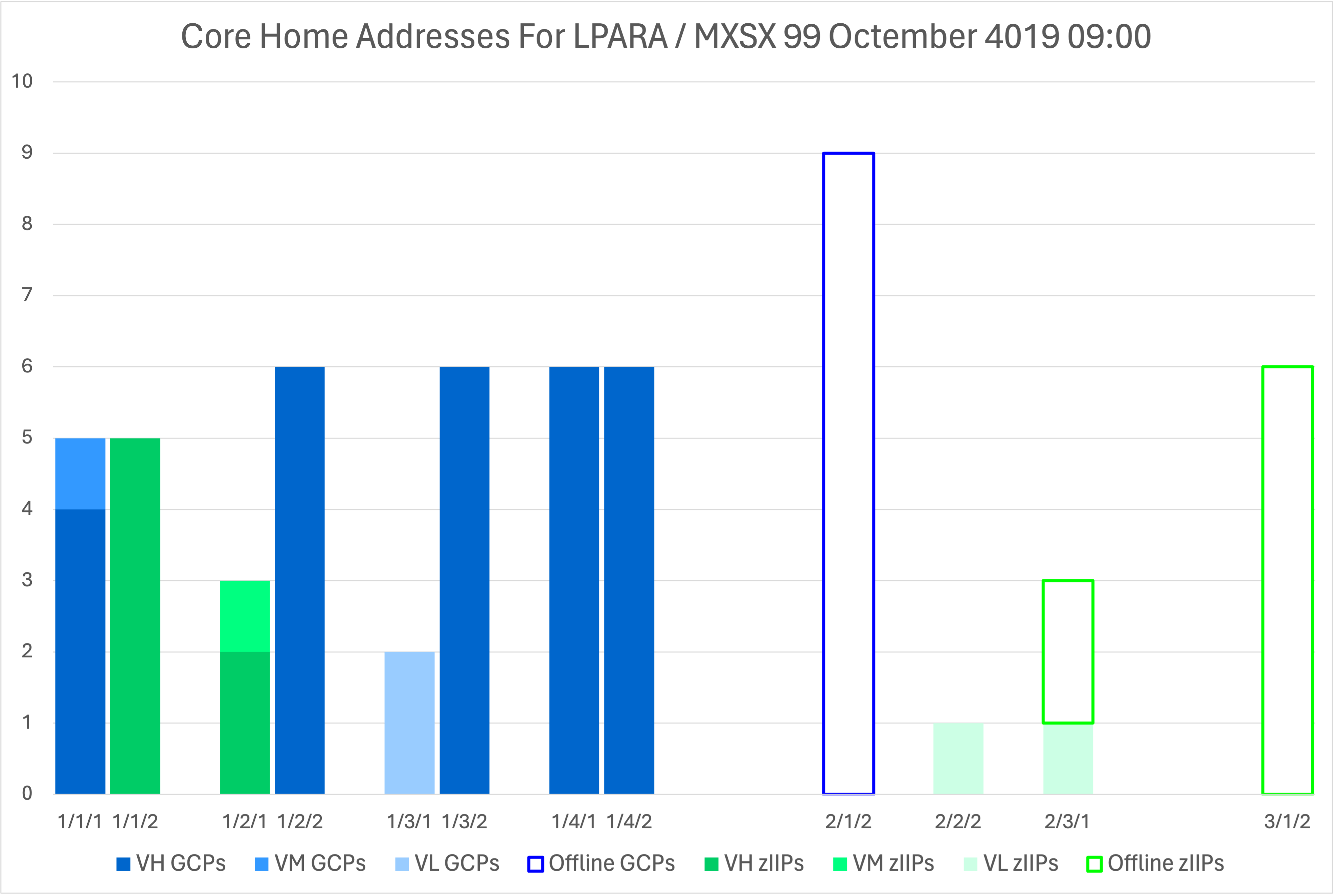
I have observed cases where 2 LPARs in a sysplex fit in Drawer 1. PR/SM is observed – using the instrumentation I’m about to describe – to indeed place both of them in Drawer 1. In one case – with a Max82 (2 drawer) machine nothing ended up in Drawer 2. This is by design.

What Is In Each Drawer?

With z16 SMF 70-1 learnt a new trick (and I along with it). Prior to z16 you could get the home addresses of logical processors from SMF 99-14. But

  • It only gave you the information for the LPAR whose RMF cut the records.
  • It only told you about z/OS LPARs.
  • It gave you no information about physical processor locations.

With z16 and the appropriate RMF support you now get the home addresses for all logical processors for all LPARs, no matter what the LPAR is. (Including IFLs and ICFs.) What you don’t get – which SMF 99-14 has – is affinity nodes. Perhaps you can guess that from processors that behave like each other, but it’s only a small pity anyway.3

I also think the home addresses for the PHYSICAL LPAR have significance: In the data I’ve processed these look very much like the physical locations of the characterised processors. But I’ve not seen this written anywhere – so maybe it can’t be relied on. Certainly the home addresses of the LPARs’ logical processors never stray outside of PHYSICAL’s home addresses. And their number corresponds – as it always has – to what is purchased (also given in SMF 70-1 but in a different section).

Neither SMF 70-1 nor 99-14 will tell you where an LPAR’s memory is. So I’d be especially careful of LPARs’ whose memory footprint might approach the average drawer’s memory.

One point to remember is that a logical processor home address is not necessarily where it will be dispatched. For Vertical High’s (VH’s) it is. For Vertical Mediums (VM’s) rather less so as they have to share physical processors. For VL’s still less so. But, as I said, even a VL can’t be dispatched outside of the physical cores of a given type.

Conclusion

I wanted to sensitise some of you to the question of “how many drawers should a machine have?” And “why?”

I also wanted to introduce (nearly all of) you to the new instrumentation in 70-1. This really changes the processor analysis game.

I haven’t necessarily covered all the aspects of this topic, of course. For that a good place to start is this Redbook. I found page 112 onwards a good read.

I also realise that drawers aren’t cost free. I also was confronted with the fact that the number of drawers a machine can have is limited by the number of frames. Further, that the bigger machines are factory build only.

Still, I hope this has been food for thought. And I expect to have even more discussions about drawers with customers going forward.

One other point: The first drawer is said to have fewer characterisable cores than subsequent ones. It seems cautious to assume any drawer’s size to be the smallest one in the machine, not just the first’s. So, for z16 that would be 39. In any case you don’t want to get too close to a full drawer.

One final thought: You can’t predict which logical (and physical) processors will end up in which drawers. You can only design sensibly and verify with 70-1 and check the effects with SMF 113. In fact the theme running through this post is indeed “design sensibly”.

Making Of

This post was started on a plane to Istanbul – to run a customer workshop. Without giving anything away at all, I can say that drawers were a topic of conversation. One of many. And this is far from the only customer where the topic has come up recently. And the post was concluded on the way back.

If you’ll pardon the pun, this post draws on my experiences using code to analyse the new SMF 70-1 fields. What I haven’t yet done is updated my diagramming code to use this data. Perhaps it’s time I did. Actually, I returned to this post a couple of weeks later – before publishing. I have some thoughts on diagramming – which could only be done with z16 SMF 70-1. As I prototype and then refine I probably will write another post.

One working title for this post Was “Er, In Drawers”. I suspect the pun is a Britishism and probably should be retired.


  1. Once upon a time, if you said “book” when the correct term was “drawer” I might’ve been churlish enough to say “you mean drawer”. Nowadays I hope I just use the term “drawer” in subsequent sentences. A “bit passive aggressive” but not so “active aggressive” as before. 

  2. If you’ll forgive a definite Britishism in, perhaps, poor taste. 

  3. I’m bound to be proven wrong on this one. 😃 

Mainframe Performance Topics Podcast Episode 34 “Homeward Bound”

We started planning this one quite a while ago. Thankfully our topics tend to be evergreen – in that they’re still topical for quite a while. In that vein I know we are gaining new listeners and they aren’t all starting with the latest episode.

Anyway, our schedules have been their usual hectic selves – but in a good way.

Actually, recording happened over quite a short timespan – when we got to it.

So, enjoy!

Episode 34 “Homeward Bound” long show notes.

This episode is about our Performance Topic.

Since our last episode, Martin was in Istanbul twice, Copenhagan, and Nottingham. Martin and Marna were both in GSE UK, which was the best GSE UK ever! Marna was in GSE Germany, which was also a fabulous event with a great technical agenda.

Mainframe – z/OSMF Software Management UUID

  • What it is:

    • Knowing what SMP/E CSI “covers” a specific active z/OS system hasn’t been possible, at least in any official programmatic way. This information is always just known by the z/OS System Programmer, usually by having naming standards. Making it not automatic, and so not robust.

    • In z/OS 3.1, we now have the capability to correlate a UUID with a running z/OS system, which can then programmatically retrieve the SMP/E CSI which represents the running system when used as directed.

  • UUID details:

    • Universally Unique Identifier. Sometimes known as Globally Unique Identifier (GUID)

    • A long string of hex digits, separated by dashes, which is actually a 128-bit label. Usually in 8-4-4-4-12 format.

    • Always unique by design. Doesn’t use a central registration authority and no coordination between parties.

  • Requirement to use this capability:

    • This function is limited to the z/OS operating system Software Instance only. Separately deployed program products and middleware are not applicable. Only for z/OS because we know an LPAR or VM guest can only have one operating system.

    • You must have an SMP/E CSI that accurately reflects your z/OS system in the first place. If you have no SMP/E CSI that is specific to that running z/OS system, this capability is not applicable. We’ve always strongly recommended that you deploy z/OS with its own CSI so that you always have an accurate CSI that represents what was deployed!

    • You must install a provided usermod during deployment, which contains the UUID. We’ll provide the SMP/E usermod and UUID when using z/OSMF Software Management, with the PostDeploy Workflow. That usermod leads to UUID being in LPA.

  • Some practical things:

    • Re-deployment, with a different CSI would mean the UUID must be updated. For example, from Test into Production. Otherwise we have a “ringer”.

    • You must be using z/OSMF Software Management to generate the Software Instance UUID. z/OS 3.1 z/OSMF Software Management will go through your inventory and automatically assign UUIDs.

    • z/OSMF Software Management keeps track of the UUID-Software Instance, which then gives us the CSI(s).

  • Value of using the new function:

    • For any programmatic usage to find out what is installed on the running system, with confidence. REST API used to retrieve UUID as part of a JSON response. Also displayable with a D IPLINFO command.

    • Use the UUID in z/OSMF Software Management queries. These REST APIs return JSON, which is widely understood, and able to used by popular modern programming languages such as python, node.js, PHP, Go, PERL, etc.

    • Ties very nicely by finding active z/OS system information in a software inventory that has a lot of inactive software. It’s a solution to an age old problem.

Performance – Engineering Part Umpteen – Logical Processor Home Addresses

  • Marna and Martin likely already talked about home addresses and SMF 99 Subtype 14. This is a continuation of that discussion.

  • Logical Processor Home Addresses are the LPAR’s preferred physical location for a specific logical processor to be dispatched. This would be the drawer, DCM, chip, core. Also degrees of meaning are for VH, VM, VL, Dedicated.

  • With z16 support it’s now in SMF 70-1, cut by Data Gatherer which everybody has.

  • Better in some ways than SMF 99-14. In that is it likely collected by all installations, collected for all LPARs, including non-z/OS and all z/OS.

  • It is useful because:

  • It contains an analysis of the effect of PR/SM Weights & HiperDispatch, drawers, DCMs, chips. SMF 113 is good for z/OS cache effects, etc.

  • It can verify the location of ICF and IFL LPARs in the top drawer, which are separated from z/OS, but sometimes impossible to usefully achieve. IFLs include IDAA and VM. Concurrent Drawer Maintenance complicates things. It’s difficult to predict what PR/SM will do. LPAR Design, though, is important.

  • Keep in mind a few health warnings:

    • Logical processors not always dispatched on their home addresses. True of VM and VL logical processors. VH and Dedicated WILL always be dispatched on home processor.

    • Location of memory is not included. SMF 113 gives hints, sort of.

    • z/OS as a VM guest not supported. SMF 70-1 doesn’t report MVS guests under VM, just the LPAR. It does flag “this MVS is in a virtual machine”.

  • Provided in z16 Exploitation support, with OA62064, and is in the z16 Exploitation Support and SMF SMP/E FIXCAT.

  • Also in SMF 74-4 CPU Section:

    • One for each Coupling Facility logical processor

    • Completes the picture by addressing External CFs’ logical processors

  • You might need SMF 99-14 in addition:

    • SMF 99-14 has affinity nodes, whereas SMF 70-1 doesn’t. In practice not much you can do about affinity nodes.
  • All in all a very useful advancement in the instrumentation, and now available for many of you. Martin has basic code to process this – so it is already featuring in engagements.

Topics – Some Useful Tips For Debugging An DFSORT E15 Exit

  • E15, E35, E32 are popular DFSORT exits, which enhance DFSORT processing. Martin uses E15 to flatten records and enhance filtering.

  • It is specified in control statement – OPTION MODS. Usually written in Assembler, can be COBOL or PL/I, though. Mostly pre-existing, so E15’s might need maintenance.

    • Example: Flattening SMF records

    • Example: Unpacking JSON or XML

  • Anyone trying to add function to DFSORT, or anyone trying to maintain DFSORT E15 exits might need some advice. Martin uses them as DFSORT can do the record I/O. It is fast, no messy Assembler, and the flattening and filtering is powerful.

  • Martin’s tips are:

    • Use exits to do the I/O for you

    • Do A COPY First

    • Stop After 1 Record To Begin With

    • Write Diagnostic Data Into Output Records

    • Forcing An Abend Can Help

    • Code A SYSUDUMP DD

    • Maintain A DFSORT Symbols Convention

    • GETMAIN Your Working Storage

    • Write To The SPOOL

  • In conclusion:

    • As a sysprog you might not have come across E15 exits but they’re valuable

    • Almost all the techniques would work with COBOL or PL/I

Out and about

  • Marna will be at SHARE Orlando. March 3-7.

  • Martin is working on lots of customer situations, destinations to be revealed at a later date

On the blog

So It Goes

Reduced To A Single Tap

(This is not a post about plumbing.) 😀

It’s been a while since I last wrote about personal automation. And in Stickiness I talked about what makes automations stick for me.

This post is about experiments with RFID detection and automation. These actually turned into something I use daily when I’m at home.

Hobbyist Digital Electronics

Let me digress a little. When I was young I learnt all about Kirchoff’s Laws and other aspects of analogue electr(on)ics. But my real love was for digital electronics. I messed around with Zilog Z80 microprocessors and the various support chips. Indeed these were the core of part of my Masters in Information Technology. And this is where I learnt my first assembly language – but not my last.

But then the rest of my life took over. 😕😀

Digital Electronics In The 2020’s

A few years ago I got into Raspberry Pi computers – mostly on the basis they were cheap Linux machines. This helped a bit with trying things out on Mac as well, with many of the utilities being essentially the same. And I did a little electronics – but not much.

But then last Xmas I acquired a Pi Hut Maker Advent Calendar. As the name suggests, it contains 12 experiments, which mostly build on each other.

At its heart is a Raspberry Pi Pico – which has a runtime rather than a Linux operating system. You program it from a real computer, which might be a Raspberry Pi. I’ve done it with a Pi but generally use one of my Macs.

The runtime interprets one of two flavours of Python: MicroPython and Circuit Python. Generally I use the former – as that is what the Advent Calendar introduced me to – but there have been Pico-based devices where Circuit Python is easier.

Pico W Is A Game Changer

The Pico comes in two flavours:

  • The Original Pico
  • The Pico W

The latter has Wi-Fi (and Bluetooth). Wi-Fi opens up lots of Automation opportunities.

While you could use the Pico to automate via a USB connection, Wi-Fi is much more flexible.

I have automations using two mechanisms that require REST interactions:

As Mac and iOS devices have different capabilities it made sense to learn how to work with both.

A Single Tap?

One of the devices a Pico – of either variety – can drive is a RFID reader.

It’s not difficult to write MicroPython code to handle card taps on the reader. Essentially you’re in a wait loop until a tap is registered. Then you “do the thing”.

My code uses the identifier embedded in the card to index into an array. Based on that a specific automation is kicked off – via a URL scheme. (Either Keyboard Maestro’s or Pushcuts’s.)

While a card can carry more information they all have a 4-byte identifier. Which is how uniqueness is supported.

My code writes a message to the (Thonny) console if the card has an identifier that is not handled. That way I can add the card to the array, along with an automation routine.

Experiments With RFID Cards

While RFID readers often come with visibly blank cards and keyrings, I’ve experimented with other RFID cards (or what I thought were):

  • Supposedly many credit cards have RFID built in. I wouldn’t recommend using these as some idiot might run off with them – even if you stick to expired ones.
  • We went on a cruise recently – and the on board passes got harvested as RFID cards. (They were no use for anything else after the cruise, except perhaps for nostalgia.)
  • I discovered my Gautrain card (cancelled since I hadn’t been to South Africa in years) also works.
  • I wondered how a Philips Sonicare toothbrush knew if you hadn’t changed the head. My surmise was it has an RFID reader built in and recognises the same old 4-byte code – until you change the head. When I changed the head I confirmed the old one had a RFID tag in. So I chopped the brush bit off and what remains is a workable test device – for “alien card” logic.
  • Some hotel room cards also work.
  • Some cards surprised me by not being RFID cards. Most notably the Oyster Card (used for getting round London).

Shrink To Fit

So there I am with my breadboard with a Pico W, 3 coloured LEDs, a resistor, and the RFID card reader hanging over the edge of it. This is clearly a fragile thing – and not at all portable.

The first thing to do was to replace the coloured LEDs with a RGB LED. This has 4 pins – Red, Green, Blue, Neutral. It’s much more compact than 3 LEDs. It’s easy to program.

The next thing I did was to find a plastic box to encase the circuitry in. This turned out to be a square makeup bud box. There are plenty of these I’ve harvested over the years. The plastic is quite soft so it was easy to cut a slot for the RFID reader’s wires and a small hole for the RGB LED. The RFID reader is stuck to the lid.

It won’t win any design awards but it gets the job done; It’s much more stable than the previous (breadboard-only) implementation. And here it is:

One small snag: Standard length (10cm) DuPont Wires are so long it was hard to shut the lid; It kept springing open. I looked for shorter (5cm) ones – in vain. So I decided to make my own. You can get a crimping tool and a set of wires and connector parts. I have to say this is fiddly in the extreme – especially with my old eyes. They say “practice makes perfect”. Well, it took a lot of practice. But finally the lid fits. I’ll probably have to solder the wires to the RGB LED. And then it might pass a shake test and I can consider it portable.

Conclusion

So this has been quite an adventure – through componentry and MicroPython programming and connector making. But I have something I use at least twice a day – “Start Day” and “End Day” being 2 cards that’ve ended up “In Production”. And 2 others kick off OmniFocus task creation and Drafts document creation.

Making Of

I realise USAns and probably others use the term “faucet” instead of “tap” – so the opening joke falls a bit apartment for them. Oops, I did it again. 😀

I started drafting this in Drafts on my iPhone – while running errands around London. And finished it on a flight to Istanbul.

Actually most of my posts are written in Drafts and then converted to HTML in Sublime Text, before being published via WordPress. This workflow works well for me, particularly as I can generate text (Markdown) anywhere in Drafts.

Signal is, of course, spotty on the underground- so link research was a bit fitful. A fortiori up in the air – where I’m not (yet) inclined to pay for WiFi.

Bursty Batch – Small Reprise

In Bursty Batch I talked about how some customers have large amounts of batch work coming in all at once, and how a new WLM function in z/OS 3.1 might be handy in catering for it. And it subsequently occurred to me there is a cheap-to-collect and therefore almost universal method of assessing how bursty batch is. This post is about that method.

One section in SMF 70-1 is the ASID Data Area Section. It has system-level statistics for such things as the number of Started Tasks or TSO userids.

To take a relevant example, you can calculate the average number of batch address spaces by dividing field SMF70BTT by SMF70SAM.

So SMF70SAM is the number of RMF SMF 70 samples in an interval. Which makes SMF70BTT the total of all the sampled batch address spaces in the system. Hence the average. Samples in this context are one per second. So a typical 15-minute interval has 900 samples. We’ll come back to samples in a moment.

An average over 15 minutes is not a great determinant of burstiness. A lot can happen in that time. While one might drop the RMF interval to 5 minutes or even 1, most customers don’t run that way; The volume of RMF SMF records goes way up the shorter the interval. So this sort of interval length is good for benchmarks or Proofs Of Concept (POC’s) – of which I have data from one at the moment.

If an average is not good, it would be nice to compute a maximum. And this is where the neighbouring field to SMF70BTT comes in: SMF70BMM. This field is described in the SMF manual as the maximum number of batch address spaces. Actually, as happens occasionally, this description doesn’t entirely cover the ground. Let me explain why.

I said I’d return to samples, and here we are: The number of batch address spaces is sampled, once for each sample point. It is the maximum of these sampled values that SMF70BMM contains. But why do I make this point? It’s because the sampling process doesn’t rule out there being times – between the sample points – where the value was higher. So SMF70BMM isn’t a perfect measure. If you want perfect measurements you have to spend a lot more resources getting them.

But is SMF70BMM good enough? Take a look at the following graph.

Here I’ve plotted the maximum number of batch address spaces in the interval, and the average. This is real customer data, in case you wondered.

  • During the day the average number of batch jobs remains pretty constant, while the maximum varies wildly. You might discern an hourly pattern, with minor peaks on the half hour. This is interesting as it suggests work is thrown in on a timer pop of some sort. You’d have to examine SMF 30 to learn more about this.
  • At night there is more variation in the average, and much more in the maximum. The system peaks at over 60 jobs – according to SMF70BMM. Of course, this is a lower bound, but the picture is pretty clear.

From this pair of metrics we can learn a lot about the nature of batch in this system.

One thing we can’t learn that much about is balance between systems. The averages won’t show the fluctuations and the maxima can’t really be compared – as they might not coincide. In this case the average is the better of the two.

So, I think the SMF70BMM approach is valuable. It’s possible the other maxima – for, say, TSO or Started Tasks – is valuable. But I’d think rather less so.

The Making Of

Again I’m writing this on an aeroplane. It’s an Airbus A380 – in British Airways Economy. I make that point because, surprisingly to me, the seat pitch is adequate for a 12.9” iPad Pro.

And, if you were wondering about the title, in my head I misattributed it to Jimi Hendrix. In fact Queen and Paul Rodgers had a song called “Small”. And at the end of the”Cosmos Rocks” they had a song called “Small Reprise’. (You might prefer, though, Roger Taylor’s own “Small”.

I thought originally this post would indeed be a small reprise. In fact it’s quite lengthy. Oh well.

And the smudge on the graph is, of course, obfuscation.

In My Estimation

This post is about Coupling Facility sizing – particularly when you don’t have one to start with. And particularly CPU. (Memory is reasonably catered for with CFSizer – whether over the web or now in z/OSMF for z/OS 3.1.)

And the reason I’m writing about this is because I was recently asked to help size in just such a set of circumstances.

Narrowing The Doubt

Coupling Facility CPU usage is so variable that one is tempted to say “I’ve no idea” – but that isn’t a very satisfactory answer. So let’s see if we can do better. This is what I call “narrowing the doubt”.

  • When I was young the Country Capacity Planning Systems Engineer was reputed to be able to size a machine from the industry the customer was in and the number of employees. Those – late 1980’s – were simpler times. I would consider this the widest possible doubt short of “I’ve no idea”.

  • Narrower might be to see what other customers of a similar size have configured, along with how well it worked for them, as well as something about the workload.

  • Narrower still, perhaps, might be some guesses at request rates and service or Coupling Facility CPU times. We can establish reasonable numbers for the latter. Don’t quote me but 3 – 5μs for a lock structure and 10 – 20μs for a cache structure might be reasonable. There are two immediate problems with this:

    • These estimates are quite wide-ranging.
    • We don’t know the request rates.
  • Benchmarking can narrow the doubt further. But that’s a luxury few sites have available to them. Further, it might not reflect reality too closely.

  • Without benchmarking, or even with, a cautious approach to implementation is indicated. In this recent case there is a roughly 20% / 40% / 40% split. It makes sense to implement the 20% first, then one of the 40% ones, then the other. There are a couple of problems with this:

    • It might not be possible to implement this way.
    • The first or second portions might not be representative of the whole.

When it comes to “narrowing the doubt” it is as well to understand how wide the residual doubt actually is. If it remains – in your opinion – very wide you have to call that out. In a recent processor sizing situation I did just that. It might sound like defeatism but calling it out early allows people to plan for if the estimate is lower than the reality. In that case part of the reason for selecting a z16 A02 over a z14 ZR1 was the upgradability – in late 2023 – of the z16.

And the topic this post addresses has a lot of doubt. But I’ve tried to outline techniques for narrowing it. Of course there might be others.

Instrumentation

What I haven’t done so far is to describe the instrumentation that helps assess Coupling Facility CPU cost. There are two levels of this, both from SMF 74-4:

  • At the Coupling Facility level fields R744PBSY and R744PWAI can be used to compute CPU busy. This – for shared Coupling Facilities – might need to be augmented with SMF 70-1.
  • At the structure level field R744SETM gives you the CPU used in the Coupling Facility not the coupled z/OS. You have to sum up all the request rates from all the systems accessing the structure, whether synchronously or asynchronously. Then you can divide the R744SETM by this sum to compute a CPU-per-request number. The actual fields are too numerous to mention here.

But obviously, without an actual Parallel Sysplex or Datasharing (or whatever) environment there’s nothing to measure.

Conclusion

I should point out that you’d not want to run a Coupling Facility above, say, 50% busy. Pragmatically, you need to understand recovery scenarios – especially “white space”.

Further, you’d want to understand how structures scale with request rates. Tough to do if you don’t have any structures to start with.

The Making Of

This is one of a pair of blog posts drafted on the plane to Johannesburg. It did, however, get the benefit of several “sleep on its”, particularly the instrumentation section and the conclusion.

Bursty Batch

Bursty batch is quite common. For example, a customer I’m dealing with right now kicks off a burst of batch at 7PM and another burst at 10PM. I doubt that customer is reading this blog post. Another customer has a burst of batch kicking off at 2AM. They probably will read this post. But their operational security is assured: This is quite common. 😃

It’s worthwhile thinking about how this comes to be:

  • In the abovementioned cases there are business reasons for the release of batch at specific times. In their case instructions from external actors.
  • The ending for the day of a CICS service is another example – which might be a bounce to let batch run and then pick up new files.
  • Some prerequisite operation completes.
  • Some arbitrary definition of when the batch starts.

In any case a lot of work suddenly can run. But should it?

The temptation is to let it all in. Possibly motivated by the necessity to make it run as quickly as possible. But this is not consequence free: It can lead to thrashing.

CPI As An Indicator Of Thrashing

If we throw too much work in at once you might expect thrashing of CPU elements, such as the cache hierarchy.

This, for one, can lead to a typical instruction taking longer. I hope it’s obvious to you that cache misses cause CPU cycles while the data is fetched. Even cache hits serviced from another drawer can take a few hundred cycles. These are wasted cycles. Now, whether this leads to elongated run times is another matter. Suffice it to say an increase in CPU time for a job makes it more prone to queueing – which can lead to even more cache-related wasted cycles.

Wasted cycles might have a financial impact. With older software licencing schemes, based around the peak rolling four hour average GCP CPU, it’s quite common to see the batch driving the cost. And quite often soft capping is involved – which stands to elongate things further.

SMF 113 includes two useful counters – at the logical processor level: Instructions Executed and Cycles While Executing Instructions. These are in the Basic Counter Set and have been there since z10 (i.e. the beginning). So you certainly can perform the calculation: Cycles Per Instruction (CPI) is Cycles While Executing Instructions divided by Instructions Executed.

(Don’t quote me but) I’m seeing CPI typically in the 2 to 4 range. I say “don’t quote me” because it depends on a lot of things, including processor generation but also LPAR design and workload. In all the customers I’ve ever seen there’s been a daily cycle (pardon the pun) that CPI is observed to follow.

By the way, if the LPAR gets busy it might cause unparking of Vertical Low (VL) logical processors- and work running on those will almost certainly exhibit a higher CPI than Vertical High (VH) and Vertical Medium (VM) logical processors. Bursty work could well do that. Which sometime explains why I see spikes in CPI, usually at the same time each day.

SMF 113 is typically recorded on the 30-minute SMF interval. You’d think that is far too long to capture bursty batch. But note:

  • Severe burstiness would “move the needle” – even if there were, say, 15 minutes of it. Conversely, you might consider it not severe if there was little trace of it.
  • If you see – in SMF 113 – a spike in CPI you can bet the actual spike was much worse.

I wouldn’t recommend you drop the SMF interval, hoping to capture such things better. That’s the sort of thing you leave to SMF 98.

But CPI is not the only indicator. You might see lots of other evidence, such as:

  • CPU Queuing, or zIIP-on-CP. This would be at the service class period level – in SMF 72-3.
  • Locking, buffer pool misses, etc in Db2 Accounting Trace (SMF 101).
  • Unexplained variations in job and step elapsed time.
  • Initiation delays – in SMF 30 and 72-3. We’ll come back to this one.

Of course, this isn’t an exhaustive list.

Is WLM Too Slow?

We don’t want WLM to be in “nervous kitten mode”. Namely overreactive. On the other hand we don’t want it to be underreactive, either.

We want WLM to make the right decisions, with the right data, in a timely fashion.

The latter is the sticking point; WLM operates in a matter of seconds, but each change is only going to add a few initiators. This is a “smoothed response” – which is generally better than “nervous kitten”.

So an onrush of submitted batch can lead to initiator delays.

You could dispense with WLM-managed initiators altogether – and hope to manually get it right. And you could have an excess of initiators and watch your batch thrash.

Fortunately there is (soon going to be) another way. Read on.

z/OS 3.1 WLM AI Initiators

This new Artificial Intelligence (AI) function observes your batch and predicts when the work will spike. Before the spike it will nudge WLM towards adding initiators.

I rather like this function and the word “nudge” is doing the heavy lifting here: The AI adds Initiator Delay samples (R723CTDQ in RMF SMF 72-3). This happens ahead of the predicted spike. But the samples are only one factor in WLM’s decision to add more initiators. System conditions have to be taken into account, such as GCP and (as of z/OS 2.5) zIIP.

This design looks good because it minimises the risk of over-initiation causing thrashing. And it tells something WLM has no other way of knowing: When work is coming over the horizon. Such as our 7PM, 10PM, and 2AM spikes.

Fairly obviously, I hope, the work has to be broadly predictable. If there’s a sudden burst of work that is “out of phase” you can’t expect the AI to spot that.

WLM Knows Best – Or Does It?

WLM gets it’s information in a number of categories:

  • Classification rules
  • Goals in the Service Definition / Active Policy
  • Sampled workload attainment
  • System conditions

And now another:

  • AI

The last ones are automatic (with AI only being there if you set it up). The first two are worth talking about:

  • You need to make sure the right batch is classified to the right service class. For example TWS (or OPC to us old folks 😃) can place late-running work on the critical path in a (supposed) Critical Batch service class. But many installations are doing this manually.
  • The batch goals need to be right – both period durations and goal values.

A note on the word “supposed”: TWS will assign such work to a specific service class name. It’s up to you to make sure that really is an appropriate service class. And much of that is to do with the other point: Decent goals.

Parting Shorts

Well, that was a long post. I wanted to get two concepts across:

  • Over-initiation can cause thrashing and SMF 113 and 72-3 can illuminate that.
  • z/OS has a nice new (optional) function that can help with delayed initiation.

Some other parting sho(r)ts:

  • It’s ever more important to get WLM classification and goal setting right.
  • Consider the value and possibility of feeding in more judiciously. Your batch might even perform better.
  • When thinking about whether z/OS 3.1 WLM AI Initiators will eventually be able to help you, plan for the z/OS AI foundation work to enable it and any other Systems Management capabilities that might come along. It’s not trivial but it’s not perversely difficult either.

The Making Of

This post was written on a flight to Istanbul – and tidied up on the flight back. The purpose of the trip is to present z/OS 3.1 to a bunch of Turkish customers. And I met with a few of them. It’s been too long since I was last here – and we all know why. 😕 So I was very pleased to meet them again – and this very topic came up in each call. I suppose there’s a shiny new thing to talk about so inevitably it will come up. But, one shouldn’t be in a “hammer looking for a nail” situation.

I won’t claim any errors or insults are the result of cramped conditions – of course.

Seriously, a longish flight gives me time to think and write.

Tips For Debugging A DFSORT E15 Exit

I suppose I’d better tell you what an E15 exit is – else you might not read the rest of the post. 😀

DFSORT (and its competitor) allow you to send records to an exit routine. This happens as the very first thing for processing an individual record. This routine is called an “E15 routine”. There are two other, similar, exit points that happen later in record processing – “E35” and “E32”.

These tend to be written in assembler, though they could be written in COBOL. My personal use cases are satisfied by the former.

But why write an exit routine at all? There are several reasons. You might want:

  1. Record selection criteria that are diffe rent from what DFSORT can offer. For example, based on a field in a variable location.
  2. To extract fields that aren’t in fixed positions.
  3. Multiple records created from one input record (even if you coalesce them later).
  4. To format fields in a particular way that isn’t doable or easy with DFSORT.

The first two are quite similar, of course. And the first three are the main reasons I write E15 exits. Though I have used Reason 4 – to convert timestamps into multiple fields.

Now, how does the above apply to SMF? SMF, of course, is my prime data source. SMF records consist of sections, addressed by triplets. The triplet mechanism allows for variable numbers of sections of a given type.

The SMF format very often leads to fields in variable positions and the need to break a record into groups for further processing.

So, to do all this, I write assembler E15 exit routines.

In fact this is almost the only time I write assembler – so I need all the help I can get. 😃

Here’s another source of such help:

But let’s look at this another way: If I write an assembler exit routine and wrap it in DFSORT I get my I/O done for free. No more mucking with BSAM, QSAM or VSAM. Plus I get other “slice and dice” for free. So I’m highly likely to write the bulk of my assembler code as a DFSORT exit routine.

Some Useful Tips

As the title suggests, this post is about debugging techniques so here are some. They’re things I actually used in my most recent debugging session. I think they’re useful.

Do A COPY First

Build up your DFSORT application in stages, starting with a COPY:

       OPTION COPY

This actually overrides eg SORT.

Once you’ve got the E15 exit working with COPY you can add in other elements, such as SORT, SUM, OUTFIL. Actually it’s as well to get the exit working with COPY before you add in INREC as well.

In general start at the beginning – the E15 exit – and work your way forwards, adding statements and refining them.

Stop After 1 Record To Begin With

It’s useful and quick to run with only 1 record being produced. In particular to make sure you can write a basic record.

       OPTION STOPAFT=1

You can always write a small number of records – and this is diagnostically different from writing just 1:

       OPTION STOPAFT=nnnn

I say that because the ability to loop over eg SMF sections in the input record isn’t trivial.

If you have a troublesome input record you might be able to avoid processing it – for now – with a combination of STOPAFT and SKIPREC:

       OPTION SKIPREC=nnnn,STOPAFT=nnnn+1

Actually, this isn’t one I had to use this time but I have in the past.

Write Diagnostic Data Into Output Records

You can write anything you like into the record the E15 exit routine passes back to DFSORT. I, for example, wrote some register values into the record my code passed back. I did, of course, delete that debugging code once I’d got over the problem I was trying to solve.

It needn’t be registers, of course. It could be contents of storage areas.

Forcing An Abend Can Help

If you want to see the state of play at any point you can force an ABEND. Coding

       ABEND 1

will get you an ABEND. But see below.

Code A SYSUDUMP DD

If you don’t you’ll get a SORTSNAP dump if the exit routine ABENDs which is rather short and doesn’t contain the input record nor any reformatted one, nor any other storage areas you might’ve GETMAINed.

If you do code a SYSUDUMP DD you’ll get a full dump. This is nice because:

  • Doing a find for “RTM2WA” will get you to the registers at the time of the ABEND.
  • You can see the address of the failing instruction and its offset into the exit load module.
  • You can navigate to storage areas, such as the input record and any reformatted output record.

Maintain A DFSORT Symbols Convention

Always code a SYMNAMES input DD and SYMNOUT output DD.

And here’s the convention I’ve used:

  1. Map the input record using symbols that don’t start with an underscore.
  2. If you have an INREC then map the record that results from it with symbols that start with an underscore.
  3. If you additionally have an OUTREC then use a double underscore for the results of that.

And so on.

GETMAIN Your Working Storage

If you use working storage then GETMAIN it and hang the address off the user exit constant.

Storing into the instruction stream is not performant and this technique minimises that.

Of course you can use DSECTs to map such storage areas – as I do.

Write To The SPOOL

Early on write the output data (probably SORTOUT DD at this stage) to the SPOOL. But don’t flood the SPOOL so restrict this to when you’re e.g. using STOPAFT.

This is a minor hint but it saves you flipping between ISPF 3.4 and SDSF to check both output aspects of the run:

  • The output data
  • Messages and Symbols information

Conclusion

That’s quite a kitbag of techniques. I will say that many of them have nothing to do with E15 exits or assembler; They make sense when developing any DFSORT application.


Behind The Scenes

If you’re going to write a blog post about debugging it’s advisable to do it as close to when you learnt the tips as possible. In fact most of the material for this post came from a mammoth debugging session this week – for SMF Type 74 Subtype 4. Still better would’ve been to have written it as I debugged – but the idea for the post emerged only during the session.

Then, a few days later, I decided it’d be a good idea to explain why you’d even want to write an E15 exit. It’s not good enough to say “if you know you know”.

Then again, another debugging session for a different SMF record (Type 30) a week later yielded a different tip.

And a pickiness point: I’ve tried to use the terms “exit point” and “exit routine” correctly. Generally one just says “exit” for both but I think that less clear.

z16 ICA-SR Structure Service Times

It was recently brought to my attention that CFLEVEL 25, made available with IBM z16, improved ICA-SR links.

(I don’t know why I didn’t spot this before – but it’s documented in several places, including IBM Db2 13 for z/OS Performance Topics, an interesting Redbook. (I actually read this from cover to cover during a recent power outage.)

An ICA-SR link is short distance, and faster than CE-LR (long reach) links. The ICA-SR fanout connects directly to the processor drawer. There are two flavours:

  • ICA-SR (Feature Code 0172)
  • ICA-SR 1.1 (Feature Code 0176)

You can carry both of these forward into a z16. This post, though, is exclusively about ICA-SR 1.1.

Note: ICA-SR links can be up to 150m. Any longer and you’d be using CE-LR links.

What’s Changed

The ICA-SR 1.1 hardware didn’t change between IBM z15 and z16. What changed is the protocol.

To quote from IBM z16 (3931) Technical Guide

On IBM z16, the enhanced ICA-SR coupling link protocol provides up to 10% improvement for read requests and lock requests, and up to 25% for write requests and duplexed write requests, compared to CF service times on IBM z15 systems. The improved CF service times for CF requests can translate into better Parallel Sysplex coupling efficiency; therefore, the software costs can be reduced for the attached z/OS images in the Parallel Sysplex.

The changes that lead to these improvements are:

  1. Removing the memory round trip to retrieve message command blocks.
  2. Removing the cross-fiber handshake to send data for a CF write command.

It almost doesn’t matter what the changes were – except Item 2 probably explains the relatively large improvement for write requests (whether duplexed or not).

Impact Of The Improvement

So, how do we interpret the effect of these improvements? Usually we divide structure service time decreases into two areas of benefit:

  1. Workload response time decreases and throughput improvements.
  2. Coupled CPU reductions for synchronous requests.

(Conversely, an increase in service times leads to the opposite effects. This would typically be a matter of increasing distance.)

On the first point, most applications aren’t overly sensitive to coupling facility request times. Often they’re more sensitive to other aspects, such as obtaining locks or buffer pool invalidations. But one shouldn’t dismiss this out of hand.

On the second point, recall that a coupled (z/OS) processor spins waiting for a synchronous request. So, the faster a synchronous request is serviced the lower the z/OS CPU cost.

It’s worth noting that individual processors are faster on a z16 compared to a z15. So it might be that the z16 ICA-SR 1.1 improvements more or less match the coupled engine speed improvement. You might consider this “running to stand still” but both improvements are net gains for most customers. Further, it makes ICA-SR 1.1 more attractive on a z16 than ICA-SR.

A reduction in request service times over physical links might make using external coupling facilities more feasible. This could open up more architectural choices – such as using external coupling facilities where today you use internal.

Note: A reduction in service times can lead to some formerly asynchronous requests becoming synchronous. This is not a request-level conversion process but rather a consequence of the dynamic conversion heuristic; Now more requests are serviced quicker than the heuristic’s thresholds. If this happens the coupled (z/OS) CPU might well go up. Of course former async requests would probably have even lower service times – because they’d become sync.

Conclusion

It seems appropriate to encourage anyone moving to z16 to ensure their ICA-SR links are 1.1 – whether they brought them forward or perhaps replaced older ICA-SR links. Of course, there might be a cost downside to balance against the upsides.

It also seems to me to make ICA-SR on z16 more attractive, relative to IC links on previous generations. That might increase configuration options, including adding more resilient design possibilities.

Two other RMF-related things to note:

  • RMF doesn’t distinguish between ICA-SR generations; They all have Channel Path Acronym “CS5”. (CE-LR is “CL5” and IC Peer is “ICP” – for completeness.)
  • RMF doesn’t have a fine-grained view of Coupling Facility request types. (It does know about castouts but that’s about all.)

Neither of these is RMF’s fault; It’s able to report only based on the interfaces it’s using.

One final thought: As articulated in A Very Interesting Graph – 4 months ago – there’s much more to request performance than just ICA-SR niceties. But the improvement in z16 ICA-SR 1.1 is surely welcome.

Mainframe Performance Topics Podcast Episode 33 “These Boots Were Made”

I hope you can tell that Marna and I had a lot of fun making this episode.

I can’t recall which of us came up with the cultural reference. But it sort of developed – until the aftershow was sort of inevitable.

Anyhow here are the show notes for Episode 33. The podcast series is here and on all good podcasting services.

Episode 33 “These Boots Were Made” long show notes.

This episode is about our Mainframe Topic.

Since our last episode, Martin was at the Munich Z Resiliency Conference, and IntelliMagic zAcademy Where Are All The Performance Analysts? – A Mainframe Roundtable.

What’s New

  • Preliminary 3.1 upgrade materials can be found in APAR OA63269 . Another APAR will be done closer to GA.

  • Python 3.11 zIIP enablement, for certain modules only, up to 70%. This is available back to z/OS V2.4 with APAR OA63406 and PH52983.

Mainframe – z/OS Validated Boot

  • This function is only on latest hardware and software: z/OS V2.5 or later, IBM z16 A01 or A02 May 2023 microcode level and another follow-on level.

  • The point is to ensure IPLs are from known, unmodified, validated in-scope artefacts, so that you can initiate a system with known objects. This is needed for Common Criteria Evaluation.

  • Good for an organisation concerned about security.

  • Two pieces to the solution: Front end and back end.

  1. Front-End first:

    • Sign in-scope IPL time artefacts, done by the customer with their own private key.

      • You could choose to do this at an initial product install: Eg z/OS 2.5 -> 3.1. Note that z/OSMF workflows delivered with ServerPac can help.

      • Note z/OS V2.5 is requirement for driving system.

      • Also you would need to do this signing post-PTF installation, as applying PTFs leads to artifacts becoming unsigned.

      • You can sign now and validate later, as this portion does not have a requirement on the IBM z16 HW.

      • The Certificate you signed with, needs to be exported (via RACF, for instance), which will have the public key in it.

      • The in-scope artifacts that must be signed for z/OS Validated Boot is: IPL text, nucleus, standalone dump text, LPA.

      • A helpful utility IEAVBPRT can be used to report on what in a data set has been signed or not. Use this as possibly a best practice after applying maintenance, before IPL with Audit.

  2. Now Back-End:

    • Signatures validated during IPL time , and this is when you have the IBM z16 HW requirement. You must import the certificate (from the Front-End) into the IBM z16 HMC.

    • IPL time has additional requirements:

      • IPL with CLPA. CLPA is building the Link Pack Areas in virtual memory. CLPA enforced for Validated Boot IPL.

      • LPAR has to have Virtual Flash Memory. Specific requirement for Validated Boot is to allow PLPA to page to somewhere secure. You might have other users of VFM, so size for both. Probably other users are much larger.

    • You have a choice of IPL type: CCW and List Directed.

      • Channel Command Word (CCW) has been around forever. A CCW IPL is compatible with signed load modules.

      • List Directed (LD) is new. This type of IPL does signature validation in two modes: Audit and Enforce.

        • Audit is used just for reporting.

        • Enforce is used for validation and potential failure. Failure is one of a few wait states with a message. Wait state indicates the first problem.

      • Do an Audit first, fix any problems, then do Enforce. Go round the loop when applying maintenance.

  • You need to revise IPL procedures, in particular deciding when to do Audit versus Enforce. Reminder: Maintenance would bias you towards Audit followed by Enforce. Be careful when selecting mode for an emergency IPL.

Performance – Db2 Open Data Sets

  • Follows on from Episode 32 Performance Topic – which we’ll call Part 1. This time we don’t have Scott Ballentine with us. Recall he’s a z/OS developer and here in Part 2 we’re concentrating on Db2.

  • In Part 1 we were talking about physical Open and Close. That is Open data sets as z/OS would see it.

  • Db2 has an additional notion of logically Open and Closed data sets. We’ll discuss both in this follow up topic. And try to keep them straight.

Physical Open And Close

  • If a data set is needed – for the portion of an index space or table space – the Db2 transaction will experience a delay if the underlying data set is physically closed. To minimise this Db2 uses a deferred close process – keeping data sets open beyond end of use. It also minimises the CPU used for opening and closing data sets by keeping a pool of them open.

  • Of course, as mentioned in Part 1, a lot of this is about managing the virtual storage for the open data sets

  • The DSMAX Db2 subsystem parameter was mentioned in Part 1. It controls the number of physically open data sets for the subsystem. When DSMAX is approached Db2 starts physically closing data sets. First, page sets or objects that are defined with the CLOSE YES option are closed. The least recently used page sets are closed first. When more data sets must be closed, Db2 next closes page sets or partitions for objects that are defined with the CLOSE NO option. The least recently used CLOSE NO data sets are closed first.

  • Db2 Statistics Trace documents the number of open data sets and the open and close activity. So you can see if your DSMAX is set sufficiently high. But, as we saw in Part 1, virtual storage comes into play and ultimately limits what a safe DSMAX value would be.

  • Two recent APARs are of interest: PH33238 and PH27493. In addition to the CLOSE YES vs CLOSE NO distinction, Data sets opened exclusively for Utility access will be pre-emptively closed after 10 minutes and will be at the front of the queue to be closed when DSMAX is approached. Fixes for both APARs are required for this to work right.

Logical Open And Close

  • Usually known as Pseudoclose – is a switch from R/W to R/O. It’s not a physical close at all.

  • Its main role is to manage inter-Db2 read/write interest, for Datasharing efficiency purposes; It’s expensive to go in and out of Group Buffer Pool (GBP) dependency.

  • When there is at least one updater and maybe one reader there is read/write interest and Db2 has to do more work in Datasharing. While flipping in and out of Inter-Db2 read/write is not a great idea there is an efficiency gain in dropping out of this state judiciously.

  • Two Db2 subsystem parameters have traditionally been used to control pseudoclose: PCLOSET and PCLOSEN. “T” for Time and “N” for number of checkpoints. PCLOSEN is gone in V12 with APAR PH28280, as part of a DSNZPARM simplification effort. (DSNZPARM is the general term for subsystem-level parameters.) So PCLOSET would need adjusting down to whatever mimics PCLOSEN – in anticipation of this APAR or V13.

  • Sidebar: Putting Db2 maintenance on is an inevitability. Another example if this is the changed Db2 DDF High Performance DBATs’ behaviour.

Open Data Set Conclusion

  • So we have two different concepts for Db2: Physical open & close. And logical open and close aka Pseudoclose.

  • And you’ll note the interplay – at least for physical open and close – between z/OS and Db2. Hence the Part 1 – primarily z/OS. And this Part 2 – primarily Db2.

Topics – Messing With Digital Electronics

  • Martin had discussed his various Raspberry Pi efforts, mainly for software. But note he uses breadboards for his electronics projects as his soldering has become atrocious.

  • Martin has used various commercial input devices before:

    • Streamdecks (lots of them!). Started off with 6 button Mini. Then 15 button Stream Deck, then 32 button XL.

      • Now Stream Deck Plus, with 4 knobs and only 8 buttons.

      • But he doesn’t have the Stream Deck Pedal – so not playing with a full deck. 😀

    • Xencelabs Quick Keys. This is portable, with only one knob.

  • All rather expensive, but at this point a sunk cost, and is most of what he uses “In Production”.

  • But then there was interest in building his own input devices.

    • Some things he’s not interested in building his own: keyboards, mice, touch screens and voice assistants. (There is a community of people who do like to build their own keyboards.)

    • However, interested in other things that trigger actions. Action which might be simple, or might be complex, automations.

  • At Christmas, got a Pi Hut Maker Advent Calendar, which was pretty cheap.

    • 12 projects, one per day. From very simple to quite complex, driven by Raspberry Pi Pico.

      • Raspberry Pi Pico is not a computer – like Pi. It is a microcontroller

      • Microcontroller has a runtime but no operating system that we’d recognise

      • You load in a Micropython or CircuitPython interpreter or you standalone C program

      • Pico W is a wifi variant – and highly recommended as it’s only slightly more expensive than the non-wifi variant.

    • Lots of digital and analogue inputs and outputs, and under $10.

  • Then Martin bought a Pico W. which was also under $10. It has Wifi, and now has Bluetooth support. Still no soldering required – as he buys the “H” (pre-soldered headers) variant.

  • First actual project – with Pico W

    • RFID cards kick off automations. Tap on RFID detector with credit card sized card. Actual credit cards usually work.

      • On iOS with Shortcuts via Pushcut. Creates a new Drafts draft with a date and time stamp for meeting notes

      • On Mac OS via Keyboard Maestro. This automation opens apps and arranges them on his second screen.

      • Both these are Swiss Army knife affairs for building automations. Above automations were just a proof of concept – but they are used regularly as they have inherent value to Martin.

  • Second project – with Pico W

    • Using Rotary Encoders, otherwise known as twirly knobs, but not the same as a potentiometer or “pot”.

    • They’re good for adjusting things like font sizes – as opposed to push buttons, which aren’t.

    • Difficult to program but there are samples on the web. Martin only did this project to prove it could work.

    • There was a lesson in the importance of physical considerations: He had some trouble fitting into a plastic case he bought – because of the clearance above the Pico W and below the rotary encoders.

  • Third project – with Adafruit Macropad

    • It’s a kit comprising a Pico plus light up keypad plus small status screen plus a twirly knob. It acts as a Human Interface Device (HID). (The USB standard divides devices into mass storage devices and human interface devices, plus more obscure device classes.)

    • Uses CircuitPython – as that has HID support and MicroPython doesn’t yet. (It’s not difficult to convert code between these two python variants.)

    • Automated a bunch of functions of his personal Mac Studio. With his programming each key lights up when pressed, and the small OLED screen says what the function is.

    • At present the twirly knob just moves the text cursor in his text editor. (BBEdit and Sublime Text but any text field would work the same.)

  • Most of the projects were just for fun, and there was a lot of fun in it.

    • Some practical stuff: Text automation, RFID to kick off stuff, e.g. a “good morning” routine.

    • There is lots of potential for practical applications, and as a hobby it’s pretty cheap. So is open source software. And the field is evolving fast. For example, Pico W just got Bluetooth support without new hardware.

Out and about

  • Marna will be at SHARE New Orleans,the week of August 14th, and is waiting to hear about IBM TechXchange week of September 11, 2023.

  • Martin (and Marna) will be at the GSE UK Annual Conference – Oct 30th – Nov 2nd, 2023.

On the blog

So It Goes

Reporting For Duty?

I’m writing this on a flight to Munich, where I’m presenting Parallel Sysplex Resiliency at a customer conference. By the way I wonder what happened to the word “resilience” and what the difference is between that and “resiliency”. But, it’s a trip to a nice city and I expect to run into lots of friends there. And I’m looking forward to presenting.

In this post I want to discuss report classes. In particular the approach one might take to defining them.

Report Classes Are Cheap And Abundant

Unlike with service classes, you can have practically as many as you like. There is no discernible cost to having more. Except for one thing that is, I hope you’ll agree, an upside: Just as RMF will report service class period attainment, so too with report classes. So you get more SMF data written – but it is valuable data.

Most customers are collecting SMF 72-3 so there’s nothing to do to get report class data – except define some report classes. (The mechanics of doing so, whether using z/OSMF or ISPF panels, is beyond the scope of this post.)

One other thing on cheapness: SMF 72-3 is much cheaper to collect and store than SMF 30 address space data. And can in many aspects perform the same role. Which is a key advantage.

So, if they’re so good let’s think about defining some.

Coverage

One thing I like to see is all the work in a system having a report class defined. From an instrumentation point of view it’s a second coverage of the work, alongside report classes. All work has a service class but not all work has to have a report class. But ideally it should. Hence my use of the term “coverage”.

All CPU that can be fairly associated with a service class is. Of course, not all can. Hence the existence of “uncaptured time” from which one can compute a “capture ratio”. This applies to both general purpose CPU (GCP) and zIIP.

A more interesting case, though, is memory. So let’s use it as our measure of coverage – at least for the purposes of this post.

We define memory usage by a report class or service class as SMF 72-3 field R723CPRS divided by the summarisation interval. (If you do this for a period longer than the interval you will need to sum the denominator and the numerator before dividing.) There is some adjustment required to turn the result into MB or GB.

Here are a couple of examples – from different customers.

I’ve graphed two things on the one graph:

  1. The total service class view of memory – as a line.
  2. The report class view of memory – as a stack.

To make the graph readable I only plot the top 15 report classes individually. The remainder I roll up. I’d be surprised if there were much in the “other” category.

So let’s look at an example where there is good agreement between report class memory and service class. Here the service class line overlays the top of the stack.

And here’s an example where the report class coverage is very poor, relative to the service class view.

By the way, I’ve recently come across a customer with no report classes.

Granularity

Suppose you have good coverage by report classes. That can be achieved without yielding much benefit.

If you have very few report classes but between them they sum up to the service class view that doesn’t help much. Sometimes customers define report classes for aggregating service classes. I would hope any reporting tool could do the aggregation for you. I consider this to be a missed opportunity.

I’d rather see report classes used to break down service classes. I think this was the original WLM intention and this is perhaps why the limit is so high.

You could use report classes to keep track of memory used by a bunch of cloned CICS regions, for example. For this to be useful they wouldn’t be all the regions in a specific service class. I suppose you could track individual regions this way, too.

And you might well use report class SMF 72-3 for just such a purpose: The above (R723CPRS) formula is much more accurate than what SMF 30 currently has.

Another example might be to tally all the CPU used by jobs in a particular job class. This is especially useful where multiple job classes share the same service class – as is almost universal.

Equally, you might break out individual address spaces from SYSTEM. Particularly those, such as XCF, that start too early to yield SMF 30 intervals records.

One quite common case is aggregating address spaces for a Db2 subsystem. Here the IRLM address space ought to be in SYSSTC and the other “Db2 Engine” address spaces in a notional “STCHI” service class. You might well combine the two.

A Caution On Memory Reporting

There’s something else worth mentioning: The above are standard graphs we call “PM2205”, relying only on SMF 72-3. I didn’t show you one we call “PM2200”.

As I alluded to above, not all memory is captured for a report (or service) class. For example, common areas and memory for logically swapped address spaces. (The latter mostly affects TSO and Batch – and logically swapped address spaces consume memory but not service.)

So PM2200 has an additional job to do: Working to ensure all allocated memory is in the stack up; PM2205 doesn’t as it would get too busy if it also had eg CSA in. By the way, you get the common area storage from a combination of SMF 71 (Paging Activity) and 78-2 (Virtual Storage Activity) data.

In PM2200 we also subtract the total memory usage – from whatever source – from SMF 71’s total memory usage. Unimaginatively we call it “other” and usually it’s quite small.

One other thing PM2200 does – as it uses SMF 71 – is relate all the above to the amount of memory online to the LPAR. (No RMF data shows anything above activated LPARs., though it does speak to the freshly important Virtual Flash Memory (VFM).)

Conclusion

I would like installations to think about their use of report classes – to make sure they are truly useful. Many of the things you can do with SMF 30 you can do more readily with the right set of report classes. I am keen on customers learning how to get the full value out of SMF 30 but often SMF 72-3 does the job just as well, if not better.

So I’d be keen for customers to collect SMF 30 interval records – which most of them already do. You just don’t always have to process them to get what you want.

And, as this post majored on memory as an example of the value, I’d like us all to continue to evolve our reporting. PM2205 was certainly a recent evolution in our code.

And – the overall message of this post – do think carefully about your report class structure.