This post started out with the title “Insufficient Nosiness?” I think most of mine do. 🙂 And if they do they should be subtitled “What You Don’t Know Can Still Harm You”. 🙂
Since then its scope’s expanded somewhat and now it’s in two parts, the second part being here.
A lot of things have come together recently…
I’ve just been involved in a discussion with a customer – which stretched me but I believe that was a good thing. Almost all I can tell you about the situation is that it involved some design work around their WLM policy, And that their installation has lots of lovely complexity.
I’ve had “warm up gigs” 🙂 recently in that I’ve been involved in several discussions about how to classify subsystems – for example CICS, DB2 and DDF. But none of these has been as comprehensive as this one. Hence the “stretching”.
If I’m looking for “lessons learned” (and I think I always am) they’d be a heady mix of things I didn’t know, things I did know that got brought into sharp relief, and new ways of structuring my thinking.
I’ll admit to walking in with a little uncertainty that I could think my way through a WLM policy review but I gave it some thought and I emerged from the discussions much happier about it.
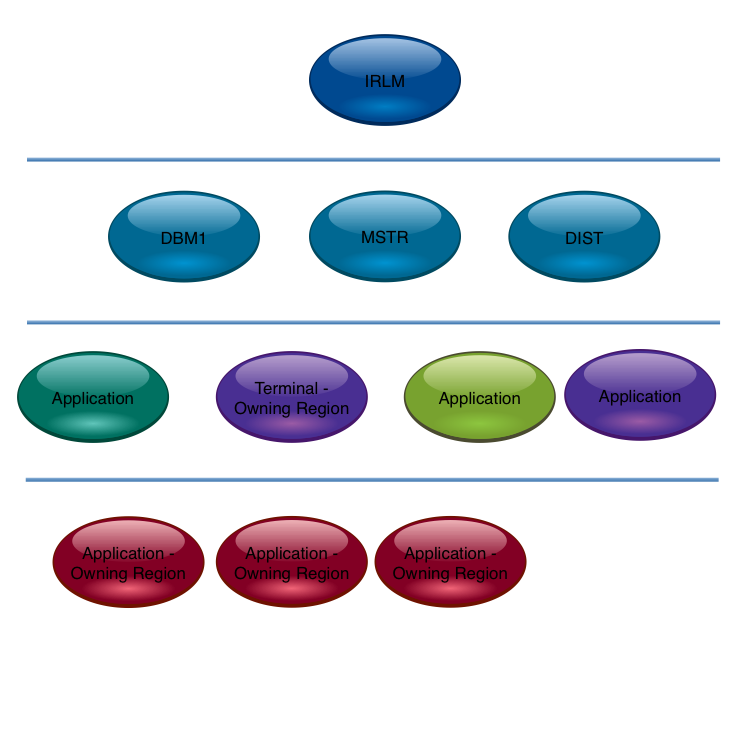
It struck me the first thing to do is to discover what address space serves what. (Generally speaking it is an address space that serves, but it often isn’t an address space that gets served – DDF transactions being a good example.)
The motivation for this – and I think it’s well known – is that work should not be allowed starve address spaces that serve it of CPU. The reason for labouring the point about serving hierarchy is that this structure gets quite complex to follow. Previous customer discussions hadn’t thrown this “real world” complexity into sharp relief: They’d only exposed parts of the hierarchy (such as the previously mentioned DB2 portion). Typically people talk about simplish things like within product relationships.
Here’s a typical CICS one: I’m advocating a more comprehensive approach. (I was going to write a presentation about just that: within product considerations. I now think it’ll be a different presentation if it emerges at all.)
We didn’t actually draw the hierarchy on a piece of paper: I think next time I actually will create a physical drawing.
Discerning The Hierarchy
This directly draws on previously-mentioned information sources, such as SMF 30 Usage data, or DB2 Accounting Trace. The discussions this week laid out the hierarchy by people talking. Perish the thought. 🙂 Actually the Usage information did get a look in, in a supporting role.
I think you can start wherever you like. Perhaps because it’s quite complex you could start with DB2 (if relevant):
By the way the horizontal lines are boundaries between categories. You might find value in using “must be above” arrows between components instead.
The following is the previous two combined.
On reflection this is getting to the limit before arrows are required.
Also notice the TOR is viewed as the anchor point for the CICS application. You could argue the TOR need not be below DBM1. But I’d try and separate them if at all possible.
You wouldn’t put all your eggs in one basket, CICSwise, would you?
A naive reading of the CICS TS 5.1 announcement materials might lead you to suppose you could.
This post is about thinking about your CICS region portfolio in the light of this announcement.
While every CICS release introduces capabilities that makes it worthwhile to review your region portfolio,
5.1 majors on scalability.
So, in the months (hopefully only months) before you install 5.1 and eventually go live,
it would be a good idea to review your CICS region portfolio.
(I properly should say “application” rather than “region” – but for us Performance Folks
we’re more likely to get involved in discussions about regions than applications.
But we should still take a more-than-polite interest in applications.
However, this post is indeed rather more about regions than applications.)
So let’s review why installations split applications up into multiple regions.
There are essentially three:
Architectural
Availability
Performance and scalability
When reviewing your portfolio it’s worth looking at all these categories.
And to me one of the major benefits of 5.1 is that it gives you more choices.
Architecture
You’re probably thinking I protest too much about not being an architect.
I’ve talked about it enough times. 🙂
What I would say is it’s worth understanding the role of each CICS region.
You can begin by using the SMF 30 Usage information – as I discuss in
Another Usage Of Usage Information.
In that post I point out you can get topology information – such as which MQ or DB2 subsystem a region uses – just from SMF 30.
The above trick won’t detect File-Owning Regions (FOR’s).
For that you probably could spot one from the Disk EXCP counts in SMF 30 or, failing that, in SMF 42–6.
You could have some fun with region names – as I discuss in He Picks On CICS.
You could use CICS’ own Performance Trace – and I think CICS Performance Analyzer helps with this – to figure out how transactions flow.
Or you could actually talk to CICS people. 🙂
Actually that’s not an exclusive or.
From the above you can get to knowing which regions are part of which application, can tell FOR’s from AOR’s from DOR’s from QOR’s from TOR’s,
and generally have a crack at figuring out how set up for available it all is.
All before breakfast. 🙂
Hmm. I think I’m going to have to write me some more code… 🙂
And, of course, in 5.1 the architectural choices increase again.
Availability
Personally I recommend having at least four servers for resilience, though that is sometimes unaffordable.
The reason I recommend four rather than two is quite straightforward:
If running out of a resource causes a server to fail only having two means the other one is likely to fail as well.
Having three others makes it much more likely the survivors could handle the load.
Virtual Storage is a good example of this.
Of course there’s a cost to provisioning four rather than two – day in day out.
Consider four way Data Sharing:
Thankfully the difference between non- and two-way- is usually greater than the cost between two-way- and four-way-Data Sharing.
Each installation must make its own decisions on availability versus cost.
Performance and Scalability
There have traditionally been two reasons for limiting the size of CICS region, performancewise:
QR TCB Constraint
Virtual Storage
QR TCB Constraint
I wrote about this in New CPU Information In SMF Type 30 Records,
where I posited the new CPU metrics introduced into SMF Type 30 in APAR OA39629 could help establish
if the QR TCB is large.
In early client data I consistently see the biggest TCB in CICS regions as being “DFHKETCB” so I think this
is the QR TCB.
I decode this string as “DFH for CICS”, followed by “KE for Kernel” and “TCB is TCB”,
so this all makes sense to me.
In any case you could work with the SMF 30 TCB time:
If a significant portion of an engine you might look at the biggest TCB.
Whether that is the QR TCB or not a large % of an engine for Biggest TCB would warrant examination.
If it is the QR TCB then you have work to do before such a region could be combined with others.
For example, a CICS region with 90% of an engine at peak would warrant further investigation:
If the biggest TCB were DFHKETCB and only 20% of an engine you could combine maybe 3 such regions without
concern for QR TCB constraint.
If, however, the QR TCB were larger you’d want to consider the appropriateness of Threadsafe before concluding regions couldn’t be merged.
In 5.1 more commands have been made Threadsafe, as has the Transient Data (TD) Facility.
This follows all the extensions to Threadsafe applicability over prior releases.
(See Threadsafe Considerations for CICS.)
Virtual Storage
Historically CICS has used 24-, 31- and 64-bit virtual storage:
Both 24- and 31-bit virtual storage should be viewed as scarce resources, especially 24-bit.
As a coarse upper bound you can use the SMF 30 Allocated virtual storage numbers.
For example, a region with less than 2MB of 24-bit allocated is probably not threatening
when combined with a few others.
Similarly a region with less than 500MB of 31-bit allocated is probably not an issue if
combined with one or two more.
I emphasis coarse because CICS suballocates memory and has its own sophisticated memory management regime.
You should use the CICS Statistics Trace virtual storage numbers to treat this subject properly.
In 5.1 a substantial number of areas have been moved to 31-bit virtual storage from 24-bit.
Similarly, a substantial number of areas have moved from 31-bit to 64-bit.
Benefits Of Merging Regions
It’s worth pointing out that there are advantages in reducing the number of CICS regions.
Two in particular come to mind:
Reduced operational complexity
Potentially improved resource usage and performance.
Others can much better explain the operational benefits.
As a primarily performance guy I consider questions of resource consumption and effectiveness.
Two simple examples are:
CICS doesn’t load a program each time a transaction that uses it runs:
It keeps it in virtual storage.
Two regions potentially means two copies – which would require twice the real memory.
One region obviously doesn’t.
In the case of VSAM (LSR) buffer pools two regions require two pools for every one that a single region would have.
Again, to get the same buffer pool effectiveness is highly likely to require twice the amount of real memory to back the pools as in the single region case.
Conclusion
In the examples in this post I gave some numbers.
Please don’t use them as rules of thumb – without applying further thought.
They are just reasonable examples:
Derive your own.
Further, this whole discussion has been necessarily simplistic.
But I think asking some basic questions is a very good start.
Hopefully I’ve given you a way to look at whether CICS TS 5.1 (and indeed 4.2 or any other release, but less so)
provides an opportunity to rework your portfolio of CICS regions and applications.
To recap, if anything, 5.1 gives you choices.
(Actually it gives you lots of other things but the focus on this post has been narrow:
How many eggs in how few baskets?)
I’m wondering whether it would be useful to work this post up into a presentation on the topic –
probably with considerable help from people who major on CICS.
What do you think?
Also, I considered inserting some graphics but thought the ones I came up with to be gratuitous and unhelpful.
So I didn’t. So there. 🙂
It’s very easy to think of WLM Service Classes as being self contained.
For many that’s true – and only their own performance numbers need to be considered for us to understand their performance.
For other Service Classes it’s different:
They serve or are served by other Service Classes, as shown here:
This relationship is interesting and it forces us to think beyond Service Classes as autonomous entities.
So the first part of the journey was adding some information about how one Service Class serves another
in the heading of the chart I discussed in
WLM Response Time Distribution Reporting With RMF
Here are three examples from one customer’s set of data:
This one – obviously for DDF – is an example where a Service Class (in this case DDF001) is Served
by another (STC003).
In this case the CICDEF (obviously CICS) Service Class is served by 8 Service Classes, of which 3
are significant (the other 5 providing 7% of the “servings”).
In this final case there is no serving Service Class -which I presume to be normal for OMVS
(Unix System Services).
But where did I get this Service Class relationship information from?
In the RMF-written SMF 72–3 record there is a section called the Service Class Served Data Section.
This section has only two fields:
Name of the Service Class being served (R723SCSN)
Number of times an address space running in the serving Service Class was observed serving
the served Service Class (R723SCS#)
Now, you probably don’t need to know the field names – and in any case they’re probably called
something different in whatever tools you’re using.
The important thing is that you can
Construct a table relating serving Service Classes to those they serve.
And hence digraphs like the one towards the top of this post.
Get a feeling for which relationships are the most important.
But there’s a caution here:
Originally I thought R723SCS# “looked a little funny”. 🙂
After this many years of looking at that data you get hunches like that. 🙂
In this case “originally” means “on and off for the past 15 years”.
Indeed there has been at least one APAR to fix the value of this field.
But bad data is not the issue…
I turns out it’s not what I thought it was:
Transaction rates.
It’s actually samples.
If the transactions are longer you get more samples.
So, you have to treat the number with a little caution, but only a little:
A high value of R723SCS# probably does mean a strong connection.
So those chart headings aren’t really misleading.
One other thing:
I saw cases where the Service Class serving contained DB2 (WLM-Managed) Stored Procedures.
Who Am I? – About identifying what an address space is and is for.
Who Do I talk To? – About address spaces this address space talks to.
If you conflate these and squint a bit 🙂 you come to the conclusion it’d be very nice
to understand which Service Class(es) an address space served.
For example, a DB2 DIST address space supports DDF transactions in different Service Classes,
using independent enclaves.
I have nice examples of how this can be examined in one of my recent sets of data.
Here’s one:
Address Space DB3TDIST (obviously DDF from the name if not the z/OS program name DSNYASCP)
is seen to have 20.6 independent enclave transactions a second from SMF 30 (field SMF30ETC).
For the same time period three DDF Service Classes complete 20.6 transactions a second between them:
DDFALL (misleading name) does 8.8.
DDF001 does 0.0.
DDF002 does 11.8.
And this was summarised over several hours.
Drilling down, timewise, an tracking this over several 30 minute intervals – the SMF interval at which 30s are cut
in this environment – the correspondence holds true.
(You can, by the way, see Independent Enclave CPU service units and transaction active time in the same Type 30 records.)
Admittedly this is a guessing game – but a good one.
It’s a good one because it fills in a bit of the puzzle of how a system fits together.
And I include it because it is very much in the spirit of serving Service Classes.
There’s one other reason:
SMF 30 and 72–3 often don’t agree – where there’re Address Spaces serving independent enclaves.
This kind of analysis helps square that circle.
(They do agree in fact: They’re just looking at different things sometimes.)
But where can this technique be applied?
And where can’t it?
In addition to DDF, Websphere Application Server (WAS) plays the same game:
In the same set of data I see a pair of WAS address spaces whose independent enclave
transaction rates match that of the WASHI Service Class.
Again in the same set of data I see CICS.
Here, Type 30 for the CICS regions doesn’t provide transaction counts.
I’m guessing that IMS looks like CICS in this regard.
I also think there are other kinds of address space like the DDF and WAS cases,
but I wouldn’t know what they are.
As I look at more sets of data no doubt I’ll find more examples in both camps.
If all you want to know is how many transactions flow through an address space
you’ll need in the CICS, DB2, IMS and MQ cases to use their own instrumentation.
In fact, for DDF, there’s a nice field in DB2 Accounting Trace (SMF 101) – QWACWLME – which gives you the Service Class.
But this is something you’d rather not have to work with:
Nice because it gives you extra granularity but at the cost of having to produce and process SMF 101 records.
You’ll’ve spotted the address space to Service Class relationship isn’t necessarily 1 to 1 (in either direction) so that potentially makes the guessing quite difficult.
To anyone who’s thinking “but I know all this, after all it’s my own installation so I know
what’s running in it” I have to politely 🙂 and rhetorically ask “do you really?”
One of the slides in “Life And Times” (L&T for short) has the title
“Let’s Treat An Address Space As A Black Box”.
I think that’s right, actually: It gives us a good framework for really getting to know
how our systems work a lot better, with the minimum of effort.
After all, there’s limited time for you to manage your systems (and for me to get to know them).
And if you ever move from one installation to another (as I effectively do) you’ll probably feel
the same way as I do: There’s a premium on getting to know the installation as quickly and as well
as possible.
It’s been an interesting line of enquiry:
As with so many other cases,
unless you’re prepared to just accept the reporting you’ve been given,
life is very much like taking a machete to the jungle and occasionally you find a
gem.
But sometimes you just find yourself cutting a circular path. 🙂
And now I just want a magical guessing machine. 🙂 Actually it’s something I’m hoping to raise with IBM Research.
If you’re running a workload with WLM Percentile Response Time goals
take a look at the RMF Service Class Period Response Time Goal Attainment instrumentation.
It’s in the Workload Activity Report but this post is about using the raw data to tell the
story better than a single snapshot (or long-term “munging”) can.
(An example of a percentile response time goal is “90% of transactions must end in 0.2 seconds or less”.)
The raw data is in the SMF 72 Subtype 3 Response Time Distribution Data Section.
For each Service Class Period an array of values is given:
Each value represents a count of the number of transactions that ended within the response time constraints
of that bucket.
Here are some examples:
Bucket 0 contains those transactions whose response time was less than 50% of the goal.
Bucket 1 contains those that ended in more than 50% but less than 60% of the goal.
The last but one bucket contains those that ended with a response time between 200% of the goal and 400% of it.
the last bucket contains those that had a response time more than 400% of the goal.
I’ve omitted the middle buckets for brevity but note there’s one that’s up to 100% of the goal response time – a handy characteristic.
This “response time bucket” data is clearly a lot more use than just knowing the average response time achieved (or even the standard deviation).
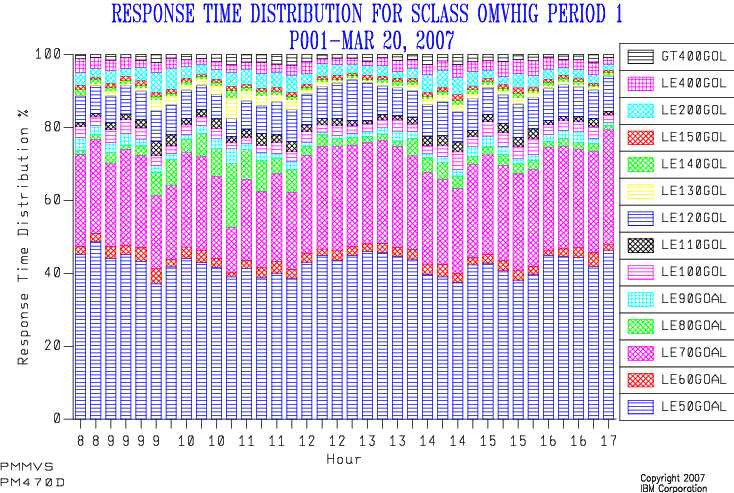
My first implementation stacked up the buckets as percentages, and here’s an example:
Isn’t it “busy”. 🙂
And what was the goal?
And the legend is pretty cruddy, too.
(This is explained by the reporting tool (SLR) insisting on using table column names as series names.)
Because I couldn’t see the wood for the trees I refurbished this graph a couple of years ago:
The graph title states the goal.
I only show the “within goal” and “not within goal” percentages.
(Obviously I do this by summing up the appropriate buckets – and that’s where the “100% of goal” bucket boundary is needed.)
When the goal is invariant I draw a datum line at the % number in the goal.
I stopped letting SLR drive GDDM to create the graph and used the REXX GDDM interface to draw the graph instead.
This meant I could label the series whatever I wanted, including using spaces.
(This is considerably more fiddly programming – but I use the code on a frequent basis so that’s tolerable.)
The result looks like:
(This is actually from a customer performance test so don’t be put off by the repetitive hour labels on the x axis. One day I’ll get round to tidying up fractional hour labels – when I get sufficiently disgusted.) 🙂
This is much cleaner than the old version:
For most of the time more than 90% of the transactions ended within the goal (0.5 seconds) – so the goal was met, sometimes comfortably.
There were times when the goal was only just met.
There was a protracted period when fewer than 90% of transactions ended quickly enough.
So, this has served me well for a while.
Thoughts For The Future
I think I might’ve gone too far in the direction of simplification with this:
I’d like to add the “just made it” and “almost made it” buckets back in.
(Whether I use shading or different colours for these is still up for debate.)
The buckets I’m tempted to break out are 90% to 100% and 100% to 110%.
The data I see, though, might drive me to use 80% to 100% and 100% to 120%.
We’ll see.
I also can’t see how goal attainment relates to transaction rate:
You might expect there to be a positive correlation though you’d hope for a neutral one.
No correlation would mean something external was going on.
Missing the goal for all transaction rates – “unsafe at any speed” 🙂 – is also significant:
Either the goal is unrealistic or something that WLM can’t affect dominates response times.
So, adding a second y axis and plotting transaction rate against it would tell that part of the story.
I’d like to understand how the percentage of transactions ending in Period 1, Period 2, etc varies:
Just today I had a situation where – over a weekend – the percentage of transactions ending in Period 1 dropped, as transactions got suddenly more CPU-heavy.
At present the code treats each Service Class Period independently, though it does print shift-average transaction rates ending in each period, along with the average CPU (not per transaction but totalled).
One thing I consider a very long stretch would be to make this a 3D chart – with the bucket boundaries considered to be “contour lines”.
That would be very pretty 🙂 but hard to draw and even harder to explain:
While I love pretty charts I actually want them to tell the story as clearly as possible.
Conclusions
I hope you’ll agree there’s lots you can usefully do with Response Time Distribution statistics.
Most particularly If you have significant workloads with percentile goals – which would be almost 100% true for DDF, and true of quite a few CICS workloads.
I also hope you’ve found the evolution of a chart interesting:
It’s been occasioned by lots of customer interactions over a number of years.
I can’t say either of the two charts I’ve shown actually caused evolutions but I think them interesting examples.
We’ll see if I actually get to make the changes I’m contemplating:
My hunch is I will – but I wouldn’t expect me to supply 3D glasses any time soon. 🙂
This post, to summarise, shows how you can use the OPSYN instruction to create your own copy of a macro as a “shim” for a supplied macro of the same name.
It’s a neat technique, involving renaming the macro in its own body, calling the now exposed original version, and then renaming the shim macro back.
The other thing we discussed was how to produce useful textual output from a macro invocation for use outside of the traditional purposes of an assembly listing. (In the original post’s case it was creating HTML documentation.)
This isn’t nearly so nice a story:
You can’t write a side file but you can write text to the assembly listing in a macro using MNOTE.
So a solution is to write lines using MNOTE with a special pair of delimiters that wrap the line.
For example
MNOTE *,'XYZZY<table>XYZZY'
will do nicely. 🙂
Then read the assembly listing with DFSORT.
(You could, of course, use REXX but DFSORT will do it just fine.
If you wanted to do some additional processing REXX might be preferable.)
With DFSORT you can write two files in a single pass using OUTFIL:
The HTML file, using OUTREC with PARSE to keep and edit the lines produced by the MNOTE instructions.
A complete listing or one with the “XYZZY” lines stripped out, to its original destination.
You can achieve the latter with the OUTFIL SAVE statement.
The question arises as to what the MNOTE lines actually look like:
By experiment we’ve discovered it varies, depending on the assembler you’re using.
For example, z390 produces different output from HLASM.
That’s not a significant problem:
If you were using this technique with z390 you wouldn’t be using DFSORT to post-process the listing.
Instead you could use any of the Linux or Windows or OSX tools available to you.
For example a simple sed invocation could extract the HTML, looking for the z390-specific version of the MNOTE lines.
The nice thing about this approach is it can be readily set up to produce the HTML documentation and the load module in the same job.
That’s particularly desirable as it means the documentation will always be up to date.
You could even have a final step that, with a clean assembly and linkedit, pushes the HTML to a documentation web server.
It’s hard to write about test environments without feeling you’re insulting somebody.
That’s certainly true when it comes to performance tests.
But I think that very fact is indicative of something:
It’s incredibly difficult to get it right.
Put another way, most environments are compromises.
In recent weeks I’ve seen a number of customer situations where things haven’t quite gone according to plan.
In what follows bear in mind that almost nobody has a fully dedicated performance test environment:
Almost all represent compromises of some kind.
(More than 20 years ago it was explained to me that benchmarking is phenomenally expensive:
Poughkeepsie does it, but almost nobody else does.
And even they produce relatively few data points.)
Here are some of the things I’ve seen recently (and I share them not to poke fun at the customers
involved but because I think they illustrate some of the difficulties in conducting performance tests any installation
might encounter):
Other stuff still running, using resources the application under test would’ve found handy.
High levels of paging and almost no free memory.
DB2 buffer pools defined unhelpfully small.
Shared-engine Coupling Facility LPARs with very long service times.
CPU limited, whether through a physical shortage or artificial constraints.
(In one case the test LPAR was in the same Capacity Group as other LPARs and the other LPARs caused the test LPAR and themselves to be solidly capped throughout the test run.)
The Test LPAR roared into life in the middle of the morning Production peak and contributed to a CPU shortage on the machine when it was already heavily constrained.
(You might not consider that to be a problem for the test environment.
Frankly I have no idea how bad a service the tests encountered.)
One thing all the above have in common is they’re tests being run on the same machine as Production services.
As I said, this is almost inevitable.
And often even the LPAR isn’t as dedicated to the application under test as you’d like:
If a truly dedicated test environment is rare, one dedicated to a single application is even rarer.
An interesting question is what people are testing for, performancewise.
It could be scalability, meaning responsiveness at load.
It could be resource consumption.
When I’ve been asked to help out – by analysing system performance numbers from a test environment – it’s been
one of the first things I ask:
Enabling a test environment to support a scalability test is different from minimising resource usage.
It could, of course, be whether the application continues to be reliable and produce the intend results at high load levels.
I’m slightly worried that the measurements from the residency I intend to run this Autumn will be taken too seriously:
We plan on doing things that will provide reasonable quality numbers.
I’ve already said, though, that the numbers won’t be “benchmark quality”.
Actually the measurements aren’t the main point:
The processes we’ll develop and describe are.
Perhaps an interesting sidebar would be some commentary on the quality (good or bad) of the measurements and the environment in which we run them.
And what this post has been about is Performance.
I’m not a Testing specialist – so I’m only averagely aware of the wider issues that discipline has to deal with.
I’ve for enough of my own, thank you so much. 🙂
Suppose you have a set of numbers S over which you define a function f.
Further suppose you partition S into S1 and S2.
I’d like to know what function g is such that g({f(S1),f(S2)}) = f(S).
As much to the point I’d like to understand which functions f even have a corresponding function
g that meets the condition.
Whoa! Was that pretentious enough for you? 🙂
Let me start again…
When I’ve talked about cloning batch jobs one of the problems to solve is what I call “fanning
back in again”.
If you split the data into, say, 2 equal subsets and run it through 2 cloned jobs in parallel
you have to take any “report file” and recreate it from whatever you could coax these clones to create.
(Maybe you should reread that first paragraph now.) 🙂
Let’s work through a simple example…
The clones work against subsets of records in file S we’ll call S1 and S2.
Originally the function f created a report from S – simply totalling the value in a field of
each record.
Then f(S1) sums that field over some of the records and f(S2) sums it over the others.
You can probably guess that g is just adding the two together.
As another example suppose f calculated an average of that field.
In this case recreating the average is merely a matter of counting the elements in S1 and S2
and using them to compute the overall average from the averages for each subset.
(In fact just summing the values in S1 and S2 and dividing by the overall count would do
just as well but involves changing the function f.
You probably would prefer not to do that in general.)
Calculating a maximum, standard deviation, or mode are three examples where it’s almost as simple
as calculating the mean.
One feature of all of these is the need to carry forward information into some “fan-in” job step.
In some of them it’s extra information – such as the subtotals for the mean.
In others it’s the original information – such as the subtotals in the first case.
What I’d like to do is think about how one figures out whether such a fan in is even possible.
I’m sure this isn’t a particularly new one – and any “divide and conquer” algorithm since time immemorial
has had to deal with this issue.
(I’m sure Hadoop has to deal with this, but we’re dealing with COBOL and PL/I here.) 🙂
And in Paragraph 1 I actually simplified it: 🙂
The “composition function” g should be designed to cope with arbitrary subsets of S – as
we’re going to have to deal with 2-up, 4-up, 8-up cloning.
It would be a real pity if the function only worked on pairs so 4-up would require 3 applications, for
example.
It should be a single sufficiently general function to allow the application to be readily cloned to whatever
degree of parallelism required.
The whole thing is, of course, simplified:
No report ever just plonks a single number on a page.
(Unless that number is 42.) 🙂
Ultimately, though, you can break the problem down into a bunch of these simpler subproblems.
But if we are going to clone processing steps this is the kind of question that we’re going
to have to answer: “Can we clone a job and still get the right results?”
And to finish here’s a nice pretty picture. 🙂 I might even make it into a slide or two. 🙂
I’m sharing this technique in case it’s useful to you.
And, selfishly, in case you can think of refinements. 🙂
(I’m not the best assembler programmer in the world so could easily be missing a trick or two.)
We map SMF records using a set of assembler macros – to create what are called log tables.
We summarise these log tables into summary tables, again defined using assembler macros.
While the assembly process does produce a readable listing it doesn’t do what I want:
Produce an HTML report I can download and usefully share.
Allow me to do useful things such as calculations.
One area that’s particularly tedious is tracing the derivation of one of the computed columns.
Another is figuring out if we have gaps (or overlaps) in mapping the SMF record.
These macros are supplied with the (long out of support but still working well) Service Level Reporter (SLR) product.
But here’s the (perhaps) novel thought:
Just because one normally assembles the macros with the SLR maclib doesn’t mean you have to.
Hence the “alternate macro libraries” in the title of this post.
Suppose you were to write your own macro library:
Then you could have it produce whatever you wanted.
Assembling with an alternate maclib is just a matter of different JCL.
The challenge that immediately hits you is how to have HLASM produce text.
There doesn’t appear to be a way to write a side file in HLASM.
But there is another way:
The PUNCH instruction writes data to the object deck.
You can write literal strings this way, with the full power of the macro assembler language.
For example, you could punch the string “</table>” to the output.
You can see where this heading.
So long as you don’t try to link edit the resulting object deck everything’s fine.
(If you do you’d better not do it into Production.
I’m hoping the link edit failure wouldn’t delete the target load module – but I don’t really know.)
Obviously you wouldn’t want to mix table macros with regular code (or macros that expand to regular code).
To take the summary table as an example there are very few actual macros…
Two define the start and end of the table.
Of these one takes parameters.
There are three that define columns in the table, all of which take parameters.
There is one that defines what are called total patterns, which also takes parameters.
These aren’t terribly difficult to code alternate macros for – at least not if you don’t do any parameter checking.
However, I want to handle default values for parameters and consider parameter checking to be only moderately more difficult.
As a relative novice at the HLASM flavour of macros I’m looking at the original SLR macro definitions:
it’s more learning than swiping the code.
Indeed for some use cases there would be copyright implications
– so a “clean room” approach might be appropriate.
For me, as IBM owns the copyright (plus I’m not shipping in a product) this is not an issue.
But coding AIF, AGO etc and handling macro parameters and SETC etc are things I’m having to learn the syntax for.
The SLR manuals tell me which parameters are required and what the defaults are.
But it’s nice to see them in the macro definitions.
So, the data lends itself to an HTML table as output, perhaps with augmentations.
And that’s what I’m building.
I have a basic version of SUMTAB (with a subset of the parameters it takes) and TABEND (which takes no parameters) working –
producing <table> and </table> elements.
So I know the technique works.
It’s a bit of a jumble of AIF instructions – but then so is the original. 🙂
I can think of other cases where tables are assembled from macros.
And that’s probably not restricted to z/OS macro decks.
I’m slightly disappointed that I can’t find a way to have a new version of a macro invoke the original while writing a side file.
That means two assemblies and two sets of JCL – one using my new macros to create documentation, and the other the original.
To keep the documentation up to date automatically requires both assemblies in the same job –
and the source code might have to be copied to a separate temporary data set if it’s in the same member as the JCL:
I would prefer to have one member containing one copy of the source code and JCL parameterised to either produce
the documentation or the load module.
Whatever the fiddliness of the JCL I think this technique works well for me – and could be readily extended to other use cases.
You could argue I got really bitten by the “Principle” Of Sufficient Disgust (POSD) with this.
I wouldn’t dissent from that view.
By the way I put the word ‘principle’ in quotes because it’s not really a principle at all:
It’s just that part of the human condition where some people get so fed up with something
they go and fix it. 🙂
Another week, another app.
This time it’s a game – and therefore a good excuse to (perhaps gratuitously) try out the
iPhone’s screenshot capability.
(In case you don’t know, you press the power button and the home button simultaneously.
If you do you get a nice camera-like click and the screenshot goes to your camera roll.
In this instance I copied them to DropBox as the easiest way to get them onto other machines.)
“All work and no play makes Jack a dull boy” is a well-known English expression.
I won’t say I’m a good game player but I like a good game, and some I even complete. 🙂
So, what am I looking for in a game?
It turns out it’s the following things:
Excellent graphics.
Engaging interaction and puzzles.
My ability to make a reasonable fist of playing the game.
I also like games where two players can cooperate on a single screen:
Resident Evil 5 and 6 are our best examples of this – doing it in split-screen mode so you don’t get
the “Lego Star Wars effect” where one play pulls the other off the ladder to their doom. 🙂
(I think the social element of gaming, whether cooperative play or spectating is under-rated.
Notice I don’t rate competitive play at all highly – though we’ve done it and the “thrills and
spills” aspect is good.)
So, Broken Sword Director’s Cut…
This is a graphical adventure where you’re solving a mystery, set in Paris.
It also has puzzles embedded in it.
In the following screenshot you see the level of graphics – they’re cartoonish but pleasing on the eye.
The protagonist is the man with the yellowy hair.
(In the original game I gather he was the only protagonist you could control – but this version is a remake
with improved graphics and a “sometimes there” female protagonist.)
You move him by tapping on the screen where you want him to go.
In the next screenshot you can see a blue circle. This is something you can interact with:
Above the circle are two icons:
Gears – which means “do something”.
Eye – which allows you to inspect something.
There is a third icon when you want to interact with someone:
Lips – which start a conversation.
Tapping on the lips gets you into conversation:
As this is set in Paris you get some attempt at French, but just to set the scene.
The conversation reverts to English immediately:
which is just as well:
While you get speech bubbles you also get audio speech.
I found the attempts at French accents annoying after a while.
(To be fair I found the American accent annoying as well – the male protagonist being American.)
There is more than a little “Dan Brown” about the plot but you can’t entirely dismiss the genre
out of hand, without also dismissing great games like the Assassin’s Creed and Uncharted series.
I think I would’ve found the plot more gripping if I could manage a better game pace:
It’s a game I’ve played in the evenings for relatively short periods of time, much of which
seemed to be spent tapping randomly on the screen looking for blue circles.
So if you’re a good game player the pace might well be good for you.
There is a single version for both iPad and iPhone – which possibly explains the enormous size (417MB).
I’ve not played it on the iPad (because I really can’t see myself playing through it twice and I’ve not
figured out if you can transfer progress between the two).
So these screenshots are from the iPhone version.
This is a game I can see myself completing after several long plane rides.
And when I do I’m going to delete it from my phone:
Even on a 64GB phone I begrudge 417MB of space for a game I can’t see myself playing again.
I think it’s a good game and one I’ve enjoyed playing – when it’s gone well.
Of course I don’t think IBM has a view on video games 🙂 – so this is a (highly) personal view.
When I first heard of Flash Express as part of the zEC12 announcement –
some time before announcement – I thought of one use case above all,
and one of particularly poignant resonance with some of my readers: Dump capture amelioration.
Then, in the marketing materials, I heard of others.
And the discussions have grown more numerous recently.
So it’s time I expressed (pardon the pun) my opinion.
The two cases I hear most often are:
Down In The Dumps
Market Open
But there is a third:
Close To The Edge
These names are, of course, glib.
The actual scenarios themselves are fuzzy in a good way:
Customers will express their needs individually but encompassing the main theme.
So let me talk about each one.
Down In The Dumps
For many customers it’s imperative that dumps – especially of major address spaces –
complete quickly.
Particularly the dump capture portion.
As you probably know, when an address space is dumped the system halts work while the dump’s
capture phase begins.
The capture phase writes to dataspace, which is ideally backed by real memory.
There are a number of things that can go wrong with this, in the worst case leading to tens
of minutes of dump capture and perhaps hours of service recovery (possibly involving a
sysplex-wide restart).
(If you’ve been through this you really don’t need me to labour the point.
If you haven’t then please still take note.)
In the worst case the dump doesn’t get captured.
Which means diagnostics to explain the need for the dump and potentially a resolution won’t
be (fully) available.
Market Open
I always think it’s useful to draw a timeline – whether on paper or just in your head.
If you consider a 24 hour period the memory usage can be very different, say,
overnight from the online day.
Overnight batch users, such as sorts, compete very effectively for real memory page frames:
It’s entirely possible online address spaces, such as CICS regions, can lose their pages
to paging disk.
At the start of day (classically when the markets open, though that’s a financial
services term) online services roar into life.
In fact many applications experience a spike in demand, which then settles down.
Coping with “market open” is about the time to recover pages to memory (and the time
to furnish new pages where the online application needs to grow its own memory footprint).
Close To The Edge
While I see many customer systems with lots of spare memory – particularly on z196 and zEC12
machines, there are cases where memory is less plentiful.
I wouldn’t advocate letting a system page as a day-to-day occurrence.
Equally it’s often beneficial to consider the value of using idle memory, say for bigger
DB2 buffer pool.
But a fair number of systems achieve stasis without a large amount of free memory.
As workloads grow, or even where there are unusually large fluctuations in usage, this happy
medium can become compromised.
What They All Have In Common
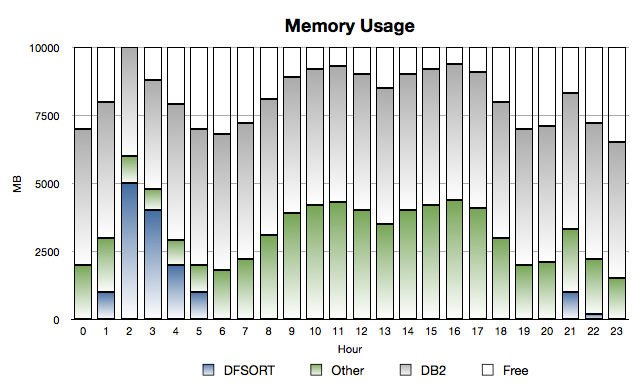
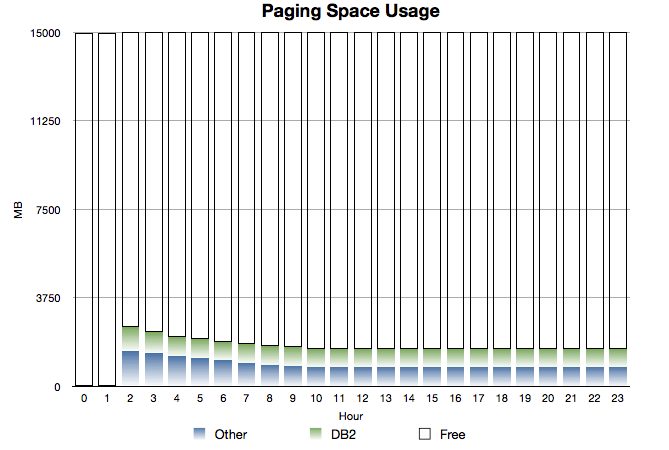
Consider the following two graphs:
Memory Spike
and
Paging Space
These are timeline graphs (as I just advocated).
While this is a situation where DFSORT spikes in usage early in the morning, it could (with
different names and timing) be a case where a large address space suddenly has to be dumped.
The salient features are:
Normally there’s some of the 10GB of memory free, but not an enormous amount.
(And you see the classical “double hump” usage profile.)
The category called “Other” is everything in the system apart from DB2 and DFSORT.
So System, CICS regions, TSO, Daytime Batch etc.
DB2 usage is relatively static – which is generally true.
In the early hours of the morning DFSORT batch jobs come in and grab a large proportion of storage.
Under some circumstances they can, as here, push other pages to page data sets.
Particularly poor competitors include CICS regions and less-used (in the night) DB2 buffer pools.
It takes a while for DB2 and Other to recover the pages they need.
Some pages remain on page data sets all the time.
This would be a mixture of two things:
Pages that aren’t referenced again.
Pages that are referenced again but the page data set slots aren’t freed up.
(Recall that when a page is stolen from memory if it’s unchanged we don’t write it out –
if there’s a copy in page data set slot – so there’s benefit in not freeing up the slot for a paged-in page.)
As I said, this scenario is common across all three.
And applying a timeline to what we naturally think of as a “point in time” picture really
helps in this situation.
Flash To The Rescue?
First, it’s not as if IBM Product Development hasn’t already done a lot of work in managing
memory and dumping better in recent releases: It certainly has.
But there’s always room for improvement.
And Flash Express certainly is a major part of this.
Reading a page from Flash (and indeed writing one to Flash) is considerably faster than
disk.
(And, though this might seem like a restatement of the previous sentence, the bandwidth
is much higher than for disk.)
Of course the page transfer time isn’t zero and the bandwidth isn’t infinite with Flash –
but it’s very high.
I labour this point because I don’t want you to think this is just a cheaper way of buying
the equivalent of real memory.
Generally it is cheaper but it’s not the same stuff.
All the three scenarios I’ve described work much better with Flash than with paging to disk.
They would work much better with additional real memory than paging to disk, but the
economics typically would be worse.
The “Close To The Edge” scenario is worth commenting on specifically:
Although it’s possible to have DB2 buffer pools, for example, page to Flash (including 1MB page
ones) this is not something you should aim to do steady state.
My view is you should back virtual storage users with real memory, as a strong preference:
retrieving pages from Flash will take time and CPU cycles.
In the “DFSORT steals online and DB2’s pages” scenario there is a technical detail I think
you need to know:
DFSORT uses the STGTEST SYSEVENT to establish how many free pages there are – so it could use
them in a responsible way for sort work.
(The majority of problems with DFSORT and memory management are where multiple sorts come in at once
or where something else grabs the storage at the same time.)
It’s important to note that STGTEST SYSEVENT does not regard unused Flash Express pages as free.
So, while DFSORT might chase other address spaces into Flash, it shouldn’t follow them there.
I think that’s significant – and that’s why I checked on STGTEST SYSEVENT with z/OS Development.
I can see a lot of scope for people to get strident: “Thou Must Not Page To Flash”.
I actually see this as more nuanced than that.
Certainly the damage in paging to Flash is much less.
So, in short, I see Flash Express as a very useful safety valve.
 I’m advocating a more comprehensive approach. (I was going to write a presentation about just that: within product considerations. I now think it’ll be a different presentation if it emerges at all.)










 Mainframe, Performance, Topics