It’s hard to write about test environments without feeling you’re insulting somebody.
That’s certainly true when it comes to performance tests.
But I think that very fact is indicative of something:
It’s incredibly difficult to get it right.
Put another way, most environments are compromises.
In recent weeks I’ve seen a number of customer situations where things haven’t quite gone according to plan.
In what follows bear in mind that almost nobody has a fully dedicated performance test environment:
Almost all represent compromises of some kind.
(More than 20 years ago it was explained to me that benchmarking is phenomenally expensive:
Poughkeepsie does it, but almost nobody else does.
And even they produce relatively few data points.)
Here are some of the things I’ve seen recently (and I share them not to poke fun at the customers
involved but because I think they illustrate some of the difficulties in conducting performance tests any installation
might encounter):
Other stuff still running, using resources the application under test would’ve found handy.
High levels of paging and almost no free memory.
DB2 buffer pools defined unhelpfully small.
Shared-engine Coupling Facility LPARs with very long service times.
CPU limited, whether through a physical shortage or artificial constraints.
(In one case the test LPAR was in the same Capacity Group as other LPARs and the other LPARs caused the test LPAR and themselves to be solidly capped throughout the test run.)
The Test LPAR roared into life in the middle of the morning Production peak and contributed to a CPU shortage on the machine when it was already heavily constrained.
(You might not consider that to be a problem for the test environment.
Frankly I have no idea how bad a service the tests encountered.)
One thing all the above have in common is they’re tests being run on the same machine as Production services.
As I said, this is almost inevitable.
And often even the LPAR isn’t as dedicated to the application under test as you’d like:
If a truly dedicated test environment is rare, one dedicated to a single application is even rarer.
An interesting question is what people are testing for, performancewise.
It could be scalability, meaning responsiveness at load.
It could be resource consumption.
When I’ve been asked to help out – by analysing system performance numbers from a test environment – it’s been
one of the first things I ask:
Enabling a test environment to support a scalability test is different from minimising resource usage.
It could, of course, be whether the application continues to be reliable and produce the intend results at high load levels.
I’m slightly worried that the measurements from the residency I intend to run this Autumn will be taken too seriously:
We plan on doing things that will provide reasonable quality numbers.
I’ve already said, though, that the numbers won’t be “benchmark quality”.
Actually the measurements aren’t the main point:
The processes we’ll develop and describe are.
Perhaps an interesting sidebar would be some commentary on the quality (good or bad) of the measurements and the environment in which we run them.
And what this post has been about is Performance.
I’m not a Testing specialist – so I’m only averagely aware of the wider issues that discipline has to deal with.
I’ve for enough of my own, thank you so much. 🙂
Suppose you have a set of numbers S over which you define a function f.
Further suppose you partition S into S1 and S2.
I’d like to know what function g is such that g({f(S1),f(S2)}) = f(S).
As much to the point I’d like to understand which functions f even have a corresponding function
g that meets the condition.
Whoa! Was that pretentious enough for you? 🙂
Let me start again…
When I’ve talked about cloning batch jobs one of the problems to solve is what I call “fanning
back in again”.
If you split the data into, say, 2 equal subsets and run it through 2 cloned jobs in parallel
you have to take any “report file” and recreate it from whatever you could coax these clones to create.
(Maybe you should reread that first paragraph now.) 🙂
Let’s work through a simple example…
The clones work against subsets of records in file S we’ll call S1 and S2.
Originally the function f created a report from S – simply totalling the value in a field of
each record.
Then f(S1) sums that field over some of the records and f(S2) sums it over the others.
You can probably guess that g is just adding the two together.
As another example suppose f calculated an average of that field.
In this case recreating the average is merely a matter of counting the elements in S1 and S2
and using them to compute the overall average from the averages for each subset.
(In fact just summing the values in S1 and S2 and dividing by the overall count would do
just as well but involves changing the function f.
You probably would prefer not to do that in general.)
Calculating a maximum, standard deviation, or mode are three examples where it’s almost as simple
as calculating the mean.
One feature of all of these is the need to carry forward information into some “fan-in” job step.
In some of them it’s extra information – such as the subtotals for the mean.
In others it’s the original information – such as the subtotals in the first case.
What I’d like to do is think about how one figures out whether such a fan in is even possible.
I’m sure this isn’t a particularly new one – and any “divide and conquer” algorithm since time immemorial
has had to deal with this issue.
(I’m sure Hadoop has to deal with this, but we’re dealing with COBOL and PL/I here.) 🙂
And in Paragraph 1 I actually simplified it: 🙂
The “composition function” g should be designed to cope with arbitrary subsets of S – as
we’re going to have to deal with 2-up, 4-up, 8-up cloning.
It would be a real pity if the function only worked on pairs so 4-up would require 3 applications, for
example.
It should be a single sufficiently general function to allow the application to be readily cloned to whatever
degree of parallelism required.
The whole thing is, of course, simplified:
No report ever just plonks a single number on a page.
(Unless that number is 42.) 🙂
Ultimately, though, you can break the problem down into a bunch of these simpler subproblems.
But if we are going to clone processing steps this is the kind of question that we’re going
to have to answer: “Can we clone a job and still get the right results?”
And to finish here’s a nice pretty picture. 🙂 I might even make it into a slide or two. 🙂
I’m sharing this technique in case it’s useful to you.
And, selfishly, in case you can think of refinements. 🙂
(I’m not the best assembler programmer in the world so could easily be missing a trick or two.)
We map SMF records using a set of assembler macros – to create what are called log tables.
We summarise these log tables into summary tables, again defined using assembler macros.
While the assembly process does produce a readable listing it doesn’t do what I want:
Produce an HTML report I can download and usefully share.
Allow me to do useful things such as calculations.
One area that’s particularly tedious is tracing the derivation of one of the computed columns.
Another is figuring out if we have gaps (or overlaps) in mapping the SMF record.
These macros are supplied with the (long out of support but still working well) Service Level Reporter (SLR) product.
But here’s the (perhaps) novel thought:
Just because one normally assembles the macros with the SLR maclib doesn’t mean you have to.
Hence the “alternate macro libraries” in the title of this post.
Suppose you were to write your own macro library:
Then you could have it produce whatever you wanted.
Assembling with an alternate maclib is just a matter of different JCL.
The challenge that immediately hits you is how to have HLASM produce text.
There doesn’t appear to be a way to write a side file in HLASM.
But there is another way:
The PUNCH instruction writes data to the object deck.
You can write literal strings this way, with the full power of the macro assembler language.
For example, you could punch the string “</table>” to the output.
You can see where this heading.
So long as you don’t try to link edit the resulting object deck everything’s fine.
(If you do you’d better not do it into Production.
I’m hoping the link edit failure wouldn’t delete the target load module – but I don’t really know.)
Obviously you wouldn’t want to mix table macros with regular code (or macros that expand to regular code).
To take the summary table as an example there are very few actual macros…
Two define the start and end of the table.
Of these one takes parameters.
There are three that define columns in the table, all of which take parameters.
There is one that defines what are called total patterns, which also takes parameters.
These aren’t terribly difficult to code alternate macros for – at least not if you don’t do any parameter checking.
However, I want to handle default values for parameters and consider parameter checking to be only moderately more difficult.
As a relative novice at the HLASM flavour of macros I’m looking at the original SLR macro definitions:
it’s more learning than swiping the code.
Indeed for some use cases there would be copyright implications
– so a “clean room” approach might be appropriate.
For me, as IBM owns the copyright (plus I’m not shipping in a product) this is not an issue.
But coding AIF, AGO etc and handling macro parameters and SETC etc are things I’m having to learn the syntax for.
The SLR manuals tell me which parameters are required and what the defaults are.
But it’s nice to see them in the macro definitions.
So, the data lends itself to an HTML table as output, perhaps with augmentations.
And that’s what I’m building.
I have a basic version of SUMTAB (with a subset of the parameters it takes) and TABEND (which takes no parameters) working –
producing <table> and </table> elements.
So I know the technique works.
It’s a bit of a jumble of AIF instructions – but then so is the original. 🙂
I can think of other cases where tables are assembled from macros.
And that’s probably not restricted to z/OS macro decks.
I’m slightly disappointed that I can’t find a way to have a new version of a macro invoke the original while writing a side file.
That means two assemblies and two sets of JCL – one using my new macros to create documentation, and the other the original.
To keep the documentation up to date automatically requires both assemblies in the same job –
and the source code might have to be copied to a separate temporary data set if it’s in the same member as the JCL:
I would prefer to have one member containing one copy of the source code and JCL parameterised to either produce
the documentation or the load module.
Whatever the fiddliness of the JCL I think this technique works well for me – and could be readily extended to other use cases.
You could argue I got really bitten by the “Principle” Of Sufficient Disgust (POSD) with this.
I wouldn’t dissent from that view.
By the way I put the word ‘principle’ in quotes because it’s not really a principle at all:
It’s just that part of the human condition where some people get so fed up with something
they go and fix it. 🙂
Another week, another app.
This time it’s a game – and therefore a good excuse to (perhaps gratuitously) try out the
iPhone’s screenshot capability.
(In case you don’t know, you press the power button and the home button simultaneously.
If you do you get a nice camera-like click and the screenshot goes to your camera roll.
In this instance I copied them to DropBox as the easiest way to get them onto other machines.)
“All work and no play makes Jack a dull boy” is a well-known English expression.
I won’t say I’m a good game player but I like a good game, and some I even complete. 🙂
So, what am I looking for in a game?
It turns out it’s the following things:
Excellent graphics.
Engaging interaction and puzzles.
My ability to make a reasonable fist of playing the game.
I also like games where two players can cooperate on a single screen:
Resident Evil 5 and 6 are our best examples of this – doing it in split-screen mode so you don’t get
the “Lego Star Wars effect” where one play pulls the other off the ladder to their doom. 🙂
(I think the social element of gaming, whether cooperative play or spectating is under-rated.
Notice I don’t rate competitive play at all highly – though we’ve done it and the “thrills and
spills” aspect is good.)
So, Broken Sword Director’s Cut…
This is a graphical adventure where you’re solving a mystery, set in Paris.
It also has puzzles embedded in it.
In the following screenshot you see the level of graphics – they’re cartoonish but pleasing on the eye.
The protagonist is the man with the yellowy hair.
(In the original game I gather he was the only protagonist you could control – but this version is a remake
with improved graphics and a “sometimes there” female protagonist.)
You move him by tapping on the screen where you want him to go.
In the next screenshot you can see a blue circle. This is something you can interact with:
Above the circle are two icons:
Gears – which means “do something”.
Eye – which allows you to inspect something.
There is a third icon when you want to interact with someone:
Lips – which start a conversation.
Tapping on the lips gets you into conversation:
As this is set in Paris you get some attempt at French, but just to set the scene.
The conversation reverts to English immediately:
which is just as well:
While you get speech bubbles you also get audio speech.
I found the attempts at French accents annoying after a while.
(To be fair I found the American accent annoying as well – the male protagonist being American.)
There is more than a little “Dan Brown” about the plot but you can’t entirely dismiss the genre
out of hand, without also dismissing great games like the Assassin’s Creed and Uncharted series.
I think I would’ve found the plot more gripping if I could manage a better game pace:
It’s a game I’ve played in the evenings for relatively short periods of time, much of which
seemed to be spent tapping randomly on the screen looking for blue circles.
So if you’re a good game player the pace might well be good for you.
There is a single version for both iPad and iPhone – which possibly explains the enormous size (417MB).
I’ve not played it on the iPad (because I really can’t see myself playing through it twice and I’ve not
figured out if you can transfer progress between the two).
So these screenshots are from the iPhone version.
This is a game I can see myself completing after several long plane rides.
And when I do I’m going to delete it from my phone:
Even on a 64GB phone I begrudge 417MB of space for a game I can’t see myself playing again.
I think it’s a good game and one I’ve enjoyed playing – when it’s gone well.
Of course I don’t think IBM has a view on video games 🙂 – so this is a (highly) personal view.
When I first heard of Flash Express as part of the zEC12 announcement –
some time before announcement – I thought of one use case above all,
and one of particularly poignant resonance with some of my readers: Dump capture amelioration.
Then, in the marketing materials, I heard of others.
And the discussions have grown more numerous recently.
So it’s time I expressed (pardon the pun) my opinion.
The two cases I hear most often are:
Down In The Dumps
Market Open
But there is a third:
Close To The Edge
These names are, of course, glib.
The actual scenarios themselves are fuzzy in a good way:
Customers will express their needs individually but encompassing the main theme.
So let me talk about each one.
Down In The Dumps
For many customers it’s imperative that dumps – especially of major address spaces –
complete quickly.
Particularly the dump capture portion.
As you probably know, when an address space is dumped the system halts work while the dump’s
capture phase begins.
The capture phase writes to dataspace, which is ideally backed by real memory.
There are a number of things that can go wrong with this, in the worst case leading to tens
of minutes of dump capture and perhaps hours of service recovery (possibly involving a
sysplex-wide restart).
(If you’ve been through this you really don’t need me to labour the point.
If you haven’t then please still take note.)
In the worst case the dump doesn’t get captured.
Which means diagnostics to explain the need for the dump and potentially a resolution won’t
be (fully) available.
Market Open
I always think it’s useful to draw a timeline – whether on paper or just in your head.
If you consider a 24 hour period the memory usage can be very different, say,
overnight from the online day.
Overnight batch users, such as sorts, compete very effectively for real memory page frames:
It’s entirely possible online address spaces, such as CICS regions, can lose their pages
to paging disk.
At the start of day (classically when the markets open, though that’s a financial
services term) online services roar into life.
In fact many applications experience a spike in demand, which then settles down.
Coping with “market open” is about the time to recover pages to memory (and the time
to furnish new pages where the online application needs to grow its own memory footprint).
Close To The Edge
While I see many customer systems with lots of spare memory – particularly on z196 and zEC12
machines, there are cases where memory is less plentiful.
I wouldn’t advocate letting a system page as a day-to-day occurrence.
Equally it’s often beneficial to consider the value of using idle memory, say for bigger
DB2 buffer pool.
But a fair number of systems achieve stasis without a large amount of free memory.
As workloads grow, or even where there are unusually large fluctuations in usage, this happy
medium can become compromised.
What They All Have In Common
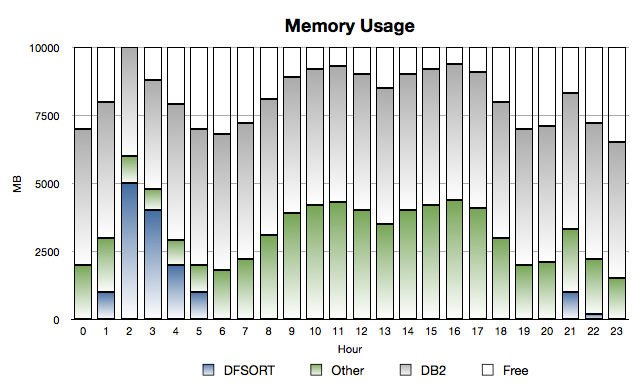
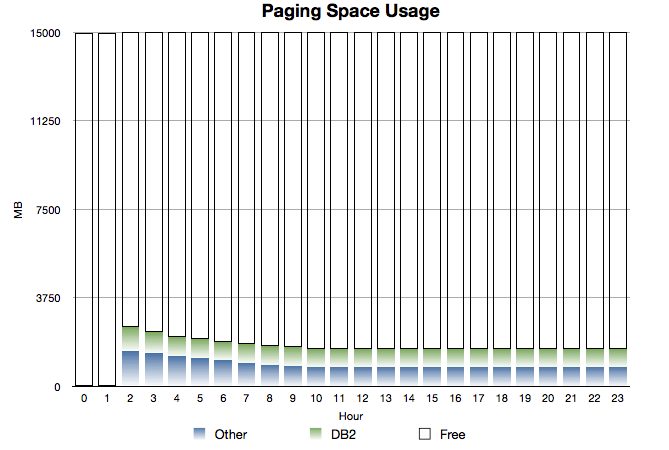
Consider the following two graphs:
Memory Spike
and
Paging Space
These are timeline graphs (as I just advocated).
While this is a situation where DFSORT spikes in usage early in the morning, it could (with
different names and timing) be a case where a large address space suddenly has to be dumped.
The salient features are:
Normally there’s some of the 10GB of memory free, but not an enormous amount.
(And you see the classical “double hump” usage profile.)
The category called “Other” is everything in the system apart from DB2 and DFSORT.
So System, CICS regions, TSO, Daytime Batch etc.
DB2 usage is relatively static – which is generally true.
In the early hours of the morning DFSORT batch jobs come in and grab a large proportion of storage.
Under some circumstances they can, as here, push other pages to page data sets.
Particularly poor competitors include CICS regions and less-used (in the night) DB2 buffer pools.
It takes a while for DB2 and Other to recover the pages they need.
Some pages remain on page data sets all the time.
This would be a mixture of two things:
Pages that aren’t referenced again.
Pages that are referenced again but the page data set slots aren’t freed up.
(Recall that when a page is stolen from memory if it’s unchanged we don’t write it out –
if there’s a copy in page data set slot – so there’s benefit in not freeing up the slot for a paged-in page.)
As I said, this scenario is common across all three.
And applying a timeline to what we naturally think of as a “point in time” picture really
helps in this situation.
Flash To The Rescue?
First, it’s not as if IBM Product Development hasn’t already done a lot of work in managing
memory and dumping better in recent releases: It certainly has.
But there’s always room for improvement.
And Flash Express certainly is a major part of this.
Reading a page from Flash (and indeed writing one to Flash) is considerably faster than
disk.
(And, though this might seem like a restatement of the previous sentence, the bandwidth
is much higher than for disk.)
Of course the page transfer time isn’t zero and the bandwidth isn’t infinite with Flash –
but it’s very high.
I labour this point because I don’t want you to think this is just a cheaper way of buying
the equivalent of real memory.
Generally it is cheaper but it’s not the same stuff.
All the three scenarios I’ve described work much better with Flash than with paging to disk.
They would work much better with additional real memory than paging to disk, but the
economics typically would be worse.
The “Close To The Edge” scenario is worth commenting on specifically:
Although it’s possible to have DB2 buffer pools, for example, page to Flash (including 1MB page
ones) this is not something you should aim to do steady state.
My view is you should back virtual storage users with real memory, as a strong preference:
retrieving pages from Flash will take time and CPU cycles.
In the “DFSORT steals online and DB2’s pages” scenario there is a technical detail I think
you need to know:
DFSORT uses the STGTEST SYSEVENT to establish how many free pages there are – so it could use
them in a responsible way for sort work.
(The majority of problems with DFSORT and memory management are where multiple sorts come in at once
or where something else grabs the storage at the same time.)
It’s important to note that STGTEST SYSEVENT does not regard unused Flash Express pages as free.
So, while DFSORT might chase other address spaces into Flash, it shouldn’t follow them there.
I think that’s significant – and that’s why I checked on STGTEST SYSEVENT with z/OS Development.
I can see a lot of scope for people to get strident: “Thou Must Not Page To Flash”.
I actually see this as more nuanced than that.
Certainly the damage in paging to Flash is much less.
So, in short, I see Flash Express as a very useful safety valve.
I’ve added the words “on iOS” because this might spread to other platforms.
A week ago I posted that I’d pick an app a week and try to get value out of it.
I also said I might blog about what I think.
This week’s app is Note & Share – an app that runs on both the iPad and the iPhone. (Probably on iPod Touch also but I don’t have one of those.)
Needless to say this isn’t an official IBM view or endorsement but my own personal experience.
I’m actually writing this post (interstitially) using Note & Share.
I started it on the Piccadilly Line and am continuing it elsewhere.
I wrote my previous post the same way.
So here are my thoughts on the app.
Basic Information
iTunes URL. The same company (ignitionsoft) makes EverClip (installed.) They are based in Hong Kong.
Purpose: Allow note taking using Markdown syntax, saving to Evernote, Dropbox and other services.
Release tested: 1.7.2 on iPad with iOS 6.1
Evernote Integration
Setting up the link to Evernote is straightforward. Notes sync to the default notebook for the linked account – and they sync quickly.
You can easily keep a MarkDown version in the Note & Share app itself – so you can revise it. Updating the note and re-sending to Evernote leads to the note being updated in Evernote, rather than a new one being created. But the “created” time stamp is also updated, rather than just the “updated” one, when you send the note to Evernote.
Tags don’t seem to make it through to Evernote properly but appear in the app’s own note list. Tags appear in title in both Evernote web app and iPad app but in both cases a tag search shows the tagged notes appropriately. iPad app shows the tags in the note info. Putting the tags on their own line doesn’t work. You might be able to clean this up with AutoEver.
Dropbox Integration
Dropbox integration works really well: When you save a note in Note & Share it is also saved to Dropbox. Even with Markdown Conversion on it saves without doing the conversion.
This makes it easy to transfer to another computer.
I started this paragraph using the gedit editor on Linux, using MarkDown syntax and saved it in a folder watched by DropBox, with the updated file automatically imported into Note & Share.
Then I added text to the paragraph in BBEdit on my Macbook Pro, again with the DropBox client active.
(In BBEdit I selected MarkDown from the list of languages under “Edit” -> “Text Options” to enable syntax colouring and formatting with “Markup” -> “Preview in BBEdit”.)
Preview in BBEdit also reloads when the file changes, whether locally (even before saving) or in Dropbox.
You have to reload the note in Note & Share for updates made elsewhere to appear on your editing screen, despite Dropbox tapping the app on the shoulder. You might also have to bring Note & Share to the foreground.
BBEdit automatically reloads the note when Dropbox alerts it to the fact the note has been changed – unless you turn off this option in Preferences.
gedit prompts you as to whether you want it reloaded.
I also edited the document from Dropbox with Geany on Linux. It will also do syntax highlighting if you set the filetype to MarkDown.
Dropbox is the key to sharing between iPads and iPhones: I successfully shared this note between 2 iPads and an iPhone, authoring changes on the 2 iPads.
I created a note in gedit on Linux and saved it to Note & Share’s Dropbox folder and it showed up just fine in Note & Share.
Late in the week I installed Marked on the Mac. It takes Markdown and creates other formats, such as HTML and RTF. It works fine.
To get this paragraph and the one before it into another Markdown document is a matter of copying and pasting.
Ease Of Composition
MarkDown syntax is simple to master but a little tough with the iPad keyboard. The MarkDown toolbar makes this much easier, though.
Standard iOS spelling suggestions are quite handy. Otherwise I’d soon get fed up with the on-screen keyboard.
TextExpander works but only after you enable immediate expansion and restart Note & Share. This is also true if you add a snippet to TextExpander. TextExpander support could be handy for creating more complex MarkDown. I’ve raided the restart issue with both ignitionsoft and SmileOnMyMac. The latter tells me there’s a specific API the former should be using to avoid the requirement for a restart.
Headings need a blank line after them.
Snippets in iOS 5 or later works OK. For example, typing “zo” offers “z/OS” as an expansion (which you can decline).
Exporting HTML
Enabling the clipboard allows you to put HTML onto the clipboard. If you disable MarkDown conversion you can get the original markup there (and can then email it or save the note to Evernote). This is, however, for all services – but the option is near the top of the options dialog, so it’s not too inconvenient.
Safari Bookmarklet
This is quite easy to set up but is not a way to import HTML as it only starts a new note with the page’s URL in.
Other MarkDown Editors / Viewers
For an online editor and converter go to Daring Fireball: MarkDown Web Dingus. It converts to HTML and displays that HTML. It also has a MarkDown cheat sheet.
All the above is the contents of a note I built over the week.
To get it into this one I copied and pasted it in. (The copy icon in the app creates HTML which I don’t want at this stage.)
I could be criticised for not being inclined to put bounds round things:
One learning point is it’s sometimes difficult (and maybe unhelpful) to review one product in isolation.
As you’ll see from the above I roped in other tools (and in one case paid for one, though not much).
You might expect a tool to stand alone but conversely to integrate well with others.
Note & Share does both nicely.
Recall the main point was to live with Note & Share and get value out of it. Writing a review was very much secondary.
Hopefully you’ll find this interesting both ways: As a product review and a view of how it fits into my kitbag of tools.
This one’s a keeper – and on the front page if my phone.
Now to decide what next to try out for a week.
It might be a game. I don’t know if I’ll write a review – we’ll see.
In any case I consider the experiment to be a success.
And standing outside a shop in Oxford Street I’m ready to post. 🙂
Except…
… Between writing this and posting the next day I notice Brett Terpstra has blogged about another (new)
Markdown editor: iOS App Review: Write for iPhone.
I’m not about to rush out and switch to it, being happy enough with Note & Share.
A couple of things have happened recently that lead me to post about projecting the amount of CPU that’s zIIP eligible.
(Everything in this post applies equally to zAAPs, of course.)
When we first introduced z/OS specialty engines we introduced the “Project CPU” mechanism, reporting most notably via RMF.
(I emphasise “z/OS” because ICF and IFL engines, which don’t run z/OS, don’t have such a mechanism.)
This tells you how much work that is zIIP-eligible that is actually running on general-purpose CPs (GCPs).
Note that there are two cases where some zIIP CPU will be projected:
Where you have no zIIPs in the LPAR.
Where you have zIIPs but still some work that is eligible runs on GCPs.
This worked fine when you had a workload already running but had no specialty engines.
(Of course the workload might grow, but that’s just relatively normal Capacity Planning.)
If a workload didn’t yet exist then RMF wouldn’t be able to report on its eligibility.
A well-known example of this is IPSec where specialty engines made it more affordable to use the function, at a time when it
had become more important to installations.
So far so good.
In recent months I’ve heard of cases where software doesn’t run the zIIP-eligible path when it determines there is no zIIP.
This is said to be to minimise CPU.
Fair enough, but it makes it difficult to assess how much work is eligible for zIIP.
So you can elect to turn on Project CPU for Omegamon XE DB2, or not to.
I’m not sure how easy it is to make this product pick up a change in this setting.
My initial reaction was to turn it on for a couple of peak hours and see what number it gave you.
I’ve moved on from that to thinking that installations should consider:
Measuring the CPU consumption by Omegamon XE DB2 with this switched off.
Turning it on for at least a day and measuring both the benefit and the additional cost in GCP terms.
Consider leaving it on permanently, or at least semi-permanently if you are about to acquire zIIPs.
Not rush to turn it off when you install zIIPs and allow the relevant LPARs to use them.
(You’re already paying the overhead of zIIP eligibility anyway and you need the diagnostics Project CPU provides.)
I’ve not seen situations where a significant amount of GCP CPU has been wasted by running the zIIP-eligible paths through products.
That doesn’t mean it can’t happen – as I see only a small subset of customer cases.
But it does suggest to me it’s not a major concern for most customers.
I’m obviously a fan of lots of knobs and dials when I say I think this Omegamon XE DB2 function is nice to see: At least
you have the choice.
I’d like to see other products do something similar.
So, two questions for you, dear reader:
Which other products detect the absence of zIIPs (or zAAPs) and choose not to use the zIIP-eligible code paths when they’re absent?
Do any of these products allow you to turn Project CPU back on again, despite the absence of zIIPs?
We must have over 200 iOS apps in our iTunes account.
Some of them we paid for, but usually not much1, but many were free.2
I’m sure I’m not alone in wondering "how did that happen?" 🙂
It’s got well beyond the point that a new app3 simply won’t appear on my iPhone and has to be searched for.
Yes, I do use app groups and yes I also know how to find the recently used apps but that’s not the point.
So, starting this week, I’m going to take an app a week and try to get value out of it – whether it’s a game or utility or whatever.
I’ll probably write a personal review in Evernote.4 I might even post a review here.
Such a review would be, it has to be said, my opinion and not that of IBM.
But that’s true of everything I post here.
And at the end of the week I’ll decide what to do with it:
Some will get promoted to my first page on the iPhone.
Some will get much more use as I finally get to grips with what the app can do.
Some will get relegated to groups in "low rent" 🙂 pages.
Some will get deleted from my iPhone.
In some ways it’s like what I should do with stuff around the house: Triage it and rediscover it.5
There’s a cautionary tale here:
Twice recently we’ve had to replace significant household items and discovered features in the old one’s manual that would’ve been really handy and will get used in their replacement.
I recommend reading the manual (again 🙂 ) 3 months after purchasing something and pressing it into service.
I’ve also dutifully installed updates to all the apps – across all the iPhones and iPads in the house:
This "app a week" approach will probably unlock things in later releases that make the app more relevant which I was largely unaware of.
Could this be like Christmas all over again? 🙂
And, finally, I might get a better understanding of how we come to acquire these apps (and perhaps other stuff).
And how to handle their lifecycle.6
Now he who is without sin may cast the first stone. Form an orderly (and I bet very short) queue. 🙂
1 Defined for the purposes of this exercise as "tuppeny pieces to this value in my pockets wouldn’t make my trousers fall down". 🙂
2 At least two of us (me being one of them) are prone to falling for the "it cost nothing to acquire so there’s no TCO" line. 🙂
3 I’m in two minds about the word "app": The ponderous part of me wonders what’s wrong with the word "application" but the rest of me likes the brevity, now the term has become commonplace and with wider applicability than just iOS apps.
4 I already have a table in Evernote for each Mac app – so the family can find apps they might think useful we’ve already acquired.
5 There is a certain amount of joy in rediscovering some half-forgotten product that actually has use. Or is just plain fun again.
6 There ya go – if you were looking for business relevance: 🙂 There’s an analogy or transferrable lesson right there.
It’s been almost four years since I wrote DB2 Data Sharing and XCF Job Name.
It mostly stands the test of time but there are a couple of things I want to bring up.
I was in the DB2 Development lab a couple of days ago, talking with a couple of developer friends about DB2 Data Sharing and XCF.
They know DB2 Data Sharing and IRLM much better than I do but XCF not so much.
(It’s probable that XCF Development have a complementary set of knowledge.)
So this conversation provided a fresh set of data as well as a chance to rehearse the contents of that blog post again.
The first thing to note is that I was inaccurate in one regard:
Because in 2009 I’d only seen data from installations where the XCF group name for IRLM was “DXRabcd” where “abcd” is the DB2 Data Sharing group name I’d made the poor
assumption this was always the case.
In this fresh set of data the IRLM XCF group name is “DXRGROUP”, which has nothing to do with the Data Sharing group name.
You can have a DB2 Data Sharing group of up to 8 characters long so “DXRgrpname” couldn’t work as a convention.
(And if you think the terms “XCF group name” and “DB2 Data Sharing group name” are confusingly similar, I’m inclined to agree.)
But all is not lost as the field that started it all – R742MJOB – contains the IRLM address space name.
IRLM address space names are quite easy to find – in SMF Type 30 – because the program name is always “DXRRLM00”.
But you might have several within the same z/OS image.
So the method I outlined for finding the IRLM XCF group name – and monitoring its performance – still stands, with this minor tweak.
The other thing the conversation did was to reinforce something I’ve been gradually sensitised to:
Keep track of how DB2 and IRLM address space CPU behaves over time.
Here I’m talking about not just the IRLM address space for a subsystem but also DBM1, MSTR and DIST.
The conversation started with a customer seeing spikes in IRLM CPU.
As we only had very few data points it was impossible to do what I like to do: Plot stuff by time of day over several days.
If I’ve worked with your data you’ll know I do this to establish patterns.
So are these spikes regular, or at least vaguely regular?
Or are they something specific going wrong?
(The notion of “going wrong” is interesting, too.)
If you have spikes in IRLM CPU in the Batch Window maybe it’s because some jobs are driving a lot of locking activity.
(And so it would be with e.g. DBM1.)
What would be interesting would be to see a coincidence between IRLM CPU and these two XCF groups’ – DXR and IXCLO – traffic spiking.
(Or indeed the lack of a coincidence.)
It’s important to notice that much IRLM activity goes nowhere near XCF or indeed the LOCK1 Coupling Facility structure.
But we didn’t get to do that. Which is a pity.
But still, I learn from every situation: And seeing lots of them is my good fortune.
But what on earth is MiGueL Mainframe 🙂 troubling himself with SMTP / MIME for?
Let’s come at this from a different angle…
You probably know by now that when you send me your data it gets put through some batch reporting:
Ultimately I don’t create the graphs by hand, but I do do the analysis and put the presentation together myself.
That’s the “high value” creative part.
Workflow
You probably also know that the JCL to build performance databases and do the reporting is generated using ISPF File Tailoring and some panels.
But what about the actual workflow?
In broad terms it’s pretty much all the same – for each engagement:
I’d like my “to do” list for a project to be automatically generated.
And I might well want some other notes to be automatically generated – perhaps a slide template or a “lessons learned” boilerplate note or something.
For most of my life I keep notes in a very fine service:
Evernote.
I also keep my “to do” list in Remember The Milk.
I’m sure other fine services exist but these are the ones I use – and the ones I know the following technique work for.
I’d like to automate my workflow, as I said, and some of my engagement-related documentation.1.
Both Evernote and Remember The Milk supply an email address specific to an account:
If you knew my Evernote email address, for instance, you could email in a note and Evernote would store it for us.2
So I can teach any email client how to add notes to Evernote and “to do” items to Remember The Milk.
The latter accepts a list of items, along with due dates, priorities etc.
Between them I’m sure I can automate quite a lot of workflow, while continuing to make careful choices to keep client information secure.
Email and z/OS / TSO Batch
So why not have my JCL generator include some steps to generate this material?
Though that was a rhetorical question it does have an answer. 🙂
You have to make it so – with a SMOP. 🙂
But actually it’s not difficult.
In “Standing On The Shoulders Of Giants“3 Mode, I notice we already have a jobstep –
very early in our process flow – that uses XMIT to send a small tracking file, containing a File-Tailored set of information about the study.
It’s a flat file but it points the way.
It doesn’t use SMTP and it doesn’t include HTML.
I found out the appropriate SMTP address that my z/OS system has access to.
With it I can send emails to anywhere – inside IBM and beyond (as Evernote and RTM both are).
Putting It Together
I’ve already created a batch job that can send HTML-formatted emails.
It looks like this:
In the above I chose to use MSGDSNAME rather than DSNAME to point to the data.
This stands a better chance of having the EBCDIC translation work right.
It points to the actual MIME message:
Helo MVSHOS
mail from:<martin_packer@uk.ibm.com>
rcpt to:<to-address>
data
From:  martin_packer@uk.ibm.com
To: to-address
Subject: This is a test
MIME-Version: 1.0
Content-type: multipart/mixed;
              boundary="simple boundary"

You have received mail whose body is in the HTML Format.
--simple boundary
Content-type: text/html

<font face="Arial" size="+2" color="blue">
This is Arial font in blue.
</font>
<br/>
<ul>
<li>One</li>
<li>Two</li>
</ul>
<font face="Arial" size="+3" color="red">
This is the Arial font bigger and in red.
</font>

--simple boundary
This is in what is called “multipart MIME format” – and you can tell this from the “Content-type: multipart/mixed;” line.
(Each part is separated by the line “simple boundary”.)
The HTML is obvious and the fact it is to be treated as HTML is indicated by the “Content-type: text/html” line.
One of the things this illustrates is that sending HTML by email isn’t complicated at all.
Note:The actual “to address” in the “rcpt” line needed a relay address in my case – preceded by an “@” and separated
from the eventual address by a “:”.
You might need one too.
When I sent this HTML to Evernote it worked fine and I have a nicely formatted note, complete with the title preserved.
If you want to understand how Evernote handles emails look here.
For Remember The Milk look here.
The note in Evernote looked very much like this:
This is Arial font in blue.
One
Two
This is the Arial font bigger and in red.
As I said earlier, sending an HTML-formatted email is not significantly more difficult than sending a plain text one.
I hope this blog post demonstrates that:
Examine the code you’re using today to send emails from z/OS and I think you’ll agree.
And I think you’ll find cases where it would be a better solution.
On a final note, IBM (and others) have email solutions.
And indeed workflow solutions.
Those have their own applicability – for the more complex or larger-scale applications.
But if you want “lightweight”, “simple”, “informal” workflow my approach might make sense to you.
As it is I’m going to build this, small pieces at a time – like I do most of my development work.
Notes:
1 I’m very clear about not compromising customer data or situations.
Customer confidentiality is key – and along with other cloud services – I can’t store sensitive or identifiable data in Evernote or Remember The Milk.4.
Similarly, I’m incredibly circumspect in reviewing customer-related stuff in public places.
2 Obviously this is open to abuse – as anyone with the email address can fill your account up with SPAM.
But you can change the email address at any time – and I don’t give it out often.
3 When I first heard this cliché I thought it was Albert Einstein.
And later on I thought (slightly more accurately) it was Isaac Newton.
Obviously giving Maths/Physics giants more credit than they’re due.
I wonder why. 🙂
4 As one of the authors of this piece of the
IBM Social Computing Guidelines
I’d urge you to read this short document to understand IBM’s stance.