As It Appens

(Originally posted 2013-02-10.)

We must have over 200 iOS apps in our iTunes account. Some of them we paid for, but usually not much1, but many were free.2 I’m sure I’m not alone in wondering "how did that happen?" 🙂

It’s got well beyond the point that a new app3 simply won’t appear on my iPhone and has to be searched for. Yes, I do use app groups and yes I also know how to find the recently used apps but that’s not the point.

So, starting this week, I’m going to take an app a week and try to get value out of it – whether it’s a game or utility or whatever. I’ll probably write a personal review in Evernote.4 I might even post a review here. Such a review would be, it has to be said, my opinion and not that of IBM. But that’s true of everything I post here.

And at the end of the week I’ll decide what to do with it:

  • Some will get promoted to my first page on the iPhone.
  • Some will get much more use as I finally get to grips with what the app can do.
  • Some will get relegated to groups in "low rent" 🙂 pages.
  • Some will get deleted from my iPhone.

In some ways it’s like what I should do with stuff around the house: Triage it and rediscover it.5 There’s a cautionary tale here:

Twice recently we’ve had to replace significant household items and discovered features in the old one’s manual that would’ve been really handy and will get used in their replacement. I recommend reading the manual (again 🙂 ) 3 months after purchasing something and pressing it into service.

I’ve also dutifully installed updates to all the apps – across all the iPhones and iPads in the house: This "app a week" approach will probably unlock things in later releases that make the app more relevant which I was largely unaware of.

Could this be like Christmas all over again? 🙂

And, finally, I might get a better understanding of how we come to acquire these apps (and perhaps other stuff). And how to handle their lifecycle.6

Now he who is without sin may cast the first stone. Form an orderly (and I bet very short) queue. 🙂


1 Defined for the purposes of this exercise as "tuppeny pieces to this value in my pockets wouldn’t make my trousers fall down". 🙂

2 At least two of us (me being one of them) are prone to falling for the "it cost nothing to acquire so there’s no TCO" line. 🙂

3 I’m in two minds about the word "app": The ponderous part of me wonders what’s wrong with the word "application" but the rest of me likes the brevity, now the term has become commonplace and with wider applicability than just iOS apps.

4 I already have a table in Evernote for each Mac app – so the family can find apps they might think useful we’ve already acquired.

5 There is a certain amount of joy in rediscovering some half-forgotten product that actually has use. Or is just plain fun again.

6 There ya go – if you were looking for business relevance: 🙂 There’s an analogy or transferrable lesson right there.

DB2 Data Sharing and XCF Job Name – Revisited

(Originally posted 2013-01-27.)

It’s been almost four years since I wrote DB2 Data Sharing and XCF Job Name. It mostly stands the test of time but there are a couple of things I want to bring up.

I was in the DB2 Development lab a couple of days ago, talking with a couple of developer friends about DB2 Data Sharing and XCF. They know DB2 Data Sharing and IRLM much better than I do but XCF not so much. (It’s probable that XCF Development have a complementary set of knowledge.)

So this conversation provided a fresh set of data as well as a chance to rehearse the contents of that blog post again.

The first thing to note is that I was inaccurate in one regard: Because in 2009 I’d only seen data from installations where the XCF group name for IRLM was “DXRabcd” where “abcd” is the DB2 Data Sharing group name I’d made the poor assumption this was always the case. In this fresh set of data the IRLM XCF group name is “DXRGROUP”, which has nothing to do with the Data Sharing group name. You can have a DB2 Data Sharing group of up to 8 characters long so “DXRgrpname” couldn’t work as a convention.

(And if you think the terms “XCF group name” and “DB2 Data Sharing group name” are confusingly similar, I’m inclined to agree.)

But all is not lost as the field that started it all – R742MJOB – contains the IRLM address space name. IRLM address space names are quite easy to find – in SMF Type 30 – because the program name is always “DXRRLM00”. But you might have several within the same z/OS image. So the method I outlined for finding the IRLM XCF group name – and monitoring its performance – still stands, with this minor tweak.

The other thing the conversation did was to reinforce something I’ve been gradually sensitised to:

Keep track of how DB2 and IRLM address space CPU behaves over time.

Here I’m talking about not just the IRLM address space for a subsystem but also DBM1, MSTR and DIST. The conversation started with a customer seeing spikes in IRLM CPU. As we only had very few data points it was impossible to do what I like to do: Plot stuff by time of day over several days. If I’ve worked with your data you’ll know I do this to establish patterns.

So are these spikes regular, or at least vaguely regular? Or are they something specific going wrong? (The notion of “going wrong” is interesting, too.) If you have spikes in IRLM CPU in the Batch Window maybe it’s because some jobs are driving a lot of locking activity. (And so it would be with e.g. DBM1.)

What would be interesting would be to see a coincidence between IRLM CPU and these two XCF groups’ – DXR and IXCLO – traffic spiking. (Or indeed the lack of a coincidence.) It’s important to notice that much IRLM activity goes nowhere near XCF or indeed the LOCK1 Coupling Facility structure.

But we didn’t get to do that. Which is a pity. But still, I learn from every situation: And seeing lots of them is my good fortune.

Evernote, Remember The Milk, SMTP / MIME and z/OS Batch

(Originally posted 2013-01-24.)

Another kernel popped the other day: SMTP / MIME.

But what on earth is MiGueL Mainframe 🙂 troubling himself with SMTP / MIME for? Let’s come at this from a different angle…

You probably know by now that when you send me your data it gets put through some batch reporting: Ultimately I don’t create the graphs by hand, but I do do the analysis and put the presentation together myself. That’s the “high value” creative part.

Workflow

You probably also know that the JCL to build performance databases and do the reporting is generated using ISPF File Tailoring and some panels.

But what about the actual workflow? In broad terms it’s pretty much all the same – for each engagement: I’d like my “to do” list for a project to be automatically generated. And I might well want some other notes to be automatically generated – perhaps a slide template or a “lessons learned” boilerplate note or something.

For most of my life I keep notes in a very fine service: Evernote. I also keep my “to do” list in Remember The Milk. I’m sure other fine services exist but these are the ones I use – and the ones I know the following technique work for.

I’d like to automate my workflow, as I said, and some of my engagement-related documentation.1.

Both Evernote and Remember The Milk supply an email address specific to an account: If you knew my Evernote email address, for instance, you could email in a note and Evernote would store it for us.2 So I can teach any email client how to add notes to Evernote and “to do” items to Remember The Milk. The latter accepts a list of items, along with due dates, priorities etc.

(To find your Evernote email address see here. Likewise for Remember The Milk.)

Between them I’m sure I can automate quite a lot of workflow, while continuing to make careful choices to keep client information secure.

Email and z/OS / TSO Batch

So why not have my JCL generator include some steps to generate this material?

Though that was a rhetorical question it does have an answer. 🙂 You have to make it so – with a SMOP. 🙂

But actually it’s not difficult.

In “Standing On The Shoulders Of Giants3 Mode, I notice we already have a jobstep – very early in our process flow – that uses XMIT to send a small tracking file, containing a File-Tailored set of information about the study. It’s a flat file but it points the way. It doesn’t use SMTP and it doesn’t include HTML.

I found out the appropriate SMTP address that my z/OS system has access to. With it I can send emails to anywhere – inside IBM and beyond (as Evernote and RTM both are).

Putting It Together

I’ve already created a batch job that can send HTML-formatted emails. It looks like this:

//XMITSMTP EXEC PGM=IKJEFT01,DYNAMNBR=50,REGION=0M
//* 
//SYSOUT   DD SYSOUT=K,HOLD=YES 
//SYSPRINT DD SYSOUT=K,HOLD=YES 
//SYSTSPRT DD SYSOUT=K,HOLD=YES 
//SYSTSIN  DD DDNAME=SYSIN 
//SYSUDUMP DD SYSOUT=K,HOLD=YES 
//SYSIN    DD  * 
    XMIT <smtp server address> NONOTIFY + 
             MSGDSNAME('<userid>.JCL.LIB(SMTPDATA)')
/* 
//*

In the above I chose to use MSGDSNAME rather than DSNAME to point to the data. This stands a better chance of having the EBCDIC translation work right. It points to the actual MIME message:

Helo MVSHOS 
mail from:<martin_packer@uk.ibm.com> 
rcpt to:<to-address>
data 
From:  martin_packer@uk.ibm.com 
To: to-address 
Subject: This is a test
MIME-Version: 1.0 
Content-type: multipart/mixed; 
              boundary="simple boundary" 
                                                                  
You have received mail whose body is in the HTML Format. 
--simple boundary 
Content-type: text/html 
                                                                  
<font face="Arial" size="+2" color="blue"> 
This is Arial font in blue. 
</font> 
<br/> 
<ul> 
<li>One</li> 
<li>Two</li> 
</ul>                                                            
<font face="Arial" size="+3" color="red"> 
This is the Arial font bigger and in red. 
</font> 
                                               
--simple boundary 

This is in what is called “multipart MIME format” – and you can tell this from the “Content-type: multipart/mixed;” line. (Each part is separated by the line “simple boundary”.) The HTML is obvious and the fact it is to be treated as HTML is indicated by the “Content-type: text/html” line.

One of the things this illustrates is that sending HTML by email isn’t complicated at all.

Note:The actual “to address” in the “rcpt” line needed a relay address in my case – preceded by an “@” and separated from the eventual address by a “:”. You might need one too.

When I sent this HTML to Evernote it worked fine and I have a nicely formatted note, complete with the title preserved. If you want to understand how Evernote handles emails look here. For Remember The Milk look here.

The note in Evernote looked very much like this:


This is Arial font in blue. 
 
  • One
  • Two
This is the Arial font bigger and in red.

As I said earlier, sending an HTML-formatted email is not significantly more difficult than sending a plain text one. I hope this blog post demonstrates that: Examine the code you’re using today to send emails from z/OS and I think you’ll agree. And I think you’ll find cases where it would be a better solution.

On a final note, IBM (and others) have email solutions. And indeed workflow solutions. Those have their own applicability – for the more complex or larger-scale applications.

But if you want “lightweight”, “simple”, “informal” workflow my approach might make sense to you. As it is I’m going to build this, small pieces at a time – like I do most of my development work.


Notes:

1 I’m very clear about not compromising customer data or situations. Customer confidentiality is key – and along with other cloud services – I can’t store sensitive or identifiable data in Evernote or Remember The Milk.4. Similarly, I’m incredibly circumspect in reviewing customer-related stuff in public places.

2 Obviously this is open to abuse – as anyone with the email address can fill your account up with SPAM. But you can change the email address at any time – and I don’t give it out often.

3 When I first heard this cliché I thought it was Albert Einstein. And later on I thought (slightly more accurately) it was Isaac Newton. Obviously giving Maths/Physics giants more credit than they’re due. I wonder why. 🙂

4 As one of the authors of this piece of the IBM Social Computing Guidelines I’d urge you to read this short document to understand IBM’s stance.

Microwave Popcorn, REXX and ISPF

(Originally posted 2013-01-21.)

To me learning is like Microwave Popcorn.

Specifically, turning

into

Part of the fun of making popcorn is watching the bag and listening to the poppings: As each kernel pops it pushes the bag out.

And so it is with learning: Every piece of knowledge contributes to the overall shape.

Anyhow, enough of the homespun “philosophy”. 🙂

I was maintaining some ISPF REXX code recently and it caused me to come across two areas where REXX can really help with ISPF applications:

  • Panel field validation.
  • File Tailoring

The introduction of REXX support is not all that recent – I think z/OS R.6 and R.9 were the operative releases – but I think most people are unaware of these capabilities.

I’m not an ISPF application programmer so if you want the technical details look them up in the ISPF manuals. But here’s the gist of why you might want to consider them.

Panel Field Validation

On one of our ISPF panels we have eight fields that together represent a time/date range. You can (with VER(), as you probably know) check these fields – two sets of year, month, day, hour, minutes – have numeric values and aren’t blank. I don’t think you can check things like whether the end date is after the start date, or whether these two dates are before today. For that you need REXX:

With *REXX in the )PROC section of the panel (terminated with *ENDREXX) you can inject REXX code. If you set variable zrxrc to 8 (and set zrxmsg to an appropriate ISPF message number) you can fail the validation. If you set zrxrc to 0 you can pass it.

Of course you might be in a position to do this all in the REXX that causes the panel to be displayed in the first place. But there are two reasons why I think you’d want to do it in the panel definition itself:

  • It’s a lot simpler than having the driving REXX redisplay the panel if the fields don’t validate.
  • Keeping all the field validation logic together – VER() and REXX – is much neater.

But you have the choice.

File Tailoring

Again driven by REXX, the code I maintain uses ISPF File Tailoring to create JCL from skeleton files, based on variables from ISPF panels.

You can write some quite sophisticated tailoring logic without using REXX. But with REXX you can do so much more.

(My first test case used the REXX strip() function to remove trailing blanks. Of course you can do that with )SETF without REXX.)

If you code )REXX var1 var2 … then some REXX then a terminating )ENDREXX you can use the full power of REXX.

In the above var1 etc are quite important: If you want to use any of the File Tailoring variables (or set them in the REXX code) you have to list them.

Note: You can use say to write debugging info to SYSTSPRT.

I don’t believe you can directly emit lines in REXX but you could set a variable to 1 or 0 and use )SEL to conditionally include text.

Again, you could perhaps do some of this in the REXX that calls File Tailoring. But I’d prefer as much of the generation logic as possible to be in the one place: The File Tailoring skeleton. This is particularly true of variable validation when you consider you can use )SET in the skeleton to set the value of a variable – after the validation code has run.


So these two items – panel field validation and file tailoring – were areas I unexpectedly found myself researching. I won’t claim they’re core to my “day job” or particularly profound but certainly they proved handy. If you find yourself developing with ISPF facilities they might save you a lot of time.

And certainly I feel my grasp of ISPF is that much better – but maybe because of the 2000 lines of ISPF REXX I reformatted and adopted in the process. 🙂

A Good Way To Kick Off 2013 – Two UKCMG Conference Abstracts

(Originally posted 2013-01-13.)

First, a belated Happy New Year! to everyone. It’s been a busy past few weeks, not least because of the customer situation I’m working on.

But, to kick off 2013 here are the two conference abstracts I submitted for the UKCMG Annual Conference. No pressure, guys. 🙂


Time For DIME

In recent years memory has become cheaper, or certainly more plentiful. This enables us to do new things, or old things faster and better.


I believe it is indeed Time For DIME (Data In Memory Exploitation). But we’ve been here before – in the late 1980’s. Much has changed but the basic concepts haven’t. So this presentation reminds us of "the way we were" but brings things right up to date. It covers why you’d want to run a DIME project and how to go about it: It covers both the project phases and technical aspects, preparing you to make a quick start on realising the benefits of DIME.


While the main example presented here is DB2, the presentation also discusses Coupling Facility memory exploitation, as well as a number of other examples.

The Life And Times Of An Address Space

A typical z/OS system has a wide variety of address spaces. So much so that managing their performance can be difficult.


This presentation prepares you to handle this diversity, discussing what’s common to all and what’s different. Centred around SMF Type 30 records, it guides you in deciding when to rely on common instrumentation, and when to go to more specific data, such as CICS instrumentation or data set records.


Personally I find it very difficult to write abstracts – particularly as you end up trying to write them before you write the actual presentation. So the finished result can be different. But then every time anyone ever gives a presentation it turns out at least a little different.


As for the UKCMG Annual Conference, this is an event I’ve been proud to present at most years in the last 20. It’s always been a great crowd and a good opportunity to catch up with what people are doing. This time it’s in London at the CBI, instead of being out in the country. I don’t know how much difference that will make. Come and join us if you can. Here’s the link: UKCMG Annual Conference, London, May 14-15, 2013

And a final thought: I write about what I want to write about (and what I think is important). If you have ideas of what I should be presenting on and writing on do let me know.

DB2 Timings For CICS Transactions – With Thread Reuse

(Originally posted 2012-12-11.)

There was a time before blogging 🙂 and what I’m about to talk about is something I used to explain quite often back in those days.

Reminded by a current customer situation – and needing to explain it again – I thought it time to do it this way.

(Here I’m presenting a simplified view, but one that covers the salient features that might help you.)

The CICS / DB2 Connection code provides a number of possibilities for optimisation, one of which is Thread Reuse. This post won’t discuss the mechanics of this in any depth but aims to explain the effect of it on DB2 instrumentation – in fact DB2 Accounting Trace (SMF 101).

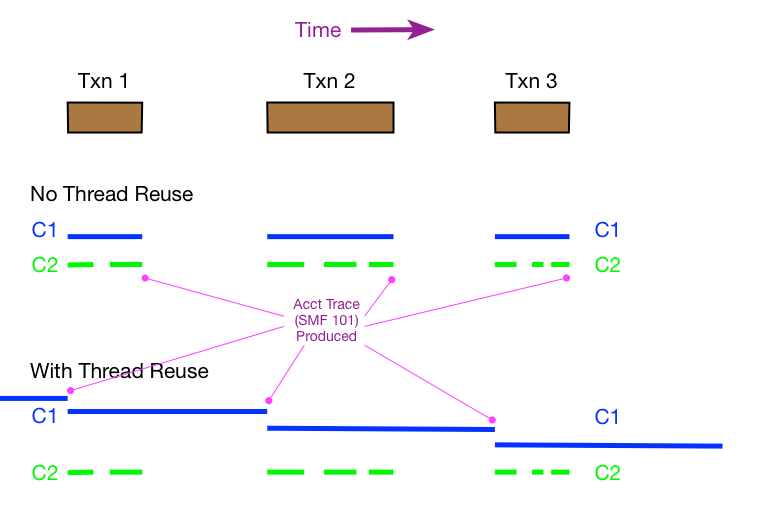
Consider the following diagram, with time flowing from left to right…

I’ve shown the two scenarios one above the other. Blue bars represent periods of Class 1 elapsed time. Green bars periods of Class 2 elapsed time. Notice how the blue bars are unbroken but the green ones can have gaps: Because Class 2 represents the time actually in DB2 there can be time between “stanzas”. (But SMF 101 doesn’t record the timings of the gaps – just two numbers which when subtracted give you the total time.)

The diagram shows three CICS transactions running one after the other, with Thread Reuse and without:

  • In the case without Thread Reuse three threads have to be created and terminated, one after the other. This is an expensive process, which is why Thread Reuse is used.
  • In the Thread Reuse case the thread is reused twice, avoid the thread management lifecycle.

The reason for discussing this is that with Thread Reuse DB2 timings in Accounting Trace (SMF 101) work a little differently.

(One thing that remains unchanged is the relationship between Class 2 elapsed time, Class 2 CPU time, the Class 3 wait components, and what’s not accounted for but still part of Class 2 elapsed time. So I won’t discuss those here. What’s also not changed is Class 1 CPU time – so computing Non-Class 2 CPU time is the same – Class 1 CPU minus Class 2 CPU.)

The most important thing to notice in the diagram is the difference in Class 1 time behaviour:

Instead of – as with the non-reuse case – starting and ending at the transaction boundaries, Class 1 time now ends when the next transaction that uses the thread starts. (And that’s when the DB2 Accounting Trace (SMF 101) record is produced.) This means, as you can see, a lot of the Class 1 elapsed time has nothing to do with executing the transaction. Obviously, under these circumstances, you can’t use Class 1 elapsed time for much.

An obvious question is “when can you trust Class 1 time in a CICS environment?”

Fortunately the answer is quite simple: The value of a field in the 101 record (QWACRINV “Reason For Invoking Accounting”) determines whether you can.

If QWACRINV has a value signifying either “New User Signon” or “Same User Signon” you know the thread was reused. Otherwise – probably with the value signifying “Deallocation” – you know it wasn’t.

(If you wanted to know how effective Thread Reuse was you’d calculate – as my code does – some ratio relating these two Signon values to Deallocation.)

In the case I’m dealing with some of the transactions in the CICS region use Thread Reuse and some don’t. For those that do I’m discarding the Class 1 elapsed time and for the rest I’m using it to give some understanding of the timings outside of DB2.

I have to be very careful when I say “some understanding of the timings outside of DB2” – but that’s really a topic of a completely different discussion, involving things like Unit Of Work Identifiers. (CICS PA does a nice job of bringing it all together – to the extent it can be.)

For now I wanted to explain why I’m careful in handling DB2 Class 1 Accounting elapsed times for CICS transactions. And to socialise a briefing for friends of mine. I had honestly aspired to be brief – and it’s frightening to me how much detail I’ve left out – but brevity was not to be.

Two Potential New Presentations – Coming Soon?

(Originally posted 2012-12-09.)

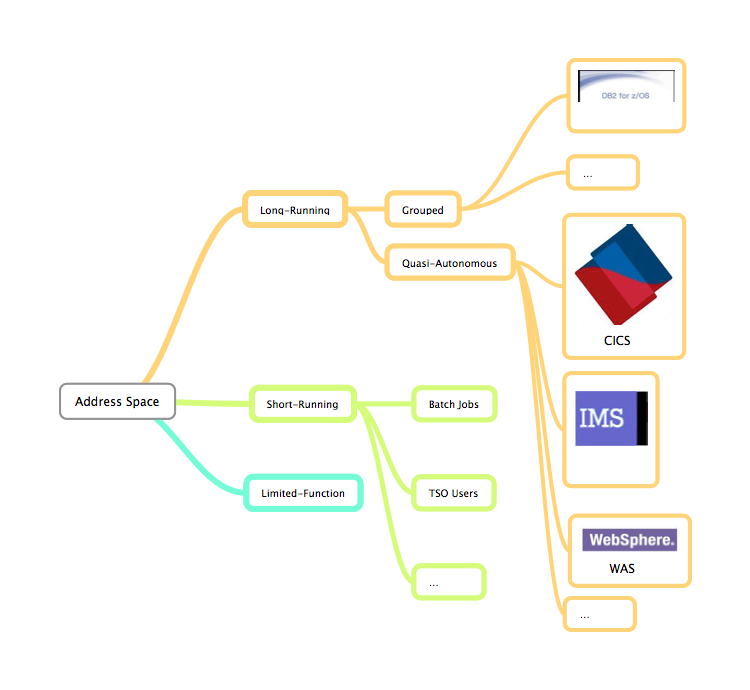
I’m trying to put some structure on the idea of Life And Times Of An Address Space. The best way to do it, I think, is to attempt a taxonomy of address space types. So here’s an initial stab:

One thing that immediately comes to mind is you can map useful SMF record types onto it:

Three things:

  • I think it immediately betrays my bias towards SMF 30 in what I get to write about. But I think that’s the point: Making instrumentation tell useful stories.
  • I haven’t attempted to draw in the product-specific instrumentation. I may well do so as another point of the presentation is likely to be “to get really useful you sometimes need to go to product-specific stuff.
  • On a technical note, batch jobs run in initiators – which are typically long running. In fact (e.g. with WLM-Managed Initiators) this might not be the case. In any case I think this is a useful simplification that might survive this writing process.

At this point the purpose of publishing this “0.0” version (as you’d see from the URLs of the two pictures) is in case someone says “you’ve got the taxonomy all wrong” or “I don’t like the direction you’re headed in. Though you might find it a useful taxonomy all in its own right.

Yes, I know the annotation is unsubtle. It’s an experiment with Skitch annotation. Of course my home-grown HTML5 Canvas annotation code is much nicer. 🙂

And the product logos are also probably not the final ones I’ll end up with: They’re really my first go at adding graphics to a MindNode-produced mind map. (And I’ve not tried using MindNode for taxonomy before.)

Still, it’s better than a beer mat. (Who am I kidding?) 🙂

Now, if you were to annotate either graphic and send it back to me that’d be interesting, dontcha fink?

Two Potential New Presentations – Coming Soon?

(Originally posted 2012-12-08.)

Every year I like to debut one new presentation, though that isn’t a firm rule: In 2012 I debuted “Send In The Clones” (SITC)1 and “I Know What You Did Last Summer” (IKWYDLS), but actually only the first one was written in 2012.

Of course presentations are “slow trains coming”: I widely trailed my desire to write IKWYDLS in 2011 and finally revealed it early this year. (In fact it evolved through the course of the year into “I Know What You Did THIS Summer” and I now refer to is as “I Know What You Did This Last Summer”.) 🙂 Or “IKWYDTLS” for short.

SITC arose much more spontaneously – being initially a presentation for a customer working group. (And it still has some of that genesis in it – with a rather pointed “where from here?” slide left in.)

The point of the above is generally I don’t just get up one day and decide “today I’ll put on a show”: You have to “record” before you can “gig”. (Of course I do just say stuff sometimes.) 🙂

So what about 2013?

I have two ideas swirling around in my head, and I’d like to know if either appeals to you:

  1. Time For D.I.M.E.
  2. The Life And Times Of An Address Space

Time For D.I.M.E.

This is more a “campaign” presentation in that I really do think it’s time (judging by my customer set) for customers (particularly those running z196 and zEC12 machines, but also z114) to consider memory usage afresh. (DIME is, of course, short for Data In Memory Exploitation.) (With the advent – a while back but practically into 2013 – of DB2 Version 10 this becomes even more relevant.)

This is probably the presentation my management would be keener I wrote – though it’s one I personally feel strongly about anyway.

The Life And Times Of An Address Space

I like to write occasionally about more abstract things, things with less immediate punch in their message. This presentation is very much in that category. Its origins are, I think, the lower-level pieces of IKWYDTLS. When giving that presentation I had to gloss over the address space piece. And there was so much more I wanted to say than was even on the slides. And stuff has happened this year that makes it even worse – as regular readers of this blog will know.

I also think there’s something of a (pseudo-)intellectual framework to be espoused here: For example, we can view batch jobs and CICS regions as looking very different but actually there is much commonality. I’d like to explore that.

(There is a practical benefit as it’s important to use the commonality but respect the differences when designing reporting.)

I also think it’s important to get beyond the idealised address space and into practical examples, such as CICS and DB2.

(Somehow BBEdit, which I’m writing this in, seems to have learned to prompt me with the words “CICS” and “DB2.) 🙂

So How About You?

What do you think of those two ideas? Feel free to comment here or in any other way you like. The aim is to take these two ideas (and any others) and turn them into useful material, whether actual presentations, blog posts, analysis code or whatever.

The next step is probably to inflict more of my handwriting on you. 🙂 And, as I’m not so good at graphics, I might collect some napkins from around the world to draw them on and post photos of these rough drafts as we go along. 🙂 Now wouldn’t it be fun to do a presentation composed entirely of photos of drawings on interesting pieces of paper, sides of cows, people holding placards2 etc? 🙂


Notes:

1 Queen fans tend to refer to songs and albums by obscure sets of initials, so that “TMLWKY” is “Too Much Love Will Kill You”, “NOTW” is “News Of The World” etc.. TMI? Perhaps. 🙂

2 I see CICS has already done it. 🙂

Filtering REXX Query Results With BPXWUNIX

(Originally posted 2012-12-04.)

I’ve talked about BPXWUNIX before but here’s a nice use case: Filtering REXX query results.

When I get your performance data I have code that stores it in a database which I query with (essentially) REXX. The predicate syntax is very simplistic so I’d like to do better. I can’t replace the syntax (not entirely true but close enough) but I can filter the results better.

Consider the following single step:

Reading it as a "U" shape, I pass the query results to a Unix Pipeline consisting of two stages:

  1. grep – which filters the query results, prepending the all-important line numbers
  2. cut – which removes the line contents, leaving just the line numbers

These line numbers (stdout) are passed back to the REXX driving code, along with any error information (stderr).

Any use case would be expected to check stderr before processing stdout.

But what is the point of jumping through these hoops?

As I mentioned most recently in Towards A Pattern Explorer – Jobname Analysis , regular expressions (regexps) are very flexible. So I can very easily code a filtering regexp that could be used to reduce the results of my original database query. The diagram above shows just such a workflow. But now for some actual REXX code…

/* REXX */ 
s.1.1=1234 
s.1.2=7543 
s.1.3=8911 
s.2.0=3 
s.2.1='XYZZY' 
s.2.2='Proxy' 
s.2.3='Xylophone'

atstart='¬' 
grepstring=atstart'XY' 

cmd='grep -i -n "'grepstring'" | cut -f1 -d:'

call bpxwunix cmd,s.2.,filter.,stderr. 

do f=1 to filter.0 
  item=filter.f 
  say item s.1.item
end 

do e=1 to stderr.0 
  say stderr.e 
end 

Let’s examine the code:

  • The first few lines emulate the query – filling a grid of stem variables with data. The code filters on the s.2. variables but eventually it’ll be the surviving s.1. variables that will be printed.
  • The line where atstart is assigned a value is interesting: With my emulator (x3270) I can’t actually type a circumflex (^) but it turns out the tilde (¬) works fine for me instead. (In regexps "^" means "the match starts at the beginning of the line".) So I set this variable so I never have to worry about it again – using it as I construct the regexp in the next line.
  • In this example the regular expression merely says "match anything starting with ‘XY’". Big deal, I could’ve done that easily in REXX. 🙂
  • The "-i" switch on the grep command says "match without regard to case". Again easy to do in REXX. 🙂
  • Specifying "-n" says "add line numbers on the front of the matching rows.
  • Cut throws away the matching rows, just returning the line numbers for them. "-f1" says "return the first field" and "-d:" says "the first field ends at a colon". In fact the line number ends with a colon so this is a good point to cut the record".
  • Note that s.2.0 has to be set to the number of variables to be passed but s.1.0 doesn’t. I stress this as it may catch you out.
  • Results are returned from BPXWUNIX in filter. variables (and filter.0 is the count of them) and stderr. contains any error messages.
  • The first loop iterates over the returned results (two records in stdout, one with the number "1" and the other with the number "3"). These are used as indexes into the s.1. variables. So s.1.1 (1234) and s.1.3 (8911) are printed.
  • Finally any error messages are printed. In Production you might actually test for the presence of nastygrams 🙂 before deciding to use the results of the grep / cut pipeline. In my testing I want both.

There are probably other ways of achieving the same thing – using regexps – using Unix programs. If you prefer them use them. This one seems quite simple to me, Unixwise. And it certainly complies with my performance objective of only transiting once to Unix programs and back. Of course, if you have a lot of filtering instances within a program you’ll transit more often – but then the effect on performance is probably still unnoticeable.

I think the first place I might use this is to better refine what I mean by a “Batch Suite”. I’ve talked about that one before.

A Nice Data Provenance Related Podcast

(Originally posted 2012-12-03.)

Just a brief follow on to Bad Data And The Subjunctive Mood: Here’s a podcast I like to listen to while running. (Music and podcasts are about the only thing that keep me running, that and the success at my modest goals.)

BBC Radio 4 has a very nice programme More Or Less: Behind The Stats. It’s a magazine programme with extremely digestible yet thought-provoking items on Statistics.

My tendency with radio programmes in general is to think ahead to where they’re going next. Start The Week would be a good example (though I find it frustrating when they miss angles). Another good example would be Friday Night Comedy but for slightly different reasons. But for More Or Less they tend to throw in things that surprise me, more than they leave out things I expect them to say.

I’m not sure whether these podcasts are available worldwide or just in the UK. Perhaps someone can let me know. In any case More Or Less would be good for “Data” people.