IBM System z Technical University 21-25 May, Berlin

(Originally posted 2012-05-12.)

With just over a week to go I’ve got my presentation materials in for this great conference: IBM System z Technical University 21-25 May in Berlin. I hope to see many friends – old and new (old and young) 🙂 there.


For the record my three sessions are:

  • zZS08 – I Know What You Did Last Summer
  • zZS18 – Optimizing z/OS Batch (repeats)
  • zZS21 – Parallel Sysplex Performance Topics

And, as well as seeing me present (which I presume you’d want to else why are you reading this blog?) 🙂 there are lots of great sessions – at all levels of complexity on all kinds of topics.<

See you there

(And if you’re not going all of these are, I think, on Slideshare.)

He Picks On CICS

(Originally posted 2012-04-29.)

If you think this title is obscure bear in mind the original working title was "Send In The Hobgoblins". 1 🙂

When I started to write – actually before the "mind mapping" stage – it was going to be all about inconsistency in the way bits of systems are named. You'll see some of that reflected in the finished article (pun intended) but the post has mostly gone in a different direction.

I'd maintain this one is a slightly less obscure title. But I accept it depends on your pronunciation of "CICS". I've heard many nice variants 2 but I'm depending heavily on just one. (And, obviously, it's my preferred one.)

I thought it'd be interesting to do a "thought experiment" 3 on what you can glean about CICS from SMF. This is a necessarily brief discussion – though it might be worth working up into a presentation one day – and I've probably touched on some of this before. If I have I hope I don't contradict myself too badly here. (Strike One for consistency.) 🙂

I'm going to do this two different ways: I'll talk about

  • Data
  • Themes

This isn't meant to be an exhaustive survey but is more intended to get you thinking. And in particular in the Themes section you can probably think of your own themes.

Data

As with every application address space, CICS regions can be looked at using standard SMF 30 Interval records.4:

  • Most notably, you can identify CICS regions from the program name – DFHSIP – and can establish usage patterns such as CPU and memory.
  • From RMF Workload Activity Report data (SMF 72 Subtype 3) you get WLM setup and goal attainment information. The SMF 30 record also contains the WLM workload, service class and report class names so you can easily figure out which CICS regions are in which service class, etc..

Obviously generic address space information can only get you so far. To go further you need more specific information. I'm going to divide it into three categories:

  • CICS-Specific
  • Other Middleware
  • I/O

CICS-Specific

CICS can create SMF 110 records at the subsystem and the transaction level – both of which can be reported on by specialist tools using CICS Performance Analyzer (CICS PA) or more general SMF reporting tools.

Such information contains subsystem performance information, response time components for transactions and virtual storage.

Other Middleware

You can get very good information about when CICS transactions access other middleware:5

  • For DB2 SMF 101 Accounting Trace gives you lots of information about application performance – as we all know. For CICS transactions the Transaction ID is the middle portion of the Correlation ID (QWHCCV) and the Region is the Connection Name (QWHCCN).6
  • Similarly, Websphere MQ writes application information in the SMF Type 116 record, which can be related to specific CICS regions and transactions.

I/O

Most performance people know about SMF 42 Subtype 6 Data Set Performance records. For data sets OPENed by the CICS region, these records are cut on an interval basis and when the data set is CLOSEd. (This obviously isn't true, for example, for DB2 data.) These records can be used with the File Control information in CICS 110 to see how, for example, LSR buffering and physical I/O performance interact for a VSAM file.


Themes

That was a very brief survey of the most important instrumentation related to CICS. Much of it is not produced by CICS itself. I kept it brief as it's perhaps not the most interesting part of the story: I hope some of the following themes bring it to life.

Naming Convention

(Strike Two for Consistency coming up.) As someone who doesn't know your systems very well it's interesting to me to figure out what your CICS regions are called. And which service classes they're in. etc.

So, to take a recent example, a customer has two major sets of CICS regions cloned across two LPARs. In one case SYSA has CICSAB00 to CICSAB07 and SYSB has clones CICSAB08 to CICSAB15. In the other case SYSA has CICSXY1, 3 and 5 while SYSB has CICSXY2, 4 and 6. Each of these happen to be in their own service class.7

You'll've spotted what I like to call "consistency hobgoblins" 🙂 in this:

  • One alternates between systems. The other has ranges on each system.
  • One starts at zero. The other starts at 1.

The customer took my teasing them about this inconsistency very well – so I don't think they'll mind me mentioning it here (particularly as, apart from them, nobody will recognise the customer).

And actually it doesn't matter – with one minor exception: The application that uses ranges (rather than alternating) would have to perform a naming "shuffle up" if they were ever to add clones. And this is not just a hypothetical scenario.

AOR vs TOR vs QOR vs DOR

You may well be able to tell this from SMF 30 – from the "lightness" of the address space. But it's better to use some of the other instrumentation:

  • Certainly there are "footprints in the sand" for things like File Control in SMF 110 so you could detect a File-Owning Region (FOR).
  • A CICS region that shows up in DB2 Accounting Trace obviously uses DB2 and looks more like a Data-Owning Region (DOR).
  • Likewise for SMF 116 and a Queue-Owning Region (QOR).

Now, regions come in all shapes and sizes and the terms "TOR", "AOR", "FOR" and "DOR" strike me as informal terms – and regions could be playing more than one of these roles so these terms aren't mutually exclusive. But the data is there.

XCF traffic (from SMF 74 Subtype 2) can be interesting:8 I noticed one application's CICS regions showed up in the job name field for XCF group DFHIR000, but not for the other application. I was informed there was a VSAM file this application shared – using CICS Function Shipping I guess.

With most topologies there is a unique correlator passed for the life of a transaction through the CICS regions. This correlator (in mangled form) even shows up in DB2. So you can tie together transactions and regions: CICS PA can apparently do this and the next time I get some CICS data in I'm going to learn how to do this. In any case transaction names like "CSMI" (the CICS Mirror transaction) tend to suggest Multi-Region Operation (MRO).

Virtual Storage

I'm reminded of this because in a customer I was able to demonstrate that while both of two applications had Allocated virtual storage of 1500MB the memory backed in one was half that and in the other almost all that. You might deem the former region set moderately loaded and the latter heavily loaded.

The virtual storage numbers – actually both 24-bit and 31-bit – come from Type 30 Interval records. The real storage numbers also from the same records but with some "interpretational help"9 from RMF 72-3 records.

But Allocated is a z/OS virtual storage concept: As with DB2 DBM1 address space virtual storage it is generally not the same as used. If it were it'd indicate a subsystem or region in trouble. So we need better information on which to make judgements. Fortunately we have it in the CICS 110 Statistics Trace records: You can do a good job of analysing and managing CICS virtual storage with this (just as you can with IFCID 225 data for DB2).

For one of these two applications virtual storage may well be the thing that determines when the regions need to be split.

Workload Balancing

You can see workload balancing in action at a number of levels:

  • At the region level (given a naming convention that lets you identify clones, as above) you can see in Type 30 even CPU numbers, EXCPs etc. If you don't, given supposed clones, you can conclude there isn't some kind of balancing or "round robin" in action – but some other kind of work distribution.
  • From CICS SMF 110 (Monitor Trace) you can see transaction volumes and can aggregate by Transaction ID. So an imbalance could be explained – perhaps because the supposed clones run different transactions or some transaction is present in all but at different rates in each clone. Or some other explanation.
  • Even without SMF 110 (which a lot of installations don't collect) DB2 Accounting SMF 101 could give you a similar picture (as might MQ's SMF 116).

So the "work distribution and balancing" theme can be addressed readily.

QR TCB vs Others

I mentioned above that virtual storage can sometimes drive the requirement to split CICS regions (whether cloned or not). The Quasi-Reentrant (QR) TCB can be another driver.10

Traditionally all work in a CICS region ran on the single QR TCB therein. And then File Control was offloaded from it. And the rest, as they say, is history.11

Then as now, if the QR TCB approaches 70% of a processor performance can begin to degrade markedly. For this reason TCB times are documented in the SMF 110 CICs Statistics Trace record. I regularly see CICS regions with more than 70% of an engine (from SMF 30) but to do this an installation needs to understand (using the 110) how much is really the QR TCB.


Without the 110's, again you could work with SMF 101 and 116 for DB2 and MQ, respectively. In fact I often do.


So, I've tried to give you a flavour of what you can learn about a CICS installation from SMF. i.e. without going near the actual regions themselves. This is indeed just a flavour.

On the "inconsistency" point, consistency isn't vital but good naming conventions have real value. It's an old joke that goes "we like naming conventions so much we have lots of them, some of which contradict each other". 🙂

There are plenty of other examples where there are inconsistencies. A good one is LPAR / z/OS system names. I've seen several customers with the following kind of scenario: "Our systems are called things like A158, SYSC, DSYS, Z001 and MVS1." And it's not just LPAR names and CICS region names, of course.

The inconsistencies in installations often reflect history. And a notable category is Mergers and Acquisitions. (The LPAR names example above is often caused by this.) I'm really impressed at what customers manage to achieve when they do something like this: Getting it to work reliably is the most important thing. Homogenisation of names should be and is secondary.

I really like to see traces of the history in the systems I examine. Some of you reading this have been with me on the journey of your systems' lifetimes for a long time now: I wonder how much history we each remember. 🙂 Next time you see me ask me to pull out some slides from previous engagements: When I do this people are astonished by how much hasn't changed and how much has.

As you possibly spotted that was "Strike Three" for consistency in this post so I guess I'm out. 🙂 This was indeed going to be a post about consistency but took a different direction, as I said. I hope you found the "CICS nosiness" aspect interesting and useful. If you do I might well turn it into a set of slides and add some more material. If you have anything to add I'd be interested in hearing about it – whether you're from Hursley12 or not.


Footnotes

1 The reference here is, of course, 🙂 to Ralph Waldo Emerson's essay "Self-Reliance" where he wrote "a foolish consistency is the hobgoblin of little minds".

2 Such as "kicks", "chicks", "thicks", "six" and "sex" (no, really). 🙂 And my least preferred one is "see eye see ess".

3 If you think I'm self-consciously channelling Einstein here you'd be wrong: It's actually Mao. 🙂 Because the thought experiment is no substitute for experience – according to "On Practice".

4 Actually I doubt the utility of SMF 30 Interval records for batch jobs.

5 I believe you can get data from IMS relatable to CICS transactions – but I know relatively little about IMS.

6 And you can tell a CICS-related 101 record because the value of the QWHCATYP (Connection Type) is QWHCCICS. Further, you can tell things about sign ons from the QWACRINV field value.

7 You might not know this but the SMF 72-3 record has the Service Class Description character string – from the WLM policy. I'm slowly evolving my charting to use the description. Time to clean it up, folks. 🙂

8 While you get member name in 74-2 (and I'm proud to say I got job name in as a more useful counterpart) you don't get "point to point" information: You just get the messages sent from and to the XCF member. Figuring the actual topology out by matching message rates is fraught. I'd love an algorithm that was effective (or efficient) at this.

9 What I mean by this will have to await another post – some time.

10 26 years ago I worked on CICS Virtual Storage at a Banking customer. Not a lot has changed. 🙂 20 years ago I was involved in enabling customers to take advantage of multiple processors by splitting regions as described in this section. Again, not a lot has changed. 🙂 But this is unfair because the Virtual Storage and CPU pictures have changed a lot.

11 Or is it hysteria? 🙂

12 Home of CICS and Websphere MQ Development

Guest Post – z/OS Release 13 ISPF Editor Enhancements

(Originally posted 2012-04-12.)

I was pleased when Julian Bridges (who I worked with in IBM Global Services for a number of years) told me he had access to a z/OS Release 13 system. He agreed to write a blog post on the enhancements to the ISPF editor in Release 13 and this is that blog post. Enjoy!

Julian Bridges

It comes as a surprise to many how flexible the ISPF editor can be. Many times sitting with clients typing away with them at your shoulder you hear, “I didn’t know you could do that”. It’s certainly worth hitting F1 in the edit screen or reading “ISPF Edit and Edit Macros” and spending a while trying to understand the power of the commands available.

Whilst much of the power is in the primary commands, in the past few releases of z/OS functionality has been added to the line commands as well.

First is simply the ability to (C)opy or (M)ove data to multiple lines. Previously you could copy or move lines to a single destination but since z/OS 1.10 this has been extended to allow multiple destinations.

For example, I’ve missed a comma from the end of the SYSUT2 and then repeated the line and hence the mistake. I can now use the move overlay line command to add a comma in to each of the lines with the error as follows:

m 0100                                                   , 
000700 //PACK     EXEC PGM=AMATERSE,PARM='PACK'           
000800 //SYSPRINT DD   SYSOUT=*                           
000900 //SYSUT1   DD   DISP=SHR,DSN=JULIAN.TZOSC01.DUMP   
ok 100 //SYSUT2   DD DISP=(,CATLG),DSN=JULIAN.TZOSC01.TRS 
001200 //         SPACE=(CYL,(1000,1000),RLSE),VOL=(,,,3) 
001300 //*                                                 
001400 //PACK     EXEC PGM=AMATERSE,PARM='PACK'           
001500 //SYSPRINT DD   SYSOUT=*                           
001600 //SYSUT1   DD   DISP=SHR,DSN=JULIAN.TZOSC02.DUMP   
ok 700 //SYSUT2   DD DISP=(,CATLG),DSN=JULIAN.TZOSC02.TRS 
001800 //         SPACE=(CYL,(1000,1000),RLSE),VOL=(,,,3) 
001900 //*                                                 
002000 //PACK     EXEC PGM=AMATERSE,PARM='PACK'           
002100 //SYSPRINT DD   SYSOUT=*                           
002200 //SYSUT1   DD   DISP=SHR,DSN=JULIAN.TZOSC03.DUMP   
ok 300 //SYSUT2   DD DISP=(,CATLG),DSN=JULIAN.TZOSC03.TRS 
002400 //         SPACE=(CYL,(1000,1000),RLSE),VOL=(,,,3) 
002500 //*                                                 
002600 //PACK     EXEC PGM=AMATERSE,PARM='PACK'           
002700 //SYSPRINT DD   SYSOUT=*                           
002800 //SYSUT1   DD   DISP=SHR,DSN=JULIAN.TZOSC04.DUMP   
o 2900 //SYSUT2   DD DISP=(,CATLG),DSN=JULIAN.TZOSC04.TRS 
003000 //         SPACE=(CYL,(1000,1000),RLSE),VOL=(,,,3) 
003100 //*                                                 

Note the addition of the “k” on the overlay command to indicate the multiple destinations. The last destination in the file is indicated by missing this “k” and is just the normal overlay “o”. The same is true for “a” after and “b” before destinations as well.

Of course, in this case, it would probably be easier just to type the comma in the correct place but you get the idea.

Secondly, with z/OS 1.13, the ability to write you own line command macros has been made available.

This does involve a few steps but basically now the ability to do pretty much anything you wish is available:

  1. Define an ISPF table to associate a line command with a macro.
  2. Write your macro.
  3. Associate the defined table with your edit session.
  4. Run the macro.

Define An ISPF Table To Associate A Line Command With A Macro

Fortunately the ISPF table utility, option 3.16, has been enhanced to make this straightforward. An option at the bottom of the screen now asks if this “Table is an EDIT line command table”

When selected it creates the table in the necessary format and you just have to fill in the blanks. The examples below show what the options mean for existing line commands.

  • User command – The line command.
  • MACRO – The macro which will run when you run this line command.
  • Program Macro – Is this a program macro.
  • Block format – Does this macro allow you to select multiple lines by repeating the last char of the command e.g. CC? CC would copy a block of text.
  • Multi line – Does this macro allow you to select multiple lines by providing a numeric suffix on the end of the command e.g. C6 will copy the next 6 lines.
  • Dest Used – Does this macro allow a destination e.g. C or M must have a destination whereas R doesn’t.

e.g.

User     MACRO    Program  Block    Multi    Dest     
Command           Macro    format   line     Used     
----+--- ----+--- ----+--- ----+--- ----+--- ----+--- 
CL       CLINE    N        Y        Y        Y       

This table must then be saved to a table library allocated to your ISPTLIB concatenation.

Write Your Macro

A few things to bear in mind. You have to use the PROCESS macro instruction to populate the range and destination variables within the macro. This is best illustrated by an example.

/* REXX */                     
Address ISREDIT                 
"macro NOPROCESS"               
"process range CL"             
dw = 72                         
"(srange) = LINENUM .zfrange"   
"(erange) = LINENUM .zlrange"   
do i = srange to erange         
  "(LINE) = LINE " i           
  line = centre(strip(line),dw) 
  "LINE " i " = (LINE)"         
end                             

This macro will centre the lines selected.

Process takes the arguments range, dest or both and the line command being entered. It gives return codes if when called a range or dest is missing.

This macro should then be saved in your SYSEXEC or SYSPROC concatenation.

Associate The Defined Table With Your Edit Session

Select ISPF option 2 and enter the name of the table in the “Line Command Table” field at the bottom of the screen.

This is now remembered whether you edit via option 2 or using “E” from 3.4.

Run The Macro

Single line

****** ***************************** Top of Data ****************************** 
cl 100 I wandered lonely as a cloud                                             
000200 That floats on high o'er vales and hills,                               
000300 When all at once I saw a crowd,                                         
000400 A host, of golden daffodils;                                             
000500 Beside the lake, beneath the trees,                                     
000600 Fluttering and dancing in the breeze.                                   
****** **************************** Bottom of Data **************************** 

Results in

****** ***************************** Top of Data ****************************** 
000100                       I wandered lonely as a cloud                       
000200 That floats on high o'er vales and hills,                               
000300 When all at once I saw a crowd,                                         
000400 A host, of golden daffodils;                                             
000500 Beside the lake, beneath the trees,                                     
000600 Fluttering and dancing in the breeze.                                   
****** **************************** Bottom of Data **************************** 

Block format

****** ***************************** Top of Data ****************************** 
cll 00 I wandered lonely as a cloud                                             
000200 That floats on high o'er vales and hills,                               
000300 When all at once I saw a crowd,                                         
000400 A host, of golden daffodils;                                             
cll 00 Beside the lake, beneath the trees,                                     
000600 Fluttering and dancing in the breeze.                                   
****** **************************** Bottom of Data **************************** 

Results in

****** ***************************** Top of Data ****************************** 
000100                       I wandered lonely as a cloud                       
000200                That floats on high o'er vales and hills,                 
000300                     When all at once I saw a crowd,                     
000400                       A host, of golden daffodils;                       
000500                   Beside the lake, beneath the trees,                   
000600 Fluttering and dancing in the breeze.                                   
****** **************************** Bottom of Data **************************** 

Multi line

****** ***************************** Top of Data ****************************** 
000100 I wandered lonely as a cloud                                             
000200 That floats on high o'er vales and hills,                               
cl99 0 When all at once I saw a crowd,                                         
000400 A host, of golden daffodils;                                             
000500 Beside the lake, beneath the trees,                                     
000600 Fluttering and dancing in the breeze.                                   
****** **************************** Bottom of Data **************************** 

Results in

****** ***************************** Top of Data ****************************** 
000100 I wandered lonely as a cloud                                             
000200 That floats on high o'er vales and hills,                               
000300                     When all at once I saw a crowd,                     
000400                       A host, of golden daffodils;                       
000500                   Beside the lake, beneath the trees,                   
000600                  Fluttering and dancing in the breeze.                   
****** **************************** Bottom of Data **************************** 

Have a play and see how you get on.

You Might Just Be A Clone If…

(Originally posted 2012-03-25.)

As previously discussed I’m often in a situation of trying to make sense of a set of job-related SMF data. Even though it may be your own installation’s data, you’re probably confronted with what I like to call “a journey of discovery” occasionally, too.

I’m always looking for what I can discern from the data.1 And, when confronted with a set of data about batch jobs, I go into overdrive. 🙂

This post is about how to tell if a set of batch jobs really are clones of each other. It’s an exercise in pattern definition, albeit loosely.

But first, why would you want to know what’s a clone set of jobs? Remember these are near-identical jobs that run in parallel against subsets of the data. Firstly, if something’s cloned you might be able to clone it further.2 Second, if it isn’t cloned you need to recognise that and think about the effort involved to even start with cloning.3

The process of detecting clones is easy to describe but not so easy to do. Here are the steps:

  1. Look for similarities in SMF 30 Step- and Job-End records.
  2. Likewise in SMF 101 DB2 Accounting Trace.
  3. And similarly for data access.

Steps 2 and 3 could be done in either order. And indeed Step 2 would be only be relevant for DB2.

Let’s think about these in a bit more detail…

Step-End And Job-End Evidence

I would expect cloned jobs to run more-or-less alongside each other – though they might be set off in groups. Of course imbalance between the clones would mean they wouldn’t end at the same time.

Additionally the jobs would have the same “step profile”. By this I mean the number of steps is consistent, the same steps in each job are the big ones. The program names are the same. And the performance profile of each step is similar across the clones, so the CPU intensiveness and the EXCP counts are similar.

I would expect also to see a sensible job-naming convention. For example “all the jobs beginning PLCD50 are clones and the suffix is 00, 01, 02 and so on”. From this you get job names like PLCD5000, PLCD5001 etc.

Generally I spot groups of jobs meeting these criteria pretty easily – using SMF Type 30 subtypes 4 (Step) and 5 (Job).

DB2 Invocation Evidence

For DB2 jobs I’d expect corroboration from DB2 Accounting Trace (SMF Type 101):

  • Plan names and package names4 should be the same.

    In many cases I’ve seen a single DB2 plan name for an entire application, and sometimes crossing application boundaries. Similarly packages are sometimes widely used – for example in the “I/O module” or Stored Procedure cases. Taken together this is a necessary but not sufficient condition.

  • DB2 Accounting Trace, as you probably know, can give a very detailed breakdown of where a step’s time goes5 – down to the package level. Again, you’d expect to see a similar profile across all the clones.

For any serious DB2 Batch analysis I’d be looking at this data anyway. I’ve written extensively about DB2 Batch, most recently here.

Data Access Evidence

This is where consistency is slightly less to be expected: Most probably DD names will be the same across the cloned jobs. But very often the data set names are slightly different. For example the clone stream number might be encoded in the data set – probably in one of the lower level qualifiers.

For DB2 it’s more difficult to assess which tables a job step access – and probably you need to look at the DB2 Catalog for insight. When you do you may well find the cloned jobs accessing partitions of the same table (in some cases).

There is other evidence of interest here:

In many cases clone jobs (or streams) are preceded by a job whose role is to split the data to feed the clones. Similarly there’s often a follow-on job to merge the results. Detecting these – in the non-DB2 case is usually pretty straightforward. (Even in the DB2 case the scheduler should tell you.) My point here is there’s value in seeing how cloning is working, not least from why there might be imbalance between the clones.

As I said at the outset it’s useful to figure out which jobs in a suite or a window are part of a cloning implementation. And as I hinted in a couple of places there’s also value in understanding balance (or imbalance). In this post I’ve given some tips on the kinds of patterns to look for. Some of this could be codified, I’m sure. In any case the human mind is a wonderful instrument for pattern recognition6.


1 I’ve talked about this sort of thing before. Most recently in Published on Slideshare: I Know What You Did Last Summer.

2 Recall my recommendation to clone 2, 4, 8, 16 … or else 3, 6, 12, 24… – unless you know differently.

3 See this part and this part especially of the ‘I Said "Parallelise" Not "Paralyse"’ series of blog posts for more on this.

4 You only get package-level statistics if you specify Accounting Trace classes 7 and 8.

5 You only get the detailed break down if you specify Accounting Trace classes 1, 2 and 3. (And see 4.)

6 This footnote is a wholly gratuitous reference to the excellent Pattern Recognition, a novel by the excellent William Gibson. 🙂

Drawing The Line

(Originally posted 2012-03-23.)

You’d think it would be pretty simple to draw a line. Right?

This post discusses an enhancement I’d like to make to my current reporting – and I’m pretty sure that technically I can do it. The question is whether I should.

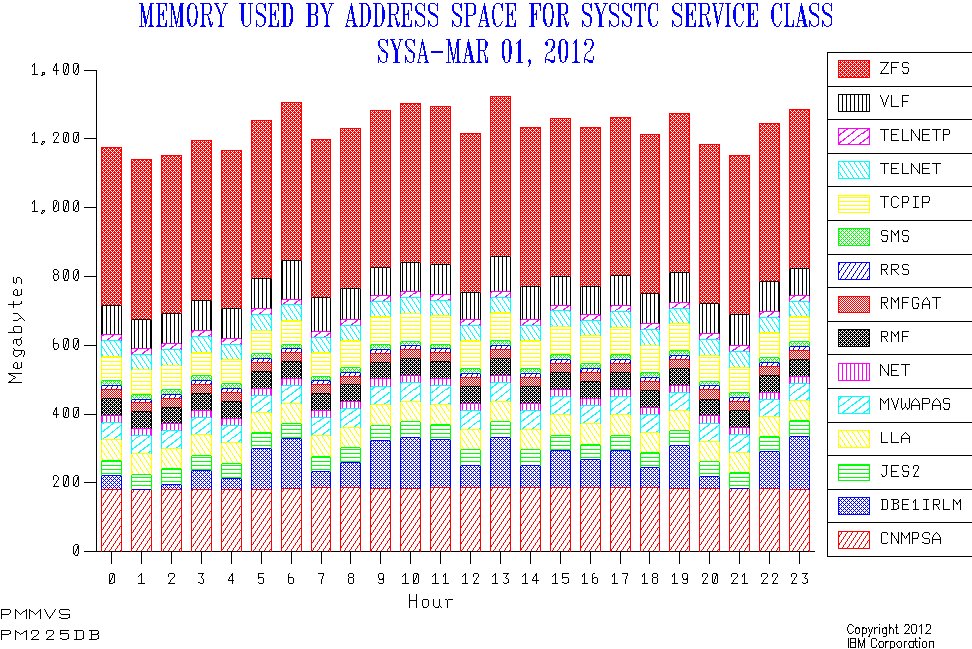
Consider my current "Memory by address space within Service Class" graph. Here’s a sample:

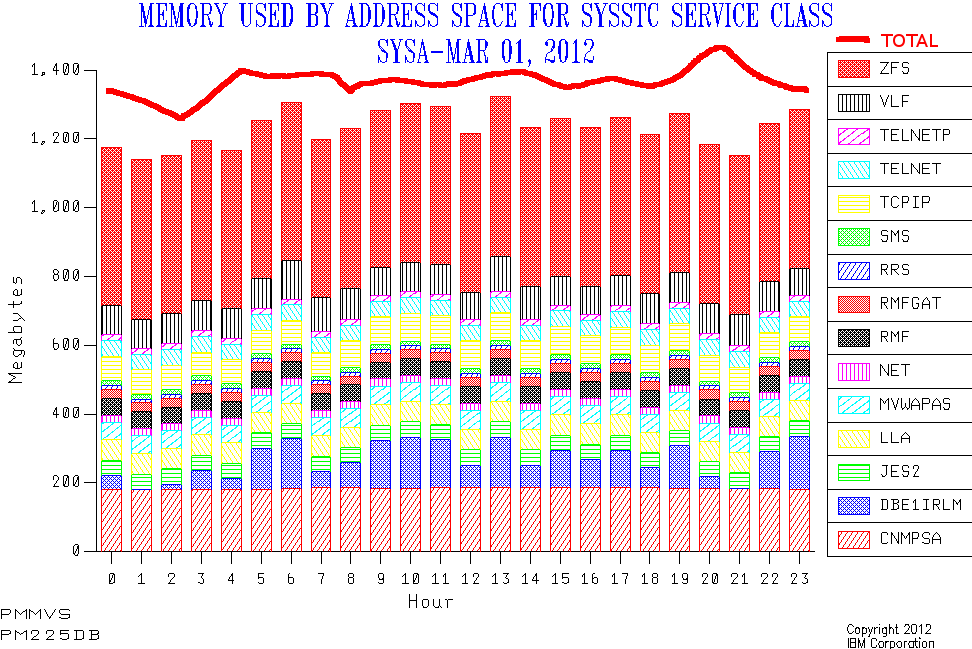
And here’s what I think I might like it to look like:

Obviously the line’s been drawn on by hand. I haven’t written any code to achieve the enhancement. And, yes, the data’s real – apart from the drawn-on line. I feel pretty safe (on behalf of the customer) in showing you this as it’s VERY generic. But, no, I can’t promise the drawn-on line’s in the right place.

Let’s talk about:

  • Motivation and Usage
  • Mechanics

Motivation and Usage

When I throw graphs at you I see myself as "story telling". Hopefully an accurate story, certainly one I believe in. So, when working on my code I ask the question "how does this affect the story telling?"

Here’s how I normally tell the (e.g) CPU story:

  1. Talk about CPU usage by processor pool by LPAR1 and stacked up to give the machine view.
  2. Break down CPU usage by WLM Workload and the Service Class2 – again by pool.
  3. Likewise by address space within a Service Class.
  4. Possibly break down address space CPU to e.g. Transaction – assuming CICS or DB2 are "in play".

When you’ve done that you certainly know where the CPU is going. You do the same thing for memory – right until you get to Step 4.

The concept of "capture ratio" is well known and bridges the gap between Step 1 and Step 2 – for CPU3. It doesn’t make sense to draw the proposed line for this case.

To bridge between the Service Class level and the Address Space level (Step 2 to Step 3) I think a different treatment is required. There are a number of reasons for this:

  • Some service classes have no address spaces. And hence no memory. "Capture Ratio" may be 100% but unlikely to be computed that way. 🙂
  • The chart I’m proposing has up to 15 address spaces on it. (We could make it more but then it becomes markedly less readable.) So, for a Service Class with more than 15 address spaces we miss some – as in this particular example. I’d like to show we had good (or bad) coverage of the "headline" Service Class number in these 15 address spaces. This works fine for CPU, memory and EXCPs.
  • Type 30 memory numbers behave badly and it would be nice to see how badly compared to the Service Class total. (Type 30 CPU numbers don’t behave badly.)

So I think the line that says what the total "should" be is ideal for this. Hence my proposal4.

Mechanics

Today the data is in two tables: A Service Class (Period) table and an Address Space table – both summarised at an interval level5. The former comes from RMF SMF 72 Subtype 3. The latter comes from SMF 30 Subtypes 2 and 3. It’s always interesting handling two different data sources as if they might magically corroborate each other. How naive. 🙂

I use standard SLR “PRINT CHART” and similar commands against these tables. Not so long ago I learnt how to drive GDDM graphing direct from REXX. Because I can do other things in the REXX (like adjust address space names to add e.g. “CICS”) I might take that route rather than using PRINT CHART. And there are some other cases I would want REXX’s sophistication to take care of – like either the 30’s or the 72’s being missing.

In your case you can probably bring the two together quite neatly. Anyone know if MXG already does this?

Conclusion

So, why am I blogging about this? Two reasons:

  • Because you might want to try the same depiction idea.
  • Because I’d like to know if you think this is a good idea.

So I’d like your input on this. (Commenting here would be fine or any other way you want.) And maybe next time I crunch your data the story will be told just that little bit better. At least that’s the plan. 🙂


1 Nowadays those pools are: GCP, ICF, zIIP, zAAP, and IFL.

2 I’ve not found much value in breaking CPU usage down by Service Class Period.

3 For memory I handle it differently – because there are reported-on memory usages that are outside of the Workload / Service Class hierarchy. And I explicitly calculate an "Other" category – which has never turned out to be negative.

4 Today I’d be showing you two charts and inviting you to do the comparison. I hope my proposal makes this quicker and smoother.

5 This interval may be different in the SMF 30 and 72 records but it’s summarised to the same interval in the code. This might be 15 minutes, 30 minutes or (most usually) 1 hour. And that’s all summarised at the "shift" level for even broader brush work.

Whocasting?

(Originally posted 2012-03-22.)

Don’t reach for your dictionary to look up the single word in the title: I just made it up. 🙂 But I hope it’ll make sense as a term once you’ve read this post.

Once in a while I like to post on Social Media. Looking back it seems to be about every 6-9 months. Some recent examples are:

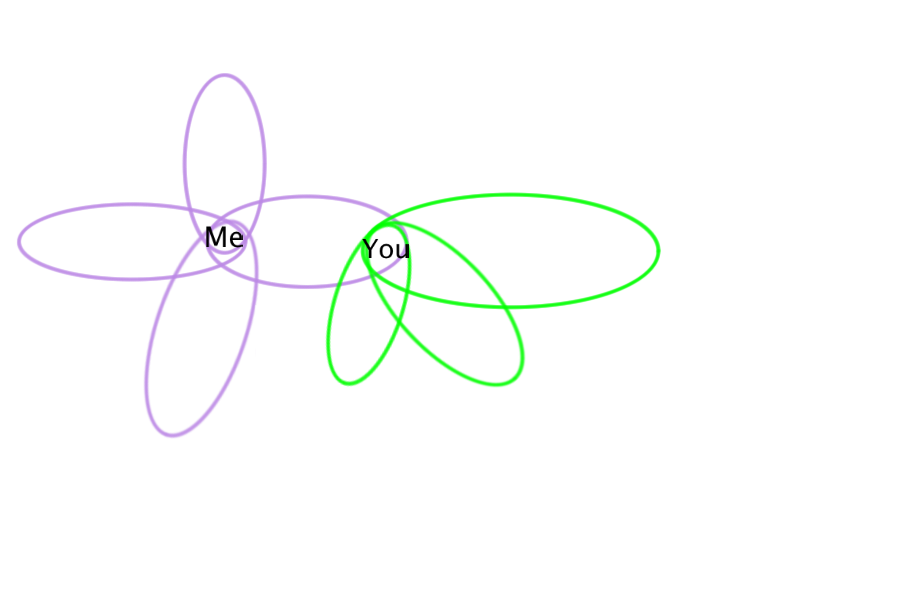
In this post I want to talk about what I’ll call "communities". You might prefer the term "consituencies". So I’ll use them interchangeably. Take a look at the following graphic. It’s a pair of Venn diagrams. It’s a gross oversimplification but I hope it illustrates a point or two.

Let’s continue but from a different standpoint: Why is it that what I say only sometimes resonates with you? (I’m doing well if most of what I say hits home.) 🙂

This question and the Venn diagrams are related:

You’ll see I’m in all the purple sets and you’re in one of them. And conversely with the green ones: You’re in all of them and I’m in only one.

Each set represents a community. So you might be in my "school friends" constituency – and the converse is probably true. When I talk about z/OS and SMF that probably won’t resonate with you. And when you talk about skateboarding it probably won’t resonate very strongly with me – as I’m not a skateboarder. But each of these topics undoubtedly resonates with several people – because they are in the appropriate community. It’s a happy accident if both "z/OS and SMF" and "skateboarding" resonate with the same person.

Which brings me on to some interesting points about the diagram:

  • It doesn’t describe all our contacts – otherwise it would be impossibly crowded.
  • It doesn’t – as drawn – admit to the possibility of us being in multiple communities we’re both members of. But that’s just because I chose to keep it simple.
  • As I mentioned before, it’s possible for communities (topologists would perhaps call them "neighbourhoods"1) of 2 different people to unexpectedly interest a third person. That’s, of course, very common. When it happens it’s magic, I think.

So far so "ho hum": We all know this stuff. And it’s really laying the groundwork for what I really want to talk about: Who we communicate with and why. Hence the "whocasting" neologism.

It’s actually my friend Bill Seubert who prompted me (perhaps unwittingly) to write this post: He talks a lot about interactions between communities, often disjoint or worse. At least that’s my "take home" of some of what he says.

I think it’s a fairly common experience to have someone say "I didn’t understand a word of that last post". I think we all get feedback somewhat along those lines. (I also think we get quite a lot of "I liked the way you put that".) I’m sure it’s not just me and (perhaps defensively) I claim it’s not (always) 🙂 just a complaint about obscurity: I think it’s a fact of life when you have so many constituencies.

If I start thinking about all the constituencies I have it’s quite a long list. Some would be: Family, School Friends, College Friends (and a subset The Pi Collective), IBM Training Stream Friends, Mainframers, Social Media Fellow Conspirators :-), and so on. That’s pretty diverse. And, again, I’m sure that’s not just me.

I think sometimes it’s fun to figure out exactly for whom a message is created. Sometimes it’s only one person. Sometimes it’s a well defined group. Sometimes it’s an ill-defined group. And, my favourite, sometimes it’s just tossed into the void to see who bites / giggles / reacts / whatever. While it might be "narrowcasting" or "broadcasting" it often isn’t either of these. The "whocasting" relates to the game of figuring it out.

Let’s talk about constituencies / communities some more:

For a start you don’t see my communities as sharply as I do. And vice versa. (I’ll leave the debate as to whether a community really has sharp boundaries out of this post, for brevity2.) If that’s true then that might making the game of spotting which community someone else is communicating with a whole lot trickier.

What’s very interesting to me is the dynamics between communities:

  • Groups of communities can "triangulate" on you. If you were now in a community whose position were opposite to that of a community you grew up in that would be interesting, wouldn’t it? 🙂
  • If those two communities got to fighting with each other – and I’ve seen it happen to other people – that might be stressful and destructive. I’d sell ringside tickets to that one. 🙂 If one were conciliatory one might exclaim "couldn’t we all just get a bong?"3 🙂
  • If two communities came together through their common member(s) that’d be really good to see.

The fact that these inter-community effects are real and happen quite often reinforces my view that there’s nowhere to hide. All you can do is be yourself and speak with your "authentic voice". This is very much like a good party: There are lots of conversations going on and it’s really rather noisy. You can duck in and out of the conversations and generally nobody much minds if you invite yourself into a conversation. If there is a difference it might be in who can overhear the conversations: I’d say it’s easier to overhear in Social Media than in many parties. We’ve even got tools that help us do that.

So, as I said, there’s really nowhere to hide. But that’s, in my opinion, really very nice. Yes, there are a few awkward moments, but generally it’s good. I was at one point going to call this post "Not Afraid"4 but I think I’ve said that already. What might I be afraid of? I suppose criticism and looking like a fool. I think I can learn from the former and it’s perhaps too late for the latter: Living openly means looking like a fool is inevitable and learning is usually the result. Oh, and fear itself. 🙂

To sum up, it’s important in Social Media to consider your constituencies and keep track of which communities you’re in, centred on each contact. And to use this information to cultivate what flows from it. But when I say that, like so many things in Social Media, it’s very easy to over-track and analyse. Perhaps, in this post, I’ve done just that (but without the tracking). Oh well. 🙂


1 The allusion here is that in topology neighbourhoods are always neighbourhoods of an element. (I won’t stretch the analogy to consider the other parts of the definition of a neighbourhood as it’s perhaps not useful here.)

2 "For brevity" is about as credible as when a mathematician says "clearly". 🙂

3 An old joke which will make some people giggle, some get annoyed, and some just fail to understand it. Which rather makes my point, doesn’t it?

4 I realise a reference to Eminem will get up some noses. If it does I’d invite you to look beyond the (potential) offensiveness and see the deftness with which he operates and to consider that much of his bile is directed at himself. I also realise he isn’t cool and doesn’t make me look cool. 🙂 Anyway, the reference is to this song (lyrics here.) In particular I think it’s the line "Holla if you feel you’ve been down the same road" that resonates with this post.

C’mon In The Water’s Lovely :-)

(Originally posted 2012-03-14.)

It’s not often I write a blog post that’s essentially a link to a web page. But on this occasion I will.

Here’s the link: Packer Advocates the Human Side of Social Business.

I hope you also read Willie Favero’s similar piece: Favero Shares His Secrets for Social Media Success.

I don’t know whether it’s the done thing to point to an article about you. Anyhow, I hope you enjoy it – and find it encouraging. I hope you’re not put off by the style that uses the surname rather than the first name. That’s not my personal style but is in keeping with the magazine.

Published on Slideshare: I Know What You Did Last Summer

(Originally posted 2012-03-10.)

I’ve just published this presentation on Slideshare. You can get it from here.

Normally I’d give a presentation at least once before publishing it. Unfortunately the event I was going to present it at earlier this week was cancelled. So I’m experimenting a little by publishing it first. As with all presentations it’ll probably evolve. What I’ve not done before is let it begin the evolution before I present it.

I hope, having seen the slides, you’re more inclined to hear me present it: There are quite a few things that you will either scratch your head at in the slides or will know are going to come alive when I present.

Actually the whole thing’s been an experiment in some ways. For a flavour of this see:

Anyhow, it’s been interesting to think and write about some slightly different stuff – and at a less detailed level. It’ll be even more interesting than usual to give the presentation because of this. I’m certainly doing it at IBM System z Technical University in Berlin May 21-25.

I Said “Parallelise” Not “Paralyse” Part 4 – Implementation

(Originally posted 2012-03-08.)

Now with free map :-), this is the concluding part of a four part series on batch parallelisation, with especial focus on cloning.

In previous parts I discussed:

  1. Motivation
  2. Classification
  3. Issues

This part wraps up with thoughts on implementation. I’m going to break it down into:

  1. Analysis
  2. Making Changes
  3. Monitoring

While there probably are iterations of this, this is the essential 1-2-3 sequence within the cycle.

I’m repeating the example from Part 3, partly because I raised some issues in relation to this diagram I want to cover here:

Analysis

Finding good places to use cloning is the same as finding good jobs to tune, with one further consideration: Because cloning is riskier and more difficult to do you’d want to be sure it was the right tuning action.

If you can find an easier tuning action that makes the batch speed up enough for now, while being scalable for the future, do it in preference to cloning. If you’re "future proofing" an application to the extent where other tuning methods aren’t going to do enough then consider cloning.

Modifying this advice only slightly, consider that you might be able to postpone cloning for a year or two. In this case keep a list of jobs that might need to be cloned eventually.

A couple of examples of where cloning might be indicated are:

  • Single-task high CPU burning steps
  • Database I/O intensive steps

Of course, feasibility of cloning comes into it. I’d view this as the last stage in the analysis process. As I like to pun: "the last thing I’m going to do is ask you to change your program code". While there may be some cases where application1program change can be avoided, the majority of cases will require code surgery. The cases where surgery isn’t required are where the data can be partitioned and the existing program operates just fine on a subset of the data.

Making Changes

(This whole post is "Implementation" but this is the bit where the real implementation happens.)

Let’s divide this into six pieces, with reference to the diagram above:

  • Splitting the transaction file
  • Changing the program to expect a subset of the data
  • Merging the results
  • Refactoring JCL
  • Changing the Schedule
  • Reducing data contention

Splitting

As noted in Part 3, the transaction file drives the loop: Each cycle round it is triggered by reading a single record from this file. Suppose we wanted to clone "4-up" i.e. to create four identical parallel jobs. There are a number of ways we could do this:

  1. Use a "card dealer" like DFSORT’s OUTFIL SPLIT to deal four hands.
  2. "Chunk" the file, perhaps with DFSORT’s OUTFIL with STARTREC and ENDREC.
  3. Split based on criteria, You could use DFSORT OUTFIL with INCLUDE= or OMIT=. Or else you could use an application program.

There are considerations with all of these:

  • The card dealer (1) ensures (practically) equal numbers of records in each transaction file, but there is no sense of logical portitioning. So it could provide balance but at the expense of cross-clone contention.
  • Neither 2 nor 3 guarantee balance across the clones. For example, Method 3 might divide records into those for North, East, South and West regions – where that division could be decidedly unequal.
  • Method 3 might not be scalable to 8-up or 16-up, simply based on the difficulty of finding 8-way or 16-way split criteria.
  • Method 2 could allow some clones of the original application program to start earlier than others. In some cases this is a good thing, in others a problem.
  • Method 2 would need occasional adjustment to rebalance.
  • Method 3 implies non-trivial application coding to effect the split but provides the best chance of minimising contention between streams. (One neat coding shortcut if you’re using DFSORT to do the split is OUTFIL SAVE – which provides a "non of the above" bucket.) Whether you use DFSORT or a home-grown split program depends on the precise split logic – but DFSORT is much simpler and scales slightly more easily to e.g. 8-way and 16-way.

Changing Programs To Expect Subsets Of The Data

In our example the original program processed all the data. It could make the "I am the Alpha and the Omega" assumption. If we split the transaction file we forego this. The most obvious result is that any report the program would have written needs to be rethought: We probably will only be able to write out a file that feeds into a new report writer (Which we’ll talk about below.)

Merging

Batch steps produce, amongst other things, output transaction files and reports. For the sake of (relative) brevity let’s concentrate on these two:

  • Output Transaction Files

    Somehow we need to merge these files (though an actual sort is unlikely). It’s important to know what the sensitivity is and cater for it.

  • Reports

    Reports usually require some calculations, extractions to form headings, and so on. Sometimes a simple merge of the report output from the cloned program is enough. My expectation, however, is that serious reworking is usually required. Totalling and averaging would be typical examples of where it gets complex (but not impossible).

    I would remove the reporting from the original program and think about where it fits best in the merge. There are advantages to separating the data merge from the "presentation": If today the report is a flat file (14032 format?) you could enhance the report to also3 produce a PDF or HTML version. That might be a nice "modernisation".

Refactoring the JCL

JCL Management is not my forte but it’s obvious to me it’s worth examining the JCL for any job that’s going to be cloned to see how it can best be managed.

It might not be feasible to keep a single piece of JCL in Production libraries for the schedule to submit as multiple parallel jobs. If you can then parameterisation is the way to go. For instance it wouldn’t be helpful to have the job name hardcoded in the JCL. Similarly data set names which differ only by the stream number need care, as would control cards you pass into a program.

Changing The Schedule

You have to change the schedule to accept new job names – for the clones of existing jobs – , insert new jobs (for splitting, merging and reporting), and wire this all up with a reworked set of dependencies.

There are decisions to make, such as whether (in TWS terms) each stream should be its own Application, and what the dependencies should be. For instance, do you keep the streams in lockstep?

One of the key things is planning for recovery: Whereas, in our example, it was all one job step you now have three (or maybe) four phases of execution. Where do you recover from?

Reducing Data Contention

In our example, File A and File B were originally each read by the original application program. If they were keyed VSAM, for example, buffering might’ve been highly effective – particularly with VSAM LSR (Local Shared Resources) buffering. Four clones reading these two data sets will have to do more physical I/O. In the VSAM LSR case some hefty buffer pools could help reduce the contention going 4-up might introduce. In a database manager like DB2 things ought to be better: Data is buffered for the common good.

Dare I mention Hiperbatch? 🙂 For the smallish4 Sequential or VSAM NSR (Non-Shared Resources) case this might work well – but it would be a very uncommon approach.

As I hinted above, one of the things that might condition how you split the transaction file is what effect it would have on data contention. If you found a split regime where all the data the clones processed was split the contention could be very low.

If you got to the point where the split regime was "universal" or at least widespread enough some of the contention (and indeed Merging) issues would disappear completely.

Tape is particularly fraught: You can’t have two jobs read the same tape data set at the same time. I’ll indulge myself by mentioning BatchPipes/MVS here 🙂 as it provides a potential solution: A "tape reader" job (probably DFSORT COPY OUTFIL) copying the data to the clones through pipes.

However you do it, the point is you have to manage the contention you could introduce with cloning.

Monitoring

Monitoring isn’t terribly different from any other batch monitoring. You have the usual tools, including:

  • Scheduler-based monitoring tools – for how the clones are progressing against the planned schedule.
  • SMF – for timings, etc.
  • Logs

If you can develop a sensible naming convention for jobs and applications your tools might be easier to use.

One other thing: You need to be able to demonstrate that the application still functions correctly. This is not a new concept, of course, but application testing is going to be challenged by the level of change being introduced.

This concludes the four-part series. If you’ve read all four all the way through thanks for your persistence! The purpose in each was to spur thought, rather then be a complete treatise. My next task is to turn this into a presentation – as the need has arisen to do so. One final thought: If this long (but necessarily very sketchy) post has put you off please re-read Part 1 as I talk there about why this could be necessary.


1 This usage of "application program" most centrally refers to programs written in programming languages such as COBOL. It could also refer to things like DFSORT invocations. The point is these are difficult things to understand and to change.

2 You do know about DFSORT’s REMOVECC, don’t you? It tells DFSORT to remove ANSI control characters – such as page breaks. When separating data preparation from presentation you may well find it useful.

3 I bolded "also" here because the original report probably has a consumer – whether human or not – who’d get upset if it didn’t continue to be produced but might like a more modern format. And if it doesn’t… 🙂

4 While technically still supported, Hiperbatch has functional limitations, such as not being supported for Extended Format data sets (whether Sequential or VSAM). Further, the only way to process Sequential data with Hiperbatch is QSAM. (For DFSORT you’d have to write an appropriate exit – E15, E32 or E35 – to read or write the data set.)

I Said “Parallelise” Not “Paralyse” Part 3 – Issues

(Originally posted 2012-03-04.)

Part 1 and Part 2 were, in my opinion a little abstract. But I think they needed to be:

  • They set the scene for why parallelising your batch can be important.
  • They gave some vocabulary and semantics to help structure our thoughts.

Now we need to go a little deeper.

Let’s start with how to think about the problem of making a job or set of jobs more parallel.

Hetereogeneous Parallelism

Here the trick is to remove dependencies – and that’s where most of the issues are.

I covered a lot of this in Batch Architecture, Part Two.

Homogeneous Parallelism (Cloning)

This is where it can get really tricky. And that’s why the bulk of this post is about the homogeneous case. (Some of the following will also have relevance to the heterogeneous case.)

There are a number of issues to work through when cloning jobs. Here are some of them:

  • Converting the serial bulk processing model to something more parallel.
  • Handling inter-clone cross-talk
  • Resource provisioning
  • Scheduling

Parallelising The Bulk Processing Model

The reasons for using batch include the advantage of using a “bulk processing model”: Doing the same thing to lots of data in one job is much more efficient than breaking it up into a huge number of one-datum transactions. But, just because it’s more efficient to process 10 million records in a single batch job doesn’t mean it’s much more efficient than doing it in 10 1 million record jobs.

The trick with cloning is to find a way of breaking up an (e.g.) 10 million record job into ten parallel 1 million record jobs.

Consider the following diagram1:

A lot of bulk processing looks like this. The salient features are:

  • Reading a Master file, one record at a time.

    This could be a sequential file, a concatenation of these, a VSAM file, rows returned by a DB2 query, or any one of a number of other similar “files”. The point is it’s a large number of records or rows – perhaps the 10 million mentioned above. And any serious attempt to parallelise this job is going to have to split this file.

  • FIle A is read to provide detail.

    Hopefully this is a keyed (direct and buffer able) read. You don’t want to have to read the whole file to find a match to the record from the Master file.

  • Likewise File B.
  • The detail that is being filled in – in this case totals – is held in memory by the program.
  • When the Master file has been completely processed a report is written – using the summarisation information in memory.

I find this notion of a circuit, driven by a Master file, useful. If you find you can’t draw it that tells you something in itself. I’m sure it’s not the only bulk processing pattern, but it’s a very common one.2

(It would be difficult to attach timings to the activities in the loop. A reasonable stab could be made, under some circumstances, at the data set accesses’ proportions of the overall run time using SMF 42 Subtype 6 records.)3

This is only an example but it illustrates some issues that cloning needs to resolve:

  • The Master file needs to somehow be split into 10.
  • The ten sub-reports need to be reworked to produce a coherent and correct final report.

We could talk about resolutions of these – and I probably will in Part 4 – but the important thing is to acknowledge these are issues that have to be addressed.

Resources

If you’re going to run more jobs in parallel you could easily “spike up” resource usage, most notably CPU consumption. Memory use might increase also, though some usage patterns (such as DB2) tend to have a noticeable memory impact. I/O bandwidth and initiators are two more things to think about. In the I/O case it could be seen as a case of this. In any case, we know how to monitor resource usage, don’t we?

Handling Inter-Clone Cross Talk

While logically it might be easy to clone a job, things like locking can make it really difficult.

For example, in (a modified version of) the case above, File A and File B might be updated. These updates might be one per record in the Master file, or just at the end. In either case cloning would introduce some locking issues. It might be possible to resolve these issues – perhaps through partitioning.

Even in the unmodified version clones reading from File A and File B might create I/O bottlenecks. In the DB2 case you’d hope this would have a happy ending.

Scheduling

If you’re going to run multiple copies of a job in parallel you need to adjust the schedule.

There are design decisions like whether you keep clones in lockstep:

Consider this example: Suppose you have a pair of cloned streams – consisting of A0, B0 and C0 in Stream 0 and A1, B1 and C1 in Stream 1. Each Bn logically follows its corresponding An and each Cn follows the corresponding Bn, based on data flows.

  • If you release B0 and B1 only when both An jobs have completed it’s more controlled but probably takes longer.
  • If you release each Bn when the corresponding An completes its’ less controlled but probably takes less time.

The term “Recovery Boundary” is probably useful here as recovering from job failures is the thing that makes the complexity introduced by cloning really matter.

I advocate cloning in powers of two: 2-up then 4-up then 8-up, and so on. A modification to this is 3-up, then 6-up, then 12-up – which has a fairly obvious appeal, when you consider typical data sets.

Automating cloning is a useful aim, whether you want to “dynamically” partition the work or just want to be able to move from, say, 4 streams to 8 without too much trouble. I put the word “dynamically” in quotes as realistically the latest you could decide on the number of clone streams is just before you kick them off. In reality it’s probably much earlier than that.

So you need to solve the problem of how you might do this: The first step would be to decide what’s realistic. The second would be to decide what’s needed.


In this post I’ve highlighted some of the issues – mainly for cloning. They’re not terribly different from this you’d encounter if you were pursuing homogeneous parallelism (which you may also need to do). Part 4 will round out the series with some thoughts on implementation.


1 Made with Diagrammix for Mac. I like this particular style, untidy thought it may be. A nice demo is here.

2 There probably are formal diagrams of this type, probably with the letters “UML” attached to them. I don’t claim to be the kind of person who would use one. I just think teasing out the circuit like this is helpful for cloning. It’s the circuit itself I’m attached to.

3 Quite apart from the incompleteness of this approach there are issues with overlap between the data sets (and with CPU). A discussion of double buffering, access methods and I/O scheduling is well beyond the scope of this post.