Engineering – Part Zero

(Originally posted 2019-03-22.)

I’m writing this on a plane, heading to Copenhagen. Planes, like weekends, give me time to think. Or something. 🙂

Ardent followers of this blog will probably wonder why there have been few “original content” posts to this blog1 recently.

Well, I’ve been working on an exciting project with my friend and colleague Anna Shugol. Now is the time to begin to reveal what we’ve been working on. We call this project “Engine-ering”2.

The idea is simple: There is real merit in examining CPU at the individual processor level, for example the individual zIIP. As one colloquial term for processor is “engine” it’s easy to end up with a title such as “Engine-ering” and the hashtag #EngineeringWorks is way too tempting not to deploy.

The project has three parts:

  • Writing some analysis code.
  • Deploying the code into real customer situations.
  • Writing a presentation.

These three are intertwined, of course. As we go on we will:

  • Write more code.
  • Gain more experience with it in customer situations.
  • Evolve our presentation.

You’d expect nothing less from us.

Traditional CPU Analysis

Traditionally, CPU has been looked at from a number of perspectives:

  • Machine and LPAR – with SMF 70-1.
  • Workload and service class – with SMF 72-3.
  • Address space – with SMF 30-2/3, also 4/5.
  • DB2 transaction – with SMF 101 – and its analogues for other middleware.
  • Coupling Facility – with SMF 74-4.

All of these have tremendous merit – and I’ve worked with them extensively over the years.

z/OS Engine Level

Our idea is that there is merit in diving below the LPAR level, even below the processor pool level. So we would want to, for example, examine the zIIP picture for an LPAR. But we wouldn’t want to just look at in in aggregate. We want to see individual processors. There are at least a couple of reasons:

  • Skew between engines could be important.
  • Behaviours, such as HiperDispatch parking, get thrown into sharp relief.

RMF

RMF (SMF 70-1) reports individual engines at two levels:

  • This z/OS image.
  • All the LPARs on this machine.

The trick is marrying these two perspectives together. Fortunately, a few years ago, I realised I could use the partition number of the reporting system and match it to the partition number of one of the LPARs. That does the trick.

In the past week I wrote some code to pump out engine level statistics for the reporting LPAR:

  • Vertical weights
  • Engine-level CPU utilization
  • Parked (or unmarked) time

The first two are from the PR/SM view. The third is from the z/OS view. Which makes sense.

In any case I have some pretty graphs. And I got to swear at Excel a lot.3

SMF 113 Hardware Counters

This one is more Anna’s province than mine. But, processing SMF 113-1 records at the individual engine level, we now can see Individual engine behaviours in the following areas:

  • We can see instructions executed, cycles used to execute them, and hence compute Cycles Per Instruction (CPI).

    At the individual engine level there is some very interesting structure, especially between Vertical Low processors (with zero vertical weight) and Vertical Highs (VHs) and Mediums (VMs).

    Actually there is a lot of difference sometimes between individual VH and VM engines.

  • We can see the impact of Level 1 Cache misses – in terms of penalty cycles per instruction – for Data Cache and Instruction Cache individually. This begins to explain the CPI behaviors we see.

    Pro Tip: Understanding the cache hierarchy in a processor really helps, and it’s different from generation to generation.

Those of you who know SMF 113 know there are many more counters. We intend to extend our code to look at those soon.

SMF 99-12 And -14

Another area we intend to extend our code to analyse is SMF 99 subtypes 12 and 14. This data will tell us how logical engines relate to physical engines, right down to which drawer they’re in, which cluster (or node for z13), even which chip. All of this can help with understanding the “why” of what SMF 113 is telling us.

Coupling Facility

You can play a similar RMF-level game for coupling facilities. Normally, you wouldn’t expect much skew between CF engines. But in Getting Nosy With Coupling Facility Engines I showed this wasn’t always the case.

I would say that, while the “don’t run your coupling facility CPU more than 50% busy” rule is sensible you might want to adjust it for any skew your coupling facilities are exhibiting.

Outro

We presented this material the other day to the zCMPA working group of GSE UK. This was to a small number of sophisticated customers, most of whom I’ve known for many years. It’s become a bit of a tradition to present an “alpha” version of the presentation.4

This post roughly follows the structure of the presentation. In this presentation we have some very pretty graphs. 🙂

Anna coined the term “research project”. I like it a lot.5 In any case, the code is a permanent part of our kitbag. If you send me data, expect me to ask for this new stuff and to use it in conversations with you. I think you’ll enjoy it.

We think the presentation went very well, with some nice discussion from the participants. Partly because of that, but not really, we intend to keep capturing hills with the code, gaining experience with customers, and evolving the presentation. Every so often I’ll highlight bits of it here. Stay tuned!


  1. I don’t count podcast show notes as “original content”, by the way. But rather a personal note on each episode. 

  2. You wouldn’t believe what various forms of autocorrect do to the string “Engine-ering”. Three examples are “Engine-Ewing” and, hilariously, “Engine-erring” and “Engine-earring”. 🙂 

  3. The only way, in my experience, not to swear at Excel a lot is to automate the things you find fiddly about it. I’ve done some of that, too. 

  4. Last year Anna and I presented an alpha version of “Two LPARs Good, Four LPARs Better?” To the same group. It was much better to actually have her in the room with us this time. 🙂 

  5. Much better than my “you’re all being experimented on”. 🙂 

Mainframe Performance Topics Podcast Episode 23 “The Preview That We Do”

(Originally posted 2019-02-27.)

This episode is hot on the heels of the previous one.

Marna set us the ambitious goal of getting it out on the day of the Preview Announcement of z/OS 2.4 – February 26th. And we succeeded. Phew!

I’m really excited about the Docker / Container Extensions (zCX) line item and I’m sure we’ll return to it – both as Mainframe and as Performance topics. Obviously, this being a Preview, that will have to wait a while.

So, I finally caved and mixed this Mono. I had no idea how I was going to do that. I hope y’all think it turned out OK.

I’m aiming to return to regular blogging soon. Right now there are things that I want to talk about but now is not quite the right time.

In the meantime, I hope you enjoy the show, and here are the notes.

Episode 23 “The Preview That We Do”

Here are the show notes for Episode 23 “The Preview That We Do”. The show is called this because we talk about the newly previewed z/OS release, V2.4, in the Mainframe section. This is our 24th episode too! How convenient! This episode is somewhat shorter than others because we wanted to slot it in for a particular date (the z/OS V2.4 Preview date) and we’d just done Episode 22.

Mainframe: z/OS V2.4 Preview

  1. “z/OS Container Extensions” aka zCX

    • Intended to enable users to deploy and execute Linux on IBM Z Docker containers on z/OS. Not just run but also to enable application developers to develop and package popular open source containers.
    • It is clear that Docker is becoming prevalent with users. Now, z/OS could leverage industry standard skills, quickly on z/OS.
    • One could pull IBM Z Linux containers from Dockerhub. Latest count was 1724 in 14 categories.
    • Martin is interested in the instrumentation, and in the SMF records. Configuration we’ll cover in a future podcast.
    • The planned preqs for zCX are: z14 GA2 or higher, and will require a HW feature code
    • zCX is planned to be zIIP eligible.
  2. z/OS Upgrade Workflow, no book

    • ”Upgrade” is the new term instead of ”Migration”
    • No z/OS Migration book, use the workflow instead. That requires you to become familiar with z/OSMF and workflows in particular.
    • Not everybody is familiar with z/OSMF, so we’ll export a workflow file and put it on Knowledge Center so you can view, search, print. However, the Workflow should give you a better experience.
  3. More in Pervasive Encryption

    • Additional z/OS data set types: PDSE and JES2 encryption of JES-managed data sets on SPOOL.
    • Without application changes, of course, and simplifies the task of compliance
  4. zfs enhancements

    • Better app availability

      • Allows app running in a sysplex and sharing rw mounted file system to no longer be affected by an unplanned outage.
      • Should no longer see an I/O error in this situation, which might have caused an application restart.
      • New mount option, and can be specifically individually or globally, and changed dynamically. New option will be ignored if specified and in a single system environment.
    • BPXWMIGF

      • Facility BPXWMIGF enhancements planned to migrate data from one zfs to another zfs, without an unmount.
      • Previously, facility was only for hfs to zfs.
      • New function helps with moving from one volume to another volume.
  5. MCS logon passphrases

    • Through the security policy profile specification, provides more consistent, secure system environment to meet security requirements.

Biggest question one may have: what level of HW will z/OS V2.4 IPL on? z/OS V2.4 will run on zEC12/BC12 and higher.

Performance: Coupling Facility Structure Duplexing

  • Two types of CF structure duplexing:

    1. User-Managed: Only DB2 Group Buffer Pools (GBP)
    2. System-Managed: e.g DB2 IRLM LOCK1 Structure
    • The structure types for system-managed duplexing are all types: list, list serialized, lock, and cache.
    • User-Managed obviously only Cache.
    • Some structures are not duplexed, e.g. XCF.
  • Structure performance matters

    • User-Managed not an issue.
    • System-Managed matters.
  • Asynchonous CF Structure Duplexing Announced October 2016

    • Just for lock structures, specifically DB2 IRLM LOCK1. This changes the rules, and requires co-operation from e.g. DB2.
    • Functional dependencies:

      • z13™, IBM® z13s with CFLEVEL 21 with service level 02.16 or later
      • z/OS® V2.2 with PTFs for APARs OA47796 (XES) and OA49148 (RMF)
      • DB2® V12 with PTFs for APAR PI66689
      • IRLM 2.3 with PTFs for APAR PI68378
    • Important considerations if Async CF Duplexing good all the time:

      • People make architectural decisions and this should not be a leap in the dark .
      • Ideally should be established with a little testing, with testing as close to production behaviors as possible.
      • Generally it’s good for you.
    • Configuration: Format couple data set, put into service, and then REALLOCATE. Again speaks to planning and testing.

  • The main event for this item is SMF.

    • SMF 74-4 Coupling Facility Activity data, primarily interested in structure-level, especially for structure duplexing of any kind. Though CF to CF pathing information also available.
    • Information at the structure-level

      • Size and space utilization, request rate and performance for both copies in the duplexing case, and bit settings for Primary and Secondary.
      • Still use old method of comparing traffic: Rates and Sync vs. Async. It doesn’t much matter for System-Managed.
    • New Async CF Duplexing instrumentation

      • APAR OA49148
      • Asynchronous CF Duplexing Summary section. Martin has a prototype in REXX to format it that gives timings of components. It is not the same as “effective request time”. Nor are raw signal service times.
      • “Effective request time” relates to effect on application, in the SMF 101 DB2 Accounting Trace.
      • Gives sequence numbers which are important for synchronization. If the sequence numbers are too far apart might indicate a problem.
  • Early days of Async CF Duplexing despite having been announced in 2016. Martin has been using a customer’s test data, and would like to build experience. Only a portion of this new SMF 74-4 data is surfaced in RMF Postprocessor reports.

  • z/OSMF Sysplex Management can help visualize and control the Sysplex resources. This function to help with control is in PI99307: SYSPLEX MANAGEMENT APPLICATION ENHANCEMENTS TO MODIFY SYSPLEX RESOURCES.

Topics: Smart home thermostats

  • Marna just installed two Nest thermostats, one in each zone (of a three-zone house). Is sharing data with Nest, and presumably whoever owns Nest currently (Google).
  • Marna’s house is oil heating, and AC with electrity. She installed them because of her electric company incentives.
  • The electric company can control the thermostat in the summer (air-conditioning) a certain number of days, for one hour, up to five 5F degrees. Since it is winter, she hasn’t seen this happen yet of course.
  • Instrumentation benefit is having an app in which she can look at what is happening at home, when away, and control it too.
  • There are excellent graphs on what has been used (hours of heating, cooling) in the app.
  • Also, there is geofencing via your phone, where the thermostat knows you are at home (or coming home) and can set the temperature what is desired. Marna has that location turned for two phones. Nest actually has been learning the habits of what she likes for temperature and can predict what to set.
  • Marna’s electricity usage hasn’t been able to shown to be reduced yet, but then again, it is not yet summer.
  • The app also compares her usages to the neighbors (whoever they might be). House size and people at home affect usage, so it’s unclear how that plays into these usage reports.

    • It is fun to gamify with neighbors!
  • Martin doesn’t have a smart home termostat, but does have a remote oil tank sensor to determine how much oil is left. This sensor feeds back into a device in the house, and connects to an app on his phone.

    • It costs 5 GBP a month, but is unsure yet if it is worth it.

Places we expect to be speaking at

  • Marna will be at SHARE Phoenix March 11-15
  • Martin will be March 12 GSE UK zCMPA Working Group – in London, with a new alpha presentation!

Contacting Us

You can reach Marna on Twitter as mwalle and by email.

You can reach Martin on Twitter as martinpacker and by email.

Or you can leave a comment below. So it goes…

Mainframe Performance Topics Podcast Episode 22 “Great App-spectations”

(Originally posted 2019-02-20.)

We just posted Episode 22 of Mainframe, Performance, Topics.

It features two of the longest topics we’ve ever recorded – and we think both of these topics warrant the time. If you want to fit this into your daily commute feel free to drive round the block a few times. 🙂

The Topics topic was particularly interesting in its gestation: It started out as a narrowish blog post of mine and then expanded into something much more general. While the iOS-specific bits might not be of especial interest to some of you, two things:

  • If you’ve not looked critically at how your apps behave and what they are capable of you might find it enlightening.

  • The z/OS-specific part of it should be of interest to all mainframers.

And we aimed that topic at both users and developers.

I would also highlight our new “Ask MPT” spot. We really do encourage questions. To quote David Brin “certainty is the lot of those who do not ask questions”. He makes certainty sound bad, doesn’t he?

And we had fun making this episode, so I guess we’ll do a few more… 🙂

Episode 22 “Great App-spectations”

Here are the show notes for Episode 22 “Great App-spectations”. The show is called this because we talk about app expections in our Topics topic.

We’ll use British spellings on these show notes, to be an equal opportunity documentation provider.

Where We’ve Been Lately

Marna has been to Istanbul, Turkey for the Tech U, February 6-8, 2019. Martin was nearly nowhere.

What’s New

  • z/OS V2.3 Enhancements RFA.
    • z/OSMF Workflow is enhanced with the PTF for APAR PH03053 to support the array type of variable, which could contain a set of values. Good things will come from this.

"Ask MPT” New spot!

  • Every podcast seems to have one: So we’ve decided to do a “Things people asked us” spot. Please submit questions!
    • Q: How can you tell who used Dynamic Linklist (with LNKAUTH=LNKLST) to implicitly APF authorise a data set?
    • A: In IEASYSxx (or on sysparm) LNKAUTH is specified or accept this as default. So when changing the linklist (and using this setting), you can see how APF authorisation is changing.
      • Looking up SMF records, we see that SMF type 90 subtype 29 for Linklist change (SET). Just notice also that subtype 31 for LPA (SET or CSVDYLPA), 37 for APF (SET or CSVAPF).

Mainframe: PI99365 Two enhancements in z/OSMF Operator Consoles

  1. Support for “sticking” WTOR and held messages on the top of the console area
  2. Visible EMCS console name
  • View WTOR and HOLD messages in a separate window

    • Tiny icon of a little display monitor next to the “bars” of messages, in the upper left to toggle this. Now there are two icons there. So it’s a separately scrollable area within the console messages area with the most important stuff
    • Can delete a HOLD messages manually from that window
      • To manually delete a message in this section, just click on the message and it gets put into a box with an “X” next to it. Just click on the X.
      • Also, z/OSMF automatically cleans up the messages. Real time messages are stored in z/OSMF (both on UI side and back end), and when messages exceed 10,000, then the oldest 5,000 are cleaned up.
    • On a busy system, this window is a little small and it’s sometimes hard to navigate. Removing messages helps with the clutter.
      • Hint: minimize the “bars” so you can see more in the WTOR and HOLD message window.
    • This line item is about making important console messages more recognisable
  • Visible console name part

    • Really handy places: on the tab for the console, and on Overview
    • Nicely helps with debug to see if your Operparm was set up correctly for the EMCS you are using

    • Overall: These two function areas help you manage your z/OSMF operator consoles better.

Performance: Paging Subsystem Design in an age of Virtual Flash

  • Question from customer about need for paging space if Flash installed , which was answered in Martin’s blog post, but there is more thinking about this.

  • Look at the paging subsystem design in the round, with two flavours of Flash:

    1. Flash Express (in zEC12, z13) which is PCI-E cards
    2. Virtual Flash Memory (z14) carved from memory
      • LPAR memory, but not the from that which a user defines for that LPAR
  • Design standpoint ideally as if no Flash

    • Think about the economics vs risk of losing Flash. The reality is loss of Flash might cause ABENDs that matter. Damage assessment is worth thinking through.
    • Flash is great – in the z/OS context – for handling dump capture, and spikes in memory demand in general.
  • Paging subsystem design: Two main considerations:

    1. Space: Ideally contain everything, particularly for dumping important address spaces
    2. Performance
  • Come together in “30% Contiguous Slot Allocation Algorithm breakdown” rule of thumb

    • Place local page data sets on separate volumes, even though virtualised.
    • Fast disk, ideally SSD (Flash)
    • 30% is not a hard and fast number, but we do see deterioation around the 30% mark.
  • Instrumentation

  • Wrap up: Paging subsystem design still worthy of care, and establish whether risk of Flash or Virtual Flash warrants conservative configuration of paging subsystem.

Topics: Anatomy Of A Great App

  • “App” here means “third party software” but we’ll say app for short, because of the title of the episode. We are talking to app developers here.

  • iOS perspective:

    • Highly biased on expectations in iOS, as Martin is a power user.

      • Automation is important
      • Fitting into Apple ecosystem –
      • Good quality apps – and is willing and able to pay for them.
    • Good

      • iCloud syncing – so data can be shared between devices.
      • URL support that is deep enough to reach specific bits of the application – so sophisticated automation can be built.
      • iPad Split Screen / Slideover support – to make it pleasant to use alongside other apps.
      • Siri Shortcuts support that is meaningful – again for automation, but also for voice control.
    • Better

      • Files access, for getting to app’s data from multiple apps.
      • Dropbox access – which speaks for itself.
      • x-callback-url support – for calls from one app to another. (Really sophisticated automation has been built this way.)
      • Programmatic automation support – whether Javascript or Python.
      • Well-chosen Siri Shortcuts support – as opposed to basic.
      • Cross-platform syncing, for start on an iPhone and finish on a Mac.
    • Best

      • Box access – less prevalent a need than DropBox.
      • TextExpander support – which can save a lot of typing and ensure consistency.
      • Workflow constructors via e.g. Drag and Drop ‘’
  • Android perspective

    • Marna is a low end user, and provides a different view. Doesn’t buy many apps, and doesn’t mind ads.
    • Bad defaults are user hostile. Example is “geography default” is not where I am right now.
    • Good provenance. Play Store is it.
    • Signed apps that must pass multiple security app scanning.
    • Sensible connections for cloud services (Google cloud and Google calendar)
  • z/OS perspective

    • SMP/E installable might have been in the past, but z/OSMF-installable is the future standard.
    • Uses documented interfaces.
    • Instrumentation. Has appropriate SMF records.
    • Security considerations. Critical.
    • Sysplex enabled, when appropriate.
  • Common stuff

    • “Day One” support for hardware and software. Be hooked into your foundation.

      • For z/OS TDMs / IBM Partnerworld
      • For iOS WWDC
    • Good support

      • Bug reporting being fit for purpose
        • On iOS you have to have a Developer account, and it’s hard to get one.
        • On z/OS we take bug reports from licensed customers
    • Decent documentation and samples.

    • Responsive developer social media presence at the usual sites. Social testing of apps is considerate.

    • Automatable

    • Not a resource pig, with not umpteen copies of frameworks. Martin and Marna’s Facebook app was rather large, but maybe that is ok if that is a critical app. z/OS has had a problem with proliferation of WebSphere Liberty profiles.

  • Conclusion: Think about more than just what your app is supposed to do. Nobody wants software whose function they like but they hate using. It is way too easy to uninstall an app (or have hundreds of them and not use them). Keep to the “Principle of least astonishment”.

Customer requirements

  • RFE 111923 Uncommitted Candidate

    • Currently Workflow default job card and the REST Jobs API requests can only be changed by individual users. We need the ability to change the current default jobcard for all users. For example, currently the default MSGCLASS is 0 we would like to change the default to X. Other installations might need to include accounting information.
    • Expecting individual userids to set their own installation default makes no sense, they should only have to change it if they won’t something different from the “normal” jobcard.

    • Seem reasonable, and might be an indication of the maturing of Workflows when you see requirements like these.

Places we expect to be speaking at

  • Marna will be at SHARE Phoenix March 11-15
  • Martin will be March 12 GSE UK zCMPA Working Group – in London, with a new alpha presentation!

On the blog

Final signoff to a legend, John Dayka

  • We have lost a dear friend, a trusted colleague, an incredible mind and an inspiring leader. John’s innovative contributions to Security over his prestigious career at IBM, his kindness to all peers, as well as his calm, level headed approach to all challenges will forever cement his legacy.

Contacting Us

You can reach Marna on Twitter as mwalle and by email.

You can reach Martin on Twitter as martinpacker and by email.

Or you can leave a comment below. So it goes…

Return Of Paging Subsystem Design

(Originally posted 2019-01-14.)

In Paging Subsystem Design, in 2005, I opened with the words

"Periodically on IBM-MAIN I’m caused to revisit something. With the advent of z990/z890 and “supposedly abundant” 🙂 real memory it seems to be time to revisit paging subsystem design.”

Note the smiley is in the original. Seems funnier now.

The z990/z890 era seems forever ago, now. And some things have changed. So an excuse to write about paging subsystem design would be welcome.

Well, I got asked a question about it by a customer. The more I thought about it the less sense it made just to reply privately. Instead, here’s a follow-on blog post.

So let’s assume z13/z141 era, there being slight differences between the two.

With z13, it is possible to acquire IBM Flash Express cards (actually available with zEC12 as well). You can page to Flash, and it’s highly performant.

With z14, Virtual Flash Memory (VFM), which is a use of real memory outside of an LPAR’s normal addressing range.

(The analogy with Expanded Storage is quite good. Indeed later implementations of Expanded Storage were in real memory. But that’s not something I want to dwell on here.)

In the rest of this, I’m going to use the term “Flash” to cover both the z13 and z14 implementations.

The Operative Question

If I have Flash, do I need as much of a paging subsystem as if I didn’t? That is the question. (What isn’t the question is whether I could have less real storage if I have Flash to page into.)

Of course “as much of a paging subsystem” refers to both space and I/O bandwidth considerations.

Assuming sufficient Flash, this becomes an availability question. I make this assumption because if it’s true we’re not going to see significant paging to the page data sets on disk. It’s actually a pretty fair assumption, for all but the very biggest workloads. For example, you can have up to 6 Terabytes of VFM (in 1.5TB increments).

But suppose something happened to Flash. You would, ideally, want the paging subsystem to handle the load. Whether the LPARs using it survived is another matter, of course; For instance, would major address spaces ABEND?

So this is a matter of attitude to risk. If you think the event is ludicrously unlikely, or that the event that caused the loss of Flash would also bring down the LPARs using it, maybe you don’t need much paging disk capability to back it up.

If, however, you absolutely must have a backup in the case of a Flash failure you would ideally configure the paging subsystem as if Flash weren’t there. Which would mean following the practices alluded to in Paging Subsystem Design.

But that’s the ideal. In practice, people might well configure somewhere between the two extremes. Now to talk to the customer about where they are on the spectrum. And to see whether I missed the point or not. 🙂


  1. I’m using “z13” and “z14” to denote generations. Of course, z13s and z14 ZR1 behave the same way as their larger cousins. 

Anatomy Of A Great iOS App

(Originally posted 2019-01-06.)

This post isn’t about what a great iOS app would functionally do. It’s about what would turn a useful app into a great one.

There are obvious personal biases here:

  • Automation is important to me.
  • I have most of the Apple ecosystem – but no HomePod speakers (yet).
  • I really want good quality apps – and I am willing and able to pay for them.

So these thoughts are obviously coloured by these biases.

I’d like to spark discussion among power users. For the rest of us some insight into what the best iOS apps do might prove useful.

I’ve divided the features into three categories:

  • Good
  • Better
  • Best

I wouldn’t take these categories too seriously. They are in fact varying degrees of “stretch objective”.

Finally all of these items are feasible – as multiple apps have already done them – but some might not be relevant for a given app1.

Good

  • iCloud syncing – so data can be shared between devices.
  • URL support that is deep enough to reach specific bits of the application – so sophisticated automation can be built.
  • iPad Split Screen / Slideover support – to make it pleasant to use alongside other apps.
  • Siri Shortcuts support that is meaningful – again for automation, but also for voice control.

Better

  • Files access – so I can get at the app’s data from multiple apps.
  • Dropbox access – which speaks for itself.
  • x-callback-url support – for calls from one app to another. (Really sophisticated automation has been built this way.)
  • Programmatic automation support – whether Javascript or Python.
  • Well-chosen Siri Shortcuts support – as opposed to basic.
  • Cross-platform syncing – so I can start on e.g. an iPhone and finish on a Mac.

Best

  • Box access – less prevalent a need than DropBox.
  • TextExpander support – which can save a lot of typing and ensure consistency.
  • Workflow constructors via e.g. Drag and Drop
  • Drag and Drop support – which frankly I haven’t really got into.

And Another Thing

Everything so far has been about the app itself. But there’s more to it than just what the code does.

I’ve been fortunate to be involved with lots of apps where I get to beta – through TestFlight. So I’m conscious of developers’ attitudes. I like to see a number of things:

  • Frequent updates, even if small. Even if only to correct issues or support new hardware / software.
  • Beta testing through TestFlight.
  • Creative licencing schemes.
  • A vibrant user community.

If you’ve read this far you’re probably part of a vibrant user community anyway. 🙂

And as I finish this post I realise this is a bit of a follow on to Day One Support; Who Needs It?.

Anyhow, I’m interested in what others think turns a good app into a great one – at least from the perspective I’ve shown in this post.

(This post was written in Drafts on iOS and this sentenceparagraph added using the (in beta) counterpart on Mac OS, and the HTML created in Sublime Text. At least one of the attributes of this post thus demonstrated: iCloud Syncing between Drafts versions.)


  1. There is no accounting for ingenuity so some of these that don’t seem useful to me might be just what somebody else really wants. 

Automation On Tap

(Originally posted 2019-01-01.)

While some beer was tasted over the vacation period, this post is about a different kind of tap.

During my Xmas and New Year holiday I’ve been experimenting with ways of kicking off automation that don’t involve talking to a device, or tapping on it, or typing anything. Specifically what you can do by tapping an iOS device on something, or waving it near something.

Most of what I’m talking about here is indeed iOS, but I bet there are similar things possible with Android. So some of this post is “go hunt for how to do it” and some of it is “here is what I did”.

There are two technologies in particular I experimented with:

Neither is an Apple technology. Hence my comment that Android users might still get ideas.

I experimented with both but it was quite late in the vacation that some NFC tags appeared, so I’ll talk about QR codes first.

But first some motivation (perhaps): There are quite a few repetitive things I do. For example:

  • When I get in the car I always switch the phone to Overcast, my podcast client of choice. This is fiddly on a phone, particularly in the near-dark.
  • I often want to dictate a quick thought in Drafts, or add a task to my to-do list manager (Omnifocus). I want the minimum amount of friction getting from thought to capture.

These are cases where just tapping on something is going to be quicker, less fiddly, and less error prone. Or at least that was the idea. And anything that reduces the friction or error rate should make me more likely to use it.

Plus, I just wanted to play with some technology away from the “day job".

Application-Specific URLs

For the rest of this post to make sense I need to tell you what application-specific URLs are.

Consider this URL: omnifocus///new

Whereas most people are familiar with URLs beginning with http:// and https:// it’s perfectly legitimate to begin the URL with a different protocol or scheme. In iOS an application can register a protocol handler. In URL terms the protocol name is the bit before the ://. In the above example, the OmniFocus app registers a protocol handler so that it handles anything with a scheme of omnifocus.

But what does an app do when it handles an application-specific URL? It should parse the rest of the URL, including the path and any query string. So, by confecting a URL and having the app handle it you can be specific with what you want the receiving app to do. And hence automate stuff. (To the extent the app supports such URLs.)

To use the URL you can:

  • Open it with a web browser – such as Safari.
  • Open it with one of the many automation apps that know how to open a URL.

Whatever you open it with, the opener doesn’t need to know anything about the app the URL invokes. However, some apps take part in a more elaborate protocol built on this called x-callback-url. This protocol enables apps to communicate with each other (bidirectionally) – if they support it. x-callback-url is described here.

The net of this is that if you have a trigger that furnishes the right URL it can automate apps on the device1 – one or more in a chain. The rest of this post is about doing just that.

QR Codes

A QR code is a kind of two-dimensional bar code – and can be displayed or printed without exotic equipment. It can be read using a device with a camera and decoding software. These requirements aren’t really strenuous with modern phones and tablets.

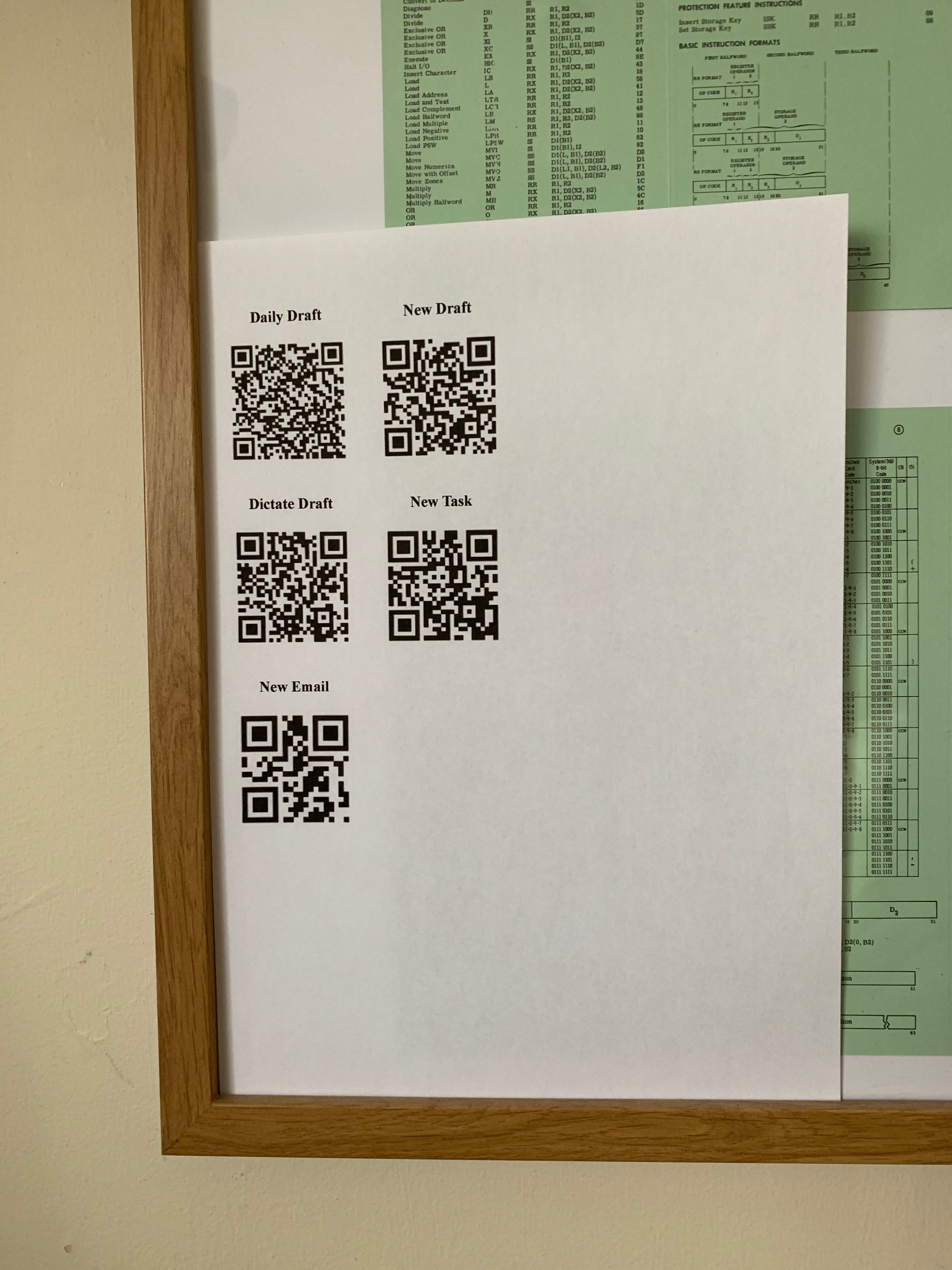
My idea was to print a sheet of QR codes, that I could stick to the wall. Here is an example one:

Stephen Millard kindly wrote a Shortcuts action to create this from a list of items. Each item consists of two elements:

  • The printed name. e.g. “New Draft”
  • The URL to invoke to run the action. e.g. “drafts5:///new”

(His code confects an HTML table and converts it into a PDF. I then printed that.)

One thing to note about this is that – if you want a hard copy – any change necessitates printing another sheet. While it’s possible you might display such a grid on e.g. an iPad I would think that a rare case.

You can get Stephen’s sample action from here. You will need to edit the first step for your own actions. And you will need Apple’s Shortcuts app to run it.(It’s free and only runs on iOS and should be regarded as a standard app in iOS 12.)

The best QR Code reader I’ve found – in terms of being able to invoke a wide range of actionable URLs – is Qrafter Pro. And opening URLs is the key point, as I’ve already said.

I got this to work nicely, but I’m not sticking with it. So I won’t be buying a laminator.

NFC Tags

A NFC tag is a very thin piece of electronics – that can be read by placing an NFC reader within 4cm of it. In fact NFC is at the heart of contactless payment systems and its use is very similar. You need an NFC-enabled device to read it – which the latest iPhones are.

Just recently Contrast updated their Launch Center Pro app to include background NFC reading – as a trigger for automation.

I’ve had Launch Center Pro (LCP) for a number of years – and it’s one of the best ways of confecting “actionable URLs” (as Stephen called them).

What’s new is being able to read NFC tags in the background. This means you tap on the tag and it launches an action without actually having to open the LCP app first. (But you do have to unlock your phone.)

But these are specially encoded tags, which cost about £1 each. Here’s one:

As you can see, I haven’t peeled it off the backing paper – as I’m experimenting with precise positioning. It’s actually the one in my home office, and I have others scattered around the house and one in my car2.

They’re very thin and a strip of 5 came in an ordinary letter-sized envelope in the mail from the USA.

Tapping on the office one yields – after tapping on a notification3 – the following menu:

Tapping on one of the items in the menu kicks off the action. They’re all simple actions at this point – and all ones LCP knows directly how to kick off. But they could be the beginning of a complex set of automation. For example, there might be one to set me up for writing a blog post, or for starting my day4.

Unlike printing a QR code grid, I can edit this menu any time I want. Indeed I’ve added actions to each of the 4 NFC tags I’ve deployed so far.

There’s a cautionary tale worth noting here. You see the Sonos item towards the bottom of the menu? All I can do with the Sonos app is open it. I wanted to be able to select which Sonos speaker to select – but the Sonos App has not been enabled for that. The lesson is you can only automate what the app lets you.

Conclusion

So it’s been interesting to experiment with two technologies that allow you to wave a phone over a QR code or tap on an NFC tag. (In case you didn’t get it, the “Automation On Tap” title refers to tapping on an NFC tag.)

I prefer the NFC implementation to the QR code one – though the latter is available to many more people. I do have some curation asks for Contrast, when it comes to Launch Center Pro. A few of them are:

  • The ability to clone the action list associated with a tag – onto another tag.
  • The ability to include a list of actions as a single item in another list.
  • Being able to resequence a list of actions. (Perhaps I already can but I couldn’t figure out how to.)
  • Cascading menus of actions – which I have figured out how to confect in both Shortcuts and Drafts.
  • Sharing a list of actions would be nice.

It’ll be interesting to see if Contrast bite on these – now they have some real users. And these WIBNI5s are an indication of enjoyment and value, rather than frustration.

I would also expect that similar things exist for Android – at least that NFC background readers were available for high end phones. I’d be extremely disappointed to think that QR code reading and creation apps weren’t available on Android.

And, as you might expect, it’s been good clean fun playing with the technology.

Now, back to work – which is also good clean fun. 🙂


  1. Or, in the case of something like IFTTT, off the device.

  2. As I’m due to change my car soon it’s floating around the driver console and will probably get lost. On the next car I’ll probably find somewhere permanent to stick it.

  3. This additional step is necessary, according to the iOS security model.

  4. Yes, I know there’s one called “Start The day”. Right now it just kicks off an action – via Shortcuts – to open Omnifocus at today’s task list. It also runs on a timer in the morning – but again the iOS security model requires me to tap on a notification to run Lots of us wish there were an iOS equivalent of crontab that didn’t require extra interactions.

  5. Wouldn’t It Be Nice If …

DDF TCB Revisited

(Originally posted 2018-12-11.)

I seem to spend a lot of time working with DB2 DDF, and it’s no wonder: Many modern applications accessing DB2 are built using it, whether through JDBC 1 or some other connective software.

This post is a by-product of a serious customer situation with DDF Performance, which I don’t intend to go into. As I say, it’s a byproduct, not the main event.

Before I continue, I have a small correction to make, which is highly relevant to this post: In DB2 DDF Transaction Rates Without Tears I labeled the authorisation unit of work as an SRB. In fact it’s a TCB.

A Brief Recap

SQL processing via DDF is done under an Enclave SRB. But before it starts, and at thread termination, code is run under a non-Enclave TCB. I’ve bolded these terms as they’re important for the discussion. In DB2 DDF Transaction Rates Without Tears I talked about classifying these enclaves, using WLM. This post, however, isn’t about that. I’m more interested in the non-Enclave TCB CPU time.

And, throughout this post, I’m referring specifically to the DB2 DIST address space. Hence the use of address space instrumentation.

zIIP Eligibility

We’ll return to this later in this post but it’s worthwhile talking about zIIP eligibility now.

It’s only the enclave portion of CPU that has any zIIP eligibility. The non-enclave CPU portion has no zIIP eligibility.

In this post, and with the examples I’m using, there is no zIIP-on-GCP. That simplifies things – and happens to be the truth in these cases.

CPU Numbers

To be able to continue this discussion we need to talk about CPU time. So let’s do so. Our source will be SMF 30 Interval records (subtypes 2 and 3). Specifically:

  • SMF30CPT is the Preemptible Class CPU
  • SMF30ENC is Independent Enclave CPU
  • SMF30CPS is Non-Preemptible CPU (SRB)
  • SMF30_ENCLAVE_TIME_ON_ZIIP – Independent Enclave CPU on zIIP
  • SMF30_TIME_ON_ZIIP – CPU on zIIP

This, I’m sure you’ll recognise, is quite a sophisticated set of numbers. But it’s only a subset of those in SMF 30. And, for less exotic address spaces, most of this sophistication isn’t needed. “Less exotic” includes batch jobs.

A Tale Of Two Customers

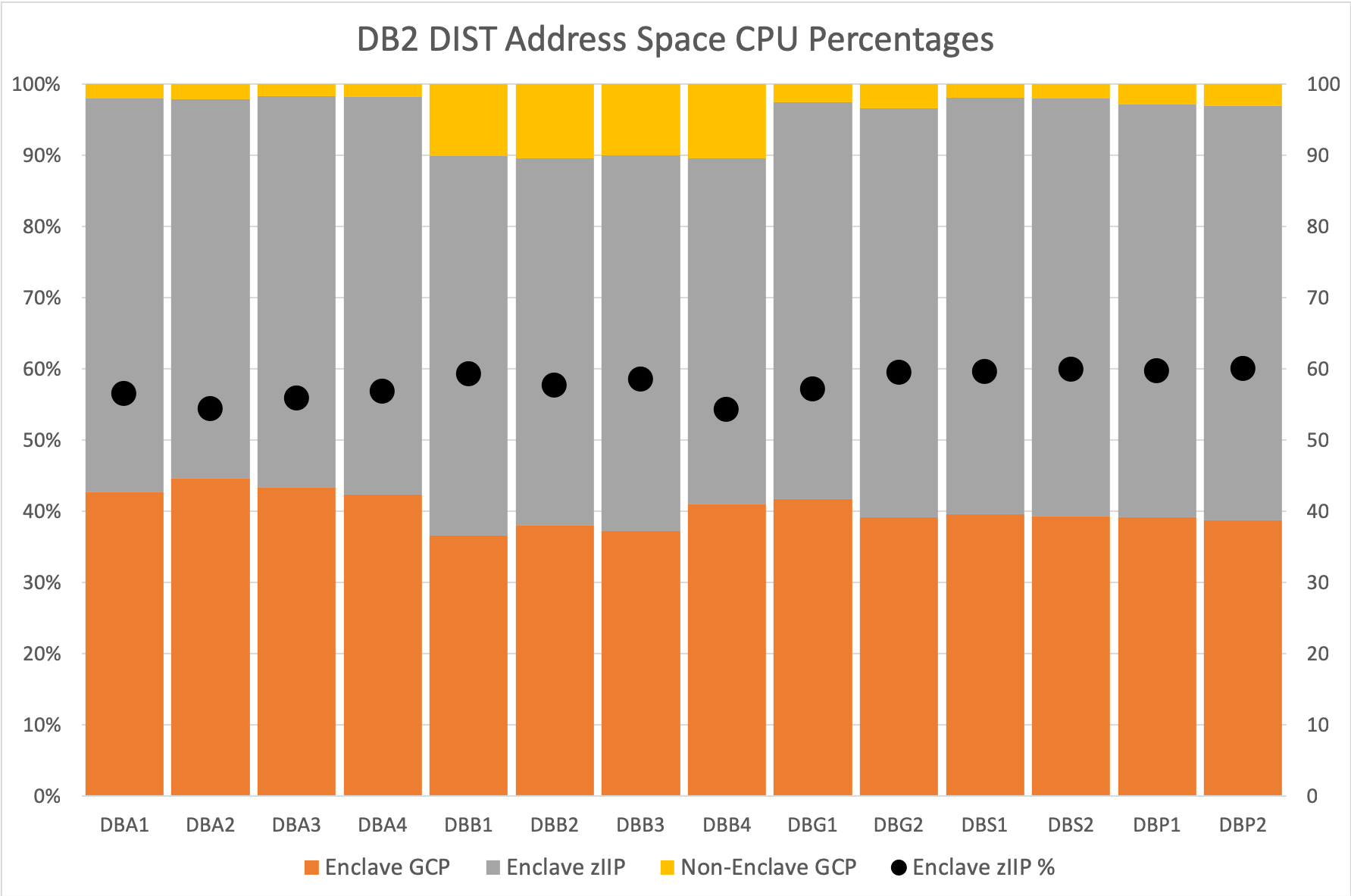
The “meat” of this blog post is how these numbers play out in practice. The following graph incorporates data from two customers I know well, each with multiple DB2 datasharing groups.

I’ve summarised the numbers over an eight hour shift. I’m primarily looking at two things:

  • Percentage zIIP eligibility
  • Distribution of CPU between the various types of work units

These customers show quite diverse DDF behaviours; Each datasharing group is quite different, even within an individual customer.

I’ve, as you might expect and hope, obfuscated the names somewhat:

  • Client A has two datasharing groups: DBAx and DBBx – being the members
  • Client B has three datasharing groups: DBGx, DBSx, and DBPx

I’m showing percentages of the total, rather than absolute values. I think this tells the story better.

zIIP Eligibility

In both these customers, and they weren’t particularly chosen for this, the processors are z13 7xx models – so the zIIP speed is the same as the GCP speed. (This post isn’t about normalisation, or it’d be a good deal longer.)

It’s only the enclave portion of the CPU that has any eligibility. And for these zIIP eligibility is on and individual thread basis: A thread is either eligible or it isn’t.

The line in the graph – or rather the round blobs – shows zIIP eligibility hovering just under 60% – across all the DB2 subsystems across both customers. (One of the things I like to do – in my SMF 101 DDF Analysis Code – is to count the records with no zIIP eligibility.)

As the folklore suggests you should get around 60% this all seems normal.

CPU Distribution

This is the bit that got me going in the first place: I’ve always asserted that the non-enclave TCB time should be small.2

But in the case of one of these datasharing groups that wasn’t the case: Looking at the DBBx members in the graph you can see that their non-enclave TCB time on a GCP is around 10% of their entire CPU.

You could argue that this datasharing group is out of line with the others. I don’t want to make that argument; There’s some variability between members and datasharing groups as a whole.

An obvious question is: “What causes the variation?”. Most of the code that’s run on the TCB before the transaction hops on the enclave SRB is authorisation.

One clue is that DBAx members are long running threads that persist across many DB2 commits 3. DBBx members have shorter-running threads that don’t. So we might expect the latter to go through authorisation more often. It could also be that each pass through authorisation is more expensive. Further on that point, it could be that each pass through authorisation is more expensive relative to the SQL processing.

At this point I’m speculating. But I would want to know why one set of subsystems behaved differently to others.

What Do I Conclude?

First, not all DDF environments behave the same, even within a customer.

Second, SMF 30 is a valuable tool for understanding something about a DB2 subsystem’s DDF work. It’s worth profiling in the way I have here, along with what I described in DB2 DDF Transaction Rates Without Tears.

And there might be value in drilling in to the data, below the shift level. Perhaps next time I have a DDF situation I will.

And, out of the corner of my eye, I see a customer with significantly less than 60% of Enclave CPU being zIIP-eligible. Interesting…

As Robert Catterall points out in this blog post non-native stored procedures could cause this. I’m just wondering where the CPU gets clocked back to – in SMF 30 terms.


  1. Java connecting – using Dynamic SQL.  ↩

  2. A corollary of this is that one can usually blithely say “60% of DIST should be zIIP eligible” rather than the more qualified “60% of DIST Enclave CPU should be zIIP eligible”.  ↩

  3. A DB2 commit ends a transaction but not necessarily the connection.  ↩

Mainframe Performance Topics Podcast Episode 21 “Fits and Starts”

(Originally posted 2018-12-08.)

We released this episode a few days ago. But I only got round to writing this post today, 5 days later. That’s because I (and probably half of our listenership 🙂 ) were involved in a rather urgent piece of customer business. There are some learning points from that one, but that’s for another day.

So it goes, indeed.

I’m continuing to experiment with recording techniques – to minimise noise (and hence distortion caused by heavy noise removal). Hopefully this one is better.

The Performance topic was from a real live, very recent, customer situation I had a lot of fun with.

The Topics topic we had a lot of fun making. It seems the Apple versus non-Apple thing we have going works well.

Nobody has mentioned chapter markers yet. If you get to see them let us know how they work for you. In this episode there’s an extra one – which some of you will appreciate… 🙂

Anyhow, enjoy the show!

Episode 21 “Fits and Starts”

Here are the show notes for Episode 21 “Fits and Starts”. The show is called this because we talk about fitness devices, and the Performance topic that had work submitted after a one minute hiatus.

Where We’ve Been Lately

Marna and Martin have been to GSE UK Annual Conference Nov 5-7 in Whittlebury, UK. Great conference!

Feedback

  • We’ve received feedback from a New Zealand listener requesting a GDPS topic. Good idea, and we’ll look into it! Martin is still playing around with a gentler stereo effect, in response to two listener comments. We hope audio is improving, by using Ferrite.
  • DocBuddy 2.2.1 for iOS and Android is available. The levels are the same between the two platforms, and yet it appears the functional content is different.

What’s New

  • z/OS V2.3 Enhancements
    • The z/OSMF Sysplex Management task is enhanced by the PTF for APAR PI99307 which is PTF UI58355 on V2.3 so you can modify sysplex resources.
    • A new z/OSMF plug-in called the zERT Network Analyzer is now available to visually determine which z/OS TCP and Enterprise Extender traffic is or is not cryptographically protected in z/OS V2.3 with APAR PH03137.

Mainframe: SMF Recording of APF Modifications

  • Post-IPL dynamic APF changes are reflected in SMF 90 Subtype 37
  • A lot of the function is in z/OS V2.2, with these fields in the SMF record:
    • Function: Add, Delete, DynFormat, StatFormat
    • Was the update via SETPROG, SET PROG, CSVAPF
    • Parmlib member suffix for the SET PROG case
    • Data set name
    • Volser
    • Time of update (STCK)
    • Jobname
    • Command Scheduling Control Block (CSCB)’s CHKEY field
    • Console ID of issuer (-1 for CSVAPF)
    • Utoken of issuer
  • More in z/OS V2.3:
    • The RACF UTOKEN is stored in its “unencrypted format”
    • The UserID within the UTOKEN is at offset x‘98’ in the data
    • The console name is provided at offset x’A8’
    • PROGxx supports APFSMFALL:
      • When specified, the SMF record includes information about updates that are “already in the correct state”. Defaults to initial behavior of not placing “no change”cases in the SMF records. The record identifies this situation by a bit: SMF90T37_AlreadyAsNeeded –the x‘01’ bit in byte SMF90T37Flags (offset 1)
  • Triggers when post-IPL APF changes dynamically: PROGxx: APF ADD …or APF DELETE … SETPROG APF,ADD,… or SETPROG APF,DELETE,…
  • Ensure to collect by setting in SMFPRMxx type 90 subtype 37 record
  • Presumably there’s not much overhead, as it will be produced when changes happen (which is probablyl not often).
  • Auditors will probably want this

Performance: An interesting Db2 DDF case

DDF stands for Distributed Data Facility. DDF is how you get to Db2 from outside the LPAR, and with a Type 4 JDBC driver if the java application is local.

Central to Martin’s DDF work is some analysis code to process SMF 101 DB2 Accounting Trace.

A customer complained their DDF application stopped dead one evening – for 1 minute. It was an application serviced by a 3-way Datasharing group. The customer sent SMF 101 data from all 3 members for 3 hours around the stoppage, and for 3 hours the previous evening for a presumably “good behaviour”.

Martin plotted application statistics at a one second interval level – across both days. Lots of data points: 6 hours x 3600 seconds is a lot of data points – 21,600.

Excel was frustrating – as ever! (Martin thinks he’s getting better at this but the swearing hasn’t diminished and it’s despite, rather than because of Excel.)

He plotted the transaction ending rate for each member.It showed sloshing (moving of workload to lightly used system to the point of it being too busy) but much more:

It showed a 40-second stoppage the evening they hadn’t complained, making the 1 minute threshold interesting as a number.

But why did the app stop?

Theory number one is that the transactions elongated. They weren’t elongated enough to support that explanation.

NOTE: SMF 101s are written at transactionending / commit not on an interval basis.

He looked more at the in-DB2 time components, and there was not much “Not Accounted For” time – typically CPU queuing.

Martin “zoomed in” to a much shorter time range . When transactions started again they were elongated, and it that was due to the clustered arrivals in clearing the backlog.

The best theory is something external stopped transactions arriving.

Further he thought there could be “near misses” many times, just short of the 1 minute mark. Martin speculates an external monitor alerted or standby process kicked in – based on a 1-minute threshold.

After transactions started coming again there were spikes in transactions arriving every minute. The speculation is this might be the middle tier doing something on a 1 minute basis: Maybe retries of some sort?

The key learning point from this experience is that drilling down well below the RMF interval can help, and you can see sloshing and routing behaviours.

NOTE: With SMF timestamp granularity you can go to 100th of a second granularity, but that’s a lot of data points!

…and you wouldn’t get many transaction endings per data point, either. (100 transactions per second = 1 per 100th, so it would appear “lumpy”.)

Topics: Fitness Tracking

  • Why are we doing this? Nosy about data, wanted to get fitter, and wanted to lose weight.
  • Marna uses a Fitbit Charge 2.
    • Key features: sleep analysis, step counts, heart rate.
    • There is a Fitbit Charge 3 coming soon.
    • Fitbit app for the Android: calculates floors, miles, calories, sleep analysis, across timescales – day, month, overall, etc and compares with age bracket.
  • Martin uses an Apple Watch, and used to have a Fitbit.
    • He wanted the Watch for other reasons: for health a few months ago, and all of the above – except for sleep tracking.
  • Marna gets employer incentives, to help with health care cost reduction.
    • However, IBM and health insurance company has the data.
    • Fitbit links to a “Vitality” website, but asked for permission.
  • Martin has been successful, as he hasn’t failed to close his rings for 3 months, for the Apple Watch. This makes him obsessive.
    • Uses iOS Overcast podcast player to send podcast episodes to the watch.
    • Runs with just the watch and AirPods. Listening to podcasts keeps me going – whether running or walking.
    • He has lost a considerable amount of weight! Cardiac situation much better, lowered resting heart rate, faster recovery from exercise, and clothes fit better.
    • There is plenty of data, and some of it is alarming.
    • Once you start you want to keep going, and you could become obsessive.

Customer requirements

  • z/OSMF supplied ftp profiles need to be GDPR compliant
    • z/OSMF supplied ftp profiles can’t be modified to require passwords (per GDPR compliance) and can’t be removed. They are useless now and confusing, as they can’t be removed and can’t be modified.
    • Adoption of z/OSMF Problem Management is difficult enough with the additional confusion of ftp profiles that no longer work and can’t be modified or removed.
    • IBM update for requirement: We take this as the ability for a customer to remove the IBM supplied profiles that they don’t want to use such as profiles that don’t require a userid and password. Martin thinks that we take GDPR pretty seriously, so this sounds reasonable in that spirit.

Places we expect to be speaking at

  • Milan, 27/28 November at an IBM technical conference.

On the blog

Contacting Us

You can reach Marna on Twitter as mwalle and by email.

You can reach Martin on Twitter as martinpacker and by email.

Or you can leave a comment below. So it goes…

Appening 7 – Ferrite Audio Editor On iOS

(Originally posted 2018-11-10.)

I’ve moved from editing audio on my Mac with Audacity to editing it on my iPad with Ferrite. So I thought I’d give you my impression of Ferrite. And this is an early impression.

In some ways I’m as much interested in encouraging people to record as anything else. The more voices we hear, particularly Mainframe voices, the better. So, the lower the barrier to entry the better. Having said that, Audacity is free and Ferrite isn’t. But, if Ferrite is usable, the advantages of editing on a tablet or phone are obvious: You can do it anywhere, even at 35,000 feet.1

My use case is voice, specifically podcasting. So I’m not making any claims about recording music and editing it on a tablet.

One other thing I should mention at this point is I’ve got the best iOS editing environment: I have a 12.9 inch iPad Pro and an Apple Pencil.3

Chapter Markers Were A First Step

A while back we introduced chapter markers into our podcast episodes. The idea is you could skip to a specific spot in the podcast episode. A secondary effect is that parts of an episode would display on things like podcast clients with specific graphics. I’ve seen this happen on iPhones and on in-car displays. Apparently this is much less of a thing with Android than iOS, but I can’t help that.2

I regard chapter markers as a professional touch; I’m telling myself our podcast series is useful and in fact the listening numbers suggest that is so. So doing it reasonably professionally appeals to me. I’m not actually convinced it’s a good thing you can skip my “Performance” topic, or even the “Topics” topic. But never mind, I think chapter markers are good.

I mention chapter markers because that was the first thing that drew me to Ferrite, some months ago. I wasn’t able to add them in Audacity. So my editing workflow was to edit and assemble the pieces of an episode in Audacity and transfer it to Ferrite to inject the chapter markers. And then, of course, to transfer it back.

Ferrite makes this pretty easy:

  • I move the editing cursor – by dragging it – to the spot where a chapter should begin and pull up the chapter marker editing dialog. I add a chapter marker there.
  • As part of that I edit the chapter name. (Ferrite offers “Chapter 1” etc – and I want something like “Intro” instead.)
  • I pull in the chapter marker graphic from a folder in Photos. These are all based on the blue background to the podcast series graphic Marna created. With my limited artistic skills I drew a foreground in white against that blue background. I’m reasonably happy with the result.

So that was my first foray into Ferrite on iOS.

Taming Stereo Was The Second Big Step

Prior to Episode 20 I edited the podcast with a 100% left/right stereo separation. Some people didn’t like it. I like stereo but I was inclined to agree this level of stereo separation was a bit harsh. But it was cumbersome to reduce the stereoscope in Audacity. In Ferrite this is ridiculously easy: If I have a pair of tracks I can use the simple controls for each track to place it wherever I want on the stereoscope. These are simulations of rotating knobs. So I chose 30% left/right as a gentler effect. I would’ve preferred to be able to type in “+30” and “-30” or some such.

The effect works and people seem to like 30% better than 100%. It’s much less harsh.

And, if I wanted to, I could explore more stereo effects.

The question, though, was: Should I continue to edit on the Mac with Audacity, just using the iPad for taming stereo and adding chapter markers? Or should I move all the editing to the iPad? Either one requires me to move the recordings at some stage to the iPad and back again?4

It all comes down to the editing experience.

The Editing Experience

I expected a learning curve – as Ferrite does things rather differently to how Audacity does them. So I set out to edit the three main topics in Episode 20 with Ferrite, learning as I went. That was the right thing to do as you really can’t learn a new tool like Ferrite without a real project to work on. As you might expect, the first topic to be edited – Performance – was slow and painstaking. But I got faster, less error prone, and slicker through these three topics.

I can’t claim Ferrite is faster than Audacity – yet. I don’t know if it will ever be. But all I really want is for it to be effective and quick enough. I don’t think the speed of the iPad is a significant factor. It’s much more about the user’s productivity.

I would also say that if you haven’t edited audio before you might find Ferrite easier than I have. I had to unlearn some habits I’d learnt in Audacity. The paradigms are slightly different.

Noise removal was actually easier with Ferrite: You just ask it to remove noise. Audacity wants to collect a noise sample – which you might not be able to furnish.

Using the Apple Pencil provided precision that a finger wouldn’t. To gain that level of accuracy you’d have to zoom in more than I was comfortable with.

One thing I learnt quite early on was to change the setting for what happens when you snip a piece of audio in two. By default it keeps both snippets selected. I changed the setting to deselect everything. That worked better for me.

A nice function was Strip Silence. Because Marna and I don’t tend to talk over each other this function created distinct snippets of her and me. These I could “punch out” to left and right – using the fragments created by Strip Silence. I suppose if we were prone to talking over each other we could punch out those snippets to a third track placed in the middle of the stereoscope. When we have guests we can do just that as well. I like putting guests in the middle.5

Rendering the final (MP3) audio is a little slower than it was on the Mac. This doesn’t matter very much as I’m not actively watching it.

Conclusion

I count the move to Ferrite on iOS a success. It means I can edit audio without having to pull out a Mac – which means I can do it in more places. I find Ferrite very usable, now I’ve got used to it. It also has some functions that weren’t available to me before. Already, adding chapter markers (including graphics) and adjusting the stereo are things I wasn’t able to do before.

I haven’t explored effects like ducking or panning. These are built into Ferrite. I don’t know that they’re actually useful for us. But I might play with them. They seem to me the basis for some good audio gags – which is something I thought I wanted to do before we even got started with podcasting.

In cost terms, Ferrite isn’t free. To get all the functions is about 20 US dollars or pounds. I consider that a good investment, particularly as I’ve spent rather more on headphones and a microphone. Which I now have to work on to get the audio quality up. To that effect I’ve bought another recording tool that works with Skype – in the hope it produces better audio. It’s called Piezo and is developed by Rogue Amoeba – who have a good reputation for such things.

I’m about to play with Ferrite’s Templates support – which might actually save a lot of time and introduce consistency. So I might reprise this, when I think I know what I’m doing.


  1. Actually, I haven’t done that yet. I think it’s feasible, though noise issues might defeat you. 

  2. To be fair, I’ve no evidence that it isn’t just me that can see the chapter marker graphics. 

  3. This isn’t quite the best case: 12.9” iPad Pros have been released since mine. And a newer Apple Pencil has been released. But my rig is the biggest screen and pretty much the most functional setup. Doing this without an Apple Pencil on a small phone would be a pain. 

  4. By the way, I find Airdrop a very convenient mechanism for moving audio between Mac and iPad. 

  5. Generally I want our podcast episode to feel like the conversation it is. Adding a guest should just add to that feeling. 

Three Early SMF 89 Results

(Originally posted 2018-10-31.)

Recently I wrote code to “flatten” SMF 89 records – in REXX.1 Now I want to share with you some of the insights I’ve acquired from early experiments with the data.2

There are three things I’d like to share with you that you might not realise you can get from SMF Type 89. But first a design standard I didn’t mention before.

CSV Files That Are Sortable

When processing data it’s useful to create a series of tables. And so it is with SMF. There are two things I’m aiming for:

  • Ability to pull into Excel – which suggests CSV format
  • Ease of processing with DFSORT or ICETOOL

These two aims are not mutually incompatible, it turns out. So here’s how you do it:

  • Pad all your fields so they are fixed width. This makes it easier for DFSORT to find the fields – as fixed width supports fixed positions.
  • Wrap character stings in double quotes.
  • Splice fields in a row with commas.

If you do those things you can process the data with a wide variety of methods – whether on z/OS or elsewhere. When I’m flattening SMF 89 I follow these rules; It’s not difficult in REXX, with right() and left() functions being your friend.

By the way what I’ve just said doesn’t just apply to SMF; It’s relevant to any tabular data.

Three Insights

Here are three things I (and you) can see – without much difficulty – from SMF 89.3

zNALC Or Not zNALC?

When examining software economics, for example, it’s important to know if an LPAR is operating under zNALC rules. zNALC is a successor to NALC.

With NALC you had to have the LPAR follow a strict (IBM-specified) naming convention. With zNALC you don’t. Operationally it’s much easier.

In SMF 89 there is a flag for whether the LPAR is zNALC or not. Maybe this one isn’t particularly useful if it’s your systems we’re talking about. For consultants and people like me it’s a different matter, of course. But the standard homily applies: “Systems should be self documenting.” In this case they are.

Actually, in my test data sets, this is a little hard to verify – as none of them contain data from zNALC LPARs. With each new set of customer data I’ll run a query until I find a zNALC LPAR. Then I’ll incorporate the test into my formal code. I quite like the idea of being able to test things. 🙂

MQ Queue Managers And DB2 Subsystems

Believe it or not, you can list the MQ and DB2 subsystems by LPAR – using only SMF 89 Subtype 1 data. You don’t need to use SMF 30 – which I have been using up until now just for this purpose.4

The key here is to look for Usage Data Sections with Product Name “DB2” or “MQM MVS/ESA”. The Product Qualifier field yields then name, perhaps slightly encoded. Decoding turns out to be easy – as you’ll see in a minute.

The Product Version field tells you what release the subsystem is running at.

Here is an example:

DB2 - All at 11.01.00
=====================

ASYS 
    DBG1
    DBR1
    DBS1
    DSN
BSYS
    DSNF
    DSNH
    DSNJ
CSYS
    DBG2
    DBP2
    DBR2
    DBS2
DSYS
    (none)

MQ - All at V8 R0.0
===================

ASYS
    EDIP
    ODSP
    ODSH

This might not be pretty – and before it hits Production it will be much prettier – but it gives useful insight:

  • All the DB2 subsystems are V11 and all the MQ queue managers are V8.
  • MQ only runs on ASYS.
  • DSYS had neither DB2 nor MQ.
  • You might be able to spot a meaningful naming convention – but this is not the technique for discovering Data- or Queue-sharing groups.

If you were a SAP installation, for example, you might be glad of a report based on SMF 89 rather than SMF 30.

MQ Queue Manager CPU By Time Of Day

This is a more surprising result: For MQ you can see the CPU in MQ by time of day. The following graph is from a real customer. I teased it on Twitter the other day. Or rather a simplified version of it.

The graph is for a single MQ queue manager across a seven-day period.

I mentioned decoding the Product Qualifier field above. For queue manager MQ01 this field takes values including:

  • MQ01
  • MQ01CHIN
  • MQ01BATC
  • MQ01RRSB
  • MQ01CICS

These enable me to plot a graph such as the one above, using the TCB time in the Usage Data Section. I’ve omitted a series “Other”. In this data Other contains zero TCB time. I calculate Other by summing up all the MQ-related TCB time where the Product Qualifier begins with “MQ01” but isn’t in this list. (I can figure out what it is and create another series for it, obviously.)

So, to what the graph shows. (Or rather what I think it shows – and you might form your own view.)

  • There is a fairly regular daily pattern.
  • RRSB is more pronounced on Tuesday, 9th October.
  • Early on Wednesday, 10th October Batch is much more pronounced.
  • Later the same day CHIN becomes much bigger.

CHIN, by the way, is MQ traffic to and from outside the z/OS LPAR. We don’t get from this data (or SMF 30) PUT and GET rates. Nor is why CHIN is unmatched by some other connection explained. But this is enough to alert you to the fact something happens, and to talk to the MQ experts in the installation.

Conclusion

I think these three insights are useful, if not a little surprising. It encourages me to work further with the SMF 89 data. Maybe it encourages you, too, to look at this record. And they weren’t hard to get. There’a more to come, I suspect.


  1. If you want to know how to process SMF in REXX see Rexx’Em

  2. There might well be more later, as I gain experience with the data. 

  3. And I’m actually not fussy about how you process the data; I just want you to know you can glean this stuff. 

  4. I very much want customers to send me (and learn how to process for themselves) SMF 30; There’s tons of insight to be gained from it.