z Systems Technical University, Dublin 18-22 May 2015, Slides

(Originally posted 2015-06-02.)

As most people know, I thoroughly enjoy conferences and learn a lot. The Dublin one 18 – 22 May was no exception.

It was great to meet up with old friends, connect with potential new ones and have a couple of compromising πŸ™‚ photos of myself and friends to prove it. πŸ™‚

But you probably don’t care much about that – unless you’re in those photos. πŸ™‚ So here are the slides from the three presentations I wrote:

Each of these has been updated in some way, so let me say a very few words about them…

DB2 Through My Eyes

This one is the new one for this conference. It was trailed early in its life in Proposed “DB2 Through My Eyes” Presentation and got its first outing in Dublin. I think it went well. So well in fact that I’m wondering about doing something similar for CICS. [1]

Time For D.I.M.E?

This is an update on one I’ve had around for a while – and which I honestly thought I’d blogged on. It’s about whether “laterzEC12, early z13” era is a good time to be embarking on a Data In Memory Exploitation (DIME) project. [2]

zIIP Capacity Planning

Updated for z13 and Simultaneous Multi-Threading (SMT) with some slides borrowed from Horst Sinram.


  1. Well it wouldn’t be all that similar.  ↩

  2. Hint: It is. πŸ™‚  ↩

The Unfit Bit? :-)

(Originally posted 2015-05-15.)

I’ve put off writing this post for a while. Largely because it might sound like boasting. The truth being I have very little to boast about.

But here goes anyway.

I’m a fitful [1] exerciser. It’s not that it’s painful but that it’s not interesting. I’ve never found a sport I enjoyed watching nor partaking in.

But with that characteristic it’s been a struggle to take any exercise at all. But I do run, or at least for a few weeks at a time. And I should, cynically, put quotes around the word “run” as many people would laugh at my (lack of) speed.

I’m sure many people can relate to this.

A Vicious Cycle?

With my sedentary lifestyle I’ve put on weight over the years. I like to beat myself up with the thought “it’s OK to lose your hair, have it turn grey, become wrinkly, etc as they’re natural parts of aging but to become unfit or gain weight is not OK as that’s definitely your own silly fault”.

Yes, I’ve lost significant amounts of weight on occasion, run for weeks on end, and become fitter. But it has been cyclical – and I’m usually worse off at the end of the cycle than at the beginning [2]. For example at the peak of this last cycle I was 2lbs heavier than at the peak of the previous one [3]

This is depressing but some good has been done. Consider what would happen if I didn’t try to address the issue: I assume I would put on more weight and become less fit. Neither of which would be good.

I’m sure plenty can relate to this, too.

But Enough Of The Self-Pity. πŸ™‚

In late 2013 a friend – by her example – finally persuaded me to buy a Fitbit Flex. I only use it for counting steps and time spent exercising. (I really didn’t need it to tell me I don’t get enough sleep as that just makes the problem worse.)

The default daily target is 10,000 steps. On a month-by-month basis I’ve been fitful in achieving that.

How do I know that? Answer: Because it tracks, records and syncs to their servers the step attainment.

Which is where the story might get more interesting – or at least more geeky. πŸ™‚

I’d wondered about how to get the data out of the Fitbit site. Apparently there’s an API but it’s not a high enough priority to work out how to use it.

However IFTTT has a Fitbit channel that lets you do things with the data. The one I use is Add Fitbit Summary In CSV Format To Dropbox.

It doesn’t produce the data in quite the shape I want it. But as it’s CSV I expect I’ll be able to do useful things with it.

Instrumented Selfish πŸ™‚

The term “instrumented self” has been widely used. I’m concerned here about the behaviours and attitudes being instrumented induces. A few silly examples:

  • If I take my Fitbit off for any reason I’m loth to take any steps at all until I put it back on again.
  • If I’m a few tens or hundreds of steps short of my daily target I’ll start (apparently) stomping around the house [4] until I make my target.
  • I’ll park the car at the furthest corner of the car park, or deliberately refuse a lift (or to take the lift) – regardless of who’s with me.

In short, being instrumented has the potential to turn one into an overly-goal-oriented sociopath. [5]

It might also have another undesirable effect: What if I fail? Today I define “fail” is if I ever don’t make my daily (or weekly) target. I might ought to redefine it as “not make target for more than, say, 1% of days (or weeks).” [6]

Planning A Head

No, that’s not a stray space.

What I’ve found is that I’ve tended to plan my day rather better – to take advantage of “steps” opportunities. I’ve also had to “shape my head” to accept e.g. walks before breakfast (sometimes in cold climes) and running in the rain.

On a longer term basis I’ve learned there are going to be really good weeks and not so good weeks, and how to plan for them. For example, this week I have few constraints but next week I’ll be at a conference in Dublin. So this week I’ve taken longer runs and a few long walks. But next week it’s going to be a different set of opportunities. But I’ll definitely pack my running kit, even if Dublin has the second worst pavements for running on. [7]

So the personal reprogramming – if you can call it that – has been interesting. So has the loss of ability to kid oneself.

Eaten Mess?

What I haven’t touched on has been diet. Fortunately I like healthy food a lot – such as vegetables and salad. I’ve never had a problem eating my greens. πŸ™‚

The trouble is I’ve never had a problem eating the other stuff, too. πŸ™‚

I think a lot of this is psychological. Enough said.

I’m also sure that while exercise creates “calorie budget” it generates a desire for more calories. I doubt I’d be better off not exercising, but it makes you think.

I’m still fitful when it comes to the willpower to restrict my intake. But aren’t we all?

On The Road To No Wear?

You can tell I’m in the mood for a bad pun or two. πŸ™‚

I don’t pretend I’m on my way to a “beach body” (or better). πŸ™‚ What I do hope for is to make progress on weight and fitness, and possibly self-respect. πŸ™‚

I got really fed up (again a bad pun) at Xmas so I upped my steps target to 12,000 a day (from 10,000). With an additional target of no week doing fewer than 100,000 steps.

  • I’ve not missed the 12,000 target since January 5th. (Over 4 months.)
  • I’ve not missed the 100,000 target for nearly 2 months.

And the net of it is I’m now 12lbs below my peak. I don’t really feel fitter but I can tell I am.

But that’s hubris. Here comes the nemesis… πŸ™‚

Probably in the form of some nice Irish (red) beer and eating out every night.


  1. Pun intended πŸ™‚  ↩

  2. At least in weight terms.  ↩

  3. But the previous time peak to peak it was steady, so it’s not all dreadful.  ↩

  4. Probably true of hotel rooms also.  ↩

  5. The original draft said “arse”. You might prefer “ass”. If you are the kind to read footnotes you might be OK with either of these and not mind the, ahem, “frankness of expression”. πŸ™‚  ↩

  6. I don’t think this makes me less guilty of what has been indelicately punned as “musturbation” but it is at least a more realistic absolute imperative – that should get me where I need to go.  ↩

  7. I say second worst because, of course sidewalks in the USA are absolutely the worst thing to run on: Concrete is very hard on the ankles and knees. Dublin just has unevenness.  ↩

Sysplexes Sharing Links

(Originally posted 2015-05-09.)

Just a brief one this time. A customer recently asked me how to detect Sysplexes sharing Infiniband links. [1]

It arose when discussing the information in the new(ish) Channel Path Data Section in RMF’s SMF 74 Subtype 4 record.

The question really boils down to “how do I detect in RMF / SMF different Sysplexes using the same identifiable link”? [2]

My first suggestion was the PCHID field R744HPCP (which we’ll return to presently). Seemed reasonable to me – as it had the word “Physical” in it. What could be more permanent and definitive? πŸ™‚

Other fields in the section with “physicality” are Host Channel Adapter ID (R744HAID) and Host Channel Adapter Port ID (R744HAPN).

My friend Erik Bakker pointed out to me that Infiniband links don’t have PCHIDs but rather Adapter IDs and Port Numbers. If you read no further then the “take home” is to use Adapter ID and Port Number as the link identifiers.

But one mystery remained: Why am I seeing valid-looking [3] numbers in the “PCHID” field?

So I spoke to Dave Surman, who’s generally very helpful in these matters. He said “For coupling links that don’t have a PCHID (namely Infiniband links), the CHSC returns something called a VCHID in the PCHID location. It’s a virtual CHID representation used by the firmware, with no physical correlation.”

CHSC is, of course, the Channel Subsystem Call machine instruction.

Now of course I would’ve known all this if I’d read the following Redbook: Implementing and Managing InfiniBand Coupling Links on IBM System z. Well Erik probably had but, being a Performance guy I unfortunately hadn’t. Section 2.4.2 talks all about VCHIDs.

I was seeing values of hex “07xx” for VCHID in R744HPCP, by the way.

So if there is a moral of the story it’s “you can never get too close to the infrastructure you’re reporting on and trying to tune”. And that’s what a large chunk of this whole blog [4] has always been about.

In case my whole credibility on Coupling Facility links hasn’t been blown away πŸ™‚ you might like these other posts of mine:


  1. The motivation for this is less about Performance and more about documentation, verification, detecting change, trouble-shooting, and “separation of concerns”.  ↩

  2. SMF being, of course, the first port of call for any self-respecting Performance person.  ↩

  3. Who knows what “valid looking” means? πŸ™‚  ↩

  4. I hate it when people say “blog” when they mean “post” (noun, not verb). In this case I definitely do mean the whole shooting match, not just a single post.  ↩

Remember The Milk: Automatic For The People?

(Originally posted 2015-05-04.)

This post is one where I really don’t speak for IBM.[1]

It’s also one that’s firmly in the “Topics” category of “Mainframe, Performance, Topics”, [2] being about the emergent fields of iOS Automation (and Web Automation).

And, while I give Remember The Milk a “could try harder” score I’m actually a big fan of what they do. Like many things I’m a big fan of I think of ways they could do stuff better – and try to make sure such dreams have a practical utility.

Remember The Milk

In brief Remember The Milk is a platform-independent cloud service for managing To Do lists (and lists in general). [3]

It’s not the only one but it’s the one I use on Linux, OS X and iOS. It has an iOS app and a web interface; I use both extensively. You can email tasks (and lists of tasks) into it. You can even set Siri up to add a task to Remember The Milk, instead of to Reminders. You can have subtasks and start and due dates and estimates and notes attached to each task. I mostly just use the end dates at present, though I have a few notes.

Some tasks are recurring and I move the due data manually to e.g. 1 week later when I’ve done it. I also move tasks around anyway, again manually. I also complete tasks – occasionally. πŸ™‚

As a cloud service I can’t put anything IBM Confidential in it, and I won’t put anything sensitive of my own in it.

iOS Automation

Until relatively recently there wasn’t much you could do to automate tasks on iOS, still less to glue them together. Now why might you want to do that? Mostly to enable function that is fiddly, overly manual or slow to do otherwise. [4]

I listen avidly to three podcasts that cover topics relating to iOS and OSX and the first two of these have recently (independently) done episodes on iOS Automation:

Mostly I listen to these while running, though occasionally in the car or on a plane. Usually somewhere where noting down the inspirations I get from them is difficult. πŸ™‚ (I’ve yet to dictate a To Do via Siri while running.) πŸ™‚

My first brush with iOS Automation was with Editorial as discussed in Appening 3 – Editorial on iOS.

Then along came Workflow on iOS, which has some amazing choreographic capabilities, with more apps being manipulated all the time. In a similar vein is Schemes.

And then Drafts – which has javascript (comparable to Editorial’s Python) hove into view. (It’s been around for a while but I’ve only just got into it.)

Meanwhile iOS 8 brought lots of functions, with ability to build extensions for apps. And the ability for third-party apps to add function to the Today screen. (Workflow allows you to build app extensions, for one.)

The Today screen piece is interesting as Drafts as well as launcher apps such as Launcher can launch from there. Launcher apps allow you with a push button to launch apps, in many cases with specific parameters.

Greg Pierce of Drafts fame introduced the x-callback-url specification which launchers tend to use. But it’s not just launchers: All the automation vehicles I’ve already mentioned use them.

Meanwhile, (largely) outside of iOS, IFTTT has web-based automation. I’ve a few workflows which use IFTTT [5] but mostly I’m interested in iOS automation as it doesn’t require the web, nor suffer from any such latency.

Automatic For The People?[6]

But not Remember The Milk.

All I can do is email tasks to Remember The Milk (or SMS to it). I can’t query it. And I can’t open its app with any control.

So I have used the email route:

  • With Launcher and Workflow I can take the clipboard contents and email them as a task – from the Today screen. (I use this for quick thoughts and they end up in my Inbox for later refinement and classification.)
  • With Drafts I have some javascript code that takes a template note and replaces ‘%c’ with a user-provided customer name (generally “Client X”) and emails that to Remember The Milk. (I’ve yet to integrate this into Drafts on the Today screen.)

These work fine but are limited. [7]

Here are some examples of what I can’t do:

  • I’d like, with a single tap, to open Remember The Milk app at the “Shopping List” list. Or “Today” or “Cust Sitns” or whatever. Launcher could do that if RTM supported x-callback-url.
  • I’d like to query a list, take the first item that hasn’t been completed, and kick off some automated action based on it. For example “kick off study” might include automation to create the various topic presentations in Dropbox. (Such as “CPU”, “Memory” etc.) [8]
  • I’d like to automatically mark a task as completed.
  • I’d like to construct a web of dependencies for a project.

But none of these things are doable with Remember The Milk right now. All for the want of some automation capabilities, most notably x-callback-url.

The TaskPaper Alternative

The Nerds On Draft podcast and the support in Editorial persuaded me that TaskPaper might be in my future. If you don’t know what Taskpaper is see Deconstructing my OmniFocus Dependency and The TaskPaper R&D Notebook.

TaskPaper is a text-based Task List format, which can readily be automated and sync’ed across many devices via Dropbox.

Intriguingly, the Sublime Text text editor which I use on Linux and OSX has a plugin – PlainTasks – which allows you to manipulate TaskPaper files. (It also allows you to write plugins in Python. What’s not to like? πŸ™‚ )

But doesn’t this sound a little geeky? πŸ™‚

I’m all for formats that can be read and updated by many standard tools. But I really don’t want to have to assemble too much of the basics myself.

My Challenge To Remember The Milk

So, my challenge (for what it’s worth) to Remember The Milk is: Embrace automation and people will build wonderfully unexpected, valuable, things with your product or your service. And you can be sure I’ll cheer you on. After all I’m in your beta programme. So I would build workflows and I’d definitely publicise the capabilities you build with them, but in a personal capacity.

And that applies to just about any product or service, iOS, Web, whatever. Make it Automatic For The People. πŸ™‚

Which is pretty ironic when you consider iOS devices were conceived as the ultimate in “hands on” machines. πŸ™‚

Breaking News

I just got a Workflow workflow working πŸ™‚ that watches Dropbox for a specific file having contents. I think I can do quite a bit with this, such as if Linux finishes a task this status file can be updated and some Editorial action kicked off on iOS.


  1. I’ve no idea if IBM has a position on iOS Automation, let alone what that would be. Likewise Web Automation.  ↩

  2. See Commatosis  ↩

  3. As examples of lists I keep in Remember The Milk that aren’t “To Do’s” I would cite my “Movies To Watch” and “Contents Of The Garage Loft” lists.  ↩

  4. As a geek I like to do these things anyway, and the iOS Automation community acknowledge it’s quite fun to build some automation out of kit parts.  ↩

  5. One pumps daily FitBit stats to a file in Dropbox. I might write more about FitBit one day soon.  ↩

  6. Yes it is that cultural reference. πŸ™‚ So, lots of apps are automatable through the x-callback-url mechanism and the tools I’ve mentioned.  ↩

  7. Because my mainframe can email with the best of them, I’m considering having it send tasks into RTM. But that’d be pretty gratuitous. πŸ™‚  ↩

  8. An OpenOffice file is a particular kind of zip file I already know how to confect. But I could just use a template.  ↩

Restructuring

(Originally posted 2015-05-03.)

Being about Coupling Facility structures, maybe this should be called “re Structuring”. πŸ™‚

Standing on the shoulders of giants, as I do πŸ™‚ , it is with some temerity that I rethink one of their designs. And it’s only because you might find it helpful that I mention it now.

Since the dawn of time coupling facilities have contained four kinds of structures:

  • Lock
  • Cache
  • List
  • Serialized List (which is really a special form of List)

Our reporting – to a very large extent – has treated these types as the same. Certainly there was one table of structures per coupling facility. But I recently made a simple change to our code – which gives us the potential to do better.

By “do better” I mean essentially

  • De-clutter our structure-level reports.
  • Tailor the reports for each structure type to guide the analyst to better conclusions more quickly.

The former means I can display information to you about your structure without a lot of “not applicable” cruft on the slide.

The latter means I can be more sure of giving you quality advice.

And the simple change? Create a separate table for each structure type for each coupling facility. Then each table need only have information relevant to that structure type.

What’s The Same

There are lots of things that are common to all structure types. Examples are:

  • The name
  • Current size, minimum size, and maximum size
  • Structure Execution Time (R744SETM) – which is the Coupling Facility CPU (not Coupled z/OS CPU)

What’s Different

Here are some examples of things that are specific to a structure type:

  • Cache: Data Element / Directory Entry Reclaims, and Castouts
  • List: Number of list headers
  • Lock: False Contentions and XES Contentions

We saw in False Contention Isn’t A Matter Of Life And Death how False Contention is a Lock Structure specific metric worth keeping an eye on. It clearly isn’t relevant to, say, cache structures.

And keeping an eye on Castouts is, of course, useless for Lock structures.

Conclusion

Hopefully this post, together with False Contention Isn’t A Matter Of Life And Death, shows you why it makes sense to treat each structure type differently.

And with my new “one table per type” code I can do a better job of consulting on Coupling Facility structures.

One Other Thing

Another change I made to my code this week – prompted by a customer – is to my “Structure Memory Pie Chart” code. (I originally wrote about it in Coupling Facility Memory)

In that post I raised the issue of “white space”. This change doesn’t complete answer the question “how much memory is really unhypothecated?” but it contributes a little.

Out of the “Unallocated” pie slice I carve another (again not shaded in) slice: I take the sum of the current structure allocations away from the sum of the Maximum allocations. This I now separately show. This really answers the question "what happens if all my structures go to their maximum sizes? Of course you can reallocate the structures bigger but that’s a much less frequent event and much more disruptive.

(I did the same in my tabular reporting of memory at the Coupling Facility level. So we get real numbers rather than %. (Even more parenthetic is the fact I now show – in this table – memory in fractions of gigabytes if the CF has more than 5GB. It’s a genuine observation that coupling facilities are getting bigger, as they often should.))

As always I’ll “road test” the change in more customer situations. But I’m already pleased to have it as my test customer’s situation showed “going to the max” only used a few percent more of the memory. So they’re close to their maxima and need to contemplate upping some of them.

Commatosis

(Originally posted 2015-04-19.)

Regular readers of this post will have noticed the masthead [1] changing.

I thought it appropriate to replace the zEC12 (and zBX) graphic with the new z13. I’ve also taken the opportunity to weave in a little gag. The blog’s title remains “Mainframe Performance Topics” but you’ll see I’ve injected a couple of commas in the masthead.

These commas make all the difference to the blog’s prospectus but absolutely none to its content. If that’s unclear Venn πŸ™‚ this might help:

As (perhaps non-existent πŸ™‚ ) regular readers know, I write about all sorts of things. I’m not particularly motivated to assert breadth of interest; I’m more interested in writing about what I want to.

In fact it’s not very broad: It’s mostly technically geeky stuff, rather than philosophy or politics. There are places for those (and I use them) but an IBM-provided platform is not the place for them.[2]

I’ve always written about:

  • Mainframe stuff,
  • Performance, and
  • Topics

And now I guess I have to defend my use of the “Oxford Comma”. πŸ™‚ In fact in the graphic it’s more a “Comma Splice”. And now I’m burbling on about commas. So perhaps I do have Commatosis. πŸ™‚

Seriously, I’ve a platform here for writing about whatever technical topics I want. With no constraints imposed on me.

And nobody’s yet said “what on earth are you writing about that for?”

So I’m going to keep writing – and the masthead graphic is perhaps a little more honest.

So I hope you like the new graphic. And enjoy the content.


  1. The graphic at the top of this blog.  ↩

  2. Facebook and Twitter are good examples of places where my more personal side is expressed – but there’s quite enough of me in all the ways I choose to communicate.  ↩

False Contention Isn’t A Matter Of Life And Death

(Originally posted 2015-04-11.)

It’s more like someone rich lighting their cigar with a hundred dollar bill. πŸ™‚

Seriously, this post is about Coupling Facility Lock Structure False Contention and why it matters. It is, of course, inspired by a recent customer situation.

Before I explain what False Contention is, and then go on to talk about its impact and instrumentation, let me justify the title by asserting Lock Contention does not ultimately cause locks to be falsely taken nor ignored. But you probably don’t want it anyway.

What Is False Contention?

Lock structures are used by many product functions, such as IMS and DB2 Data Sharing, VSAM Record-Level Sharing, and GRS Star. As the name implies they’re used for managing locks between z/OS systems.

A lock structure contains two parts:

  • A lock hash table (called the lock table)
  • A coupling facility lock list table (called the modified resource list)

The lock hash table can contain fewer entries than there are resources to manage. The word hash in the name reflects there being a hashing algorithm between locks and lock table entries.

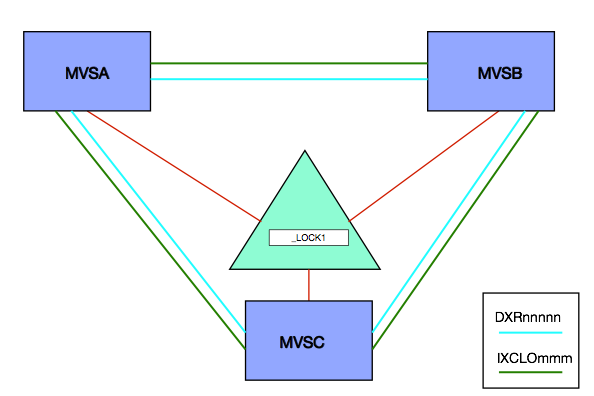
For each lock structure there is at least one XCF group associated with it – whose name begins with IXCLO. For some lock structures the owning software (middleware) has a second XCF group.

When a resource is requested it is hashed to a particular lock table entry. Potentially two or more resources could hash to the same lock table entry. They are said to be in the same hash class.

If it appears a resource is unavailable (the lock appearing to already be taken) XES must resolve whether this is true or not. So XES uses the IXCLO XCF group for the structure to resolve the apparent contention:

  • If this XCF traffic indicates the lock is truly taken this is called an XES Contention.
  • If the result of this traffic indicates this is not a true contention (but rather the result of two resources hashing to the same lock table entry) this is deemed a False Contention.

Statistically, the larger the set of lock resources being managed relative to the number of lock table entries the greater the chance of False Contention.

What Harm Does False Contention Do?

As I said above, False Contention doesn’t distort the management of locks from the point of view of the middleware or the applications.

So its harm is limited to causing additional XCF traffic. The main effects of this are:

  • Higher coupled (XCF address space) and coupling facility CPU.
  • Higher use of the XCF signalling infrastructure, such as Channel-To-Channel (CTC) links and coupling facility paths.

How Can You Detect False Contention And Its Effects?

You can see effects with RMF in both the Coupling Facility (74–4) and XCF (74–2) records.

Coupling Facility

Each lock structure is instrumented in each systems’ 74–4 record. [1] Though some things are common to all systems – such as the structure size – some things are system-specific, such as the traffic from the system to the structure.

In particular, the rate of requests, those leading to XES Contention, and of False Contention are available. Keeping the False Contention rate small relative to the request rate and, even more so, relative to the XES Contention rate is a sensible goal.

XCF

For Integrated Resource Lock Manager (IRLM) exploiters there are two XCF groups associated with the lock structure – the one whose name begins with IXCLO and another whose name begins with DXR. [2]

For the others I’ve worked closely with there is just the IXCLO XCF group. The IRLM case is illustrated below:

You can measure (with SMF 74–2) the traffic in the IXCLO and DXR groups (though the latter has nothing to do with False Contention). [3]

You can, of course, see how much CPU in the Coupling Facility is used to support a specific XCF List Structure. Likewise you can see the effects on XCF CTC links.

Perhaps less usefully, you can measure the CPU used by the XCF Address Space on each system – using SMF 30 (2,3) Interval records or a suitably set up Report Class using SMF 72–3 (Workload Activity). I say “perhaps less usefully” because most of the time the IXCLO and DXR groups’ traffic is dwarfed by that of e.g. DFHIR000 (Default CICS).

How Might You Easily Reduce False Contention?

Generally the answer is to increase the number of lock table entries in the lock structure. The most obvious way of doing this is to increase the lock structure size, though this might not be entirely necessary:

The size of each entry in the lock table can be managed. Its size is dependent on the value of MAXSYSTEM when the structure is (re)defined. A value less than 8 results in a 2-byte entry, whereas 8 to 23 is 4 bytes and above that it’s 8 bytes.

Only a few of my customers need more than 23 connecting systems. But many have a need for 4-byte entries.

You can, with sufficient memory in the Coupling Facility, define a bigger lock structure, so the technique of reducing the lock table entry size is best reserved for when structure space is at a premium.

Conclusion

Practically installations tolerate some level of False Contention, with the concommitant XCF traffic that tends to entail, but generally you want to minimise it to the extent you can.

Hopefully this post will’ve given you some motivation for monitoring lock structure False Contention. And explained how you might deal with it.

Here, by the way, is a very nice blog post from Robert Catterall: DB2 for z/OS Data Sharing: the Lock List Portion of the Lock Structure .


This post brought to you by (NSFW) Loca People which should probably be my theme tune. πŸ™‚


  1. In the case of a (System-Managed) Duplexed lock structure each copy appears separately – though they behave identically.  ↩

  2. The DXR XCF group is used by IRLM to further refine the locking picture. IRLM has a more subtle collection of locking states than XES. This traffic is used to determine whether a XES lock conflict (XES Contention) is a lock conflict from IRLM’s point of view (IRLM Contention. Its volume has nothing to do with False Contention.  ↩

  3. Also perhaps irrelevant is field R742MJOB which gives the address space name of the XCF member, in this case the IRLM address space.  ↩

And Now In Colour

(Originally posted 2015-03-31.)

As you know, we turn data into reports and try to make sense of it. One thing we’ve not done before is use colour in our textual and tabular reports. So here’s what I’ve learnt about how to make B2H use colour.

Our Reporting Process

But first a word or two about how we get these reports.

  1. We collect SMF data into engagement-specific VSAM-based performance databases.

  2. We use canned reporting – driven by parameters – to produce GIFs and Bookmaster [1] (SCRIPT) source.

  3. For our “Job Dossier” and “Batch Suite” reporting we create Postscript and hence PDF documents.

For any other textual or tabular reports B2H converts the Bookmaster source into HTML.

B2H takes Bookmaster Source and converts to HTML.

This post could usefully be read in conjunction with Many Ways To Skin A Cat – Modernising Bookmaster / Script … which discusses some techniques for controlling B2H and handling the resulting HTML.

Why We Want Colour

  • Because it’s prettier. πŸ™‚
  • Because we can highlight things for the specialist to look at.

As our reporting is automatically created I think it would be valuable (and possible) to have the code highlight a few things – for the specialist to take note of.

Some Techniques

Bookmaster itself has very little in the way of colour support, being from the days when colour printers were expensive and scarce. [2]

And I’d really like to – as much as possible – stick to the original Bookie source format. In case we end up going through the scripting process again. But I’m not that hard and fast about it.[3]

So let’s start with what you can do with minimal changes to the Bookie source.

Minimal Change

Let’s start with some legitimate Bookie – which is what your existing text would be. The following would script perfectly well and produce some shading: [4]

:tdef id=xlight refid=shade shade='no xlight'.
:tdef id=light  refid=shade shade='no light'.
:tdef id=medium refid=shade shade='no medium'.
:table cols='* 3*'.
:tcap.Default appearances for SHADE
:thd.:c.Shade Type :c.Actual appearance:ethd.
:row.
:c.SHADE=NO
:c.Some text with no shading
:row refid=xlight.
:c.SHADE=XLIGHT
:c.Some sample text with extra-light shading
:row refid=light.
:c.SHADE=LIGHT
:c.Some sample text with light shading
:row refid=medium.
:c.SHADE=MEDIUM
:c.Some text with medium shading
:etable.

Everything between the table and etable tags defines a table, the rows being started by row tags. Each cell in the row starts with a c tag.

Notice the refid attributes on the row tags. These refer to the tdef tags at the top. Each tdef has a shade attribute. The words in the shade attribute govern what shading each column has.

So the first tdef specifies that the first cell in any row that uses it has no shading, but the second cell has extra light shading.

Here’s how B2H formats it – and Bookie would create something very similar:

Now we can turn this into colour in B2H by adding some special comments that scripting would ignore:

Adding the following lines at the beginning creates the colour table below.

.*B2H OPTION SHADE.LIGHT=FFF0F0
.*B2H OPTION SHADE.XLIGHT=F0FFF0
.*B2H OPTION SHADE.MEDIUM=F0F0FF

These three lines are Bookmaster comments but when run through B2H they have specific effects.

Take the first statement. It says that what Bookie calls “xlight” should be shaded with the RGB [5] value FFF0F0 (or very pale red).

You’ll’ve spotted there’s nothing extra light about a RGB value of ‘FFF0F0’ (hex). Well no more than the next two (‘F0FFF0’ hex and ‘F0F0FF’ hex – which are pale green and pale blue). So you have to keep this correspondence by other means.

Something Less Clunky?

There are at least two things wrong with the above:

  • The opacity of “extra light” being translated into “very pale red”.
  • You can only pick from a palette or rows and can’t turn on shading at the individual cell level.

Consider the following Bookie:

.* light is red
.*B2H OPTION SHADE.LIGHT=FFF0F0
.* xlight is green
.*B2H OPTION SHADE.XLIGHT=F0FFF0
.* medium is blue
.*B2H OPTION SHADE.MEDIUM=F0F0FF
:tdef id=c1r3r refid=shade shade='light no light no'.
:tdef id=c1r3g refid=shade shade='light no xlight no'.
:tdef id=c1r3b refid=shade shade='light no medium no'.
:tdef id=c1g3r refid=shade shade='xlight no light no'.
:tdef id=c1g3g refid=shade shade='xlight no xlight no'.
:tdef id=c1g3b refid=shade shade='xlight no medium no'.
:tdef id=c1b3r refid=shade shade='medium no light no'.
:tdef id=c1b3g refid=shade shade='medium no xlight no'.
:tdef id=c1b3b refid=shade shade='medium no medium no'.
:table cols='* * * *'.
:tcap.Columns 1 And 3 Have Coloured Backgrounds
:thd.
:c.First Column
:c.Second Column
:c.Third Column
:c.tdef
:ethd.
:row refid=c1r3r.
:c.A
:c.B
:c.C
:c.c1r3r
:row refid=c1r3g.
:c.D
:c.E
:c.F
:c.c1r3g
:row refid=c1r3b.
:c.G
:c.H
:c.I
:c.c1r3b
:row refid=c1g3r.
:c.J
:c.K
:c.L
:c.c1g3r
:row refid=c1g3g.
:c.M
:c.N
:c.O
:c.c1g3g
:row refid=c1g3b.
:c.P
:c.Q
:c.R
:c.c1g3b
:row refid=c1b3r.
:c.S
:c.T
:c.U
:c.c1b3r
:row refid=c1b3g.
:c.V
:c.W
:c.X
:c.c1b3g
:row refid=c1b3b.
:c.Y
:c.Z
:c.!
:c.c1b3b
:etable.

It produces the following table – with B2H.

The intended effects are:

  • Columns 1 and 3 are shaded – in turn red, green and blue.
  • Column 2 is never shaded.
  • Column 4 is never shaded but documents the tdef id. I’ve adopted a naming convention for the tdef ids that encodes the column number and its notional value. For example “c1b3r” means “column 1 blue and column 3 red”.

This is the minimum you need to shade all 9 combinations of columns 1 and 3.

It’s really very cumbersome – but perfectly programmable. For applications (such as mine) where maybe only 1 or 2 cells in a row require “smart shading” this might be acceptable.

Also cell shading – while what I will probably want most if the time – is not the only effect that HTML is capable of. (Even if we restrict ourselves to CSS and don’t use javascript.)

It’s the most you can do with “pure” Bookie (but with B2H comment instructions). Or is it?

As noted in Many Ways To Skin A Cat – Modernising Bookmaster / Script … you can add HTML in B2H comments (which Bookie will ignore).

So one thing to try is using the style attribute on a div element within a cell. Here’s how you might code it:

:c.
.*b2h html <div style='background-color: lightblue; display: inline-block;width: 100%;'>
Some sample text with a background.
.*b2h html </div>

In this the c tag is followed by a B2H line to add a div element, with styling. Then we have the actual text to put in the cell. And finally an end div tag.

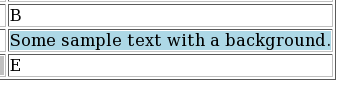
In this case we set the background colour to a (standard) light blue. The display: inline-block; width: 100% ensures the background colour fills the cell.

The cell looks something like this:

This, of course, can be done at the individual cell level. And it’s easy for a program to generate lines like these new ones.

One nice thing about this technique is you can apply arbitrary CSS to a table cell. For example setting the foreground colour with e.g. color: red;.

Colouring A Heading

It’s perfectly possible to set the format of any heading level. Taking an example from the B2H manual:

.*b2h option headrec.text='<style type="text/css">'
.*b2h option headrec.text='H1    { font-size: x-large; color: red  }'
.*b2h option headrec.text='H2    { font-size: large;   color: blue }'
.*b2h option headrec.text='</style>'

says that all h1 elements will be red. h2 elements will all be blue.

You’d put this at the top of the source.

Colouring Arbitrary Text

In many places in Bookmaster you can use Highlighted Phrases. These are coded somethng like:

Here is some :hp4.highlighted:ehp4. text.

You can define what each highlighted phrase looks like. I’m going to use the example of hp9 which is probably one you’s not normally use. Here’s how you specify its formatting to B2H:

.*b2h symbol :TAG.  HP9 IT=N VAT=N ATT=N SE=Y V='<span style="color: red;">'
.*b2h symbol :TAG.  EHP9 IT=N VAT=N ATT=N SE=Y V='</span>">'
:p.Here is some :hp9.highlighted:ehp9. text.

which formats as:

Conclusion

As I think I’ve shown it’s perfectly easy to enhance Bookmaster source so that when formatted with B2H it adds a dash of colour. More than an em-dash, in fact. πŸ™‚

Now to find places to use it.


  1. Affectionately known as “Bookie”.  ↩

  2. But who said anything about printing? πŸ™‚  ↩

  3. If you have a professional interest in this it’s because you have an application to maintain that you want to modernise to, for example, add a splash of colour.  ↩

  4. In this post I’m using screen grabs rather than inline HTML. That way the results should be consistent, wherever you read the post.  ↩

  5. Red, Green & Blue.  ↩

What’s The Latency, Kenneth?

(Originally posted 2015-03-22.)

OA37826 really is the gift that keeps on giving: I got really nosy about Coupling Facility links when it came out [1] , though most customers didn’t get the added benefits of CFLEVEL 18 for a while.

This post is about a customer installation which pointed out another benefit of the instrumentation. [2]

Customer Example

I’ve simplified the customer situation a little – in a way that doesn’t detract from the truth. [3]

Here’s a simplified version of their Parallel Sysplex environment:

They have 3 routings between two data centres – and 6 links from each CEC to the CF image in the other data centre. Structure duplexing is not used – as the customer is using external (to this sysplex) coupling facilities.

According to the SMF 74 Subtype 4 data the signalling latency from MVSA to CFB is 161μs (x2), 172μs (x2), and 176μs (x2). You can see the three routes on the diagram.

MVSB shows the same signalling latencies to CFA – which is to be expected.

You’ll notice I’ve used latency – which is what 74–4 gives you. A good rule of thumb is each 10μs of latency translates into 1 kilometer of distance. [4]

I was supplied with the customer’s own diagram and it shows slightly different distances. The discrepancies between the two sets of estimates are not accounted for by any inaccuracy in that formula. I say that because one of the customer’s path distance estimates is substantially lower than my minimum, one if substantially higher, and the third about the same. [5]

It could be a matter of the vendor being inaccurate, though not by much (and life isn’t usually that simple). If the discrepancy was massive compared to this you might begin to suspect “fibre suitcases” left in the route. In any case for once SMF can give you a view of distance.

The “local” latency is 1μs, which is the same as I’ve seen in previous cases. The latency value is an integer number of microseconds and the minimum value is 1 for a supported link type. It means “very short link indeed”.

Both the high values (161 – 176 μs) and the low value (1μs) are consistent with the Adapter types – HCA3-O LR (1X) in the former case and HCA3-O (12X) in the latter. Talking of which, the physical adapters are reported in the Channel Path Data Section (as mentioned in System zEC12 CFLEVEL 18 RMF Instrumentation Improvements ), alongside the latency. So we can see which links / CHPIDs / PCHIDs / ports etc use which routes. [6]

In this customer case there is nothing to recommend. I simply observe the three-route solution, which is patently sensible.

Impact On My Reporting

I’ve modified my reporting only slightly as a result of this customer example, I’m pleased to say.

In my tabular report that documents the paths between z/OS systems and coupling facilities I had one row per z/OS-to-CF pairing. It had the range of latencies for that pairing. In the customer example it said “161 – 176”.

That was useful as it alerted me to the possibility (I hadn’t considered before) of multiple latencies and hence multiple routes. But it told me I could do better:

Now, for each link I list the latency separately – if there is any variation. So, “tourist information” perhaps but I can discuss with a customer their use of alternate routes between sites. [7]

I consider this a nice little piece of (easy to code) extra information.

Final Thoughts

This example shows how you can verify the distance of routes between data centres – or at any rate between z/OS images and distant coupling facilities. You can verify it to within 100 metres, which I think is plenty good enough.

Note that the Coupling Facility does not select paths based on distance/latency. And that latency values are static in all the sets of data I’ve seen. These two facts are mutually consistent.

Also signalling latency is not the same as request service time. It might be interesting to compare latency to service time to try to understand the non-CPU component of service time. But expect Async requests to weaken the correlation – as requests can be expected to be delayed sometimes for reasons unrelated to signalling links.

And finally all this applies equally to links between coupling facilities for structure duplexing.

Anyhow look up the data in your favourite performance reporting tool and try it. You’ll like it!

And wasn’t I naΓ―ve when I wrote “Call me nosey [8] but I really want this – as I like to figure out whether machines are close together or in different data centres.” πŸ™‚


  1. Described in The Missing Link? and Coupling Facility Topology Information – A Continuing Journey and System zEC12 CFLEVEL 18 RMF Instrumentation Improvements  ↩

  2. By the way this customer is using CMF. But, apart from how the “OA37826” function is enabled, I don’t expect this to affect the validity of my message.  ↩

  3. And I’ve anonymised it, too. Not that the customer has anything to be embarrassed about.  ↩

  4. Not “as the crow flies” but “as the Infinibird flies”. πŸ™‚ Infinibirds fly rather more like ducks, I mean through ducts. πŸ™‚  ↩

  5. So this is not a case of systematic error.  ↩

  6. Actually that should read “have which latency” but the effect is similar.  ↩

  7. Another example of why I think I can claim to sometimes be doing Infrastructure Architecture.  ↩

  8. In my defence I’d say Shakespeare couldn’t spell his own name consistently and here I am writing “nosey” and “nosy” alternately. πŸ™‚  ↩

As Alike As Two Peas In A Pod

(Originally posted 2015-02-21.)

… or probably more.

I was going to use “Send In The Clones” but I’ve already used it – and someone who shall remain nameless once misremembered it as “Let There Be Clones”. Let there be clones, indeed. πŸ™‚

So, how do I detect cloned CICS regions, for example?

(And if you want to know why I’m asking that question now it’s an enforced rereading of CICS XCF Traffic Analysis – A Suitable Case For Treatment to expunge some errors that led me to think about the question.)

In that post I have two CICS regions that appear to behave identically. But that’s just from the XCF Traffic point of view.

What Should Be Similar

Each CICS region’s SMF 30 records will have one or more Usage Data Sections:

  • It would be reasonable to expect the CICS section to have the same version and release, though this transitionally might not be the case.
  • Similarly, for CICS and MQ, the versions and releases would match, and subsystem names would match. (The subsystem name in this case is consistently embedded in an identifier.)
  • For IMS we just get the version and release. But this section’s presence and consistency is to be expected.

Some things should be similar – for well-balanced clones. But see below. Those things include:

  • CPU
  • I/O rates
  • Memory
  • XCF traffic, including partner systems.

By “similar” two things to note:

  • Exact matches for numeric values are unrealistic.
  • Timing is important. The matching would be across all hours of the day.

You might expect restart times and dates to be pretty similar, but these might be rolling – from LPAR to LPAR. And if you dynamically provision cloned CICS regions (not that I’ve ever seen it) the restart times would vary.

Naming conventions are fraught. While clones generally do obey a naming convention more than half of the customers I’ve looked at this way would yield “false positives”. For example CICSA and CICSB are clones, but CICSC isn’t.

What Might Vary

Just because regions are cloned doesn’t mean all the numbers have to match. For example

  • If the CICS regions are spread across LPARs (or machines) with different effective engine speeds their CPU times could be expected to vary.
  • If work distribution – by whichever method – is uneven a lot of the numbers might vary.
  • Memory – whether virtual or real – is quite fraught.

Some Further Thoughts

It’s occurred to me – looking at my current reporting – that some level of clone detection could be automated. To be fair the reporting that puts me on the brink of this is less than a year old. So many reporting ideas; So little time. πŸ™‚

And if I did detect clones, what then? Ideally I’d be generating diagrams. Just yesterday I gave up on drawing a CICS / IMS / MQ / DB2 topology diagram for a sysplex. I gave up because it took too longer to manually gather the data. Actually the diagram layout is the difficult (rather than tedious) bit. But I have ideas… πŸ™‚

As usual, the aim is to get closer to what you’re running and how; And what issues that creates. And I’m a lot further on than I was with He Picks On CICS. The journey continues…