New zIIP Capacity Planning Presentation

(Originally posted 2014-02-19.)

In zIIP Address Space Instrumentation I discussed the subject of zIIP Capacity Planning.

What I was working on – but wasn’t ready to reveal – was a presentation on zIIP Capacity Planning. But I was also working on my new “zIIP CPU From Type 30” code. And that’s indeed what that post is about.

Now I am in a position to reveal my new presentation. You can get it from here. Usually I present a new set of slides at some conference or other, and then publish on Slideshare. This time I’m doing it the other way round.

Thst does, of course, present a small risk: It’s possible conference organisers will decide they don’t need me to present. I’ll take that risk as:

  • I consider this material to be important to get out there.
  • This is a living presentation.
  • I think people want to hear me anyway. 🙂

The “important” bit is, ahem, important. 🙂 It relates to the fact that DB2 Version 10 changes the rules a bit: As I said in zIIP Address Space Instrumentation it’s the first zIIP exploiter that has especially stringent[1] requirements for access to CPU. This means you need to examine zIIP CPU more critically than ever. This message bears repeating, controversial as it probably is.

The “living presentation” bit relates to the fact that each customer situation teaches me something It’s a fair bet future ones will influence this presentation, without negating its essential thrust. Indeed several situations over the past three months have led to this presentation being better. I also have John Campbell and Kathy Walsh to thank for this being a significantly better presentation now.

Anyhow, feel free to read the slides and tell me what you think. And hopefully I’ll get to present the material a fair few times.[2].


  1. “Stringent” is the best word I’ve come up with so far.
    The only other contender has been “critical” but that’s already taken, as in “CPU Critical”.

  2. When I first drafted this post a few weeks ago I had no opportunities to present lined up. Now, at the time of posting, I have two in the UK:

    • 2 April 2014: Large Systems GSE Working Group, probably IBM Southbank.
    • 9 April 2014: GSE/UKCMG zCapacity Management and zPerformance Analysis Working Group, IBM Bedfont Lakes.

LPARs – What’s In A Name?

(Originally posted 2014-01-15.)

Basic tutorial or advanced nicety? You decide…

Having been told what I thought was a nice high level presentation was “a bit too technical” I’ll confess to a perpetual (slight) anxiety about “level”. 🙂

Anyhow, this post is about inferences from LPAR names, particularly deactivated ones.

(If you catch me saying “inactive LPARs” I apologise. I mean ones that are defined on a machine but not activated, as opposed to those that are just idle.)

You probably know that RMF’s Partition Data Report lists activated LPARs by processor pool. (In some cases this can mean an LPAR appearing twice or thrice – if zIIPs or zAAPs are configured to the LPAR.) What you might not know (or might have ignored) is that the same report contains a list of deactivated LPARs.

As someone who majors on SMF data rather than RMF Reports (though I’m thoroughly conversant with the Partition Data Report) I’ve not reported on deactivated LPARs before. In our reporting we only list ones with some engines and memory defined.

A number of things have led me to believe understanding the defined-but-deactivated LPARs is handy:

  • I see gaps in LPAR numbers I’d quite like to explain.
  • I hear customers talk of recovering LPARs from one machine to another.
  • I’d like to understand how much memory is hypothecated for currently deactivated LPARs.
  • I’d like to understand whether an LPAR might be set up but be going to be activated later.

You could call these “nosiness matters” but I think they help tell the story.

What Do We Have?

In SMF 70 Subtype 1 (CPU Activity) we have two sections that are relevant to PR/SM and LPARs:

  • PR/SM Partition Data Section
  • PR/SM Logical Processor Data Section

The former has one for every LPAR defined on the machine, regardless of whether it’s activated or not. The latter has one for every logical processor, whether online (even if parked) or not. Deactivated LPARs have no logical processors, so no Logical Processor Data sections.

Up until now my code has merged Partition Data sections with Logical Processor Data sections and thrown away data for deactivated LPARs. Not any more.

But what you get in the Partition Data section for a deactivated LPAR is only a small subset of what you get for an activated one: You get the name and the LPAR number. That’s it (and I’m not complaining). You don’t get, for example, memory allocated – as there is none.

So I routinely report on the deactivated LPARs for each machine you send me data for. The table has their names and and numbers.

Nosiness Matters

(I have a presentation called “Memory Matters”. Perhaps I should have one called “Nosiness Matters”. 🙂 )

Back to my list of things I wanted to know about deactivated LPARs:

Missing LPAR Numbers

Unless you can tell me differently I see filling in the gaps in LPAR numbers a matter of tidiness. In any case the deactivated LPARs’ LPAR numbers let me do that.

Recovering LPARs

When I’ve used ERBSCAN and ERBSHOW to look at SMF 70-1 records (which I do as a diagnostic aid sometimes, and when developing new code) I see eerily familiar LPAR names.

For example, I might see CEC1 with an activated MVSA LPAR and CEC2 with a deactivated MVSA LPAR. It’s a reasonable guess that either

  • The LPAR got moved permanently from CEC2 to CEC1 (and the definition was left unchanged).

or

  • The intent is to recover MVSA from CEC1 to CEC2 if necessary.

I’ll admit I don’t know nearly enough about recovery strategies (outside of what Parallel Sysplex and some of its exploiters can do). But this should be a good conversation starter.

Hypothecated Memory For Deactivated LPARs

You don’t get, as I mentioned, memory for deactivated LPARs. This is because they don’t have any: It would be in unallocated memory (a figure RMF also doesn’t have.)

So my approach is to note the deactivated LPARs and enquire how much memory is notionally reserved for them. I can get the purchased memory from the machine’s Vital Product Data (VPD) and do the sums.

LPARs Not (Yet) Present

For some machines I see “aspirational” LPARs – such as ones with “LINUX” or “VM” in their names. Those would be ones the installation hopes to use at some stage. (I’d rather believe that than that the LPAR was the result of an unconvincing experiment.) 🙂

In one set of data I see two pairs of LPARs, one for each of a pair of demerging organisations. Each pair is Prod and Dev. Of these one “DEV” LPAR is deactivated. I guess Development has already moved off, leaving just the counterpart Production LPAR. (The other pair of Prod and Dev remain activated.)

Conclusion

You’ll spot not all my potential lines of enquiry are exhausted. But you”ll see I can make good progress – and ask a whole series of new questions. Hopefully you’ll see value, too.

I’ve also not talked about the panoply of different activated LPAR names. For example, having MVS1, IPO1, SYSA and C158 in the same machine says something about heritage. 🙂

zIIP Address Space Instrumentation

(Originally posted 2013-12-13.)

Increasingly people are going to want to understand their zIIP usage and do capacity planning for zIIPs. Previously I’ve written about zIIP CPU numbers from the RMF perspective, namely at the WLM Workload and Service Class levels. This post is about taking it down a layer – to the address space level – using SMF Type 30 records.

(I’ve always thought it a pity there isn’t a standard reporting program for SMF 30, analogous to the RMF Postprocessor. But I digress.)

As you’ve probably gathered SMF 30 is one of my favourite record types. This post describes a few more ways you can get value from it. And some of those ways are, as you’d expect from me, more about nosiness about what customers are doing than about performance or capacity.

What We Have

First, a brief review of the zIIP-related numbers. (And just about everything I say in this post relates to zAAP as well.)

  • For a very long time we had TCB and (Non-Preemptible) SRB time.

  • A long time ago – when they were introduced – we had Preemptible SRB times – for Dependent and Independent Enclaves.

  • When zIIPs were introduced we had zIIP-eligible and zIIP-eligible-but-on-a-GCP sets of times.

    The latter is the case where work was eligible to run on a zIIP but instead ran on a General Purpose processor (or GCP for short).

Both sets of zIIP times incorporate two buckets of time: for Dependent Enclaves and Independent Enclaves. I subtract these two numbers from the headline zIIP time. For example,

Other_zIIP = Overall_zIIP
           - Dependent_Enclave_zIIP
           - Independent_Enclave_zIIP

This is a useful thing to do – as we shall see.

zAAP On zIIP

zAAP On zIIP allows you to treat zAAP-eligible work as if it were zIIP-eligible. The benefit of this is that it gives you additional ways to fill up a zIIP.

From an instrumentation point of view, with zAAP On zIIP all the zAAP-related numbers become 0.

Address Space Characterisation

(My standard claim applies here: It helps a lot if you can get information from widely-available instrumentation without either asking someone or going to more specific data. In this instance it’s provided by SMF 30.)

Suppose you have an address space in mind – and it could be any Full Function address space:

  • It could be a batch job, cutting SMF 30 Subtypes 4 and 5 when steps and the job end.
  • It could be a long-running address space, cutting SMF 30 Subtypes 2 and 3 on an interval basis.
  • It could be a terminating address space, in which all four subtypes should get cut at the appropriate points.

The point is it doesn’t matter which of the above applies. The fields I just described are always present.

Let’s pick on one example: The job name is immaterial but the program name is CTGBATCH (and zAAP on zIIP is in play). You might know this program name denotes the address space is running CICS Transaction Gateway (CTG). You might not know that much of CTG’s work is executing Java. (Non-JNI) Java work is zAAP-eligible but in a zIIP-but-not-zAAP environment it becomes zIIP-eligible. But it’s not work that runs in either a Dependent Enclave or an Independent Enclave: Its CPU falls into the “Other zIIP” category I just calculated. This would also be true of System XML processing (which is not Java).

Another example is DDF. The DIST address space is obvious to spot: Its job name ends in “DIST”, just as the corresponding DBM1 address space’s job name ends in “DBM1” (and the subsystem name is whatever precedes these two in the job name) . When some DDF work enters the system it is assigned to an Independent Enclave – but not until work such as authorisation has already taken place under TCBs. You can see the TCB time, the Independent Enclave time and the zIIP-eligible Independent Enclave time in SMF 30. The “Authorisation etc” time is the TCB time minus the Independent Enclave time.

Commonly we talk of the eligible percentage for DDF. That is the zIIP-eligible Independent Enclave time divided by the Independent Enclave time, converted to a percentage.

If you want to go deeper on this you do, of course, need to work with DB Accounting Trace (SMF 101).

An Important Case – DB2 Version 10

In DB2 Version 10 some performance-critical categories of work – Deferred Write Engines and Prefetch Engines – became zIIP-eligible. Note the words “ performance-critical categories of work”. This is the first time that phrase could be used with reference to zIIP-eligibility. And it’s right: If these engines don’t run in a timely fashion bad things happen.

The implication of this is we can’t fill zIIPs to the brim with this kind of work, and especially not if the LPAR has only one or two zIIPs.

If we do then either the work will get delayed because it can’t cross over to the General-Purpose Processors (GCPs) – and that will be a problem – or else it does cross over and we might get an unacceptable loss of zIIP benefit.

DB2 Lab recommends that, averaged over the peak 15 minutes (happily usually an RMF interval), you don’t run DBM1 zIIP utilisation for this work above 30 to 50% busy. The 30% number is for a single zIIP and the 50% number is for numerous zIIPs.

But what about “multitenant” zIIP usage? For example DBM1 plus Java work?

You can infill with less performance-critical work such as Java so long as you:

  1. Classify DBM1 properly so WLM and SRM can protect it.
  2. Classify this infill work appropriately.
  3. Don’t load the zIIPs as heavily as you would GCPs.

So how do you identify this performance-critical DBM1 work? It’s actually not difficult as the work shows up in the Dependent Enclave zIIP Eligible CPU time. (And the amount that crosses over to GCPs is in an analogous time bucket – so yiu can check if this amount is acceptable or not.)

I’ve just mentioned how to tell if there’s too much crossover to GCPs. But what about the other problem area – work getting delayed? There are two places to look:

  • In Accounting Trace for work being delayed. I’d expect it to show somewhere like the Read Asynchronous Wait and Write Asynchronous Wait buckets.
  • In Statistics Trace with failures to get Prefetch and Deferred Write engines.

Note: Prior to PM30468 DB2 Version 10 scheduled these engines in a way that caused the CPU to show up under MSTR rather than DBM1. With the fix it’s in DBM1. (I’ve not seen it in MSTR.)


I hope you’ve seen how the various zIIP-related fields in SMF 30 can be used to understand the proclivities of an address space. More importantly, I hope you’re more aware than ever of the importance of zIIP capacity planning. And especially the added emphasis the new zIIP exploitation by DB2 Version 10, now it’s become a widespread version.

(I’ve had this post “in the can” for a couple of weeks and been sensitised in the meantime to some new things. All of which will appear in the “zIIP Capacity Planning” presentation I also have in the works.)

Batch Job Cloning Residency – To The Better End

(Originally posted 2013-11-08.)

Usually a residency ends on the last day. Well doesn’t everything? 🙂

But this one’s been a little unusual in that regard. Straight after the residency came a week in which two of us presented at the GSE UK Annual Conference on aspects of the residency:

  • Dean Harrison presented on Scheduling and JCL aspects.
  • I presented on Performance aspects.

And Karen Wilkins, the other resident, was working the DB2 stream.

So, we got a chance to test reactions to some aspects of the book. We also collected a couple more reviewers.

I won’t mention any names here but my session in particular “lit up” when it came time to questions. And these got me thinking (which is why I love getting questions).

  • There was a question about I/O bandwidth and increased parallelism. Yes, I think that has to be analysed and managed. And I should probably write something in the book about it. In our tests we didn’t actually manage to drive I/O in a way that caused time to be spent in the DB2 I/O-related Accounting Trace buckets. But I don’t feel bad about that as it’s impossible to construct an example that exemplfies everything and the technological lessons are fairly straightforward to grasp. (For reference they are in the area of I/O reduction and dealing with the remaining I/O hot spots in the usual ways.)

  • There was a question about examining the whole environment into which you thrust this cloned workload. Again I should probably write something in the book about it.. And in our case it mattered because, not to spoil the story, the 32-up cloning cases led to CPU Queuing which limited our ability to scale effectively.

These two are actually questions I’ve addressed in previous Batch Performance Redbooks. So I don’t want to repeat myself very much. But they are important for cloning.

There was a third question which is worth addressing:

  • Is there really anything new in this? The answer is: Not really, but people are increasingly going to have to pay attention to it, plus we have some nice techniques in the book (and Dean explained some of those in his presentation). We did the book because one is needed.

There was a fourth question or rather theme. We rather dodged it in the book. It’s really about how to treat whole strings of jobs. And I should probably write something in the book about it.

But it’s mainly about when to (and how to) “Fan Out” and “Fan In”.

When To Fan Out And When To Fan In

In the book we simplify things by writing about a single original job step that needs cloning. While that’s the right thing to do there are important considerations at the “stream of jobs level”.

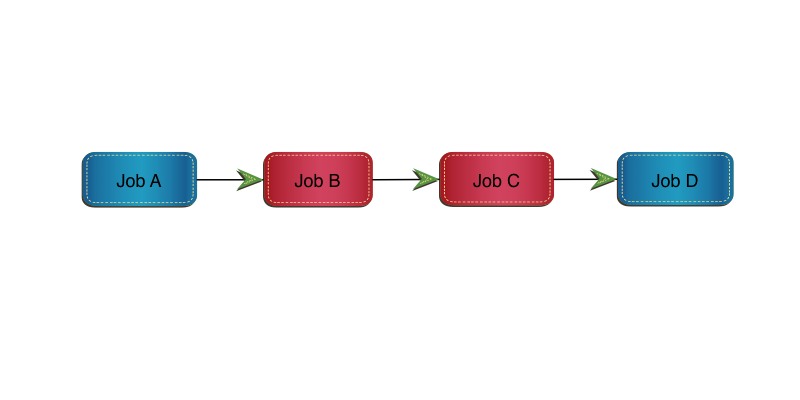
Consider the following simple set of 4 jobs:

Job A and Job D won’t be cloned for now. Job B and Job C will.

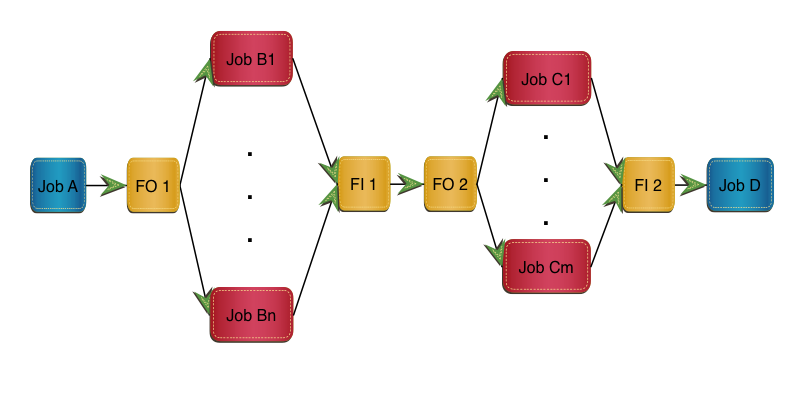
Here’s a naive implementation of what we recommend in the book: In this implementation Job B is replaced by FO 1, m clones and FI 1. Job C is replaced by FO 2, n clones and FI 2.

I don’t doubt we need FO 1 to fan out and FI 2 to fan in again, though both of these might be null. But do we really need to fan in after the Job B clones, only to fan out again before the Job C clones? There are a few reasons why we might not:

  • From a scheduling point of view we wait for all the Job B clones to complete before we can start any of the Job C clones.
  • Bringing data back together might be expensive.
  • There are lots of moving parts here.

And that’s with just two jobs being cloned in the stream.

How Many Clones?

You’ll notice there are n clones of Job B and m clones of Job C. It’s probably best to standardise on one or the other for the stream. That might be a difficult judgement to make, based on each job’s cloning “sweet spot”. And it might turn out that actually n=2m is better than n=m, for example.

Data Sets Flying Everywhere

Another difficult judgement to make is how to handle inter-job data. This gets complicated very fast and has to be taken on a case by case basis – so I won’t inflict more diagrams on you. 🙂

As a relatively simply example we might need to write consolidated data in FO 1 to data set DSA (for some external purpose). I don’t see that as being avoidable but that needn’t stop the Job C clones. With care (and maybe technology) FI 1 might run alongside the Job C clones:

If Job C read data set DSA that Job B wrote then Job C1 might need to read data set DSA1 that Job B1 wrote, in parallel with FI 1 reading it. (Job FI 1 has to recreate data set DSA, in this scenario.)

Likewise Job Cn needs to read DSAn that Job Bn wrote, in parallel with FI 1 reading it.

The most obvious difficulty here is contention between the Fan In job (FI 1) and the readers (C1 … Cn). Whether this is serious or not depends on things like the quantity of data written.

One Obvious Scenario

One scenario I can see the “when to fan in and out” question coming up in is during the actual implementation: Job A might be cloned but the follow-on Job B not yet and its follow-on Job C not yet. It’s probably best to clone Job A then Job B then Job C (or all three at the same time). Cloning Job A and Job C but not yet Job B is not so good. So extend the sequence of cloned jobs outwards rather than doing it spottily.


See, I used the word “simplify” a while back: This stuff gets complicated very fast. And I don’t know how much complexity is worth delving into. The previous section is a first go at handling it. Any deeper and I don’t think we help the reader. (That’s you.) 🙂


I bolded the words “I should probably write something in the book about it” when I wrote them because it’s a key message from the GSE Conference: We have more work to do. I turns out I have the latitude to do just that, with the writing tools on my laptop, and perhaps a little time (some of it likely to be on aeroplanes).

The conventional wisdom is that when the residents go home no more writing can be done. That’s probably a fair assumption but in this case I think it’s a little pessimistic. Or at least I hope so.

I’m tremendously proud of what Dean, Karen and I have achieved over our four weeks in Poughkeepsie. If you read the book, even in the state it’s in now, I think you’ll like it.

Technically we probably could go on for ever, adding stuff to it. One day that’ll have to stop – as we really do want to get the book out soon. (And actually I’d rather like to work with some customer applications in the vein of what we’ve written – but I don’t control my workload enough to insist that happens soon.) But for now the writing goes on.

Now where can I shove some more “Galileos”? 🙂

More Maintainable DFSORT

(Originally posted 2013-10-20.)

While writing Creating JSON with DFSORT I realised one statement in particular is difficult to read and maintain. It’s this one:

    INREC IFTHEN=(WHEN=INIT,BUILD=(SEQNUM,4,BI, 
              C'{"name": "',NAME,C'","number": "',NUMBER,C'"}')),
            IFTHEN=(WHEN=(1,4,BI,GT,+1),BUILD=(2X,C',',5,70)), 
            IFTHEN=(WHEN=(1,4,BI,EQ,+1),BUILD=(2X,5,70)) 

It’s not the first one that’s become complicated: Increasingly people are realising the power of what you can do with DFSORT – especially if you use multiple stages with IFTHEN. So complexity can become a real issue.

This post is the result of some thinking about how to make developing, reading and maintaining DFSORT applications a little easier. (And everything I say here is applicable to ICETOOL as well.) In a nutshell:

  • Map the input records with symbols.
  • Use symbols for intermediate fields.
  • Consider symbols for combined fields.
  • Use indentation.
  • Build applications from the front to the back in stages.
  • Consider using “dummy” IFTHEN stages.
  • Use OUTFIL SAVE to avoid losing records.

The rest of this post expands on these.

Map The Input Records With Symbols

Whether you use COBDFSYM (in Smart DFSORT Tricks) to map COBOL copybooks or code your own by hand you should map the input records using DFSORT symbols. This makes the DFSORT invocation much more readable and a little more maintainable.

That’s actually what I did for the example in Creating JSON with DFSORT and if it’s readable that would largely be why.

(On COBDFSYM I wrote about it further in “Chapter 23.4.1 Converting COBOL copybooks to DFSORT symbols” of SG24–7779 Batch Modernization on z/OS.)

Use Symbols For Intermediate Fields

If you have, say, two fields NAME and NUMBER in your input record and you move them around or reformat them or otherwise mess with them consider remapping the modified record. Code

POSITION,1

to reset the Symbols pointer and then start mapping the modified record. Here’s something I tend to do:

If the original field is called NAME I create a new field in the remapping called _NAME. Similarly NUMBER becomes _NUMBER.

If I modify them again they become __NAME and __NUMBER. And so on.

(By the way the underscore characters in the above are written in Markdown by prefixing them with a backslash. I learnt that the hard way.)

Consider Symbols For Combined Fields.

If you are manipulating sets of fields consider using a symbol to describe them as a group. For example you might have formatted an intermediate form of the record with NAME followed by a blank followed by NUMBER. The Symbols deck might look like:

_NAME,*,8,CH
SKIP,1
_NUMBER,*,8,CH

But you could code an additional symbol:

_NAME_AND_NUM,*,17,CH
_NAME,=,8,CH
SKIP,1
_NUMBER,*,8,CH

And then you can use it as a combined field. The trick here is to use = to specify remapping. It positions the Symbols cursor back to the start of the first field.

In general * and = are very handy in Symbols decks. In brief

  • * in the position field means the symbol’s position is just after the end of the previous symbol.
  • = in the position field means it’s at the beginning.
  • = in the length field means use the same length as the previous symbol’s.
  • = in the type field means use the same type as the previous symbol’s.

Use these wherever you can and it should help maintainability.

Use Indentation

Instead of coding

     ...
  IFTHEN=(WHEN=INIT,BUILD=( ... )),
  IFTHEN=(WHEN=(...),FINDREP=(...)),
     ...

try coding something like

     ...
  IFTHEN=(WHEN=INIT,
    BUILD=(...)),
  IFTHEN=(WHEN=(...),
    FINDREP=(...)),
     ...

and it’ll be a little clearer.

You might also want to do something like

   INREC FIELDS=(NAME,
     RANK,
     NUMBER,EDIT=(IIT),
     ...

indenting the fields where possible and putting each on its own line. (You could indent the EDIT in the above but I think that’s going too far.)

Build Applications From The Front To The Back In Stages

Sometimes – and the past few days have been a good example of this – it takes a long time to debug a DFSORT application. The main reason is not understanding how the various stages – whether INCLUDE, OMIT, INREC, SORT, SUM, COPY, MERGE, or OUTFIL fit together. (And I’ve probably missed one or two out.) It’s even more complex with IFTHEN.

So I recommend building up the set of instructions, and within them IFTHEN stages, slowly. Check the output at each point is what you expect – before you build the next stage (which relies on it).

It sounds obvious but I labour the point as this stuff is getting complex and it’s easy to make mistakes. (Most of these are fuzzy understandings of what DFSORT will do.)

Consider Using “Dummy” IFTHEN Stages

This is a minor point and might be slightly controversial. Don’t do it in Production if you’re squeezing every last ounce of performance out of the application – but I seriously doubt it’ll be a problem.

Consider the statement:

INREC
  IFTHEN=(WHEN=INIT,
    BUILD=(...))

The bad news is it’s not legal DFSORT syntax and you’ll get a syntax error. The following, however, is legal:

INREC IFTHEN=(WHEN=INIT,OVERLAY=(5:5,1)),
  IFTHEN=(WHEN=INIT,
    BUILD=(...))

The first WHEN=INIT actually doesn’t change any records. Well it does but in a null fashion:

It replaces the byte at position 5 with the contents of the byte at position 5. 🙂 The net effect is to leave the record unchanged. If you can’t stand the first effective IFTHEN not being indented then this gets round it. More seriously you can move the effective IFTHENs around without having to mess with indentation.

As I said this is unlikely to affect performance. But if you think this trick obscure don’t use it. I just think it helps with maintaining indentation.

Use OUTFIL SAVE To Avoid Losing Records

If you are routing different records to different OUTFIL destinations – using OUTFIL’s own INCLUDE or OMIT parameters – it can get complicated to ensure all the records go somewhere. OUTFIL SAVE routes the records that don’t meet any previous OUTFIL INCLUDE/OMIT criteria to another DD. This saves coding complex “everything else” rules – even if Augustus De Morgan did found your Maths Department and you do understand Relation Algebra. 🙂

Note: The records thrown away by INCLUDE or OMIT statements can’t be recovered using OUTFIL SAVE.


As I say, writing the previous post reminded me of how ungainly the coding can be. But I didn’t think a list of techniques to handle that belonged in the same post. Hence this one.

If you have other DFSORT comprehension and maintainability tricks I’d love to see them. If you think these aren’t right – especially the last – let me know.
Creating JSON with DFSORT

(Originally posted 2013-10-18.)

This post is yet another spin off from the residency I’m on in Poughkeepsie.

I mentioned in We Have Residents! I might do something with JSON (Javascript Object Notation) and indeed I have.

But why would a residency on Batch Performance concern itself with JSON (and indeed XML, which I’ve also written about in the Redbook)?

The reason lies in the word “modernisation”. This actually works two ways:

  • Effective job cloning – where there is some kind of “printed” output – requires breaking the report data generation and report formatting into separate pieces. This is because there’s a need to fan in the reporting data. This re-engineered data flow provides the opportunity to publish the data to new consumers. If we’re going to do that it might as well be something nice and modern like JSON or XML. I’ve talked about XML before – so I won’t in this post.
  • Modernising batch jobs means opening the code up anyway (and that might indeed be to produce new formats of output) so it would be good to consider whether it should be parallelised. And the most obvious way is by cloning it.

Now obviously not all batch jobs want modernising or cloning. But some in an installation probably do.


So below is a simple example of using DFSORT to create JSON from SYSIN. Consider the following JCL:

    //MAKEJSON EXEC PGM=ICEMAN 
    //SYSOUT   DD SYSOUT=* 
    //SYSPRINT DD SYSOUT=* 
    //SYMNOUT  DD SYSOUT=* 
    //SYMNAMES DD * 
    POSITION,1 
    NAME,*,8,CH 
    SKIP,1 
    NUMBER,*,8,CH 
    /* 
    //SORTIN   DD * 
    ALPHA    ONE 
    BRAVO    TWO 
    CHARLIE  THREE 
    DELTA    FOUR 
    /* 
    //SORTOUT  DD SYSOUT=* 
    //SYSIN    DD * 
    OPTION COPY 
    * 
    INREC IFTHEN=(WHEN=INIT,BUILD=(SEQNUM,4,BI, 
              C'{"name": "',NAME,C'","number": "',NUMBER,C'"}')),
            IFTHEN=(WHEN=(1,4,BI,GT,+1),BUILD=(2X,C',',5,70)), 
            IFTHEN=(WHEN=(1,4,BI,EQ,+1),BUILD=(2X,5,70)) 
    * 
    OUTFIL FNAMES=SORTOUT,REMOVECC, 
     HEADER1=('{'/, 
    '"inventory": ['), 
    TRAILER1=(']',/, 
    '}') 
     END 
    /*

On my system it produces:

{
"inventory": [
  {"name": "ALPHA   ","number": "ONE     "}
  ,{"name": "BRAVO   ","number": "TWO     "}
  ,{"name": "CHARLIE ","number": "THREE   "}
  ,{"name": "DELTA   ","number": "FOUR    "}
]
}

If you put that through a JSON validator, such as JSONLint it is reported as clean JSON. (This particular service reformats it prettily as well.)

There’s a trick here, though, that’s worth describing:

JSON is picky in that – for elements or arrays – you have commas in between but you can’t have a leading or a trailing comma separator. (This actually isn’t always true of Javascript but was enforced for (the derivative) JSON.

All the interesting action is in the INREC (could’ve been OUTREC or even OUTFIL OUTREC) statement. This has three IFTHEN clauses (or stages if you prefer):

  1. Always fires. Produces the formatted line with a 4-byte sequence number on the front. The sequence number starts at 1 and is in binary format.

  2. Fires if the sequence number is greater than 1. Places a comma (and two indenting spaces) in front of the formatted line.

  3. Fires if the sequence number is 1. Just places the two spaces (and no comma) in front of the formatted line.

I say “trick” but this is just the standard “treat each record according to its characteristics and through multiple stages” approach you can take with DFSORT IFTHEN.

In any case it produces 1 line without a comma and the following ones with a comma. And JSON rules are satisfied.


By the way you might be wondering why the values are capitalised or have trailing spaces. This is actually preserving what was in the original records (in in-stream SORTIN). You can certainly take trailing spaces out but it needs a little more work. Semantically both belong in the output data, of course.

And if you insist on taking trailing spaces off the lines – as opposed to out of the items – you can always use DFSORT’s VLTRIM.

I think it looks a little odd to have the separator commas at the beginning of the lines. But I don’t know of a way in DFSORT to test for the last line – to avoid placing a comma on it. If you can think of a way let us know.

But for now we have valid JSON that any JSON reader – whether raw Javascript, a framework like jQuery or Dojo, or some other language – can process.

And yes it would be nice to breathe new life into old data.

And – below the line 🙂 – is a brief discussion on JSON itself.


JSON is a spin-off from javascript. As I mentioned above you can process it with javascript by assignment. The following is entirely valid:

var inv={
"inventory": [
  {"name": "ALPHA   ","number": "ONE     "}
  ,{"name": "BRAVO   ","number": "TWO     "}
  ,{"name": "CHARLIE ","number": "THREE   "}
  ,{"name": "DELTA   ","number": "FOUR    "}
]
}
alert(inv.inventory.name[0])

which would – in a browser pop up a message box with “ALPHA” in it.

You mightn’t want to do that as you can end up executing arbitrary code. So direct assignment should only be used where you can trust the JSON. Which is why people tend to use libraries to parse it – and the good ones don’t do direct assignment.

People like JSON because it’s easy to generate, less verbose than XML, and now has a lot of ways of processing it. What’s not so good is that there is no notion of things like namespaces and schemas – so perhaps not so good for “Enterprise”. And it doesn’t have transformational tooling like XSLT. But it’s very popular.

Unusual Sort Fields

(Originally posted 2013-10-14.)

While working through a scenario in our residency it became (briefly) important to be able to preserve sort order on a field. But this field wasn’t sorted in any recognisable way. So the records couldn’t be sorted alphabetically or numerically. In fact they had to be sorted so that this field was preserved in the following sequence:

red

orange

yellow

green

blue

violet

pink

white

black

hot

This post talks about two methods of maintaining this sequence.

  • Using INREC / OUTREC / OUTFIL CHANGE.

  • Using ICETOOL JOINKEYS.

Using CHANGE

The trick is to create an additional numerical field on which to sort – and then to throw it away. Use CHANGE to create it with coding like…

MYFIELD,CHANGE=(4, 
  C' red',X'00000001', 
  C' orange',X'00000002',
  C' yellow',X'00000003',
  C' green',X'00000004', 
  C' blue',X'00000005', 
  C' violet',X'00000006',
  C' pink',X'00000007', 
  C' white',X'00000008', 
  C' black',X'00000009', 
  C' hot',X'0000000A',
  C'NOTSEEN',X'FFFFFFFF'), 
  NOMATCH=(X'00000000') 

This can be used in INREC, OUTREC or OUTFIL. For one-pass sorting purposes INREC would be the place to do it. (But the syntax is OK elsewhere.) And you’d probably want to throw away the field in OUTREC or OUTFIL OUTREC.

Obviously you specify this temporary (4-byte numeric) field on the SORT statement.

The disadvantage of this approach is the table is hardcoded into the DFSORT invocation. You might not like that.

Notice the NOMATCH value of 0. This makes unmatched records collate to the front. You might use OUTFIL INCLUDE to move them to a side file you check for emptiness. (Use OUTFIL SAVE for the rest to send them to the normal output file.)

Notice also the “NOTSEEN” value which collates last. Actually it doesn’t matter where it collates and no input record has that value in the field. The purpose of the “NOTSEEN” line is to make sure the closing bracket isn’t on any real lookup lines. So you could code lines up to the CHANGE inline and the lines from NOTSEEN onwards inline. The lines between are the real lookup table and could be in a data set. Something like

//SYSIN DD *

...

MYFIELD,CHANGE=(4,
/*
//      DD DISP=SHR,DSN=HLQ.LOOKUP.TABLE 
//      DD *
  C'NOTSEEN',X'FFFFFFFF'), 
  NOMATCH=(X'00000000') 

...

This, I think, is reasonably maintainable.

(You might be able to think of another way to keep the closing bracket on a separate line. If so please let me know.)

Using ICETOOL JOINKEYS

If you don’t want to maintain the collation table in the DFSORT invocation you can keep it in a file and use ICETOOL JOINKEYS.

To do the sort would require an additional pass over the data – with the SORT statement on the looked up field in. For smallish amounts of data that’s probably fine. But for larger amounts of data you’ll probably want to use the CHANGE method and live with the maintenance of the table in the DFSORT invocation.


Maintaining sort order on a non-standard collating key like this looks important for when you are splitting jobs up to run against subsets of the data and want to bring things back together.

Our case creates a report sequenced in part on this nonstandardly sorted field. The first thing we do – to prepare for cloning – is separate the reporting from the data analysis and update. We use a transient file. When we clone we have multiple transient files and we need to merge them somehow. So maintaining sequence on this (actually the third) key is important:

Without forcing ourselves to define the clones as processing ranges of this field’s value we can’t just concatenate these transient files: We have to keep the order of this field preserved.

Extending The Idea

Though this isn’t relevant to the residency’s purpose – teaching people how to clone batch jobs – there is a nice extension to the idea of sorting using a lookup table.

With DFSORT’s arithmetic operators and other capabilities it’s possible to compute a temporary result and sort on that field. Exploring that idea I’ll leave as an exercise to the reader.

If you want to try it create a file with count and total fields in each record. Use these two fields to calculate an average and sort on it, optionally discarding the resulting average field.


This is the sort of practical issue we’re thinking through right now. It’s proving challenging but fun!

Processing VBS Data With REXX

(Originally posted 2013-10-12.)

In What I’m Looking Forward To In z/OS 2.1 I mentioned processing VBS (Variable Blocked Spanned) data with REXX. This post describes what I learnt when I used it on our residency z/OS 2.1 system.

The most widely-known VBS data is SMF, though the Tivoli Workload Scheduler (TWS) Audit Log is also in this format.

A lot of different types of data are stored as Variable Blocked (VB) data, but this has the restriction that no record can be longer than the block size. Variable Blocked Spanned (VBS) data can, in contrast, contain records longer than the block size. SMF data often contains records which indeed are longer than the block size.

Prior to z/OS Version 2 Release 1 it was possible to process some SMF data by copying it to a VB data set. But this is risky as actually spanning records would be broken this way. (A typical example is SMF Type 30 Address Space records.)

Reading SMF

For my first experiment I extracted SMF 70 Subtype 1 records and printed the SMF ID (from the record header) and the Hardware and Software Model from the CPU Control Section.

To read the records you typically use EXECIO. My very first experiment used

"EXECIO * DISKR RMFIN (STEM RMFIN. FINIS"

but this caused the job to run out of memory. That’s because there was a lot of data – and the “*” means “read all the records”. I could’ve used

"EXECIO 1 DISKR RMFIN (STEM RMFIN."

(note no “FINIS”.) But I prefer to read, say, 100 records at a time.

When you read VB or VBS data REXX returns records without the 4-byte Record Descriptor Word (RDW). But SMF data contains offsets relative to the start of the record (including the RDW). The solution to this is to add three hexadecimal zero bytes to the front of the record. It’s three rather than four to take into account the fact REXX uses 1-based positions rather than 0-based offsets.

Writing SMF

Reading’s fine and allows you to experiment with the data. But writing is pretty useful, and I have a real use case in mind.

For my experiment I took the very same SMF 70–1 records and wrote them out. Again, no problem. (I did remember to take the three byte prefix off that I’d added when reading.)

Both SMF Dump and, more pickily, ERBSCAN and ERBSHOW were happy with the data.

The use case I have in mind is with different data: We’ll be running a fair number of batch jobs and there’ll be a naming convention that covers them. We’re only interested in these “test case” jobs and not e.g. compile jobs.

So I’ll write a REXX EXEC to read in the entire set of SMF 30 data and write out only the records that pertain to these jobs. Then my analysis code will run much faster (and so will getting the data to my home system be).

Certainly I can (and probably will) extend this to extracting the related SMF 101 (DB2 Accounting Trace) records and maybe the data set ones. But the 30’s will tell us how well our cloning efforts are doing.


I’m not recommending you replace more efficient SMF-processing tools (such as Tivoli Decision Support or SAS / MXG) with REXX for Production. But VBS support in REXX makes it easy to prototype analysis and to check data in a quick-to-write way. Which is exactly what I’d thought it would do.

And, to show we’re not all work and no play 🙂 the team is off to the Walkway Over The Hudson. It’s a nice day for it. 🙂

On The Third Day

(Originally posted 2013-10-09.)

Actually it’s not been quite that bad, jetlagwise. 🙂 So on this third day we’re moving into the creative phase. For example I might be writing actual Redbook text, Karen might be writing actual COBOL, and Dean might be telling TWS to do his actual bidding. 🙂

The past two days have been filled with kick off and getting stuff set up. We did, though, sketch out an outline of the Redbook. So that gives me somewhere to start writing from.

(It’s nice to hear cries of joy from the other room.) 🙂

Here’s a nice picture of the team – courtesy of Ann Lund:

From left to right Dean (@steamheaduk), myself (@martinpacker) and Karen (@kazgl6).

And, as this is all being done on a z/OS 2.1 system, I’ve experimented with processing SMF data with REXX, using the new VBS support in EXECIO, and a blog post is in the works. But I’ll have to save that for another day. And we’re all individually discovering the joy of “=xall” to get out of ISPF.

My Considered Opinion?

(Originally posted 2013-09-16.)

If you’re looking for a considered opinion you came to the wrong place. 🙂 Or so anyone reading Down In The Dumps? shortly after reading Enigma And Variations Of A Memory Kind might conclude.

It’s possibly a fair cop, possibly not, but it got me thinking…

In reality life is a sequence of experiences, many of which we hopefully learn something from. But it’s a journey of understanding and the question is when to “cut and run”:

Take the “dump accommodation” question, as it’s exemplified by the two posts I led with. You might consider it better to have written about both aspects as one post, rather than two. And that would’ve perhaps happened if I’d waited to pursue the “when is DUMPSRV busy?” line of enquiry. But, by that argument, you’re maybe never ready to publish.

There’re two mental models I have that relate to this:

1) The thinking peters out after a while – and that’s when you decide your opinion is a considered one.

(But when is that exactly? It’s rather like microwave popcorn, popping at a decreasing rate until maybe there’re no more pops.) But here you never quite know.

2) The thinking carries on for an arbitrarily long time, perhaps increasing and perhaps just varying.

In some things I think the “peters out until an opinion can be declared considered” is right but for most it isn’t: Because experience builds – if you let it.

One of the benefits of waiting for your opinion to be a considered one is incorporating amplifications and extensions. In normal conversation, though, a "forget everything since ‘good morning"’ situation occurs quite frequently. Fortunately that’s rare in stuff I write (and I’d like to think I recognise such things and handle them appropriately). So there’s a difference between conversation and publishing.

It seems to me sometimes I don’t give people the space to break in. That’s probably true (and not an endearing fault) but the “iterative” publication approach should give people the chance to break in and give their perspective. And for me to acknowledge it and handle it well.

I also think the “publish when you’ve got enough” approach is helpful in keeping post sizes down: Though you might disagree it limits them enough.

In summary, knowing when to publish and how much is a matter of judgment. It’s difficult to get it right and I wouldn’t claim I always do. Or in other words: This explains it all. 🙂

And that’s my considered opinion. Or is it? 🙂