Bad Data And The Subjunctive Mood

(Originally posted 2012-12-02.)

Or should that be “Subjective Data And The Bad Mood”? 🙂

A good friend of mine says that when dispensing advice one shouldn’t use “may” or “might”, but that one should be more definite.

I’ve probably said this before: When I say or write “may” or “might” I’m deploying the subjunctive mood for what I hope aren’t “weasel words” reasons. My claim would be the subjunctive mood reflects some underlying subtlety like genuine reasons for doubt, and that I’d be forthright in standing behind this more nuanced position.

(I do sometimes catch myself saying “may” when I mean “might”, but I think we all do that.)

Now, to come to(wards) the point, I’ve been saying for a while now that “data provenance” is important.

So I see a field in a record which is acting bizarrely (as happened to me this week)…

  • Do I conclude the field is broken?
  • Do I conclude it’s telling the truth?
  • Do I conclude it’s telling one version of the truth?

I think the sensible thing to do, rather than leaping to any conclusion, is to seek corroboration. But also situational context.

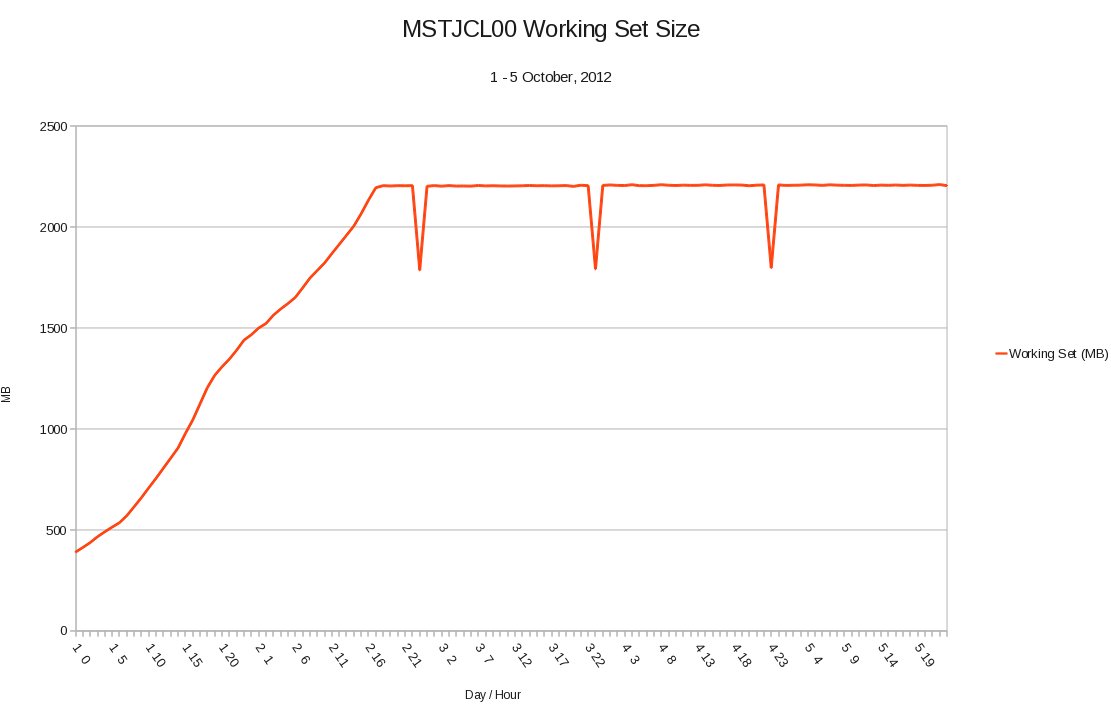
This latter point is actually quite important and one us technical people tend to forget… So what if MSTJCL00’s working set appears to be 2GB on every LPAR the customer has? (And this was the case this week.) The “so what” on this one is the obvious economic cost but also the sneaking suspicion that some other nasty effects are occurring. (Perhaps cruelly it might be worth noting the customer should’ve spotted this – if it’s a true phenomenon.)

I’ll also note that in my – nowadays wide and varied – experience of customer systems I’ve never seen MSTJCL00 be more than a few tens of megabytes. Indeed another customer’s data that I’m currently reviewing shows this norm in action.

I glossed over corroboration back there. It turns out the customer is also seeing the phenomenon – now they’re looking for it (I think using RMF Monitor III) – and will be pursuing it as a potential defect. Where that takes us I don’t know yet, it being out of my sphere of understanding.

But you can see that for me to barge into the customer and tell them that they’d better fix this usage of memory, without a hint of doubt, would not be the right approach. Working with them to establish the truth and its relevance is much better. So phrasing like “it looks a lot like you’ve got a problem worth worrying about with MSTJCL00’s use of memory” is better.

By the way in this case I suspect MSTJCL00 (Address Space 1) is an anchor for the storage and it may well be some other user of 64-bit Common that’s the real big user.

In case you think this might be bad data or at least an isolated bad data point look at the following graph:

The days and hours are along the bottom and the system was IPL’ed the day before.

There is something funny about the 11PM hour on each day (which might give a clue) but otherwise the picture is reasonably clear:

  • The working set rises from a “normal” value just after IPL until it reaches a steady state.
  • If this is a memory leak then something’s having to “bail out” to create the levelling off we see.
  • As the final usage is more than 2GB this is either a number of 31-bit address spaces and/or dataspaces, or else it’s 64-bit. Personally I suspect the latter and that this is a 2GB large memory object filling up. But what?

So one of the points here is the value of a time-driven view.

Now for something approaching a “payload” for this blog post:

We have to be careful of the provenance of any data we use. And a very good book on the subject I’ve been reading is Bad Data Handbook. Whether you’re a data scientist (and I think very few of those would be following this blog) or a performance specialist it’s a very worthwhile read, being a collection of papers from many authorities on the subject. You won’t find anything specific to mainframe performance in it but the more general lessons are readily applicable. In general performance people need to take on board some of the data science lessons and this is a good primer.

(I bought my copy as a digital download: It seems O’Reilly have frequent 50% off deals and I took advantage of the recent one. There might be another one along soon.)

See what I did just there: I used the subjunctive mood (“might”) to alert you to the possibility. I think that was useful. 🙂

The point of this post has been threefold: To urge the correct use of “might” (and “may”), to mention this MSTJCL00 observation at a customer, and to mention the Bad Data Handbook. Comments on all of these are, of course, welcome.

Towards A Pattern Explorer – Jobname Analysis

(Originally posted 2012-11-24.)

I seem to be obsessed with finding patterns in data, don’t I? And, to my mind, I’m insufficiently obsessed to bring it all to a thunderous conclusion.

Pardon the self-flagellation 🙂 here: This stuff is technically difficult. But just yesterday I think I made a breakthrough. I think it’s worth sharing it with you. But first some motivation and some prerequisite knowledge.

Motivation

In one of my current studies I encountered a WLM service class with over 100 IMS Message-Processing Regions (MPR’s), a sea of address space names that all seemed to start with “IM” and had a “T” as the fourth character. I wanted to do two things:

  • See how well this pattern fitted (and any others I thought I saw).
  • Extract any varying portions.

As you’ll see with Regular Expressions I could do both.

Regular Expressions

Regular expressions (in this post referred to as "Regexps" though often seen as "Regexes" or "Regex’s") neatly (but geekishly) solve the problem of a general search and matching language).

Regexps are extremely powerful and reasonably well understood in the Unix / Linux / Web world. We don’t really know them in the z/OS world but we can certainly use them. Tools like sed, awk and grep all use Regexps. In my case I’m using the PHP built-in prey_match() function.

Consider the following regular expression: ^IM(.)T(.+)$.

It looks complicated, but let’s dissect it:

Believe me you soon get used to the above set of pretty standard pieces of RegEx.

This particular Regexp wasn’t chosen at random, or particularly to show off features. It’s actually the first one I used on real live jobnames – as I thought I saw a pattern.

Capturing groups need a little explanation – as they’re a very useful and highly relevant feature of Regexps. They have two main functions:

  • Allowing you to extract the varying portions of the string being matched. This, you’ll recall, I wanted.
  • Through the use of back references to refer to a varying match early in the Regexp in a later portion of the Regexp. For example, “\1” refers to the first capturing group. (I actually didn’t need this but it’s possible I might in some other set of data.)

I replaced the second capturing group – “(.+)” – with one that more tightly defined the match: “(\d+)” matches any number of numeric digits. The number of matches stayed the same, demonstrating that all the jobs had a trailing numeric identifier. (I’d suspected this but wasn’t keen on wasting my time checking it when a well-crafted Regexp could do it for me.)

So, I’ve shown you some of the power of Regexps. And they’re not too bad to work with once you’ve got used to them.

My Prototype

Bear in mind this is a prototype that’s already yielded results: I’m confirming patterns, counting matches and extracting variable portions of job names.

I wrote some PHP code, using the preg_match() built-in function to do the Regexp work. This code reads a file containing the results of a query against my performance database, each line starting with the SMFID and the job name. It also puts up an HTML form (the reason this is PHP) which allows me to enter up to five Regexps. These Regexps are all applied to each job name and a line printed about the job’s matching, including the fragments yielded by the two capturing groups.

A count of matches for each Regexp is printed at the bottom, together with the number of job names that failed to match any of the Regexps.

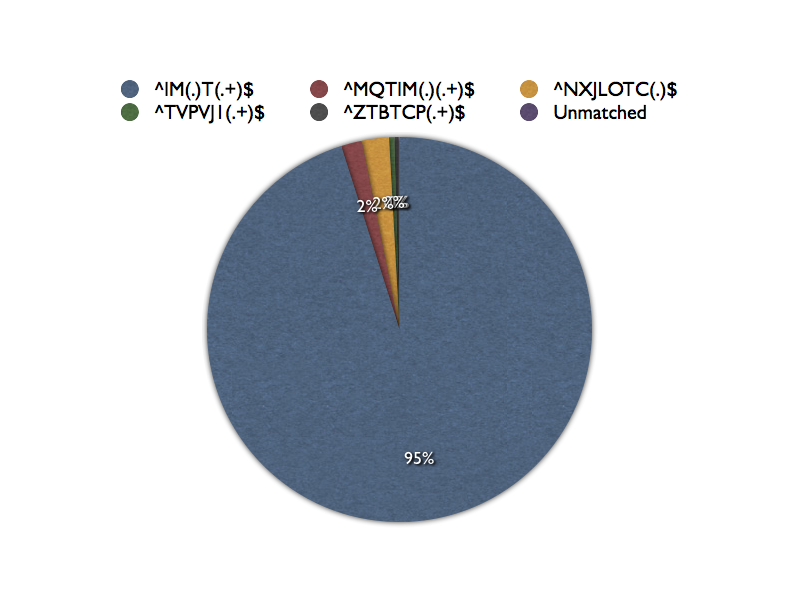
In fact with five Regexps only one job name failed to match. These five Regexps are disjoint in that none are refinements of any of the others. If I put them on a pie chart it would look something like this:

I don’t suppose I’m going to present it to the customer with labels such as these. 🙂

Conclusion

This is just the start of something, and there are lots of ways to go on it. But it’s immediately useful.

I wrote the PHP code in such a way I could easily allow for more RegExps.

I could work on the presentation a lot. I could, for example, do some analysis of the varying portions of the job names.

I could apply it to just about any character string, from an data. So, for example, data set names, volsers, SMFIDs are just a few possibilities. And I could use it to analyse multiple (space-delimited) fields at once: An interesting one which actually would use back references is checking whether a portion of the SMFID appeared in the jobname (or if the SMFID appeared in a data set name).

What I think is a lot further away is automatically generating the Regexps. I’ve made attempts at this before but I think typing in my own Regexps is quite good enough.

You’ll recognise there are common building blocks in the Regexp I’ve dissected:

  • “^” and “$” as anchors.
  • “(.)”, “(.+)” and “(\d+)” as capturing groups.
  • “/1” etc as back references.
  • Literal character strings.

Some of these could become buttons and some entry fields. So I could simplify the creation of Regexps a little. (If it’s just for me I don’t think I’ll bother.)

So lots of possibilities. I’m just very pleased it worked. And I think many of you might find it a useful technique, too: Throwing a battery of Regexps at e.g. job names.

A Simple Graphing Enhancement Makes All The Difference

(Originally posted 2012-11-20.)

Once in a while there comes along a simple coding enhancement that really kicks the story forwards. This post is about just such a simple thing, as I think customer Performance people would benefit from it.

Consider the following perfectly ordinary graph heading (and ignore the grottiness of the font if you can). 🙂

I’d like to draw your attention to the portion if it in the brown box. That’s the new bit.

The whole heading is automatically generated by my REXX code – and you’ll recognise some of my parameterisation. But let me zoom out somewhat and start the story proper…

Originally the tooling I now maintain "only" 🙂 processed RMF-originated SMF (record types 70 through to 79). In particular the finest detail in CPU and memory terms was down to the WLM service class level.

But then I took the plunge and extended the charting down to the "Top 15" address spaces in the service class. (Any more than 15 and the graphs get very confusing.) The way my code works is a sequence of two queries, the first finding the Top CPU / Memory address spaces averaged over the entire shift and the second using that list of names to generate an hour-by-hour graph. CPU and memory are done separately.

As you can see from this example 15 doesn’t completely describe the service class (SYSSTC in this case), there being 50 address spaces in all.

The questions I had to "hand wave" and verbalise before were twofold:

  • How many address spaces are there in this service class?

  • What proportion of the CPU or memory does this represent?

On a bad day I won’t even remember to ask myself those questions. 🙂

In recent client engagements I’ve taken to hand annotating the graphs with some special HTML5 Canvas tooling I’ve developed. I’d rather not be doing that – and I guess you’d rather not have to annotate your graphs and reports by hand either.

So I was pleased it was remarkably simple to change my code to generate this piece of the title. In fact the calculations had already been done and sent to SYSOUT when I wrote the original Type 30 code.

I think it is an interesting fact that the memory for SYSSTC – as this heading shows – is overwhelmingly dominated by 15 address spaces out of 50. (And in fact it turns out the real big hitters are much fewer in number.)

I’ve deliberately avoided choosing an "Application" service class as that’s much closer to who the client is and what they’re doing. I tend to avoid exposing that. Suffice it to say they have many more IMS MPRs than 15 and so it’s interesting what proportion of the total the top ones are.

On and off over the years I’ve considered showing how the 80/20 rule plays out for address spaces in a service class: I could graph "contour lines" for groups of, say, 5 address spaces – sorted by overall CPU time. It’s a similar but different thing to trying to figure out which address spaces in a service class are clones of each other.

But the real point of this post is to urge people to automate those little things on graphs you frequently have to explain. Maybe the title’s not the right place – but for me it’s codewise the easiest thing to annotate. Maybe a graph note is – and GDDM (my graphing engine) allows for that if you drive it deeply enough. (But chart notes have their own problem: placement.)

Many Ways To Skin A Cat – Modernising Bookmaster / Script

(Originally posted 2012-11-19.)

With apologies to cat keepers everywhere (of whom I’m one). 🙂

Most of my reporting – when not graphical using GDDM – is created using Bookmaster. This looks in many ways like HTML and is another declarative markup language for text.

It used to be what most IBM publications (including Redbooks) are written in. And customers bought Bookmaster (and DCF / Script/VS), embedding it into the document-creation portion of their applications.

To modernise this kind of document creation you could rewrite, generating PDF or HTML. I’d like to suggest there’s an alternative, one that is evolutionary and might not require much change to your original programs. In fact probably none to existing code.

You can use B2H (described here) either on z/OS or on a PC to convert Bookmaster (Bookie to her friends) or some kinds of DCF Script to HTML. I use B2H on Linux, using Open ObjectRexx, though I also have it installed on my z/OS system.

You could stop there – with HTML – but you’ll see in a second why I think you shouldn’t.

Motivation

Consider what you get if you run Bookmaster source through B2H:
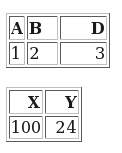
This is a pair of tables, with no augmentation and without any styling.

Now consider:

This is the result of applying some elementary styling (including a box shadow from CSS3). Doesn’t it look better?

I won’t claim to be the most experienced CSS user but this little sample shows some of what can be done. (CSS or Cascading Style Sheets is the modern evolving standard for styling HTML, with increasingly good compliance from the major browser makers.)

One nice thing about the approaches I’m outlining here is that you can largely separate styling from content: Normally we would speak of content developers having different skills and concerns from web designers – and CSS is what the latter would use (and other technologies such as Javascript and Dynamic HTML (DHTML) and so on). In this case the content developers might not exist any more: The application code is decades old. So this separation is especially valuable here.

How To Get There

The HTML that B2H creates is fairly old-fashioned, though you can influence some aspects of its generation. For example, it probably wouldn’t pass a formal parsing test. But most browsers will happily render it – and create an acceptable Document Object Model (DOM) tree. Creating a DOM tree is important, as we shall see.

As I showed above one can do nice things with CSS, and even more with CSS3. But how to inject it?

There are are several ways. Here’s one that doesn’t require any change to the source file:

B2H allows you to define a profile. The default one has a name which is a variation on B2H.profile. But you can override this with the USERPROF option when you invoke B2H. If you do so you can place lines like the following in this user profile:

headrec.text='H2    { font-size: large;   color: blue }'

This will inject a line into the HTML <head> element. You can place as many of these as you like in the user profile. (This one is just a fragment of CSS, of course.)

The actual CSS for the above example, by the way, is:

table
{
  background: #DDDDFF; 
  border-collapse: collapse;
  border: 2px solid black;
  box-shadow: 10px 10px 5px #888888;
}
th
{
  font-weight: bold;
  background: #BBBBFF;
}

Suppose You CAN Change The Program That Creates Bookie

This is probably the best place to inject stuff that affects how B2H operates. Within a psc tag bracket you can inject HTML and this will only affect B2H processing. For example:

:psc proc='html'.
.*B2H HTML <img src='/myimage.png'/>
:epsc.

I actually use this one in my code – to inject disk and tape icons above descriptions of disk and tape controllers. (Not very pretty icons but good enough to remind which I’m dealing with.)

Another good use would be to inject some CSS, either inline or referring to an external file.

You can also inject stuff into the HTML <head> element without an external profile. To rework the example that used a user profile, consider the following.

.*b2h option headrec.text='H2    { font-size: large;   color: blue }'

This has the same effect – and is simpler because it doesn’t require a user profile.

One other thing you might want to try is “wrapping” an element generated by B2H. Consider the following:

:psc proc='html'.
.*B2H HTML <span id='myTable'>
:epsc.
:table …
â‹®
:etable.
:psc proc='html'.
.*B2H HTML </span>
:epsc.

This wraps an entire HTML (as it will become) table in a span. (You could do it with a div though this would probably change the layout.) The span element has an id so the table can be readily referenced in CSS. This technique is also useful with Javascript.

What If You Want To Work With Document Content?

In my code I actually do want to work with the document content. In particular I update the title element – as the original Bookie doesn’t have the title I want. (In Firefox this appears on the tab and I’ve taken steps to make this mnemonic and succinct.)

The answer in most cases is to inject some Javascript. I’ve already shown you ways of doing this. I would recommend – where possible – you reference an external Javascript file, rather than adding the code inline. (The same would be true of CSS.)

But here’s another technique – which my code actually uses:

I use XMLHttpRequest (XHR for short) via the Dojo framework to load the HTML created by B2H and on load I invoke a Javascript function to modify the web page.

My code looks quite like this:

function handleLoadedBookie(response,reportName) {
  // If first row has a TD in it then that must signal a tdesc so stick classname of "tdesc" on it
  // NOTE: CSS expects that class and uses it to bold the text.   
  tdescTables=dojo.query("table").filter(function(x) {
    possibleTD=x.childNodes[1].firstChild.childNodes[1]
    if(possibleTD.nodeName=="TD") {
      // Flag with tdesc class so CSS can pick up on it
      possibleTD.className="tdesc"
            
      // Filter returns this node
      return true
    }
    else {
      // Filter throws away this node
      return false
    }  
  })
}

// Runs when DOM loaded
function onready(){

  dojo.xhrGet({

    preventCache: true,
    url: '/studies/ClientA/ClA1012/A158/03 OCT P/LPAR.html',

    error: function(response,ioArgs){
      alert(response)
    },
    
    load: function(response,ioArgs)
    {
      dojo.query('body').addContent(response)
      handleLoadedBookie(response,'LPAR')
    }
  })
}

I’ve extracted from my actual code and I’m not going to describe what it’s doing in detail because many people won’t be using Dojo. The fundamental calls you would use in Javascript to manipulate the DOM tree (and hence the page) are:

  • getElementById – which returns the element whose id matches the parameter passed in. (Which is why I mentioned id just now – with reference to wrapping.)
  • getElementsByTagName – which returns an array of elements whose tag name is passed in. e.g. “tdesc”. You could use this either to apply a change to all elements with the same tag name or to perform logic like “get me the third table in the page”.

Of course there are many ways of using Javascript to manipulate a web page – via its DOM tree. But it’s beyond the scope of this post to describe them. A competent Javascript programmer (and I “play one on TV” 🙂 ) will be thoroughly conversant in this area.

But here are a couple of pointers:

  • You can use Javascript to attach event handlers to elements and so add interaction.
  • You can use Javascript to manipulate the content of the web page, such as totalling columns in a table.

Really quite powerful stuff.

What If You Don’t Want HTML?

Here I’m a little hazy as I don’t actually do this. I break down the problem into two parts:

  • Exporting the content.
  • Producing a facsimile of the page, styling and all

The latter I know can be done in Firefox with the PrintPDF Extension. I tried it and it looked good. I tried other extensions that somehow use a web service to point at your data’s URL. That didn’t work for me as I’m not exposing my data to the web.

Actually there’s such a wide range of things you might want to do with Bookie documents once converted to HTML that this part of the blog couldn’t cover a significant proportion of them. So I’ll you ask you, dear reader, what you do with HTML.

Conclusion

I’ve shown you some ways you can use the HTML produced by B2H and some post-processing to modernise documents produced by programs that used to produce Bookie source. I would say these techniques, rather than attempting to parse the HTML by some other programmatic means (whether PHP, Python or Java, or something else) are straightforward. Indeed it would take a most liberal HTML parser in any of those languages (which do exist, at least in some of them) to handle the HTML that B2H generates. Fortunately most web browsers are very liberal. Unfortunately I’m not aware of a “headless one” i.e one that does everthing in the background. (I don’t think CURL could help here, but I’d love to be proven wrong.)

In case you’re wondering why we ever used Bookie in the first place, it’s because we used to generate real paper books – with all our graphs and tables in. But now I never print anything out: All my presentations are done using GIFs created via GDDM (for the graphs) and sometimes captures of the tables (generated by Bookie and B2H). If you see me pop up a web browser when I’m presenting to you I’m either fumbling for the GIFs or else the Bookie reports – courtesy of B2H and some of the tricks I’ve outlined in this post.

So, you can revive good things written in Bookie with B2H, and you can breathe new life into them with some of the techniques in this post.

And you can see some of the reason why my misspent middle-age was misspent with CSS, HTML and Javascript. 🙂

Self-Documenting Systems (Actually Coupling Facilities) – One Year On

(Originally posted 2012-11-17.)

About a year ago I posted: A Small Step For RMF, A Giant Leap For Self-Documenting Systems.

A year on I’ve encountered some customer data that’s made me go "huh?", related to this.

In the referenced post I mentioned R744FLPN, the Coupling Facility’s LPAR Number. For the first time I’ve seen data where the match – with SMF 70 Logical Partition Number (in Logical Partition Section) – doesn’t work.

But that’s because I misinterpreted R744FLPN: It’s actually the User Partition Identifier. The difference, as I understand it is that Logical Partition Number can vary over time, as reconfiguration happens. Whereas the User Partition Identifier can be set and remain the same forever.(And apparently you need that for the CFRM Policy to work.)

Obviously I’ve fixed up my code – to use the User Partition ID in SMF 70 (again in the Logical Partition Section). And it’s yielded an additional set of detail in my code that describes the LPARs on a machine. (Deciding whether to kick myself is “a dish best served cold”. 🙂

So it’ll be interesting to see how people use User Partition ID (UPI). If you’re using it perhaps you could let me know the scenario where you’re finding it useful. And remember UPI is not just for Coupling Facility LPARs.

Another new aspect of self-documenting coupling facilities is described in System zEC12 CFLEVEL 18 RMF Instrumentation Improvements. That is all about how CF links are getting better documented.

(And if you were wondering why I haven’t blogged for a month it’s because I’ve been extremely busy with customer engagements and speaking at the UKCMG 1-Day Meeting and GSE Annual Conference (both of which were thoroughly enjoyable). I’m beginning another big study – and this post is the result of the first thing I tripped over in their data.)

Hackday X – Batch Analytics Baby Steps

(Originally posted 2012-10-13.)

Hackday X was good clean fun yesterday – though I think it deserves more than one kiss. 🙂

Seriously, for once I think I have a hack that actually worked – at least up to a point.

I called my entry “z/OS Batch Analytics Baby Steps” and I think that’s about right. My purpose in taking part in successive Hackdays has been more to participate rather than to win any prizes, and to wave the flag a little for System z hackers. And to get some stuff done, experimental stuff I probably couldn’t afford to try out in my day job: The code enhancements I do there are more focused on the customer situation in hand or some annoyance or idea deriving from a real situation. With Hackday I can be more “out in left field” with what I try to do.

Actually having something to show for it would be nice. And in this case I could probably make it usable “in Production” in a couple more hours. But I wonder though if you think “usable” really means “valuable”. But first a recap of an oft-repeated rant.

Batch Analytics

I’ve said many times, including in this blog, that installations (and casual visitors such as me) know far too little about how batch runs.

While everyone has some batch reporting, and I have quite a lot of it, I think there’s a long way to go.

Here’s a good example, and one I chose to address with this hack:

While I might list job names and their run times it’s hard to see more than the most obvious of patterns. I choose to adopt the term “Analytics” here as a direction of travel as patterns are a part of it. At this point I’m going to suggest you read a recent post of mine: Games You Can Play With Timestamps and spend my column inches in this post talking about the actual hack.

So, in case you were in any doubt, “Batch Analytics” in this post refers to “Analytics of Batch”, rather than “Analytics run in Batch mode”.

The Hack Itself

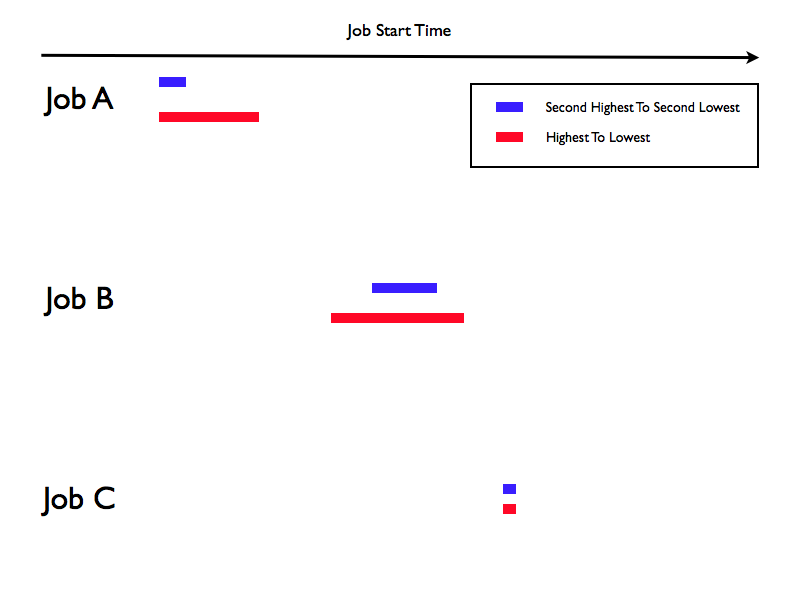
Consider:

This is, with the exception of the colouring, what my hack produced.

There are three jobs and I plot their start times, over a number of days. Actually I don’t: The red bars depict the earliest start time through to the latest. The blue bars depict the second earliest through to the second latest. In my test data I had five days of data so many jobs ran five times, some ran only once and one ran ten times. Next to the job name I print the number of times I saw the job run. (I also have a proper start time axis across the top.)

Though this is made up data the real data sample looked pretty similar:

  • There were many jobs much like Job A and Job B, with lots of variation in start time.
  • There were some jobs (mainly towards the front of the schedule) like Job C – with very little start time variation.

I think in the fullness of time I can do much better: This prototype uses Bookmaster Schedule tags to create a Gantt Chart. It’s monochrome and I think I’ve almost exhausted what it can do. But it was quick to code up and illustrates a point: Visualisation of job run times can be helpful.

The raw data is, of course, SMF Type 30 Subtype 5 Step-End records – and for once I didn’t need to change how the performance database is built. So the new bit is just more REXX code.

Futures

There are at least two things I can think of that would be better visualisations, though creating the apparatus to graph them would be a bit of a challenge. So I mocked up two possible graphs. While these graphs are almost identical they bear no relation to the one above.

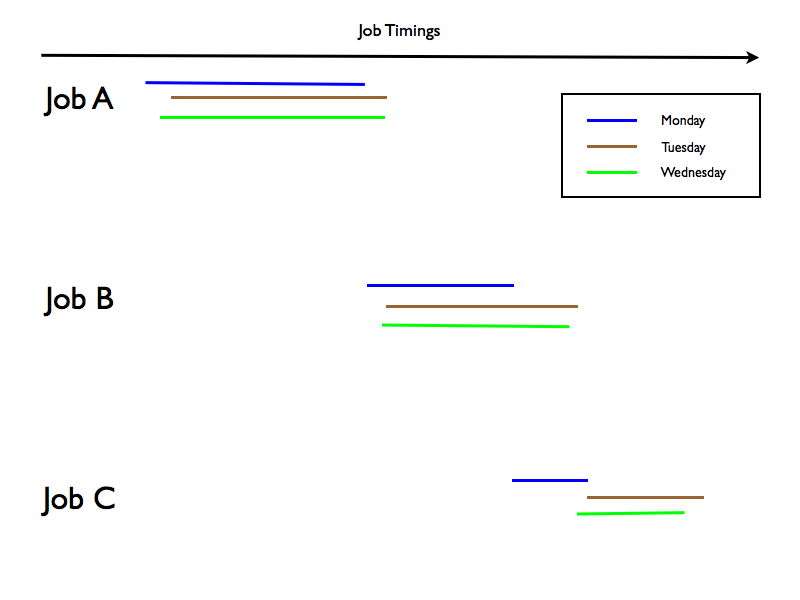
The simpler, and perhaps more consumable one in practice is:

In this one I plot both the start and end times for each job’s runs, with a different colour bar for each day the job ran.

This could show you the variance in start times and in end times.

It might be possible to produce it using bar charts with clever usage of invisible bars in the stacks but marking hours and minutes on the axis would be a nuisance. It might be easier to generate some HTML5 Canvas code (javascript) to create the whole thing.

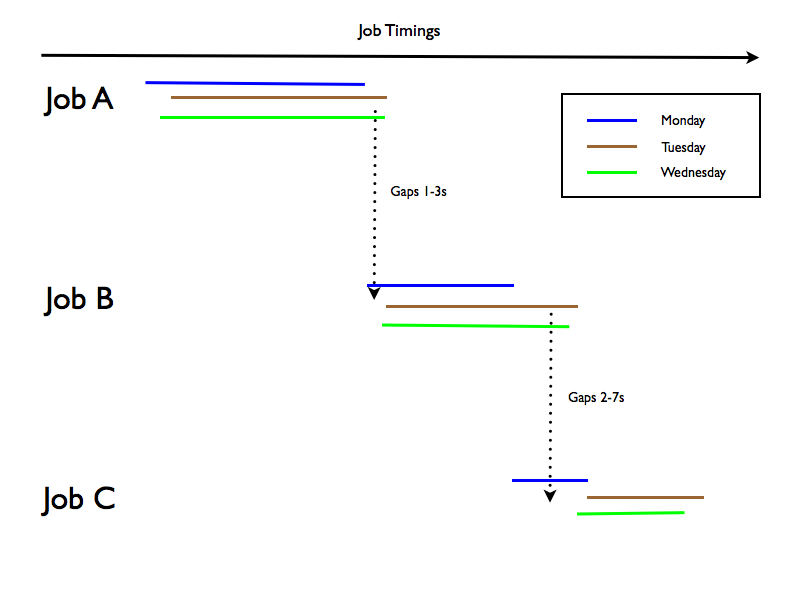
Now consider an enhancement – which in practice might get messy:

In this example the code would calculate the gaps between e.g Job A finishing and Job B starting and annotate the picture with it.

The calculations (as I mentioned in Games You Can Play With Timestamps) are very easy.

My concern about this is that the number of “gaps” annotations on a picture like this would grow to be huge very rapidly. Maybe some “smarting” that only annotates if the gaps between 2 jobs tend to be less than 5 seconds would help here.

It’s too tempting a goal to abandon entirely. And I can think of other wrinkles like annotating when jobs are consistently seen to start together.

But after a good day’s hacking I returned to the day job: A large mount of (non-batch) performance data arrived and duly got built into databases. And I’m looking forward to gaining insight into that customer’s systems over the next few days. But Hackday X was a great chance to explore some of the themes in (you guessed it) Games You Can Play With Timestamps which had been rolling around in the back of my mind. (You can imagine maintaining discipline to focus on less speculative stuff until Hackday itself was quite difficult – but I managed it somehow.)

But then that’s what Hackday is all about: Releasing untapped ideas into the wild and building prototypes that can be built upon later. If you ever get a chance to do something similar in your company do take it – it’s very rewarding but frustrating in that you only get a little time.

New CPU Information In SMF Type 30 Records

(Originally posted 2012-10-10.)

Round about now you’d be expecting posts to be geared towards the recent zEC12 announcement, or perhaps CICS TS 5.1 or the DB2 11 Preview, or IDAA V3. So what this post is about will probably have slipped by unnoticed. After all you don’t spend all your time looking for obscure New Function APARs, do you? 🙂

But I think some of you will find this one of value, or at least quite interesting.

(I presented a slide on this at the UKCMG 1-day meeting, October 10 2012, so you might consider this to be the script for that slide.)

I could’ve given this post a provocative title like "Do You Really Need CICS PA1?" and you’ll see why that’s an only slightly daft question to ask in a minute.

Single TCB (task) speed has always been an important topic, and continues to be so. Here are three examples of why, irrespective of processor technology:

  • For CICS regions much of the work is still performed on the QR (Quasi-Reentrant) TCB. There’s one per CICS region and when it’s saturated the region can support no more throughput: Installations are usually forced to split the affected regions.
  • For CPU-bound batch jobs there is usually a single TCB conditioning their speed: To make them go faster takes application code tuning, removal of queueing or a faster processor.
  • For complex CPU-bound DB2 queries the picture is similar to that of CPU-bound batch jobs. But here CPU Query Parallelism might help.

And these are just the most obvious examples, which we all know and love.

There’s an industry trend that’s beginning to make this even more important: Although the zEC12 had a very healthy single-processor speed increase over the z196, this is not a long-term trend. Processors of all architectures are getting faster more slowly, and this probably isn’t going to change. All architectures are relying on more engines and more threads to support larger workloads and zEC12 upping the limit to 101 engines from 80 is a good example of that.

So it behoves us to understand the single-TCB proclivities of our workloads, for all four reasons, and more.

A key point is, of course, what to do about it. But this post introduces some new instrumentation that at least helps with the analysis.

APAR OA39629, available for z/OS Releases 12 and 13, has the title "New Function To Report The Highest Percent Of CPU Time Used By A Single Task In An Address Space".

It provides two new fields in SMF 30 Interval (subtypes 2 and 3) and Step-End (subtype 4) and Job-End (subtype 5) records:

  • CPU % of the highest CPU consuming task.
  • This task’s program name.

For Step- and Job-end records the CPU % is highest percentage among the intervals during the running of the job or step.

The rest of this post is slightly speculative, as I’ll confess I haven’t actually seen SMF 30 records with the new fields in yet.

When there is no CPU you get blanks for the program name. If the program can’t be determined you get ‘????????’.

Let’s return to CICS: Consider the following diagram

This depicts a CICS region, though not a wholly typical one. As depicted, I would expect for most CICS regions the QR TCB to be the biggest. I don’t know whether the program name will actually be "DFHSIP" but I would expect it to be mnemonic and it’ll probably start with "DFH". If this is right we have a ready way in Type 30 to figure out how big the QR TCB is and therefore whether it is an impending constraint. And we can do this without creating CICS Statistic Trace records.2 I mentioned Type 30 records and QR TCB in He Picks On CICS without a solution to the question of how to distinguish QR TCB from the rest.

The diagram also shows a File-Control TCB (think “VSAM”), three MQ TCBs and four DB2 TCBs. A typical region wouldn’t have all these doing much, if indeed they were present. And showing this level of evenness would, I’d hazard, be unusual.

For CICS regions with a heavy DB2 component, for example, the QR TCB might not be the biggest TCB3. In this case we’ll see a different program name and we can provide an upper bound on the QR TCB %. We’d do this by subtracting the biggest TCB (whatever that is) from the headline TCB time – also in the Type 30 (with some adjustments to make the maths right)4.

Of course CICS PA and the standard DFHSTUP (CICS Statistics Utility Program), which prints CICS TCB percentages at the subsystem level, do far more than just reporting CPU at the transaction instance and region level. But sometimes all you need is to figure out if the QR TCB is a vulnerability. In fact if you do have a region that needs work you probably would drill down (using something like CICS PA).

The above would use the Interval records (subtypes 2 and 3) and the same approach could be used with any long-running address space5. But there’s value for batch jobs – using subtypes 4 and 5. Admittedly most jobs are single-tasking. But not all are: For example, DB2 Utilities can be significant multitaskers6. So there is some value in finding the biggest TCB (and subtracting from the "headline" TCB number): You can better assess the benefit of faster engines (or understand which job steps are susceptible to engines not getting much faster).

So, I’m really looking forward to seeing real customer data – which I’m convinced will be very interesting.

I can’t believe it’ll be long before I see some. And when I do I’ll write some more about it.

Notes:

  1. CICS Performance Analyzer, which produces reports based on SMF 110 Monitor Trace records. i.e. at the Transaction ID or transaction instance level.
  2. I think this is actually quite significant: While I see customers with only a few CICS regions I see others with tens, hundreds or (in a few cases) thousands of CICS regions. Turning on Statistics Trace for a large subset of regions, particularly with a sensible Statistics Interval, is cumbersome if you’re just monitoring QR TCB %. Triaging them into "fix now", "monitor growth" and "don’t worry" regions is something you’d like to do with SMF 30 rather than SMF 110. After all most customers have SMF 30 Interval records permanently switched on.
  3. I think this is a little unlikely: A CICS region will typically have multiple DB2 (or MQ) Attach TCBs, each of which would normally be quite small. So I’d still expect the QR TCB to be the biggest.
  4. Another approach might be to use the fine structure of the Usage information I mentioned in Another Usage Of Usage Information. But the boundaries of usage might not completely align with TCBs. This is an experiment yet to be performed.
  5. But many address spaces are architected so as not to have a "dominant" TCB, and indeed CICS has moved that way.
  6. You could use SMF 101 Accounting Trace to see some elements of multi-tasking but I’d hope you wouldn’t have to.

System zEC12 CFLEVEL 18 RMF Instrumentation Improvements

(Originally posted 2012-10-04.)

I don't know how many of you will've spotted this but there was a nice instrumentation enhancement in the recent System zEC12 announcement.

It comes with the RMF support for CFLEVEL 18 (OA37826 and provides much more detail on paths to Coupling Facilities (CFs).

Previously RMF reported channel path acronyms – one per path. And that was all. (A channel path acronym is something like "CIB" for "Infiniband".) Those of you who know something about Coupling Facility link technology will recognise there are multiple types of Infiniband link now. If you do you'll equally recognise other deficiencies in the RMF topology information. This support fills in many of the gaps.

(Note: The existing support covers not only paths between z/OS LPARs and CFs but also between CFs – in support of structure duplexing.)

Though my personal interest is in the enhancements to the SMF Type 74 Subtype 4 record cut by RMF, there are corresponding enhancements to RMF Monitor III and the RMF Postprocessor.

So, what do we have?

  • CHPID
  • PCHID – which allows a better view of sharing where two or more z/OS images share a link to a CF. (This might explain why IC links don't play.)
  • Channel Path Operation Mode – e.g. "CIB path operating at 1X bandwidth using the IFB protocol, adapter type HCA3-O LR". I hope you'll agree this is much better characterisation than just "CIB".
  • Host channel adapter ID and port number.

The above is all topology information. What we don't have is traffic over the paths. Personally I think I'd like to see it for two reasons:

  • Though I don't want to reverse-engineer path selection logic I do get questions about mixed topology z/OS-to-CF configurations and I'd like the data to provide answers on how traffic is routed.
  • I'd like to be able to monitor path degradation – to proactively resolve issues. I'll admit the one "bad path" situation I've been involved with was catastrophic – in that the fibre broke – but seeing degradation over time would be useful.

If you agree that traffic and error analysis would be something you'd value let me know. Alternatively, if you think it's a dumb idea let me know (gently). 🙂

The new information is available for both z/OS-to-CF and CF-to-CF links. The only difference between the two is the "anchor" in the Local Coupling Facility and Remote Coupling Facility sections.

There is some performance information, which I think is useful:

  • Path Is In Degraded Mode flag. This is binary and is passed from the hardware. I'm still getting clarity on what it actually means. What is clear is that there are both "path is degraded but some signals are getting through" and "path is totally dead" situations that could lead to this flag being set.
  • Channel Path Latency Time. RMF uses this to estimate signalling distance at 10 microseconds per kilometer. Call me nosey but I really want this – as I like to figure out whether machines are close together or in different data centres.

    The field description notes this is the average round-trip path time in microseconds. A value of 0 means that the time was not measured. A value of 1 means a time less than or equal to one microsecond. So it's obviously not accurate enough to calculate distance to the nearest metre. I suspect we'll get to one of three states: The machines are very near to each other, they are a few hundred metres apart, or they are some kilometers away (and how far away they are).

Most of the information in the SMF record is in a new section (Channel Path Data Section) – which is going to cause mass bustage of my code. (Actually I don't handle Remote Coupling Facility sections terribly well so some reworking of my code is overdue anyway.) Fortunately the lab sent me a pretty complex set of data – so if I'm quiet 🙂 you'll know I'm 'heads down' in my code.

And I'm looking forward to seeing data from real customers: If you're at z/OS RMF Release 12 or 13 you can install the PTFs and take advantage of the new stuff too.

I Know What You Did THIS Summer

(Originally posted 2012-09-29.)

Do you see what I did there? 🙂

On March 10th I published the slides to “I Know What You Did Last Summer” on Slideshare. Since then I’ve given the presentation thrice and in the process got to know it a little.

(Yes I really do think creations take on a life of their own, sort of autonomously.) 🙂

So, six months on, I’m very pleased to have been asked to give the presentation again, but there are a couple of extra challenges in there:

  1. It has to fit into 45 minutes, instead of 1 hour+.
  2. It’s got to be sufficiently different to how it was before.

I’ll confess challenge 1 is one I should’ve addressed from the outset: You always have to be able to adapt your material to any timeslot. Yes, I can rip slides out but a “controlled contraction” would be better.

The second challenge is a blessing in disguise. The rest of this post more or less says why – and points the way to some future blog posts…

Much has happened in the past six months, some of which has been remarked upon in this blog. So the new elements I’m going to introduce are:

The second of those I’ve already talked about. The other two belong as blog posts in their own right. Maybe “1 blog post per slide” is a good rule of thumb here.

Two other things have happened in the past six months are:

  • I now have a semi-official part time role in pursuing the case for better instrumentation and talking about what we already have. I’m not sure this should be in the presentation.
  • Talking to several customers and IBM developers through the summer I’m even more sure “Batch Architecture” gleaning is vital to many enterprises. So I ought to emphasise that more.

So, as I say, updating the presentation is something I want to do. And to see if I’ve made a good job of it come along to UKCMG FREE Forum on the 10th October 2012 at The Magic Circle in London.

Some Things You Might Not Know About VSAM SMF Type 64 Records

(Originally posted 2012-09-24.)

This was originally going to be a different post about VSAM’s SMF 64 record, based on a customer situation. But it’s morphed into something else: A round up of "recent" enhancements to the SMF 64 record.

"Recent" is a nice euphemism: Some of these enhancements are 15 years old. 🙂 But let’s start the story at (or at any rate nearer to) the beginning…

Back in the early 1990’s I’d written the kernel of what would become SG24-2557 "Parallel Sysplex Batch Performance". Subsequently a few chums and I started putting together what would become "PMIO" – some tooling around which the Batch Window Tuning offering of the same name was built.

Other people in the team built the VSAM pieces – mostly out of DFSORT steps with assembler E15 and E35 exits, but also SLR as the database and REXX for reporting. Essentially the code marries up SMF 30-4 (step-end), 62 (VSAM OPEN) and 64 (VSAM CLOSE) records.

And it came to pass that I inherited all this code…

I’d not been closely involved with the code before so there was the usual re-engineering effort: Understanding the code, working on the comments and a little reformatting. It’s good code but quite fragile. So the "getting to know you" piece is essential. It’s the same as for any code adoption.

So what has all this got to do with "new" stuff in SMF 64?

If it ain’t broke don’t fix it" applies here – especially given what I said about fragility. So adding stuff that would give additional insight was what drove me to open up the code…

The first thing I added was new with z/OS Release 12: CA (Control Area) Reclaim. There are two fields in support of this line item: They tell me if you’re using CA Reclaim for a VSAM data set and if you’re getting benefit. (Thanks to Scott Drummond for reminding me of this – in the context of my customer’s problem.)

It’s not embarrassing that I’ve only just added this. But here’s one that IS: 🙂 In 1997 in OS/390 Release 4 DFSMS introduced System-Managed Buffering (SMB). This enables you to, for example, enable VSAM LSR (Local Shared Resources) and control it.

(LSR is a big deal as it allows you to change the VSAM buffering scheme to a better one than high-level languages tend to support. Previously one might’ve used the Batch LSR Subsystem to do this.)

So SMF 64 has lots of information on SMB, such as whether the JCL specifies what SMB’s buffering approach will be, whether it leaves it to SMB and what that approach will be (ACCBIAS). And now, only 15 years late, I capture this information: It rounds out what one can say about a VSAM data set’s performance rather nicely.

As for the customer situation: It turns out I mixed up CI (Control Interval) and CA (Control Area) split statistics (I do know the difference) and, wrongly concluded CA splits was a real issue. What I really had was a program-driven load (not a utility) which was causing a huge number of Index CI (write) I/Os. I think the simplest fix for this is to use SMB to turn on LSR buffering with Deferred Write.

It turns out this client is using neither SMB nor CA Reclaim. But if you get to send me your data I will now spot how you’re using these – assuming it’s relevant to the overall story. And we’ll see how well it’s working for you.