Give Me All Your Logging

(Originally posted 2017-06-13.)

Long ago I added reporting on DB2 log writing to our code. At the time it was just to understand if a particular job or transaction was “log heavy”. That is, I was interested in the job’s perspective, and whether it was dependent on a high-bandwidth DB2 logging subsystem.

A recent incident, however, gave me a different reason to look at this data: We were concerned with what was driving the logging subsystem so heavily in a given timeframe.[1] This is because there were knock-on effects on other jobs.

It’s as good an opportunity as any to alert you to two useful fields in DB2 Accounting Trace:

  • QWACLRN – the number of records written to the log (4-byte integer)
  • QWACLRAB – the number of bytes logged. (8-byte integer)

In this case I wasn’t really interested in the number of records. In other contexts I might well calculate the average number of bytes per record – because that can be tunable.

I was interested in logging volumes – in gigabytes.

Each 101 (IFCID 3) record has these fields so it’s quite easy to determine who is doing the logging. What is more difficult is establishing when the logging happened:

  • Yes, the SMF record has a time stamp, marking the end of the “transaction”.
  • No, the records aren’t interval records.

For short-running work this is fine. For long-running work units, such as batch job steps this can be a problem. To mitigate this I did two things:

  • Asked the customer to send data from the beginning of the incident to at least an hour after the incident ended.
  • Rather than reporting at the minute level, I summarized at the hour level.

The latter took away the “lumpiness” of long-running batch jobs. The former was enough to ensure all the relevant batch jobs were captured.[2]

What we found was that a small number of “mass delete” jobs indeed did well over 90% of the logging (by bytes logged) – and they started and stopped “right on cue” in the incident timeframe.

In this case I modified a DFSORT E15 exit of mine to process the 101s, adding these two fields. I then ran queries at various levels of time stamp granularity.

These two fields might “save your life” one day. So now you know. And it’s another vindication of my approach of getting to know the data really well, rather than having it hidden behind some tool I didn’t write. And I hope this post helps you in some small way, if you agree with that proposition.


  1. This is from an actual customer incident, which I’m not going to describe.  ↩

  2. Fairly obviously even an hour might not have been enough. So you might argue I got slightly lucky this time. I’d’ve asked for another hour’s data if I hadn’t, so no real risk.  ↩

A Tale Of Two Batteries

(Originally posted 2017-05-19.)

I’m starting to write this on a train to London. (Not Paris.)[1] When I get there I’m going to present the “New Improved” “Even More Fun With DDF” pitch to the UK GSE zCMPA user group.

I was done with the slides a few days ago – or so I thought.[2]

Well, I got some “down time” earlier this week to work on my DDF code some more – which resulted in another slide in the deck, and now this blog post.[3]

You might recall that I can – from SMF 101 (DB2 Accounting Trace) – discern the topology of machines connecting to DB2 via DDF. I wrote about it extensively in DDF Networking. One of the examples was a pair of groups of 32 contiguous IP addresses.

Each of the groups of 32 machines – as that is what they are – comprises machines connecting to a single application. The Platform Name is filled in – via the JDBC driver in this case – so I know the application name. Actually the Platform Name is not constant in this set of data but follows a clear naming convention.

Before I go on, I should say contiguous IP addresses aren’t necessary for this method; Just the naming convention. But contiguous IP addresses suggests a battery of machines deployed at the same time.

The Thought, Such As It Is

So, I got to thinking: If these really are batteries of middle-tier machines we can perform statistical analysis on them.[4]

Some people might be confused by the term “battery”; I’m appealing to the original meaning – as in “gun battery” rather than the thing you lick to get a tingle on your tongue. πŸ™‚

<<Serious Face Back On>>

Pro Tip

I modified my code in the following way:

  1. I changed the DFSORT step that produces the raw file the REXX formatting step reads to a CSV file. This is very easily accomplished.
  2. I modified the REXX step to expect CSV, not just fixed-position fields. Again, easy to do.

The “pro tip” is this: When passing a transient file consider if it wouldn’t be more useful to pass a CSV file. There is no need to squeeze any of the fields to get rid of blanks. Not squeezing is handy for any downstream DFSORT or ICETOOL processing.

I loaded the CSV file into Excel (which I actually find frustrating to use).

I then created graphs to show the CPU seconds of Class 1 time occasioned by each machine in the battery.

A Nice Test Case

So I took 3 hours of a customer’s data for a 4-way DB2 Data Sharing Group. For simplicity in what follows I’m only showing a single DB2 subsystem’s view.

In this example there were two batteries of 16 machines each. These are Websphere Application Server (WAS) machines, handling part of the customer’s Mobile[5] workload.

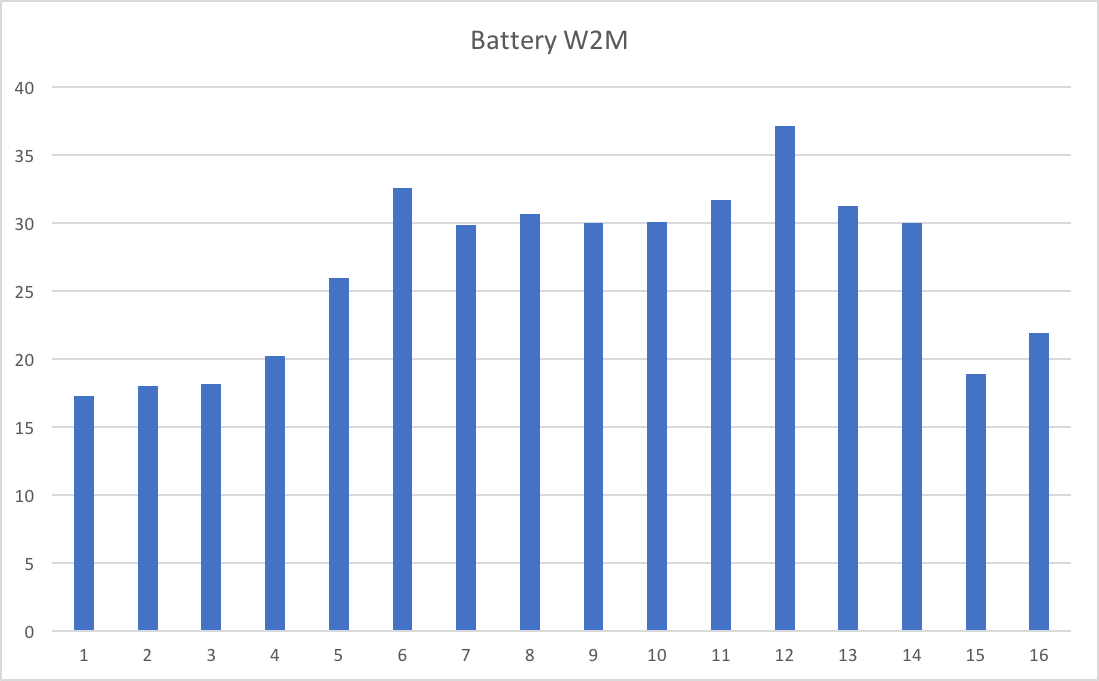
I’m led to believe these two batteries of servers are meant to be balanced. So I would expect – certainly over the 3-hour interval – the Class 1 CPU in DB2 to be balanced. So look at the following two graphs:

This is Battery W2M.

And the following is Battery W3M.

src=”https://mainframeperformancetopics.com/wp-content/uploads/2020/01/battery-w3m.png”&gt;

Each graph has 16 bars. Each bar is DB2 Class 1 CPU seconds in the 3-hour data swag for a single WAS server.

So, there are a number of things to observe:

  • None of these numbers is particularly large.
  • The servers in a battery are not balanced. I think I observe the middle servers are busier than the ones at the edges – but I can’t explain that.
  • The two batteries aren’t balanced. (I’ve ensured the scales on the two graphs are the same, before you check.)

Conclusion

I think we can do useful work this way:

  • We can ask why the imbalance between and within batteries.
  • We can – with a third dimension – see the behaviour of the battery with time.
  • We can monitor at the machine and battery level – to understand when the workload is building up. Or – not the case in this example – if a machine is “beaconing”.
  • We could – with adequate statistics from these machines [6] – correlate DB2 Class 1 CPU with middle-tier machine CPU.

So, the “rich vein” of DDF so-called insights continues. And this post is yet another example of stuff you can do with SMF to bring conversations with architects and others to life.

So now you know – if you send me 101s – another rabbit hole I’m likely to go down. πŸ™‚

I’m finishing writing this on the train home from London; We had a very lively discussion on DDF (and a great meeting overall). Of course the two graphs in this post featured – and played as I thought they would.

One particular aspect seemed to gain traction: In DB2 DDF Transaction Rates Without Tears I wrote about SMF30ETC – Enclave Transaction Count in SMF 30.

The context was trying to work out which DB2 subsystems and which time frame to analyze SMF 101 from. While it might only be possible to get and process 15 minutes to 1 hour of data (particularly if you’re a consultant as I am) you want to time it right. SMF30ETC might very well tell you where to dig. Of course, without complete coverage you never know if some other piece of DDF work from some other timeframe was important. Oh well, you can’t have everything.


  1. Get the literary reference in the title? πŸ™‚  β†©

  2. Old presentations never die’ They just get leggy and unprunable. πŸ™‚  β†©

  3. Does it make me a dinosaur to hate it when people say “blog” when they mean “blog post”? πŸ™‚  β†©

  4. Who knows what might be useful? “Suck it and see” is a good approach. πŸ™‚  β†©

  5. This seems to me quite a natural configuration – dedicated Mobile middle-tier machines. It also, using WLM DDF classification rules, fits into a Service Definition that helps with Mobile Workload Pricing. (I’m not, however, a Software Pricing expert.)  β†©

  6. Pardon my bias πŸ™‚ but I think it’s tough getting decent middle-tier machine statistics.  β†©

Mainframe Performance Topics Podcast Episode 13 “We’ll Always Have Paris”

(Originally posted 2017-05-06.)

It’s been a few weeks since we last recorded and it was good to get back in “the studio” again.

As usual it’s quite a wide range of topics. We hope you enjoy them.

Two technical notes:

  • I have new headphones which reduced the amount of bleed through from my ears to the microphone. Not entirely perfect but better. I still have to go through a fair amount of clean up, which I’m getting quicker at.
  • I found the “Reverse” filter for Audacity. It features in this episode, though you might not spot it. πŸ™‚

The comment about my DDF code being something I’d like to share is not an idle one, by the way. It is early days, though, for a number of reasons. But, if you see me present or download the presentation and like what you see in the customer cases you might want to drop me a line about it. Some level of interest makes it easier for me to pursue sharing.

Episode 13 “We’ll Always Have Paris” Show Notes

Here are the show notes for Episode 13 “We’ll Always Have Paris”. The show is called this because both Marna and Martin reminisce about lovely times in the City of Light.

Where we’ve been

Martin has been to Chicagoland to visit a customer, and partake in the local victuals.

Marna has just returned from vacation (hence, the title and Topics topic on Paris).

Mainframe

Our “Mainframe” topic discusses what has been a popular item since more people have finished migrating to z/OS V2.2: GDGEs.

Generation Data Group Extended (GDGEs) were introduced in z/OS V2.2, and should only be used after fully migrated to that release everywhere. “Old” GDGs allow >255 generations. GDGEs allow up to 999, but with a very different internal structure. GDGEs are externally usable transparently.

There is no straightforward conversion way in DFSMS. Steve Branch (alias name of “Mr. Catalog”) and Marna had a six step JCL job to convert (which used IDCAMS ALTERs), and would work if the generations were SMS-managed, which was the initial use case.

A nice customer used our original six-step JCL, but didn’t work for him. His use case was non-SMS GDGs on tape. Back to the drawing board, and with more test cases.

  • Problem was IDCAMS ALTERs, as didn’t handle non-SMS managed GDG (with IDC3009I). Steve thought that replacing them with TSO/E RENAMEs might be better. But tape would still be a problem.

Steve’s thoughts on why a DFSMS utility to convert is difficult: GDGE internal record design does two things: makes the Generation Aging Table limit field 2 bytes (instead of 1) and removes the concept of GDG sub-records which were present in GDG.

  • For Steve to handle the conversion in DFSMS, there are important worries about backout and failures if the conversion didn’t complete successfully. And these worries happen at three different points a when it comes to the steps in the necessary conversion. He mentioned that a recovery might look something like a full volume dump and restore if there were problems, which is not palatable in many cases.

  • And because so many ask: the limit is 999 because it was the largest number that JCL could handle without making changes which might have been incompatible. (Incompatibility brings Marna to your office for a personal deskside chat about z/OS migration.)

Tests ran for three cases with the new TSO/E RENAME flavor: combos of NON-SMS/SMS, and DASD/Tape:

  • NON-SMS/DASD was a success, and SMS/DASD (but migrated data sets were recalled!) was a success.

  • NON-SMS/TAPE: failure because it is not on DASD. However, a solution could be constructed whereby:

    • write some REXX to produce JCL that would individually: uncatalog the tape GDG generations,

    • delete the GDG base, define it as a GDGE, recatalog all the tape generations as GDGE.

    • Doable, but with work…but might be worth it for 999 generations!

This nice customer, however, has followed up with me and has offered the share the REXX to do just that. All JCL and REXX discussed can be found here: Marna’s Blog.

Mainframe Summary

  • You can do the conversions for your GDGs to GDGEs, but you need to decide if it’s worth it.

  • The TSO/e RENAME will work in all the cases that IDCAMS ALTER would, plus more.

  • The shared REXX exec can be used if you want to convert NON_SMS/TAPE GDGs to GDGEs.

  • Still, if you have a gazillion references in places like JCL, it is a compelling case to take some extra one-time work and do the conversion.

  • Mind the recalls! You’ll need a lot of recall space on DASD, if you are recalling lots of data sets and they are large.

Performance

Martin talked about a presentation he’s been keeping updated, Even More Fun With DDF. The original presentation covered:

  • why you should care about DDF,
  • LPAR to Service Class Level views,
  • side themes of zIIP and DB2 address spaces, and a discussion of SMF 101 and DDF.
  • Contains three different customer cases: some basic statistics, a CPU Spike case, and “sloshing”.

The updated presentation has:

  • SMF 30 Enclave Statistics graphing

  • Thoughts on handling clients with huge numbers of short commits

  • Matching client and server DB2 101s where DB2 to DB2 DDF

  • Production vs Feral DDF

  • Diagrams of machines connecting to DB2 via DDF

An analysis is done using RMF and SMF 30, and SMF 101 DB2 Accounting Trace, using special code written by Martin:

  • DFSORT WITH E15 To select and “flatten” DDF 101s

  • DFSORT and a small amount of REXX to run queries

    • From hours to seconds level granularity

    • From subsystem to client software / hardware / userid granularity

  • Might generally be useful, contact Martin if you want to chat about it.

Performance summary

  • Last year’s presentation significantly extended, with experience and better tooling.
  • Most likely more will be coming.
  • Look at DDF: remarkably interesting topic and an important one

Topics

Our podcast “Topics” topic was Paris and visiting it. Marna just got back from Paris with her son (the one that built his own gaming computer). They discuss what they like to do there.

  • Sites:

    1. Martin loves to go to the museums. Especially the Louvre and Beaubourg. He could spend all day in the Louvre.
    2. Marna’s son doesn’t like museums, so they visit other spots like the Catacombs (with a four hour wait!) and the gargoyles at Notre Dame (only a two hour wait).
  • Food: Marna and her son focus on cheese, and have become quite adept at all three raclette contraptions available: pans, “two winged panels”, and “up/down lever”. Of course, these are not the official names, but they are the best describers of the method to scrap all the cheese you can onto your plate.

  • Getting around: Martin loves the metro, which is so easy and convenient. He loves the part on the metro when you come out from underground to the raised tracks in some places. Marna did a lot of walking. (Fitbit while at Versailles registered 31k steps = 13. miles = 22 km.)

  • At Versailles: lots of walking, especially if you go all the way out to Marie Antoinette’s “farm” with goldfish…or is that carp ? You can decide.

  • Pro Tips: Use the “skip the line” and make reservations very early. Buy tickets early online too. Use the available apps too (like for Versailles ). Check the schedule for when the Versailles fountains are on.

Where We’ll Be

Marna will be at IBM Systems Technical University in Orlando, 22–26 May 2017.

Martin will be at GSE UK zCMPA 18 May, 2017

On The Blog

Martin has published two blog posts recently:

Marna had this prior blog from 28 March 2017, which this Mainframe Topic was based on:

Contacting Us

You can reach Marna on Twitter as mwalle and by email.

You can reach Martin on Twitter as martinpacker and by email.

Or you can leave a comment below.

Automatic For The Person

(Originally posted 2017-04-24.)

Many people know I’m a bit of an Automation “nut” but like most such people I feel a smidgeon of guilt that I might:

  1. Be spending more time setting up automation than I save.
  2. Having too much fun with it.

But let’s dismiss Item 2 straight away; Fun is an enabler and motivator in the best possible way.

There’s little more satisfying than seeing well-targeted automation doing its thing.

Doing it well, consistently, quickly, in a tailored fashion, and with only the minimum amount of human interaction.

By the way this post follows on from Automatic For The Peep-Hole.

Easy Cases

Some automation is easy to justify: Our Production code, for instance, is irreplaceable. Without over-egging the justification it, in its many iterations, has been used worldwide in dozens (if not hundreds) of engagements.

Where It All Gets A Little More Difficult

In “Easy Cases” I alluded to usage metrics: User population and use counts.

But what if the number of users is frustratingly small? I could, for instance, develop a piece of automation and find no other takers, despite offering it as a “token of love / esteem / whatever “. I’ll come back to trying to answer that in a moment.

Let’s consider why you might end up with “an audience of zero”:

  1. Nobody has the same environment (software and hardware stack, plus the services and systems they connect to) as me.
  2. Nobody recognizes the same problems as I do.
  3. What I’ll call “ownership”. Sometimes a gift is an imposition in that it’s an “expression of taste”.

All these factors can lead to a “dinner for one” situation.

Environment

My colleagues, family and friends have myriad different kit. For example, some are on Windows. Further, people connect to different z/OS systems or web services.

Still further, I’ve bought a lot of software on iOS and Mac OS; Most people around me – immediate family excepted – won’t have access to this software. The same is true of hardware.

Problems

My fairy king can see things … that are not there for you and me” applies, I’d say. πŸ™‚

So I stumble across irritations that others don’t, and vice versa. More positively, and more relevantly, people see opportunities for automation in a somewhat haphazard way.  

Ownership

Suppose I build something for you; Do you want it as much as you would if you built it for yourself? “In your own image” one might say. I would guess not.  

An Example Of A Hyperspecific Piece Of Automation

I was listening to an episode of Nerds On Draft podcast where they were talking about note taking and also Taskpaper format. Taskpaper format is a plain text way of describing tasks.

One of the reasons it interests me is you can import Taskpaper text into Omnifocus and have it parse it into new tasks.

Here is an example:

- Finagle The Wotsit @due(+2d)

where the dash at the start of the line says “this is a task”, “Finagle The Wotsit” is the task name, and “@due(+2d)” says “the task is due in 3 days”. Simple!

This is an incredibly simple example of a Taskpaper format task. But note even this contains some nice date maths.

The scenario I thought up has two components:

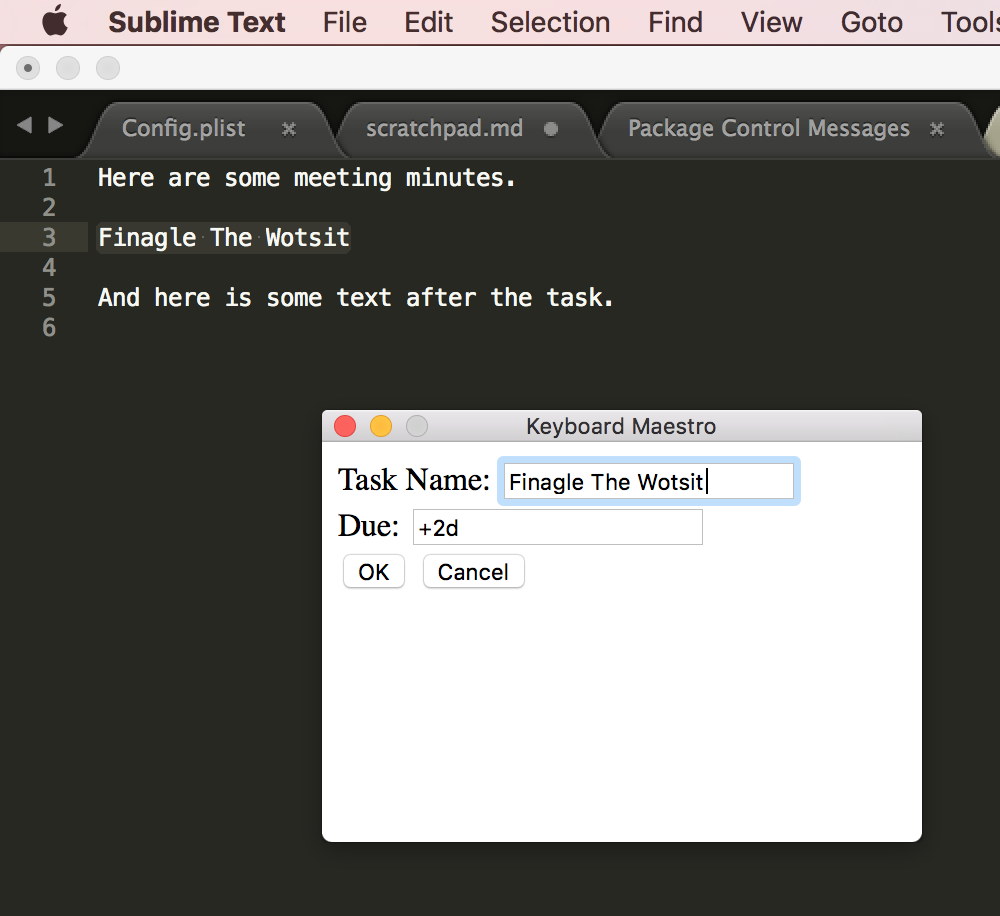
  1. When in a meeting take notes in Sublime Text in Markdown format, with tasks in Taskpaper format. Here selecting the text of the task and typing Ctrl+t1 pops up a dialog that lets me type in a due date. The selected text is replaced by the Taskpaper text.
  2. Typing ctrl+o gathers all the Taskpaper tasks in the file and injects them into Omnifocus.

I got this working with a pair of very simple Keyboard Maestro scripts.

So here it all is in action 2 :

Here the text to be turned into a task is highlighted.

Here the Keyboard Maestro dialog is displayed. (It is very basic HTML but could be fancier.)

Here the highlighted text has been replaced by a Taskpaper task – as a result of selecting “OK”.

And here’s a screenshot of the task added to Omnifocus.

Note: There could be several tasks in a set of meeting notes processed this way, so it is faster and better than doing it by hand.

While I can believe other people might benefit from this automation, I’d think them thinly spread around the globe.

By the way, I got really frustrated just now with all those links: I’ve decided any URL I use should be in a file in Markdown format – ready for pasting into anywhere. The process of acquiring those links and massaging them is tedious, fiddly and error-prone; I could build lots of automation around that . πŸ™‚

Obscure automation opportunities like these abound in my life.

What Is To Be Done?

I wonder how many of you will recognise the cultural reference in the title of this section. No matter. πŸ™‚

It seems to me people could get a lot out of automation. The key point of this post is that often you have to build it yourself, for yourself.

So, what can self-confessed automation freaks like me usefully do for others? I can think of two things:

  • Provide automation samples. “Samples” because it’s reasonable to think people will “adapt and adopt”, rather than just “adopt”.

  • Encourage people to look for opportunities to automate, and to explore tools that can help them.

In this post I think I’m doing the latter. I hope you feel encouraged.

And a parting thought: Some of you might think “why spend your own money and time on automation that only benefits your employer?” My, admittedly fiscally unoptimised, point of view is the removal of frustration is well worth the cost. Besides, as I said, it’s good clean fun. πŸ™‚


  1. Yes, Mac people, I did mean “Ctrl” and not “Cmd”. πŸ™‚ Because Mac interactions generally use the Cmd key much of my Keyboard Maestro Mac collection uses Ctrl to minimise clashes. β†©

  2. As a first experiment with screen grabbing on the Mac (which went quite well). β†©

Back To Machines

(Originally posted 2017-04-08.)

This is a follow up to Machines (Back To Humans) and nothing to do with Mac-hinations.

The ‘“Principle” Of Sufficient Disgust’ πŸ™‚ kicked in – as it so often does – about a year ago.

The issues outlined in that original posted revolved around having only one way to identify a machine. My code accepted only one type of specification for a machine:

02-12345=EWELME A

By the way Ewelme is a real place[1] with one of those quintessentially English names few people can pronounce. πŸ™‚

The 02 is the plant number (Poughkeepsie, in this case) and 12345 is the last five digits of the machine’s serial number.

Getting to the hallowed state of being able to construct a string like that was a pain. Hence my frustration. And you could probably tell I was frustrated from the original post.

So today I’ve enhanced the code to accept the following additional forms of syntax:

  1. ?-12345=EWELME A where the plant isn’t known but the 5-digit serial is.
  2. ?-?2345=EWELME A where we only have the 4-digit variant of the serial number.
  3. SYSC=EWELME A where I mean ‘the machine on which SYSC sits is called “Ewelme A”’.

To be fair, Case 1 is a rarity; Most people, if they know the 5-digit serial number, know the plant number.

Case 2 I see quite a bit in customers’ machine diagrams. It, I think, relates to SCRT and there is at least one place in SMF 70 where the 4-digit variant appears. It seems silly to be using it when we have the full plant and serial numbers in SMF 70.

Case 3 is probably the most user-friendly. I see diagrams and descriptions where customers say or depict ‘We call the machine with SYSC on it “Ewelme A”’.

Previously, I would take whichever of the previous 3 description types I got and manually work with the data to figure out the plant and 5-digit serial number (and use that in e.g. VPD[2] look ups, as well as relating it to the machine’s human-friendly name).

I don’t think I ever got it wrong but it sure was tedious.

Now, with the new code you use all those semantics, plus the original one – because I automated it.

Here’s how I did it:

  1. Extract From SMF 70 records the cutter’s SMF ID (SMF70SID) and the plant (SMF70POM) and serial number (SMF70CSC), building a lookup table.
  2. Perform lookups in that table for every utterance in one of the 4 forms above.

Really very simple.

There is one (obscure) catch: If I specify SYSA=MACHINE A and I have two different SYSA z/OS systems I will pick the first match. This won’t be quite right. But this is very rare.

The upshot is I won’t be quite so desperate to get your machine serial numbers, though I’ll happily take them. I don’t know how you refer to your machines but now I have a foolproof[3] way of handling them.

One more thing: I recently had an engagement where a customer moved LPARs from one machine to another. My code doesn’t handle that at all; We just have to be careful.

And if you listen carefully to this you will hear the refrain “Back To Machines”. πŸ™‚


  1. But one most unlikely to ever host a machine room, despite water (for the cooling) flowing through it. πŸ™‚ lt’s one stream over and has watercress beds, if you can picture that.  ↩

  2. Vital Product Data  ↩

  3. Though there is no accounting for the, um, “ingenuity” of customers. πŸ™‚ Sorry, that’s a very old joke. Probably old enough to be retired. πŸ™‚  ↩

Mainframe Performance Topics Podcast Episode 12 “Baker’s Dozen”

(Originally posted 2017-04-01.)

This episode came hot on the heels of Episode 11. The next one will be somewhat further away, unfortunately. As usual it was fun to make, though not without its share of technical difficulties. Which is ironic, considering our “Topics” topic.

We’re still playing with the “Zero Indexing” thing, as all good geeks should. πŸ™‚ Hence the title.

Episode 12 “Baker’s Dozen” Show Notes

Here are the show notes for Episode 12 “Baker’s Dozen”. The show is called “Baker’s Dozen” because it is the thirteenth episode, after starting at Episode #0.

Where we’ve been

Martin has not been anywhere since our last podcast.

Marna has not been anywhere, either.

Mainframe

Our “Mainframe” topic discussed some fun small enhancements Marna has enjoyed from GRS.

  1. With OA42221 back to z/OS R13, GRS has the ability to write SMF records (87 subtype 1) to identify heavy users of global generic queue scans. This is what Marna calls a new “monitoring capability”. These issuers might be the cause of increased CPU and GRS private storage. Turn on with GRSCNFxx MONITOR(YES)

    • Existing monitoring of ENQ/DEQs at this point, are not written into SMF records. And the only filtering capability at this point is the old “ISGAUDIT” method. “ISGAUDIT” is a where you prepare you filter, assemble and link edit it into load module and then manipulate it with many MODIFY commands. Not very simple for everyone to do.
  2. With z/OS V2.2, there are two excellent new functions building on OA42221:

    1. SMF 87 subtype 2 records can be written for ENQ/DEQs, and
    2. a new filtering capability available with parmlib member GRSMONxx. There is no IEASYSxx for GRSMONxx, so you must start it with SETGRS GRSMON=xx. Only one GRSMONxx is allowed per system.

Now, you can get all your “monitoring” into SMF records for both ENQ/DEQs and global generic queue scans. And you don’t need to use the cumbersome ISGAUDIT anymore.

Performance

Martin talked about coupling facility structure performance, especially as it concerns DB2 lock and cache structures. Having a lot of structures isn’t a problem, as long as you are looking at how “busy” the coupling facility is – both CPU- and memory-wise.

Sorting in descending order the structures by a metric you want is an important and easy way to figure out which structures to pay attention to.

Balance this with the number of DB2 structures to manage – perhaps hundreds! Some advice was given as to what were the most important metrics to concentrate on.

Looking at “false contentions” and “XES contention” for lock structures is important, and may indicate that these structures need to be larger. Especially if the number of false contentions is high, relative to the lock structure requests.

For cache structures, there are different metrics.

You may have gotten a large number of structures because you are using DB2 data sharing. Look at names and types for a clue as to where they came fromm.

Topics

Our podcast “Topics” topic is how the audio for this podcast gets produced. If you are interested in audio editing, here are some items that recording this podcast has uncovered:

  • For recording:

    1. Equipment: Headphones and microphones are necessary.

    2. Recording programs: We use Skype with plugins to record: For Windows, Marna uses iFree Skype Recorder. Martin uses a nice recorder on the iMac: Ecamm’s Call Recorder for Skype

  • For editing process:

    1. Record in chunks, for each podcast section.

    2. Audacity is used for the actual editing. Martin places each speaker on a different side (right or left). Guests might be half-left, half-right, or in the middle. Audacity makes this very easy.

    3. Clean up removes noise, ensures flow, and sound effects are added. Audacity has some nice filters for noise removal, though this isn’t 100% perfect.

As you can tell some “humanity” (mistakes and flubs) is kept in. But hopefully not too much.

Customer Requirements

Marna and Martin discussed two customer requirements which concern sysplex:

Where We’ll Be

Marna will still be at IBM Systems Technical University in Orlando, May 22–26, 2017.

Martin will be in Chicago, IL USA for pizza in mid April, and he’ll have to make a customer visit while he’s there.

On The Blog

Martin has published one blog post recently:

Marna has finally finished one blog post:

Contacting Us

You can reach Marna on Twitter as mwalle and by email.

You can reach Martin on Twitter as martinpacker and by email.

Or you can leave a comment below.

A Few Of My Favourite Things

(Originally posted 2017-03-26.)

We recently went to z/OS 2.1 on our Production system in Greenford. And just last week I threw into Production some JCL that used two of the new z/OS 2.1 JCL changes, plus an oldie that might have escaped your attention.

Now we are firmly on 2.1 we can exploit them, with the certainty of not having to revert them. I expect many of you are in a similar position.

So here they are, with the context in which I’m using them.

The Problem I Was Solving

On z/OS we have a REXX-based tool which – unless we seriously fork it[1] – creates transient[2] data sets of the form:

<userid>.Bnnnnnnn.Β£TMPnnnn

These typically can be a few tens of cylinders in size so leaving them lying around is not good. Also we don’t know their name.

The question becomes how to delete them in the same step or a follow on step in the same job.

And I want to do this as SYSIN in a PROC, just to make it worse.

Deleting With A Mask

What I hadn’t realised is that z/OS Release 11 APAR OA31526 introduced TSO support for the IDCAMS DELETE MASK capability. This is ideally suited for our case.

I can achieve what I want with

DELETE &MYHLQ..B*.Β£TMP* MASK

if I can get &MYHLQ to resolve to the userid the job ran under. This is the userid under which all those transient data sets are created.

Of course you want to be careful with the mask.

What I can’t do – which would’ve been perfectly valid is to code

DELETE *.B*.#TMP* MASK

because that requires me to supply the catalog name[3]. I really don’t want to code that in the DELETE command.

SYSIN In A JCL Procedure

This just works. Try it some time.

As you’d expect, you code something like

//SYSTSIN DD *
  EXECUTIL SEARCHDD(YES
  ALLOC FI(BLAH) ...
  %MYREXX ...
  FREE FI(BLAH)
/*

This, obviously, is much better than copying SYSIN to a temporary data set before the PROC gets invoked. Plus it allows for customisation, which brings me to the next capability.

Symbol Substitution In A SYSIN Data Set

Remember I somehow wanted to set variable MYHLQ and have it resolved in SYSIN.

This requires only a small change:

Instead of

//SYSTSIN DD *

I coded

//SYSTSIN DD *,SYMBOLS=EXECSYS

and it works fine.[4]

The one remaining piece of the puzzle is to set MYHLQ. This is standard:

//       EXPORT SYMLIST=(MYHLQ)
//       SET MYHLQ=&SYSUID     

using the built in symbol SYSUID.

I’ll confess I don’t know what happens if I try using SYSUID without setting another variable with its value. Perhaps you’d like to try it.

Conclusion

I’ve long known that it’s difficult to fully appreciate a technology advance until you try using it. And so it was with these.

They solved a real problem. More to the point, I now know how to use them, so I’ll be using them a lot.

And I guess you[5] might use them, too.

By the way, I don’t claim to be a particularly accomplished JCL writer, so some of what I’ve written above you can probably do better another way.

One final point: The fact that TSO DELETE MASK dates back to the R.11 era was a complete surprise to me; Who knows what nuggets lie in z/OS that you hadn’t realised existed?


  1. We don’t even own the copyright, by the way. So forking pro bono publico would be extremely dodgy.  ↩

  2. These are not temporary data sets or there’d be no problem to solve.  ↩

  3. You use the CATALOG(<catalogname>) parameter.  ↩

  4. Read the manual carefully for other semantics than EXECSYS.  ↩

  5. “You” here leans heavily on the (reasonable) assumption you’re a JCL writer or maintainer. Otherwise you wouldn’t’ve read this far. πŸ™‚  ↩

Mainframe Performance Topics Podcast Episode 11 “XI T’ing”

(Originally posted 2017-03-25.)

This has to have been one of the most trouble-prone episodes we’ve ever done, when it comes to pulling it together. All the issues have been audio[1], not the material.

I think you’ll spot some of those but I think the material is very good, so bear with us. (I don’t think it’s fair to say you wouldn’t’ve noticed if I hadn’t pointed it out to you.)

Anyhow, TSMGO. πŸ™‚

I’ve also learnt a fair amount more about Audacity in the process. Perhaps I’ll write about that some time.

I’m particularly pleased with Anna Shugol recording with me. That one we’ve been wanting to do for some time. And we really do expect to do a follow up later on. Stay tuned! We also want to record with her on another topic; I’ll let people who know her guess what that would be about.

I also thought the Topics topic was interesting, crossing over as it did into both Mainframe and Performance.

And the discussion on the z/OSMF Workflow Editor has got me inspired; I just need a sample of the XML[2] to play with. πŸ™‚

Episode 11 “XI-Ting” Show Notes

Here are the show notes for Episode 11 “XI-Ting”. The show is called “XI-Ting” because, well, it is episode #11 and we had one shot at the Roman numeral to use and took it.

Follow-ups

In Episode 10 we talked about the Workflow iOS app, and its role in automation. Just this week it was announced Apple has bought the Workflow app and its developers are now Apple employees. The app is now free on the iTunes Store.

One view of this announcement can be read here: Apple Acquires Workflow – from MacStories

Feedback

A special hello to Australia and Sweden (“HallΓ₯ !”), who we’ve heard from and has listened to the podcast.

Where we’ve been

Martin has not been anywhere (except for Hursley, UK) since our last podcast.

Marna has been at SHARE in March 2017 in San Jose, California. It was an excellent conference with familar faces and was made even better by the ability to talk about the z/OS V2.3 previewed items.

Mainframe

Our “Mainframe” topic was Marna’s experience in trying out the z/OSMF Workflow Editor. The z/OSMF Workflow Editor is a new function in z/OSMF to create your own Workflow, or change an existing Workflow. The Workflow Editor is available on z/OSMF V2.1 in PTF UI43814 and on z/OSMF V2.2 in PTF UI42847.

Marna pointed out some hints about using this new feature. Some discussion points include:

  • “Folders” for information you need to provide: Metadata, Variables, Steps, …

  • You will always have a correctly produced Workflow definition file. Much easier than the old way (Marna used Notepad++ and kept interating).

  • Your first Workflow will probably use a “template” (file like JCL, script, or exec in a step) that you want to drive. You will probably have “variables” (customized values in that template) that you want the Workflow user to specify. Always make sure you associate your variables with the steps! Otherwise they won’t coordinate together.

  • The open source Apache Velocity Engine is used for variable substitution and conditional directives.

  • There is a very small checkbox for resolving variable substitution in the Workflow Editor. Don’t forget to check it if you are using variables!

  • Remember to remove the first “dummy” step when creating a Workflow from scratch. You don’t need it.

There is a self-directed lab to learn about the z/OSMF Workflow Editor available here which you can run on your own system by using the samples in the Appendix.

Performance

Martin had a special guest for a conversation on zHyperLinks, Anna Shugol, IBM Mainframe Technical Specialist.

Martin and Anna talked about a Statement of Direction that was released at the beginning of 2017. This topic is very important because it is an innovative new IBM I/O and Storage technology to improve performance for DB2-centric applications. This is designed to provide dramatic improvements in I/O latency, and change the I/O paradigm.

It complements existing technology, such as Hiper Performance FICON and using large DB2 buffer pools. zHyperlinks is intended to provide short distance (150 meters between the CEC and the storage unit) point-to-point improvements, which are expected to support 8GBs (gigabytes per second) with new protocols.

  • Today, there is I/O to the Coupling Facility, and FICON to disk and tape and times associated with those. zHyperlinks is planned to support improvements in the connect and pend times, with Sync I/O wait times being the dominant DB2 components helped with zHyperlinks. A tool to help with the analysis is expected, along with SMF record evaluation, at a later time.

  • The IBM Storage device required for this solution will be a minimum of DS8880, with up to 16 zHyperLinks being able to be connected.

  • The minimum z/OS and DB2 levels will be provided later.

Stay tuned for more on this topic, as further details are released; Remember this is a Statement Of Direction (SOD) rather than a formal announcement at this stage.

Topics

Our podcast “Topics” topic has been sub-titled “Some Assembly Required” ; Not the HLASM that mainframers might think that relates to, but actually something in the same vein.

Marna’s 14-yr old son who is interested in hardware has just built his first personal computer. Marna and Martin talk about how that first computer has a lot in common with a mainframe:

  • Workload (“gaming and intense graphics” for the kid) had to be optimized, with availability and performance in mind.

  • Budget was a big consideration. Some compromises had to be had, but there would be no compromise on the Graphics Processing Unit (GPU).

  • Air vs. Liquid cooling? The CPU and GPU need serious cooling (the way he’s going to run it). Liquid cooling was the better choice, but had to be foregone for air cooling (8 fans: 2 CPU and 6 chassis). Granted those fans are pretty good, and Marna wanted them quiet.

Here’s the interesting thing about Marna’s son:

  • He saved up for two years to buy the parts for this computer. Talk about a kid being focused.

  • He did not learn from any mentors, he learned only from YouTube videos. He had never build a computer before. He had a Raspberry Pi, but shunned it as it was “too software”.

Well, the first smoke test passed fine. The thing to understand? The new generation can understand mainframe concepts and likes them, even if they don’t know they are mainframe concepts.

Customer Requirements

Marna and Martin discussed two customer requirements:

Where We’ll Be

Marna will be at IBM Systems Technical University in Orlando, May 22–26, 2017

Martin has a plan to go nowhere but as always, things change with his schedule.

On The Blog

Martin has published three blog posts recently:

Marna has written one half of one, which is not ready to talk about.

Contacting Us

You can reach Marna on Twitter as mwalle and by email.

You can reach Martin on Twitter as martinpacker and by email.

Or you can leave a comment below.


  1. We know what they are and how to fix them.  ↩

  2. I know more than is perhaps good for me about manipulating XML… πŸ™‚  ↩

Mac-hinations

(Originally posted 2017-03-19.)

I’m probably the last person you should give a new piece of kit to – if you want them to remain productive. πŸ™‚

But I’m probably towards the front of the queue if you want them to exploit the hell out of it. πŸ™‚

So IBM got me a new Macbook Pro for work. This post is about my early experiences with it.

Some Background

It’s fair to say this is not my first Mac; My household is – with this one – now completely Apple.

It started over five years ago with a 13" Macbook Pro, having got fed up trying to run iTunes on Linux under KVM[1].

Along the way two things happened:

  1. A bunch more Macs appeared, eventually replacing everyone’s Windows machines, plus a 27“ ”family" iMac.
  2. A load of iOS devices appeared – in almost all the form factors available .

So we’re an Apple household now.

Meanwhile, on the work front, I moved from Windows to Linux 9 years and 2 laptops ago.

Plus the Blackberry service was terminated and I was given an iPad Air 2. (For what it’s worth I use the Blackberry for calls abroad – as it has roaming still on, and my personal iPhone only over WiFi or in the UK.)

I’d been doing some things with personally-bought software on my own Macs, but this had been most cumbersome. Still, good stuff got done.

You can read about some of my exploits here:

But these are only some of them.

Making A Move

I told myself I might need 2 months as this is a major architectural change for me. In fact it’s been 3 weeks and I’m pretty much there.

It’s taken time when we’re preparing for a big[2] customer workshop in a few weeks time.

I am convinced now I’ll be doing the workshop with my new Mac rather than my old Thinkpad.

I won’t detail how I made the move from Linux on a Thinkpad to Mac. But the mechanics were smooth though extensive[3].

Better Than Before?

Mostly I am a lot better off than before:

  • I have an SSD!
  • Five years have gone by and machines have become a lot faster.
  • The screen is much nicer.
  • I like Macs – hardware and software – anyway.

Those are fairly obvious, but there are some other things.

The wonderful Duet app allows me to use my 12.9" iPad Pro as a second screen everywhere.

But the real pay off is in automation:

  • I have TextExpander doing keystroke expansion. it nags me when I’m typing the same thing over and over to define a shortcut. My collection of shortcuts is expanding fairly fast.

  • I’m using Keyboard Maestro to automate lots of hot key driven stuff. Most notably in IBM Notes and 3270 Emulation. But also for Markdown.

  • Speaking of Host Emulation, I’m using TN3270. It doesn’t help that the keyboard doesn’t have an Insert or Home key, to name but two. So some Keyboard Maestro macros get round that, but not all of them are in this category.

  • I’m using Better Touch Tool for a few custom trackpad gestures: I can swipe up and down to scroll in ISPF. (I taught it to turn these gestures into PF7 and PF8 keystrokes.)[4]

So I’m getting somewhere – and already I’m ahead.

Tidying Up

The tone of this post hasn’t been “see how much better Mac is than Linux” though some of the above I hadn’the managed to do before.

I think the real thing for me is moving (largely) from the kludge that is personal Mac plus IBM-provided Thinkpad to one consolidated device.

So there’s a lot of simplification right there. Plus I now have the Mac with me on trips – so I can rely on it.

It’s good that I had five years personal experience before embarking on switching to Mac at work, but two notes:

  • I’d already started on doing a little work on my personal Mac.
  • I’m accelerating my adoption of Mac productivity tools now it’s “for free real”.

Finally let me recommend two podcast series and the Facebook page associated with one of them:

This has been a personal journey and post (so far). I’m interested in how others have taken to the productivity opportunities with Mac; I suspect most IBMers, frankly are not so far along.

And I think it’s fair to say this has cost me a fair amount of money. But I’m worth it[5]. πŸ™‚


  1. As many people know iTunes is pretty bad under Windows.  β†©

  2. Important (as all customer workshops are) but, more to the point, this is a big mainframe estate.  β†©

  3. And that more to do with bringing stuff over from my home Macs than from the Thinkpad.  β†©

  4. I also set up Better Touch Tool – while finishing off this post – to make Byword on Mac emulate two gestures of Editorial on iOS: Two-finger swipe left to preview markdown as HTML and right to return to markdown editing.  β†©

  5. It’s really hard to value productivity. Perhaps accuracy and frustration are the real currencies.  β†©

Structural Analysis

(Originally posted 2017-03-13.)

If confronted by a plethora1 of things to manage you have to be careful with the approach you take.

And so it is with Coupling Facility structures.

Usually I would look at the biggest structures – whether memory, request rate, or CPU is the metric of “bigness”. And normally I’m expecting a few dozen structures in a sysplex.

Recently I was confronted with a scale challenge: Over 800 structures in two coupling facilities2.

Does CFCC Scale To Hundreds Of Structures?

400 structures or so in a coupling facility raises in my mind the obvious question: “Will Coupling Facility Control Code (CFCC) scale well with such a large number of structures?”

Talking to Development I’m assured it will; Even with such large numbers the usual questions, such as CF CPU Busy, arise. But nothing new.

How Do You Analyse Lots Of Structures?

This is the meat of the post.

Basically it’s a case of “think of a metric and sort all the structures by that metric, descending”.

So here are some Lock Structure examples:

  • Sort by False Contention rate. This is really the subject of a longer post3 but essentially False Contentions cause extra XCF traffic and hence CPU. This is usually easy to solve: Increase the structure size.
  • Sort by XES Contention rate. This time we’re looking to reduce the locking traffic and, if possible, genuine lock collisions. Easier said than done.

And here are some Cache Structure examples:

  • Sort by Directory Entry Reclaims.
  • Sort by Cross Invalidations.
  • Sort by Castouts.
  • Sort by Data Element Reclaims.

So this is the same old “top list” approach, but with metrics relevant to CF structures.

You’ll also notice that I’ve listed metrics for Lock and Cache structures separately. This is very much in the spirit of Restructuring.

How Did We Get To So Many Structures?

This question is quite important: If you know how you got to so many structures it might give some insight into how to manage them.

In this case – and it’s clear from the structures’ names and types – there are dozens of DB2 Datasharing Groups. A Datasharing Group has a LOCK1 lock structure4, and several Group Buffer Pool (GBP) cache structures. Their names have the Datasharing Group name embedded in them.

It turns out that the “top Data Element Reclaims structures” list is overwhelmingly dominated by two group buffer pool numbers – GBPs 1 and 10. Each appears across a wide range of Datasharing Groups5. In any case this is a nice pattern to spot.

So I suspect cloning of Data Sharing Groups. And this suggests consistent undersizing across them of these two Group Buffer Pools.

So, the management point I alluded to earlier is “wouldn’t it be nice if the customer had some sort of tool that propagates GBP changes across the estate?”

I don’t (yet) know if this customer has such a tool. But it would be really handy if it did, particularly if it could be persuaded to propagate a doubling of the GBPs’ sizes.

Hand-tuning 800+ structures seems like a non-starter; If that is their reality it’s difficult to get it right. In any case I’m in awe of this customer.

But “one size fits all” is problematic, too.

Conclusion

While the “top list” approach to Performance is not new, it’s the first time I’ve applied it to Coupling Facility structures. And this was caused by the sheer scale.

But I think this approach is useful for even much smaller numbers of structures than 800+.

At this point I’ve written no new code; I’d like to get to some day; Oh well…


  1. I’ve made this reference before in DB2 DDF Transaction Rates Without Tears but you can go direct to 3 Amigos if you prefer.

  2. One clue this is a huge installation is our standard summary report – without any graphs – turned out to be 28MB of HTML.

  3. Perhaps this one: False Contention Isn’t A Matter Of Life And Death

  4. The lock structure that has the highest level of False Contention turns out not to be a DB2 (actually IRLM) lock structure.

  5. The customer said that one of these pools was for indexes; A further hint at a “cookie cutter” approach.