A Few Of My Favourite Things

(Originally posted 2017-03-26.)

We recently went to z/OS 2.1 on our Production system in Greenford. And just last week I threw into Production some JCL that used two of the new z/OS 2.1 JCL changes, plus an oldie that might have escaped your attention.

Now we are firmly on 2.1 we can exploit them, with the certainty of not having to revert them. I expect many of you are in a similar position.

So here they are, with the context in which I’m using them.

The Problem I Was Solving

On z/OS we have a REXX-based tool which – unless we seriously fork it[1] – creates transient[2] data sets of the form:

<userid>.Bnnnnnnn.Β£TMPnnnn

These typically can be a few tens of cylinders in size so leaving them lying around is not good. Also we don’t know their name.

The question becomes how to delete them in the same step or a follow on step in the same job.

And I want to do this as SYSIN in a PROC, just to make it worse.

Deleting With A Mask

What I hadn’t realised is that z/OS Release 11 APAR OA31526 introduced TSO support for the IDCAMS DELETE MASK capability. This is ideally suited for our case.

I can achieve what I want with

DELETE &MYHLQ..B*.Β£TMP* MASK

if I can get &MYHLQ to resolve to the userid the job ran under. This is the userid under which all those transient data sets are created.

Of course you want to be careful with the mask.

What I can’t do – which would’ve been perfectly valid is to code

DELETE *.B*.#TMP* MASK

because that requires me to supply the catalog name[3]. I really don’t want to code that in the DELETE command.

SYSIN In A JCL Procedure

This just works. Try it some time.

As you’d expect, you code something like

//SYSTSIN DD *
  EXECUTIL SEARCHDD(YES
  ALLOC FI(BLAH) ...
  %MYREXX ...
  FREE FI(BLAH)
/*

This, obviously, is much better than copying SYSIN to a temporary data set before the PROC gets invoked. Plus it allows for customisation, which brings me to the next capability.

Symbol Substitution In A SYSIN Data Set

Remember I somehow wanted to set variable MYHLQ and have it resolved in SYSIN.

This requires only a small change:

Instead of

//SYSTSIN DD *

I coded

//SYSTSIN DD *,SYMBOLS=EXECSYS

and it works fine.[4]

The one remaining piece of the puzzle is to set MYHLQ. This is standard:

//       EXPORT SYMLIST=(MYHLQ)
//       SET MYHLQ=&SYSUID     

using the built in symbol SYSUID.

I’ll confess I don’t know what happens if I try using SYSUID without setting another variable with its value. Perhaps you’d like to try it.

Conclusion

I’ve long known that it’s difficult to fully appreciate a technology advance until you try using it. And so it was with these.

They solved a real problem. More to the point, I now know how to use them, so I’ll be using them a lot.

And I guess you[5] might use them, too.

By the way, I don’t claim to be a particularly accomplished JCL writer, so some of what I’ve written above you can probably do better another way.

One final point: The fact that TSO DELETE MASK dates back to the R.11 era was a complete surprise to me; Who knows what nuggets lie in z/OS that you hadn’t realised existed?


  1. We don’t even own the copyright, by the way. So forking pro bono publico would be extremely dodgy.  ↩

  2. These are not temporary data sets or there’d be no problem to solve.  ↩

  3. You use the CATALOG(<catalogname>) parameter.  ↩

  4. Read the manual carefully for other semantics than EXECSYS.  ↩

  5. “You” here leans heavily on the (reasonable) assumption you’re a JCL writer or maintainer. Otherwise you wouldn’t’ve read this far. πŸ™‚  ↩

Mainframe Performance Topics Podcast Episode 11 “XI T’ing”

(Originally posted 2017-03-25.)

This has to have been one of the most trouble-prone episodes we’ve ever done, when it comes to pulling it together. All the issues have been audio[1], not the material.

I think you’ll spot some of those but I think the material is very good, so bear with us. (I don’t think it’s fair to say you wouldn’t’ve noticed if I hadn’t pointed it out to you.)

Anyhow, TSMGO. πŸ™‚

I’ve also learnt a fair amount more about Audacity in the process. Perhaps I’ll write about that some time.

I’m particularly pleased with Anna Shugol recording with me. That one we’ve been wanting to do for some time. And we really do expect to do a follow up later on. Stay tuned! We also want to record with her on another topic; I’ll let people who know her guess what that would be about.

I also thought the Topics topic was interesting, crossing over as it did into both Mainframe and Performance.

And the discussion on the z/OSMF Workflow Editor has got me inspired; I just need a sample of the XML[2] to play with. πŸ™‚

Episode 11 “XI-Ting” Show Notes

Here are the show notes for Episode 11 “XI-Ting”. The show is called “XI-Ting” because, well, it is episode #11 and we had one shot at the Roman numeral to use and took it.

Follow-ups

In Episode 10 we talked about the Workflow iOS app, and its role in automation. Just this week it was announced Apple has bought the Workflow app and its developers are now Apple employees. The app is now free on the iTunes Store.

One view of this announcement can be read here: Apple Acquires Workflow – from MacStories

Feedback

A special hello to Australia and Sweden (“HallΓ₯ !”), who we’ve heard from and has listened to the podcast.

Where we’ve been

Martin has not been anywhere (except for Hursley, UK) since our last podcast.

Marna has been at SHARE in March 2017 in San Jose, California. It was an excellent conference with familar faces and was made even better by the ability to talk about the z/OS V2.3 previewed items.

Mainframe

Our “Mainframe” topic was Marna’s experience in trying out the z/OSMF Workflow Editor. The z/OSMF Workflow Editor is a new function in z/OSMF to create your own Workflow, or change an existing Workflow. The Workflow Editor is available on z/OSMF V2.1 in PTF UI43814 and on z/OSMF V2.2 in PTF UI42847.

Marna pointed out some hints about using this new feature. Some discussion points include:

  • “Folders” for information you need to provide: Metadata, Variables, Steps, …

  • You will always have a correctly produced Workflow definition file. Much easier than the old way (Marna used Notepad++ and kept interating).

  • Your first Workflow will probably use a “template” (file like JCL, script, or exec in a step) that you want to drive. You will probably have “variables” (customized values in that template) that you want the Workflow user to specify. Always make sure you associate your variables with the steps! Otherwise they won’t coordinate together.

  • The open source Apache Velocity Engine is used for variable substitution and conditional directives.

  • There is a very small checkbox for resolving variable substitution in the Workflow Editor. Don’t forget to check it if you are using variables!

  • Remember to remove the first “dummy” step when creating a Workflow from scratch. You don’t need it.

There is a self-directed lab to learn about the z/OSMF Workflow Editor available here which you can run on your own system by using the samples in the Appendix.

Performance

Martin had a special guest for a conversation on zHyperLinks, Anna Shugol, IBM Mainframe Technical Specialist.

Martin and Anna talked about a Statement of Direction that was released at the beginning of 2017. This topic is very important because it is an innovative new IBM I/O and Storage technology to improve performance for DB2-centric applications. This is designed to provide dramatic improvements in I/O latency, and change the I/O paradigm.

It complements existing technology, such as Hiper Performance FICON and using large DB2 buffer pools. zHyperlinks is intended to provide short distance (150 meters between the CEC and the storage unit) point-to-point improvements, which are expected to support 8GBs (gigabytes per second) with new protocols.

  • Today, there is I/O to the Coupling Facility, and FICON to disk and tape and times associated with those. zHyperlinks is planned to support improvements in the connect and pend times, with Sync I/O wait times being the dominant DB2 components helped with zHyperlinks. A tool to help with the analysis is expected, along with SMF record evaluation, at a later time.

  • The IBM Storage device required for this solution will be a minimum of DS8880, with up to 16 zHyperLinks being able to be connected.

  • The minimum z/OS and DB2 levels will be provided later.

Stay tuned for more on this topic, as further details are released; Remember this is a Statement Of Direction (SOD) rather than a formal announcement at this stage.

Topics

Our podcast “Topics” topic has been sub-titled “Some Assembly Required” ; Not the HLASM that mainframers might think that relates to, but actually something in the same vein.

Marna’s 14-yr old son who is interested in hardware has just built his first personal computer. Marna and Martin talk about how that first computer has a lot in common with a mainframe:

  • Workload (“gaming and intense graphics” for the kid) had to be optimized, with availability and performance in mind.

  • Budget was a big consideration. Some compromises had to be had, but there would be no compromise on the Graphics Processing Unit (GPU).

  • Air vs. Liquid cooling? The CPU and GPU need serious cooling (the way he’s going to run it). Liquid cooling was the better choice, but had to be foregone for air cooling (8 fans: 2 CPU and 6 chassis). Granted those fans are pretty good, and Marna wanted them quiet.

Here’s the interesting thing about Marna’s son:

  • He saved up for two years to buy the parts for this computer. Talk about a kid being focused.

  • He did not learn from any mentors, he learned only from YouTube videos. He had never build a computer before. He had a Raspberry Pi, but shunned it as it was “too software”.

Well, the first smoke test passed fine. The thing to understand? The new generation can understand mainframe concepts and likes them, even if they don’t know they are mainframe concepts.

Customer Requirements

Marna and Martin discussed two customer requirements:

Where We’ll Be

Marna will be at IBM Systems Technical University in Orlando, May 22–26, 2017

Martin has a plan to go nowhere but as always, things change with his schedule.

On The Blog

Martin has published three blog posts recently:

Marna has written one half of one, which is not ready to talk about.

Contacting Us

You can reach Marna on Twitter as mwalle and by email.

You can reach Martin on Twitter as martinpacker and by email.

Or you can leave a comment below.


  1. We know what they are and how to fix them.  ↩

  2. I know more than is perhaps good for me about manipulating XML… πŸ™‚  ↩

Mac-hinations

(Originally posted 2017-03-19.)

I’m probably the last person you should give a new piece of kit to – if you want them to remain productive. πŸ™‚

But I’m probably towards the front of the queue if you want them to exploit the hell out of it. πŸ™‚

So IBM got me a new Macbook Pro for work. This post is about my early experiences with it.

Some Background

It’s fair to say this is not my first Mac; My household is – with this one – now completely Apple.

It started over five years ago with a 13" Macbook Pro, having got fed up trying to run iTunes on Linux under KVM[1].

Along the way two things happened:

  1. A bunch more Macs appeared, eventually replacing everyone’s Windows machines, plus a 27“ ”family" iMac.
  2. A load of iOS devices appeared – in almost all the form factors available .

So we’re an Apple household now.

Meanwhile, on the work front, I moved from Windows to Linux 9 years and 2 laptops ago.

Plus the Blackberry service was terminated and I was given an iPad Air 2. (For what it’s worth I use the Blackberry for calls abroad – as it has roaming still on, and my personal iPhone only over WiFi or in the UK.)

I’d been doing some things with personally-bought software on my own Macs, but this had been most cumbersome. Still, good stuff got done.

You can read about some of my exploits here:

But these are only some of them.

Making A Move

I told myself I might need 2 months as this is a major architectural change for me. In fact it’s been 3 weeks and I’m pretty much there.

It’s taken time when we’re preparing for a big[2] customer workshop in a few weeks time.

I am convinced now I’ll be doing the workshop with my new Mac rather than my old Thinkpad.

I won’t detail how I made the move from Linux on a Thinkpad to Mac. But the mechanics were smooth though extensive[3].

Better Than Before?

Mostly I am a lot better off than before:

  • I have an SSD!
  • Five years have gone by and machines have become a lot faster.
  • The screen is much nicer.
  • I like Macs – hardware and software – anyway.

Those are fairly obvious, but there are some other things.

The wonderful Duet app allows me to use my 12.9" iPad Pro as a second screen everywhere.

But the real pay off is in automation:

  • I have TextExpander doing keystroke expansion. it nags me when I’m typing the same thing over and over to define a shortcut. My collection of shortcuts is expanding fairly fast.

  • I’m using Keyboard Maestro to automate lots of hot key driven stuff. Most notably in IBM Notes and 3270 Emulation. But also for Markdown.

  • Speaking of Host Emulation, I’m using TN3270. It doesn’t help that the keyboard doesn’t have an Insert or Home key, to name but two. So some Keyboard Maestro macros get round that, but not all of them are in this category.

  • I’m using Better Touch Tool for a few custom trackpad gestures: I can swipe up and down to scroll in ISPF. (I taught it to turn these gestures into PF7 and PF8 keystrokes.)[4]

So I’m getting somewhere – and already I’m ahead.

Tidying Up

The tone of this post hasn’t been “see how much better Mac is than Linux” though some of the above I hadn’the managed to do before.

I think the real thing for me is moving (largely) from the kludge that is personal Mac plus IBM-provided Thinkpad to one consolidated device.

So there’s a lot of simplification right there. Plus I now have the Mac with me on trips – so I can rely on it.

It’s good that I had five years personal experience before embarking on switching to Mac at work, but two notes:

  • I’d already started on doing a little work on my personal Mac.
  • I’m accelerating my adoption of Mac productivity tools now it’s “for free real”.

Finally let me recommend two podcast series and the Facebook page associated with one of them:

This has been a personal journey and post (so far). I’m interested in how others have taken to the productivity opportunities with Mac; I suspect most IBMers, frankly are not so far along.

And I think it’s fair to say this has cost me a fair amount of money. But I’m worth it[5]. πŸ™‚


  1. As many people know iTunes is pretty bad under Windows.  β†©

  2. Important (as all customer workshops are) but, more to the point, this is a big mainframe estate.  β†©

  3. And that more to do with bringing stuff over from my home Macs than from the Thinkpad.  β†©

  4. I also set up Better Touch Tool – while finishing off this post – to make Byword on Mac emulate two gestures of Editorial on iOS: Two-finger swipe left to preview markdown as HTML and right to return to markdown editing.  β†©

  5. It’s really hard to value productivity. Perhaps accuracy and frustration are the real currencies.  β†©

Structural Analysis

(Originally posted 2017-03-13.)

If confronted by a plethora1 of things to manage you have to be careful with the approach you take.

And so it is with Coupling Facility structures.

Usually I would look at the biggest structures – whether memory, request rate, or CPU is the metric of “bigness”. And normally I’m expecting a few dozen structures in a sysplex.

Recently I was confronted with a scale challenge: Over 800 structures in two coupling facilities2.

Does CFCC Scale To Hundreds Of Structures?

400 structures or so in a coupling facility raises in my mind the obvious question: “Will Coupling Facility Control Code (CFCC) scale well with such a large number of structures?”

Talking to Development I’m assured it will; Even with such large numbers the usual questions, such as CF CPU Busy, arise. But nothing new.

How Do You Analyse Lots Of Structures?

This is the meat of the post.

Basically it’s a case of “think of a metric and sort all the structures by that metric, descending”.

So here are some Lock Structure examples:

  • Sort by False Contention rate. This is really the subject of a longer post3 but essentially False Contentions cause extra XCF traffic and hence CPU. This is usually easy to solve: Increase the structure size.
  • Sort by XES Contention rate. This time we’re looking to reduce the locking traffic and, if possible, genuine lock collisions. Easier said than done.

And here are some Cache Structure examples:

  • Sort by Directory Entry Reclaims.
  • Sort by Cross Invalidations.
  • Sort by Castouts.
  • Sort by Data Element Reclaims.

So this is the same old “top list” approach, but with metrics relevant to CF structures.

You’ll also notice that I’ve listed metrics for Lock and Cache structures separately. This is very much in the spirit of Restructuring.

How Did We Get To So Many Structures?

This question is quite important: If you know how you got to so many structures it might give some insight into how to manage them.

In this case – and it’s clear from the structures’ names and types – there are dozens of DB2 Datasharing Groups. A Datasharing Group has a LOCK1 lock structure4, and several Group Buffer Pool (GBP) cache structures. Their names have the Datasharing Group name embedded in them.

It turns out that the “top Data Element Reclaims structures” list is overwhelmingly dominated by two group buffer pool numbers – GBPs 1 and 10. Each appears across a wide range of Datasharing Groups5. In any case this is a nice pattern to spot.

So I suspect cloning of Data Sharing Groups. And this suggests consistent undersizing across them of these two Group Buffer Pools.

So, the management point I alluded to earlier is “wouldn’t it be nice if the customer had some sort of tool that propagates GBP changes across the estate?”

I don’t (yet) know if this customer has such a tool. But it would be really handy if it did, particularly if it could be persuaded to propagate a doubling of the GBPs’ sizes.

Hand-tuning 800+ structures seems like a non-starter; If that is their reality it’s difficult to get it right. In any case I’m in awe of this customer.

But “one size fits all” is problematic, too.

Conclusion

While the “top list” approach to Performance is not new, it’s the first time I’ve applied it to Coupling Facility structures. And this was caused by the sheer scale.

But I think this approach is useful for even much smaller numbers of structures than 800+.

At this point I’ve written no new code; I’d like to get to some day; Oh well…


  1. I’ve made this reference before in DB2 DDF Transaction Rates Without Tears but you can go direct to 3 Amigos if you prefer.

  2. One clue this is a huge installation is our standard summary report – without any graphs – turned out to be 28MB of HTML.

  3. Perhaps this one: False Contention Isn’t A Matter Of Life And Death

  4. The lock structure that has the highest level of False Contention turns out not to be a DB2 (actually IRLM) lock structure.

  5. The customer said that one of these pools was for indexes; A further hint at a “cookie cutter” approach.

What Are Goals Made Of?

(Originally posted 2017-03-11.)

Not sugar and spice and all things nice. πŸ™‚

Seriously, I'm interested in how Workload Manager (WLM) goals come to be.

I've talked about WLM quite a bit over the years and one theme has repeated itself a number of times: “Just how did you arrive at that goal?”

As I wrote in Analysing A WLM Policy – Part 2 I see three categories of WLM policies:

  1. IBM Workload Manager Team based policies.
  2. Cheryl Watson based policies.
  3. “Roll Your Own” policies.

Corollary: All WLM policies “degenerate” to Category 3. πŸ™‚

(Something I thought about making a footnote but decided it was too important: If you're not actively maintaining your policy enough to look a fair amount like Category 3 you're probably not maintaining it enough to meet current needs.)

This post isn't really about the structure of a WLM policy, but rather the goal values for each service class period.

Suppose you have a goal like"95% of transactions to complete in 22 milliseconds". There are questions I'd like to ask about this – both about the “95%” part and the “22ms” bit. Here are a couple to start with. More in a minute.

  • Is this goal realistic?
  • Is this goal necessary?

Now, this is a (Percentile) Response Time goal. I have questions in a similar vein about Velocity goals.

Response Time Goal Values

Response time goals come from somewhere. Quite often it's a case of “we'll ask for what we're currently achieving”. I guess this mostly answers the first question:

  • Is this goal realistic?

It tends to answer it because, presumably, a goal is likely to remain achievable. But not always.

The second question is a little more awkward:

  • Is this goal necessary?

It's almost the same as another question:

  • Did the business ask for this goal value?

I'd probably be living in a fantasy world if I thought the conversations about performance between IT folk and their customers were as extensive as they ought to be.

Here's another one:

  • Would it help to achieve shorter response times?

Better performance is rarely free. So, to reduce that response time from e.g. 22ms to 15ms might well take money. Money for CPU (and hence software) and for memory being two obvious examples. People time to tune (e.g. SQL) is another.

  • Is e.g. 95% the right clipping level?

This is a difficult one. It depends on your attitude to outliers – and whether you expect to get many.

And here – as with our sample goal – there are two dimensions: Percentage and target response time.

I recently came across a pair of CICS response time goals. One had a tighter response time but a lower percentage. The other had a laser response time and a higher percentage. It would be very difficult to establish which was harder. And it would be charitable to assume the site was consciously handling differing outlier patterns. My suggestion would be to consider combining these two CICS service classes.

And for an average response time goal you really are allowing for a lot of variability.

  • What do we actually expect WLM to do to help?

There are some goals that are utterly unachievable no matter what WLM tries to do. For example, locking issues are rarely1 solved by WLM. So setting an unattainable goal in the face of that is asking for trouble.2 WLM also can't make a processor faster, nor a transaction take substantially fewer cycles.

But the gist of response time goals is they have a tangible relationship to “real world” outcomes. But in modern complex IT environments z/OS internal response times are somewhat “semi-detached” from what the end user sees.

Velocity Goal Values

Velocity goals are less directly relatable to real world outcomes. It would be rare for a business to demand a velocity of, say, 70% from the IT folks. It would be more usual to request “top priority” though that doesn't necessarily mean “Importance 1”.3

I've already touched on a lot of the questions around velocity goal values – as they are much the same as for response time goals.

But there are some twists.

  • Just because a goal value was right before is it still right?

We recommend customers re-evaluate velocity goals in the light of things like processor configuration changes and disk controller replacements. For example, more capacity might lead to less CPU queuing. This would show up in fewer “Delay For CPU” samples. Conversely, if this upgrade was achieved with faster processors there might well be fewer “Using CPU” samples. So the velocity could go change in either direction.

So, I recommend people understand velocity goal attainment from two angles:

  • The Using and Delay samples – which I hinted at above.
  • How the velocity varies with load

These two are beyond the scope of this post. But both of the above feed into the assessment of what's realistic and how it might change with workload and system configuration changes.

Conclusion

The general drift of this post is that goal values need just as much care as goal structures.

I have a slide I usually put into every WLM section of a workshop. It outlines seven questions I like to ask about a WLM policy, questions installations should ask themselves periodically.

To it I'd like to add a “Bonus Question”: Just where did you get these goal values from anyway?

Having asked that question I think I can make the conversation very interesting indeed. πŸ™‚


  1. WLM's “Trickle” support might be a counter-example. 

  2. Such as WLM giving up on the goal. 

  3. For example “top priority” work might be at Importance 2 while most of DB2 should be at Importance 1 and IRLM in SYSSTC. 

Mainframe Performance Topics Podcast Episode 10 “234U”

(Originally posted 2017-02-25.)

So here we are, barely one week on, with another episode. As I indicated, we had bits of this in the can when we put Episode 9 together.

It was really nice to interview Elpida, and we have ideas for a couple more items in a similar vein; I always contemplated this as being the kick off for a stream of stuff.

According to our statistics, quite a few of our listeners are on iOS, so hopefully the Topics topic will give them some ideas (and maybe cost them money). πŸ™‚

And I’m pleased we’ve got a glimpse of z/OS 2.3, right on cue. πŸ™‚

And rest assured we have plans for Episode 11, specifically, and beyond.

I had fun with Audacity again, and a couple of minor frustrations with it. I hope you have fun listening.

Below are the show notes.

The series is here.

Episode 10 is here.

Episode 10 “Back In Black” Show Notes

Here are the show notes for Episode 10 “234U”. The show is called “234U” because:

  • We are very happy that we can talk about z/OS V2.3 now that it’s been previewed on February 21, 2017.

  • We liked the consecutiveness 2-3-4, and U added works nicely.

Where we’ve been

Martin has not been anywhere (except for Hursley, UK) since our last podcast.

Marna has not been anywhere, except her desk (to work on SHARE presentations).

Mainframe

Our “Mainframe” topic was a highlight of some of the newly previewed z/OS V2.3 enhancements! We will surely talk a lot about z/OS V2.3 in podcasts to come.

First, it is important to know that z/OS V2.3 will only IPL on an zEC12, zBC12 and higher. Prepare now if you need to.

Here’s a brief list of the items planned for V2.3 (which is planned to GA on September 29, 2017)

  • System logger’s log stream staging datasets can be allocated greater than 4 gigabytes.

  • Data set encryption for z/OS data sets and zFS file systems (policy-enabled), and CF structures (list and cache, with the CFRM policy).

  • zFS:

    • zEDC compression on individual files, and existing and new zFS files systems. Existing zFS while in use!

    • Salvage utility to run online with file system is still mounted

    • Dynamic changes to aggregrate attributes for common MOUNT options, and dynamic changes to sysplex sharing status.

    • New facility (from TSO or UNIX shell) to allow for migration from HFS to zFS, without requiring the “from” file system to be unmounted.

  • email: ability to have an email address in the RACF user profile. JES2 and z/OSMF could use email notification to the user.

  • JES2 JCL, the delimiter keyword (DLM) on SYSIN is extended from 2 to 18 characters long.

  • SCRT is a component delivered in z/OS, with support for enabling ISVs to generate an ISV-unique SCRT report.

  • Auto-starting z/OSMF be default, late in the IPL hopefully after OMVS and TCP/IP are up. The biggest migration action in z/OS V2.3 identified yet.

  • TSO/E support for 8 character userids. Many products require changes to support this, so do planning for this one.

Important SODs:

  • The release after V2.3 is planned to be the last release to support HFS. In other words, the release planned for 2021 is anticipated to not contain HFS support. Move to zFS well before then! Use the new z/OS V2.3 facility to help you with this.

  • In the “future” IBM intends to discontinue delivery of z/OS platform products and service on magnetic tape. DVD remains for physical delivery. We recommended electronic delivery.

Performance

Martin had an esteemed guest for our “Performance” topic, Elpida Tzortzatos, Distinquished Engineer from z/OS Development.

Martin and Elpida chatted about several important recent advances made in the area of z/OS memory management.

  • Review of UIC (Unreferenced Interval Count), which is how long in seconds a page has remained unreferenced. High count is low contention, low count is high contention. Since moving to large memory (64-bit, zArch), the design changed to reduce the review frequency from 1 sec to 10 seconds.

    When more memory support was added (128G to 4TB) it was again reduced to not do any UIC updates, other metrics are used to judge contention instead.

    • RMF reports high impact, medium impact, and low impact frames evicted today, for a performance judgement. The calculations are based on a percentage on the page frame table reviewed, which can then be used for a classification of low, medium, or high.

    • Because of today’s behavior with the UIC, other means are more important to use as mechanisms to show memory contraints, such as the AFQ, available frame count. Demand paging is very fast today (with paging from Flash).

    Customers should be looking at average available memory, and minimum too. Make sure your AFQ can handle workload spikes and SVC dumps. Here is a WSC paper about that.

  • Large frames (1MB and 2GB page sizes): the Dynamic Address Translation (DAT) is on the critical performance path for every program execution. The TLB (Translation Lookaside Buffer) is close to the processor chip(expensive and not a lot of memory). The TLB size hasn’t changed much, but addresses that can be covered is increased with large frames. To improve performance, then increase the size of the working set in the TLB, to reduce a TLB miss.

    Use the LFAREA specification for 1MB and 2GB frame usage. Breaking of 1MB frames into 4K (and reconsolidation) can be done, but not in all cases.

Summary

  1. Memory management has evolved to scale to nicely support very large sizes.
  2. Memory is interesting, and has been scaling up and improving performance with each release, and done it in a way that improves application performance.

Topics

Our podcast “Topics” this time was about Automation in iOS, and should appeal to anyone looking at getting more use out their Apple products. Martin talked about how to save time with tailored apps from simple ones, and ways of automating for “bulk” processing.

A wide range of topics to do with iOS and Web Automation were covered in the Topics topic.

The iOS apps mentioned were

One that wasn’t mentioned but which would be useful is:

The x-callback-url specification is described here..

The web automation services discussed can be found here:

Mostly everything discussed in this item is from 3rd party app developers. Although not everything has an Android equivalent, we can see where this is going and how to easily take advantage of what you have once you know about it. It’s advanced quickly over the past few years.

Customer Requirements

Marna talked about one customer requirement that caught her eye, and even Martin liked:

The requestor would like BCPii to provide more CEC information, specifically:

  • storage-total-installed

  • storage-hardware-system-area

  • storage-customer

  • storage-customer-central

  • storage-customer-available

Where We’ll Be

Marna will be at SHARE in San Jose, California March 6 through March 10, 2017.

Martin has a plan to go nowhere but that could be oh so easily derailed. πŸ™‚

On The Blog

Martin has published one blog post recently:

Marna has written one:

Contacting Us

You can reach Marna on Twitter as mwalle and by email.

You can reach Martin on Twitter as martinpacker and by email.

Or you can leave a comment below.

DDF Networking

(Originally posted 2017-02-18.)

In Lost For Words With DDF I wrote about matching up Client DB2 and Server DB2 Accounting Trace (SMF 101) records – for DDF. In this post I'm writing about a more generally relevant technique for DDF.

In fact I've just completed some prototype code for this and, of course :-), thrown it straight into Production. Such is the way tools get sharpened.

This technique enables me to draw the network of machines and applications accessing DB2 using DDF.

Why Worry About What Accesses DB2 Via DDF?

Speaking purely from the Performance perspective 1 understanding what accesses DB2 is important.

I've often spoken about the mythical “person in the expensive corner office whose Excel spreadsheet kicks off a query that trawls through the entire Production transaction table”. Such a query can be very expensive – and it's origin needs detecting. 2

Another aspect is Verification. You'd like to know your DDF “estate” is what you think it is. After all people add connections to mainframes all the time.

Finally, WLM classification rules can include who and where the DDF work comes from. There might be benefit in taking advantage of that.

For my part nosiness leads me to want to draw the diagram anyway. πŸ™‚

How Do You Detect Who Accesses DB2 From Accounting Trace?

DB2 Accounting Trace has – as I probably should have said in Lost For Words With DDF – a very nice section for identifying connectors – QMDA3.

Among other things this section tells you:

  • The IP address the client connected via.
  • The type of connector – for example “DSN” is DB2 on z/OS, and “JCC” is Java.
  • The software level of the connector – for example “11.1.5” for DB2 on z/OS is Version 11 in New Function Mode (NFM).
  • The Netid – of which more in a minute.
  • The DB2 Authid and End User ID.
  • The platform name – for example “Solaris”.

Some of these fields play differently for DSN, SQL and JCC. For example, for JCC the platform name looks much more like an application name in the set of data I'm testing with,4 as you'll see in a minute.

Some Fragments Of Reporting

A quick look at the samples below will demonstrate I've done a lot to obfuscate what is real customer data. What is especially difficult is obfuscating IP addresses and Netids but, apart from that, the data remains consistent.

It is indeed from a single diagram.

Before we look at some examples note that I've used colour coding for different connector types – typically operating system but also guessing what is Websphere Application Server.

Let's start with a simple example.
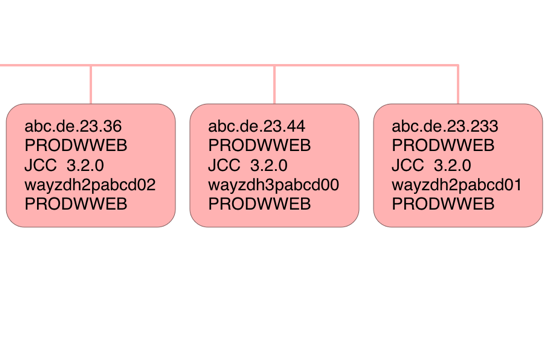
Here are three simple connectors.

The lines in each box are:

  • IP Address
  • Authid
  • Connector type
  • Platform
  • End User ID

By “simple” I mean that the connection is direct – not via a gateway.

I haven't shown the Netid but for Distributed connectors it is an encoding of the Client Workstation IP Address. While all bar the first character is a hex digit the first is an encoding to make sure the first digit isn't numeric. So “G” means 0, “H” means 1 and so on.

The reason I haven't shown the Netid is that when you decode it this way it's identical to the IP Address – so there is no gateway.

The three connectors (machines) shown have non-contiguous IP addresses so I show them separately.5

In the above case the JCC level is 3.2.0 but in this data I sometimes see the same machine with two levels:
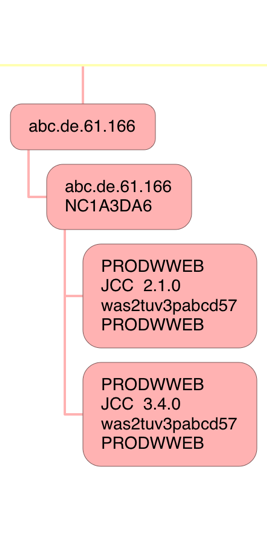
In this case I show both levels – as separate nodes. Mea culpa: You can see in this case consolidation hasn't been as complete as I'd like, again there being no gateway.

The consolidation of contiguous IP addresses is especially helpful in cases like the following:
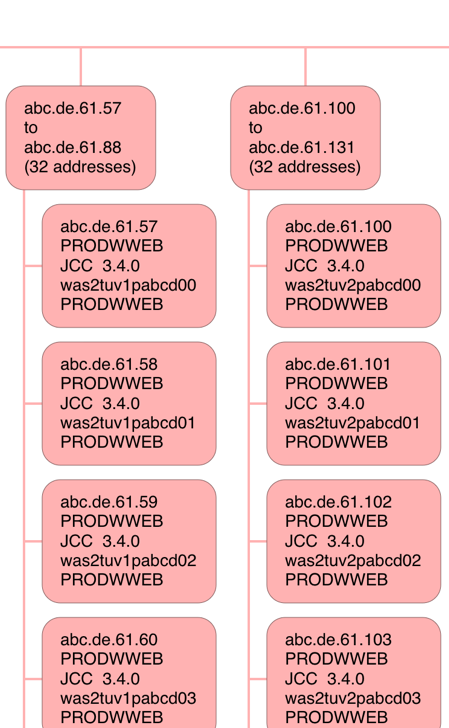
I've cut this off after a few addresses – to save you excessive scrolling. But you can see two blocks of 32 contiguous IP addresses, with a fairly obvious naming convention for the JCC Platform ID. I would surmise these are Websphere Application Server machines front-ending the “tuv”6 DB2 application.

Finally a rather busy one (and you'll want to view this fragment in a new tab):
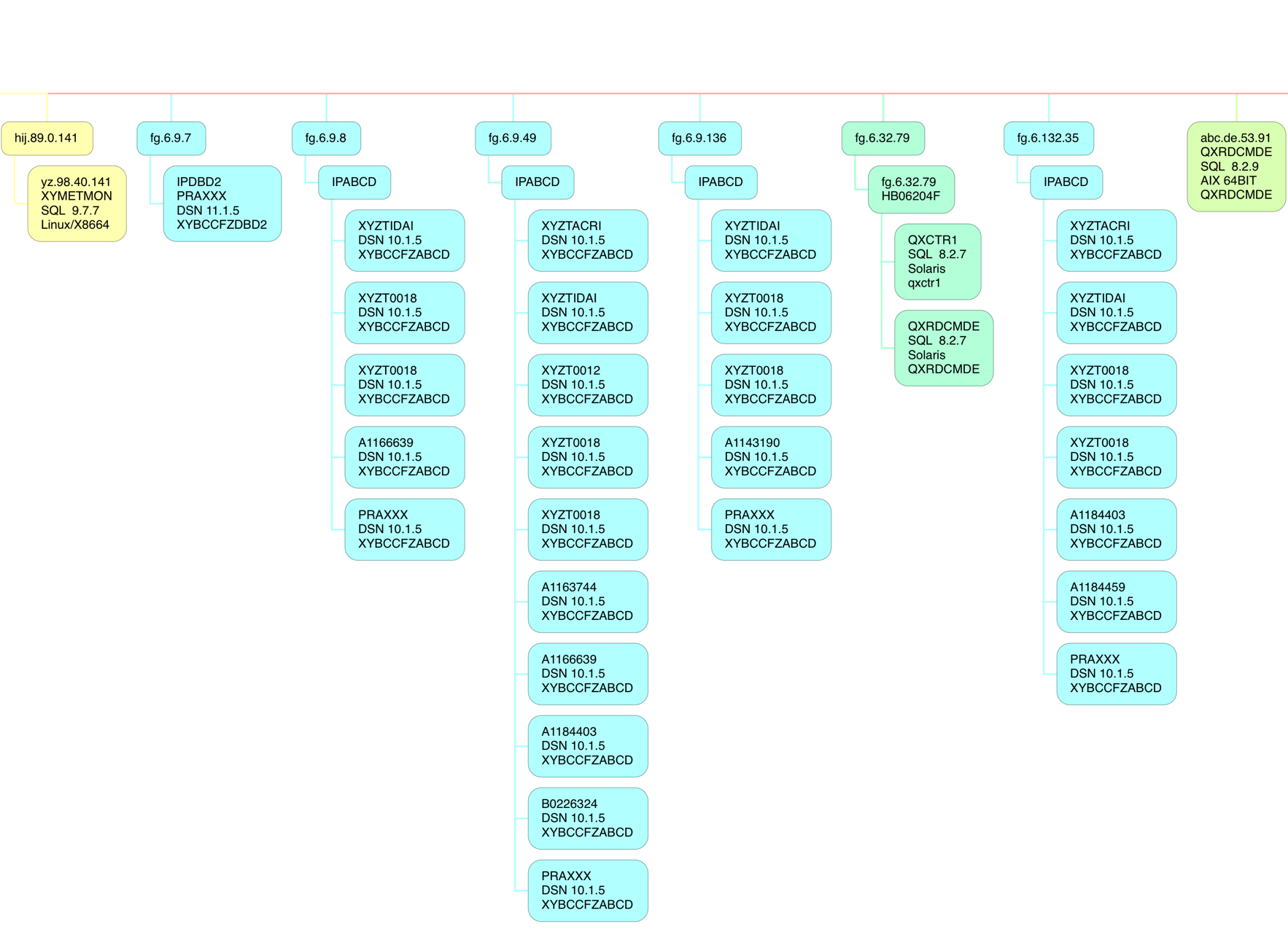
Here there are several different software platforms:

  • 64-Bit Linux on Intel
  • DB2 on z/OS
  • 64-Bit AIX
  • Solaris

And within the DB2 on z/OS category notice “10.1.5” and “11.1.5”. This customer was in transition from DB2 Version 10 to Version 11. Also I recognise 4 client DB2 subsystems at 10.1 – which are the 4 that are in a DB2 Data Sharing group talking DDF to this subsystem (and its Data Sharing Group partners). I bet if I asked the customer those IP addresses would be utterly familiar.

Note also the Netid commonality – “IPABCD” – which I will probably see as a common feature, when I get more experience.

How I Made the Diagram

The process for creating the diagram is two-step:

  1. Crunching the data into a Comma-Separated Value (CSV) file.
  2. Importing this CSV file into the diagramming application I'm using.

I'll share a few of the specifics with you. If you want to do this you'll need to follow much the same path.

Crunching The Data

Crunching the data, in my case, consists of two batch job steps:

  1. A DFSORT step that summarises the 101 records, boiling down to unique names, and preserves the fields needed for diagramming.7
  2. A REXX EXEC that takes this summarised flat file and generates the CSV file.

I may have mentioned this before but I once wrote a REXX exec to convert this CSV file into Freemind format. I've yet to throw this CSV through the exec but it will be something to try soon.

Producing The Diagram

The process for producing the diagram consists of importing the CSV file into a Mac OS app – iThoughtsX – and a small amount of cosmetic tidying up.

The snippets you see above were actually produced by the counterpart iOS app on my iPad Pro – iThoughts.

Conclusion

While fine tuning the diagram was fiddly creating at least a basic version was very easy.

As always, as I gain more experience with this I'll evolve the diagramming. One obvious thing to do is to highlight the “high volume” or “high CPU” connectors; As I have the data in my flat file it'd be simple to colour code the “hotter” connectors.

One of the nice things to note is a modern tool such as iThoughts allows some quite neat navigation and pattern seeking. For example, I can – in both the Mac OS and iOS versions – use filtering. If I were to type in “mobi” – which appears in the unanonymised version of this diagram – a bunch of nodes will show up and the rest will be grey. This example has obvious application.

For me at least the sorts of insights I can draw into a customer's DDF estate are really nice.

The other nice thing about iThoughts is it has some Presenter capabilities for a mind map such as these; I actually haven't played with that much but I think that could prove really handy.

Perhaps this dinosaur is evolving wings. πŸ™‚


  1. From other perspectives, such as Security, it matters too. β†©

  2. But would you want to be the one showing up at their door, unannounced, to give them some “friendly advice”? πŸ™‚ β†©

  3. Mapped by DSNDQMDA. β†©

  4. I think this is configurable, though. β†©

  5. If they were contiguous I'd try to lump them together – with some appropriate factors defeating that effort. β†©

  6. Obviously “tuv” is not its real name. β†©

  7. This step, as well as counting records with a unique set of identifiers, sums up things like Class 1 Elapsed Time – but today I make no use of this summation. β†©

Mainframe Performance Topics Podcast Episode 9 “Back In Black”

(Originally posted 2017-02-17.)

It's been a long time since I…

… recorded a podcast episode.

But Marna and I have had lots of commitments since we last did. But we're back, and intend to stay that way. Indeed we have bits of Episode 10 “in the can”.

And such a lot has happened in the meantime.

Note: This is actually our tenth episode, though you might count Episode 0 as a pilot and Episode 10 as the real 10th episode. Frankly I don't, as I think Episode 0 is entirely valid. We were certainly learning our craft. What is nice is that people don't seem to have given up on us after that one. πŸ™‚

So, to Episode 9:

In a “packed show” :-), we had all the usual ingredients:

  • We had follow up on Continuous Delivery.
  • Marna interviewed John Eells on new initiatives in software installation.
  • We talked about enhancements to my Parallel Sysplex Performance Topics presentation. (The show notes contain a link to the presentation on SlideShare.)
  • Marna indulged me in talking about Voice-Operated Digital Assistants. I've gone “all in” on these.
  • She also had a couple of nice requirements.

So I hope you enjoy the show; We had fun making it!

Below are the show notes.

The series is here.

Episode 9 is here.

Episode 9 “Back In Black” Show Notes

Here are the show notes for Episode 9 “Back in Black”. The show is called “Back in Black” because:

  • We've been away for a long time, traveling for Martin and on vacation for Marna.

  • A vague reference to a BBC tv show about British fantasy author, Terry Pratchett

We are very happy to be resuming our episodes, and the next isn't far behind this one!

Continuous Delivery Follow-up Announcements

Where we've been

Martin has been all over since our last podcast! Whittlebury UK (with Marna), Amsterdam, Johannesburg, Toronto, Chicago, and the IBM Silicon Valley Lab.

Marna has been to the IBM Technical University in Austin, TX.

Mainframe

Our “Mainframe” topic was an interview with John Eells, z/OS System Test and lead on the Software Installation Strategy.

This topic is very important for z/OS system programmers to understand. IBM and ISVs have been working on a common install method, that handles both SMP/E and non-SMP/E. This would go beyond laying down code, and would eventually hook seamlessly into doing configuration tasks (via z/OSMF Workflow). It would even be able to package software, if you wanted to, and all delivered within the base z/OS operating system.

The common install method would be provided through z/OSMF's Software Management plug-in, so make sure you are setting up and becoming familiar with z/OSMF now.

John and Marna also talked about some of the wishlist items we'd like to see in this solution.

Performance

Our “Performance” topic was about some about additions and changes to Martin's Parallel Sysplex Performance presentation that he's been presenting over the years. Somehow this presentation never seems to get any shorter.

This presentation has several sections: Structure-Level CPU, Matching CF and PR/SM views of CPU, Structure Duplexing, XCF traffic, CF link information, and CF Thin Interrupts.

The new parts and changes he has made in this presentation are:

  • Asynchronous Duplexing for lock structures. You can also find a good Mainframe Insights article about this by David Surman here.

  • XCF traffic and Data Sharing Group topology

and

  • CF Thin Interrupts and CPU.

The updates have been presented in both Munich (at the System z Technical University) and at GSE Annual Conference. Slides are found on SlideShare's Parallel Sysplex Performance Topics from Munich 2016.

Topics

Ahoy! In our “Topics” section we discuss voice-activated assistants that have been hitting the market for a while now.

Martin has a good amount of experience in Siri from Apple and Alexa (Amazon) Echo and Dot. A third one is Google Home.

Martin talks about the various pros and cons on each. Considerations for using these include: inadvertent waking, integration with household devices (such as Philips Hue lights and Wemo switches), extendable capabilities (for Alexa they're called “Skills”) that you can create yourself, what tasks you want it to do, future growth (where competition will help), and country availability.

Customer Requirements

Marna talked about two customer requirements that caught her eye:

Where We'll Be

Marna will be at SHARE in San Jose, California March 6 through March 10, 2017.

On The Blog

Martin has published three blog posts recently:

Marna has written one: Trying out the new z/OSMF Workflow Editor

Contacting Us

You can reach Marna on Twitter as mwalle and by email.

You can reach Martin on Twitter as martinpacker and by email.

Or you can leave a comment below.

Lost For Words With DDF

(Originally posted 2017-02-12.)

I'm lost for words with DDF, I really am.

“What's up with him?” my one reader asks. πŸ™‚

So let me explain…

I debuted a presentation last year called “More Fun With DDF”. But I've made progress since then.

So what do I add to the front of this title? “Still”? “Yet”? “Even”?

I don't even think there's a hierarchy to these so it's a one shot deal tacking one of these on the front for 2017. “Even More Fun With DDF” is my favourite of these.

Caveat author! πŸ™‚

So let's get to the meat of it: Something you might actually want to know…

DB2 Calling DB2

So I've been involved in a couple of situations where one DB2 on z/OS calls another, using DDF, recently.

  • I'll call the one that does the calling the Client DB2.
  • I'll call the one that is called the Server DB2.

The Client DB2 might call the Server DB2 on behalf of anything – such as CICS transactions, Batch Jobs, or even its own DDF clients1.

For the rest of this post refer to this diagram, summarising key aspects of the SMF 101 (DB2 Accounting Trace) records.

Detecting Client And Server DB2 Subsystems

So how do we detect Client and Server situations?

Firstly the presence of a QLAC section in a SMF 101 (DB2 Accounting Trace) record tells you the 101 represents something participating in DDF – whichever role the DB2 is playing.

Secondly field QLACSQLS tells you this unit of work sent SQL requests somewhere – so it's acting as a Client. Similarly field QLACSQLR tells you it received SQL statements – so its acting as a Server.2

Matching DDF 101 Records

So, if I know that one DB2 is calling another I want SMF 101 (DB2 Accounting Trace) records from both DB2 subsystems. That should help me understand the conversation more fully. I will call these the Client 101 and Server 101 records, respectively.

But how do you match them up?

It turns out that timestamps are useless for this. But Logical Unit Of Work IDs are ideal – well the first 22 bytes of the 24. This is fields QWHSNID, QWHSLUNM, and QWHSLUUV concatenated.

Match these up and you're in business.3

Doing The Matching

I have code that reformats DDF 101s into records with important fields in fixed positions. With this code:

  1. I reformat the Client 101s with important information, including the match fields, into fixed positions, with DFSORT COPY.
  2. I reformat the Server 101s with important information, including the match fields, into the same fixed positions, with DFSORT COPY.
  3. I use DFSORT JOINKEYS to join the two records together, extracting relevant fields from both the Server record and its matching Client record.

Actually I separate Batch, also CICS, also Other DDF joined records into their own data sets. For Batch “blow by blow” is appropriate; For CICS a statistical approach is better. So I have two CSV files, ripe for importing into a spreadsheet, for each of these.

Timings

Timings (and perhaps names) are the payoff for matching up these records.

The first thing to note is that normal (non-DDF) timings apply – in the QWAC and QWAX sections.

That's almost all you need to look at for the Server 101 record. Similarly, for the Client 101 record, the standard time buckets apply.

But there is a field – QWAXOTSE – that documents time waiting for the other DB2.4 It works both ways. And when its value is not explained by the 101's time buckets it can indicate communication problems.

Another piece of timing information is the end timestamps – the SMF record cutting time. What I've observed for Batch DDF is that the Server cuts its record a few minutes after the Client. My guess is this is because the Server realises the Client isn't coming back anymore; Some sort of idle timeout. I further suppose the QWACRINV field – the reason for invoking accounting – might provide the explanation But I really need more experience with this. I haven't seen the same effect with CICS DDF transactions, but then the overall numbers are much smaller.

Conclusion

It is perfectly possible to match up Client and Server DDF 101 records; Its value lies in getting a more complete view of such a DB2-to-DB2 conversation, complete with some extra diagnostic capability.

For example, knowing that a Batch DDF step's time is dominated by Synchronous Read I/O Wait in a specific different DB2 subsystem is useful. Or that QWAXOTSE dominates, unaccountably.

So this code is in Production and working fine.

As always, I expect my understanding to grow and the code to get refined. Both things tend to happen with more customer situations and data. You can be sure I'll relate any significant learning points here.


  1. When a DDF call into a DB2 subsystem leads DDF calls out could be a really interesting case. 

  2. Of course both could be non-zero. 

  3. Actually you want the highest Commit Count (QWHSLUCC) for most purposes. 

  4. I'm told this is only for the TCP/IP case, rather than SNA. I'm not sure how much of the latter I'll see.  

The Suite Spot

(Originally posted 2017-01-15.)

What is a batch suite?

That might seem like a silly question to ask but it’s inspired by some significant enhancements to our Batch reporting. Dave Betten and I have worked hard on these as time permitted over more than a year.

Traditional Definition Of A Suite

Traditionally, a batch suite is a set of related jobs, usually with some kind of a naming convention that makes them recognisable.

Such a naming convention might be ‘all jobs whose names begin with “XYZ” comprise the XYZ suite’.

Now, following a naming convention like this doesn’t guarantee relatedness. And not all naming conventions look like this. In fact many don’t.

Our Traditional Suite Reporting

Our motivation for reporting at a suite level is twofold:

  • Customers understand suites – because that’s how they designed their batch.
  • It’s a mid-way point in the hierarchy – between batch service classes / workloads and individual jobs.

So we use suites as a way of structuring the batch conversation.

We produce suite-level reporting (for the past 25 years) comprising such elements as:

  • A summary of the suite
  • Which jobs in the suite are released together
  • Job statistics
  • Step statistics
  • Job start delays
  • Data sets accessed by the suite
  • DB2 access by the suite

This set of reports has evolved somewhat over the years, and I’m skipping a lot of the detail.

What hadn’t changed was how we determined which jobs were in the suite: We were restricted to:

  • An explicit list of jobs – cumbersome to compile and manage.
  • Jobs with a single specific leading character string – in the spirit of “XYZ” above.

Neither of those is entirely satisfactory – so we got to work.

Enhancements To Our Tooling

  • As well as filtering on leading characters of a job name we can also filter on trailing characters (which we call “suffixes”).

Originally we only allowed one suffix. Now we allow multiple. For example “D”, “M”, “W”, “Q”.

  • We allow filtering on Service Class and Report Class
  • We allow filtering on Elapsed Time and CPU Time

As we’ve done this we’ve slowly re-architected the code and tweaked a few things, too. So, for example, we see all the RACF userids and group names.

How This Refines Our View Of A Suite

I guess we’re getting away from real suites with some of this. And this is a good thing:

  • A question we get asked a lot is how to reduce CPU – usually for software billing purposes – and so a pseudo-suite called “Big CPU Burners” is really handy.
  • When trying to reduce someone’s batch window a pseudo-suite called “Long Elapsed Time Jobs” helps.
  • Knowing which jobs are in e.g. “PRDBATHI” Service Class can be useful.

But we also have much more flexibility in defining real suites:

  • We have the extensions to job name filtering I mentioned above.
  • Sometimes customers will define a Report Class for a particular application.

So I think we’ve made real progress and it’ll enable us to help customers much better.

But I share all this because it might get you thinking about how to analyse and manage your batch estate better, too. For example, making more use of Report Classes to document suites could be handy. That would require cross-functional cooperation – between the people who create the JCL and the schedule and the WLM Keeper.

But a parting word on the value of real suites:

It’s really handy, when doing deeper analysis, to see a job’s predecessors and successors. So a pseudo-suite of “high I/O jobs”, for example, is unlikely to include many neighbours like that.