Mainframe Performance Topics Podcast Episode 5 “The Long Road Back From Munich”

(Originally posted 2016-08-11.)

(Reposted without change as I accidentally deleted it while getting rid of a SPAM comment.)

Episode 5 had a different feel for me. It was our first “trip report” episode, and it felt much looser for that.

In fact the sound effects between topics could’ve been elided but for now I’m sticking slavishly to the format. It didn’t feel too artificial to me.

I’m conscious that most of my readership and our listenership (and the stats prove you exist, as I said in the show) weren’t in Munich.

I think, though, there are things that non-attendees will find valuable or at least enjoy.

People probably think I like the sound of my own voice; The reality is I’m coming to like it. 🙂 Nobody likes how they sound recorded. But the conventional wisdom – that you get used to it – seems to be true.

Thanks to our friend Margaret Moore Koppes for “playing Paparazzi”. 🙂

And the audio production gimmick is subtle this time. 🙂

Below are the show notes.

The series is here.

Episode 5 is here.

Episode 5 “The Long Road Back From Munich” Show Notes

Here are the show notes for Episode 5 “The Long Road Back From Munich”. Here is the link back to all episodes: Mainframe, Performance, Topics episodes.

The show is called “The Long Road Back From Munich” because we’ve both returned from a successful z Systems conference 2016 IBM z Systems Technical University, 13 – 17 June, Munich, Germany. For one of us the journey was much longer back than for the other one.

Mainframe

Our “Mainframe” topic was Marna’s z/OS observations from the conference:

  • *IBM HTTP Server Powered by Apache*: it seemed about 30–40% were impacted by the move from the Domiino to Apache server. More than hoped, but if you work on it while on z/OS R13 or V2.1, you’ll be well-positioned for z/OS V2.2.

  • *zEvent sessions*: Martin and Marna both went to Harald Bender’s zEvent session where he discussed using your mobile device (either Apple or Android) to receive timely information about events on your z/OS system. The handouts are here: zEvent and z/OS Console Messages to Your Mobile Device . This app was so easy to download and start using, Martin did just that during Harald’s session!

  • *z/OSMF*: Marna was happy with the interest in z/OSMF, and with the z/OSMF V2.2 enhancements rolled back into z/OSMF V2.1 in PTFs from January 2016 PTF UI90034.There is no reason to delay using it. The z/OSMF lab for SDSF, however, had a problem as CEA had gotten its TRUSTED attribute removed somehow before Munich. After it was made TRUSTED (after the conference), everything was fine again. Goes to show how important the security settings are for z/OSMF!

  • *z/OS V2.2*: Good interest in the release. Happy to see so many people already running z/OS V2.

  • *Secure electronic delivery*: Since regular FTP for electronic delivery was removed on March 22, 2016, only secure delivery is available. No one at the conference said they were impacted, which was nice to see.

Performance

Our “Performance” topic was Martin’s performance observations from the conference:

  • *State Of SMT Instrumentation Knowledge*: Simultaneous Multi Threading (SMT) metrics are not well understood at this point. Customer data from turning on SMF (for both zIIP and IFL) is starting to appear on Martin’s desk. The good news is that the pickup on this function is fast.

  • *His Presentations*: Martin’s sessions were nicely attended. Martin is continuing with his fun at looking at DDF, and “He Picks on CICS” might have more information to be added in the future.

The presentations can be found on Slideshare:

Topics

In our “Topics” section we discussed various other conference observations:

  • *Martin presented sessions from his iPad.*: Although a lot of cables had to be carried around, it did work fine. He even used his Apple Pencil to mark on the slides during his presentations. So he might never lug a laptop to a conference again. Famous last words!

  • *Conference poster sessions*: What a success! Martin & Marna had a poster about…wait for it…this podcast. Martin was very busy talking to people who were interested in our poster. Marna also had a poster on using MyNotifications for New Function APAR notification: New Function APAR Notifications .

    We tried out a QR code for our podcast, and it worked for most all people.

    Paparazzi were there to take photos of some famous folk that stopped by the poster sessions: A Motley Crew.

Where We’ll Be

Martin is taking a well deserved vacation for July, so there’ll be no new podcast episodes in July. But we promise to return early in the Autumn!

Marna is going to SHARE in Atlanta, August 1–5, and IBM Systems Symposium in Sydney Australia (August 16–17).

On The Blog

Martin posted to his blog, since our last episode:

Contacting Us

You can reach Marna on Twitter as mwalle and by email.

You can reach Martin on Twitter as martinpacker and by email.

Or you can leave a comment below.

Mainframe Performance Topics Podcast Episode 6 “Expect The Unexpected”

(Originally posted 2016-07-11.)

Episode 6 was a complete surprise to us!

Marna had thought I was on vacation a week earlier than I was. To be fair, I expected to be with a customer in Australia that week. But then the workshop got pushed back and so this week came free [1]

So we went “why not?” and so this episode was born.

It is of course largely built around this blog post but we had a couple of other things we want to say.

And I wanted Marna’s take on the topic.

Talking of the other topics, it’s occurred to me the QR Code capability in zEvent 3.0.0 could be a thumpingly good way of setting up subsequent devices with the same Connection URL.

And the audio production gimmick is accidental this time. 🙂

Below are the show notes.

The series is here.

Episode 6 is here.

Episode 6 “Expect The Unexpected” Show Notes

Here are the show notes for Episode 6 “Expect The Unexpected”. Here is the link back to all episodes: Mainframe, Performance, Topics episodes.

The show is called “Expect The Unexpected” for two reasons:

  • We really didn’t expect to be recording an episode in this timeframe.
  • The Performance topic lends itself to such a title.

We had one piece of follow up:

  • IBM zEvent has been updated to 3.0.0 (“The Cat”) on both Android and iOS. It has enhancements in lots of areas. The one we both noticed was the ability to show and scan QR codes for connections.

Mainframe

Our “Mainframe” topic was a discussion on IBM Doc Buddy – available for iOS and Android.

It’s a tool for looking up error messages and is now enhanced with z/OS Unix Reason Codes. It enables retrieving z Systems message documentation and provides the allows you to look up message documentation without Internet connections after downloading desired files.

It’s available for z/OS, as well as other products like CICS, and IMS, and for many releases of those products.

Performance

Our “Performance” topic was about what happens when unexpected work appears on your beloved mainframes. A number of themes were discussed, including:

  • Not knowing mobile workload was appearing – leading to potential loss of savings on Mobile Workload Pricing.
  • When unannounced work arrives, leading to implications for e.g. Security, Performance Management, and Capacity Provisioning.

In reality how you handle this is a governance and culture question, but we want you to think about the problem.

Topics

In our “Topics” section we discussed two items:

  • iTunes – where you can now find our podcast here. We hope some of you find this new way to subscribe easier.
  • Liberated Syndication (or LibSyn for short). This gives us some interesting statistics about our listenership.

Where We’ll Be

Martin is taking a well deserved vacation for July, so there’ll be no new podcast episodes in July. But we promise to return early in the Autumn!

Marna is going to SHARE in Atlanta, August 1–5, and IBM Systems Symposium in Sydney Australia (August 16–17).

On The Blog

Martin posted to his blog, since our last episode:

Contacting Us

You can reach Marna on Twitter as mwalle and by email.

You can reach Martin on Twitter as martinpacker and by email.

Or you can leave a comment below.


  1. When I say free I guess, as always, I should mean “it got filled up with lots of other good stuff” :-). I might blog about some of it when I return from vacation.  ↩

What Do I Know?

(Originally posted 2016-07-02.)

Or “The Man Who Knew Too Little”?

This post is occasioned by a number of things coming together, the most recent of which is reviewing a very nice upcoming RedPaper.

The gist is this: You’re responsible for managing Performance, Capacity and (to some extent) mainframe costs. But you can’t rely on anybody to tell you anything.

A bit pessimistic, perhaps a little misanthropic. But still something I’m sure a lot of you can relate to.

There are two major exemplars that cause me to write this post:

  • Mobile
  • Cloud

There, I’ve got two buzzwords into a post. 🙂

But let me take each in turn.

Mobile

My main interest in mobile work is the potential for customers to take advantage of Mobile Workload Pricing (MWP).

Entirely correctly, people are exercised by the need to “Tag and Track”:

  • Tag means labelling the work as Mobile, whichever application architecture you choose.
  • Track means using the tagging to report the Mobile CPU.

I would add a third (or rather a zeroeth 🙂 ) one: Identification. And herein lies the problem…

Since the announcement of MWP I’ve been taking soundings with customer friends: I’ve asked them “If someone introduced new mobile workload to your systems would they tell you?”

Maybe I’m being humoured but their take has been “not necessarily”. I’m inclined to believe them.

The implication of any non-reporting is clear: Opportunities to exploit MWP might be missed. And one implication of that would be z/OS is unnecessarily less competitive than it might be. I certainly don’t want that.

One thing to note is I don’t think you can assume you’d detect new mobile work, nor to discern its eligibility for MWP in any automated fashion. But I hope you would detect new work showing up.

Cloud

Cloud presents a different problem:

On z/OS the usual approach to cloud deployment is not to create new LPARs; Rather it’s to deploy new subsystem instances, such as MQ queue managers, DB2 subsystems and CICS regions.[1]

With modern tools, such as z/OSMF and UrbanCode Deploy it’s ever easier to create new groups of address spaces – in response to some business application need.

While I’d never advocate making things unnecessarily difficult, making them very easy might have an unintended consequence: Not enough attention to the implications of deployment.

So, for example, the memory footprint of a new DB2 subsystem, another MQ queue manager, and a bunch of CICS regions could be significant. Yes, modern machines tend to have tons[2] of memory but it still needs to be provisioned and managed.

I haven’t done Security for over 25 years but I would suspect there’d be companion concerns there, too.

The good news here, though, is you can detect new containers and their interconnectedness. I’ve written about the SMF 30 Usage Data Section extensively. (If you haven’t picked up on this read this 2012 post of mine.

Mobile and Cloud Have Much In Common

Both these cases are examples where work can show up on your beloved z/OS systems with no warning; You’re expected to handle it optimally.

It’s not often I write about such an “up-market” topic as Governance [3] but I think this is what is called for.

Your processes for onboarding work are what’s important here:

  • It needs to be the culture that new work arriving needs some sort of review.
    • For Mobile business application owners need to understand the opportunity for cost savings if they enable you to Identify, Tag and Track work.
    • For cloud it shouldn’t be the case that the ease of deployment leads to unannounced “new arrivals”.
  • Detection and tracking – to the extent possible – is key.
  • Architecture remains important: A hodge-podge of new applications, without considering architecture, is not what’s really wanted.
  • The above sound like “policing”. More positively, Performance Tuning and proper Resource Provisioning can make a big difference to how well the business owners view the successive of the deployment.

I don’t know anymore if my readership is confined to (bemused)[4] Performance People. I would hope it would now include architects. In any case y’all are key to successfully managing cloud and mobile workloads on z/OS.

Game on!


  1. Or, maybe, into existing ones. But the most prevalent case is whole address spaces.  ↩

  2. Or is it oodles? 🙂  ↩

  3. The previous time was with Jan van Cappelle in REDP–4816–00 “Approaches to Optimize Batch Processing on z/OS” from 2012.  ↩

  4. Because I go off on tangents like this one. 🙂  ↩

Engineering

(Originally posted 2016-06-11.)

Pardon the bad pun. Perhaps I should’ve written “Engine-ering” but where exactly do you put the dash?[1]

There were hints on this topic in Born With A Measuring Spoon In Its Mouth but the real motivation came from a z196 customer without Hiperdispatch enabled.

But what on earth am I on about?

OK, here we go:

Generally our[2] code doesn’t report down to the single engine (or processor) level.

  • SMF
  • Hiperdispatch

Actually the same customer who isn’t using Hiperdispatch is using IRD [3], a predecessor and third case where engine-level reporting could be handy.

Why We Don’t Generally Go Down To Engine Level

We generally stop at pool (or processor type), for example the zIIP pool.

Traditionally there hasn’t been much you can actually affect at the engine level.

So the sorts of questions we ask are:

  • How busy is the IFL Pool?
  • How much CPU in the GCP Pool is this LPAR using?
  • Which application componentry is using the zIIP capacity?
  • How busy is a Coupling Facility?

None of these are helped much by going to the level of an individual engine.

Why We Might Be Interested In Engines

LPAR design has always been interesting (and a little tricky).

It’s got worse[4] with the advent of such things as IRD, Hiperdispatch and “high stringency” zIIP users[5].

So, to take one example, Hiperdispatch Parking behaviour is an engine-level phenomenon most customers need to understand and monitor.

Theoretically, if we were interested in certain kinds of contention, seeing a skew in favour of, say, one engine might be interesting.

Where Are We Starting From?

Let me lift the lid on where our code is (just a little):

  • In table (record mapping terms) we go down to the engine level for all RMF record types. We roll up from there.
  • in reporting we handle IRD and do some Hiperdispatch work. See below.

IRD Reporting

We graph shifting weights within an LPAR Cluster. Our view of what the weights say the number of shared engines for an LPAR should be is dynamic.

We graph the number of online engines for an LPAR. When IRD was in its heyday this could be quite interesting.

Hiperdispatch Reporting

We look at two things:

  • Vertical Polarisation
  • Parking

A couple of posts of potential interest are:

Engine-Level Data Model

The engine-level data model is pretty extensive. There are two cases to consider:

  • Coupling Facility View Of CPU (SMF 74–4)
  • General View

Coupling Facility Engines

I already dealt with the CF view in Shared Coupling Facility CPU And DYNDISP. You might not have read it – if you don’t have Shared ICF engines.[6]

In the post I mentioned R744PBSY and R744PWAI – “Busy” and “Wait” times. What I briefly mentioned is that these are recorded at the logical processor level.

My current take is there’s only limited excitement to be had by reporting at the engine level – given L-shaped ICF LPARs are a thing of the past.

So, right now, our log table does indeed have Processor Number (R744PNUM) as a key. Our summary table (the one we actually report from) doesn’t. I don’t intend to change that.

General View

SMF 70–1 gives engine-level information in quite a few areas:

  • I previously mentioned Online Time (SMF70ONT) in the context of IRD.
  • For Hiperdispatch we have Polarisation flags – For High, Medium and Low engine cases. We also have Parked Time (SMF70PAT) but only for the reporting LPAR’s processors (which I first wrote about in 2008 in System z10 CPU Instrumentation).
  • At the LPAR level we have the Logical Processor Data Section
  • For SMT we have all I mentioned in Born With A Measuring Spoon In Its Mouth.
  • We have CPU busy by engine for the reporting LPAR in the CPU Data Section.

The Shape Of Things To Come?

So what am I thinking of?

Well, the underlying principle is that it’s the non-uniformity between (logical) engines for an LPAR that is interesting.

And maybe – in another dimension – how that non-uniformity varies through time.

So I’ve run a couple of experiments with recent customer data:

  • A Non-Hiperdispatch Case.
  • A Hiperdispatch Case where the GCP Engine Pool is extremely busy.

I don’t have to hand the case where Hiperdispatch is in play but the GCP Engine Pool is not busy. I have thoughts on what might happen, but this post is already running long.

Non-Hiperdispatch Case

In this case the LPAR is defined with 8 Online GCPs and 10 Online zIIPs -on a z196.

Here work is “smeared” across all the online engines, certainly the GCPs. None is more than half full, and typically they’re about a third full.

This has effects, such as short engine effect. Also the cache effectiveness won’t be wonderful.

Hiperdispatch Busy GCP Pool Case

In this case the LPAR is defined with 10 Online GCPs (6 Vertical High, 2 Vertical Medium (at 65%) and 2 Vertical Low) and 2 Online zIIPs (both Vertical Medium (at 80%)) – on a z13.

Here, the work is “corralled” into just the Vertical Highs and Vertical Mediums, in accordance with the vertical (engine-level) weights. We are approaching full engines – quasi-dedicated to the LPAR – for the VH cases. There is some evidence of parking and unparking of the Vertical Lows.

So What Might I actually Do?

I can certainly generate graphs like the above at will – and I probably will.

I’m more inclined to do it for the system under study than for all LPARs on a machine / in the data for three reasons:

  • It’d be an awful lot of graphs for most of my customers. And the value for obscure LPARs wouldn’t be huge.
  • If I have SMF 70 cut by an LPAR (really z/OS system) it will also contain Parked Time (SMF70PAT). Relating Parked Time to Engine Busy Time will be interesting.
  • Keeping core vs logical processor straight is important, and driving the above graphs down to logical level is useful. It can only really be done for the systems I have data from.

All the above sounds a little undecided to me – and it is. The reason for sharing all this is because I think Engine Level could well prove useful, as well as being interesting. And, not having seen much writing on this, I suspect this is something most Performance and Capacity people won’t’ve thought about.

I for one intend to keep thinking about this and experimenting. Stay tuned. 🙂


  1. And you never know how some piece of infrastructure will fail to cope with punctuation in a title.  â†©

  2. Collective rather than Royal “We” here. 🙂 But there are times when it really usefully could. Two that come to mind are:  â†©

  3. Intelligent Resource Director.  â†©

  4. Or perhaps better from my point of view. 🙂 At any rate more complex and interesting.  â†©

  5. Such as DB2 DBM1 zIIP usage.  â†©

  6. But the post got a surprisingly large number of hits. 🙂  â†©

Born With A Measuring Spoon In Its Mouth

(Originally posted 2016-06-05.)

SMT really was born with a measuring spoon in its mouth.[1]

Let me rewind a few years…

So, when SMT (Simultaneous Multithreading) was being designed I was privileged to be on the periphery of discussions about how to instrument SMT. Things like CPU Utilisation get a little wierd in the SMT case, as you can imagine.

Now, I was only on the periphery of the discussions and they carried on without me in the run up to the announcement of z13 in early 2015. But the drift I caught was that the hardware was going to have to help out, essentially being self-metering.

Fast forward to now, just over a year after we first shipped z13. And now I come to warm over our CPU code to account for SMT.

Timely, huh? 🙂

Seriously, from where I sit I have to see real data from real customers before I can do serious development.[2]

Now, in mid–2016, there are lots of z13 customers. So it’s time to act.

Remember that SMT “only” affects zIIPs and IFLs. GCPs and ICF engines are not affected. So everything already works fine for GCPs. But obviously hiding behind the fact it’s only certain types of engines that support SMT is not a good thing to do.

Rewind again, but this time to the Autumn of 2015. I had the privilege of presenting a one day workshop on Performance for the ITSO in Europe.

A smallish section of this was about SMT, and an even smaller portion of it was about the measurements. So what I really wanted to impart with that material was the general sweep of the instrumentation; That some stuff was on a per-core basis and some on a per-logical-processor basis.

Now a core is the thing that can have multiple threads and it’s basically all PR/SM knows about. It’s z/OS that knows about logical processors or threads.

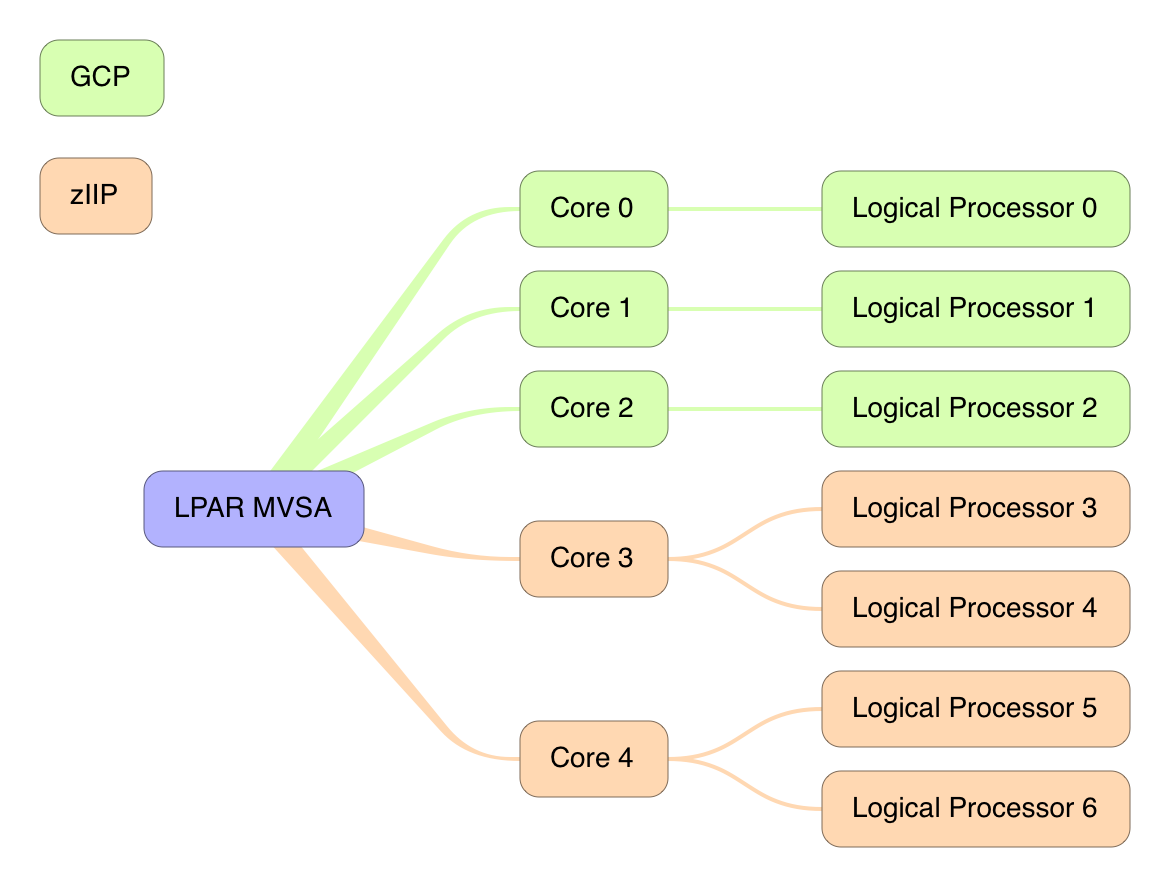
Here’s an example[3] that might explain the relationship between logical processors and logical cores:

In this example MVSA has 5 logical cores.

  • Logical cores 0,1, and 2 have a single thread and are GCP cores.
  • Logical cores 3 and 4 have two threads and are zIIP cores.

So SMT–2 clearly affects zIIPs and not GCPs, as the diagram shows.

Obviously logical cores get dispatched on physical cores by PR/SM.

In the workshop I showed (briefly) sample RMF reports – for PROCVIEW CPU (non-SMT) and PROCVIEW CORE (SMT 1 and SMT 2). By the way the support in RMF came with OA44101.

Back To The Present

Returning to the present moment I want to replicate that, and then put my own personal twist on it.

(Generally that’s the way to go: Replicate RMF and then progress beyond the product’s reporting.)

So, for most major numbers in an RMF report you have to derive them. The nice surprise with the SMT support is that the numbers are basically there. By “basically” I mean the worst you have to do is divide by 1024.[4]

So, for example the following fields are all there in the SMF 70–1 record (in the sole CPU Control Section).

  • Maximum Capacity Factor
  • Capacity Factor
  • Average Thread Density

You get one each for GCPs, zIIPs and (gasp!) zAAPs.

I mention these by name in the hope the astute reader will recognise them as terms used in most performance materials related to SMT.

But the point is that no fancy derivation is necessary.

What Else Is New And Changed In SMF 70–1 For SMT

First the CPU Data Section (previously one per logical processor) is at the thread level, not the core level. (In fact, thread is synonymous with logical processor.)

So this now needs relating to the core. Here’s where the next change comes in: The new Logical Core Data Section.[5]

This has a number of aspects:

  • It allows you to relate the logical processor / thread to the core.
  • You get the Core Productivity number.
  • You get the Core LPAR Busy time.

A question you’d probably like to be able to answer is “which LPARs on this machine have PROCVIEW CORE in effect?” The answer to this is found in the PR/SM Partition Data Section (one per LPAR): If field SMF70MTID is greater than 0 PROCVIEW CORE is in effect; Otherwise it’s PROCVIEW=CPU.

Finally, in the PR/SM Logical Processor Data Section (one per logical core) SMF70MTIT gives you the “Multithreading Idle Time in microseconds accumulated for all threads of a dispatched core. This field is only valid if SMF70MTID is not zero for this partition.”[6]

A Lot To Chew On

If you’d come to the conclusion there’s a lot to chew on here you’d be right. But at least we’re being spoon-fed.

To continue the malaphor, I’m still digesting this; The definitions are a little hazy in my brain, but at least I have a way of seeing how the data behaves in real customers.

And I have some thoughts on how to diagram things (as the picture above illustrates) and otherwise tell the story. More on this as I implement in my code; For now things are going to have to be hand-drawn.

Happy chomping!

And here’s a nice presentation on SMT to digest: IBM z Systems z13 Simultaneous Multi-Threading (R)Evolution by Daniel Rosa, IBM Poughkeepsie.


  1. Pardon the mangled cultural reference. Those that get it get it. 🙂  ↩

  2. OK, sometimes I’m ahead of the game. But not this time.  ↩

  3. This is a diagram I might actually teach our code to create from a customer’s data. Is it helpful?  ↩

  4. And that, I surmise, is just to allow the fields to be integers when the actual metrics are decimal. For example 1126 represents 1.100.  ↩

  5. The RMF support for SMT brings an eighth triplet, pointing to this section. My code tests for 8 triplets and that the eighth triplet has a non-zero count for this section.  ↩

  6. Quoted, as straight from the SMF manual.  ↩

Mainframe Performance Topics Podcast Episode 4 “The Road To Munich”

(Originally posted 2016-06-04.)

Episode 4 was, of course, our fifth podcast episode. 🙂

I had a lot of fun making the intro – with Audacity. I’m not sure if it’s “lost souls” or “tuning in”. It was meant to be the latter but the former is also good.

Below are the show notes.

The series is here.

Episode 4 is here.

Episode 4 “The Road To Munich” Show Notes

Here are the show notes for Episode 4 “The Road To Munich”. Here is the link back to all episodes: Mainframe, Performance, Topics episodes.

The show is called “The Road To Munich” partly in homage to the Road To… movies and partly because we’re preparing for the 2016 IBM z Systems Technical University, 13 – 17 June, Munich, Germany.

Follow Up

Following up the Episode 3 “Topics” item on iThoughts and Mind Mapping, Martin wrote up how to make a (colour-coded) legend in iThoughts The Legend on his blog.

Mainframe

Our “Mainframe” topic was on a small z/OS V2.1 enhancement that few seem to be using: SMFPRMxx’s AUTHSETSMS. This new option controls whether you want to allow use of the SETSMS command, different from the SET SMS command, without tying it anymore to the specification of PROMPT. Exploiting this function is as easy as adding AUTSETSMS to your SMFPRMxx for the next IPL!

Performance

Our “Performance” item was a discussion on another of Martin’s “2016 Conference Season” presentations: “He Picks On CICS”.

We’ll publish a link to the slides when they hit Slideshare, probably after the 2016 IBM z Systems Technical University, 13 – 17 June, Munich, Germany.

Topics

Under “Topics” we discussed Uncharted 4. The Wikipedia entry is here.

On The Blog

Martin posted to his blog, in addition to the previously-mentioned item:

Contacting Us

You can reach Marna on Twitter as mwalle and by email.

You can reach Martin on Twitter as martinpacker and by email.

Or you can leave a comment below.

And we hope to have a poster session in Munich. Join us then or come and stop us any time you like that week.

Shared Coupling Facility CPU And DYNDISP

(Originally posted 2016-05-29.)

You probably don’t have the same problem I do, namely not having access to SMF data from all the systems in your mainframe estate.

You’ll recognise that as a provocative statement if ever there was one; For all sorts of reasons not every system’s RMF SMF is collected.

Most notably, test systems often aren’t instrumented.

This post is about Coupling Facility (CF) image CPU. Mostly it’s about CF images on the same footprint as a z/OS system for which you do have data. [1] The discussion is limited to CPU.

So there are two views of Coupling Facility CPU:

  • SMF 70 Partition
  • SMF 74–4 Coupling Facility

Both of these are available at the partition and engine level, but the latter is less interesting.[2]

Coupling Facility CPU Utilisation Might Not Be What You Expect

So a standard formula for Utilisation % would be, summed over all engines:

From an SMF 70 perspective that’s certainly true, but it’s not how CF CPU Utilisation is calculated. It’s the following formula , summed over all the engines:

Now, the two formulae look similar, and they would be the same if R744PBSY+R744PWAI added up to the interval length. Well, this is true only for dedicated CFs, namely those not sharing engines with other LPARs.

So for dedicated LPARs that’s fine: CF view of busy (74–4 view) is the same as PR/SM view (70–1 view).

What Are R744PBSY and R744PWAI?

R744PBSY is the CPU time (in the CF) processing requests – from all systems.

R744PWAI is the CPU time (in the CF) polling for requests to process.

With DYNDISP=NO R744PBSY+R744PWAI do indeed add up to the interval x the number of engines as the CFCC never stops polling for requests.

With DYNDISP=YES they don’t add up to the interval x the number of engines. This is because the CFCC stops polling for requests, but not immediately.

So the formula for CF utilisation is really about what percentage of the CF CPU cycles is used processing requests.

What Is R744SETM?

I first wrote about this field in 2008 and you might get a snigger at my expense. Readers in 2008 did. 🙂 Here’s the post: Coupling Facility Structure CPU Time – Initial Investigations

It’s the Structure Execution Time, or CPU time in the Coupling Facility for a CF structure. Key points about it are:

  • R744SETM is for all systems accessing the structure.
  • R744SETM adds up to R744PBSY

Because of the latter its capture ratio is 100%. This has an effect at low traffic rates; There appears to be some CPU utilisation without any requests. But the CPU per request tends to settle down.

As I said in the above-referenced post the CPU per request [3] calculation relies on having data from all systems sharing the structure.

Standard Recommendations Still Apply

It’s still wise not to run coupling facilities above 50% (according to the SMF 74 formula). This is for two primary reasons:

  • The CF needs to be as responsive as possible, as it affects Coupled CPU. (This includes link times, of course.)
  • You might well need “white space” for recovering structures (or, in the case of User-Managed Duplexing, for the Group Buffer Pools to become primary).

What Of Coupling Facility Thin Interrupts?

So now I’m coming to the point[4].

System zEC12 and CFLEVEL 19 introduced Coupling Facility Thin Interrupts, enabled with DYNDISP=THIN.

Barbara Weiler has a nice paper on this: Coupling Thin Interrupts and Coupling Facility Performance in Shared Processor Environments, so this post is covering only a small (but relevant) portion of what she covers.

In essence Thin Interrupts shortens the time a CF spends polling for work, releasing the physical CPU sooner. This makes it a “better citizen” in terms of sharing the (generally ICF) CPU Pool with other CF LPARs.

The net effect of this is that R744PWAI – the CPU time spent polling for requests – should decrease. From the formula that means the CF CPU Utilisation should increase, despite (or because of) less CF CPU being used overall.

To achieve this PR/SM has to be more active, so at very least the PR/SM CPU for the LPAR (SMF70PDT – SMF70EDT) should increase.

NOTE: Even with Thin Interrupts I’d be wary of using CFs with shared engines in Production. This is because a CF still tends to wait to get an engine back when sharing, elongating requests and making their service times more variable.

So let’s discuss two cases:

  • Where you have SMF 74–4 for the CF LPAR.
  • Where you don’t have SMF 74–4 for the CF LPAR.

SMF 74–4 View Of Thin Interrupts

First, SMF 74–4 has a new bit field (in R744FFLG) for when Thin Interrupts are enabled.

Second, R744PWAI, as indicated above, should be relatively small and the CF CPU Utilisation relatively high.

So you have “full disclosure” in this case.

SMF 70 View Of Thin Interrupts

I think this is the more prevalent case, as people don’t tend to send me data from test environments (and it’s easier for them to send me “the lot” than to weed out the subsidiary environments).

All you have is SMF 70.

Here, as noted, SMF70PDT – SMF70EDT might well be higher, especially when there is some load.

It’s worth noting that for a non-dedicated CF LPAR the 70 Partition Data view will show the CPU used as variable, and generally far less than the CPU share. When you have a plethora of CF LPARs, or you’re kept away from the real infrastructure, this might be your only clue that Thin Interrupts is enabled.

For dedicated CF LPARs the 70 Partition Data view is of completely utilized engines.

By the way (pro tip here) 🙂 I recently changed our code to put the dedicated engine CF LPARs at the bottom of the stack; It just looks so much better that way. (See A Picture Of Dedication.)

Conclusion

Coupling Facility CPU is a complex topic. As I said on Twitter, I thought this would be a short blog post… 🙂

Well more poured out of my head than I initially thought; I hope some of this is worth pouring into your head. 🙂

So Thin Interrupts has been a good excuse to talk about Coupling Facility CPU Utilisation. It’s also going to be a good reason to revamp some of my code, when I get around to it. 🙂


  1. It’s hopeless trying to understand the performance of CF images for which you have neither SMF 70 Partition Data nor SMF 74–4.  ↩

  2. Except when it isn’t (which I think would be rare).  ↩

  3. Obviously useful for capacity planning.  ↩

  4. … or at least the originally intended point; This post has expanded somewhat, but I’m glad it did.  ↩

Refactoring ISPF File Tailoring And DFSORT

(Originally posted 2016-05-24.)

On Twitter I joked ‘refactoring’ is ‘taking perfectly well working code and risking breaking it’. This post describes one such exercise.

tl;dr: It was well worth it!

In DFSORT Tables I wrote about a technique to create tables (or grids) using IFTHEN.

It’s been a maintenance headache to the extent that the “Principle” Of Sufficient Disgust kicked in. So this post shares some optimisations in ISPF File Tailoring I’ve just made that might prove useful to you.[1]

In our code we use ISPF File Tailoring, substituting in variables from ISPF panels to create e.g. JCL decks. It’s what makes us quick to generate engagement-specific JCL.

This particular portion of our code is a sequence of DFSORT steps against DDF-specific DB2 SMF 101 Accounting Trace records, related to DDF Counts. It generates CSV files we import into spreadsheet programs.

Repeated Fragments Of Code

The JCL had grown into a series of repeated DFSORT reports. When I say “repeated” I mean we had 3 reporting steps where large portions of the DFSORT code was repeated.

So the first optimisation was to replace these 3 queries with sets of repeated File Tailoring Imbeds.

For example:

)IM ZDDFASYM

Now adjustments get made once and automatically appear in all 3 places in the generated JCL.

I said “sets” because I created imbed files for DFSORT Symbols, 2 for INREC fragments, 1 for SUM, and 2 for OUTFIL OUTREC.

Looping Field Generation

I’d been creating tables for 4 DB2 subsystems – so sets of 5 columns (these 4 plus 1 for “Other”).

Sometimes – in customer data – I’d had fewer than 4 subsystems in the data. This was OK because my code just generated blank columns that can easily be deleted in the spreadsheet.

But my latest customer set of data has 6 major DB2 subsystems in. When run with my original code a lot of data appeared in the “Other” columns; Not what I wanted.

Time to go to 8 subsystems, or was it?

So I hand-crafted 6 Subsystems’ worth. It was tedious but not impossible.

But then I realised I could do this much better with ISPF File Tailoring looping:

I set a variable at the top:

)SET SSIDS = 8

And then I loop all the repeated lines:

)DO I = 1 TO &SSIDS
  ZERO,
)ENDDO

Note ZERO is a DFSORT symbol for X'00000000.

While making this massive sequence of edits I actually corrected an error (a typo) in my code I hadn’t noticed before.

At one point I defined a “1 short of” variable as the last line had to be different:

)SET SSIDS1 = &SSIDS - 1

In general this mass edit was well worth it; The code is much more maintainable.

Calculations

The code uses STCK-value[2] related thresholds that I set using real world values such as “1 second”.

Setting these thresholds was obscure and error-prone.

So now I let ISPF File Tailoring do the calculation for me:

)SETF THRESH = @eval(4096000/4)
RT_BUCKET&B,+&THRESH000   1/4 Second

In the first line of the above the /4 yields 1/4 of a second and the use of @eval requires )SETF rather than )SET.

In the second line the B variable is the bucket number whose threshold is being set. The 000 is needed because the values that @eval can use and generate are 32-bit signed integers.

When tailored, with a value of 8 for &B(the bucket number) we get:

RT_BUCKET8,+1024000000   1/4 Second 

This is much more maintainable – so I could change the bucket thresholds at any time.

Conclusion

The three sets of changes give me much tighter and more maintainable code, fixing as bug or two along the way.

One further tweak I can see is defining a bunch more variables in the panel, such as the number of DB2 subsystems and the thresholds. But that will have to await another day.


  1. If you’re an expert in ISPF File Tailoring you might not learn much from this. Indeed you might have tips of your own to share.  ↩

  2. 8-byte Store Clock timing values.  ↩

iThoughts The Legend

(Originally posted 2016-05-19.)

As I’ve indicated elsewhere we use iThoughts for outlining our podcast episodes (and use it to track completion).

I’ve developed quite a nice technique for iThoughtsX (the macOS flavour), which I’ll share with you. This is in case you’re inclined to play with newer toys. 🙂

Consider the following fragment of an outline:

You’ll see some of the nodes are filled (arguably) blue, others red and still others green. So we’ve started to colour code the nodes.

Over to the left you see a set of coloured boxes. Zooming in a bit on them:

  • Blue is for “Yes, we will do this bit in this episode”.
  • Red is for “No we won’t this time”.
  • Green is for “This is where the guest comes in”.

The idea for the green is that we share with the guest the outline by screen sharing when recording (over Skype) and they can concentrate on just their bit.

So this is a kind of legend, describing the colour coding of the nodes.

But there are other times when I want a legend. Namely when I’m abusing mind maps to show, for example, which CICS regions connect to a particular DB2 subsystem.


This Is The Stuff Legends Are Made Of

Making one of the boxes of the legend is simple in iThoughtsX (on macOS). You can do it one of two ways:

  • Topic -> New Topic -> Floating and then move the node into place.
  • Context Menu -> New Floating and again move it into place.

You can change the shape to a square as I have done. You also want to set its colour using the colour palette, and those of the “in the tree” topics you want to match it. Finally you’ll want to put some text in the box.

Legends And Templates

We actually have a template for our podcast episodes, which I copy into a new outline. That’s pretty straightforward.

For my other uses I use REXX code to generate the outline – in a particular form of CSV (Comma-Separated Value). I haven’t found a way to robotically generate the legend but there is a simple technique to “parachute” it in: Paste As Floating does the trick.

One example is for CICS-related regions. Specifically I colour code e.g CICS Data Tables Server address spaces but hang a child node with the text “Data Tables Server” off the node that names the address space. With a legend I can dispense with this child node and tidy up.

An Infestation Of Ticks

You’ll notice the red tick marks.[1] They’re actually to signal we’ve completed that piece of the recording. iThoughts supports tasks and the notion of completion. I defined a pair of Keyboard Maestro hot key combinations to mark completion and unmark it.[2]


So, for those of you who like playing with modern tools (as I do), I hope this has been interesting.

Anyhow, more mainframe technical content soon.


  1. When capturing the graphic I accidentally left them in. But it’s actually a nice feature so I didn’t remake the graphic.  â†©

  2. While iThoughts allows you to specify partial completion we are binary: It’s all or nothing, completionwise.  â†©

More Fun With DDF

(Originally posted 2016-05-16.)

Already this year I’ve posted thrice on DDF:

It’s clearly something that’s important to me right now. 🙂

So this post is to mention I’m putting the finishing touches to a new presentation (the third of the year so far). I’m giving it to European customers in Munich in mid June. I’m also giving it as an internal IBM webcast in the same timeframe. Of course, I hope to use it again and again.

It’s called “More Fun With DDF”.

The basic thesis is there’s lot of interesting analysis to do for DDF workloads at a number of levels:

  • System
  • WLM Service Class
  • DB2 Subsystem address spaces
  • DB2 Accounting Trace

Obviously you can’t do analysis without data and it is indeed there aplenty.

So after what I’m calling a Tutorial I dive into a number of customer cases. While I’ve been using them as test data (for my rapidly evolving code) they do illustrate a number of points. None of the cases are exactly “war stories” but I do think they’re interesting.

And after this presentation it’s on to “refurbishing” an older presentation.

But for now previously unthought of slides are popping into my head (and hence into the presentation) at a rate of about 1 a day; I’m well past the “I can’t fill an hour” stage. 🙂 I just hope it is more fun. 🙂