Getting Nosy With Coupling Facility Engines

(Originally posted 2017-12-03.)

In my “Parallel Sysplex Performance Topics” presentation I have some slides on Coupling Facility Processor Busy. I’ve worried about including them, considering them borderline boring.1

In my head I justified them because they:

  1. Help people understand Structure Execution Time (R744SETM).
  2. Help people see the changed behaviour with Thin Interrupts.

For both of those topics it’s been enough to take a “whole Coupling Facility” view, aggregating over all the Coupling Facility’s processors.

But, and not many people know this, RMF documents the picture for individual processors in SMF 74 Subtype 4. The reason this isn’t widely known is mainly the reports don’t show this level of detail.

One can speculate why this level of detail exists. My take is that it was relevant long ago when we had “Dynamic ICF Expansion”.2 This feature allowed an ICF LPAR to expand beyond the ICF pool into the GCP Pool. Performance Impacts of Using Shared ICF CPs describes this feature. (The document is from 2006 but it does describe this one feature quite well.)

There, you’d want a better picture of Coupling Facility processor busy than just summing it all up. In particular you’d want to know if the GCP engines had been used.

What Is Coupling Facility Processor Busy?

This seems like a silly question to ask, but it isn’t.

If you were to look at RMF’s Partition Data Report for the ICF pool you’d find dedicated ICF LPARs always 100% busy. And it’s not just because they’re dedicated. It’s because the Coupling Facility spins looking for work. So that’s not a useful measure – for dedicated ICF LPARs3.

So a better definition is required, and thankfully RMF provides one. There are two relevant SMF 74 Subtype 4 fields:

  • R744PBSY – when the CF is actually processing requests.
  • R744PWAI – when the CF is not processing requests but the CFCC is still executing instructions.

Using these two the definition of busy isn’t hard to fathom:

Coupling Facility Busy % = 100 * R744PBSY / (R744PBSY + R744PWAI)4

This, as I say, is normally calculated across all processors in the Coupling Facility.

By the way, you might find Coupling Facility Structure CPU Time – Initial Investigations an interesting read. It’s only 9 years old. πŸ™‚

Processor Busy Considerations

But let’s come almost up to date.

I recently looked at a customer’s parallel sysplex and got curious about engine-level Coupling Facility Busy, so I prototyped some code to calculate it at the engine level. I not only summarised across all the RMF intervals but plotted by the individual 15-minute interval.

Here is the summarised view for one of their two 10-way z13 Coupling Facilities:

The y axis is Coupling Facility Busy for the engine, the x axis being the engine number.

So clearly there is some skew here, which I honestly didn’t expect. By the way, at the individual interval level the skew stays about the same. Indeed the same processors dominate, to the same degree.

A couple of points:

  • At this low utilisation level the skew doesn’t really matter as no engine is particularly busy. However, we like to keep the Coupling Facility as a whole below 50% busy. Part of this is about “white space”5 but it’s also about everyday performance. I have to say I’ve not seen a case where Coupling Facility busy caused requests to get elongated, but that means nothing. πŸ™‚ So, I’d like to suggest that individual engine busy needs measuring, to ensure it doesn’t exceed 50%. This is a revision of the “whole CF” guideline. But at least the data’s there.

  • This is a 10-way Coupling Facility. It would be better, where possible, to corral the work into fewer engines. Perhaps fitting within a single processor chip. In this customer’s case there’s a spike which means this isn’t possible. Working on the spike’s the thing.

CFLEVEL 22

Now let’s come really up to date.

z14 introduced CFLEVEL 22. One area of change is in the way work is managed by the Coupling Facility Control Code (CFCC). In particular, processors have become more specialised. This is to improve efficiency with larger numbers of processors in a Coupling Facility.

CFLEVEL 22 introduced “Functionally specialized” ICF processors for CF images with dedicated processors defined under certain conditions:

  • One processor for inspecting suspended commands
  • One processor for pulling in new commands
  • The remaining processors are non-specialized for general CF request processing.

This avoids lots of inter-processor contention previously associated with CF engine dispatching.

If there are going to be specialised engines I’d expect more skew than before. At this stage I’ve no idea whether the two specialised processors are going to be busier than the rest or less busy6. Further, I don’t know how you would manage down the CPU for either the specialised processors, nor the rest. Maybe the state of the art will evolve in this area.

Note: There’s no way of detecting a processor as belonging to one of these three categories.

So, this makes it even more interesting to examine Coupling Facility Busy at the individual engine level. I’ve not yet seen CFLEVEL 22 RMF data, but at least I have a prototype to work from, whether the customer’s data is at the CFLEVEL 22 or not.

Stay tuned.


  1. And if I think that, goodness knows what the audience thinks. 😦 β†©

  2. z10 was the last range of processors to have this. β†©

  3. While shared Coupling Facilities are interesting here this post won’t discuss them. (My presentation does, if you’re curious.) β†©

  4. These fields are in microseconds, though it doesn’t matter for the purposes of this calculation. β†©

  5. So we can recover structures from failing Coupling Facilities. β†©

  6. And I’ve no idea which of the two would be the busier one. β†©

Pay Attention To SYSSTC And SYSTEM

(Originally posted 2017-11-19.)

I was in two minds whether to do this as a screencast or a blog post. Obviously I plumped for the latter. There are a few reasons why:

  • This is not terribly visual, there being only one graph.
  • It’ll reach a wider audience, and the message is quite important.
  • I’m feeling lazy. πŸ™‚

Anyway, here we are and I think this is quite an important subject – so I’m glad you’re here.

Usually, when looking at WLM, we tend to ignore service classes such as SYSSTC and SYSTEM. But there are two reasons why you shouldn’t:

  • What’s classified to SYSSTC matters.
  • It’s not a given that it will perform well.

It’s the latter that concerns us in this post. (The former is touched on in Screencast 12 – Get WLM Set Up Right For DB2.)

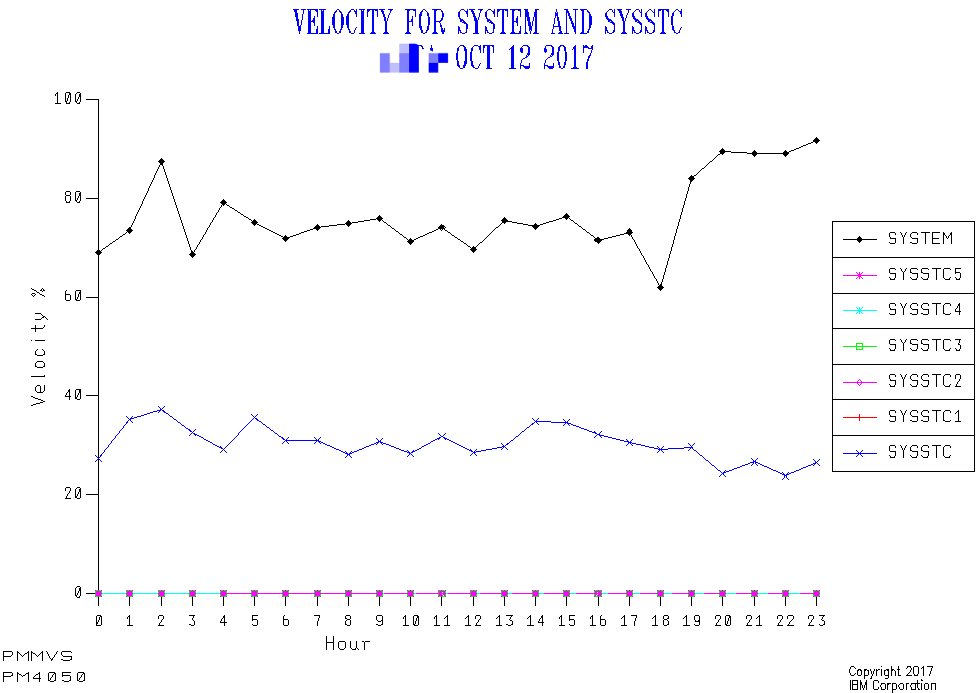
From the very same data set in that screencast I saw something I’d not noticed before: SYSSTC velocity is alarmingly low.

The above is one of four systems. Each has a persistently low velocity in the range 25% – 40%.

I didn’t expect this. To be honest, I’ve never looked at SYSSTC Velocity before. And what made me see it was adding the above graph to my kitbag a few months ago 1 . (That and what happens to Importance 1, 2, etc Goal Attainment.)

Never having looked at SYSSTC velocity I have no real basis for an expectation, but this seems alarmingly low. And as I see more customer data I’ll form some “folklore in my head” πŸ™‚ about it.

So this begs the question “what is it that is making SYSSTC’s velocity so low?” The search for an answer has to start with understanding which Delay component drags the velocity down. In this case it is Delay For CPU (and not zIIP, by the way).

I would’ve thought SYSSTC was relatively protected from CPU queuing 2 but the data tells us otherwise. But consider two things:

  • The low velocity is pretty consistent across the day.
  • We know – from the previous blog post – there can be substantial CPU in SYSSTC at times.

So, it’s not really workload driven. So I suspect the LPAR set up and other things going on in the machine. A vague diagnosis for now. But at least I suspect something πŸ™‚ – and that’s quite an advance.

Now why is this important? If you’ve reviewed Get WLM Set Up Right For DB2 you’ll know that key address spaces, such as DB2 / IMS lock managers (IRLM), run there. Without good access to CPU these address spaces will damage performance across a wide range of work.

So this is an unusual situation – until I keep seeing this in customers. πŸ™‚ But it’s one worth looking out for.

One final thought: I probably should suppress the graph lines for SYSSTC1 – SYSSTC5 if there is no CPU in them. Oh to have some spare time. πŸ™‚


  1. The “PM4050” on the graph refers to the standard graph in our kitbag that covers this ground. β†©

  2. After all, SYSTEM apparently is. β†©

Why WLM Controls Are Not Enough For DDF

(Originally posted 2017-11-05.)

For once this isn’t a blog post that discusses a podcast episode or a screencast. It is one where I feel a little exposed, but only a little.1

I just updated my “Even More Fun With DDF” presentation – after a whole two months. You’d think there’d be little new to say after only two months, but you’d be wrong. Quite apart from some other additions, there is a whole new thought2 to share. And I’m interested in opinions on it.

I think it’s a quite important thought: WLM Controls Are Not Enough For DDF.

Let me explain.

Traditional DDF Control Mechanisms

As you probably know, you classify DDF work below the DB2 address spaces and based on multiple potential qualifiers. Each transaction is a single commit3. Which is often just a small part of the requestor’s conversation with DB2. And WLM doesn’t know about the whole conversation, just the (independent enclave) transaction.

You can use period aging – so as a transaction accumulates service it can fall into periods 2, 3, and maybe 44. You would expect each successive period to have a looser goal and a lower importance.

You can also use Resource Groups – but I consider that a pretty blunt instrument.

Where Does This Fall Short?

It falls short in two main areas:

  • Non-Performance Controls
  • Short Transactions

Non-Performance Controls

It might be stating the obvious but this is important: WLM does not control access to DB2.

So, you have to set up Security in DB2 and your security manager (such as RACF). You not only have to decide who can access a given DB2 and from where but also what they can do.

This is not a performance issue as such, but it’s the first clue that DB2 and Security people need to be involved in discussions about how to manage DDF work.

Short Transactions

A very short transaction is difficult to manage in any case. A bunch of all-the-same short transactions doubly so. There’s no period aging to be had there, for one.

This is the new area for me: I’m seeing in several recent cases bursts of short transactions from the same source. Two examples come to mind:

  • SAP Batch. Which is really a bulk insertion of short DDF transactions.
  • Java Batch. Likewise, quite often.

One thing these have in common is that they are generally5 detectable. The Unit Of Work ID6 is a constant for the “batch job”.

But this doesn’t really help control them. For that you really need gating mechanisms in DB2 / DDF and maybe outboard of that. And that’s really the new point.

To be fair, for SAP Batch, you generally see a Correlation ID of xyzBTCnnn where xyz is a kind of application code and nnn is a three-digit number. So you could classify it in a separate Service Class from e.g. SAP Dialog transactions (xyzDIAnnn).

Two Parting Thoughts

Another thing that occurred to me is this: Control of DDF is important not just for System purposes but to protect other DDF from rogue7 DDF.

Consider DB2 logical resources such as DBATs, which are a subsystem-level resource. If rogue DDF work came in and used them all at once it could crowd out Production DDF. And there’s plenty of that around that matters. So you definitely want to protect Production DDF. Probably with DDF Profiles, but with other DB2 mechanisms as available. And this is where I chicken out and defer to people like Rob Catterall – and posts such as this.

And one final thought: Slowing down DDF work might not be all that helpful, particularly if it holds locks that other work needs. But then this is true of other work, like lower-priority batch jobs. So WLM controls might have an unfortunate effect.


  1. It’ll be obvious where in this post that manifests itself, and I don’t think it detracts from my main argument. It’s possible My Considered Opinion? is helpful here. 

  2. So this whole post is about a single slide. Yeah, so? :-) 

  3. Or abort. 

  4. 4 periods is a bit excessive, in my opinion, but I have seen it. 

  5. Unless obfuscated by their source, somehow. 

  6. Minus the Commit Count portion. 

  7. Or “Feral” DDF if you prefer (as I do). 

Screencast 12 – Get WLM Set Up Right For DB2

(Originally posted 2017-10-31.)

Hot on the heels of Screencast 11 – DDF Spikes is my latest screencast: Screencast 12 – Get WLM Set Up Right For DB2.

In it I talk about the important topic of ensuring DB2 is protected against shortages of CPU (and zIIP). There are a couple of quite nice examples to illustrate the point.

I should note that I don’t see instrumentation that explicitly shows what happens when IRLM gets heavy competition for CPU. I’m more concerned to show – as one of the examples does – that DBM1 can be significant so it’s worth keeping below IRLM.

Production Notes

This was the first time using Camtasia where I pruned out silence at the final – audio and video recombined – stage. I think I’m finally getting the hang of the tool and there’s a certain amount of muscle memory developed now.

Also, and I hope it doesn’t show too much, my editing of the audio (with Audacity) involved getting rid of a lot of huffing and puffing. I’d like to believe I wasn’t getting (too) old (to record) πŸ™‚ and that this was just a cold. It seemed to me the more excited I got the less the huffing and puffing. I’m not sure if there’s a life lesson there or not. πŸ™‚

Mainframe Performance Topics Podcast Episode 16 “Chapter And Worse”

(Originally posted 2017-10-30.)

It’s been a busy few weeks but we’ve a new episode out.

The experiment with narrowing the “stereoscape” was an interesting one. It is always going to be effort to do this, but having edited all 5 segments I got quite good at it. I think I maybe narrowed it a little too much, but I’d be interested in how it sounds to y’all. To my ears Marna and I (and indeed our guest and Marna) are coming at you from discernably different points, but it’s not too harsh.

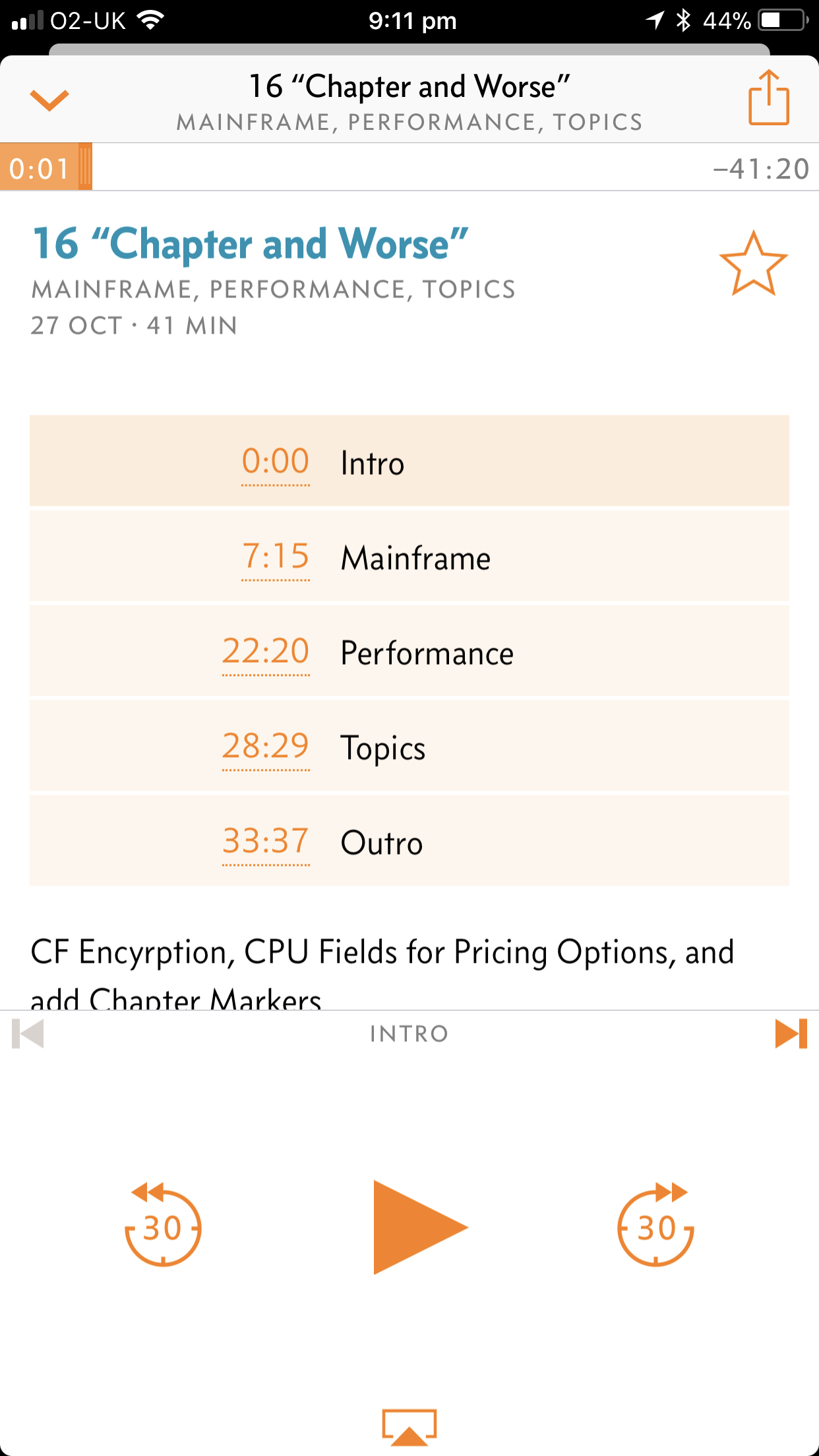
This is the second episode where I added chapter markers. In case you’re not able to see them in your podcast client this is how it looks on my phone:

Anyhow, we hope you enjoy this show. Here are the show notes.

Episode 16 “Chapter and Worse” Show Notes

Here are the show notes for Episode 16 “Chapter and Worse”. The show is called this because our Topics topic is about adding chapter markers (and pictures!) to our published MP3 file. We hope those of you that can see them enjoy them.

Where we’ve been

Marna has just returned from conferences and events in Johannesburg ZA, Chicago IL, and Munich Germany.

Martin has been to Munich Germany, and also visited a customer in Siena Italy.

Feedback

We have received feedback (in person, in Munich!) that our stereo separation of the channels was a little dizzying. Martin will be trying to make it less severe to relieve this effect.

Thanks for the feedback; We want to hear more!

Follow Up

Martin and Marna talked to the developers of the DocBuddy app, about their new release.

The latest release is 2.0.1, and has added a lot of social aspects (and fixed reported problems). The ability to look up messages is still there, but z/OS V2.3 isn’t there yet. We anticipate it will be coming soon, though, as it is important.

You can sign into the app (very easy to do!), and subscribe to Products and People, and discover them. People are “Influencers” and can be subscribed to. Products doesn’t include all the core z/OS elements, but Communications Server is there and has been active.

Feedback can be given, it’s an email under “Settings”, which took us a while to find.

Mainframe

Our “Mainframe” topic discusses a new z/OS V2.3 function, Coupling Facility Encryption, with Mark Brooks, Sysplex Design and Development. Mark talked about this latest capability in Sysplex, which has been getting a lot of attention as part of the larger Pervasive Encryption direction.

Mark explained that CF Encryption means that the customer’s data is encrypted by XCF in z/OS, sent along the link as encrypted, and stored as encrypted on the Coupling Facility.

z/OS sysprog needs to set it up by:

  • using new keywords on CFRM policy on a structure by structure basis

  • putting it in your CFRM couple data sets, and the policy change will be pending

  • rebuild the struture (to get it from unencyrpted to encrypted)

  • DISPLAY XCF structure commands can be used to see what the policy has, what the structure currently is, and the form of encryption used.

List and Cache structures contain customer sensitive data, the XCF control information will not be encrypted because it is not sensitive customer data. Lock structures don’t contain sensitive customer data, and are not encryptable.

Software requirements:

  • z/OS V2.3. Strongly recommend not using CF encryption in production until fully at z/OS V2.3.

  • ICSF. Need to have ICSF to generate keys and talk to the crypto cards. Every system in sysplex needs to be running with the same AES master key (meaning, same PKDS), note this requirement!

  • XCF generates the key from ICSF services and stores that wrapped key inside the CFRM couple data set.

Hardware requirements:

  • CPACF

  • Encryption is performance sensitive, because it is extra work to encrypt and decrypt. You want it to be executed quickly. Encryption is host-based, and zEC12 has these facilities, however the older machines are not as fast as a z14. Take that into consideration.

Tooling:

  • zBNA looks at new SMF data, so that you can see the amount of data transferred to the CF. From there, you could judge the cost of doing the encryption.

  • SMF 74 Subtype 4 records contain the new information on the amount of data, via measurement APAR OA51879 on z/OS V2.2. Planning can begin on z/OS V2.2 with this APAR.

For more information, see the z/OS Setting Up a Sysplex.

Performance

Martin talked about MSU-related CPU fields for doing software pricing analysis. Some of these fields are used by SCRT in support of the new Mobile function.

Most notably the fields cover:

  • Mobile Workload Pricing (MOBILE), using a new WLM mechanism, is available to many customers today. (The old way of doing Mobile Workload Pricing has been around for quite a long time.) Note a misrecording of IMS Mobile CPU at the Service Class Period level, which is fixed in IMS V15 APAR PI84889 and IMS V14 APAR PI84838.

  • CATEGORYA and CATEGORYB: These are just placeholders for any future additional pricing options that come about.

These categories of CPU/MSUs are brought to life using the Workload Manager ISPF panels, using a new reporting attribute. You scroll twice to the right to get there. The values in the field can be MOBILE, CATEGORYA, or CATEGORYB.

Container Pricing is another pricing model, ….., and maybe another topic on that later.

The overall idea: Be aware of the new fields that you will be analysing. These fields are available at two levels:

  • At the System level, as Rolling 4 Hour Average numbers – in SMF 70 Subtype 1.
  • At the Service Class Period level, as interval-based numbers – in SMF 72 Subtype 3.

Topics

Our podcast “Topics” topic is about adding chapter markers to the MP3 file for podcast apps. This makes it nice to skip from one section to another easily. Our podcast has five sections, each with its own graphic and chapter.

Copyright on the MP3 specification expired finally in 2017, allowing more things to be done with the format. Chapters is one of them.

Martin adds the chapter markers into the MP3 file after doing the audio editing with Audacity. He then takes the MP3 file, and runs it into another tool on iOS called Ferrite. Audacity doesn’t have the ability to mark chapters (or to add the graphics), but Ferrite does. Hence it has to be processed with this second program to give the final MP3 chapters and graphics! (Ferrite was among the first tools to support Chapter Markers, with or without graphics.)

On Martin’s iOS podcast app, Overcast, he sees the chapter markers and graphics fine. Marna uses Android and CastBox, in which she cannot see them. She then tried another Android app, PodcastAddict, which claimed to have chapter support, and yet she still doesn’t see them. So it goes. πŸ™‚

Customer Requirements

RFE 100505 Specify DSN HLQ for Healthchecker Debugging

The quoted description is: When the Healthchecker DEBUG option is turned on, the Healthcheck needs to write to a dataset. If that HLQ is not defined to security (in the case of Top Secret), the Healthcheck will fail. The customer then has to get this HLQ defined and appropriate access granted. I would like the customer to have the ability to control the DSN that the Healthcheck writes to.

Our discussion:

  • Those checks which are added by the check writer themselves, usually during initialization with HZSADDCK service, set the HLQ. Right now, these checks are not changable by the user for DEBUG, which is what the requirement is all about.

  • Sounds helpful, and desirable to have control of the high level qualifier(s) of the data sets. We agree.

  • A likely solution would be to put it in HZSPRMxx, and allow the customer to control it (hopefully) across several checks.

Where We’ll Be

Martin will be in Whittlebury UK 7-8, November for GSE UK.

Marna will also be in Whittlebury UK 7-8, November for GSE UK with Martin. Then, at the big IBM Z event Systems Technical University in Washington, DC, 13-17 November. Then, in Milan, Italy 28-29 November for a System Z Symposium.

On The Blog

Martin published one blog post, which highlights a screencast of his:

Marna has an idea for a blog, but needs more time to do some testing for it. It will be coming!

Contacting Us

You can reach Marna on Twitter as mwalle and by email.

You can reach Martin on Twitter as martinpacker and by email.

Or you can leave a comment below.

Screencast 11 – DDF Spikes

(Originally posted 2017-10-24.)

It’s been a month since I last did a screencast – and boy what a busy month I’ve had.

And in that month I had the privilege of working with a very nice customer, exercising my DDF Analysis code.1

As so often happens, a graph or two come together to tell a nice story. One I shared with the customer, and one I’m sharing with you.

Because graphs are involved the natural medium for sharing it is a short video, so that’s what I made. You can find it here.

I think the background to the topic is quite important, so I preface the actual customer case with some educational material. Indeed there is a key point I’m keen to get across:

Guarding against ill-behaving (or “feral”, as I like to call it) is important. It’s insufficient to rely on Security mechanisms and DB2 controls to avoid feral DDF misbehaving. And misbehaviour matters. In the example I give it’s CPU – both GCP and zIIP – that is consumed by the engineful2. But it might be precious DBATs, or other DB2 resources.

To clarify, while most people are interested in CPU as it relates to capacity planning (and software cost), I’m more worried about bursts of CPU affecting critical infrastructure. Though, I’ll admit, a (thick) veneer of “low value” DDF usage through a protracted period is worth managing down.

But this isn’t an easy phenomenon to control, particularly for egregious short-commit-scope work (aka bursts of small transactions).

One of the key sources of data is DB2 Accounting Trace (SMF 101) because it gives much finer timestamp granularity than RMF SMF. Further, the ability to identify a spiky consumer is pretty good. I advocate summarising at the 1-minute level, perhaps breaking out by IP address or Authid. This is realistic for me as I’ve built some nice DFSORT-based code to do the analysis.

The graphs come from CSV files created by this code. The question is whether you, dear reader, have access to a way of summarising individual 101 records in this way. I would assume, for example, MXG would allow you to. But I can say that the DFSORT code I use is very fast and very light.

Anyhow, I hope you enjoy the video (and the others in the series).


  1. Actually, we talked about much more ,or “of cabbages and kings” as Lewis Carroll would’ve put it. :-) 

  2. I’d say “ARMful” but that would be the wrong architecture. :-) 

Mainframe Performance Topics Podcast Episode 15 “Waits And Measures”

(Originally posted 2017-09-06.)

So this is a shorter episode, much to Marna’s pleasure. (Personally I’m indifferent to show length, regularly listening to episodes of other podcasts that run to 1.5 to 2 hours.)

It was very good to have a guest: Barry Lichtenstein. (I kept in the bit where I mispronounced his name, as I thought it a funny mistake[1]. You’ll find another piece of flubbing, again because it was funny.)

Enjoy!

Episode 15 “Waits And Measures” Show Notes

Here are the show notes for Episode 15 “Waits and Measures”. The show is called this because our Performance topic is about LPAR weights, and because this episode was after a seasonal hiatus.

Where we’ve been

Martin has been to nowhere in person, but has talked on the phone to several interesting locations.

Marna has just returned from SHARE in Providence, RI and from Melbourne, Australia for conferences.

Mainframe

Our “Mainframe” topic discusses a small new function in z/OS UNIX that there were customer requirements for, and that might not have been highlighted as much as other new functions in z/OS V2.3: automatic unmount of the version “root” file system in a shared file system environment. Our guest was Barry Lichtenstein, the developer of the function, and he told us all about it:

  • there is a new BPXPRMxx VERSION statement parameter, UNMOUNT. This means that when no one is using that “version file system” (the new name for the “version root file system”!), it will be automatically unmounted. This is not the default. Syntax here
  • this function is nice, as it will allow an unused version file system to be “rolled off” when you don’t need it anymore. Unused here, means that no system is using it or using any file system mounted under it. z/OS UNIX will do this detection automatically, and unmount not just the version file system, but mounted file systems under it that are no longer used by any systems after an unspecified amount of time.
  • you can turn this on and off dynamically with a SET OMVS or SETOMVS command. There is DISPLAY command support of it. And perhaps the best news, the health check USS_PARMLIB will see if the current settings don’t match the used parmlib specification. (Marna thinks this check is the gold standard for using dynamic commands and not regressing them on the next IPL with the hardened parmlib member!)
  • we weren’t sure if SMF record 92 would be cut when the unmount happened, but Barry said nothing unique was happening for this function so what happens today is most likely the same behavior. There are messages that are issued in the hardcopy log when the unmounts happen. SMF 90 might be issued for SET changes.

Performance

Martin talked about Weights and Online Engines in LPARs, and Martin again looking at customer information.

  • Intelligent Resource Director (IRD) changed PR/SM worked:
    1. Dynamic weight adjustment
    2. Online logical engine management (vary online and offline). Shows minimum and maximum weights when changed by IRD.
  • HiperDispatch: took away logical engine management (and manages it better!), and kept IRD dynamic weight adjustment. With HiperDispatch’s parking of engines, no work is directed towards it. An affinity node is a small group of logical engines to which a subset of the LPAR’s work is directed.
  • More instrumentation was introduced, such as Parked Time and refined instrumentation on weights (vertical weights, by engine).
  • Customer situation was that they did their own version of IRD and HiperDispatch: Varying logical engines online and varying weights (not using IRD itself). Martin expected IRD to change weights, but he saw the IRD weight fields were all zero. You must look at the “inital weights”, which means initial since you last changed it.
  • Why not let IRD do it? Martin thinks there was something in the customer’s mind to control it themselves, perhaps somethind other than WLM goal attainment (which IRD would adjust weights for).
  • Why not use HiperDispatch? Martin thinks that maybe a subtle difference might be needed, but LPARs should be designed properly. One possible aim might be to fit in one drawer, for instance. Maybe it’s not understanding what HiperDispatch does.
  • How did the customer adjust the weights? It was an open question. Probably via BCPii? Feedback would be welcome on this.
  • As an aside, with IRD a change in weights would lead to HiperDispatch recalculating how many Vertical High, Medium, and Low logical engines each LPAR has.

Lesson learned: Assumption on how something has dynamically changed may not always be correct.

Topics

Our podcast “Topics” topic was “Video Killed the Radio Star?” and about screencasting.

Martin has been trying to post screencasts to YouTube. Here’s one.

Screencasts are not videos where you see the speaker. It’s just a visual of what is happening on a screen with a talkover.

The best candidates are graphs and program output. Martin uses these steps to create these screencasts:

  1. First, make a set of slides or images. Annotations are good to use, to point to a particular feature on the screen. (They don’t have to be animated.)

  2. Use the screen recorder to add sound to the slide. (In PowerPoint, record the slides.)

  3. Editing, with proper fadeouts. Split the audio out and clean it up with Audacity.

  4. Re-unite the audio and the video. Camtasia, while expensive, has some promise.

  5. Publish on Youtube.

Customer Requirements

As well as Barry’s mention on the v/OS V2.3 automatic unmount of version file system requirement (RFE Number 47549, “Automatic disposal of z/OS UNIX version root”), there was another customer requirement we discussed:

RFE 97101 Make /dev/random available on z/OS without ICSF dependency

The quoted description is:

/dev/random is a special file that serves as a psuedo-random number generator source for applications. On z/OS, this special file is only provided if ICSF is started. If ICSF is not available, we need to resort to some other source of random numbers (which will have to be implemented within applications). Goal here is to make /dev/random available on z/OS, independently of whether ICSF is available or not.

Our discussion:

  • It’s a major migration action in z/OS V2.3 to have ICSF available for /dev/random.
  • ICSF is a dependency for many functions. It’s important to have on every single z/OS system.
  • Another aspect: each user had to have authority to use these ICSF services for certain of the functional depedencies (including /dev/random).

Martin mentioned that random number generators vary in quality, and behaviour. He hopes, if this were done, it would be high quality. One criterion would mean a close enough match to the ICSF-based algorithm, distributionwise.

Where We’ll Be

Martin will be in middle of Italy in August, 2017. He is threatening to drive from Italy to the Munich zTechU conference.

Marna will also be in Munich too. Marna is going to Johannesburg for the IBM Systems Symposium, aka IBM TechU Comes to You. She is also going to Chicagoland area on Sept 26 and 27, 2017 for some area briefings.

Both Martin and Marna are hoping to do a poster session in Munich, which should be jolly good fun.

On The Blog

Martin has actually not published a blog recently!

Marna actually did publish a blog recently!

Contacting Us

You can reach Marna on Twitter as mwalle and by email.

You can reach Martin on Twitter as martinpacker and by email.

Or you can leave a comment below.


  1. Some of you will notice a cultural resonance, with Young Frankenstein :-).  ↩

How Does Transaction CPU Behave?

(Originally posted 2017-07-14.)

If a customer has Transaction goals[1] – for CICS or IMS – it’s possible to observe the CPU per transaction with RMF.

But you have to have:

  • Transaction rate
  • CPU consumed on behalf of the transactions.

This might seem like stating the obvious but it’s worth thinking about: The transaction rate and the CPU consumption have to be for the same work.

Now, a Transaction service class doesn’t have a CPU number. Similarly, a Region service class doesn’t have transaction endings.

So you have to marry up a pair of service classes:

  • A Transaction service class for the transaction rate.
  • A Region service class for the CPU.

Operationally this might not be what you want to do. Fortunately, you can do this with a pair of report classes.

There’s another advantage to using report classes: You can probably achieve better granularity – as you can have many more report classes than service classes[2].

So I wrote some code that would only work if the above conditions were met[3].

Unimaginitively my analysis code is called RTRAN; You feed it sets of Transaction and Region class names.

Perhaps I should’ve said you could have e.g. a pair of Transaction report classes and a single Region report class and the arithmetic would still work[4].

But why do we care about CPU per Transaction?

There are two reasons I can think of:

  • Capacity Planning – by extrapolation
  • Understanding what influences the CPU cost of a transaction

From the title of this post you can tell I think the latter is more interesting. So let’s concentrate on this one.

In what follows I used RTRAN To create CSV files to feed into spreadsheets and graphs[5]. Over the course of a week I captured four hills while developing RTRAN.

The first thing to note is that CPU per Transaction is not constant, even for the same mix of transactions.

This might be a surprise but it makes sense, if you think about it. But let’s think about why this could be.

Two Important Asides

But first a couple of asides on this method:

  • Take the example of a CICS transaction calling DB2. While most of the work in DB2 is charged back to CICS not all is: There is a significant amount of CPU not charged back[6]. It’s highly likely the DB2 subsystem is shared between CICS and other workloads, such as DDF and Batch; It gets much less satisfactory trying to apportion the DB2 cost so I simply don’t.
  • Likewise, I’m ignoring capture ratio. While it would be wrong to believe it’s constant, for most of customers’ operating range it’s a fair assumption to go with a constant value for capture ratio.

In a nutshell, both these asides amount to “this is not a method to accurately measure the cost of a transaction but rather to do useful work in understanding its variability.”

Why CPU Per Transaction Might Vary

I’m going to divide this neatly in two:

  • Short-Term Dynamics
  • Long-Term Change

Short Term Dynamics

CPU per transaction can, demonstrably vary with load. There are a couple of reasons, actually probably more. But let’s go with just two:

  • Cache effects, that is more virtual and real storage competing for the same scarce cache.
  • If a server becomes heavily loaded it might well do more work to manage the work.

But it’s not just homogenous variation; Batch can impact CICS, for example.

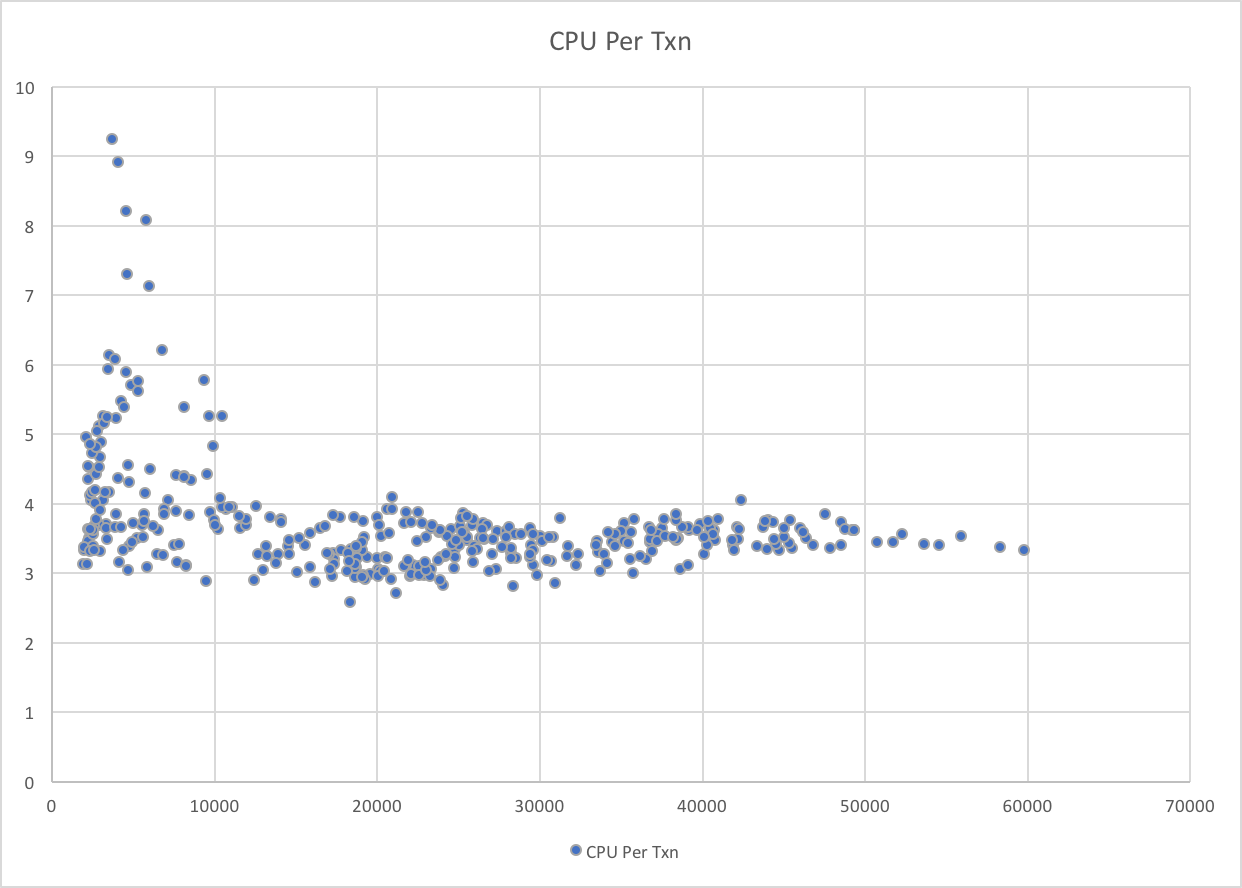
Look at the following graph:

In this case it’s the lower transaction rates that are associated with the higher CPU per transaction. But not all low transaction rate data points show high CPU per transaction.

A tiny bit more analysis shows that the outliers are when Production Batch is at its heaviest, competing for processor cache. It’s also the case that these data points are at very high machine utilisation levels, so the “working more to manage the heavy workload” phenomenon might also be in play.

Long Term Change

“The past is a foreign country; they do things differently there” L. P. Hartley The Go-Between.

Well, things do change, and sometimes it’s a noticeable step change, like the introduction of a new version of an application, where the path length might well increase. Or, perhaps, a new release of Middleware[7]. Or, just maybe, because the processor was upgraded[8].

But often, perhaps imperceptibly, CPU per transaction deteriorates. For example, as data gets more disorganised.

Conclusion

If it’s possible to do, there’s real value in understanding the dynamics of how the CPU per transaction number behaves.

Try to understand “normal” as well as behavioural dynamics, and watch for changes.


  1. With CICS and IMS you can have two main types of service classes – Region and Transaction. In the case of the latter, WLM manages CPU in support of the Transaction service class’ goals rather than the (probably velocity) goal of the Region service class. Note: You can have multiple Transaction service classes for the one CICS region, despite it only having only one Quasi-Reentrant (QR) TCB.  ↩

  2. And there’s no performance penalty for doing so.  ↩

  3. I’m hopeful I can persuade customers to think about their service / report classes with the above in mind.  ↩

  4. Perhaps that’s stating the obvious.  ↩

  5. I’ve moved to Excel and I have to say I find it cumbersome to use, compared to OpenOffice and LibreOffice.  ↩

  6. With DB2 Version 10 much of this is zIIP-eligible, and even more in Version 11.  ↩

  7. Hopefully this one causes a decrease.  ↩

  8. This one could go either way – with faster processors, or with multiprocessor effects.  ↩

My Point Of View

(Originally posted 2017-07-08.)

I’m writing this under a lovely cherry tree in my back garden, in cool shade on a warm summer’s day. Before you complain “that ain’t working” I’ll just point out this is on a Saturday afternoon. πŸ™‚ And the “air cooling” is what makes this post possible. πŸ™‚

Just this past week I began an experiment. As with all experiments I might continue with it, but I might not; It depends on whether people find it interesting or valuable.

One of the nicest things about my job is when a truly interesting graph or diagram appears in front of me, especially if it’s the result of some programming of mine. This week has been full of such moments, as I’ve developed some new code. (More of that in a different post, I think.)

And the week started with an episode of Mac Power Users talking about screencasting.1

About 10 minutes into the episode I suddenly thought “I could use screencasting to talk about some interesting graphs”. For once, I had the discipline to listen to the rest of the episode before doing something about it. I will admit I was fair chomping at the bit. πŸ™‚

My development approach this week has been the nearest to disciplined I think I’ve ever been. πŸ™‚ It turns out I had four hills to capture. Because I might have to stop with only a few hours’ notice this is a nice characteristic. Each hill took about a day and I promoted into Production after each hill was captured.

Agile? More like Fragile. πŸ™‚

And so after capturing the first hill I recorded my first screencast:

This was pretty basic; I’m just moving the pointer around on a single graph while I talk.

After the second hill I recorded my second:

This time I had three graphs to show, building on the story from Screencast 0.

But then I thought I would take one of my “in Production” graphs and annotate it. It’s one that has nothing to do with the first two but one I very commonly use:

Here I used Pixelmator for Mac, which is rather overkill. I take the base graphic (a PNG) and create more graphics with successive annotations. It actually was unwieldy, given I don’t have much experience with Pixelmator.

Then I captured a third hill, which led to:

This time I used the much simpler (and built in to Mac OS) Preview to annotate. It did indeed take much less time, though it would be fair to note it’s only a single “base” slide.

And finally, for now, it was really quick to illustrate the capturing of the fourth hill with:

At this point point I realized my screencasting might be a “thing” so then the question of “materials management” came up. My answer is just to shove each screencast (episode) in its own folder. I feel vaguely organized now. πŸ™‚

Thoughts

It’s occurred to me this is quite a light-weight teaching aid. So when I develop new code I might well use this to explain the value, issues and nuances.

It also occurs to me that anyone – certainly on a Mac – could produce (and share or publish) material like this. And if you had, say, presentation slides to give you might do it this way.

As you can see, I’m experimenting with annotation tools. So far I’ve used two on the Mac – preparing them as static graphics before recording. I also have several on iOS, most notably Pixelmator for iOS and Annotable. What I’m not doing is annotating the video itself. I probably should get round to audio clean up and video editing; I’m not sure how I’ll do that. 2

One stance I deliberately took was to produce short but frequent videos. I think that makes it less daunting to do and possibly more consumable for the viewer.

I don’t know if I’ll commit to keeping on going. Certainly daily (my current rate) seems too aggressive and weekly too infrequent. That depends on the viewership. I certainly think material is going to keep appearing that this medium would be well suited to.

Nobody would call me “camera shy”. πŸ™‚ But the effort of recording and editing pieces to camera seems to me quite high, with little value. This, however is much easier to do. So I don’t think I’m going to do videos with me in them – unless something changes my mind.

This is – to me – a great toe in the water. I hope it is to you, too.


  1. To be specific, #384: Screencasting 101 with JF Brissette ↩

  2. This, however, isn’t a priority. ↩

Mainframe Performance Topics Podcast Episode 14 “In The Long Run”

(Originally posted 2017-07-07.)

Boy has this one been a “slow train coming” but I’m glad it’s out now. And it was fun making it. Especially the piece with Frank and Jeff.

It’s a long listen; As always I’m comfortable with long podcast episodes.

Enjoy!

Episode 14 “In The Long Run” Show Notes

Here are the show notes for Episode 14 “In the Long Run”. The show is called this because the episode ran longer than usual, and it is of fitting length if you have a very long commute.

Follow-ups

Martin has two new blog posts about DDF (DB2’s Distributed Data Facility), following up on Episode 13 where he talked about recent DDF analysis enhancements:

(Follow Up is of course an invention of John Siracusa.) πŸ™‚

Where we’ve been

Martin has been to London (to the UK GSE zCMPA User Group) to present his ever-updated DDF presentation, and had more fun with it.

Marna has been to the Systems University in Orlando, Florida (May 22, 2017 week).

Mainframe

Our “Mainframe” topic is the first in a series of deep dives into z/OS V2.3. Part 1 is on z/OSMF Autostart.

This is the most important migration action in z/OS V2.3, and requires special consideration by every customer IPLing z/OS V2.3. Things that you’ll need to consider are:

  • Whether to start z/OSMF or not. (Starting is the default). You control this via IZUPRMxx parmlib members (which in new news can be shared via PI82068).

  • If you don’t start z/OSMF and have its functions available to system(s), then you not be able to use certain functions (notably in z/OS V2.3: JES3 Notification).

  • If you don’t want to start z/OSMF on a certain system, you can connect to another z/OSMF system in the same sysplex, and that requires specification on which group that would be.

  • The number of z/OSMF servers in a sysplex hasn’t changed, still as it was before V2.3.

  • z/OSMF server starting on an LPAR with good zIIP capacity, and memory (minimum of 4GB) is a starting consideration.

  • Strong recommendation: start z/OSMF now on your V2.1 or V2.2 system so that there are fewer work items to do (a couple of security profiles, new procs, parmlib updates only).

Performance

In our “Performance” topic Martin talked about two Parallel Sysplex items that he’s been pondering extensively recently. He’s been using RMF data (taken from SMF type 74 subtype 2 and 4).

Coupling Facility

This is the subject of a blog post: Some Parallel Sysplex Questions, Part 1 – Coupling Facility

  • Resources: CPU, memory, and path

  • Structures: their role to applications, and how responsiveness responds to work load is interesting

XCF Signalling

This is the subject of another blog post: Some Parallel Sysplex Questions, Part 2 – XCF

  • Resources: Paths, buffers, and transport groups

  • Groups: again, knowing the application types, with the theme of managing traffic down when possible

Topics

Our “Topics” topic is subtitled “Podcast meets Podcast” with the newest mainframe podcast we know: Terminal Talk.

Frank De Gilio and Jeff Bisti are the hosts, and concentrate on a wider introductory perspective than our MPT podcast does.

  • Terminal Talk (TT) has enviable technology for recording, and came about from Frank and Jeff taking long car rides to Pennsylvania.

  • Planning for the TT podcast consists mostly on engaging guests, and not necessarily following an outline.

  • Length is a big consideration: TT is intended to be of a work-commute length.

  • Editing is done with Audacity, just like our MPT podcast. TT records mono. MPT does stereo. Martin uses the Audacity waveform visualisation when editing; Hence the terms “um fish” and “so so birds”. πŸ™‚

We had great fun talking to Frank and Jeff; Martin left some of the laughs in the final edit. And we’re sure a lot of you will enjoy Terminal Talk, having listened to all their episodes so far.

Customer Requirements

Marna and Martin discussed three customer requirements:

<–! * 76875 and 75766: Migration check for CF structure sizes β€œat risk” due to impending new levels of CFCC –>

Where We’ll Be

Marna will be at SHARE in Providence, RI, 7–11 August 2017 and [IBM Systems Symposium, 15–17 August 2017 in Melbourne, AU)[https://www.regonline.co.uk/registration/Checkin.aspx?EventID=1939263]

Martin will be going nowhere for a while.

On The Blog

Martin has published six blog posts recently. The two not already mentioned are:

Marna has not blogged since our last podcast episode.

Contacting Us

You can reach Marna on Twitter as mwalle and by email.

You can reach Martin on Twitter as martinpacker and by email.

Or you can leave a comment below.