DDF Counts

(Originally posted 2016-01-17.)

I don’t think I’ve ever written very much about DDF. Now seems like a good time to start.

I say this because I’ve been working pretty intensively over the last couple of weeks on upgrading our DDF Analysis code. Hence the recent DFSORT post (DFSORT Tables).

I’m actually not the DB2 specialist in the team but, I’d claim, I know more about DB2 than many people who are. At least from a Performance perspective.

Actually this post isn’t about how to tune DDF. It’s about how to categorise and account for DDF usage. As usual I’m being curious about how DDF is used.

The Story So Far

A long time ago I realised it would be possible and valuable to “flatten” parts of the SMF 101 Accounting Trace record. A DDF 101 record is cut at every Commit or Abort – in principle.

And the DDF 101 record has additional sections of real value:

  • QMDA Section (mapped by DSNDQMDA) has lots of classification information, most particularly detail on where requests are coming from.
  • QLAC Section (mapped by DSNDQLAC) documents additional numbers such as rows transmitted.

In addition a field in the standard QWAC Section (mapped by DSNDQWAC) documents the WLM Service Class the work executed in. This field (QWACWLME) is only filled in for DDF.

So I wrote a DFSORT E15 exit to reformat the record so that all the useful DDF information is in fixed positions in the record. This makes it easy to write DFSORT and ICETOOL applications against the reformatted data. (In our code this data is stored reformatted on disk, one output record per input record.)

These reports concentrated on refining our view of what applications accessed DB2 via DDF. So, for example, noticing that the vast majority of the DDF CPU was used by a JDBC application (and its identity).

I also experimented with writing a DDF trace – using the time stamps from individual 101 records. Because installations can now consolidate DDF SMF 101 records[1] (typically to 10 commits per record) this code has issues. [2]

This code was good for “tourist information” but showed a lot of promise.

2015 Showed The Need For Change

A number of common themes showed the need for change, particularly in 2015.

There were some defects. The most notable was the fact that DB2 Version 10 widened a lot of the QWAC section fields. But also my original design of converting STCK values to Millisecond values was unhelpful, particularly when summing.

But these are minor problems compared to two big themes:

  • Customers want to control DDF work better, particularly through better crafted WLM policies.
  • Customers want to understand where the DDF-originated CPU is going, with a view to managing it down.[3]

These two themes occurred in several different customer engagements in 2015, but I addressed them using custom queries.

New Developments

So now in early 2016, while waiting for an expected study to start, I’m enhancing our DDF code. With the test data (from a real customer situation) the results are looking interesting and useful.

Time Of Day Analysis

My original code always broke out the SMF record’s date and time into separate TSDATE, TSHOUR, TSMIN, etc fields. This means I can create graphs by time of day with almost arbitrary precision.

My current prototype graphs with 1-minute granularity and (less usefully) with 1-hour granularity. And there are two main kinds of graph: Class 1 CPU and Commits.

With my test data (actually to be fed back to the customer) the Commits show an interesting phenomenon: Certain DDF applications have regular bursts of work, for example on 5 minute and 15 minute cycles. Normally I don’t see RMF data with 1-minute granularity so don’t see such patterns. Bursts of work are more problematic, including for WLM, than smooth arrivals. Now at least I see it.

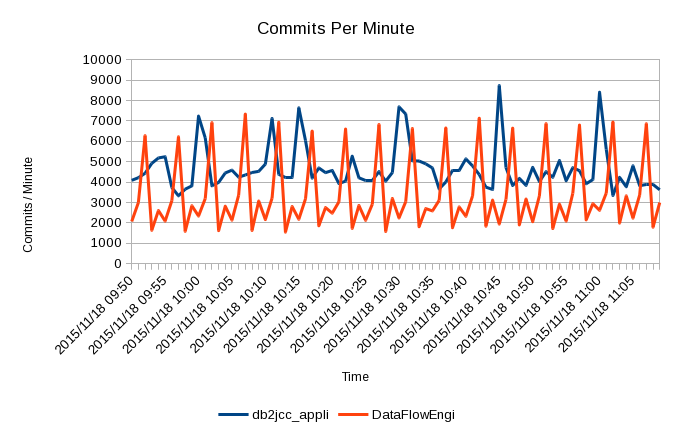
What follows is an hour or so’s worth of data for a single DB2 subsystem, listing the top two Correlation IDs.

Here’s the Commits picture:

As you can see there are two main application styles [4], each with its own rhythm. These patterns are themselves composite and could be broken out further with the QMDA Section information, right down to originating machine and application.

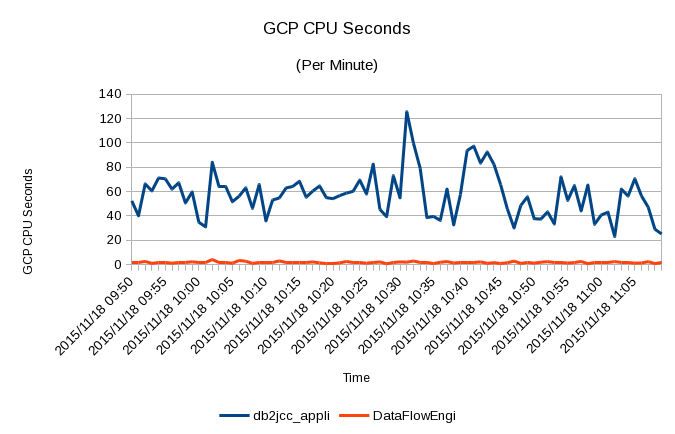
And here’s the corresponding CPU picture:

It shows the two applications behave quite differently, with the cycles largely absent. This suggests the spikes are very light in CPU terms and that other e.g. JDBC applications are far more CPU-intensive. Notice how the CPU usage peaks at 2 GCPs’ worth (120 seconds of CPU in 60 seconds). The underlying JDBC CPU usage is about 1 GCP’s worth.

zIIP

I’ve also added in three zIIP-related numbers:

  • zIIP CPU
  • zIIP-eligible CPU
  • Records with no zIIP CPU in

zIIP CPU is exactly what it says it is: CPU time spent executing on a zIIP.

zIIP-eligible CPU has had a chequered history but now it’s OK. It’s CPU time that was eligible to be on a zIIP but ran on a General-Purpose Processor (GCP).

The third number warrants a little explanation: With the original implementation of DDF zIIP exploitation every thread was partially zIIP-eligible and partially GCP-only. More recently DB2 was changed so a thread is either entirely zIIP-eligible or entirely GCP-only. By looking at individual 101 records you can usually see this in action.

So I added a field that indicates whether the 101 record had any zIIP CPU or not – and I count these. Rolling up 101 records complicates this but my test data suggests the all-or-nothing works at the individual record level.

Workload Manager

Last year I did some 101 analysis to help a customer set up their WLM policy right for DDF.

Nowadays I get the WLM policy (in ISPF TLIB form) for every engagement.[5] So I can see how you’ve set up WLM for DDF. What’s interesting is how it actually plays out in practice.

And this is where the 101 data comes in:

  • QWACWLME tells me which WLM Service Class a transaction runs in (only for DDF).
  • The record has CPU data which enables you to calculate CPU Per Commit.
  • You also get Elapsed Time Per Commit.

It would be wonderful if SMF 101 had the ending Service Class Period but it doesn’t. But at least you can do statistical analysis, particularly to see if the work is homogenous or not.

Similar statistical analysis can help you set realistic Response Time goals.

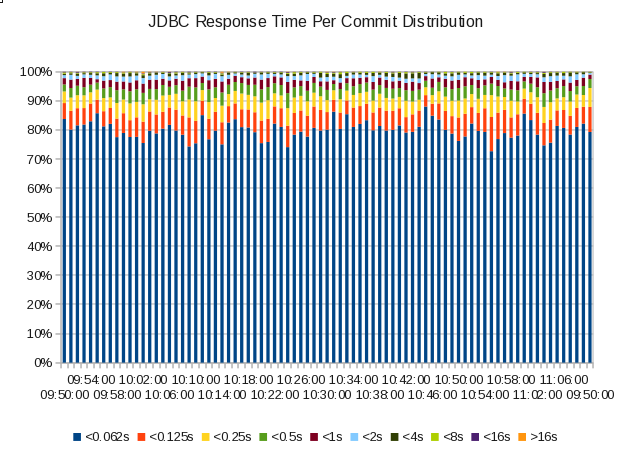
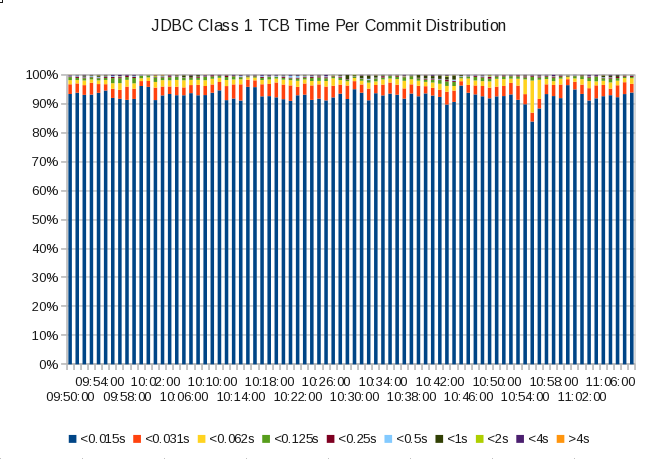
Here are a couple of graphs I made by teaching my code how to bucket response times and Class 1 TCB times, restricting the analysis to JDBC work coming into a single DB2 subsystem: [6]

Here’s the response time distribution graph:

If this were a single-period Service Class one might suggest a goal of 95% in 0.5s – though if that were the case it’d be an unusually high value (0.5s).

You can also see attainment wasn’t that variable through this (75 minute) period.

And here’s the Class 1 TCB time distribution graph:

Notice how the bucket limits are lower than in the Response Time case. In my code I can fiddle with them separately.

Over 95% of the transactions complete using less than 15ms of CPU.

These two graphs aren’t wildly interesting in this case but they illustrate the sort of thing we’ll be able to see as analysts with the new code. I think it’s a nice advance.

In Conclusion

It’s been hard work and I’ve rewritten much of the reporting code. But I’m a long way forwards now.

It’s interesting to note the approach and, largely, the code is extensible to any transaction-like access to DB2. For example CICS/DB2 transactions. “Transaction-like” because much of the analysis requires frequent cutting of 101s. Most batch doesn’t look much like this.

I’d also encourage customers who have significant DDF work and collect 101 records to consider doing similar things to those in this post. This is indeed a rich seam to mine.

And I think I just might have enough material here for a conference presentation. Certainly a little too much for a blog post. πŸ™‚

As always, I expect to learn from early experiences with the code. And to tweak and extend the code – probably as a result of this.

So expect more posts on DDF.


  1. By the way I count Commits and Aborts per record And can see where DDF rollup is occurring and whether the default 10 is in effect.  ↩

  2. But I think I have a workaround of sorts.  ↩

  3. Or at least doing Capacity Planning.  ↩

  4. Which are JDBC (Java) and (presumably) “Data Flow Engine”, whatever that is.  ↩

  5. It’s not quite that I won’t talk to you without it but pretty close. πŸ™‚  ↩

  6. I’m making the graphs add up to 100%. I could, of course, use absolute values. And that might be useful to figure out if we even have enough transaction endings to make Response Time goals useful.  ↩

DFSORT Tables

(Originally posted 2016-01-10.)

It’s been a while since I posted a DFSORT trick – and it’s high time I did.

This post follows (distantly) on from More Maintainable DFSORT and is occasioned by some recent development work on our tools.

As so often happens, developing this code has been a bit of a journey of discovery. And I’ve learnt (the hard way) a couple more ways you can make the code more maintainable.

Let me straight away share a few of these with you – in case you use [1] DFSORT but don’t want to read much further.

  • Where possible specify fields on separate lines. So, rather than writing

    INREC FIELDS=(A,B,C)
    

    write

    INREC FIELDS=(A,
      B
      C)
    

    In fact the above mentioned post contained this advice, but in my recent development work it’s proved invaluable.

  • Consider a padding final field on eg OUTREC:

    OUTREC FIELDS=(A,
        B,
        X)
    

    where the ‘X’ is a single blank specifier. [2] That way when you move fields around or delete them you don’t need to worry about the trailing bracket – as it’s after the invariant X.

  • You can decode a STCK value into printable seconds with

    TIMESTAMP,DIV,+4096000,EDIT=(IIIT.TTT)
    

Using IFTHEN To Make A Table

This is the “meat” of this post.

Suppose you want to produce a report that is a grid or table, with the same type of value in each cell.

Consider the following input data set:

ALPHA       WHITE  7
ALPHA       BLUE   1
BRAVO       RED    3
ALPHA       WHITE  4
ALPHA       RED    8
BRAVO       RED   11
CHARLIE     BLUE  67
BRAVO       RED   34
BRAVO       WHITE 57
CHARLIE     BLUE   8
ALPHA       WHITE 34
CHARLIE     BLUE  81
DELTA       RED   24
ECHO        BLUE   9
FOXTROT     RED    7

Three columns, of which the third is numeric though character rather than binary.

Now look at this report, produced from the data:

 Division       RED Sold WHITE Sold  BLUE Sold Other Sold   RED Txns WHITE Txns  BLUE Txns Other Txns
 ------------ ---------- ---------- ---------- ---------- ---------- ---------- ---------- ----------
 ALPHA                 8         45          1          0          1          3          1          0
 BRAVO                48         57          0          0          3          1          0          0
 CHARLIE               0          0        156          0          0          0          3          0
 DELTA                24          0          0          0          1          0          0          0
 ECHO                  0          0          9          0          0          0          1          0
 FOXTROT               7          0          0          0          1          0          0          0

The second field from each input data record is used to define the column, while the first field is used to define the row.

The input data is mapped with the following DFSORT Symbols (SYMNAMES DD) statements:

* MAPPING OF ORIGINAL RECORDS
POSITION,1
DIVISION,*,12,CH
COLOUR,*,6,CH
SOLD,*,2,CH

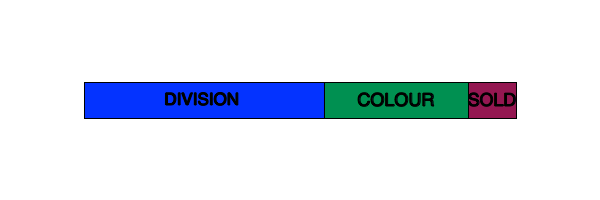
In picture form:

To achieve the desired results in the report using the following DFSORT statements.

First INREC to reformat the data:

 INREC IFTHEN=(WHEN=INIT,
   BUILD=(DIVISION,
     COLOUR,
* SOLD VALUE IN INPUT RECORD CONVERTED TO BI
     SOLD,UFF,TO=BI,LENGTH=2,
* SOLD TALLIES
     X'0000',
     X'0000',
     X'0000',
     X'0000',
* RECORD TALLIES
     X'0000',
     X'0000',
     X'0000',
     X'0000')),
 IFTHEN=(WHEN=(_COLOUR,EQ,C'RED   '),
    OVERLAY=(_RED_SOLD:_SOLD,_RED_RECS:X'0001')),
 IFTHEN=(WHEN=(_COLOUR,EQ,C'WHITE '),
    OVERLAY=(_WHITE_SOLD:_SOLD,_WHITE_RECS:X'0001')),
 IFTHEN=(WHEN=(_COLOUR,EQ,C'BLUE  '),
    OVERLAY=(_BLUE_SOLD:_SOLD,_BLUE_RECS:X'0001')),
 IFTHEN=(WHEN=NONE,
    OVERLAY=(_OTHER_SOLD:_SOLD,_OTHER_RECS:_SOLD))

Second a SORT statement:

 SORT FIELDS=(_DIVISION,A)

Third a SUM statement:

 SUM FIELDS=(_RED_SOLD,
  _WHITE_SOLD,
  _BLUE_SOLD,
  _OTHER_SOLD,
  _RED_RECS,
  _WHITE_RECS,
  _BLUE_RECS,
  _OTHER_RECS)

And fourth an OUTFIL statement:

 OUTFIL FNAMES=SORTOUT,REMOVECC,
 HEADER1=('Division    ',X,
   '  RED Sold',X,
   'WHITE Sold',X,
   ' BLUE Sold',X,
   'Other Sold',X,
   '  RED Txns',X,
   'WHITE Txns',X,
   ' BLUE Txns',X,
   'Other Txns',X,/,
   '------------',X,
   '----------',X,
   '----------',X,
   '----------',X,
   '----------',X,
   '----------',X,
   '----------',X,
   '----------',X,
   '----------'),
 OUTREC=(_DIVISION,X,
   _RED_SOLD,EDIT=(IIIIIIIIIT),X,
   _WHITE_SOLD,EDIT=(IIIIIIIIIT),X,
   _BLUE_SOLD,EDIT=(IIIIIIIIIT),X,
   _OTHER_SOLD,EDIT=(IIIIIIIIIT),X,
   _RED_RECS,EDIT=(IIIIIIIIIT),X,
   _WHITE_RECS,EDIT=(IIIIIIIIIT),X,
   _BLUE_RECS,EDIT=(IIIIIIIIIT),X,
   _OTHER_RECS,EDIT=(IIIIIIIIIT),X,
   X)

The data reformatted with INREC is mapped with these Symbols (in the same file as the input data symbols):

* RESULTS OF INREC
POSITION,1
_DIVISION,*,12,CH
_COLOUR,*,6,CH
_SOLD,*,2,BI
_RED_SOLD,*,2,BI
_WHITE_SOLD,*,2,BI
_BLUE_SOLD,*,2,BI
_OTHER_SOLD,*,2,BI
_RED_RECS,*,2,BI
_WHITE_RECS,*,2,BI
_BLUE_RECS,*,2,BI
_OTHER_RECS,*,2,BI

The data remains formatted this way until the OUTFIL statement produces the final report to the REPORT DD.

Mostly this is complicated stuff so let me take you through it, statement by statement.

INREC

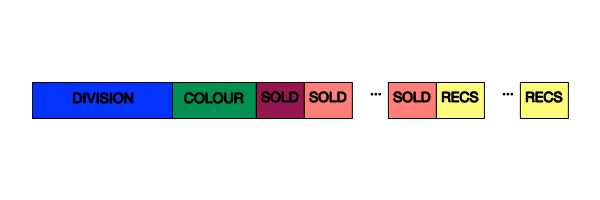
The INREC statement reformats the record to look like this:

Here two sets of four new fields have been added to the input record. They are mapped with (previously-shown) symbols:

_RED_SOLD,*,2,BI
_WHITE_SOLD,*,2,BI
_BLUE_SOLD,*,2,BI
_OTHER_SOLD,*,2,BI
_RED_RECS,*,2,BI
_WHITE_RECS,*,2,BI
_BLUE_RECS,*,2,BI
_OTHER_RECS,*,2,BI

Also the SOLD field has been converted to a 2-byte Binary field:

_SOLD,*,2,BI

So this is all achieved with a set of IFTHEN “stages”, looking a lot like a pipeline:

  • IFTHEN WHEN=INIT is always performed – and first. It primes the counter fields (with 3 bytes of Binary zeroes apiece) and uses SOLD,UFF,TO=BI,LENGTH=2 to convert the SOLD field to Binary.
  • IFTHEN WHEN=(_COLOUR,EQ,C’RED ‘) is used only for records where the COLOUR field is ‘RED ’ to copy the _SOLD Binary value into the _RED_SOLD field and to write Binary 1 (X’0001’) to the _RED_SOLD field.
  • Likewise the next two IFTHEN clauses, which do the same for ‘BLUE ’ and ‘WHITE ’.
  • IFTHEN WHEN=NONE is performed only for records where none of the previous IFTHEN WHEN conditions were met. With the exception of the WHEN=INIT clause. It copies the SOLD value into _OTHER_SOLD and Binary 1 into _OTHER_RECS.

After INREC the number of records is the same but the SOLD field is copied into the right _SOLD field and 1 into the _RECS field.

The left hand side of the data at this point looks like:

ALPHA                 0          7          0          0          0          1
ALPHA                 0          0          1          0          0          0
BRAVO                 3          0          0          0          1          0
ALPHA                 0          4          0          0          0          1
ALPHA                 8          0          0          0          1          0
BRAVO                11          0          0          0          1          0
CHARLIE               0          0         67          0          0          0
BRAVO                34          0          0          0          1          0
BRAVO                 0         57          0          0          0          1
CHARLIE               0          0          8          0          0          0
ALPHA                 0         34          0          0          0          1
CHARLIE               0          0         81          0          0          0
DELTA                24          0          0          0          1          0
ECHO                  0          0          9          0          0          0
FOXTROT               7          0          0          0          1          0

For legibility I’ve left the last few columns out and in fact what you’re seeing is formatted so you can read the Binary numbers.

At this point there’s been no summation.

SORT

I sort on the _DIVISION field, which is really the same as the DIVISION field.

SUM

I sum the 4 _SOLD and the 4 _RECS fields. To show you the result of this in a viewable form I’d pretty much be showing you the final result (and I’ve already done that).

OUTFIL OUTREC

While there are some very sophisticated uses of OUTFIL this one is a simple case of report writing:

  • HEADER1 just prints a one-time header line (or two). The ‘/’ just specifies a new line.
  • OUTREC reformats the records passed, in this case making them printable. For example _RED_SOLD,EDIT=(IIIIIIIIIT) converts _RED_SOLD to a printable number with leading zeroes suppressed.

Conclusions

The above worked example is readily adaptable. But it is a little bit fragile, as is so often the case with advanced DFSORT and ICETOOL applications. Once I got used to the basic technique – using a series of IFTHEN WHEN clauses to copy one input field into a series of different output fields depending on another field’s value – it became readily extensible and adaptable.

And some of the techniques in this post (and in More Maintainable DFSORT) made this much easier.

Some things to note:

  • You have to know how many columns you want and what (in this case) COLOUR field values to expect. In my real world example I took full advantage of the _OTHER fields to ensure I captured them all.[3]
  • This example shows you can have 2 fields “gridded” like this. In this case one is just a count but I’ve done this with two and indeed three distinct input record fields.

  • This whole technique depends heavily on DFSORT Symbols.

I appreciate this has been a long and fiddly post. Perhaps we can hope for something more succinct soon. πŸ™‚


  1. By “use” I mean “write DFSORT / ICETOOL statements” rather than “run jobs”.  ↩

  2. With OUTFIL if you specify a header (eg HEADER1) you might want to pad the OUTREC with lots of blanks, eg 50X. But you wouldn’t want to do that with high-volume Production data.  ↩

  3. In Production I have another query which tells me what values to expect.  ↩

Tis The Season

(Originally posted 2015-12-22.)

I can cope with both “zee” and “zed”. [1]

I love the myriad ways of pronouncing “CICS”.

I can even detect such things as “Day Bay Tway” when I hear them.

But there are a couple of things that I’m slightly bemused by:

  • People saying “zee-oss” or “zed-oss” or “zoss”.
  • People calling WLM “Willem”.

I wonder if it’s a more modern version of what I’d call “Amdahl Coffee Mug Syndrome”…

When I first started at IBM customers used to goad IBMers by offering them coffee in an Amdahl mug. I don’t know how we were supposed to react but I’d just say “thank you very much” and accept the coffee. No point in being goaded.

I actually try to pronounce everything right – even at the risk of sounding like a poseur. Even competitive products. And certainly the names of people.

I’d encourage everybody to do the same.

And with that brain dump of misanthropy πŸ™‚ into my phone on the last flight home I’ll take this year (back from Istanbul – where the people are friendly and the beer’s the beer) πŸ™‚ …

I’ll wish everyone Happy Holidays!

Or, if you prefer…

Bah[2] Humbug! πŸ™‚


  1. I normally get this right, knowing that some countries prefer one, some the other, and that some don’t care.  ↩

  2. The SwiftKey keyboard on the phone first rendered “Bah” as “Bahamas”. You might prefer that. πŸ™‚  ↩

Overdoing It

(Originally posted 2015-12-22.)

WLM will give up on an unachievable goal, eventually. Recently I came across a customer who didn’t know this and for whom this was a big problem.[1]

This customer, like many others, was running heavily constrained for CPU. [2]

But it does have consequences.

In this particular case they had defined two service classes – one for their main Production IMS address spaces and one for their Production DB2 subsystem.

The goals were both with Importance 1. One had a Velocity goal of 99% and the other of 95%.

I joked they’d’ve specified 100% if they could. One of them said the panel only allowed 2 digits. πŸ™‚

In both cases the goals were set way too high and the velocity attainment would fall well short of the goal. **Much of the time the Performance Index (PI) would be so high[3] that WLM would give up on the goal.

Of course the customer had several service classes with work using IMS and DB2 and with lesser importance (2, 3, etc) and with more modest goals.

These “lesser” service classes tended to meet or even exceed their goals. But it doesn’t mean the applications performed well or stably in real world terms. You need the server to perform well for that to happen. And in this case IMS and DB2 were starved of CPU – both GCP and zIIP. They became donors rather than receivers. And priorities were effectively inverted.

So this effective inversion of priorities was damaging, particularly at higher utilisation levels.

The moral of the story is: Don’t overdo it, goalwise and do check goal attainment, adjusting goals sensibly based on that. Otherwise you could be in for priority inversion and a nasty surprise.


  1. And, coincidentally, an IBMer who didn’t know it either.  ↩

  2. That, of course, is their prerogative.  ↩

  3. The higher the PI the worse the goal attainment, with a PI of 1 meaning “just met the goal”.  ↩

WLM Policy Timestamp Analysis

(Originally posted 2015-12-19.)

After writing Reviewing The Situation I got thinking. [1]

I’ve known for a long time the WLM Policy (XML) has timestamps in it. The thought was “maybe there’s value in doing timestamp analysis”.

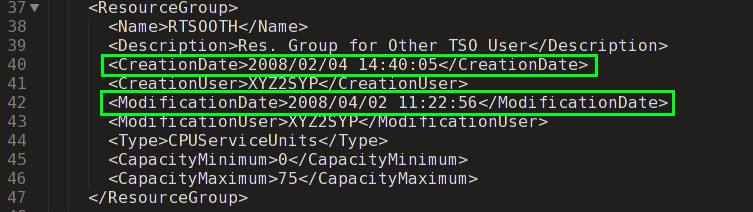
Here is a fragment of a real customer policy, showing a resource group definition:

It’s pretty easy to read. Obviously the XML elements whose node name start with “Creation” or “Modification” are of interest here.

So I modified my PHP code to produce the following two tables:

I’ve tested this with a couple of customers. Basically it counts which years things were created and also modified.

In the real life example there is a gap of a couple of years – a few years ago – but otherwise the story is one of continual maintenance.

In the case of the other test customer it was interesting to hear them translate userids into names; Some of the people were still working for the customer while others had retired. While this might seem like “tourist information” I do believe quite a bit of the job I do is social.

So these two customer cases aren’t huge leaps forward, but it’d be interesting to see what happens when I encounter a customer who hasn’t maintained their WLM policy recently.

There are some issues with this method:

  • The precise items created and updated aren’t reflected in this current report, nor are the precise changes e.g. How a goal’s velocity was altered.
  • The granularity of items changed isn’t great.
  • For an item that has been modified the data only contains the created and last modified date, with no hint of any intermediate changes.

One thing I could fix is producing a more detailed report; For now I have to hunt for the time stamps in the HTML report I produce. So, for example, knowing when a bunch of classification rules were added could be interesting.

As I said at the beginning it was a thought; I’m not convinced there’s a huge amount of value in this but, as with so many new data, evolving code and more experience with real customer situations I might change my mind.[2]


  1. Perhaps I should’ve thought first, and written second. Now, now, settle down. πŸ™‚  β†©

  2. I’m not actually a pessimist but data always looks least useful right at the beginning.  β†©

Reviewing The Situation

(Originally posted 2015-12-14.)

I might have written about this before but it’s such a nebulous subject Web searches don’t enable me to tell. In any case it’s a subject worth reviewing every now and then.

The subject is “when to review your WLM policy”.

I’ve written extensively on how to look at a policy.

While I think you should read Analysing A WLM Policy – Part 1 I want to refer to something I wrote in Analysing A WLM Policy – Part 2.

I talked about 3 categories of WLM policy:

And I noted it was Category 3 that was the most problematic.

I’ve reviewed a fair few WLM policies since then – and I stand by what I said.

But, as is so often the case, applying a “calendar line” view is useful here.[1]

If I were to hatch a rule it would be “all WLM policies evolve to Category 3”.

No policy should remain static, and there are as many cases where the policy should have evolved but didn’t as there are of unhelpful changes.

Two examples:

  • The machine configuration changed but velocity goals weren’t re-evaluated.
  • Response time goals weren’t adjusted to meet the needs of the business.

The evolution towards Category 3 occurs over time, for example as new workloads appear. (And when they disappear clean up seldom happens.)

So, aside from explicit reasons like new hardware, or new applications, I think that someone should take a good look at a WLM policy every few years. Almost inevitably it will have deteriorated in that time.

By the way I don’t care who does the review – so long as they’re competent. While I get to see my fair share of WLM policies, it’s not my prime job. (Though it is a key topic in many customer conversations.) So it’s not my intention to sell you Services.

Talking of “competent”, one thing I like to emphasise is remaining plugged into the (evolving ) folklore. For example conferences, Redbooks, Facebook, Twitter, LinkedIn, user groups like MXG-L and IBM-MAIN, blogs like this (!), etc. Wherever people discuss stuff, in fact.

That way, if it is you reviewing the situation, you stand a good chance of doing a great job. Likewise of knowing when the time has come for such a review.

My main source of information on changes to a customer’s WLM policy is what I get when they send me the WLM ISPF TLIB.[2] I get:

  • Notes – and most customers use the policy notes to log changes.
  • Lots of “created” and “modified” footprints in the sand in the policy itself, complete with the userid of whoever made the change. This leads to interesting discussions sometimes. πŸ™‚

I’d be interested in hearing readers’ views on WLM policy maintenance.

I suspect, for instance, policy changes are often documented more fully in the installation’s Change Management system than in the notes in the policy.

I also suspect most customers are still using the WLM ISPF Application, rather than z/OSMF. I’ve no recommendation to make on this, except to note investment is most likely to be made in z/OSMF.


  1. cause nothing lasts forever, even cold November rain. πŸ™‚  ↩

  2. Generally there’s less breakage if I get a TLIB than XML, the latter usually requiring me to waste time repairing it with a text editor.  ↩

Thanks In Five Languages – ITSO 2015 Tour

(Originally posted 2015-12-10.)

I’ve been very lucky (and kept busy and challenged) these last two months.

In addition to my usual case load of customer situations I’ve had the enormous privilege of participating in the ITSO 2015 Mainframe Topics tour. I’ve presented whole-day sessions on Performance and Availability in five cities: Amsterdam, Paris, Warsaw, Vienna and Bromsgrove.[1]

The main topics have been:

  • Software Pricing and Performance Specialists’ role in it
  • z13
  • zEDC

I’ve learnt an enormous amount, and some of the questions have been really good. Several participants have opened my eyes by sharing experiences.

And I’ve met splendid people – both old friends and new.

I’ve injected some of my experiences, where I hope it’s been useful to.

So this is really a “straight out of my brain onto the page” thank you post to all who participated.

And I hope next year I get to author some slides of my own and take them on tour.


  1. Hence the “five languages”.  ↩

A Note On Velocity

(Originally posted 2015-12-07.)

Not to be confused with Notational Velocity.

A recent customer situation reminded me of how our code calculates velocity. It’s worth sharing with you.

The standard way of calculating velocity is to compute

(Using Samples)/(Using Samples + Delay Samples)

and convert to a percentage by multiplying by 100.[1]

The numbers are all recorded in SMF Type 72 Subtype 3.

We have two main graphs associated with Velocity for a single service class period:

  • How the velocity attained varies with the amount of CPU in the service class period.
  • What the Delay Samples and Using Samples are, by time of day, for the service class period.

You would expect the two graphs to agree – with the Using Samples as a proportion of the whole similar to the velocity data points. Indeed I hadn’t questioned that until this situation.

The surprise was that the Using Samples suggested a far higher velocity than that we computed. In detail, the Using Samples were dominated by Using I/O.[2]

The surprise was only momentary because our reporting also tells us that in this sysplex I/O Priority Management is disabled. This is unusual in my experience and one implication is that neither Using I/O nor Delay For I/O samples are included in the velocity calculation.

So why did my velocity calculation work? It’s because we use two key fields in the SMF 72–3. They are the headline Using (R723CTOU) and Delay (R723CTOT) Sample counts – which reflect how WLM itself calculates velocity. We don’t use the individual Delay an Using sample counts e.g Delay For CPU (R723CCDE) or Using zIIP (R723SUPU) in the velocity calculation.

A few things flow from this:

  • We could produce “With I/O Samples” and “Without I/O Samples” velocity calculations and use them to guide customers in adjusting their goals.
  • We could tally up Using and Delay samples and compare to the headline counts. This way we can see how complex things like zIIP samples play.

But those ideas are for another day or, more likely, another year (it being December now).

But let’s look at a worked (real) example. This is summing over 1 hour for the “DB2STC”[3] service class for 1 system.

The headline sample counts in that hour are:

Category Samples
Using 1101
Delay 1349
Idle 235912
Unknown 28571

If you calculate the velocity it’s about 45%. Also Using + Delay is about 6%, fairly typical for this kind of work, the vast majority being Idle.

Breaking down Using and Delay samples, using the explicit fields in 72–3:

Category Samples
Using CPU 928
Using zIIP 173
Delay CPU 1200
Delay zIIP 144
Delay For Swap In 5

The above doesn’t include Using I/O and Delay for I/O but the samples included do add up to the headline numberss. I’ve also excluded any zero-value counts, including “Using zIIP on CP”.

Now here are the I/O related sample counts:

Category Samples
Using I/O 14715
Delay for I/O 289

If these samples are added in the resulting velocity is 91%. In fact the goal is Importance 1, Velocity 70% – so the goal would be easily met if I/O Priority Management were enabled.

But that doesn’t necessarily mean better performance: Up to a point CPU queuing would be masked by the very strong Using I/O component. But a revised goal of, say, Importance 1 Velocity 90 with I/O in might be better.

Food for thought.


  1. Unknown Samples and Other Samples, while recorded by RMF, are not used in the calculation.  ↩

  2. Delay For I/O Samples were minimal.  ↩

  3. What’s in a name? It turns out this service class provably (from SMF 30, as we always do) contains the MSTR, DIST and DBM1 address spaces for the customer’s Production DB2 on this system.  ↩

Twitter Polls: An Early View

(Originally posted 2015-12-05.)

It’s very early days for Twitter Polls but I think they have promise.

So here’s a post on my experience with them in their infancy. [1] The point of writing about it is twofold:

  • To encourage others to try it – both as a pollster and as a respondent[2].
  • To encourage Twitter to tweak it a bit.

I’m always looking for ways to interact with people. As you probably know Twitter is one of my favorite ways. So it was with some anticipation I learned of Twitter Polls.

Twitter Polls

As a Twitter user you can easily create a poll, with up to 4 choices. Other users have 24 hours to cast their votes – using the Twitter web application. They can vote only once.[3]

After 24 hours the poll is closed and the results published on the pollster’s Twitter page. Both the votes and the % for each option are shown.

A Little Experiment

The only way to form a view about something like this is to try it. So I created a test poll…

This blog is called “Mainframe, Performance, Topics” so asked which of these 3 I should concentrate most on.

It wasn’t a very serious poll, and I made that quite clear. But I have to start somewhere.

20 hours in I had the following votes:

  • Mainframe – 4
  • Performance – 2
  • Topics –2

Not many votes overall – but that’s OK. So I tweeted a chivvy and got 1 more vote. πŸ™‚

The final results were:

  • Mainframe – 4
  • Performance – 2
  • Topics – 3

I found it straightforward to conduct a poll but I have some observations.

And, by the way, the poll wasn’t meant to actually help me decide too much on what to write about. Focus groups aren’t my thing. And I’m not dejected by the low turn out: 9 out of over 2000 followers.

Observations

When you create a poll it’s very easy. But you can’t write much for the poll question, and especially not for the choices. I suspect it’s fitting inside 1 or 2 standard (140 char) tweets, or maybe a 256-minus-protocol-byte block.

More poll “real estate” would be helpful.

And I’d like the choices to include pictures: Suppose I wanted my followers to help pick my blog’s new masthead graphic.

I’ve only seen the poll show up properly in the Twitter web application. Talking to the developers of Tweetbot – usually quick to adopt – they tell me there is no public API for Twitter Polls. I want to add “yet” as clearly that helps make this more pervasive.

More Twitter clients participating means better polls.

Not to insult my pollees but maybe people who use the web application have different views from those that use e.g. mobile clients.

In my poll I’d’ve liked pollees to be able to vote more than once. I suspect they’d’ve liked it, too. Voting more than once might be multiple thumbs up and encouragement. Which takes us on to use cases – in conclusion.

Conclusion

Because you can only vote once you can’t show support for multiple propositions. You might, for example, have wanted to encourage me to write about “Mainframe” and “Performance”. But you can’t. So this instrument is a bit blunt.

So we’re down to “make your mind up” sort of polls. Which I think are still valuable.

I do think Twitter Polls show a lot of promise and I sincerely hope they develop into something that fulfils that promise. Some of the points in “Conclusions” look more resolvable than others. But what do I know? πŸ™‚


  1. Early December, 2015  β†©

  2. I like the term “pollee” but I fear it doesn’t exist.  β†©

  3. It appears the pollster can’t themselves vote.  β†©

A Parked Topic

(Originally posted 2015-11-30.)

In IRD And Hiperdispatch – Wrong ’Em Boyo I briefly mentioned the concepts of Parking and Unparking. It wasn’t appropriate to cover them in depth there. So I’ll talk about them now, focusing on the RMF instrumentation.

But first a brief discussion on Parking versus IRD Logical Processor Management.

  • IRD could – without Hiperdispatch – vary logical processors on and offline.[1] You can observe the behaviour using SMF70ONT in the Logical Processor Data section.[2]

  • Hiperdispatch doesn’t vary logical processors online and offline. SMF70ONT will show each engine online for the whole interval. Instead it parks and unparks them, with a parked engine selecting no work to run.

The data that describes parking is in SMF 70 but not in the Logical Processor Data section. Instead it’s in the CPU Data section.

Why Does What Section It’s In Matter?

It’s because some SMF 70 sections are PR/SM-originated and some related only to this z/OS system. The parking-related data is in a section that is in the latter category.

This means to understand Hiperdispatch parking and Unparking you need to collect SMF 70 data from all significant systems. Our reporting takes data from all systems from which it’s generated, and yours should too.

So What Is This Data?

For parking it’s one field: SMF70PAT, described here:

So, a logical processor that is online but parked will show

  • A full interval’s worth of Online Time in SMF70ONT.
  • A full interval’s worth of Parked Time in SMF70PAT.

If you draw the two data sources together you can make sense of parking, particularly if you understand the Polarization picture (described in IRD And Hiperdispatch – Wrong ’Em Boyo)

And believe me our code in this area has got very complex. πŸ™‚ And it’s going to get more complex soon… πŸ™‚[3]


  1. Early on IRD would vary low-numbered logical processors offline first – which wasn’t great for handling I/O interrupts. Then it changed to the high-numbered processors first.  β†©

  2. Offline Processors Can’t Hurt You might be a useful post to review at this point.  β†©

  3. In fact since drafting this yesterday a couple of nice little tweaks went in. πŸ™‚  β†©