Some Lessons On DFSORT Join

(Originally posted 2017-06-25.)

Back in 2009 I wrote about Performance of the (then new) DFSORT JOIN function.

This post is just a few notes on things that might make life easier when developing a JOIN application. Specifically the one I alluded to in Happy Days Are Here Again? when I talked about processing SMF 101 (DB2 Accounting Trace) records.

And I wrote it having scratched my head for a few hours developing a JOIN application that will soon be part of our Production code.

Lesson One: Massage The Input Files In Separate Steps

This flies in the face of what I said in 2009 but bear with me. That post was about Performance in Production. Here I’m talking about Development, specifically prototyping.

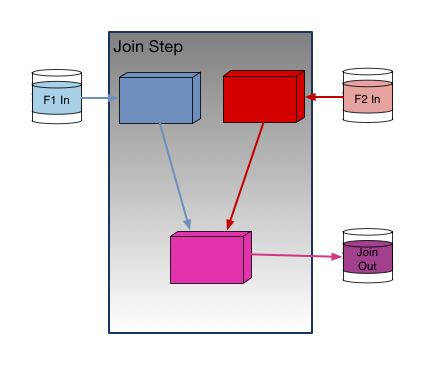
Here is what “Single Step” looks like:

And this is what “Multiple Step” looks like:

The clear advantages of “Single Step” are:

  • There is no need for intermediate disk storage (and I/O).
  • It is simpler.

But sometimes you really want to know what the intermediate records look like. In particular what positions fields end up in, what lengths they have, and what formats they appear in.

And you can always move the logic to the JOIN step as you approach Production; In fact you should. SYSIN becomes JNF1CNTL for file F1 and JNF2CNTL for file F2.

Viewing Intermediate Files While Running JOIN

While you could run these pre-processing steps and stop before the JOIN step that isn’t actually necessary. You can still see the intermediate files if you could something like

OUTFIL FNAMES=(SORTOUT,TESTOUT)

and route TESTOUT DD to SYSOUT (or wherever). The SORTOUT data set can then be fed – as you originally intended – into the JOIN step.

In my case the two data sets fed into the JOIN are temporary; When the job completes they’re gone.

Lesson Two: Debug Failed Joins One Field At A Time

When I was developing my JOIN I had two unexpected (and wrong) things happening:

  1. I got zero records out.
  2. I got far more records than expected out.

Zero Records Out

This is the case where there were no matching records, or so it seemed.

In my application I’m joining on multiple key fields – 8 in my case.

Having got very confused for a while[1], I took the following approach:[2]

  1. Try matching on one field.
  2. If that doesn’t work, p out why. And fix.
  3. Repeat with that field and another.
  4. And so on.

By the way it’s probably best not to direct the output to the SPOOL; While I was debugging this way I was sending several million lines there before I caught and purged the job.

Far More Records Than Expected Out

This one was a little more difficult to debug. The net of it is the JOIN key – all umpteen fields of it – isn’t long enough (specific enough).

In my case I was using the first 22 bytes of the 24-byte Logical Unit Of Work ID (LUWID). And I was getting orders of magnitude more records out than I expected.

The final two bytes are a commit number. For some reason I thought it shouldn’t be part of the join key. I was wrong.

Extending the key to 24 bytes made the JOIN (demonstrably) behave.

Lesson Three: Careful With The Name Spaces

DFSORT doesn’t really afford multiple name spaces, so you have to fake them.

So for the F1 file you might prefix the symbols with “F1_” and, similarly, the symbols for the F2 file might begin with “F2_”.

Conventionally, I use “_” before the symbols that map a record after INREC. You could adapt that so the results of REFORMAT could be mapped using symbols prefixed with “_”.

In any case some sort of symbol scheme is needed.

While we’re talking about symbols, I wouldn’t attempt JOIN without them.

If you’re developing with the “Multiple Step” approach you can reuse the symbols between the reformatting and JOIN steps – because you can concatenate SYMNAMES data sets. But note this reusing the output symbols from the reformatting steps for the input to the join.

One thing you can’t do is specify different SYMNAMES DDs for the pre-processing stages in the “Single Step” case. So you have to be careful with names.

In case the above is clear as mud let me try a little example.

In F1 Step you might code:

//SYMNAMES DD DISPLAY=SHR,DSN=HLQ.F1.INPUT.MAPPING
//         DD *
POSITION,1
F1_A,*,16,CH
F1_B,*,8,BI
/*

And for the F2 Step you might code:

//SYMNAMES DD DISPLAY=SHR,DSN=HLQ.F1.INPUT.MAPPING
//         DD *
POSITION,1
F2_A,*,16,CH
F2_C,*,4,BI
/*

In the JOIN Step you might code:

//SYMNAMES DD DISPLAY=SHR,DSN=HLQ.F1.INPUT.MAPPING
//SYMNAMES DD *
* FROM F1
POSITION,1
F1_A,*,16,CH
F1_B,*,8,BI
*
* FROM F2
POSITION,1
F2_A,*,16,CH
F2_C,*,4,BI
*
* REFORMAT OUTPUT
POSITION,1
FLAG,*,1,CH
_A,*,16,CH
_B,*,8,CH
_C,*,4,BI
* OUTREC OUTPUT
__A,*,16,CH
... 
/*

Of course, in the above you’d probably put the F1_ and F2_ fields in their own symbols files – to enable reuse.

One minor annoyance with symbols files is they push you towards another ISPF session, which you could probably do without. But it is only a minor annoyance.

Lesson Four: REFORMAT Isn’t The Final Reformatting

I expected REFORMAT – which pulls the fields together from the two input streams – to allow formatting such as character strings.

It doesn’t. So you have to add them in an OUTREC or OUTFIL statement. A cumbersome alternative is to pass the fixed strings in as fields from the F1 or F2 streams.

One thing that is available in REFORMAT (and only from REFORMAT) Is a single-character indicator of how the record was matched. It has three potential values:

  • 1 – only from F1.
  • 2 – only from F2.
  • B – from both F1 and F2.

This might prove useful In debugging. You indicate you want this flag using the “?” character.

Conclusion

So, these are the learning points from my second DFSORT JOIN application. If this looks complex I think it reflects some of the powerful complexity of DFSORT JOIN. I also think it’s fair to say complex DFSORT applications can be fiddly.

The one overarching thing in my mind is to build any DFSORT application up in simple stages, and perform optimisations later. A good example, which I’ve already shown you, is the “Multi Step” approach to building up JOIN.


  1. It happens to us all; If it hasn’t happened to you then you haven’t done nearly enough programming. πŸ™‚  ↩

  2. That has got to be the rubbishest flow diagram you ever did see. πŸ™‚  ↩

Happy Days Are Here Again?

(Originally posted 2017-06-20.)

I’ve written a lot about DDF and SMF 101 (Accounting Trace) over the years. It turns out my code went backwards a few years ago, and with good reason.

Let me explain.

But before I do, recall “my code” refers to a DFSORT E15 exit that “flattens” SMF 101 records, extracting the DDF-related fields into fixed positions. Each input record leads to an output record (if it qualifies). Downstream code does summarization but, crucially, records aren’t joined together.[1]

Happy Days

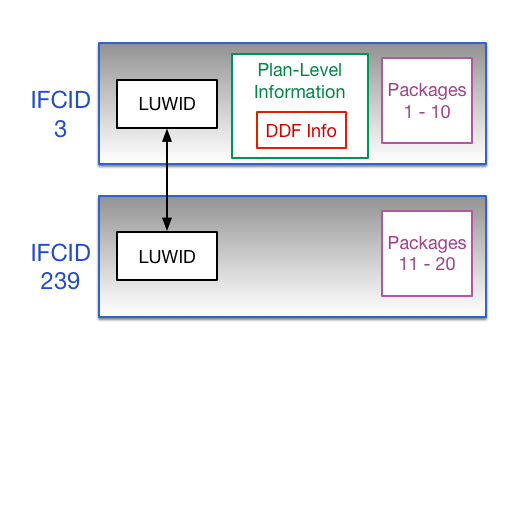
Prior to DB2 Version 8 package-level information was recorded in the main (IFCID 3) 101 record. IFCID 239 (also 101) records contained overflow package sections only, as shown in the following diagram. My code picked up the first few packages in the IFCID 3 record.

Notice the first 10 packages were in the IFCID 3 record, with the first IFCID 239 record containing up to 10 more, and so on.

The importance of package-level information for DDF is threefold:

  • The initial package says a lot about the calling (usually distributed) application.
  • Quite a lot of DDF applications work by calling Stored Procedures and User-Defined Functions (UDFs). We see that fine structure in the package-level information.
  • You can, as usual, see where the time and CPU is being spent – to the package level.

Generally I could do my work without needing IFCID 239 records as the first 10 packages were described in the IFCID 3 record.

Life was goodish. [2]

Not So Happy Days

But then Version 8 came along and the structure of SMF 101 changed.

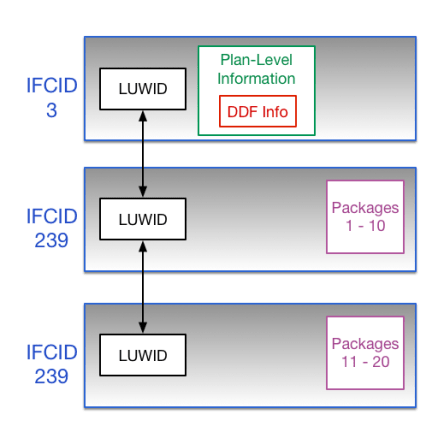
Now the IFCID 3 records don’t contain package information. All this is in IFCID 239 records now. So I couldn’t get information about the first two, say, packages for a DDF invocation. The colour drained out of this. 😦

I wanted, for example, to know which machines access IBM Content Manager and which functions they used. I probably see something mnemonic at the plan level in the IFCID 3 record. I definitely see something mnemonic in the IFCID 3 record but now they’re separate records. Never the twain shall meet.

So, reluctantly, I ripped the package analysis stuff out of my code. A good few years ago. And I was miserable. πŸ™‚

And you’ve seen all the things I’ve been able to do with DDF with SMF 101s – in previous blog posts.

Happy Days Are Here Again

But then along came DFSORT JOIN which allows pairs of records to be efficiently joined together.

This is great but what would the key to join on be? It couldn’t be the time stamp – as the IFCID 3 and IFCID 239 records’ timestamps would usually be slightly different – and probably no combination of other SMF 101 record fields either. Well, some bits for the IFCID 3 and 239 records are common. In particular the Standard Header (mapped by DSNDQWHS). One field in particular stands out: The Logical Unit Of Work ID (LUWID).

As you can see in each of the diagrams the LUWID[3] ties the related records together.

So then there was hope.

So I extended my DFSORT E15 exit to emit two types of flattened record and the DFSORT invocation itself to write to an additional destination: DD IFCID239. So IFCID–3-originated records are formatted differently and go to different data sets than IFCID–239-originated records.

Now I can use join – very much in the style of Lost For Words With DDF. In that post I talked about joining Client and Server 101 (IFCID 3) records based on most of the LUWID. In this new case I can do something pretty similar.

At this stage I have thrown into production this code to write the flat files, having run some test reporting to verify my code works.

In my first set of data I see (as I mentioned above) IBM Content Manager callers, complete with nested stored procedures. I can tell they’re stored procedures because they have the appropriate flag set in the right sections.

Now to build some reporting based on these files and JOIN. Actually I can see some value in reporting on the IFCID 239 data alone.

Stay tuned for another thrilling installment. πŸ™‚ Seriously, I fully expect to learn stuff, including some new tricks, as build on this foundation.

And as I finish this post off, sitting in my back garden πŸ™‚ , I’ve jotted down a few notes on using DFSORT JOIN. So expect to hear more about that soon.


  1. Except as detailed in Lost For Words With DDF.  ↩

  2. Reference Dave Gorman  ↩

  3. Plus, I suppose the SMFID and SSID – just to be sure.  ↩

Some Parallel Sysplex Questions, Part 2 – XCF

(Originally posted 2017-06-17.)

This post follows on from Some Parallel Sysplex Questions, Part 1 – Coupling Facility. Again it’s a high level treatment.

In contrast to Coupling Facility (CF), there is really only one type of resource: Signaling paths. But again application componentry is what brings it all to life. In this case it’s XCF groups and members.

And the motivation for all this? Responsiveness and (CPU) efficiency.

Most of what I do with XCF relies on the SMF Type 74 Subtype 2 record – which is dedicated to XCF.[1]

Signaling Paths

There are two kinds of signaling path:

  • Channel To Channel (CTCs), using dedicated channels and cabling
  • Coupling Facility (CF) structures, using the whole CF infrastructure

Signaling paths are owned by Transport Classes (TCs). In my experience most customers rely on transport classes shared between all XCF groups. Just occasionally I see TCs dedicated to specific groups. I’ve not seen a real case for this and would observe that a TC owns its own links so that might be the motivation. Fairly obviously that constrains XCF’s choices in which paths to send a particular set of messages.

Paths, of course, are between pairs of systems. Even if we’re talking about CF structure paths.

TC’s have their own set of output buffers in each system. These buffers have a specific size – controlled by CLASSLEN. You also define how many there are. Statistics in SMF 74–2 speak of Small Messages, Fit Messages, Large Messages (some With Overhead). There will be times when these statistics really matter, but these are few and far between.

“Small”, “Fit” and “Large” are relative to CLASSLEN – for the TC. Messages that are “Small” could’ve used a smaller CLASSLEN. This implies a (small) waste of memory. “Large” means a larger buffer had to be used. “With Overhead” is where this could really matter.

If you get the impression I don’t think Transport Class (TC) tuning is a major event you’d be right. It would be nice to have better message size statistics – such as distributions to enable a more scientific TC design, particularly of CLASSLEN.

One thing well worth doing is understanding which signaling paths are predominantly being used by their owning TC. In particular whether the traffic is refusing to use CF structures.[2]. I’ve seen cases – generally where the CF has shared engines – where all the traffic has gone via the CTC’s.

Groups And Members

As I said, groups and members are where the real fun is. Here are some reasons why:

  • Among the heaviest CF structures are the XCF signaling structures
  • Part of DB2 Data Sharing tuning is minimising LOCK1-related XCF traffic
  • It’s interesting to see – at the address space level – who talks to whom. A good example of this is CICS regions talking, using the DFHIR000 XCF group[3].

74–2 reports members and groups, but not which Transport Class each group uses. So there isn’t a direct link between XCF applications and resources.[4]

For each member of a XCF group, you get traffic to each system. You do not get member-to-member traffic. So it isn’t possible to directly see who talks to who. And the “inference game” is somewhat fraught. As was pointed out to me, it’s not feasible to document a 2048 x 2048 sparse matrix in SMF 74–2.

Conclusion

Some of my comments above might lead you to believe all is not well with XCF instrumentation. I have to say the gaps are very minor, and more to do with nosiness than real performance work.

In terms of priorities for tuning Parallel Sysplex, XCF is the junior partner. But it is well worth examining, alongside Coupling Facility.

By the way, one of the things causing me to write these two posts was fixing a number of bugs[5] in my code which made me examine how we do Parallel Sysplex tuning. One in particular was that some of my code doesn’t translate from System Name to SMFID. My latest client has completely different System Names and SMFIDs.


  1. As I’ve previously written, field R742MJOB is the job (address space name), in contrast to the member name. This can be used to tie an XCF member to SMF 30 records. Very handy!  ↩

  2. And also the CF structure statistics in 74–4.  ↩

  3. In conversation with a customer the other day we talked about their need to have more than one CICS XCF group, because they needed more than 2048 members. The interesting question is where to split the group, without compromising operability.  ↩

  4. But a lot of the time you can infer it, from the message rates.  ↩

  5. And while the code was open doing some enhancing that helps us tell the story better. Such is life. πŸ™‚  ↩

Some Parallel Sysplex Questions, Part 1 – Coupling Facility

(Originally posted 2017-06-15.)

In Some WLM Questions I outlined my approach to looking at WLM implementations. It was necessarily very high level, but the intention was twofold:

  • To prime customers about the kinds of questions I might be discussing with them – if I ever saw their data.[1]
  • To give anyone maintaining a WLM policy some structure. It remains my view that WLM needs care and feeding, on a not-infrequent basis.

You could argue these two purposes are essentially what this blog is all about.

So, this post does the same thing but for Parallel Sysplex. Actually it’s Part 1 of 2, dealing with Coupling Facility (CF) questions. The other part (covering XCF) will be along presently.

Again, expect a high level treatment. There are plenty of posts in this blog that talk at a more detailed level.

(Perhaps Superfluous) Disclaimer: This isn’t all about performance and capacity, because I’m not either.

I’ll structure this post in two pieces:

  • Resources
  • Structures

That’s how I look at Coupling Facility, so it seems as good a structure for this post as any.[2]

Note: Everything I’m talking about is instrumented with SMF Type 74 Subtype 4.[3]

Resources

If we were examining z/OS systems we’d start by looking at resources, so it’s natural to look at coupling facilities the same way.

The difference, though, is in what those resources are and how they behave. For example:

  • Coupling facilities don’t do I/O in the conventional sense.
  • Coupling facilities don’t page.
  • Memory management is more or less static.
  • Access to resources is not policy-driven; There is no WLM or SRM for coupling facilities.

So let’s examine the different types of resources.

CPU

In this piece I assume the coupling facility has dedicated processors.[4]

A basic metric is CPU utilisation. We talk a lot about how busy a coupling facility should be, both for steady state and for recovery situations. As a rough guideline, a CF that tops 40% is one where I would be concerned about the effects of growth. One above 50% I’d be more immediately concerned about. Here I’m touching on the topic of β€œwhite space”.[5]

Usually a sysplex has more than one coupling facility. While I wouldn’t be fetishistic about it, I would investigate the reasons for any significant imbalance.

Which brings us onto a point that strays into the second part of this post: We can readily see which CF structures drive CPU utilisation. So we know which structures might contribute to imbalance. We’ll come back to CF structure-level CPU in a bit.

Memory

Memory usage is much more static than with z/OS; You allocate structures and rarely change their size. But this doesn’t make CF memory a boring topic.

As with CPU, the memory instrumentation is good; You can, for instance, readily see how much is installed and how much is free. Again, the concept of β€œwhite space” exists for memory. Here, we’re more interested in recovering structures from a failing CF into a surviving one.[5]

But most of my discussions with customers about CF memory haven’t been about leaving space. I’m finding quite a few who have tons of free memory; The point has been to encourage them to exploit the memory. The structures discussion below touches on this also.

Talking of structures, my code calculates how much extra memory would be taken (and how much less would be free) if all structures went to their maximum size. Usually there’s plenty free, even if they did.

Links And Paths

In my experience link and path utilisation are rarely a problem, but there’s plenty of CF-level instrumentation for the cases where this is a problem. My guess is customers generally get this right. In any case the remedies would usually be simple.

I’ve written extensively about CF path statistics. These are now excellent to the point where there’s only one more thing I’d like to see: The number of times a path is chosen.

In the category of β€œinfrastructural understanding” would, of course, be the path latency – a proxy for distance.

Structures

Structures are where it gets really interesting, because this is where the applications and middleware come to life. Generally it’s very easy to discern what a structure is for. Indeed my code discerns things like DB2 Data Sharing groups and CICS structures.

Here is an example of a DB2 Data Sharing group, using two CFs. The numbers are the request rates. The obfuscated text is the two CFs’ machine names.

You can, for example, see Group Buffer Pool (GBP) Duplexing but the LOCK1 structure not being duplexed.[6]

There are a number of themes I like to explore:

  • Structure performance with increasing request rate

    A structure whose response time stays stable with increasing traffic is a good thing; One that deteriorates needs investigating.

  • CPU usage by structure

    This is useful for both capacity planning and understanding the structure’s performance. As an example of the latter, it’s not uncommon for a lock structure on a β€œlocal” (IC link connected) CF to have almost all of its response time accounted for by CF CPU – especially at higher request rates.

  • Memory exploitation and structure sizing

    As I said just now, structure exploitation of memory is a key theme. The two main examples are:

    • Increasing lock structure sizes, to avoid false contentions
    • Increasing directory entry or data element sizes for cache structures to reduce reclaims

There is no information on CF links at the structure level, nor do I think there needs to be.

Conclusion

This has been, necessarily, a high-level view. I wanted to give you an overall structure to work from. There are plenty of other blog posts that go rather deeper.

My interest in in coupling facilities is not just performance and capacity; The setup aspects help me get closer to how it is to be a customer with a parallel sysplex (or several).

In the next post I’ll talk about XCF, the other (and original) sysplex component.


  1. Oh, you like surprises, do you? πŸ™‚  β†©

  2. If we were talking about z/OS I’d be talking about resources and applications; This is broadly analogous.  β†©

  3. My code to process this data continues to evolve, covering more themes and doing it more succinctly.  β†©

  4. Though the method extends reasonably well to, unusual in Production, shared engines. The data is there.  β†©

  5. Duplexing, of course, alters this picture.  β†©

  6. But LOCK1 not being duplexed is OK as CFPRODA is an external CF.  β†©

Give Me All Your Logging

(Originally posted 2017-06-13.)

Long ago I added reporting on DB2 log writing to our code. At the time it was just to understand if a particular job or transaction was “log heavy”. That is, I was interested in the job’s perspective, and whether it was dependent on a high-bandwidth DB2 logging subsystem.

A recent incident, however, gave me a different reason to look at this data: We were concerned with what was driving the logging subsystem so heavily in a given timeframe.[1] This is because there were knock-on effects on other jobs.

It’s as good an opportunity as any to alert you to two useful fields in DB2 Accounting Trace:

  • QWACLRN – the number of records written to the log (4-byte integer)
  • QWACLRAB – the number of bytes logged. (8-byte integer)

In this case I wasn’t really interested in the number of records. In other contexts I might well calculate the average number of bytes per record – because that can be tunable.

I was interested in logging volumes – in gigabytes.

Each 101 (IFCID 3) record has these fields so it’s quite easy to determine who is doing the logging. What is more difficult is establishing when the logging happened:

  • Yes, the SMF record has a time stamp, marking the end of the “transaction”.
  • No, the records aren’t interval records.

For short-running work this is fine. For long-running work units, such as batch job steps this can be a problem. To mitigate this I did two things:

  • Asked the customer to send data from the beginning of the incident to at least an hour after the incident ended.
  • Rather than reporting at the minute level, I summarized at the hour level.

The latter took away the “lumpiness” of long-running batch jobs. The former was enough to ensure all the relevant batch jobs were captured.[2]

What we found was that a small number of “mass delete” jobs indeed did well over 90% of the logging (by bytes logged) – and they started and stopped “right on cue” in the incident timeframe.

In this case I modified a DFSORT E15 exit of mine to process the 101s, adding these two fields. I then ran queries at various levels of time stamp granularity.

These two fields might “save your life” one day. So now you know. And it’s another vindication of my approach of getting to know the data really well, rather than having it hidden behind some tool I didn’t write. And I hope this post helps you in some small way, if you agree with that proposition.


  1. This is from an actual customer incident, which I’m not going to describe.  ↩

  2. Fairly obviously even an hour might not have been enough. So you might argue I got slightly lucky this time. I’d’ve asked for another hour’s data if I hadn’t, so no real risk.  ↩

A Tale Of Two Batteries

(Originally posted 2017-05-19.)

I’m starting to write this on a train to London. (Not Paris.)[1] When I get there I’m going to present the “New Improved” “Even More Fun With DDF” pitch to the UK GSE zCMPA user group.

I was done with the slides a few days ago – or so I thought.[2]

Well, I got some “down time” earlier this week to work on my DDF code some more – which resulted in another slide in the deck, and now this blog post.[3]

You might recall that I can – from SMF 101 (DB2 Accounting Trace) – discern the topology of machines connecting to DB2 via DDF. I wrote about it extensively in DDF Networking. One of the examples was a pair of groups of 32 contiguous IP addresses.

Each of the groups of 32 machines – as that is what they are – comprises machines connecting to a single application. The Platform Name is filled in – via the JDBC driver in this case – so I know the application name. Actually the Platform Name is not constant in this set of data but follows a clear naming convention.

Before I go on, I should say contiguous IP addresses aren’t necessary for this method; Just the naming convention. But contiguous IP addresses suggests a battery of machines deployed at the same time.

The Thought, Such As It Is

So, I got to thinking: If these really are batteries of middle-tier machines we can perform statistical analysis on them.[4]

Some people might be confused by the term “battery”; I’m appealing to the original meaning – as in “gun battery” rather than the thing you lick to get a tingle on your tongue. πŸ™‚

<<Serious Face Back On>>

Pro Tip

I modified my code in the following way:

  1. I changed the DFSORT step that produces the raw file the REXX formatting step reads to a CSV file. This is very easily accomplished.
  2. I modified the REXX step to expect CSV, not just fixed-position fields. Again, easy to do.

The “pro tip” is this: When passing a transient file consider if it wouldn’t be more useful to pass a CSV file. There is no need to squeeze any of the fields to get rid of blanks. Not squeezing is handy for any downstream DFSORT or ICETOOL processing.

I loaded the CSV file into Excel (which I actually find frustrating to use).

I then created graphs to show the CPU seconds of Class 1 time occasioned by each machine in the battery.

A Nice Test Case

So I took 3 hours of a customer’s data for a 4-way DB2 Data Sharing Group. For simplicity in what follows I’m only showing a single DB2 subsystem’s view.

In this example there were two batteries of 16 machines each. These are Websphere Application Server (WAS) machines, handling part of the customer’s Mobile[5] workload.

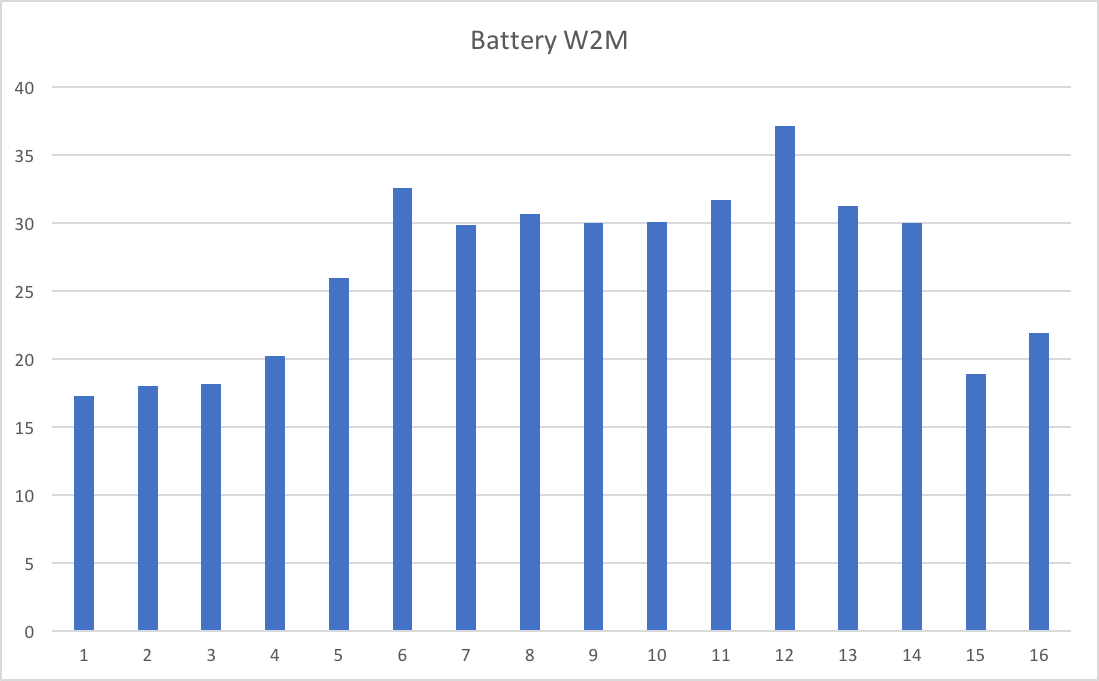
I’m led to believe these two batteries of servers are meant to be balanced. So I would expect – certainly over the 3-hour interval – the Class 1 CPU in DB2 to be balanced. So look at the following two graphs:

This is Battery W2M.

And the following is Battery W3M.

src=”https://mainframeperformancetopics.com/wp-content/uploads/2020/01/battery-w3m.png”&gt;

Each graph has 16 bars. Each bar is DB2 Class 1 CPU seconds in the 3-hour data swag for a single WAS server.

So, there are a number of things to observe:

  • None of these numbers is particularly large.
  • The servers in a battery are not balanced. I think I observe the middle servers are busier than the ones at the edges – but I can’t explain that.
  • The two batteries aren’t balanced. (I’ve ensured the scales on the two graphs are the same, before you check.)

Conclusion

I think we can do useful work this way:

  • We can ask why the imbalance between and within batteries.
  • We can – with a third dimension – see the behaviour of the battery with time.
  • We can monitor at the machine and battery level – to understand when the workload is building up. Or – not the case in this example – if a machine is “beaconing”.
  • We could – with adequate statistics from these machines [6] – correlate DB2 Class 1 CPU with middle-tier machine CPU.

So, the “rich vein” of DDF so-called insights continues. And this post is yet another example of stuff you can do with SMF to bring conversations with architects and others to life.

So now you know – if you send me 101s – another rabbit hole I’m likely to go down. πŸ™‚

I’m finishing writing this on the train home from London; We had a very lively discussion on DDF (and a great meeting overall). Of course the two graphs in this post featured – and played as I thought they would.

One particular aspect seemed to gain traction: In DB2 DDF Transaction Rates Without Tears I wrote about SMF30ETC – Enclave Transaction Count in SMF 30.

The context was trying to work out which DB2 subsystems and which time frame to analyze SMF 101 from. While it might only be possible to get and process 15 minutes to 1 hour of data (particularly if you’re a consultant as I am) you want to time it right. SMF30ETC might very well tell you where to dig. Of course, without complete coverage you never know if some other piece of DDF work from some other timeframe was important. Oh well, you can’t have everything.


  1. Get the literary reference in the title? πŸ™‚  β†©

  2. Old presentations never die’ They just get leggy and unprunable. πŸ™‚  β†©

  3. Does it make me a dinosaur to hate it when people say “blog” when they mean “blog post”? πŸ™‚  β†©

  4. Who knows what might be useful? “Suck it and see” is a good approach. πŸ™‚  β†©

  5. This seems to me quite a natural configuration – dedicated Mobile middle-tier machines. It also, using WLM DDF classification rules, fits into a Service Definition that helps with Mobile Workload Pricing. (I’m not, however, a Software Pricing expert.)  β†©

  6. Pardon my bias πŸ™‚ but I think it’s tough getting decent middle-tier machine statistics.  β†©

Mainframe Performance Topics Podcast Episode 13 “We’ll Always Have Paris”

(Originally posted 2017-05-06.)

It’s been a few weeks since we last recorded and it was good to get back in “the studio” again.

As usual it’s quite a wide range of topics. We hope you enjoy them.

Two technical notes:

  • I have new headphones which reduced the amount of bleed through from my ears to the microphone. Not entirely perfect but better. I still have to go through a fair amount of clean up, which I’m getting quicker at.
  • I found the “Reverse” filter for Audacity. It features in this episode, though you might not spot it. πŸ™‚

The comment about my DDF code being something I’d like to share is not an idle one, by the way. It is early days, though, for a number of reasons. But, if you see me present or download the presentation and like what you see in the customer cases you might want to drop me a line about it. Some level of interest makes it easier for me to pursue sharing.

Episode 13 “We’ll Always Have Paris” Show Notes

Here are the show notes for Episode 13 “We’ll Always Have Paris”. The show is called this because both Marna and Martin reminisce about lovely times in the City of Light.

Where we’ve been

Martin has been to Chicagoland to visit a customer, and partake in the local victuals.

Marna has just returned from vacation (hence, the title and Topics topic on Paris).

Mainframe

Our “Mainframe” topic discusses what has been a popular item since more people have finished migrating to z/OS V2.2: GDGEs.

Generation Data Group Extended (GDGEs) were introduced in z/OS V2.2, and should only be used after fully migrated to that release everywhere. “Old” GDGs allow >255 generations. GDGEs allow up to 999, but with a very different internal structure. GDGEs are externally usable transparently.

There is no straightforward conversion way in DFSMS. Steve Branch (alias name of “Mr. Catalog”) and Marna had a six step JCL job to convert (which used IDCAMS ALTERs), and would work if the generations were SMS-managed, which was the initial use case.

A nice customer used our original six-step JCL, but didn’t work for him. His use case was non-SMS GDGs on tape. Back to the drawing board, and with more test cases.

  • Problem was IDCAMS ALTERs, as didn’t handle non-SMS managed GDG (with IDC3009I). Steve thought that replacing them with TSO/E RENAMEs might be better. But tape would still be a problem.

Steve’s thoughts on why a DFSMS utility to convert is difficult: GDGE internal record design does two things: makes the Generation Aging Table limit field 2 bytes (instead of 1) and removes the concept of GDG sub-records which were present in GDG.

  • For Steve to handle the conversion in DFSMS, there are important worries about backout and failures if the conversion didn’t complete successfully. And these worries happen at three different points a when it comes to the steps in the necessary conversion. He mentioned that a recovery might look something like a full volume dump and restore if there were problems, which is not palatable in many cases.

  • And because so many ask: the limit is 999 because it was the largest number that JCL could handle without making changes which might have been incompatible. (Incompatibility brings Marna to your office for a personal deskside chat about z/OS migration.)

Tests ran for three cases with the new TSO/E RENAME flavor: combos of NON-SMS/SMS, and DASD/Tape:

  • NON-SMS/DASD was a success, and SMS/DASD (but migrated data sets were recalled!) was a success.

  • NON-SMS/TAPE: failure because it is not on DASD. However, a solution could be constructed whereby:

    • write some REXX to produce JCL that would individually: uncatalog the tape GDG generations,

    • delete the GDG base, define it as a GDGE, recatalog all the tape generations as GDGE.

    • Doable, but with work…but might be worth it for 999 generations!

This nice customer, however, has followed up with me and has offered the share the REXX to do just that. All JCL and REXX discussed can be found here: Marna’s Blog.

Mainframe Summary

  • You can do the conversions for your GDGs to GDGEs, but you need to decide if it’s worth it.

  • The TSO/e RENAME will work in all the cases that IDCAMS ALTER would, plus more.

  • The shared REXX exec can be used if you want to convert NON_SMS/TAPE GDGs to GDGEs.

  • Still, if you have a gazillion references in places like JCL, it is a compelling case to take some extra one-time work and do the conversion.

  • Mind the recalls! You’ll need a lot of recall space on DASD, if you are recalling lots of data sets and they are large.

Performance

Martin talked about a presentation he’s been keeping updated, Even More Fun With DDF. The original presentation covered:

  • why you should care about DDF,
  • LPAR to Service Class Level views,
  • side themes of zIIP and DB2 address spaces, and a discussion of SMF 101 and DDF.
  • Contains three different customer cases: some basic statistics, a CPU Spike case, and “sloshing”.

The updated presentation has:

  • SMF 30 Enclave Statistics graphing

  • Thoughts on handling clients with huge numbers of short commits

  • Matching client and server DB2 101s where DB2 to DB2 DDF

  • Production vs Feral DDF

  • Diagrams of machines connecting to DB2 via DDF

An analysis is done using RMF and SMF 30, and SMF 101 DB2 Accounting Trace, using special code written by Martin:

  • DFSORT WITH E15 To select and “flatten” DDF 101s

  • DFSORT and a small amount of REXX to run queries

    • From hours to seconds level granularity

    • From subsystem to client software / hardware / userid granularity

  • Might generally be useful, contact Martin if you want to chat about it.

Performance summary

  • Last year’s presentation significantly extended, with experience and better tooling.
  • Most likely more will be coming.
  • Look at DDF: remarkably interesting topic and an important one

Topics

Our podcast “Topics” topic was Paris and visiting it. Marna just got back from Paris with her son (the one that built his own gaming computer). They discuss what they like to do there.

  • Sites:

    1. Martin loves to go to the museums. Especially the Louvre and Beaubourg. He could spend all day in the Louvre.
    2. Marna’s son doesn’t like museums, so they visit other spots like the Catacombs (with a four hour wait!) and the gargoyles at Notre Dame (only a two hour wait).
  • Food: Marna and her son focus on cheese, and have become quite adept at all three raclette contraptions available: pans, “two winged panels”, and “up/down lever”. Of course, these are not the official names, but they are the best describers of the method to scrap all the cheese you can onto your plate.

  • Getting around: Martin loves the metro, which is so easy and convenient. He loves the part on the metro when you come out from underground to the raised tracks in some places. Marna did a lot of walking. (Fitbit while at Versailles registered 31k steps = 13. miles = 22 km.)

  • At Versailles: lots of walking, especially if you go all the way out to Marie Antoinette’s “farm” with goldfish…or is that carp ? You can decide.

  • Pro Tips: Use the “skip the line” and make reservations very early. Buy tickets early online too. Use the available apps too (like for Versailles ). Check the schedule for when the Versailles fountains are on.

Where We’ll Be

Marna will be at IBM Systems Technical University in Orlando, 22–26 May 2017.

Martin will be at GSE UK zCMPA 18 May, 2017

On The Blog

Martin has published two blog posts recently:

Marna had this prior blog from 28 March 2017, which this Mainframe Topic was based on:

Contacting Us

You can reach Marna on Twitter as mwalle and by email.

You can reach Martin on Twitter as martinpacker and by email.

Or you can leave a comment below.

Automatic For The Person

(Originally posted 2017-04-24.)

Many people know I’m a bit of an Automation “nut” but like most such people I feel a smidgeon of guilt that I might:

  1. Be spending more time setting up automation than I save.
  2. Having too much fun with it.

But let’s dismiss Item 2 straight away; Fun is an enabler and motivator in the best possible way.

There’s little more satisfying than seeing well-targeted automation doing its thing.

Doing it well, consistently, quickly, in a tailored fashion, and with only the minimum amount of human interaction.

By the way this post follows on from Automatic For The Peep-Hole.

Easy Cases

Some automation is easy to justify: Our Production code, for instance, is irreplaceable. Without over-egging the justification it, in its many iterations, has been used worldwide in dozens (if not hundreds) of engagements.

Where It All Gets A Little More Difficult

In “Easy Cases” I alluded to usage metrics: User population and use counts.

But what if the number of users is frustratingly small? I could, for instance, develop a piece of automation and find no other takers, despite offering it as a “token of love / esteem / whatever “. I’ll come back to trying to answer that in a moment.

Let’s consider why you might end up with “an audience of zero”:

  1. Nobody has the same environment (software and hardware stack, plus the services and systems they connect to) as me.
  2. Nobody recognizes the same problems as I do.
  3. What I’ll call “ownership”. Sometimes a gift is an imposition in that it’s an “expression of taste”.

All these factors can lead to a “dinner for one” situation.

Environment

My colleagues, family and friends have myriad different kit. For example, some are on Windows. Further, people connect to different z/OS systems or web services.

Still further, I’ve bought a lot of software on iOS and Mac OS; Most people around me – immediate family excepted – won’t have access to this software. The same is true of hardware.

Problems

My fairy king can see things … that are not there for you and me” applies, I’d say. πŸ™‚

So I stumble across irritations that others don’t, and vice versa. More positively, and more relevantly, people see opportunities for automation in a somewhat haphazard way.  

Ownership

Suppose I build something for you; Do you want it as much as you would if you built it for yourself? “In your own image” one might say. I would guess not.  

An Example Of A Hyperspecific Piece Of Automation

I was listening to an episode of Nerds On Draft podcast where they were talking about note taking and also Taskpaper format. Taskpaper format is a plain text way of describing tasks.

One of the reasons it interests me is you can import Taskpaper text into Omnifocus and have it parse it into new tasks.

Here is an example:

- Finagle The Wotsit @due(+2d)

where the dash at the start of the line says “this is a task”, “Finagle The Wotsit” is the task name, and “@due(+2d)” says “the task is due in 3 days”. Simple!

This is an incredibly simple example of a Taskpaper format task. But note even this contains some nice date maths.

The scenario I thought up has two components:

  1. When in a meeting take notes in Sublime Text in Markdown format, with tasks in Taskpaper format. Here selecting the text of the task and typing Ctrl+t1 pops up a dialog that lets me type in a due date. The selected text is replaced by the Taskpaper text.
  2. Typing ctrl+o gathers all the Taskpaper tasks in the file and injects them into Omnifocus.

I got this working with a pair of very simple Keyboard Maestro scripts.

So here it all is in action 2 :

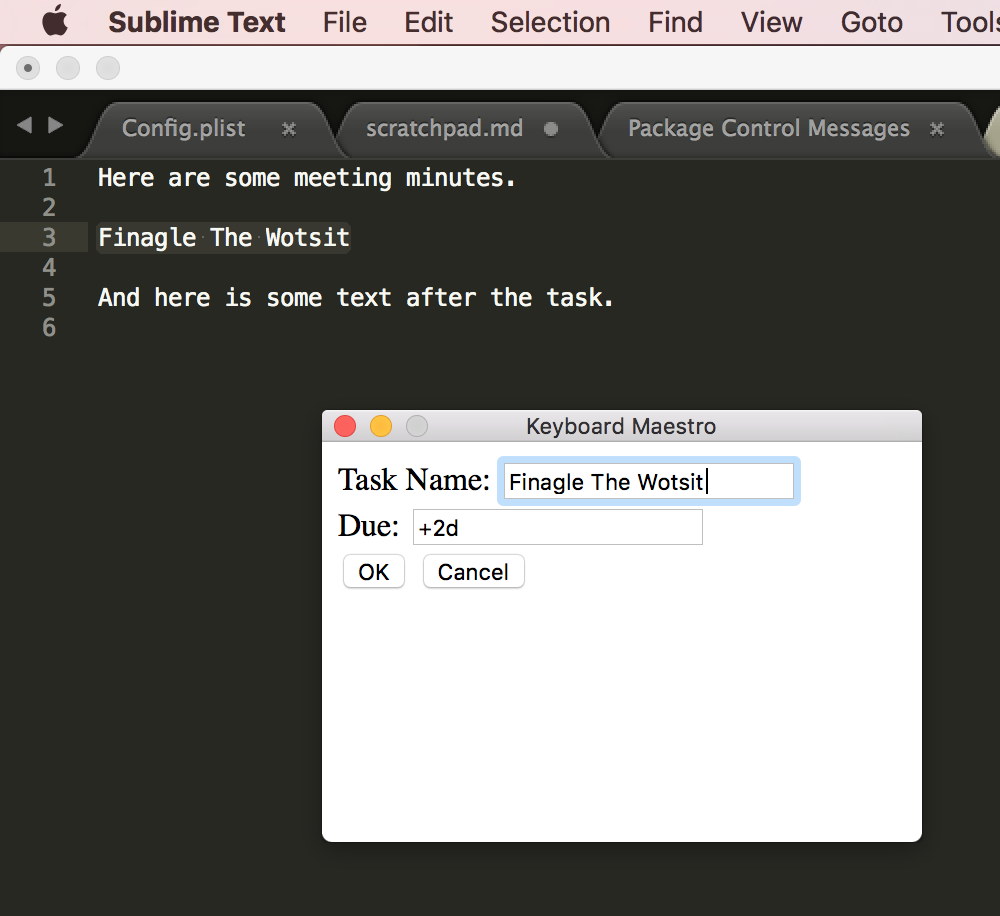
Here the text to be turned into a task is highlighted.

Here the Keyboard Maestro dialog is displayed. (It is very basic HTML but could be fancier.)

Here the highlighted text has been replaced by a Taskpaper task – as a result of selecting “OK”.

And here’s a screenshot of the task added to Omnifocus.

Note: There could be several tasks in a set of meeting notes processed this way, so it is faster and better than doing it by hand.

While I can believe other people might benefit from this automation, I’d think them thinly spread around the globe.

By the way, I got really frustrated just now with all those links: I’ve decided any URL I use should be in a file in Markdown format – ready for pasting into anywhere. The process of acquiring those links and massaging them is tedious, fiddly and error-prone; I could build lots of automation around that . πŸ™‚

Obscure automation opportunities like these abound in my life.

What Is To Be Done?

I wonder how many of you will recognise the cultural reference in the title of this section. No matter. πŸ™‚

It seems to me people could get a lot out of automation. The key point of this post is that often you have to build it yourself, for yourself.

So, what can self-confessed automation freaks like me usefully do for others? I can think of two things:

  • Provide automation samples. “Samples” because it’s reasonable to think people will “adapt and adopt”, rather than just “adopt”.

  • Encourage people to look for opportunities to automate, and to explore tools that can help them.

In this post I think I’m doing the latter. I hope you feel encouraged.

And a parting thought: Some of you might think “why spend your own money and time on automation that only benefits your employer?” My, admittedly fiscally unoptimised, point of view is the removal of frustration is well worth the cost. Besides, as I said, it’s good clean fun. πŸ™‚


  1. Yes, Mac people, I did mean “Ctrl” and not “Cmd”. πŸ™‚ Because Mac interactions generally use the Cmd key much of my Keyboard Maestro Mac collection uses Ctrl to minimise clashes. β†©

  2. As a first experiment with screen grabbing on the Mac (which went quite well). β†©

Back To Machines

(Originally posted 2017-04-08.)

This is a follow up to Machines (Back To Humans) and nothing to do with Mac-hinations.

The ‘“Principle” Of Sufficient Disgust’ πŸ™‚ kicked in – as it so often does – about a year ago.

The issues outlined in that original posted revolved around having only one way to identify a machine. My code accepted only one type of specification for a machine:

02-12345=EWELME A

By the way Ewelme is a real place[1] with one of those quintessentially English names few people can pronounce. πŸ™‚

The 02 is the plant number (Poughkeepsie, in this case) and 12345 is the last five digits of the machine’s serial number.

Getting to the hallowed state of being able to construct a string like that was a pain. Hence my frustration. And you could probably tell I was frustrated from the original post.

So today I’ve enhanced the code to accept the following additional forms of syntax:

  1. ?-12345=EWELME A where the plant isn’t known but the 5-digit serial is.
  2. ?-?2345=EWELME A where we only have the 4-digit variant of the serial number.
  3. SYSC=EWELME A where I mean ‘the machine on which SYSC sits is called “Ewelme A”’.

To be fair, Case 1 is a rarity; Most people, if they know the 5-digit serial number, know the plant number.

Case 2 I see quite a bit in customers’ machine diagrams. It, I think, relates to SCRT and there is at least one place in SMF 70 where the 4-digit variant appears. It seems silly to be using it when we have the full plant and serial numbers in SMF 70.

Case 3 is probably the most user-friendly. I see diagrams and descriptions where customers say or depict ‘We call the machine with SYSC on it “Ewelme A”’.

Previously, I would take whichever of the previous 3 description types I got and manually work with the data to figure out the plant and 5-digit serial number (and use that in e.g. VPD[2] look ups, as well as relating it to the machine’s human-friendly name).

I don’t think I ever got it wrong but it sure was tedious.

Now, with the new code you use all those semantics, plus the original one – because I automated it.

Here’s how I did it:

  1. Extract From SMF 70 records the cutter’s SMF ID (SMF70SID) and the plant (SMF70POM) and serial number (SMF70CSC), building a lookup table.
  2. Perform lookups in that table for every utterance in one of the 4 forms above.

Really very simple.

There is one (obscure) catch: If I specify SYSA=MACHINE A and I have two different SYSA z/OS systems I will pick the first match. This won’t be quite right. But this is very rare.

The upshot is I won’t be quite so desperate to get your machine serial numbers, though I’ll happily take them. I don’t know how you refer to your machines but now I have a foolproof[3] way of handling them.

One more thing: I recently had an engagement where a customer moved LPARs from one machine to another. My code doesn’t handle that at all; We just have to be careful.

And if you listen carefully to this you will hear the refrain “Back To Machines”. πŸ™‚


  1. But one most unlikely to ever host a machine room, despite water (for the cooling) flowing through it. πŸ™‚ lt’s one stream over and has watercress beds, if you can picture that.  ↩

  2. Vital Product Data  ↩

  3. Though there is no accounting for the, um, “ingenuity” of customers. πŸ™‚ Sorry, that’s a very old joke. Probably old enough to be retired. πŸ™‚  ↩

Mainframe Performance Topics Podcast Episode 12 “Baker’s Dozen”

(Originally posted 2017-04-01.)

This episode came hot on the heels of Episode 11. The next one will be somewhat further away, unfortunately. As usual it was fun to make, though not without its share of technical difficulties. Which is ironic, considering our “Topics” topic.

We’re still playing with the “Zero Indexing” thing, as all good geeks should. πŸ™‚ Hence the title.

Episode 12 “Baker’s Dozen” Show Notes

Here are the show notes for Episode 12 “Baker’s Dozen”. The show is called “Baker’s Dozen” because it is the thirteenth episode, after starting at Episode #0.

Where we’ve been

Martin has not been anywhere since our last podcast.

Marna has not been anywhere, either.

Mainframe

Our “Mainframe” topic discussed some fun small enhancements Marna has enjoyed from GRS.

  1. With OA42221 back to z/OS R13, GRS has the ability to write SMF records (87 subtype 1) to identify heavy users of global generic queue scans. This is what Marna calls a new “monitoring capability”. These issuers might be the cause of increased CPU and GRS private storage. Turn on with GRSCNFxx MONITOR(YES)

    • Existing monitoring of ENQ/DEQs at this point, are not written into SMF records. And the only filtering capability at this point is the old “ISGAUDIT” method. “ISGAUDIT” is a where you prepare you filter, assemble and link edit it into load module and then manipulate it with many MODIFY commands. Not very simple for everyone to do.
  2. With z/OS V2.2, there are two excellent new functions building on OA42221:

    1. SMF 87 subtype 2 records can be written for ENQ/DEQs, and
    2. a new filtering capability available with parmlib member GRSMONxx. There is no IEASYSxx for GRSMONxx, so you must start it with SETGRS GRSMON=xx. Only one GRSMONxx is allowed per system.

Now, you can get all your “monitoring” into SMF records for both ENQ/DEQs and global generic queue scans. And you don’t need to use the cumbersome ISGAUDIT anymore.

Performance

Martin talked about coupling facility structure performance, especially as it concerns DB2 lock and cache structures. Having a lot of structures isn’t a problem, as long as you are looking at how “busy” the coupling facility is – both CPU- and memory-wise.

Sorting in descending order the structures by a metric you want is an important and easy way to figure out which structures to pay attention to.

Balance this with the number of DB2 structures to manage – perhaps hundreds! Some advice was given as to what were the most important metrics to concentrate on.

Looking at “false contentions” and “XES contention” for lock structures is important, and may indicate that these structures need to be larger. Especially if the number of false contentions is high, relative to the lock structure requests.

For cache structures, there are different metrics.

You may have gotten a large number of structures because you are using DB2 data sharing. Look at names and types for a clue as to where they came fromm.

Topics

Our podcast “Topics” topic is how the audio for this podcast gets produced. If you are interested in audio editing, here are some items that recording this podcast has uncovered:

  • For recording:

    1. Equipment: Headphones and microphones are necessary.

    2. Recording programs: We use Skype with plugins to record: For Windows, Marna uses iFree Skype Recorder. Martin uses a nice recorder on the iMac: Ecamm’s Call Recorder for Skype

  • For editing process:

    1. Record in chunks, for each podcast section.

    2. Audacity is used for the actual editing. Martin places each speaker on a different side (right or left). Guests might be half-left, half-right, or in the middle. Audacity makes this very easy.

    3. Clean up removes noise, ensures flow, and sound effects are added. Audacity has some nice filters for noise removal, though this isn’t 100% perfect.

As you can tell some “humanity” (mistakes and flubs) is kept in. But hopefully not too much.

Customer Requirements

Marna and Martin discussed two customer requirements which concern sysplex:

Where We’ll Be

Marna will still be at IBM Systems Technical University in Orlando, May 22–26, 2017.

Martin will be in Chicago, IL USA for pizza in mid April, and he’ll have to make a customer visit while he’s there.

On The Blog

Martin has published one blog post recently:

Marna has finally finished one blog post:

Contacting Us

You can reach Marna on Twitter as mwalle and by email.

You can reach Martin on Twitter as martinpacker and by email.

Or you can leave a comment below.