What’s The Latency Really?

(Originally posted 2015-08-19.)

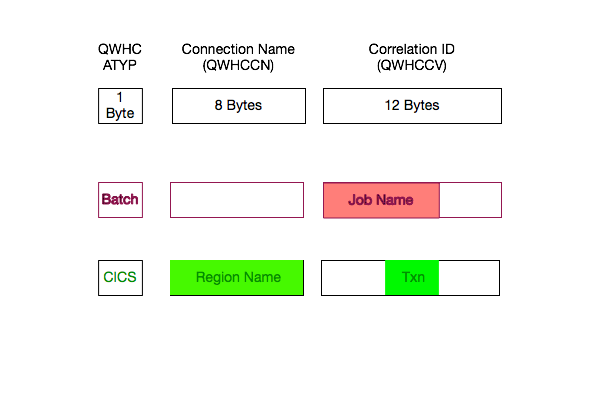
In What’s The Latency, Kenneth? I talked about Coupling Facility Link distance and OA37826. The whole supposition was that you might want to know about really long links.

A recent situation showed me that short distances might be a different and interesting matter.

So what’s a microsecond or two amongst friends?

Well, 1Ξs represents 100m of distance and 2Ξs represents 200m. This is, of course, as the fibre-bound photon flies. 🙂

But consider that RMF (and CMF for that matter) records latency in integer microseconds. And that the lowest value we record is 1Ξs meaning “no distance”.

I would hazard that “1Ξs” really means “from zero metres to 150 metres or so” and that “2Ξs” really means “ from 150 metres or so to 250 metres or so”. I’ve added the “or so” because I don’t think the 10Ξs per kilometre number is accurate to many significant figures.

But why does this matter?

In this situation the customer currently has a pair of zEC12 machines showing 1Ξs and 2Ξs latencies – depending on the path. All the links are Infiniband 1X HCA3-O LR (as in “long range”) links.

They’d like to move to z13 with perhaps Integrated Coupling Adapter ICA-O SR (“short range”) links or even 12X HCA3-O SR links. Both of these have maximum distances of 150 metres. Both are designed to have better performance than 1X HCA3-O LR links.

You can see the problem right there: Will these technologies do the job?

The latency information isn’t accurate enough to tell us. But nobody said it would be.

But hardware planners aren’t stupid either; They probably would’ve used 12X if they could.

Oh well, time to get the tape measure out 🙂 and see if we can get to under 150m.

The Right Curves?

(Originally posted 2015-08-17.)

In true IBM fashion this post features graphs without scales. [1] My aim is to share a rhetorical device I used in a recent customer workshop. I hope you find it useful. [2]

The customer was worried about a piece of hardware whose responsiveness had deteriorated over the past year, but got better in recent days, coinciding with some tuning changes they’d made. This graph shows that:

I’ve abstracted to “rate” and “response” to avoid getting specific. Specificity isn’t helpful here. You’ll see that the rate also dropped roughly concurrently with the response.

So could the rate drop have caused the response improvement all by itself?

Or did the tuning efforts actually make a difference?

It’s very hard to tell so I posited a different way of graphing it. I drew on their whiteboard a graph similar to the following:

Instead of drawing a pair of curves of response and rate (or load) against calendar time line:

  1. Divide the timeline up into sections, with each section after the first being marked by a single tuning action.
  2. Plot each section as a fresh line on the same graph, with the x axis being load / rate and the y axis being response.

In the (sketched) example there are three curves:

  1. Baseline – before any tuning. (“Original”)
  2. With one tuning action. (“Tune 1”)
  3. With a second tuning action. (“Tune 2”)

If you can achieve a set of curves like this you can see the effect of tuning actions. In this case the first tuning action was clearly effective but the second had no effect (being essentially the same curve).

I think this is a handy technique, but there are a pair of issues that come readily to mind:

  1. These sections might “go stale” after a while. For example, other changes that you didn’t take into account might happen within the life of the curve. An application change nobody told you about [3] could affect performance.
  2. Getting enough data points could be tough. It’s tempting to go to 24 hours of 15-minute data points from, say, daily average data points. Care is required with this. Maybe restrict this to Prime Shift only, for example.

These issues need thinking about, but I don’t think they invalidate the idea. And more and more I’m plotting things like Response versus load / rate rather than against time. [4]


  1. Listen: You’re lucky to have axes. OK? 🙂  ↩

  2. As it’s such a sketchy 🙂 notion I decided to hand draw it, using a rather nice stylus, an iPad and a ruler. Yes, you can use a ruler but it might slip given the amount of plastic involved.  ↩

  3. As if that ever happens. 🙂  ↩

  4. Actually it’s as well as – as a view that understands time of day remains enormously helpful.  ↩

Tally Ho!

(Originally posted 2015-07-10.)

Numbers are key to what I do; They’re the basic data I use as evidence. Without them it’s often just supposition.

And nowhere is this truer than when trying to reduce bad[1] habits and reinforce good ones.

So a while back I invested a small amount of money in a very nice little app: Tally, a Simple, Eyes-Free Counter for iOS.

So this post is about why I like this app and also a request for an enhancement that I think would really make it more useful – at least to me.

What Is Tally?

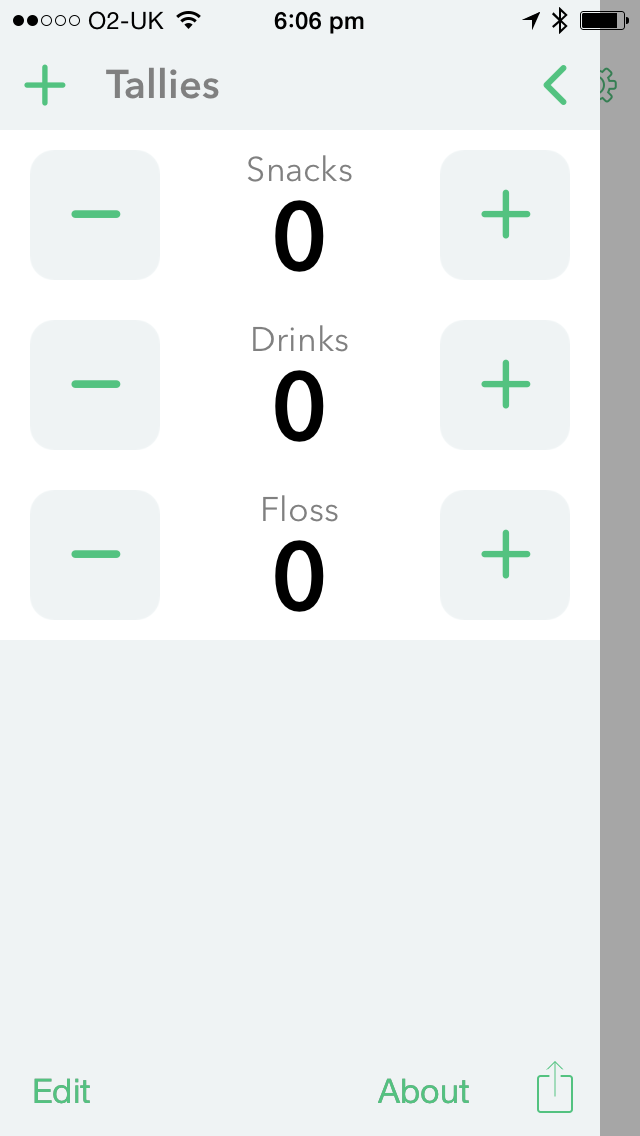
I don’t mind sharing with you the three tallies I use[2]:

You’ll see here two unhelpful (perhaps) habits I’d like to indulge less in. Far more important, actually, is “Snacks” as there’s nothing wrong with my drinking.[3]

I also have a habit I’d like to do more off – “Floss”.

The above is a screen shot from the Tally app itself. You tap in the right place to bump a count (or Tally) up or down. You can, of course, clear tallies.

To make it easier to add to tallies, Agile Tortoise took advantage of the iOS 8 “Today” screen enhancements and created a Widget:

So this is nice.

But then came the Apple Watch and the app now sports a Watch counterpart:

This makes it even easier to add, for example, the pudding and the nice bottle of Proper Job I had with supper to the two relevant tallies: I just say “hey Siri open Tally” and I’m there.

One other thing I like – though I haven’t used this – is that Tally has its own x-callback-url scheme for automation. [4] This is unsurprising as Tally is developed by Greg Pierce who invented x-callback-url and uses it extensively in his Drafts app (which I also use).

At the moment I manually transfer the tallies – once a week – to a spreadsheet and clear them in the app. So I have some idea where I am with reducing or increasing them.

(I’ll probably back off and smooth them over 4-week periods, (not quite) also known as months. This kind of “squinting” might give me a better, smoothed, view.)

With the x-callback-url support I could probably automate this using the Workflow app and possibly Drafts. I’m not inclined to bother except, perhaps, as a learning exercise.

What Do I Want?

So in Theses on Feuerbach Karl Marx wrote: “Philosophers have hitherto only interpreted the world in various ways; the point is to change it.” So much of life is this way, and especially so for habits you’re trying to change.

So I could just [5] do less of the unhelpful and more of the helpful.

But it helps a lot if you understand when you do the things you’d like to less of. Snacking is a prime example of that.

So here’s what I propose: I’d like Tally – exposed through x-callback-url or similar – to keep a timestamp along with each increment or decrement of a Tally.

So I can see two immediate things here:

  • If my problem really is a mid-afternoon low I’d like to understand more about that and think about how to combat it.[6]
  • If I can push the snack that results back a 15 minutes every week I can probably make it collide with Supper [7] and disappear.

In both cases timestamps would really help here.

So I’ve been utterly honest about why I want timestamps with tally bumps – mainly to illustrate a real use case. I’ve no idea how Greg intended Tally to be used, nor how other people are using it. But it’s a nice little app that’s been well built and exploits much of the iOS and Apple Watch technology. I’d like to see it even more useful.

You might think I’ve been overly honest in this post. I actually find it helpful when other people admit to stuff where I can say “me too”. The human condition has a a lot of commonality.

And now my watch has just told me to stand up. So I guess it’s time to stop writing. 🙂 [8]


  1. Actually I don’t really like the moral tone of “bad” or “good”; I prefer more functional words like “useful” or “unhelpful”, particularly when it comes to food and dieting.  ↩

  2. But I won’t share the actual tally values. 🙂  ↩

  3. I’ve no idea how much my doctor drinks. 🙂 (In fact it’s a group practice so perhaps I should move the “s” from “drinks” to “doctor”.) 🙂  ↩

  4. A topic I discussed in Remember The Milk: Automatic For The People … – IBM  ↩

  5. A four-letter word if ever there was one. 🙂  ↩

  6. I also think I have a “late in the week” problem where willpower has been dissipated.  ↩

  7. or Dinner or High Tea, if you prefer. 🙂  ↩

  8. What a lame ending. 🙂  ↩

IMS Though My Eyes

(Originally posted 2015-06-22.)

As a matter of chance, over the past few months I've been involved in a number of situations where IMS has been an important component of the customers' infrastructure (and I'm about to be involved in another one).

Although I hope my customers don't think I think of them only as test data 🙂 it's been good to have their data move my story forward: Several nice pieces of analysis code have appeared, or been enhanced. 1

But this post isn't really trumpeting the enhancements I've made, so much as discussing how I now view IMS. It should help anyone who – as an outsider – is trying to understand IMS.2

So I'd like to look at how I detect IMS components in two categories:

Actually a third is really a hybrid of the two:

In fact what I call “Applications” some people might well call “System”; To me it's just a useful division.

System

There are three major IMS address spaces that I consider “System” – Control Region, DBRC and DL/I SAS (Separate Address Space).3

To detect these I look for a program name of “DFSMVRC0” and use the job name to distinguish between them, the endings being generally CTL, DBRC and SAS respectively.

For Data Sharing an IRLM address space is necessary – with program name “DXRRLM00” – but it's difficult to tell the difference between and IMS one and a DB2 one. Possibly naming conventions help here.4

The address space doing all the I/O is the Control Region; I see this in both SMF 30 and 42 Subtype 6.

I can see the Virtual Storage Allocated for 24- and 31-bit (and both can be a big deal sometimes). Likewise 64-bit, though that tends to be rather small for IMS.

The SMF 30 Usage Data Section confirms this is IMS and tells me the version. Note IMS Version 11 says “V1R1” but I believe it's been corrected in subsequent versions. 5

Unlike DB2, however, The Usage Data Section for IMS doesn't encode the subsystem name. 6

Applications

IMS applications are reasonably easy to detect, even if they're from e.g. CICS.7

So detecting an Application address space that talks to IMS is easy, one of two ways:

  • It has IMS in the Usage Data Section.
  • It has a program name of “DFSRRC00”.

Both are definitive. But after that it gets more difficult:

You can't necessarily easily tell a Batch Message Processor (BMP) batch job from a Message Processing Region (MPR). The “necessarily” refers to the fact that while conventionally an MPR has a Proc Step of REGION that's just JCL and, I guess, could be changed.

My code uses this but also looks for “JES” or “BMP” or “BAT” in a number of attributes – WLM Workload, Service Class and Report Class. As long-running address spaces can be started as started tasks or jobs even “J”/“JOB”8 vs “S”/“STC” isn't definitive for job IDs.

But mostly my code gets it right.

Recently I've been creating Gantt charts of when (groups of identically-named) MPRs stop and start. That's quite interesting as you see whether there are times when no MPRs with a given name are up, or whether there is a gap between when a set comes down and gets restarted.

I'm able to observe a number of interesting things about MPRs and BMPs, such as which DB2 and MQ subsystems they talk to, I/O despite the data being owned by the System address spaces, and virtual storage. On the topic of virtual storage in one customer I've just spotted a group of MPRs with very similar names, and the same Service Class and Report Class. You'd think they were cloned regions but it appears they're not, not least because their virtual storage allocations are very different.9

Batch DL/I

Batch DL/I is kind of a hybrid between the “Applications” and “System” categories above. A DL/I Batch job acts as a stand-alone IMS instance, for example managing its own buffers, I/O etc.

From a batch tuning perspective this is much easier to handle, precisely because of the above. I can see virtual storage and I/O to individual data sets and so can form a view of tuning actions and the nature of dependencies.

Conclusion

So, I think we can get quite a long way in identifying and observing aspects of the behaviour of IMS componentry. But, as usual, you really need to talk to your IMS specialists to go deeper. And this blog post barely scratches the surface of how you can look at IMS with non-IMS instrumentation.

And, in case you hadn't noticed, IMS has gained new capabilities – in terms of application styles, if nothing else. And that is one specific reason why I'm looking forward to the next IMS client engagement; I already know they have Java in their dependent regions.

So a “Part Deux” 🙂 seems likely some time. Actually this is pretty inevitable as I'm always learning (and keen to share.)


  1. I like to return the favour by discussing the relevant new insights with them. If you've been my client you'll know I like to be pretty explicit about this. (And sometimes this looks like and is a test of my analysis.) 

  2. Much like I did with DB2 Through My Eyes – Dublin, May 2015 for DB2. 

  3. Long ago the DL/I SAS was optional – to provide 24-Bit Virtual Storage Constraint Relief (VSCR) – but I don't know if it still is and I haven't seen an IMS installation without for a long time. At the beginning of my mainframe career I did Virtual Storage (including IMS). 

  4. IMS Coupling Facility structures are quite easy to detect but again tying them back to IMS subsystems is difficult. 

  5. But you should see the other guy. 🙂 One of the other major software vendors has garbage in the Version field. Another doesn't use the Usage Data Section at all. 

  6. This is true for all: System, Applications and Batch DL/I. 

  7. Here the Usage Data Section in SMF 30 tells you that IMS is connected to, but again not which IMS. 

  8. For 5-digit job numbers a job ID is of the form “JOBnnnnn” whereas for 7-digit it's “Jnnnnnnn”. 

  9. It's worrying that one of these 8 regions has a 31-bit virtual storage allocation of 1066MB, which is more than 80% of the limit. The rest aren't even close to this. 

z Systems Technical University, Dublin 18-22 May 2015, Slides

(Originally posted 2015-06-02.)

As most people know, I thoroughly enjoy conferences and learn a lot. The Dublin one 18 – 22 May was no exception.

It was great to meet up with old friends, connect with potential new ones and have a couple of compromising 🙂 photos of myself and friends to prove it. 🙂

But you probably don’t care much about that – unless you’re in those photos. 🙂 So here are the slides from the three presentations I wrote:

Each of these has been updated in some way, so let me say a very few words about them…

DB2 Through My Eyes

This one is the new one for this conference. It was trailed early in its life in Proposed “DB2 Through My Eyes” Presentation and got its first outing in Dublin. I think it went well. So well in fact that I’m wondering about doing something similar for CICS. [1]

Time For D.I.M.E?

This is an update on one I’ve had around for a while – and which I honestly thought I’d blogged on. It’s about whether “laterzEC12, early z13” era is a good time to be embarking on a Data In Memory Exploitation (DIME) project. [2]

zIIP Capacity Planning

Updated for z13 and Simultaneous Multi-Threading (SMT) with some slides borrowed from Horst Sinram.


  1. Well it wouldn’t be all that similar.  ↩

  2. Hint: It is. 🙂  ↩

The Unfit Bit? :-)

(Originally posted 2015-05-15.)

I’ve put off writing this post for a while. Largely because it might sound like boasting. The truth being I have very little to boast about.

But here goes anyway.

I’m a fitful [1] exerciser. It’s not that it’s painful but that it’s not interesting. I’ve never found a sport I enjoyed watching nor partaking in.

But with that characteristic it’s been a struggle to take any exercise at all. But I do run, or at least for a few weeks at a time. And I should, cynically, put quotes around the word “run” as many people would laugh at my (lack of) speed.

I’m sure many people can relate to this.

A Vicious Cycle?

With my sedentary lifestyle I’ve put on weight over the years. I like to beat myself up with the thought “it’s OK to lose your hair, have it turn grey, become wrinkly, etc as they’re natural parts of aging but to become unfit or gain weight is not OK as that’s definitely your own silly fault”.

Yes, I’ve lost significant amounts of weight on occasion, run for weeks on end, and become fitter. But it has been cyclical – and I’m usually worse off at the end of the cycle than at the beginning [2]. For example at the peak of this last cycle I was 2lbs heavier than at the peak of the previous one [3]

This is depressing but some good has been done. Consider what would happen if I didn’t try to address the issue: I assume I would put on more weight and become less fit. Neither of which would be good.

I’m sure plenty can relate to this, too.

But Enough Of The Self-Pity. 🙂

In late 2013 a friend – by her example – finally persuaded me to buy a Fitbit Flex. I only use it for counting steps and time spent exercising. (I really didn’t need it to tell me I don’t get enough sleep as that just makes the problem worse.)

The default daily target is 10,000 steps. On a month-by-month basis I’ve been fitful in achieving that.

How do I know that? Answer: Because it tracks, records and syncs to their servers the step attainment.

Which is where the story might get more interesting – or at least more geeky. 🙂

I’d wondered about how to get the data out of the Fitbit site. Apparently there’s an API but it’s not a high enough priority to work out how to use it.

However IFTTT has a Fitbit channel that lets you do things with the data. The one I use is Add Fitbit Summary In CSV Format To Dropbox.

It doesn’t produce the data in quite the shape I want it. But as it’s CSV I expect I’ll be able to do useful things with it.

Instrumented Selfish 🙂

The term “instrumented self” has been widely used. I’m concerned here about the behaviours and attitudes being instrumented induces. A few silly examples:

  • If I take my Fitbit off for any reason I’m loth to take any steps at all until I put it back on again.
  • If I’m a few tens or hundreds of steps short of my daily target I’ll start (apparently) stomping around the house [4] until I make my target.
  • I’ll park the car at the furthest corner of the car park, or deliberately refuse a lift (or to take the lift) – regardless of who’s with me.

In short, being instrumented has the potential to turn one into an overly-goal-oriented sociopath. [5]

It might also have another undesirable effect: What if I fail? Today I define “fail” is if I ever don’t make my daily (or weekly) target. I might ought to redefine it as “not make target for more than, say, 1% of days (or weeks).” [6]

Planning A Head

No, that’s not a stray space.

What I’ve found is that I’ve tended to plan my day rather better – to take advantage of “steps” opportunities. I’ve also had to “shape my head” to accept e.g. walks before breakfast (sometimes in cold climes) and running in the rain.

On a longer term basis I’ve learned there are going to be really good weeks and not so good weeks, and how to plan for them. For example, this week I have few constraints but next week I’ll be at a conference in Dublin. So this week I’ve taken longer runs and a few long walks. But next week it’s going to be a different set of opportunities. But I’ll definitely pack my running kit, even if Dublin has the second worst pavements for running on. [7]

So the personal reprogramming – if you can call it that – has been interesting. So has the loss of ability to kid oneself.

Eaten Mess?

What I haven’t touched on has been diet. Fortunately I like healthy food a lot – such as vegetables and salad. I’ve never had a problem eating my greens. 🙂

The trouble is I’ve never had a problem eating the other stuff, too. 🙂

I think a lot of this is psychological. Enough said.

I’m also sure that while exercise creates “calorie budget” it generates a desire for more calories. I doubt I’d be better off not exercising, but it makes you think.

I’m still fitful when it comes to the willpower to restrict my intake. But aren’t we all?

On The Road To No Wear?

You can tell I’m in the mood for a bad pun or two. 🙂

I don’t pretend I’m on my way to a “beach body” (or better). 🙂 What I do hope for is to make progress on weight and fitness, and possibly self-respect. 🙂

I got really fed up (again a bad pun) at Xmas so I upped my steps target to 12,000 a day (from 10,000). With an additional target of no week doing fewer than 100,000 steps.

  • I’ve not missed the 12,000 target since January 5th. (Over 4 months.)
  • I’ve not missed the 100,000 target for nearly 2 months.

And the net of it is I’m now 12lbs below my peak. I don’t really feel fitter but I can tell I am.

But that’s hubris. Here comes the nemesis… 🙂

Probably in the form of some nice Irish (red) beer and eating out every night.


  1. Pun intended 🙂  ↩

  2. At least in weight terms.  ↩

  3. But the previous time peak to peak it was steady, so it’s not all dreadful.  ↩

  4. Probably true of hotel rooms also.  ↩

  5. The original draft said “arse”. You might prefer “ass”. If you are the kind to read footnotes you might be OK with either of these and not mind the, ahem, “frankness of expression”. 🙂  ↩

  6. I don’t think this makes me less guilty of what has been indelicately punned as “musturbation” but it is at least a more realistic absolute imperative – that should get me where I need to go.  ↩

  7. I say second worst because, of course sidewalks in the USA are absolutely the worst thing to run on: Concrete is very hard on the ankles and knees. Dublin just has unevenness.  ↩

Sysplexes Sharing Links

(Originally posted 2015-05-09.)

Just a brief one this time. A customer recently asked me how to detect Sysplexes sharing Infiniband links. [1]

It arose when discussing the information in the new(ish) Channel Path Data Section in RMF’s SMF 74 Subtype 4 record.

The question really boils down to “how do I detect in RMF / SMF different Sysplexes using the same identifiable link”? [2]

My first suggestion was the PCHID field R744HPCP (which we’ll return to presently). Seemed reasonable to me – as it had the word “Physical” in it. What could be more permanent and definitive? 🙂

Other fields in the section with “physicality” are Host Channel Adapter ID (R744HAID) and Host Channel Adapter Port ID (R744HAPN).

My friend Erik Bakker pointed out to me that Infiniband links don’t have PCHIDs but rather Adapter IDs and Port Numbers. If you read no further then the “take home” is to use Adapter ID and Port Number as the link identifiers.

But one mystery remained: Why am I seeing valid-looking [3] numbers in the “PCHID” field?

So I spoke to Dave Surman, who’s generally very helpful in these matters. He said “For coupling links that don’t have a PCHID (namely Infiniband links), the CHSC returns something called a VCHID in the PCHID location. It’s a virtual CHID representation used by the firmware, with no physical correlation.”

CHSC is, of course, the Channel Subsystem Call machine instruction.

Now of course I would’ve known all this if I’d read the following Redbook: Implementing and Managing InfiniBand Coupling Links on IBM System z. Well Erik probably had but, being a Performance guy I unfortunately hadn’t. Section 2.4.2 talks all about VCHIDs.

I was seeing values of hex “07xx” for VCHID in R744HPCP, by the way.

So if there is a moral of the story it’s “you can never get too close to the infrastructure you’re reporting on and trying to tune”. And that’s what a large chunk of this whole blog [4] has always been about.

In case my whole credibility on Coupling Facility links hasn’t been blown away 🙂 you might like these other posts of mine:


  1. The motivation for this is less about Performance and more about documentation, verification, detecting change, trouble-shooting, and “separation of concerns”.  ↩

  2. SMF being, of course, the first port of call for any self-respecting Performance person.  ↩

  3. Who knows what “valid looking” means? 🙂  ↩

  4. I hate it when people say “blog” when they mean “post” (noun, not verb). In this case I definitely do mean the whole shooting match, not just a single post.  ↩

Remember The Milk: Automatic For The People?

(Originally posted 2015-05-04.)

This post is one where I really don’t speak for IBM.[1]

It’s also one that’s firmly in the “Topics” category of “Mainframe, Performance, Topics”, [2] being about the emergent fields of iOS Automation (and Web Automation).

And, while I give Remember The Milk a “could try harder” score I’m actually a big fan of what they do. Like many things I’m a big fan of I think of ways they could do stuff better – and try to make sure such dreams have a practical utility.

Remember The Milk

In brief Remember The Milk is a platform-independent cloud service for managing To Do lists (and lists in general). [3]

It’s not the only one but it’s the one I use on Linux, OS X and iOS. It has an iOS app and a web interface; I use both extensively. You can email tasks (and lists of tasks) into it. You can even set Siri up to add a task to Remember The Milk, instead of to Reminders. You can have subtasks and start and due dates and estimates and notes attached to each task. I mostly just use the end dates at present, though I have a few notes.

Some tasks are recurring and I move the due data manually to e.g. 1 week later when I’ve done it. I also move tasks around anyway, again manually. I also complete tasks – occasionally. 🙂

As a cloud service I can’t put anything IBM Confidential in it, and I won’t put anything sensitive of my own in it.

iOS Automation

Until relatively recently there wasn’t much you could do to automate tasks on iOS, still less to glue them together. Now why might you want to do that? Mostly to enable function that is fiddly, overly manual or slow to do otherwise. [4]

I listen avidly to three podcasts that cover topics relating to iOS and OSX and the first two of these have recently (independently) done episodes on iOS Automation:

Mostly I listen to these while running, though occasionally in the car or on a plane. Usually somewhere where noting down the inspirations I get from them is difficult. 🙂 (I’ve yet to dictate a To Do via Siri while running.) 🙂

My first brush with iOS Automation was with Editorial as discussed in Appening 3 – Editorial on iOS.

Then along came Workflow on iOS, which has some amazing choreographic capabilities, with more apps being manipulated all the time. In a similar vein is Schemes.

And then Drafts – which has javascript (comparable to Editorial’s Python) hove into view. (It’s been around for a while but I’ve only just got into it.)

Meanwhile iOS 8 brought lots of functions, with ability to build extensions for apps. And the ability for third-party apps to add function to the Today screen. (Workflow allows you to build app extensions, for one.)

The Today screen piece is interesting as Drafts as well as launcher apps such as Launcher can launch from there. Launcher apps allow you with a push button to launch apps, in many cases with specific parameters.

Greg Pierce of Drafts fame introduced the x-callback-url specification which launchers tend to use. But it’s not just launchers: All the automation vehicles I’ve already mentioned use them.

Meanwhile, (largely) outside of iOS, IFTTT has web-based automation. I’ve a few workflows which use IFTTT [5] but mostly I’m interested in iOS automation as it doesn’t require the web, nor suffer from any such latency.

Automatic For The People?[6]

But not Remember The Milk.

All I can do is email tasks to Remember The Milk (or SMS to it). I can’t query it. And I can’t open its app with any control.

So I have used the email route:

  • With Launcher and Workflow I can take the clipboard contents and email them as a task – from the Today screen. (I use this for quick thoughts and they end up in my Inbox for later refinement and classification.)
  • With Drafts I have some javascript code that takes a template note and replaces ‘%c’ with a user-provided customer name (generally “Client X”) and emails that to Remember The Milk. (I’ve yet to integrate this into Drafts on the Today screen.)

These work fine but are limited. [7]

Here are some examples of what I can’t do:

  • I’d like, with a single tap, to open Remember The Milk app at the “Shopping List” list. Or “Today” or “Cust Sitns” or whatever. Launcher could do that if RTM supported x-callback-url.
  • I’d like to query a list, take the first item that hasn’t been completed, and kick off some automated action based on it. For example “kick off study” might include automation to create the various topic presentations in Dropbox. (Such as “CPU”, “Memory” etc.) [8]
  • I’d like to automatically mark a task as completed.
  • I’d like to construct a web of dependencies for a project.

But none of these things are doable with Remember The Milk right now. All for the want of some automation capabilities, most notably x-callback-url.

The TaskPaper Alternative

The Nerds On Draft podcast and the support in Editorial persuaded me that TaskPaper might be in my future. If you don’t know what Taskpaper is see Deconstructing my OmniFocus Dependency and The TaskPaper R&D Notebook.

TaskPaper is a text-based Task List format, which can readily be automated and sync’ed across many devices via Dropbox.

Intriguingly, the Sublime Text text editor which I use on Linux and OSX has a plugin – PlainTasks – which allows you to manipulate TaskPaper files. (It also allows you to write plugins in Python. What’s not to like? 🙂 )

But doesn’t this sound a little geeky? 🙂

I’m all for formats that can be read and updated by many standard tools. But I really don’t want to have to assemble too much of the basics myself.

My Challenge To Remember The Milk

So, my challenge (for what it’s worth) to Remember The Milk is: Embrace automation and people will build wonderfully unexpected, valuable, things with your product or your service. And you can be sure I’ll cheer you on. After all I’m in your beta programme. So I would build workflows and I’d definitely publicise the capabilities you build with them, but in a personal capacity.

And that applies to just about any product or service, iOS, Web, whatever. Make it Automatic For The People. 🙂

Which is pretty ironic when you consider iOS devices were conceived as the ultimate in “hands on” machines. 🙂

Breaking News

I just got a Workflow workflow working 🙂 that watches Dropbox for a specific file having contents. I think I can do quite a bit with this, such as if Linux finishes a task this status file can be updated and some Editorial action kicked off on iOS.


  1. I’ve no idea if IBM has a position on iOS Automation, let alone what that would be. Likewise Web Automation.  ↩

  2. See Commatosis  ↩

  3. As examples of lists I keep in Remember The Milk that aren’t “To Do’s” I would cite my “Movies To Watch” and “Contents Of The Garage Loft” lists.  ↩

  4. As a geek I like to do these things anyway, and the iOS Automation community acknowledge it’s quite fun to build some automation out of kit parts.  ↩

  5. One pumps daily FitBit stats to a file in Dropbox. I might write more about FitBit one day soon.  ↩

  6. Yes it is that cultural reference. 🙂 So, lots of apps are automatable through the x-callback-url mechanism and the tools I’ve mentioned.  ↩

  7. Because my mainframe can email with the best of them, I’m considering having it send tasks into RTM. But that’d be pretty gratuitous. 🙂  ↩

  8. An OpenOffice file is a particular kind of zip file I already know how to confect. But I could just use a template.  ↩

Restructuring

(Originally posted 2015-05-03.)

Being about Coupling Facility structures, maybe this should be called “re Structuring”. 🙂

Standing on the shoulders of giants, as I do 🙂 , it is with some temerity that I rethink one of their designs. And it’s only because you might find it helpful that I mention it now.

Since the dawn of time coupling facilities have contained four kinds of structures:

  • Lock
  • Cache
  • List
  • Serialized List (which is really a special form of List)

Our reporting – to a very large extent – has treated these types as the same. Certainly there was one table of structures per coupling facility. But I recently made a simple change to our code – which gives us the potential to do better.

By “do better” I mean essentially

  • De-clutter our structure-level reports.
  • Tailor the reports for each structure type to guide the analyst to better conclusions more quickly.

The former means I can display information to you about your structure without a lot of “not applicable” cruft on the slide.

The latter means I can be more sure of giving you quality advice.

And the simple change? Create a separate table for each structure type for each coupling facility. Then each table need only have information relevant to that structure type.

What’s The Same

There are lots of things that are common to all structure types. Examples are:

  • The name
  • Current size, minimum size, and maximum size
  • Structure Execution Time (R744SETM) – which is the Coupling Facility CPU (not Coupled z/OS CPU)

What’s Different

Here are some examples of things that are specific to a structure type:

  • Cache: Data Element / Directory Entry Reclaims, and Castouts
  • List: Number of list headers
  • Lock: False Contentions and XES Contentions

We saw in False Contention Isn’t A Matter Of Life And Death how False Contention is a Lock Structure specific metric worth keeping an eye on. It clearly isn’t relevant to, say, cache structures.

And keeping an eye on Castouts is, of course, useless for Lock structures.

Conclusion

Hopefully this post, together with False Contention Isn’t A Matter Of Life And Death, shows you why it makes sense to treat each structure type differently.

And with my new “one table per type” code I can do a better job of consulting on Coupling Facility structures.

One Other Thing

Another change I made to my code this week – prompted by a customer – is to my “Structure Memory Pie Chart” code. (I originally wrote about it in Coupling Facility Memory)

In that post I raised the issue of “white space”. This change doesn’t complete answer the question “how much memory is really unhypothecated?” but it contributes a little.

Out of the “Unallocated” pie slice I carve another (again not shaded in) slice: I take the sum of the current structure allocations away from the sum of the Maximum allocations. This I now separately show. This really answers the question "what happens if all my structures go to their maximum sizes? Of course you can reallocate the structures bigger but that’s a much less frequent event and much more disruptive.

(I did the same in my tabular reporting of memory at the Coupling Facility level. So we get real numbers rather than %. (Even more parenthetic is the fact I now show – in this table – memory in fractions of gigabytes if the CF has more than 5GB. It’s a genuine observation that coupling facilities are getting bigger, as they often should.))

As always I’ll “road test” the change in more customer situations. But I’m already pleased to have it as my test customer’s situation showed “going to the max” only used a few percent more of the memory. So they’re close to their maxima and need to contemplate upping some of them.

Commatosis

(Originally posted 2015-04-19.)

Regular readers of this post will have noticed the masthead [1] changing.

I thought it appropriate to replace the zEC12 (and zBX) graphic with the new z13. I’ve also taken the opportunity to weave in a little gag. The blog’s title remains “Mainframe Performance Topics” but you’ll see I’ve injected a couple of commas in the masthead.

These commas make all the difference to the blog’s prospectus but absolutely none to its content. If that’s unclear Venn 🙂 this might help:

As (perhaps non-existent 🙂 ) regular readers know, I write about all sorts of things. I’m not particularly motivated to assert breadth of interest; I’m more interested in writing about what I want to.

In fact it’s not very broad: It’s mostly technically geeky stuff, rather than philosophy or politics. There are places for those (and I use them) but an IBM-provided platform is not the place for them.[2]

I’ve always written about:

  • Mainframe stuff,
  • Performance, and
  • Topics

And now I guess I have to defend my use of the “Oxford Comma”. 🙂 In fact in the graphic it’s more a “Comma Splice”. And now I’m burbling on about commas. So perhaps I do have Commatosis. 🙂

Seriously, I’ve a platform here for writing about whatever technical topics I want. With no constraints imposed on me.

And nobody’s yet said “what on earth are you writing about that for?”

So I’m going to keep writing – and the masthead graphic is perhaps a little more honest.

So I hope you like the new graphic. And enjoy the content.


  1. The graphic at the top of this blog.  ↩

  2. Facebook and Twitter are good examples of places where my more personal side is expressed – but there’s quite enough of me in all the ways I choose to communicate.  ↩