Broker And SMF 30

(Originally posted 2014-06-03.)

Sitting in Dave Gorman’s Broker V9 presentation in Budapest it struck me it would be a useful exercise to apply the “Systems Investigation” techniques I write about to Broker running on z/OS. So let’s see how far we can get with SMF 30 Interval records, in the vein of Life And Times Of An Address Space. It’s a nice exercise [1] but I think it’s directly useful for looking at Broker itself.

By the way the name IBM Integration Bus is in use as of V9, but I’ll persist with “Broker” in this post.

I have two sets of customer data with Broker in, one active and one where Broker is up but not active.

What Is Broker?

Broker is a multiplatform product family that allows business information to flow between disparate applications across multiple hardware and software platforms. Rules can be applied to the data flowing through the message broker to route and transform the information. The product is an Enterprise Service Bus providing connectivity between applications and services in a Service Oriented Architecture.

The previous paragraph is mostly not my words. In my words I would say you get to connect disparate applications together using pipeline-like constructs called flows. These flows have nodes, akin to pipeline stages.

As well as running on other platforms Broker runs on z/OS. It writes Statistics and Accounting data in it’s own SMF 117 record (but this post isn’t about that).

Am I Broker?[2]

An address space is Broker if one of the following sets of conditions is met:

  1. The program is BPXBATA8 and the Proc Step Name is one of “BROKER”, “EGENV” or “EGNOENV”.  
  2. One of the SMF 30 Usage Data Sections for the address space had a product name of WMB.

These conditions are corroborative but the second condition is possibly simpler to detect than the first.

All the address spaces for a Broker instance have the same job name (but, obviously, different job IDs).

The structure of a Broker instance is as shown here:

Broker Address Spaces

Broker Instance BRK1 has a Control Address Space and three others.

Execution Groups

Broker flows run inside Execution Groups, each of which is an address space. The step name is different for each Execution Group, being the last 8 characters of the Execution Group Name.[3]

In the two sets of data one has a handful of Execution Groups, each with a mnemonic name.[4] The other has no Execution Groups, so no flows can be deployed to this one.

In the example diagram above, there are three Execution Groups: Tom, Dick and Harry. Each has its own flows.

There’s one further piece of information we can glean about execution groups:

If the Proc Step is EGENV the Execution Group has its own specific profile. If it’s EGNOENV it doesn’t. In the case of the customer with Execution Groups they are all EGNOENV.

Which Broker?

The Broker instance is given by the job name which, as I said, is the same for the Control Address Space and all the Execution Groups.

Which Version?

You can use the Usage Data Section to establish the Broker version, except I’m seeing “NOTUSAGE” in both the sets of data I’ve seen – which doesn’t help distinguish Version 7 from 8 from 9. But I’ve only got two sets of data…

CPU

Drilling down into individual address spaces / Execution Groups pays dividends when it comes to CPU:

For the customer with a handful of Execution Groups only two use significant amounts of CPU. The total is about 3.5 engines’ worth and one Execution Group uses 60% of that and the other uses 40%.

There was a tiny amount of zIIP CPU usage in the active case, also. As you can write nodes in java that’s not surprising. You can also access DB2 in a flow but whether it’s the right kind for DRDA zIIP Eligibility I don’t know.

Memory Usage

There’s good news here:

Because Broker is 64-Bit the vast majority of virtual storage is allocated above the bar and memory (and Aux / Flash) usage numbers are accurate. For 24-Bit and 31-Bit Virtual Storage I can only see Allocated but, as there’s not much of it, I can live with treating that as Used Real without too much overstatement.

The LE Heap is the main user of memory, and thank goodness it’s 64-Bit: I’m seeing values from a few hundred MB to several GB. In the customer with no Execution Groups much of this is paged out to Aux. I can tell this because, as I said, 64-Bit Virtual is reported in SMF 30 as either backed by real memory or Aux / Flash.

Who Do I Talk To?

As those of you who’ve seen me present Life And Times Of An Address Space know I see two main ways of figuring out who an address space talks to, without going deeper than SMF 30:

  • Usage information in SMF 30.
  • XCF Member information in SMF 74–2.[5]

In the data I’ve seen Broker doesn’t directly use XCF signalling (and I think that’s generally true of Broker) so I don’t expect 74–2 data to show anything.

I do see Usage information for other products associated with the address spaces:

  • In one case I see DB2, Websphere MQ and Websphere Transformation Extender (WTX).
  • In the other case I just see DB2 and Websphere MQ.

In both cases I see the DB2 and MQ versions and subsystem names. In the WTX case I again see “NOTUSAGE” but this is a single data point.

Workload Manager

I see, of course, WLM Workload, Service Class and Report Class in SMF 30. One of the features of Broker is you can classify each Execution Group (address space) separately to WLM. I’ve not seen it done but I’m certain that would be reflected in SMF 30.

I/O and Database

In the case of the customer with active flows I see quite a high EXCP rate (290 per second), with one Execution Group performing about 90% of this. I also see a small amount of Unix File System I/O, this time mainly in a different Execution Group.

I would expect I/O to vary depending on the nature of the flows.

I was not in a position to look at DB2 but some flows process SQL so I would expect DB2 Accounting Trace to be of some use here.

Handling Multiple Address Spaces With The Same Name

As I said, a complete Broker Instance comprises a set of address spaces, each with the same name. My code generally summarises all the address spaces with the same name into one row per reporting interval (or higher). That’s what the SLR Summary Table does.

In this case that level of summarisation is unhelpful. So I retained the Log Table, which does keep separate JobIds separately and wrote reporting to go against this log table – but only if the sum of In and Out address spaces with a given name is more than 1.

It more or less doubles the size of my performance database doing it this way. But for cases like this it’s worth it.

There are some other cases where this approach might well yield dividends. A good example might be DB2 Workload-Manager Stored Procedure address spaces (which I tend to term Server Address Spaces). Potentially these can be legion, with the same job name.

Conclusion

I think you can do quite a bit with detecting and analysing Broker. To really go to town on it you do need SMF 117 (or the Distributed equivalent), of course. And I don’t yet know what DB2 Accounting Trace (SMF 101) would reveal.

I haven’t, in this post, written about a time-driven view using SMF 30. After all these are Interval records. I’m about to teach my code to pump out some graphs that will help me do that. Stay tuned.

It’s been an interesting exercise which has stretched my code[6]. I’m, in parallel, applying the code and techniques to CICS, CTG, DB2, MQ, and IMS [7] groups of address spaces. I might write about some of those too. Again, stay tuned.


  1. Which should make it interesting and useful for z/OS customers who don’t have Broker on z/OS.  ↩

  2. As opposed to Broken. 🙂  ↩

  3. The Control Address Space name, in SDSF, is the same as the job name, being the Broker name. In SMF 30 Interval records, however, it just says “STARTING”.  ↩

  4. Actually they have two LPARs, each with a Broker instance on. The Execution Groups are the same in each, except one Execution Group where the two instances have slightly different spellings on the name. I’m not sure if this is deliberate or a mistake.  ↩

  5. If you process SMF 30 you probably process 74–2 so I don’t count that as deeper.  ↩

  6. Which is, in my book, always a good thing. 🙂  ↩

  7. I generated test cases around specific IBM products. I might well add to this list. And I just applied the code to a group of jobs beginning “NTA” which explained a CPU spike early one morning on a customer system. (Even though I could have step- and job-end SMF 30 (Subtypes 4 and 5) Interval records helped with this spike rather better.)  ↩

System z Technical University, Budapest 12-16 May 2014, Slides

(Originally posted 2014-05-21.)

In Budapest at the European System z Technical University I presented three topics:

The links take you to the Slideshare uploads of these presentations. The first two of these are updated for this conference and I’ve overwritten the previous versions – as the new versions subtracting nothing.

I think this was a really good conference, with lots of interesting discussions, some catching up with friends, and acquiring some new ones.

Comments and questions welcome, as always.

And Just Complain

(Originally posted 2014-05-18.)

“Mobile” appears to be “flavour of the month” right now, and this week at System z Technical University it has certainly been a topic in evidence, whether it’s discussions in the breaks, sessions on software pricing, or sessions on Mobile-enabling technology.

I don’t intend in this post to discuss any of these.

Instead I want to talk about the types of users Mobile brings, and the impact on such things as capacity planning. But, for once, I don’t want to talk at length about either topic.

User Characteristics

The title of this post [1] nods in the direction of the kind of users mobile brings.

Compare Mobile users with traditional interactive users. I’m thinking in particular of CICS and TSO users. These traditional users have at least some understanding of computers, though I might be overstating this.

Mobile users, though, have no real understanding of how the service is provided and don’t really care (and nor should they.) So I think they can be characterised as much less patient and much less tolerant of service issues, and that’s fine.

Capacity Planning

In recent months most customer interactions have included at least some discussion about the onslaught of Mobile, even if the discussion didn’t start out that way: Customers are volunteering it, unprompted. In a word they’re worried.

A colleague pointed out that it isn’t really possible to do Capacity Planning for Mobile:

  • You can measure load and attempt to assess the footprint of a user – up to a point.
  • You can’t predict the demand.

So there are two things to do:

  • Understand what might limit scaling, whether it be some resource such as CPU or CICS Virtual Storage, or something logical like locking. Then you build a plan to overcome those potential bottlenecks. Fortunately we have nice CPU, memory, disk etc scale up capabilities – but not for free. And we have good facilities to deal with many kinds of logical constraints, too.

  • Try to get some interlock between the business units doing Mobile and the IT people who have to handle the workload. One example that came up a couple of times this week is of a bank’s customers who drive many more transactions for no more bank revenue: The customer still expects to get good service, or they’ll go elsewhere.[2] So the organisation needs to understand the cost implications.

Is This Just Mobile?

Actually I don’t think it is just Mobile, and that might be reassuring to know.[3]

Web users in general are in many ways similar, with the same impatience, unpredictability of load and incomprehension characteristics.

But, not counting Mobile users, the scale has been smaller with Web. I say “not counting” because many Mobile users are web users, using the same http(s) protocol.

Actually this begs the question “what is Mobile?” Some of the discussion this week has been around that very topic. Which leads to a plea…

A Plea

As a Systems or Performance / Capacity specialist try to understand your installation’s Mobile architecture. And try to spot the roll out and ramp up.[4]

An informal sampling of customers this week suggests that could be quite hard to do. But it will, I think, make life easier in the long run.

And finally a thank you to my friend Theresa Tai for the pun word “mobilise”. She used it in her presentation on Monday to mean “make ready for Mobile”, but I like the other meaning: So let’s mobilise for Mobile. 🙂


  1. Fairly obviously a gratuitous Queen reference: To Radio Ga Ga. 🙂  ↩

  2. With customers like that maybe you want them to. 🙂  ↩

  3. Maybe only because we’ve seen it before.  ↩

  4. Part of this is about recognising componentry appearing and evolving. Part of it, though, is about defining metrics and actually using these to measure.  ↩

Hints Of Other Systems

(Originally posted 2014-05-17.)

You can blame the weather for this post. 🙂 I’m writing it on a flight above thick cloud[1] on my way to Munich and then to Budapest for this year’s European System z Technical University.

I like to see the complete picture when I’m examining systems: It makes getting it right so much easier. And there’s something rather satisfying about getting your arms all the way round something.

But I don’t always get “complete” data from a customer. So I work with what I can get and this post is about what I can infer about others systems whose data I don’t have.

When I talk of “not getting data from all systems” I should perhaps clarify: Most installations run RMF on most of their systems and the SMFID in the header of SMF records is the system RMF ran on. I do get information at some level about other systems from RMF SMF records, but its far from complete.

Partial Data

There are a number of good reasons why customers don’t send me data for all systems, including:

  • It can be a lot of data.
  • Coordinating across multiple systems can be difficult.
  • One system, or maybe two, shows the behaviour of all eight.
  • Only a subset of the systems are of interest.

The last of these is the most common, particularly with installations jamming all their Production systems into one Sysplex.[2]

For some situations I really do need to see all systems. A few examples that come to mind are:

  • When designing a software cost minimisation scheme I want to see all the systems’ use of CPU.
  • When understanding the dynamics of a coupling facility structure I want to (at very least) see the request rates from all systems using the structure.
  • I recently had a Group Capacity situation where I only had SMF 70–1 data from 1 of the 2 systems in the group: I couldn’t explain why it was hitting the cap.[3]

But generally I can tolerate seeing data from a subset, so I’m not insistent when I don’t need to be.

The question of the day is “how much can I glean about systems whose data isn’t present?” Because maybe I can get a good understanding of an installation anyway. So let’s see what we can do.

Spotting Other LPARs

You can see all the LPARs on a physical machine from SMF 70 Subtype 1 Logical Partition Data Section[4]. You get further detail on logical engines, memory allocated and CPU Utilisation in the 70–1 Logical Processor Data Section for these LPARs.[4]

Among other things the names and definitions of these LPARs can be fascinating.

You also get a small amount of data for deactivated LPARs, most particularly the name and Partition Number.[5] It’s relevant to know for example that one machine has an activated SYSB and another has a deactivated one.[6]

Spotting Other Systems

I can sometimes see the existence of other systems, not on the same footprint, Here are a couple of examples of how:

  • SMF 74–4 (Coupling Facility Activity) has a list of all the systems in the Parallel Sysplex[7]. But I don’t see from this data which footprint they are on, or anything else about them.
  • SMF 74–2 (XCF Activity) has information about XCF members (and their corresponding job name). So if this system uses XCF to communicate with members in other LPARs you see those other members and those other systems.[0]

    A nice example of this is DB2 Data Sharing where – through the three XCF groups involved – you see all the IRLMs. In one case I saw four IRLMs on four systems, despite only having RMF SMF from one of them.

    Another nice example is CICS regions that talk to ones on this system via XCF.

Spotting Coupling Facilities

RMF SMF 74–4 records are cut for all coupling facilities in the Parallel Sysplex, regardless of which footprint they are on.

This data nowadays includes the machine serial number and LPAR Number.

Sometimes I infer the existence of a whole machine – where none of the systems on it provided RMF data – from the existence of a coupling facility on it.

And What Of It?

Maybe not much to you if you work in a customer.[8] But to me this fills in handy gaps. And it’s nice to spot probably unintended clues.

(Completed on a bumpy ride from Munich to Budapest.) 🙂


  1. Rest assured that if there were no cloud below I’d be enjoying the view instead of writing. 🙂  ↩

  2. If you don’t know why then ask a grownup. 🙂  ↩

  3. While from 70–1 I know when an LPAR is affected by the group cap for LPARs that I don’t have data for I don’t get each LPAR’s Rolling 4 Hour Average CPU Utilisation – if I don’t have the SMF records their RMF cut.  ↩

  4. Which shows up in the Partition Data postprocessor report.  ↩

  5. see LPARs – What’s In A Name?  ↩

  6. As you probably guessed, it’s likely to be a recovery LPAR in case, for example, the first machine dies.  ↩

  7. These are 8-character XCF System Names rather than 4-character SMFIDs but usually they are the same (or at least relatable).  ↩

  8. Actually I’m increasingly of the opinion this isn’t true: It’s probable as a customer you don’t know as much as you’d like to about what goes on in your installation.  ↩

Appening 4 – SwiftKey on iOS

(Originally posted 2014-05-03.)

Sometimes I’m in the mood to carefully peck at the text and sometimes I’m in the mood to just “splurge write”. And sometimes a bit of both.

This post is a case in point: I just want to get the words out as fast as I can.

Now, I do quite a bit of writing on iOS as it lets me write wherever and whenever I get the chance. I like its prediction and correction capabilities. But the app I want to talk about in this post takes that a good deal further.

It’s SwiftKey – available on iPhone and iPad alike.

You type and it presents three alternative words to choose from, as shown below.

Of course I chose the middle one.

It often predicts the words before you complete typing a word and sometimes you don’t even have to tap a word for it to be chosen.[1]

In my experience the accuracy of prediction is high, especially if you let it read your Evernote account to glean your writing style. It also learns from what you type in the app: So, in the example in the screenshot it has learnt that the word “choose” is often followed by “from”.[2]

I find whether I use a Bluetooth or an on-screen keyboard I can type much faster – which is a good thing as my brain often overruns my ability to type.

SwiftKey doesn’t understand (Multi)Markdown so it’s not much use for formatting. But recall one of the strengths of MultiMarkdown is the lack of formatting commands when writing paragraphs. Markup can often wait.

Unfortunately you can’t use SwiftKey as the standard text entry subsystem for apps in general. So I find myself cutting and pasting the text into other apps, such as Editorial. This is only a minor pain in fact: I’m still getting ideas down very fast. But it would be nice if Apple allowed customer data input mechanisms.

In fact you can use SwiftKey as a fast test entry mechanism for Evernote as it can save notes directly into Evernote. In fact I don’t do that: Most of my Evernote notes come from elsewhere (and have a good deal more structure.) Perhaps I’ll write about that one day.

So this is the fourth in a series about apps I use. The previous one was Appening 3 – Editorial on iOS. My reviews aren’t as comprehensive as many you’ll find on the web but they are more insights into how I use stuff than formal reviews. Of course this isn’t an official IBM endorsement of SwiftKey: I’m just telling you about a tool I use and what I think about it.


  1. This is the case if the middle choice (in white) is the one you want.  ↩

  2. SwiftKey doesn’t transfer its learning from one machine to another (for example via Dropbox) but I haven’t noticed this to be a problem – even though I use multiple iOS devices for authoring.  ↩

Once Upon A Restart

(Originally posted 2014-05-02.)

If you have a large mainframe estate it can be difficult to keep track of when the various moving parts start and stop. For example, if you’re a Performance person it’s quite likely nobody bothered to tell you when the systems were IPL’ed. You might well know what the regime for starting and stopping CICS is but I wouldn’t.

As you know I’m curious as to how customers run their installations and starting (and stopping) pieces of infrastructure interests me. I’m also impressed when a piece of infrastructure has been up for years – as sometimes happens. Up until now it’s been a matter of folklore such as “the installation that didn’t take an application down for 10 years”.[1]

But I’ve turned my attention to when z/OS is IPL’ed and when key address spaces start and stop. I’m sharing the technique in case it’s something you want to do.

I’m also interested in the sequence and timing between a z/OS system’s IPL and when important subsystems are up.[2]

I’m not going to pretend to be an expert in how systems are restarted or recovered but I am going to take an interest. Knowing what’s “normal” is, I think, useful.

Simple Instrumentation

You probably know that SMF 30 subtypes 4 and 5 describe steps and jobs, respectively. You probably also know SMF 30 subtypes 2 and 3 are interval records.

If you’re already collecting these you’re in good shape as Reader Start Time is in all of these. It’s all you need to figure out when stuff starts.[3]

I prefer the interval records as

  • Most customers send me SMF 30 interval records. (I get the others for batch studies.)

  • You can get the Reader Start Time from these even when the address space is still up. (When the Reader Start Time changes for an address space I know it’s restarted.)

Summarisation And Reporting[4]

For some address space types I report each job name separately. CICS regions are a good example of this. For others I pick the first one for a subsystem. DB2 and MQ subsystems are a good example of this.

To detect an IPL I choose the address space whose program is IEEMB860. In principle the job name could vary. And yes I know that “pressing the button” on IPL invokes NIP etc before this (the Master Scheduler) address space starts up.

I only print date, hour and minute for Reader Start Time. It goes to hundredths of seconds but I’m not interested in that level of detail.[5]

In my report I sequence by timestamp. That makes it easier to see when an IPL is followed by, say, a DB2 start and then some CICS regions. I could probably create a useful Gantt chart from this, but today I don’t. The technology’s there to make this easy to do.

Conclusion

Looking at this data gives me a much better idea how installations manage the lifecycles of their address spaces. If I talk to you about this topic it’ll probably be from this data and I might well refer you to this blog post. This is also one of the topics in the 2014 revision of my “Life And Times Of An Address Space” presentation.

Two final points:

  • Reader Start Time doesn’t denote the time that a subsystem became available, so it’s not that good for application availability. You probably want to use the subsystem’s own instrumentation, such as logs, for that.[6]
  • One of the merits of the Reader Start Time technique is that it’s very “light touch”.

  1. I made that one up but it’s not unrepresentative.  ↩

  2. I guess the readers of the System z Mean Time to Recovery Best Practices Redbook would be interested also.  ↩

  3. Other start timestamps are available but this one does just fine.  ↩

  4. I expect to evolve my reporting. I usually do.  ↩

  5. People analysing IPLs probably are, or at least down to the second. And they’re probably interested in the differences between the various start timestamps. I could take an interest in the precise sequence in which “low Jobid” address spaces start up. Likewise the sequence in which e.g. clusters of CICS regions or DB2 address spaces start up. The data’s all there.  ↩

  6. Or use what I call the “roaring silence” technique. A good example would be when the SMF 101 (DB2 Accounting Trace) record cutting rate drops to zero for a few minutes. That might denote a restart, with the subsystem being “back in business” once records start to be cut again.  ↩

Appening 3 – Editorial on iOS

(Originally posted 2014-05-01.)

Over a year ago I wrote about a couple of iOS applications I was enjoying using.[1]

And now it’s time to write about a third, as it’s part of my authoring toolkit. In Recent Conference Presentations I showed off my then new writing rig: Byword (with MultiMarkDown) and my iPad Mini with a Logitech light keyboard cover. I said that would be my rig for a while.

So this post also serves to talk about my current writing setup. The hardware has changed a fair amount: I still use the iPad Mini in lots of places but now I’m using my iPhone for writing in tight spots and a new iPad Air for where I can spread out a bit more.

The software has changed as well: I use Byword on the Mac for final editing and use it less on iOS devices. That’s because I have a new writing tool on the iPads: Editorial, which also does MultiMarkDown. The “secret sauce`” in Editorial is the ability to write what are called workflows. Some of these are drag and drop essentially pipeline stages. But, and this is where my interest really takes off, you can write workflows in Python.[2]

Those of you who follow me on Twitter might’ve spotted me talking about building workflows with Editorial. The two most notable ones – both built in Python are:

  • A workflow to check footnotes are properly defined and actually get referenced. (It actually sorts the footnotes by first reference – which is useful for authoring but redundant when it comes to converting the MultiMarkDown to HTML.)

  • A workflow to check I’ve created the images I reference – or at least that they exist on the iPad.

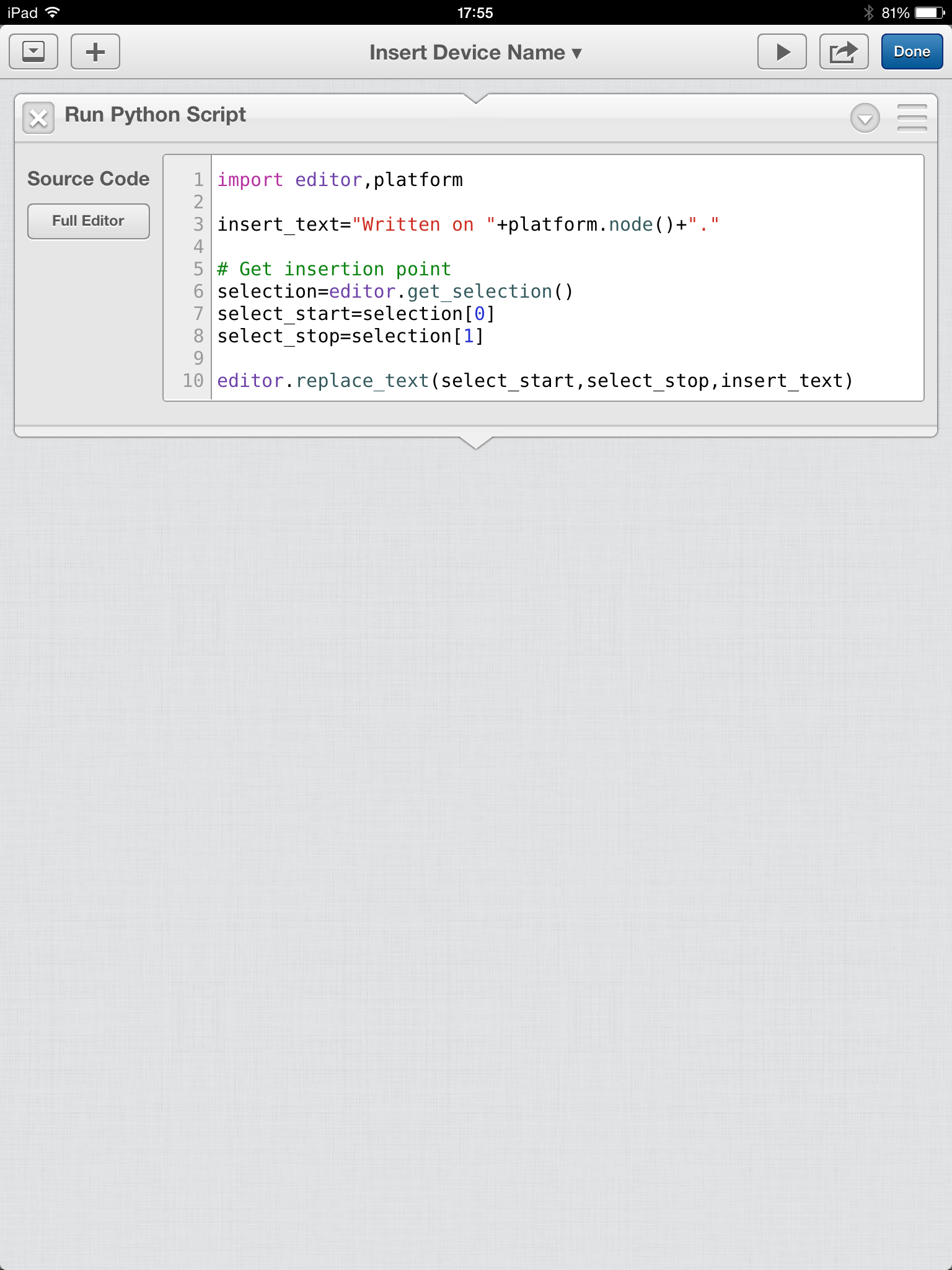
But here’s a simple workflow. It does a (probably useless) thing of inserting the name of the iOS device into your document’s text at the cursor. The workflow has only one “stage”, a Python script[3]:

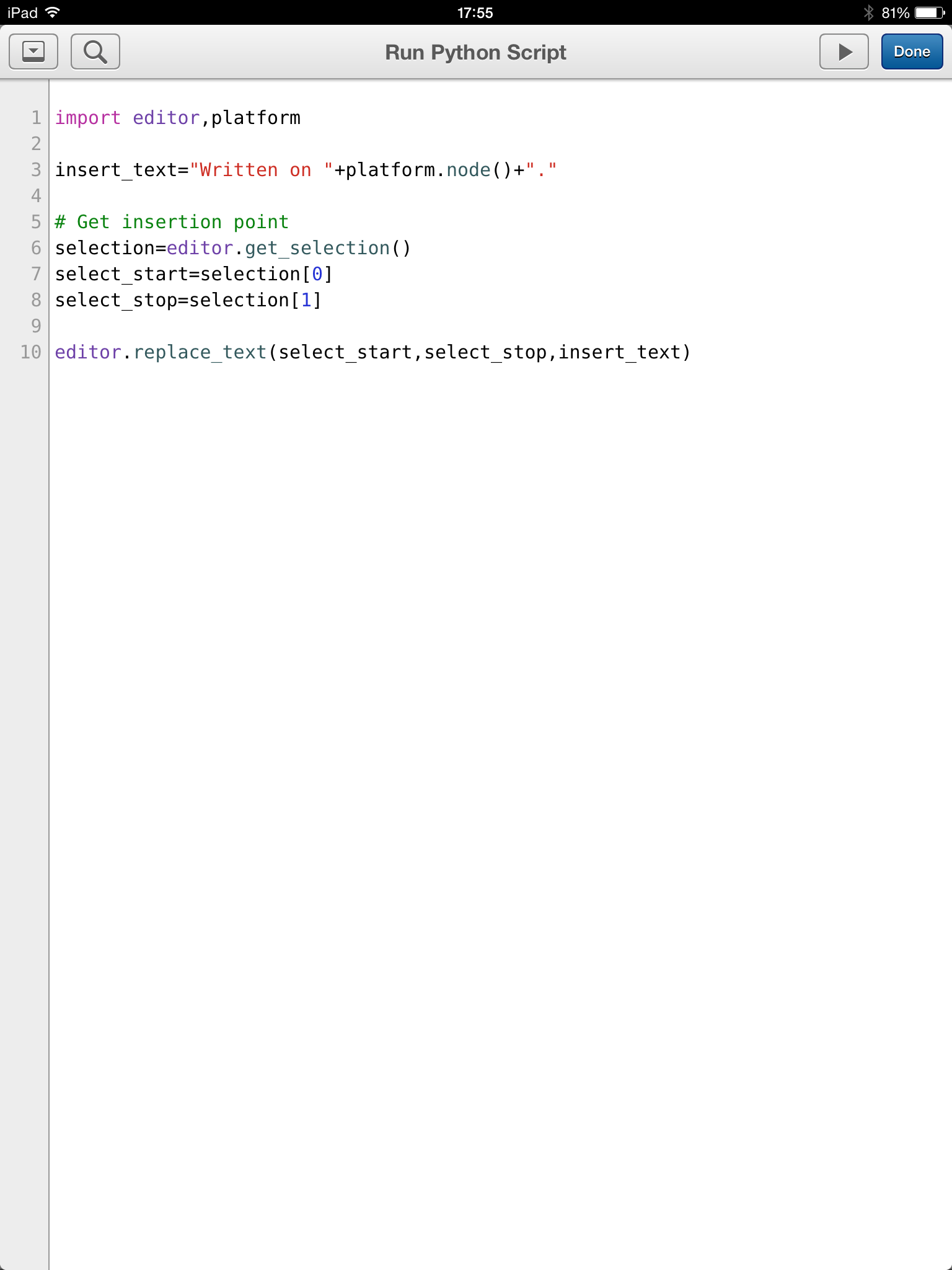
This looks like “keyhole surgery” but clicking on the full editor yields

and then you can edit, with some very nice syntax assistance and module prompting, to your heart’s content.

When you run this the words “Written on FunfPad[4].” are inserted into the text. Actually, if you have selected range of text it will all be overwritten with these words.

Of particular note here is the editor module – which gives tight integration between Python and the editor. Others such as workflow round the integration out nicely.

There’s a nice little community for discussing Editorial (including with the author) at omz:software Forums.[5] I’m learning a lot from this community.

I’m also using Dropbox to keep posts and graphics I’m working on. This enables me to work on them across Linux, OSX and multiple iOS devices. (I have no reason or appetite to write on Windows.)

So, you can see my writing toolset is evolving, and no doubt it will continue to. By the way this is my personal view and experience, rather than an IBM endorsement. But I’m sure you realised that.


  1. See As It Appens, Appening 1 – Note & Share on iOS and Appening 2 – Broken Sword Director’s Cut on iOS  ↩

  2. Ole Zorn, the author of Editorial, released Pythonista some months before. Pythonista is, as the name suggests, a Python programming environment for iOS. I like it as well but if Editorial had come along first I probably wouldn’t’ve bothered with it.  ↩

  3. Sometimes you can avoid Python, sometimes you can build a workflow with just a single Python stage, and sometimes you need to combine Python stages with other stages.  ↩

  4. Get it? 🙂 Hint: My German-speaking friends will groan at this bad pun and at “DreiPad”. 🙂  ↩

  5. Currently the supported level of Python is Version 2. The community is, for example, debating the merits and method of getting to Version 3.  ↩

Setting MEMLIMIT

(Originally posted 2014-04-30.)

I’ve been meaning to write about MEMLIMIT and its importance for some time.[1]

But it’s a moving target. So either there’s no good time to talk about it or lots of good times. 🙂 So let me discuss it now and then again later as necessary.[2]

So timing a post on MEMLIMIT is like choosing a wave to catch: In this case the wave was a discussion in IBM-MAIN about where to find out the MEMLIMIT for an address space, plus the way the MEMLIMIT value came to be set for that address space. Or maybe it’s the announcement of MQ Version 8, which does move the folklore on a bit.

So let me start by describing what MEMLIMIT is and why it’s important. Then I’ll talk about a few examples. Finally I’ll talk about instrumentation.

Why Is MEMLIMIT Important?

Nobody cares how much virtual storage you use, so long as you don’t cause real world effects.[3]

Real world effects include overuse of real memory – as it’s not free – and overcommiting real memory and, still worse, paging space.

MEMLIMIT is the mechanism for limiting an address space’s use of virtual storage. It can be set on the JCL EXEC statement, via an IEFUSI installation exit or in SYS1.PARMLIB(SMFPRMxx).[4]

One way or another you have to set MEMLIMIT for each address space:

  • Set it too low and the address space might refuse to start. Here I’m thinking of specific products.

  • Set it too high (or to Unlimited) and you create an exposure: Someone could create a vast 64-Bit Memory Object and touch every page, potentially causing the system to die.[5]

A good but old document on MEMLIMIT is Limiting Storage usage above the bar in z/Architecture by Riaz Ahmad.

Some Key Products

Let’s talk about CICS, DB2 and MQ.

CICS

In a typical CICS environment there are numerous CICS address spaces. In CICS 4.2 the minimum value of MEMLIMIT is 4GB, else the CICS region won’t start. In CICS 5.1 the minimum is 6GB.

In reality CICS will use what it needs to. But a region might in fact need more virtual storage, so do keep track of its usage: SMF 30 can help.

DB2

There are generally few DB2 subsystems. The only really big address space is the DBM1 address space. Nowadays the MEMLIMIT is set in the JCL as 4 Terabytes. Don’t change it: DB2 can be trusted not to use a threatening amount of real memory, so long as you do due diligence on real memory.[6]

MQ[7]

Again there are relatively few MQ subsystems but usually the big address space is MSTR. In Version 7 the default MEMLIMIT was set at 2GB in the JCL.[8]

In Version 8 things can potentially change, and you might need to increase the MEMLIMIT value: While buffer pools are by default still 31 Bit you can choose to make them 64 Bit (and you can long-term page fix them). If you make them 64 Bit you will need to review MEMLIMIT:

I’d suggest adding the sizes of the 64 Bit buffer pools plus 10% [9] to 2GB and setting that as your new MEMLIMIT.

Actually the CHIN address space can be pretty big, particularly if you have a large number of external connections. But it remains 31 Bit.

Instrumentation

As you might expect , SMF 30 (all subtypes) has the eventual MEMLIMIT value (in MB) for the job step. It also has the method by which the MEMLIMIT value was established.

I report on both of these at the address space level. And looking at this data gives me a much better idea how installations manage MEMLIMIT in general. If I talk to you about your MEMLIMIT approach it’ll be from this data and I might well refer you to this blog post. And I’m certainly talking about this in the 2014 revision of “Life And Times Of An Address Space”.


  1. In fact it is in the latest version of my “Life And Times Of An Address Space” presentation (see Recent Conference Presentations.)  ↩

  2. It’ll become necessary to when, for example, a product raises the minimum MEMLIMIT value necessary for its address spaces to start.  ↩

  3. Not entirely true as presumably the work you’re running matters to somebody, but rhetorically close enough.  ↩

  4. The default is the SMFPRMxx value.  ↩

  5. Am I foolhardy in mentioning this? I would say I wasn’t as most installations have sensible limits in place to prevent this scenario. Please check yours and fix it if need be – and then my purpose in mentioning it will’ve been served.  ↩

  6. This is rapidly becoming understood by z/OS and DB2 Performance people. Perhaps I should write a separate post on this some time.  ↩

  7. My thanks to Matthew Leming of MQ on z/OS Development for the information herein.  ↩

  8. In fact there was a small amount of 64 Bit exploitation but 2GB is generally sufficient.  ↩

  9. The additional 10% is for the buffer pool control blocks, which are above the bar whether the buffer pools themselves are or aren't.  ↩


TSO Regular Expression Testing Tool

(Originally posted 2014-04-26.)

I’ll admit I’ve found regular expressions a bit of a struggle. I bet most people have. For me it’s a matter of lots of arcane symbols that don’t have any inherent meaning. Contrast with many programming languages, which do have some.

It’s also not the case I don’t understand the concepts.

Anyhow I’m edging towards the point where Production code will need to allow regexes. So I want to take a list of space-separated names and see which items match a given regular expression.

For example a list of address space names.[1].

And so the FL (for “Filter List”) REXX EXEC was born.

The code is below. It uses grep to do the testing and BPXWUNIX invokes grep.

You invoke it with

TSO FL <regex> <list>

if you’ve put it in a suitable CLIST library. Mine is in my ISPF one. I can also call it from ISPF Option 6 or from Batch.[2]

For example

TSO FL CICS$ CICSA CICSB PRODCICS MYCICS

Will display the string

PRODCICS MYCICS

as these two items match the regular expression.

/* REXX */
parse arg mygrep mylist

/* Create a temporary stem set with data to pass to grep via BPXWUNIX */
wds=words(mylist)
do w=1 to words(mylist)
  tmpStem.w=word(mylist,w)
end 
tmpStem.0=wds

cmd='grep "'mygrep'"'

/* Do the actual grep */
call bpxwunix cmd,tmpStem.,filter.,stderr.

/* Turn returned stem set into space-separated list */
resultList=""
do f=1 to filter.0
  resultList=resultList filter.f
end

/* Print any error messages */
do e=1 to stderr.0
  say stderr.e
end

say strip(resultList)

exit

Obviously this could be modified to be a callable routine, or to use one. In this simple sample I thought it best to leave it as open code.

You could probably also find a way to pass parameters to grep like -i for case insensitivity.

One further refinement which is more of a stretch is handling list items with a space in them: You’d need to rewrite the bit that creates stem variables from the words in the list string. But for my purposes I’m looking at names which don’t have spaces in them.

Observant readers will spot this code is derived from Filtering REXX Query Results With BPXWUNIX but this version is easy to prototype with from the command line.

If you’re wanting to get started with regular expressions have a play with it. Enjoy!


  1. See Towards A Pattern Explorer – Jobname Analysis where I’ve explored this before.  ↩

  2. I’ve no idea how to invoke it if the list parameter is long enough to be beyond what fits on one line – interactively. In Batch you can use + or – as a continuation character. Calling from REXX you can, of course, pass an arbitrarily long string. But for my testing a short list suffices.  ↩

zIIP And DB2 Version 10 DBM1

(Originally posted 2014-04-14.)

This post adds some additional DB2 Version 10 specifics to what I mentioned in New zIIP Capacity Planning Presentation. I said this would be a living presentation, and so it has proven to be. It’s had two outings so far and there are a couple more confirmed.

First the times I’ve given it:

  • On 9 April 2014 I was very pleased this was the very first presentation given at the GSE/UKCMG zCapacity Management and zPerformance Analysis Working Group in IBM South Bank.
  • This past week I tried it out as the jumping off point for a single-company discussion on zIIPs.

Now what’s ahead:

  • I’m using the material again in another single-company setting. I’m quite keen the material can be used this way as I think a lot of installations will want to think the subject through.
  • At the System z Technical University, 12 – 16 May in Budapest, I’m presenting to a (hopefully) much larger audience. Do come along if you can!

So since after these two outings I’ve extended the presentation by a couple of slides – and it’s these new topics I want to discuss in this post. They are:

  • Subcapacity General Purpose Engines (GCPs)

and

  • DB2 DBM1 zIIP Eligibility levels in DB2 Version 10

Subcapacity General Purpose Engines

I’m seeing quite a few installations with “subcapacity general purpose engines” – such as zEC12 Model 6xx processors. As you probably know with these the effective capacity of the GCPs is less than that of a 7xx but the zIIP (and ICF and IFL) engine capacity is the same as that of a 7xx GCP engine.

For example a z196–6xx has GCPs that are roughly half the speed of the zIIPs. And a zEC12–5xx would be a little more than 1/3 the speed of the zIIPs[1].

Having a faster zIIP than GCP can be good news as each zIIP could process CPU-intensive work faster and has more capacity. On the other hand when zIIP-eligible work runs on a GCP (as it might do in times of zIIP Pool stress) stuff (maybe “CPU Stringent” stuff) will run slower – introducing variability.[2]

It’s tempting to configure fewer zIIPs than you might if they’re, say, three times faster than the GCPs. I’d be cautious about that – because of the queuing effects[3] and the drop in performance that running zIIP-eligible work on a GCP might bring.

DB2 Version 10 zIIP Eligibility

One discussion I had was about an imminent migration from DB2 Version 9 to Version 10. In this case the use of zIIP by DBM1 is entirely new. My off-the-cuff response was to estimate the whole of DBM1 going to zIIP upon migration. This is, as you would probably guess, an overestimate. But it’s good enough for checking you have enough zIIP capacity to take the additional demand.

But I went back to the data I have from two DB2 Version 10 customers:

  • Client A has no zIIPs.
  • Client B has zIIPs.

After a head scratching moment I was pleased that I had both cases: The data appears to behave differently in the two cases, but in reality it’s consistent.

Here’s the unifying piece of information – that got me beyond head scratching:

Field SMF30CPT – which contains TCB and similar – includes zIIP-eligible work that runs on a GCP. It doesn’t contain zIIP-eligible work that actually does run on a zIIP.

Client A

The following is a graphic I already had in the presentation. (You might want to pop it into a separate tab in your browser.)

As I said they have no zIIPs so all zIIP-eligible work is included in the TCB number in the table.

If you look at the “DSNRDBM1” row in the table you see the TCB is 1.0% of an engine and the zIIP-on-GCP number is 0.84% of an engine. All the Dependent Enclave CPU is zIIP-eligible[4].

So somewhere between 80 and 85% of all the DBM1 CPU is zIIP-eligible – dividing 0.84 by 1.0 or so.

By the way, SRB is tiny so I’ve not displayed it.

Client B

Remember Client B does have a zIIP.

Again, any zIIP-on-GCP CPU would appear in the TCB number – but here it’s tiny. All the zIIP-eligible work does indeed run on a zIIP, so isn’t included in the TCB value.

As a one-off [5] I’ve created the following graph that explores zIIP-eligibility by time of day. I’ve added it to the presentation.

It shows generally zIIP-eligibility is in the region of 70 – 80 % of the total, consistent with Client A. The reason for creating it was to see how much the zIIP-eligibility varies. For this customer there is some variation and indeed a few sekips[6]. These, if one were to take the trouble to explain them, would probably turn out to be periods of low Prefetch and low Deferred Write. One might hazard a Direct and Read-Only situation could lead to a much lower level of zIIP-eligibility.

So, I would think it reasonably important to measure what proportion of DBM1’s CPU is zIIP-eligible but expect it to be in the region of 3/4. If you’re going to Version 10 from Version 9 I would provision enough zIIP CPU to support 100% but expect rather less.


I’ve enhanced the presentation with the above and that’s what I intend to give in Budapest and use in this next customer discussion. It might evolve a bit in the meantime – and that’s OK. The next version going up on Slideshare will probably be after Budapest, so mid May.

And I already know I need to do some work on the changes on DB2 Version 11 which promise more DB2 zIIP eligibility: I haven’t done the research yet.


  1. At the z/OS System level you can see the speed difference using field SMF70NRM, at the Service Class Period level using field R723NFFS and at the address space level using field SMF30SNF. In all these you need to divide by 256.  ↩

  2. PM30468 changed the zIIP-eligibility behaviour of DDF work in a way that has similar consequences (but less severe than it happening to a DBM1 address space): Instead of a proportion of a thread being eligible, a portion of the threads are entirely zIIP-eligible and the rest not at all. I would expect some variability of outcome (perhaps masked by other response time components) with Subcapacity GCPs.  ↩

  3. Standard Queuing Theory has a particularly unforgiving curve for a single zIIP. Two way, though much better, still isn’t pleasant.  ↩

  4. This being from a genuine report shows different levels of precision for some fields. One day I’ll get round to fixing it.  ↩

  5. I’m not yet convinced I need to create this graph as a matter of course.  ↩

  6. Well, what would you call the opposite of a spike? An antispike? 🙂  ↩