SMT – Some Actual Graphs

(Originally posted 2016-11-13.)

Back in the Summer I talked about z13 Simultaneous Multithreading (SMT) in Born With A Measuring Spoon In Its Mouth. I shared that I was feeling my way forward, and discovering others were doing likewise.

Here we are a few months later and my code has come on in leaps and bounds.1

So I think it’s worth sharing some design stuff and a little discovery; I’m working on the principle that people have to embrace SMT on their own personal journey. 2

So let me show you a couple of graphs. I’ve obfuscated the system names on the graphs but otherwise they are “live”.

Changeable Things Need Graphing By Time Of Day

That is, of course, stating the obvious. But here is my graph that shows how some key metrics vary by time of day:

So, for example, Maximum Capacity Factor – being estimated from live measurements – varies by time of day and workload mix. Obviously, Capacity Factor – representing current load – also varies.

Notice how Average Thread Density – the average number of active threads when any are active – peaks during the day. This is a java-heavy workload, peaking in its use of zIIP during the day.

I’m not yet certain I’m wringing all of the insight out of the dynamics yet but I think this graph a good first step in that direction; My experience of this sort of thing is this graph will evolve a little – as I gain more experience.

Engine-Level Analysis Is Interesting

I’ve been meaning to create this sort of graph for a long time – and SMT provides the perfect excuse.

The x axis is processor (or thread) sequenced by Core ID.3

You’ll notice the general-purpose (CP) processors come before the zIIPs (IIP).

Generating a readable graph but without too many x axis label suppressions is tough. But note for the zIIPS each core has two CPUs (with SMT–2) whereas the CPs have one.

While – from the previous graph – the picture is dynamic I think there is value in this shift-level graph. Doing a 3-dimensional one wouldn’t be hard but I think it would be hard to consume. (Time would be the third dimension.)

In any case there’s some interesting stuff in this graph:

  • The Parked processors (in turquoise) are interesting: No GCPs are permanently parked but several are partially parked. For the zIIPs, however, it’s a different story: 6 permanently are – 3 cores. 4

  • Certain things come in pairs: LPAR Busy and Core Productivity – as they are at the core level, rather than the thread level.

  • That’s not entirely true: GCPs don’t exhibit the “paired” behaviour. But that makes sense: Only a single thread is enabled on a core.

  • For GCPs CPU Ids are even numbers; For zIIPs they’re both odd and even. The zIIP values didn’t surprise me. The GCP ones did – and I’ve seen this for two customers’ data sets now.

  • Some of the zIIP CPU Ids are up in the x’70’ onwards range. This surprised me and caused me to have to widen the CPU Id field to 5 characters. 5

Today a lot of the above looks like tourist information. My golden rule with tourist information is there’s high probability it’ll turn out to be diagnostic rather than just interesting – some day.

Conclusion

So, I’m quite pleased with the way these graphs turned out; They do illustrate some of the SMT behaviours.

Obviously experience will condition how this reporting evolves. Watch this (or some similar) space!


  1. “That must be nice for you” y’all cry. 🙂

  2. It might also help if I come calling and throw graphs at you. 🙂

  3. I’ve chosen to print CPIDs as hex but coreids as decimal.

  4. I’ve wanted to plot Parked Processors for a long time now; SMT is just an excuse.

  5. CPU Id is two bytes and the SLR query returns it as a decimal number – which necessitates 5 decimal positions.

Mainframe Performance Topics Podcast Episode 8 “Queue Me Up”

(Originally posted 2016-10-29.)

We wanted to get this episode out much sooner, but things conspired against us somewhat. Not least someone we really wanted to interview – to kick off a whole series of topics – having technical troubles.

So we went a different way from what we intended.

And we also had a few scheduling problems. But we’re here now. I hope it was worth the wait.

And just to repeat one thing: If you come anywhere near use we’re miked up. 🙂 Seriously, we’re conducting impromptu interviews when we’re out and about. Find us or avoid us, to taste. 🙂

Below are the show notes.

The series is here.

Episode 8 is here.

Episode 8 “Queue Me Up” Show Notes

Here are the show notes for Episode 8 “Queue Me Up”. The show is called “Queue Me Up” because:

  • Marna talks about moving up to higher z/OS releases…or releases “in the queue”.

  • Martin talks about the Coupling Facility list structures…or “queues”.

We had some follow up:

Mainframe

Our “Mainframe” topic was a discussion on z/OS upgrade timing considerations.

z/OS R13 is now out of service since end of September 2016, five years of regular service support since GA. There are three consecutive releases of coexistence (with releases planned on coming out every two years).

This “discrepancy” between five years of service and and six years (three times two) of coexistence has been quite interesting and deserves some thought. Marna talks about some considerations, and it might be that the “n-2” model should be reconsidered to be a “n-1” model for some customers.

Performance

Our “Performance” topic was an extension of this blog post of Martin’s: Right On Queue.

Martin talks about Coupling Facility list structures, and how they are different from lock and cache structures. He also covers some considerations and causes for how they might get filled up. (Think of the analogy of a pipe getting blocked as one case.)

Sizing is important and he uses SMF 74-4 and RMF Monitor III. A good rule of thumb is that your structure’s maximum size should be in the range of 50% to 100% of the current size. More than double puts you at risk of having a list structure full of control blocks and little data. You also need to monitor how much of the current size is actually in use.

Topics

In our “Topics” section we discussed a travel app called Waze. It’s a crowd-sourcing app you can use to get real-time travel estimates and routes. It also alerts you about such items as accidents, debris, police cars, etc, which other users have reported. This app is particularly useful even if you have to put up with a very small amount of advertising.

Where We’ll Be

Martin is in the *shires (Buckinghamshire, Yorkshire, Wiltshire), as well as a short trip to Amsterdam, during the rest of the year (at the time of going to press). And…also with Marna in:

  • Guide SHARE Europe UK, November 1-2, 2016. A roving microphone might appear, so please join the conversation if you wish!

Marna is going to:

On The Blog

As well as Right On Queue, Martin posted to his blog since our last episode:

  • Automatic for the Peep-Hole – about experimenting with automation for his Apple watch to dictate and send emails – using both web-based and on-device tools. It was really a test bed for thinking about when on-device automation is best and when web-based automation is better.

  • Transaction Counts – about counting transactions with RMF.

Contacting Us

You can reach Marna on Twitter as mwalle and by email.

You can reach Martin on Twitter as martinpacker and by email.

Or you can leave a comment below.

Right On Queue

(Originally posted 2016-10-22.)

Seasoned readers will recognise the title of this post as a bad pun, rather than a mis-spelling. [1]

One emergent theme in our code for Parallel Sysplex Performance is treating individual coupling facility structures on their merits. For example, lock structures are different from cache structures.

But there is much commonality in the instrumentation. For example Maximum Size, Size and Minimum Size are common to all.

One type of structure I haven’t paid much detailed attention to is List structures. Two common examples are:

  • XCF Signalling Structures [2]
  • CICS Shared Temporary Storage queues[3]

But an incident recently led me to think about List Structure behaviour:

Two test systems with CICS regions on were sharing a Temporary Storage Queue List structure. The structure itself is 20MB in size (with a Maximum Size of 98MB)[4]

The structure itself got to full.

If you approach the structure as some form of queue it helps, because it lets you muse in the following ways:

  • Maybe the reader stopped reading.
  • Maybe the writer suddenly splurge wrote.
  • Maybe the writer outpaced the reader for some other reason.

The truth of it does need sorting out. All of these are feasible explanations in a testing scenario but you wouldn’t want to go into production like this.

In a queuing environment you have to think about how big a queue is required.[5]

In general a large queue (buffer) helps with transient variations in writer and reader speed; It doesn’t help much with persistent outpacing.

But what can put a “bung” in the pipe? Or appear to?

  • A dead reader can do it – whether (in this case) a CICS region, the DB2 it connects to, the LPAR or the machine. You get the picture, I’m sure: It’s not just the actual reader that matters.
  • “Market Open” – where a concerted spike in writes can remain unmatched for a while.

So we need to monitor certain list structures. In SMF 74–4 we have, among other things:

  • Maximum number of elements – R744SMAE
  • Current number of elements – R744SCUE

Plotting the latter as a % of the former is probably the right thing to do. Obviously an RMF interval of, say, 15 minutes might not catch sudden spikes.

But in the “Market Open” type of scenario it’s worthwhile trying to understand what it does to major queues. And as this post is about list structures those would include XCF signalling structures, CICS Temporary Storage queues and MQ shared message queues.

In the case I mentioned, the structure was resized to 49MB. I didn’t hang around to see what the resolution was, from the CICS point of view.

One final thought: Don’t be tempted to set the Maximum Size of a structure ludicrously big, relative to the Initial Size (or even the expected day-to-day size): I have it on good authority the structure would be full of control blocks, rather than data.


  1. An even worse pun would be “write on queue”, of course. 🙂  ↩

  2. Detectable from SMF 74–2 XCF records’ Path Data Sections.  ↩

  3. You can detect the address spaces because their program name is DFHQXMN but not the structures directly from SMF. Generally, however, the list structure name is mnemonic.  ↩

  4. I’ve no real idea, by the way, if this is too small. I guess that’s part of the point of this post.  ↩

  5. We’ve been here before (some of us) with BatchPipes/MVS “Pipe Depth (BUFNO)”.  ↩

Automatic For The Peep-Hole

(Originally posted 2016-10-09.)

I have to admit to being a bit of a wannabe when it comes to automation.

Certainly most of my career has been built on using and building tools – and you’d have to pry them out of my luke-warm retired hands. 🙂 But when it comes to automation in my personal life it’s a bit of a different story:

  • I haven’t (yet) got into Home Automation. Baby steps still.1
  • I don’t use many automation scripts on computers and iThingies.

Now this might surprise some people. But my modus operandi is much closer to “find a real use case” than you might think; I have to find projects that look like they’re close to a pay-off.

Anyhow, I have had a fair amount of practice trying to put workflows together, generally with decent results. Which leads me to slightly abstract musings on the subject of Automation.

In any case, I hope this post is in some small way an eye opener for you as to what you can do with the hardware and software (literally) to hand.2

Having installed Watch OS 3 on my Apple Watch3 I’ve found much to like; The usability, particularly the speed boost and the new dock, has improved to the point I want to play with it much more.

(I also paid a lot of money for a Task Manager that has a very nice Apple Watch interface – OmniFocus – but that’s another story.)

So I’m happy to input text on the Apple Watch – indeed inspired by Omnifocus4 – and there are lots of ways to do that. Given that, I thought a nice experiment would be to craft workflows where I can input text on the watch and have that sent as an email to my work email address.

Experiment: Sending An Email To Work

I tackled the exercise of dictating into the Watch and having it email me two different ways:

  • Workflow – running entirely on the iPhone and the Apple Watch.
  • DO Button by IFTTT and IFTTT – which mostly uses services on the web, kicked off by the Do Button app on the Watch.

One key difference between these two approaches is that Workflow is entirely device-oriented, whereas IFTTT has a heavy dependence on external services. Of course, both approaches require an external agent to actually send the email.

So let’s examine the two approaches in a little more detail.

With Workflow – Solely On iOS and Watch OS

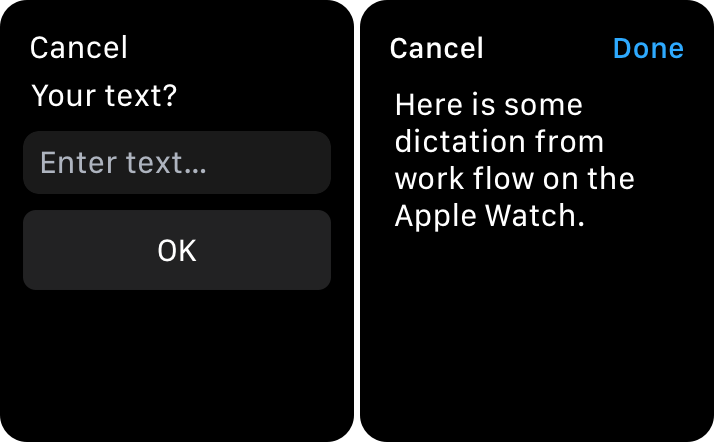
I can rapidly kick off a workflow from the dock in the Watch. The left side below shows the first screen. You can dictate from there. The result is the screen on the right.

If I tap on “Done” the workflow continues, but there’s a twist:

I deliberately (and gratuitously) inserted a stage that gets the phone’s battery level. Obviously this can’t be run on the watch and, more importantly, can’t be run on the web. It has to be run locally and this is the key point:

Automation on the device can pick up things only the device knows about.

Setting up this workflow was very easy – being entirely on the iPhone. To make it work from the Watch I just had to select that as an option.

I will say the folks that make Workflow are very responsive and are rapidly adding to its capabilities.

You can get workflows others have built from within the app, and browse them on the web.

With IFTTT – External Automation

The IFTTT approach is a bit different. For a start you compose recipes using a Web interface, or use ones already built.

Secondly, the trigger for the recipe is a separate app – Do Button.

Thirdly, the action really takes place on the web.

One consequence of web-orientation is that it is device-neutral with an Android client being available. Or even not using a device at all. A couple of my recipes don’t use a device.

Again the action starts in the dock on the Watch.

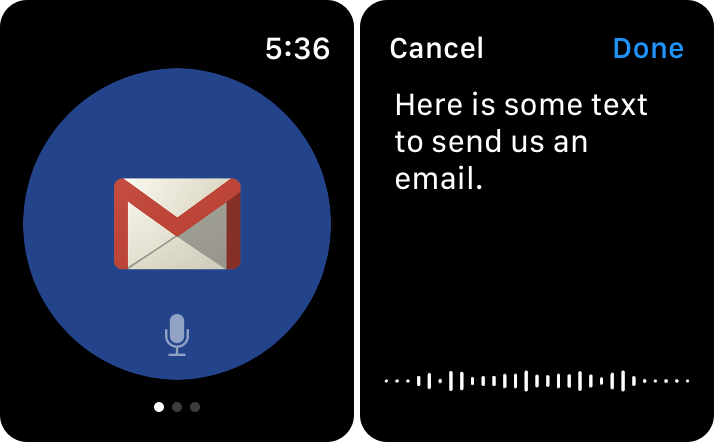
The left side below shows the first screen of the recipe. The right side shows the dictation screen.

This time I have no ability to insert the phone’s battery level. But that’s not a real-world requirement for me.

I will say I found the recipe creation process a little more cumbersome, but not really difficult.

Again the developers are adding capabilities all the time.

Conclusion

While there’s quite a lot of automation you can do solely on an iOS device – and Workflow is not (quite) the only game in town – eventually most workflows (automation scripts, if you prefer) will need external services. Sending an email is just one of those cases.

But I would counsel people to do as much automation on the device as possible, for three reasons:

  • It’s probably easier to develop with e.g. the Workflow editor.
  • Security is probably better.
  • Speed will be better.
  • You can test – and possibly run in “Production” – even when there is no network connectivity. At least up to a point.

But the “on device” and ’fetching out for external services" approaches are not mutually exclusive. For example Workflow has an IFTTT action – where a named recipe can be invoked. It’s just that making good choices as to how to automate pays dividends. And at any given time each mode – on-device and on-web – will have access to different sources of data and actions.

By the way, the screenshots were taken by:

1) Pressing the digital crown and the side button simultaneously.5 This stores the screenshot in the Photos app.

2) Using the LongScreen app to stitch the photos together.

Well, I hope I’ve encouraged some of you to play with some nice toys; Despite what I said at the beginning I have a few choice workflows that ease my life.

And I’ll leave it to you to figure out the title. 🙂 It’s a rather contrived pun.


  1. I just got an Amazon Echo as a real first step.

  2. Or indeed on your wrist.

  3. It’s a Series 0, as some people have dubbed it, or the original Apple Watch. I think I’ll skip Series 2 and await Series 3, perhaps next year.

  4. I use dictation to send new tasks to my Inbox for later classification. I’ve been known to pull into a lay-by to do this. 🙂

  5. That behaviour has to be restored on Watch OS 3 from the Watch app on the iPhone.

Transaction Counts

(Originally posted 2016-10-06.)

I’ve been musing on counting transactions for a customer recently. I’d like to share some of that thinking with you.

This post is about RMF SMF Type 72 data, rather than middleware-specific stuff. That’s because it’s

  • Generic – applicable to multiple transaction managers.
  • Much lighter weight – so every customer can collect, retain indefinitely, and process it.

I’m sure this customer is far from alone in being interested in where growth came from. Because they are a CICS / DB2 and DDF customer I’ll concentrate on that, particularly CICS.

I’ve actually had no IMS situations recently. Also TSO transaction rates are rarely significant in the customers I see, so I’ll ignore TSO.

Batch is quite significant in this customer, but it requires a completely different treatment. Perhaps I’ll write about it some other time.

When I say “growth” it is of course a combination of two factors:

  • Growth in transaction rates.
  • Changes in CPU time for each transaction.

DDF

I’m going to discuss DDF transactions only briefly; I’ve talked about them a fair amount, not least in More Fun With DDF.[1]

Perhaps more useful is this presentation of mine[2]

But to recap what many people already know: DDF Transaction rate is recorded at the Service Class Period (also Report Class) level – in SMF 72.

This doesn’t really help you when it comes to CPU per transaction. For that – at the DB2 subsystem level – you get DDF transaction rate and Enclave CPU (plus response time). [3]

CICS

CICS is an interesting case, and one I’ll talk about for the rest of this post.

In what follows I’ll refer to the following example, which incorporates a number of typical elements.

If your CICS work is managed to WLM Region goals you don’t get transaction endings.

If transaction Service Classes are used the transaction rate is recorded. [4]

In the example transactions enter through a TOR and progress thence to an AOR. For most topologies the transaction is counted once in SMF 72 even if the transaction spans multiple regions. With SMF 110 CICS Monitor Trace enabled in both the TOR and the pair of AORs, you would see transactions ending in both places. The 110 view of transaction rate would be twice that of the 72 view.

On the subject of growth, for CICS at least difficult to calculate CPU per transaction

  • Transaction service classes not same as region ones
    • CPU recorded in region service classes

Difficult To Relate To Business Transactions

How IT transactions are wired together to form business transactions can be difficult to ascertain. In the example there are two business transactions – one in blue and one in green.

Both pass through some intermediate infrastructure, perhaps a web server. Even how non-z/OS transactions turn into z/OS ones can be difficult to ascertain. In our example:

  • Business Transaction 1 (in blue) spawns two CICS transactions – which each pass through the TOR to separate AORs the one DB2.
  • Business Transaction 2 (in green) spawns a single CICS transaction – which passes through the same middleware components. Possibly it uses the same transaction IDs as Business Transaction 1.

It’s worth keeping an eye on how Applications folks wire together transactions as they can be subject to change; While CPU per CICS transaction might not change the number of them that form a business transaction might.

The trend is towards more complex business transactions – which could mean a heady mix of more CICS transactions and heavier ones.

Difficult To Calculate CPU Per Transaction

As I alluded to when discussing DDF, the CPU per CICS transaction can’t be gained from SMF 72 as the region Service Classes have the CPU and the transaction Service Classes the transaction rate.

If, however, you had a transaction Report Class that corresponded to the region Report Class you would be able to use the data from the two to perform the calculation – CPU from the region Report Class and transaction count from the transaction Report Class.

But what do I mean by this?

If the transactions for a region in a specific Report Class had one of a set of Report Classes that were specific to that Report Class the correspondence could be made.

So, for instance, all the regions for the ATM application have Report Class RRCICATM. The second “R” refers to “Region” and “ATM” refers to the fact this is for the ATM application.

All the transactions that run in these regions have Report Classes like RTCICAT1, RTCICAT2, etc.. When these transactions run in different regions[5] their Report Classes have to be different. Here the first “T” says “this is a transaction Report Class”. “AT1”, “AT2” etc are for the ATM application.

Personally, I think this might be a little fiddly to achieve. But I offer it as a suggestion.

Time To Rework CICS Report Classes?

There are lots of reasons for examining your WLM policy periodically. What I’ve discussed in this post is just another reason to.

Some specific things I’d suggest in this area, for Report Classes, are:

  • Make good use of report classes for transactions.

    For example, breaking out Mobile.

  • Ensure report class transaction rates add up to the corresponding service class’s transaction rate.

    Unless you’re using Report Classes to aggregate Service Classes they should provide a useful breakdown of the Service Class transaction rate.

  • Consider the technique I outlined to relate transactions to regions.

A couple of notes on implementation:

  • It’s safe to introduce changes to the Report Class setup one step at a time; There is no impact on performance.
  • If you’re tracking through time (and you should) changes to the Report Class (and Service Class, for that matter) setup are likely to introduce problems when comparing “before” to “after”. [6]

In general, though, I would be trying to calculate transaction rates and CPU per transaction on a daily basis, as well as over the longer term.

“Daily” might surprise you but with SMF 72 it’s lightweight and it just might catch an application change that either introduces more IT transactions or makes them heavier.


  1. This will in turn point you to a veritable thicket of posts about DDF.  ↩

  2. I’m about to update this for UK GSE Conference (November 2016).  ↩

  3. see DB2 DDF Transaction Rates Without Tears.  ↩

  4. Also response time distributions, relative to the goal, as depicted here.  ↩

  5. Unlikely in this example. So perhaps a poorly chosen one.  ↩

  6. Those are quite bad enough anyway. One problem we encountered was trying to find comparable “Month Ends”.  ↩

Mainframe Performance Topics Podcast Episode 7 “We Were On A Break”

(Originally posted 2016-09-10.)

Getting back “in the studio” was really nice. And we never had any doubt we’d keep recording – so the title is very tongue in cheek.

Below are the show notes.

The series is here.

Episode 7 is here.

Episode 7 “We Were On A Break” Show Notes

Here are the show notes for Episode 7 “We Were On a Break”. The show is called “We Were On a Break” because:

  • It’s been a very long time since we last recorded an episode. You should read nothing into other than our schedules and, in particular, Martin’s long holiday put paid to recording for a while.

    But now we’re back…

We had one piece of follow up:

  • IBM Doc Buddy – available for iOS and Android.

    This app has been enhanced with new components (aka libraries) and has received some fixes that users have found. There’s a very reponsive team working on this tool! This app is now better than the old LookAt tool, since reason codes can be searched.

Mainframe

Our “Mainframe” topic was a discussion on Continuous Delivery.

Marna talked about four important references to understand what the z/OS platform is doing for Continuous Delivery. (IBM is embracing Agile development for many new functions, and will be providing those functions to customers in a Continuous Delivery method.)

Takeaway: some products will be putting their new functions in the service stream, while others might be putting them in releases. Read announcements carefully to see which of your products is following which model.

Performance

Our “Performance” topic was an extension of this blog post of Martin’s: Why Do We Keep Building Bigger Machines?

We acknowledge this is quite a high level treatment but it’s a question that we’re sure has been in the back of lots of minds. We’ve ideas to take some of the subtopics and make them topics in their own right.

Topics

In our “Topics” section we discussed what we (especially Martin) are using for creating presentations these days.

Products Martin mentioned were:

These are all available in some form or other for both Mac OS and iOS. And, of course, other tools are available.

Where We’ll Be

Martin is going nowhere fast. 🙂 Seriously, his travel plans are relatively local for the next few weeks.

Marna is going to:

Interesting Customer Requirements

Here’s two customer requirements we’ve taken notice of. Of course, IBM may or may not decide to do them, but they might be interesting if you’d like to vote on them.

  • “zFS Definitions of Greater Than 4 GB Not Being SMS-Managed Should be Available Under IDCAMS”, ID 92523

  • “Let IBM Knowledge Center search within a manual and simplify the use”, ID 93288 .

Request for Enhancements (RFEs) can be found here. Most z/OS items are under Brand “Servers and Systems Software”, and Product “z/OS”. Hint: use “I want to specify the brand, product family, and product” when searching.

On The Blog

As well as Why Do We Keep Building Bigger Machines?, Martin posted to his blog since our last episode:

Contacting Us

You can reach Marna on Twitter as mwalle and by email.

You can reach Martin on Twitter as martinpacker and by email.

Or you can leave a comment below.

Why Do We Keep Building Bigger Machines?

(Originally posted 2016-09-03.)

I know of no customer who uses the full capacity of a zEC12, let alone a z13? 1 So why do we make them bigger each time?

I should state this post is not in support of any product announcement; It’s just scratching an itch of mine.

I think it’s an interesting topic; I hope you agree.

What Is Bigger?

While this post isn’t exhaustive I think the main aspects are:

  • Processor Capacity
  • Memory
  • I/O Capability
  • Number Of LPARs

While I’ll touch on these, as examples, I won’t talk much about engine speed; That’d be a whole other post – if I were to write about it.

Where Are Most Customers?

This is just from my personal customer set, but most of my customers are in the range of 10 – 20 purchased processors per machine. Quite a few have sub-capacity processors.

Generally they have two or three drawers (on z13) or a similar number of books (z196 and zEC12). And most of my customers’ machines are either zEC12 or z13, with a few z196 footprints remaining.

Memory-wise, I’m seeing sub-terabyte to several-terabyte configurations, depending mainly on generations.

Customers I work with tend to have two or more machines.

Typically, customers have more than 10 LPARs on a footprint.

I don’t think any of the above is giving away any secrets. And not all customers are like this.

So Why Build Bigger Machines?

There are a number of reasons, which benefit a wide range of customers. Here are some that come to mind.

Scalability

To meaningfully achieve 141 processors (or 10TB of memory) on a single footprint requires good scalability.

I remember, just after the dawn of multiprocessor mainframes, how awful the multiprocessor ratios were. To achieve even modest levels of multiprocessing a lot had to change. And indeed it has, both in software and hardware.

To be able to scale to 141 processors successfully means good multiprocessor ratios are essential. For your 15-way to be feasible, scalability has to be good across the board, all the way up to 141.

The analogy of “the Moon Shot led to non-stick frying pans” is perhaps inappropriate, but the idea that engineering needed for top end machines yields results for smaller machines is sound.

Running Everything On One Surviving Footprint

Bad stuff happens thankfully rarely to mainframe footprints, but when it does customers need to run their high-importance workloads somewhere.

One of the scenarios wise customers plan for is running (the bulk of) two machines’ worth of work on one. Under those circumstances a normally, for example, 20-way might need to become a 35-way. And be effective at it.

So your operating range might need, in an emergency, to be much higher up the scale.

But it’s not just the “machine gone” scenario that has to be catered for. Indeed a subset of the drawers 2 in a machine might need to be taken out of service. Then you’d still want to run on the surviving drawers. So, a more powerful physical machine is a good thing, under those circumstances. 3

Unexpected Demand

While the economics of unexpected demand might not be nice, the inability to support a sudden massive increase in workload is even worse.

Most customers I know could grow their workload several times over and still be contained within the same number of footprints.

The trick is to avoid derailment factors. Perhaps “wargaming” massive growth scenarios should be seen in the same light as Disaster Recovery tests.

Two examples:

  • The use of the various capacity-on-demand capabilities.
  • Middleware scalability e.g. CICS QR TCB.

LPAR Limits

I know customers for whom the (pre-z13) limit of 60 LPARs on a footprint was a real limitation. These are mostly outsourcers.

Several use zVM but it would be nice not to have to 4.

I would say a prerequisite to raising the limit to 85 (on z13) was raising the limit on the number of configurable processors way past that. In the distant past I was involved in a Critsit with very large numbers of z/OS images on a footprint.

LPAR design is, of course, critical in this. And Hiperdispatch helps.

Memory

Physically installing memory is one thing; Making it perform is quite another.

For example, we’ve several times changed the fundamentals of memory management in z/OS over the years. 5

But note the continuing evolution of the way middleware uses memory.

Also note the way memory pricing has substantially improved over the years.

Closing Thoughts

Workloads are generally growing quite rapidly, mainly through two factors:

  • Increasing business volumes
  • More being done with each datdatum

So what might today seem very large might seem much more modest going forward.

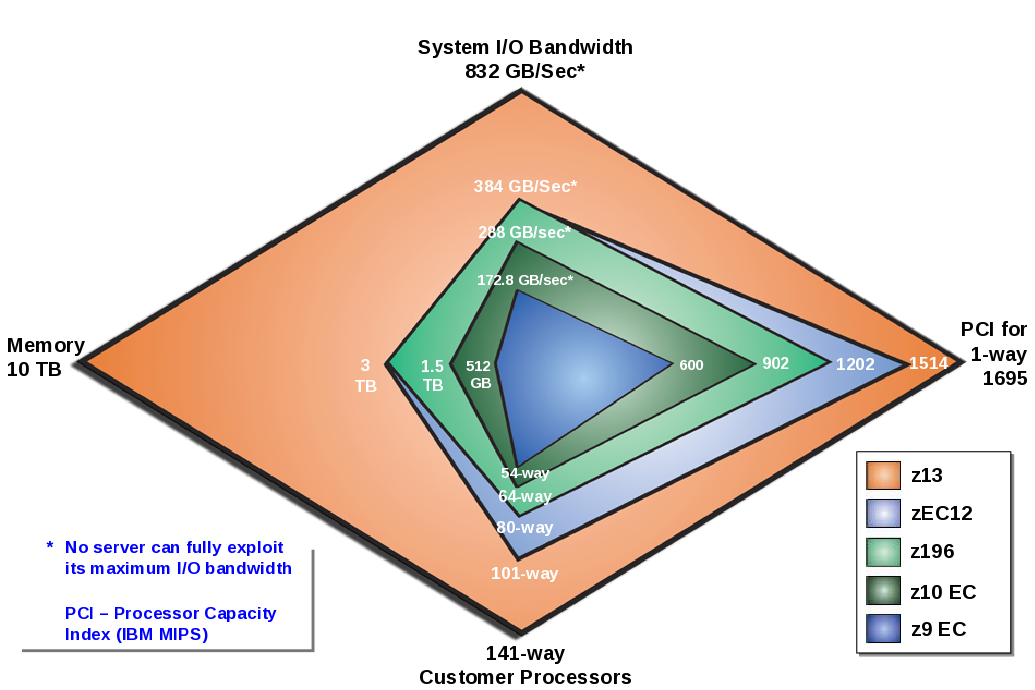
I’ve touched on more than just CPU because configuring systems in a balanced way is important. And you can see we pay attention to that in the following graphic.

This polar chart is for z13 and it shows how over the generations growth has been across all aspects.

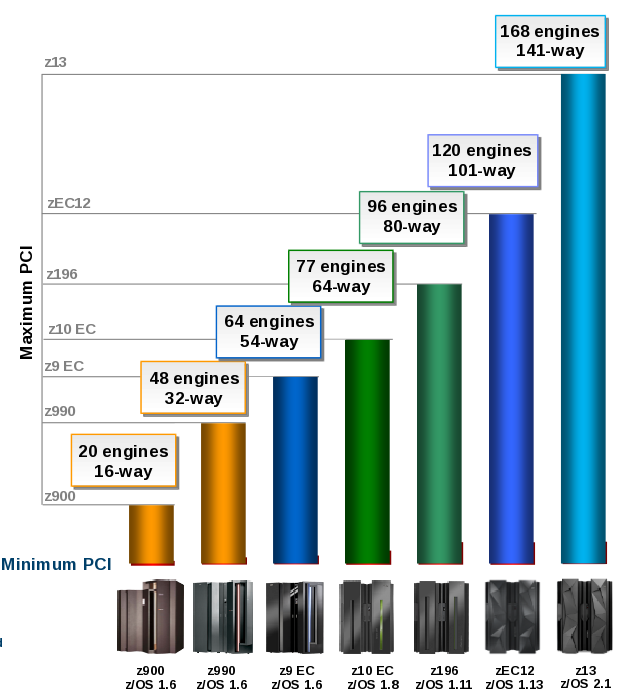
To be specific about CPU, the following chart shows steady growth.

(By the way these two charts were sourced from the most excellent TLLB (Technical Leadership Library).)

We’ve come a long way!


  1. I’m sure there are some fully-configured machines in the world, but I’ve yet to encounter them personally. ↩

  2. Or books if you are on a machine prior to z13. ↩

  3. As an aside, the first physically-partitionable machine I remember was the 3084-QX; It could be split into two independent 2-ways. I’m not sure if this ever had to be done to rescue one half. ↩

  4. This is not an anti-zVM statement, of course. ↩

  5. Are you still using UIC for much? If so please stop. ↩

A Record Of Sorts

(Originally posted 2016-08-27.)

When looking at a batch job1 I like to see how the data flows through the various steps.

The first step – some 23 years ago 🙂 – was to look at the Life Of A Data Set (“LOADS” for short).2

With LOADS – for VSAM and non-VSAM data sets – you can see who reads and writes the data set. You can also see the EXCP count. More on that in a bit but suffice it to say EXCP count might be enough to tell you if the data set was written or read in its entirety.

Why Record Counts Matter

Probably just out of curiosity. 🙂

Actually, really not…

I just said I can detect readers and writers and I used the words “in its entirety”. But I think it useful to go deeper. Here are two – off the top of my head – reasons to want record counts:

  • Because business volumes can show up in record counts. For example, a transaction file’s record count is the number of transactions in the life of this version of the data set.

  • Because it might explain some other count. More on this one in a minute.

Estimating Record Counts

I just used the word “estimating”. Under some circumstances we can do better than estimating, as we’ll see.

One of the reports our “Job Dossier” code produces is called “Job Data Set”. Basically a list of steps and the data sets each step accesses.3

For data sets accessed by QSAM we can estimate the number of records in the data set by examining the LRECL, the Block size and the EXCP count. But there are lots of problems with this:

  • This is only going to work for Fixed-Blocked (FB) data sets.
  • Compression complicates things. We need to fix our code to handle this – though today we print the compression ratio.
  • The assumption is the processing is sequentially start-to-finish.
  • You might do a small number of EXCPs not related to actual data transfer.
  • It’s likely the step will read or write partially-filled blocks.

Still, where applicable it’s a good start.

But we can do better:

DFSORT’s SMF 16 tells you the overall counts of input records and output records4 whether SMF=FULL5 or not.

So in a very simple case – a single sort invocation in a step – we can use these record counts to estimate the number of records in the SORTIN and SORTOUT data sets. And we can find the SORTIN data set represented by an SMF 14 record and the SORTOUT data set by an SMF 15 record.

Record Counts And SQL Statements

Several times in a recent batch study the SMF 101 SQL counts have borne some relation to record counts. Consider the following (very realistic) scenario:

The sort step reads a data set (SORTIN DD) and writes one (SORTOUT DD). The DB2 step reads the same data set and does something with DB2 data based on the records read.

For example, in one job step the Singleton Select count matches the input record count.

So we can glean that the selects are record-driven – just with SMF.

By the way, we match SMF 101 records with SMF 30–4 Step End records by Timestamp comparison and Correlation ID matching, which I describe in gory detail in Finding The DB2 Accounting Trace Records For an IMS Batch Job Step. Ignore the “IMS” bit if you like; The preamble is the more general bit.

What My Code Does Today

So, the essential thing is that DFSORT keeps good account of the records written – overall. For output data sets it keeps good counts at the individual data set level (with SMF=FULL).

We map all this, of course.

My first toe in the water is very limited:

For the “single sort in a step with one input data set and one output data set” case I use the SMF 16 record counts as the data set sizes. These overwrite any EXCP / block size / LRECL estimate for FB data sets – as it’s more accurate.

The really nice thing is it gives me an accurate estimate for VB data sets, which I didn’t have before.

Possible Extensions

A number of quite feasible extensions are:

  • I could keep the output data set’s record count once I’ve got it and use it in downstream steps. If it gets rewritten then the previous estimate could be invalidated, so that’s safe.
  • It would be tricky but I could propagate backwards the input data set’s record count to previous steps that read or wrote the data set.
  • I could use the OUTFIL and Output File sections in the SMF 16 record (as we query them) to handle the “multiple output data set” case.
  • With multiple input data sets I could pro-rate the input record count across them using the Access Method calls count in SMF 16 Input FIle sections of the SMF 16 record. (This one is dodgy but better than “I’ve no idea”.)
  • I said “single sort in a step” but there is enough timestamp instrumentation to do better than that. But where do multiple sorts in a step come from? Here are some examples:
    • DB2 Utilities – where record counts would be especially useful
    • ICETOOL
    • DFSORT JOINKEYS
    • Programs that happen to invoke DFSORT multiple times
  • I don’t flag whether a record count is exact – from DFSORT – or estimated. The latter could be printed in italics.

This is quite a long list of potential extensions – but each one is fiddle. Some will get done; Some possibly won’t.

All I know is our code’s ability to estimate record counts took a leap forward, and that is proving useful straightaway. And writing this has helped me sort my thoughts out, as has explaining it to a couple of friends (with a stake in this). And I haven’t even begun to talk about VSAM yet… 🙂


  1. Or indeed a whole suite of jobs. ↩

  2. Last mentioned in DFSORT JOINKEYS Instrumentation – A Practical Example, a post I need to write a follow on to. There is good news to share. ↩

  3. There’s much more in it but this will do for now. ↩

  4. As well as Inserts and Deletes. ↩

  5. I much prefer SMF=FULL as it gives you really nice stuff like individual input and output data set information. ↩

Fearful Symmetry

(Originally posted 2016-08-21.)

The title of this post is a Physics reference but this is not about Physics.1

A customer asked me the question “why am I not getting balanced CPU Utilisation between the various machines”? I’m responding without data at this stage so I’m going to be even more “hand wavy” than usual – both in the long call I had with them and this post.

So, let’s take it in stages…

Why Would You Want Balance?

I think it’s important to put this in context: You’re probably never going to achieve perfect balance, so the real world can’t be an automatic fail.

However, there are real world outcomes from imbalance. In the following diagram the impact – however you measure it – is much greater at higher load.

And you might measure it in terms of things like:

  • CPU per transaction
  • Transaction response time – the example given in the graph
  • Batch runtime
  • Virtual Storage occupancy

So there can be an impact and that should help you judge what is trivial imbalance and what is substantial.

Consider the following two cases:

Obviously in the former case the imbalance – taken as a whole – is not as severe as in the latter case. Momentarily, however, it could be significant 2.

There are other considerations:

For example, suppose you have a System Design Point of say 90%. That’s where no system should exceed that level of utilisation. Then significant imbalance (or skew) would cause other systems to have to have a lower maximum utilisation. So upgrades might have to happen sooner.

Where Does Imbalance Come From?

I would divide the causes into two:

  • Long-term structural asymmetry
  • Short-term routing decisions

Structural Asymmetry

When I look at customers’ mainframe estates I often see symmetric (at a high level) configurations. For example, the “twin machine” architectural pattern is commonplace.

If I dig a little deeper I might see sysplexes spread across these two machines, but additional LPARs on either side that break symmetry.

I might also see the two machines aren’t identical, hardware-wise. For example, one might be a z13 and the other still a zEC12.

Even if the machines are similar enough, their connectivity might not be. For example:

  • The primary disk controller might be in the same machine room as one machine, but distant from the other (because the latter is in a different machine room).
  • Connectivity to an external coupling facility might be asymmetrical.

Take the case where a sysplex comprise four3 members, two to a machine. I’ve seen cases where these four members aren’t running quite the same workload, in architectural terms. Two examples I’ve seen:

  • CICS regions might appear on two members with no analogues on the other two
  • Distributed (DDF) DB2 work comes into 2 members of the sysplex but not the other two.
  • Likewise asymmetric MQ connections.

Routing Decisions

Work gets routed on a continual basis. I think we can divide this neatly into two:

  • Big globs such as Batch
  • Smaller pieces of work, such as CICS, IMS and DDF transactions

In principle, big globs ought to be harder to balance than transactions, as should work with affinities. In practice I’ve found this to indeed be so as I’ve had quite a few questions about Batch imbalance.

There are two primary workload distribution systems:

  • Round robin, like a card dealer
  • Goal oriented, where quality of service influences placement

The former tends to even out the transaction rate, whether work is routed to the optimal place or is indeed CPU-wise balanced. But, statistically speaking, the chances of CPU balance are pretty reasonable.

The latter also has the potential for imbalance, because a better-performing server could well receive the bulk of the work. This imbalance could very well be OK as the aim is to run work well.

Imbalance in the “goal-oriented routing” case is especially a concern with a mixture of faster and slower systems, but this is really a case of Structural Asymmetry, as previously discussed.

How Can I Look At The Data?

The standard “problem-decomposition” approach applies but it’s worth rehearsing it:

  • Machine- and LPAR-level configuration and CPU Utilisation from RMF SMF 70
  • I/O Subsystem and Sysplex with various subtypes of SMF 74
  • Workload-level with RMF SMF 72
  • Address Space-level with SMF 30 Interval records
  • Transaction level with SMF 101 (DB2), 110 (CICS), MQ (116), 120 (WAS)

All the above is pretty standard and I hope you can see how each of these sets of instrumentation can detect imbalance – whether transient or structural.

Conclusion

So all the above was “talking cure” thinking it through; I suspect actually seeing data would add a whole extra layer of insight and experience.


  1. And no I didn’t know the Blake origin (according to this). ↩

  2. And with something like “Sloshing” – which generally isn’t detectable at the RMF e.g. 15 minute interval level it could be much greater still. ↩

  3. In this regard maybe George Orwell was right (in Animal Farm) with “Four legs good, two legs bad!” but probably not: Four of anything should provide better resilience than two. But balancing across two might well be easier ↩

Corroboration Not Correlation

(Originally posted 2016-08-14.)

This is a post where I have, yet again, to be careful to obfuscate the customer’s situation; I’ve no wish to embarrass them. So you’ll forgive me if there are no numbers. But there is a lesson worth sharing here. So I’m going for it…

It’s about DB2 and Workload Manager.1

I was recently asked to explain why an application’s DB2 Accounting Trace was showing so much Not Accounted For Time2 (NAT). Willie Favero discussed this here, essentially pointing to this IBM Technote.

There are a few things I’d pull out from this document:

  1. It’s part of DB2 Class 2 time – so when DB2 is supposed to be in control.

  2. The main causes are CPU Queuing and Paging. But there are a lot of others.

  3. It talks about NAT usually being small but I’d have an open mind about that. My experience is it is often quite large.

Point 2 is worth exploring in this case:

The umpteen others are generally not the cause of NAT, so I tend to advise customers to concentrate on CPU Queuing and Paging as potential causes.

So, while discussing this with the customer, the following occurred to me:

Let’s look at this from a WLM point of view

Before we go too far with this, it’s important to understand where DB2 work gets classified in WLM terms.

While there is some work that gets classified as DB2 – the subsystem address spaces in their Service Classes – the vast majority of DB2 work runs with the Service Class (and Dispatching Priority) the original work was classified with. For example:

  • CICS transactions with the CICS goal for their region (or one derived from the Transaction ).
  • DDF work classified via its own rules – into Enclaves in the DB2 DIST address but still not with DIST’s Service Class / Dispatching Priority.3

So, the point of this post is to make the linkage between WLM Goal Attainment and DB2 NAT.

To keep this simple – and the actual customer case looks like this – let’s assume we’re talking about a CICS application with regions classified with Region goals, going against a DB2 subsystem.

Region goals are Velocity goals, which makes the following make sense…

Suppose the Velocity goal is Importance 2, Velocity 60%.4

Given velocity attainment is

you could have quite a lot of Delay For CPU samples and still make the goal. So long as there were no other Delay samples, such as Delay For I/O.

And, you probably guessed this part, this level of Delay For CPU is going to appear as some level of NAT.

Corroboration Not Correlation

At this point I flatter myself to think you’ve been wondering where the title comes from. 🙂

So let’s get to it…

I don’t think you can take the WLM view (from RMF Workload Activity Report / Data) and use the numbers therein to derive Not Accounted Time (NAT). So you won’t get Correlation.

But I think you will get Corroboration: A large amount of WLM Delay For CPU will probably happen at the same time as a large amount of NAT.

And that’s really all that’s needed.

To finish this off, let’s look at some wrinkles:

  • There are other Delay sample types, such as Delay For I/O, that aren’t related to NAT. (Paging, however, is related to it.)
  • It might be difficult to summarize DB2 Accounting Trace over any given WLM Service Class. Note: Apart from DDF the 101 record doesn’t contain the WLM Service Class.
  • Delay For CPU might hit other things, such as non-DB2 CICS transaction processing.
  • Likewise the non-DB2 portion of a DB2 / CICS transaction, where it would show up in Class 1 minus Class 2 time.

So, this was an interesting question to be dealing with but it’s not entirely “clean”. The upshot, however, is that if you see lots of Not Accounted For Time in DB2 Accounting Trace it’s worthwhile looking at the WLM (or even System) perspective.

And we’re definitely in the Corroboration not Correlation space, and certainly not Causation.


  1. Which is, of course, a perennial topic.

  2. Also Known As “Unaccounted For Time” or, in one of our reports, “Other Wait”. I think I’ve discussed some of this before.

  3. You’ll notice I’ve used Dispatching Priority (DP) twice now. That’s deliberate as z/OS still uses DP to manage access to CPU; It’s just the externals are through WLM in support of its goals, rather than IPS.

  4. Without getting into how you should set up WLM let me just say this is not unreasonable.