IRD And Hiperdispatch – Wrong’Em Boyo

(Originally posted 2015-11-27.)

Applying the maxim “the customer is always right” this week revealed a bug in my analysis code. It also gave me the opportunity to write about how RMF sees the interaction between IRD Weight Management and Hiperdispatch.[1]

But let me start with some brief, basic information about the technologies in question. If only this proves useful the blog post will still have been worthwhile.

IRD Weight Management Basics

The initial implementation of PR/SM managed LPAR CPU access using static weights.

A long time later Intelligent Resource Director (IRD) introduced three new capabilities, two of which are related to CPU:

  • Weight Management
  • Logical Processor Management

The third, not the topic of this post, is about I/O priority management.

Weight Management introduced Dynamic Weights: Weights could shift between a group of LPARs on a machine, called an “LPAR Cluster”. The total weight for an LPAR Cluster is constant.

Weight shifting occurs in response to WLM’s view of goal attainment.

With Logical Processor Management an LPAR’s logical processors would be varied on and offline. (RMF Field SMF70ONT reflected for how long in an interval the logical processor was online.)

Hiperdispatch Basics

What follows is an extremely basic introduction to one aspect of Hiperdispatch. But it will, I think, suffice.

Without Hiperdispatch an LPAR’s weight is distributed evenly across all its online logical processors – so-called Horizontal CPU Management.

With Hiperdispatch, an LPAR’s weight is distributed unevenly (think “in a focused manner”) across its online logical processors – so-called Vertical CPU Management.

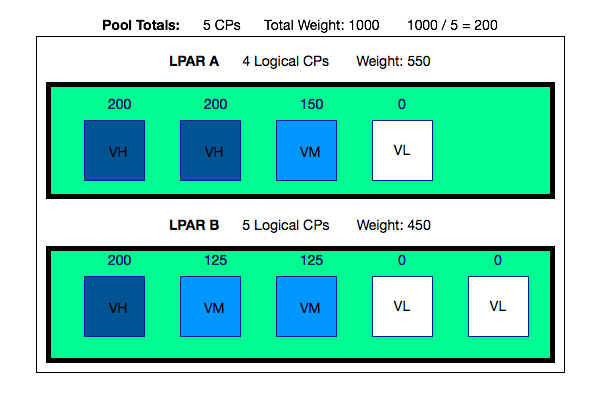
Consider the following (confected and so simpler than in real life) example of a machine’s processor pool. It contains 5 physical processors and the two LPARs’ weights add up to 1000.

So a physical processor’s weight’s worth is 1000 / 5 or 200. Hang on to the 200 as it’s important in what follows.

  • LPAR A has a total weight of 550 and 4 logical CPs. Rather than distribute the weight across all 4, a pair of CPs are designated Vertical High (VH) and assigned a weight of 200 each. The remaining 150 goes to a third CP, which is designated a Vertical Medium (VM). The fourth logical CP has a weight of 0 and is deemed a Vertical Low (VL). It can be “Parked”, meaning work is prevented from running there. It can also be “Unparked” and then work can run there.

  • LPAR B has a total weight of 450 and 5 logical CPs. It has 1 Vertical High, leaving a further 250 in weights to distribute. But rather than having 2 Vertical Highs and a Vertical Medium with (a rather puny) weight of 50 Hiperdispatch splits this remaining 250 across 2 Vertical Mediums, each with a weight of 125. The remaining logical CPs are, of course, 2 Vertical Lows with weights of 0.
It’s beyond the scope of this post to describe how logical processors map onto physical processors, except to say the Vertical Highs are pseudo-dedicated.

One thing to note is with Hiperdispatch enabled Logical CPU Management is no longer available. Hiperdispatch’s Parking and Unparking mechanism does a rather more sophisticated version of what Logical CPU Management did.

But the above example is a static picture.

Hiperdispatch Interaction With IRD Weight Management

With IRD Weight Management it’s possible [2] for the LPAR weights to shift. Taking the previous example and further supposing the two LPARs are in an LPAR Cluster…

Suppose the weights shift by 50 in favour of LPAR A. So LPAR A’s new weight is 600 and LPAR B’s is now 400.

The picture is now as follows:

You’ll notice the Vertical Polarization is now different:

  • LPAR A now has 3 Vertical Highs, rather than 2 Vertical Highs and 1 Vertical Medium. It still has 1 Vertical Low.
  • LPAR B now has 2 Vertical Highs, rather than 1 Vertical High and 2 Vertical Mediums. The number of Vertical Lows is increased from 2 to 3.

Notice the number of logical processors assigned to each LPAR hasn’t changed, only the share of the processor pool (or the weights).

My Bug

My code said a specific LPAR had 7 General Purpose engines (GCPs) but the customer said it had 8.[3] And those were genuinely the numbers.

The customer, as I hinted, was right.

So let me explain now how RMF instruments all this (well a little of it ). SMF70POF is a field in the Logical Processor Data Section, of which there is one per logical processor for every LPAR (as described in Offline Processors Can’t Hurt You).

Here is an extract from the SMF manual:

  • Bits 0 and 1 indicated whether and how the processor is polarized .
  • Bit 2 indicates this changed during the interval.

Combinations of these bits do the job of telling me the story of the logical processor’s polarization through the RMF interval.

In a nutshell what happened was my code didn’t count processors that transitioned in the period of interest from e.g. Vertical High to e.g. Vertical Medium. It certainly counted processors in 6 categories:

  • Unpolarized (or rather Horizontally Polarized )
  • Vertical High
  • Vertical Medium
  • Vertical Low
  • Vertical Transitioned
  • Unknown

The code was meant to add up all totals but 1 was missing. And IRD shifting weights caused, for once, a processor to appear in the Vertical Transitioned category.

Anyhow the bug is fixed now and one of the results is this post. So I guess that’s progress. 🙂 And I’m genuinely grateful to the customer for spotting the error, even if it cost an hour or so of heartache.


  1. I talk quite a bit in the current ITSO 1-day workshop on Performance and Availability. (These are not my slides .)  ↩

  2. In practice, in many customer sets of data the weights don’t shift, but for a substantial minority they do. Not dramatically, but they change.  ↩

  3. A bit like The Clash’s Wrong ’Em Boyo (from the excellent London Calling): “Stagger Lee throwed seven / Billy said that he throwed eight” – hence part of the title of this post. A gratuitous reference if ever there was one. 🙂 />  ↩

(Originally posted 2015-11-27.)

Applying the maxim “the customer is always right” this week revealed a bug in my analysis code. It also gave me the opportunity to write about how RMF sees the interaction between IRD Weight Management and Hiperdispatch.[1]

But let me start with some brief, basic information about the technologies in question. If only this proves useful the blog post will still have been worthwhile.

IRD Weight Management Basics

The initial implementation of PR/SM managed LPAR CPU access using static weights.

A long time later Intelligent Resource Director (IRD) introduced three new capabilities, two of which are related to CPU:

  • Weight Management
  • Logical Processor Management

The third, not the topic of this post, is about I/O priority management.

Weight Management introduced Dynamic Weights: Weights could shift between a group of LPARs on a machine, called an “LPAR Cluster”. The total weight for an LPAR Cluster is constant.

Weight shifting occurs in response to WLM’s view of goal attainment.

With Logical Processor Management an LPAR’s logical processors would be varied on and offline. (RMF Field SMF70ONT reflected for how long in an interval the logical processor was online.)

Hiperdispatch Basics

What follows is an extremely basic introduction to one aspect of Hiperdispatch. But it will, I think, suffice.

Without Hiperdispatch an LPAR’s weight is distributed evenly across all its online logical processors – so-called Horizontal CPU Management.

With Hiperdispatch, an LPAR’s weight is distributed unevenly (think “in a focused manner”) across its online logical processors – so-called Vertical CPU Management.

Consider the following (confected and so simpler than in real life) example of a machine’s processor pool. It contains 5 physical processors and the two LPARs’ weights add up to 1000.

So a physical processor’s weight’s worth is 1000 / 5 or 200. Hang on to the 200 as it’s important in what follows.

  • LPAR A has a total weight of 550 and 4 logical CPs. Rather than distribute the weight across all 4, a pair of CPs are designated Vertical High (VH) and assigned a weight of 200 each. The remaining 150 goes to a third CP, which is designated a Vertical Medium (VM). The fourth logical CP has a weight of 0 and is deemed a Vertical Low (VL). It can be “Parked”, meaning work is prevented from running there. It can also be “Unparked” and then work can run there.

  • LPAR B has a total weight of 450 and 5 logical CPs. It has 1 Vertical High, leaving a further 250 in weights to distribute. But rather than having 2 Vertical Highs and a Vertical Medium with (a rather puny) weight of 50 Hiperdispatch splits this remaining 250 across 2 Vertical Mediums, each with a weight of 125. The remaining logical CPs are, of course, 2 Vertical Lows with weights of 0.

Hiperdispatch Before IRD Weight Shift

It’s beyond the scope of this post to describe how logical processors map onto physical processors, except to say the Vertical Highs are pseudo-dedicated.

One thing to note is with Hiperdispatch enabled Logical CPU Management is no longer available. Hiperdispatch’s Parking and Unparking mechanism does a rather more sophisticated version of what Logical CPU Management did.

But the above example is a static picture.

Hiperdispatch Interaction With IRD Weight Management

With IRD Weight Management it’s possible [2] for the LPAR weights to shift. Taking the previous example and further supposing the two LPARs are in an LPAR Cluster…

Suppose the weights shift by 50 in favour of LPAR A. So LPAR A’s new weight is 600 and LPAR B’s is now 400.

The picture is now as follows:

Hiperdispatch After IRD Weight Shift

You’ll notice the Vertical Polarization is now different:

  • LPAR A now has 3 Vertical Highs, rather than 2 Vertical Highs and 1 Vertical Medium. It still has 1 Vertical Low.
  • LPAR B now has 2 Vertical Highs, rather than 1 Vertical High and 2 Vertical Mediums. The number of Vertical Lows is increased from 2 to 3.

Notice the number of logical processors assigned to each LPAR hasn’t changed, only the share of the processor pool (or the weights).

My Bug

My code said a specific LPAR had 7 General Purpose engines (GCPs) but the customer said it had 8.[3] And those were genuinely the numbers.

The customer, as I hinted, was right.

So let me explain now how RMF instruments all this (well a little of it ). SMF70POF is a field in the Logical Processor Data Section, of which there is one per logical processor for every LPAR (as described in Offline Processors Can’t Hurt You).

Here is an extract from the SMF manual:

SMF70POF

  • Bits 0 and 1 indicated whether and how the processor is polarized .
  • Bit 2 indicates this changed during the interval.

Combinations of these bits do the job of telling me the story of the logical processor’s polarization through the RMF interval.

In a nutshell what happened was my code didn’t count processors that transitioned in the period of interest from e.g. Vertical High to e.g. Vertical Medium. It certainly counted processors in 6 categories:

  • Unpolarized (or rather Horizontally Polarized )
  • Vertical High
  • Vertical Medium
  • Vertical Low
  • Vertical Transitioned
  • Unknown

The code was meant to add up all totals but 1 was missing. And IRD shifting weights caused, for once, a processor to appear in the Vertical Transitioned category.

Anyhow the bug is fixed now and one of the results is this post. So I guess that’s progress. 🙂 And I’m genuinely grateful to the customer for spotting the error, even if it cost an hour or so of heartache.

  1. I talk quite a bit in the current ITSO 1-day workshop on Performance and Availability. (These are not my slides .)  ↩

  2. In practice, in many customer sets of data the weights don’t shift, but for a substantial minority they do. Not dramatically, but they change.  ↩

  3. A bit like The Clash’s Wrong ’Em Boyo (from the excellent London Calling): “Stagger Lee throwed seven / Billy said that he throwed eight” – hence part of the title of this post. A gratuitous reference if ever there was one. 🙂  ↩

A Picture Of Dedication

(Originally posted 2015-11-22.)

Sometimes a little visual tweak can make all the difference. This post is about one such case.

Actually the code change to achieve it was quite complex but the visual rearrangement is simple.

I have a number of customers with Integrated Coupling Facility (ICF) processor pools with both dedicated and shared Coupling Facility (CF) processors.

For Production most people (sensibly) define their ICF LPARs with dedicated processors. But it’s perfectly legitimate for Test or Development Parallel Sysplexes to use shared processors.

Both the customers whose data I’m looking at right now have such a mixed arrangement. [1]

Existing Depiction

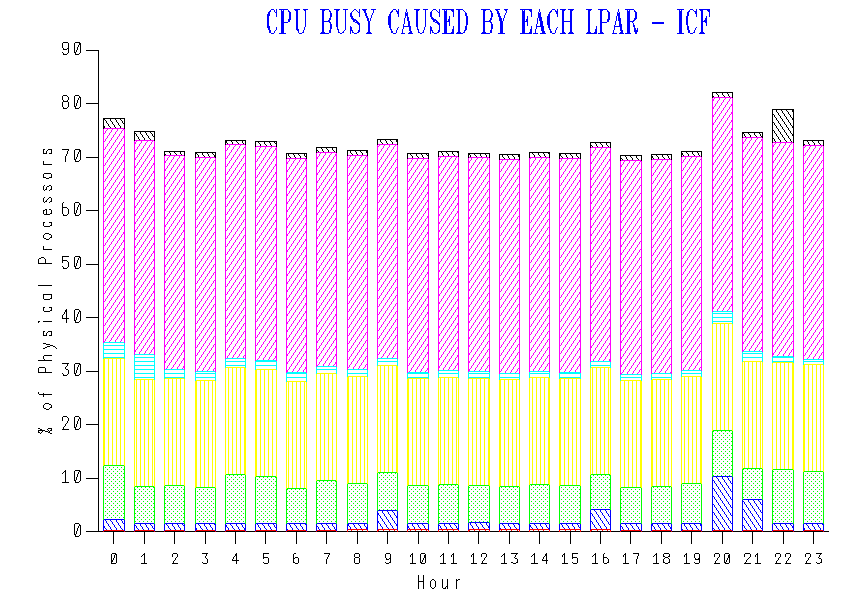
Up until now our code has stacked up ICF LPAR CPU usage by time of day like so:

Though you can’t see it (as I’ve cropped the legend off) the LPARs are stacked alphabetically. There’s been no more logic to it than that.

The purple and yellow LPARs turn out to have 2 dedicated processors and 1 dedicated processor, respectively. While you probably could tell that, it’s really not “in your face”.

New Depiction

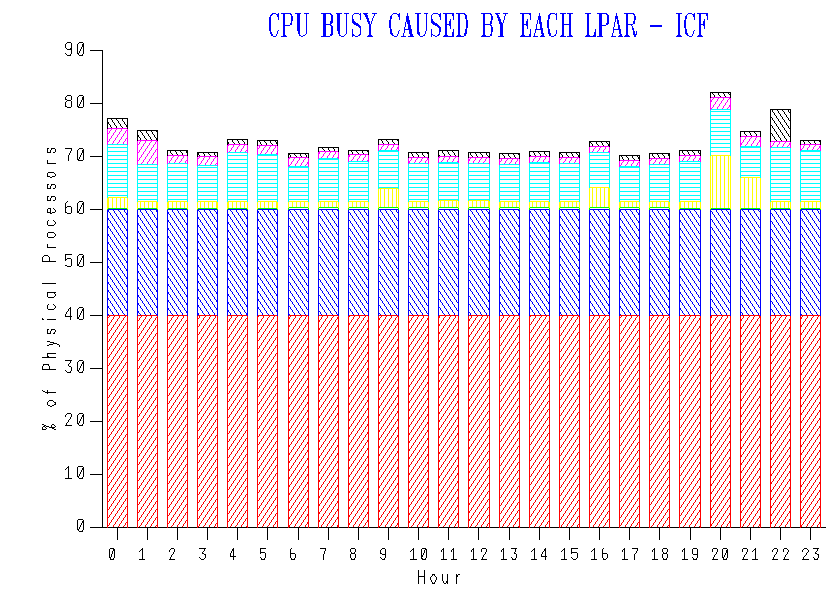
Consider the following redrawing: [2]

In this redrawing I sorted the LPARs by Number Of Dedicated Processors descending and, within that, alphabetically.

Here we clearly have two LPARs with dedicated processors. This being the ICF pool the ICF LPARs don’t give the processors back.

The remaining LPARs share what’s left of the pool.

You can see the red LPAR uses 40% of the pool and the blue one 20%. We happen to know that the pool has 3 dedicated ICF processors and 2 shared.

We’re much more clearly depicting the 2 LPARs with dedicated processors.

As I said this is a minor tweak, but it’s a much nicer result. If you’re graphing your ICF processor pool you might like to consider this rearrangement of stacking.

There are some further tweaks I could make. For example:

  • I could make the y axis the number of processors and make it end at (in this case) 5 processors.
  • I could make the series labels show e.g. “2 ded” for an LPAR with 2 dedicated processors.

At the beginning I said the code change was substantial, though the visual change was small. I now have much more control over the construction of this graph, so I can do things with axes I couldn’t before. Similarly I can do things with series labels I couldn’t before.

I mention this re-engineering as I half expect it to enable more creativity in how we depict processor pools. If anything worthy of sharing comes up I’ll share it here. Stay tuned!


  1. I suspect the third customer, whose data is just arriving, will turn out to be the same.  ↩

  2. And ignore the colour changes.  ↩

Good Things Come in Threes?

(Originally posted 2015-11-16.)

It's that time of year when I start to think about writing conference presentations for user groups and conferences in 2016.

Already I have three in mind, with varying degrees of sketchiness. Their working titles are:

  • He Picks On CICS
  • Fun With DDF
  • So You Want To Be A Better Performance Specialist?

I don't want to “design by committee ” and as for focus groups yeugh! 🙂 But I do care about what what topics my readers and audience are interested in.

I have my ideas, as the above list shows, but I'd like to hear yours.

IBM doesn't mind what I write about, there being no agenda other than the obvious one of “mainframe performance is fascinating”. Presentations are another matter as I really need a platform – whether a conference or a user group.1

It's not an “either or” situation: I could produce a barrage of presentations for the conference season2, or dribble them out throughout the year.

I'm experimenting with Twitter Polls 3 so I might do one on this list of topics. The relative shares will be interesting but more so the level of interest. My Twitter following, though, is dominated by people who aren't mainframers.

Worth a try once, though, as so many things are. 🙂

(This post was banged out on my phone between Heathrow and Munich, en route to speaking all day at an ITSO workshop in Warsaw.)


  1. Actually that's not strictly true as good material comes in handy at unexpected times. And there's always Slideshare. And besides I learn quite a bit by writing. 

  2. I'm not entirely sure when this is: Formally it could be System z Technical University in May, but user group meetings happen all the way through the year. 

  3. It appears Twitter are only experimenting with this as well right now: There is no API, Tweetbot tell me. Furthermore even the web implementation looks basic, with very short choice text limits. 

Captivating Capture Ratios

(Originally posted 2015-11-15.)

I don’t think I’ve written about the concept of Capture Ratio[1] before. To be honest it’s kind of a “nerdy” or “internal” thing. But a recent experience suggests to me it is interesting, even if only for the wrong reason.

What Is Capture Ratio?

Not all CPU in a z/OS system can be attributed to a service class: If you add up all the CPU in SMF 72–3 (Workload Activity) it always amounts to less than the CPU in SMF 70–1 (System-Level).

If we divide Workload CPU by System CPU and turn it into a % we get a Capture Ratio. [2]

So what do we expect? Our observations are

  • Generally most systems show capture ratios in the range 85% to 95%.
  • Capture ratios vary, but not usually by very much. [3]
  • Capture ratios are lower for very low utilisation systems than very high utilisation ones.
  • Capture ratios are lower for highly paging systems, and probably for high I/O ones.

Generally I don’t see anything better about a system with a capture ratio in the low 90’s than one in the high 80’s, percentagewise. So I wouldn’t fret about that.

How Do We Use Capture Ratio?

As I indicated at the outset, this has been an internal thing.

In a recent study, to tweak nobody’s nose at all, we saw appallingly low and more or less random capture ratios. It turned out we were missing lots of 72–3 records.[4] So the capture ratio was a good diagnostic tool.

Despite what I said about capture ratio being “internal” we have a standard chart that plots capture ratio for a system by day. This is why I know about the behaviours listed above.

What Went Wrong?

In some studies over the past few years our capture ratio has gone over 100%. It really shouldn’t.

While this has been “subliminally troubling” it hasn’t been enough to make me spring into action. With a recent study, however, we were getting capture ratios of hundreds of percent. Enough to set alarm bells ringing. So Dave Betten and I set to debugging.

It’s all down to zIIP: We only get capture ratios above 100% when both the following are true:

  • We have substantial zIIP CPU relative to GCP CPU.
  • The zIIP Normalisation Factor is substantially higher than 1.

Our code has a combined capture ratio, plus separate ones for GCP and zIIP CPU. We plot the former but have ignored the latter two.

I saw the pattern: Excessive zIIP capture ratio. Dave debugged the logic, which confirmed it. We’re using the zIIP Normalisation Factor[5] wrong in both the general and zIIP capture ratio calculations.

Adjusting the zIIP capture ratio in a spreadsheet one system’s pair of capture ratios look like this:

I’ve summarised across 8-hour shifts and the x axis is a shift number.

The numbers appear to have “come right” and examining our logic suggests they should be right.

I think I discern that most of the time zIIP capture ratio is slightly above GCP capture ratio. This is what I’d guess, based on zIIPs not doing I/O. But I’m not 100% sure. Future data sets will tell.

Interestingly, the “wrong calculation” zIIP capture ratio was proportionately worse for a system on a machine where the zIIP Normalisation Factor is 6.22 than the ones where it is 2.36. But that’s not surprising.

Putting It Right

One key lesson is: Don’t boost everything by capture ratio to fill in gaps.

  • The “low and random” case shows that’s not good idea as you introduce distortion that way.
  • The “impossibly high” case shows something fundamental is wrong.

So we know what the “excessively high” case is caused by. Now to get a fix tested and into Production.

And you might expect to see (at least pedagogically) a new chart that separates zIIP Capture Ratio from GCP Capture Ratio. I think this “fine structure” will be useful to glean.

So I hope I’ve shown that Capture Ratio is interesting, even without the bug we’ve troubleshot.

And “every day for us something new, open mind for a different view, and nothing else matters” [6] applies to this. Comme d’habitude. 🙂


  1. I’ve seen people write “capture ration” and it’s not been people for whom English isn’t their first language, but it could be autocorrect. 🙂  ↩

  2. Of course this is technically wrong as it’s a percent, not a ratio. Nevermind. 🙂  ↩

  3. This stability is fairly reassuring. It seems like a real thing.  ↩

  4. This has now been resolved and we have complete set of 72–3 data.  ↩

  5. You have to divide what’s in SMF 70–1 and in SMF 72–3 by 256 – which implies a granularity all of its own.  ↩

  6. Nothing Else Matters  ↩

Offline Processors Can’t Hurt You

(Originally posted 2015-11-14.)

Or can they?

Actually I can’t answer that question. I’m aware my blog gets distributed in Development in Poughkeepsie (at very least) so maybe one of them can give a far better answer than I can.

Though this post isn’t meant to address this in its entirety I have a point of view:

A long time ago I learnt there were processor-related control blocks in 24-Bit Virtual. Though in the MVS/XA era you wouldn’t have expected a few (1 – 4) engines’ control blocks to be a major threat, in terms of virtual storage. [1] I’m pretty certain control blocks for engines must’ve evolved in the past 30 years. Now z/OS supports so many more processors, I find it hard to believe things haven’t had to change. Scaling **isn’t ** just about increasing the value of some “max_engines” quantity. It’s also about making the experience worthwhile. So, for example, multiprocessor ratios (essentially, what happens when you add another engine) have to be convincing.

There’s plenty of evidence of Development making the mainframe and z/OS (and DB2 and CICS and …) scale.

So I’m pretty confident offline engines are largely harmless.

But, Soft! Methinks I Do Digress Too Much

This post wasn’t meant to be about any of the above. It’s actually about what happens when a physical machine has a very large number of logical processors.

Specifically, what happens to SMF 70 Subtype 1 records.

There are two scenarios that concern me (or at least challenge our code):

  • A very large number of LPARs on a machine, reported on by an RMF instance.
  • LPARs with a large number of logical processors defined.

Or, frankly, some combination of both.

I’ve seen 3 sets of data this year that have challenged our code because of either or both of the above.

So let me explain…

… The “headline” issue is multiple [2] SMF 70–1 records per RMF per interval.

Let Me Explain In More Detail

Most of the sections in the 70–1 record are either singletons or small. But two are worth looking at more closely…

  • Logical Partition (Data) Sections – One per LPAR, whether active or not.
  • Logical Processor (Data) Sections – One per logical engine, defined to an LPAR, whether Online or not.

An LPAR’s Logical Partition section points to the related Logical processor sections – with a first section number and a count.

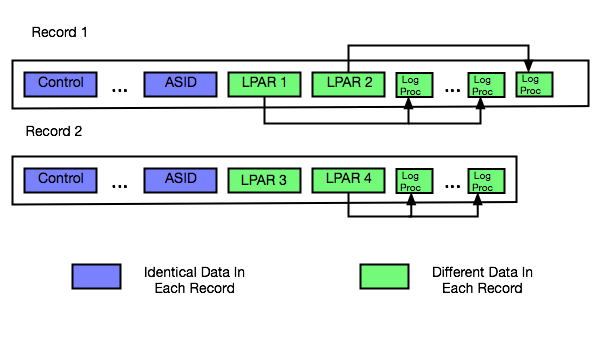
The following diagram illustrates this.

t70Sections.png

Here we have 2 records from the same interval and the same RMF instance:

  • The first record has 2 Logical Partition sections, each pointing to a number of Logical Processor sections.
  • The second record has the remaining 2 Logical Partitions section for the machine. The first one (LPAR3) is deactivated, having no Logical Processor sections. The second one (LPAR4) has Logical Processor sections (and is therefore active).

Around 300 – 350 Logical Processor sections are enough to fill up a 32KB SMF record. And that’s when you get a second one.[3]

This Requires Care

Here are some things to note:

  • When processing these sections it’s very useful that all the Logical Processor sections for an LPAR are in the same record as the corresponding Logical Partition section.
  • Every 70–1 has counts of the machine’s characterised processors (the ones you bought).
  • Every 70–1 has other sections, related to this LPAR’s definition and CPU Utilisation and Address Space queues. These are all present in each record for the RMF / interval combination.
  • Every 70–1 has the pool names, in a set of 6 CPU Identification sections.

Because the CPU utilisation and address space queue information is in all the 70–1 records we were double-counting important things [4] – when we had 2 70–1’s per interval. I fixed this by only using the first record’s copy of these sections.

How Does This Come To Be?

As I said above, the 70–1 contains Logical Processor sections even for offline processors. If you have lot of LPARs, each with say 32 logical processors defined and with 25 offline, you get lots of 32-section groups.

It’s not hard to get to more than 300 Logical Processor sections for a machine, then.

And scenarios where LPARs have lots of defined processors is very common:

  • IRD’s Logical Processor Management function varied engines on and off line.
  • Bringing online an offline processor is much easier than having to define additional ones.
  • Hiperdispatch parks and unparks Vertical Low processors. They’re still online when parked.

There are probably other scenarios I’m not intimately familiar with.

An Aside On Duplicate 70–1 Data

A discussion I had this week with a colleague highlighted that not many people know the following:

Suppose you have a machine with 2 LPARs (SYSA and SYSB), each running RMF.

Suppose you broke up their 70–1 records and stored the Logical Partition and Logical Processor sections as rows in 2 performance database tables.

You will get two sets of rows in each table, seemingly near identical. This is because when RMF in SYSA and RMF in SYSB cut 70–1 records they retrieve the same data independently from PR/SM.

In our code, when laying out the LPARs, we pick one z/OS RMF system for each machine and only report on the LPARs from its 70–1s. It might be stating the obvious but you should do the same.

We also report on each processor pool separately, noting that z/OS LPARs are often in two pools – GCP Pool and zIIP Pool.

In Conclusion

Almost everything I’ve talked about in this post relates to logical processors. Once you add in physical processors the 70–1 record gets to be even more complex.

It’s highly valuable data so process it carefully.

And most customers don’t have to worry about multiple 70–1 records per interval per RMF. You can easily use ERBSCAN and ERBSHOW against an SMF data set in ISPF 3.4 to see if you do.

But generally, offline processors are harmless. Indeed operationally useful.


  1. Correct me if I’m wrong, please. I suspect someone has a war story or two.  ↩

  2. Actually, in each case it’s been only two – but the problem generalises to more than two (as does our code solution).  ↩

  3. And potentially a third, etc.  ↩

  4. For example, the Capture Ratio was just short of 50% – because the 72–3 records weren’t double counted.  ↩

And Latency Once More

(Originally posted 2015-11-06.)

This is about the third time I’ve written about this, and it probably won’t be the last. 🙂 [1]

I was presenting to customers about the Coupling Facility Path Latency statistics I’ve previously spoken of when one of them told me of the following incident. I’m sure he won’t mind me sharing it without you, so long as I don’t identify the source.

The customer has two zEC12 machines, with Internal Coupling Facilities (ICFs) in each, and with z/OS LPARs in each machine, using Infiniband links and Internal Coupling links to these ICFs. [2]

The customer believed they had two groups of four Infiniband paths between one z/OS image and a remote CF. These groups of paths take routes said to be [3] 5km and 8km long.

One day they looked at an RMF Coupling Facility Activity postprocessor report and saw the new path data information, new with OA37826 and CFLEVEL 18. That was a nice surprise.

What wasn’t a nice surprise was the report indicating three paths at 8km and five paths at 5km. This was not what they expected.

Their initial suspicion was that the routing was wrong and the instrumentation right. But it proved otherwise:

  • First, by getting an independent measurement of the path lengths, they discovered that all the paths were of the correct length.
  • Second, by moving paths between adapters, they isolated the problem to a specific adapter.

So, the upshot was that the adapter card was reporting the incorrect distance. The card has, fairly obviously, been replaced and everything is fine now.[4]

There’s no suggestion there was anything else wrong with the card, but it’s good it was replaced. An interesting question is whether incorrect latency measurements could cause poor routing decisions, but I certainly can’t comment on that publicly.

Another question I can’t answer is whether the latency measurement suddenly went bad; All we know is that when the customer looked at the Coupling Facility Activity report for the first time it had the wrong number in it.

While I don’t propose to write reporting that assumes dynamically changing CF Path Latency values I do think it’s worthwhile to look occasionally at this data. I always do when I get customer data – and most customers have OA37826 applied and are at CFLEVEL 18 or higher.

So please do look at this every so often, including right now, as a useful verification exercise.


I’m now keeping a list of my blog posts on Coupling Facility links in a separate file. Here’s what it looks like so far:


  1. I’m learning you can never tell when the well will run dry with technology, and CF Path Latency is certainly a case of this.  ↩

  2. This is so common a configuration I’d call it an architectural pattern if I were pretending to be an architect (which I sometimes do). 🙂  ↩

  3. Pardon my skepticism on this topic; Long-term readers will know it’s justified.  ↩

  4. Hopefully nobody is mad at me for mentioning a card went bad. We all know hardware can fail and that’s why we design configurations and procedures to cope with it.  ↩

The CPU That You Do

(Originally posted 2015-10-31.)

It’s difficult to write about a live situation for two reasons:

  • You don’t want to spoil the surprise.
  • You mustn’t expose the customer.

Actually, make that three reasons:

  • You don’t know how it’s actually going to turn out. 🙂

So why am I writing at all?

Well, the big engagement my team are involved in exemplifies the method for tuning CPU down, with a twist or two of its own. It’s the outline of that method I want to share with you.

At its simplest it’s very simple indeed:

Take The Large CPU Numbers And Make Them Smaller

But in this case (as in so many others) it’s not quite so simple. There are two complicating factors, one of which is universal, the other only sometimes present.

  1. Which metric of CPU matters?
  2. How do you handle multiple machines with, usually, diverse processor configurations?

The Relevant CPU Metric

For most customers the relevant metric is Peak Rolling 4-Hour Average. In our case it happens to be total CPU seconds.[1]

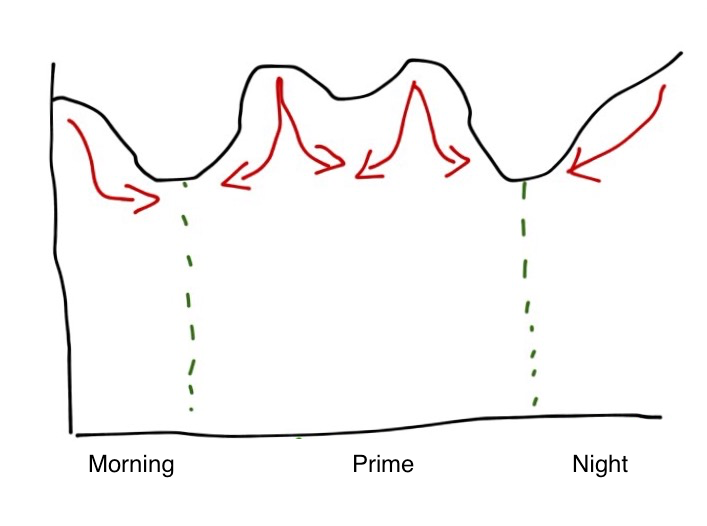
For the Peak Rolling 4-Hour Average (R4HA) one of the options is to depress the peaks, perhaps by displacing work in time.[2]

As an example consider the following (typical) pattern:

It has overnight batch intensiveness and two day time peaks. The red arrows show how you might try to displace work – as well as actually reducing the CPU consumed.

If you’re paying based on CPU seconds the area under the curve is what matters and the displacement option isn’t a good one. So you have to rely on reducing CPU seconds by tuning.

Actually, you could reduce the CPU load by shooing work away.[3] But I don’t think you generally want to.

Multiple Machines

Multiple machines pose a problem in that they often have diverse configurations and engine speeds. For the purposes of this exercise I’ve examined the Service Units Per Second and used the ratio across the LPARs to derive the relative engine speed.

The emphasis is deliberate in the previous sentence because, when you read on, the inaccuracy this introduces is irrelevant to the exercise: Deciding where to expend effort doesn’t need much accuracy.

It turns out the SU/Sec numbers varied by up to 10% across the whole estate – so I treated them all as the same. For this study it’s a nice simplification and I’m confident we have found the big handfuls of CPU.

Take The Big Numbers And Make Them Smaller

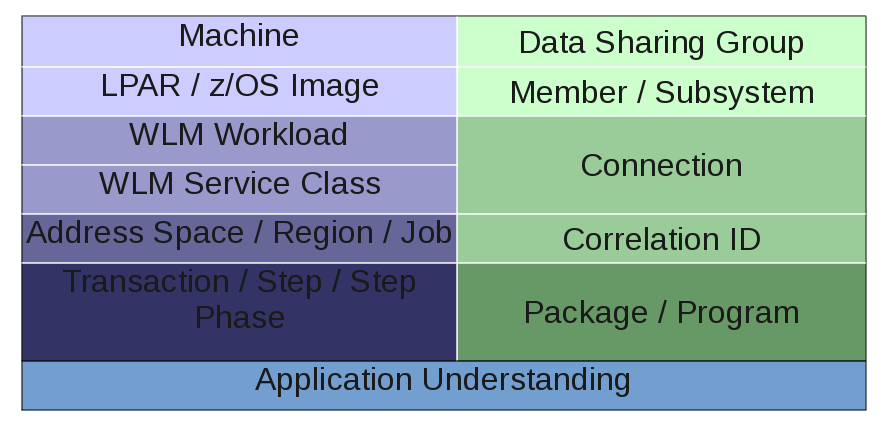
This is, of course, a recursive process – and it’s classic problem decomposition. This diagram summarises it.

I’ve divided the diagram into two hierarchies [4] that more or less meet towards the bottom:

  • On the right side we have DB2.
  • On the left side we have “System” and similar stuff.

By side I don’t mean to imply that in a competitive sense, just literally sides of the diagram and as a label to aid division of labour.

System Side

The sequence of Machine then LPAR then Workload then Service Class then Address Space then… is entirely obvious and sensible. And you’d use such data as:

  • SMF 70 – for the top layers.
  • SMF 72 – for Workload and Service Class (Period) (and Report Class).
  • SMF 30 – for address spaces, jobs and steps.

DB2 Side

In fact this side is generally handled by my DB2 colleague but, having done this in the past, I know:

  • Data Sharing Group / Member / Subsystem start with Statistics Trace.
  • The rest use Accounting Trace.

Actually, in this study I did look at DB2 Accounting Trace for two specific purposes:

  • For DDF to get detailed information on which external applications were driving mainframe CPU when accessing DB2.
  • For Batch to understand a little more about job steps’ use of CPU, for example whether Class 1 (“total”) or Class 2 (“in DB2”).

But my DB2 colleague looked at the myriad ways the subsystems could be tuned to reduce CPU. He raised an interesting point: If the DB2 subsystem is tuned wholesale doesn’t that mean the System-side CPU picture will change? Yes it does, but I think the balance of risk that large chunks of CPU will suddenly become unworthy of tuning because of DB2 subsystem tuning is small. (So work should proceed in parallel on both sides of the diagram.)

Application Understanding

This is where the magic happens:

By bringing together the System-side and DB2-side decompositions you should have quite a precise view of the moving parts that need tuning.

It’s time to wield the scalpel, now the body scanner has told you where to make the cuts.


So the above is sketchy, right? But it is a methodology as it’s systematic and yes I do have tools to implement it.

Do I have all the tools I could want? [5] Actually the sheer scale of this engagement has led me to believe one could build better tools – based off our current tools – that could make this go much quicker. Getting to build them any time soon is a matter of priorities.


  1. In fact there are off-shift discounts and others related to zIIP, but I won’t go into detail about these here.  ↩

  2. The most displaceable work is Batch (or Batch-like).  ↩

  3. And there are plenty of ways of doing this.  ↩

  4. There are similar hierarchies for eg CICS and MQ but I’m simplifying here. (This study isn’t big on CICS or MQ and I’m reusing a graphic from the actual study.)  ↩

  5. What a silly question! 🙂 One never has all the tools one wants. 🙂  ↩

Slide Over A Bit More – Responsive Design

(Originally posted 2015-10-06.)

I’ve played some more since I wrote Slide Over A Bit, most notably from the perspective of developing a web app that acts as a Slide View widget. This post addresses some of the issues. In particular:

  • Offline web apps, a feature of HTML 5.
  • Responsive design – writing a web app that works well in Slide View mode while still looking OK in Full Screen mode.
  • Remote hosting.

I wrote a better version of my “wrap pasted text in quotes” widget to try things out – and because I want one. It looks like this:

It might not be the prettiest widget in the world but producing it required quite a bit of experimentation. Without the experimentation it would be impossibly small.

Offline Web Apps

To make a web page load quickly and from anywhere is good.

How can you make a web page load without a network connection? Well, it has to have content that doesn’t require a server update. One that is javascript plus a few fields and doesn’t need fresh data from a server is a good candidate. All of that is static and can be loaded from the browser’s cache. A widget is ideal – unless it actually needs data from somewhere.

Plenty of material on the internet exists that describes how to write an offline app, for example Offline Web Applications – Dive Into HTML5. I won’t repeat the material here but it needs your web page to point to a cache manifest file. Every time you change the web page’s contents you need to change the cache manifest file – perhaps by updating a timestamp. Frankly I couldn’t get Safari to recognise the cache manifest file had changed. Perhaps this was because I was developing in Pythonista with the web server code I showed in Slide Over A Bit.

Responsive Design

This is the meat of this post. Consider the case of some very simple HTML:

<html>
  <body>
    <h1>It works!</h1>
  </body>
</html>

If you serve it to Full Screen Mobile Safari it looks like this:

but if you view it in Slide Over Mobile Safari it looks like this:

What has happened is the page is scaled down. My widget is unusable with this scaling down – or it would be if I didn’t do something about it.

There are two main ways to arrange elements on a web page:

  • Using Javascript
  • Using Cascading Style Sheets (CSS)

In both cases we need a trigger to cause different rendering when in Full Screen and in Slide Over. My first attempts were to use the page width – but this fails as Safari reports the same width in each mode.

The breakthrough came when I realised (and later proved) the height is different in the two modes.

Javascript

On my iPad Air window.innerHeight is 2021 when a page is displayed in Safari in Slide Over and under 700 when Full Screen.

You could use this to lay out the page differently in each case.

CSS

In CSS a simple media query will do the trick. Wrapping the CSS Slide Over mode in the following worked for me:

@media all and (min-height: 2021px){
  ...
}

Actually lower values than 2021 worked. And this was in landscape, on an iPad Air. In portrait, or on a different kind of iPad, it will be different. Experiment with window.innerHeight in Javascript to see what works for the configurations you intend to support.

In my code I specified:

font-size: 40px;

and this made the text big enough (just about).

I also specified:

button {
  width: 300px;
  height: 300px;
  background-color: LightBlue;
  border-radius: 150px;
}

to make those nice round blue buttons.

If you know CSS you’ll get the general idea.

For Full Screen you’d probably use max-height instead of min-height – in the same style sheet.

Remote Hosting

I uploaded my single HTML file to Dropbox. It works fine – but in “cheapo” basic mode the file has to be downloaded before being executed, and I don’t see how to get the page to refer effectively to the cache manifest file needed for offline use.

Here is the HTML:

<!doctype html>
<html manifest="cache.manifest">
<style>
@media all and (min-height: 2021px){

    * {
      font-size: 40px;
    }

    textarea {
      height: 500px;
      width: 800px;
    }

    button {
      width: 300px;
      height: 300px;
      background-color: LightBlue;
      border-radius: 150px;
}
</style>
<br/>
<p>
Paste in text and press a button to format it.
<p>
<textarea rows='5' cols='30' id="myText">
</textarea>
<br/>
<br/>
<button onclick="singleQuotes()">Single Quotes</button>
<span>&nbsp;&nbsp;&nbsp;&nbsp;&nbsp;&nbsp;&nbsp;</span>
<button onclick="doubleQuotes()">Double Quotes</button>
<br/>
<script>
textbox=document.getElementById("myText")

function wrap(prefix,suffix) {
  textbox.value=prefix+textbox.value.trim()+suffix
}

function prepareToCut(node){
  node.focus()
  node.setSelectionRange(0,9999)
}

function singleQuotes() {
  wrap("'","'")
  prepareToCut(textbox)
}

function doubleQuotes() {
  wrap('"','"')
  prepareToCut(textbox)
}
</script>
</html>

To a real web developer this is probably basic and incomplete – but I hope it raises and begins to solve one key issue: How to make web pages look good in Mobile Safari in both Slide Over and Full Screen. The former is particularly important to make Slide Over “widgets” easy to write.

Now, I’m not a professional web developer and certainly not a CSS expert. So if you have anything to add please feel free to chip in.

The fun continues. 🙂

Slide Over A Bit

(Originally posted 2015-10-02.)

The last post hit both the “Mainframe” and “Performance” aspects of this blog. This one is firmly in the “Topics” category.[1]

You might’ve noticed a slew of announcements from Apple recently, and iOS 9 and OS X 10.11 “El Capitan” delivery. [2] I’d like to talk here about one feature of iOS 9 that is more useful than it appears at first sight: Slide Over on the iPad.[3]

What Slide Over Is

If you have a modern enough iPad or iPad Mini you can use Slide Over.[4]

In landscape mode (is there any other?) 🙂 you can slide over from the right of the screen to display a vertical list of apps in the right-hand third. It looks like this:[5]

App developers have to explicitly support Slide Over and quite a few have. Apparently it’s not difficult.

You pick an app from the list and the original app (in the left two thirds of the screen) pauses. Tapping in this left area resumes the original app (full screen).

Why Am I Excited About This?

Well, apart from the novelty, there’s a nice use case – which becomes much slicker:

Suppose you’re writing and you want something done to a chunk of text. The first example I stumbled over was extracting some text from a BBC News website article and wrapping it in quotes. I wanted to tweet the text and a link.

The following workflow would suffice:

  1. Copy the text to the clipboard.
  2. Slide over and select a tool to paste into that wraps text with quotes.
  3. Copy the result back to the clipboard
  4. Paste into the tweet and post.

Actually I did a very similar thing to create the numbered list above – using the List function of Texttool:

In the above I chose the numbered list option you can see – and then pasted the result back in to Editorial.

Notice how Editorial is greyed out while Texttool is in full colour.

So mini apps (or widgets) that process text are a very good use of Slide Over.

Some Ways Of Getting Such Widgets

As I mentioned there are quite a few apps – some from Apple, many not – that show up in Slide View.

Here are some examples.

  • Clips – which keeps multiple items you’ve cut to the clipboard for ease of use.
  • Texttool – which does simple text transformations.
  • Workflow – which allows you to build workflows, as the name suggests.
  • Likewise Editorial and Drafts.
  • PCalc – a nice calculator.
  • Roll Your Own.

In several of these – Workflow, Texttool and Roll Your Own – I’ve succeeded in wrapping pasted in text in quotes.

Rolling My Own

One of the most flexible (and not that difficult) ways of building your own is using bookmarks in Safari to locally hosted web pages.

As an experiment I set up a simple webserver in Pythonista using (the possibly inadvisable) port 80:

# coding: utf-8
import SimpleHTTPServer
import SocketServer

port=80

handler=SimpleHTTPServer.SimpleHTTPRequestHandler

HTTPD=SocketServer.TCPServer(("",port),handler)

HTTPD.serve_forever()

(By the way I just used Texttool in Split View to indent the above code by 4 spaces to get it to format as code in Markdown.)

Anyhow, in the same Pythonista directory I created quoteText.html:

<!doctype html>
<html>
<script>
str=prompt("Throws double quotes round text.\n\nPaste in text.")
if(confirm("Double Quotes?")){
  prompt('','"'+str+'"')
}else{
  prompt('',"'"+str+"'")
}
</script>
</html>

In Safari I have this bookmarked and Safari can be used in Slide View with it.

In essence I’ve prototyped my own Slide Over text processor. This one wraps in single or double quotes any text you paste into a prompt.

As you can see it’s very simple.

Creating an HTML 5 web app from a remote webserver that stays permanently on the iPad is left as an exercise for the reader. (I’ve done something similar before but, having Pythonista, I didn’t need to for this example.)

It’s Not Quite Perfect

Slide Over is saving me time. But there are some things that could be better:

  • I find selecting apps a bit cumbersome: Pinning some, or text-based navigation would help.
  • I’d like it to be easier to roll my own.
  • I’d like to be able to go direct to bookmarked web pages there (perhaps pinned).
  • Cutting and pasting is a cumbersome method of transferring data – particularly if you forget to Cut and use Copy instead. 🙂

But overall I think the “side bar widget” use case for Slide Over is compelling.

I briefly mentioned OS X 10.11 El Capitan. At last it allows you to have two windows up – snapped to either side of the screen. I’m going to experiment with snapping stuff to the right side – in a similar vein. I don’t expect it to work as well. Perhaps the Today view is the analogue.

Fun, eh? 🙂


  1. Not that I really feel the need for legitimisation.  ↩

  2. Oh, plus a few nice bits of hardware I’ve not got to purchasing yet. 🙂  ↩

  3. Clearly this is not a complete review of iOS 9. Plenty of websites and podcasts have covered that ground.  ↩

  4. As well as a (non-participant) iPhone 5s (won’t be long now) 🙂 and a too-old-to-participate original iPad Mini I have an iPad Air (which I’m writing most of this post on).  ↩

  5. Notice how Safari has greyed-out content rendered, whereas Clips and Texttool don’t, because Safari is already running.  ↩

CICS and Batch DB2 Identifiers

(Originally posted 2015-09-30.)

DB2 Accounting Trace names are a(n endless) [1] source of fascination to me.

As many of you know, bridging the gap between DB2 and callers and the environment is permanently an imperative for me. These names might be cryptic but they can usually be related to non-DB2 concepts. As I’m about to explain this to colleagues at work I thought I might as well explain it to the world (or at least my readership). So here goes.

(Note: I explained this for IMS Batch in Finding The DB2 Accounting Trace Records For an IMS Batch Job Step but now I want to do it for non-IMS Batch and CICS.)[2]

DB2 Accounting Trace (SMF 101) has three fields of particular interest, which behave differently depending on the type of working coming into DB2.

  • Connection Type (QWHCATYP) – a 1-byte integer
  • Connection Name (QWHCCN) – a 8-byte character string
  • Correlation ID (QWHCCV) – a 12-byte character string

Here’s a diagram, illustrating these 3 fields and how they behave for Batch (like) and CICS connection types.

Connection Type tells you which style of connection the SMF 101 refers to. For example TSO, BATCH, DB2CALL, CICS, DDF. [3]

Connection Name is interesting for CICS: It’s the CICS region name.

Correlation ID is interesting for CICS and for Batch, but each is differently treated:

  • For CICS the middle 4 bytes are the CICS Transaction ID.[4]
  • For Batch the first 8 bytes are the Job name.

By the way Connection Types “TSO”, “DB2 Call”,“Utility” and “Batch” are often Batch, regardless of what they look like. They just represent different ways of getting to into DB2 from a batch job step.

I think I’ll add a slide for this to my “DB2 Through My Eyes” Presentation.

Oh, and this is just Batch and CICS. DDF has even more information in the QMDA and QLAC sections. Perhaps I should write about that some time.


  1. 25 years so far, but who’s counting? 🙂  â†©

  2. I discussed the CICS DB2 Connection briefly in He Picks On CICS  â†©

  3. Constant-value symbols are defined in the mapping macro for each supported type. For example QWHCCICS.  â†©

  4. The first four are strings such as “POOL” and “ENTR”, telling you what kind of CICS / DB2 Connection thread this is. The last four are the commit number.  â†©