The Effect Of CF Structure Distance

(Originally posted 2014-11-29.)

Here’s an interesting case that illustrates the effect of distance between a z/OS image and a Coupling Facility structure.

I don’t think this will embarrass the customer; It’s not untypical of what I see. If anything I’m the one that should be slightly embarrassed, as you’ll see…

A customer has two machines, 3 kilometers apart, with an ICF in each machine and Parallel Sysplex members in each machine. There is one major (head and shoulders above the rest) structure: IRRXCF_P001 (with a backup IRRXCF_B001 in the other ICF).

The vast majority of the traffic to this structure is from a system on the “remote” machine (the one 3km distant from the ICF).

At this point I’ll admit I’d not paid much attention to IRRXCF_Pnnn and IRRXCF_Bnnn structures in the past – largely because traffic to them is typically lower than other structures such as DB2 LOCK1 and ISGLOCK (GRS Star). I hadn’t even twigged that this cache structure was accessed via requests that were initially Synchronous. (And that’s the tiny bit of embarrassment I’ll admit to.)

RACF IRRXCF_* Structures

Let me share some of what the z/OS Security Server RACF System Programmer’s Guide says:

To use RACF data sharing you need one cache structure for each data set specified in your RACF data set name table (ICHRNDST). For example, if you have one primary data set and one backup data set, you need to define two cache structures.

The format of RACF cache structure names is IRRXCF00_tnnn where:

  • t is “P” for primary or “B” for backup
  • nnn is the relative position of the data set in the data set name table (a decimal number, 001-090)

So the gist of this is that it’s a cache for RACF requests and it’s accessed Synchronously – at least in theory.

So what does “accessed Synchronously” actually mean?

RACF issues requests to XES, which is the component of z/OS that actually communicates with Coupling Facility structures. XES can decide to convert Synchronous requests to Asynchronous, heuristically.1 So in this case it means RACF requested Synchronous; XES might have converted to Async, depending on sampled service times.

A Case In Point

Now to the example:

Three systems (SYSA, SYSC and SYSD) are on the footprint 3km away from the structure. SYSB is on the same footprint as the structure.

Let’s first examine the traffic rate:

As you can see the vast majority of the traffic is from SYSC and almost all the traffic is Async (and RMF doesn’t know if RACF issues the requests Sync (and they were converted to Async) or if RACF issued them Async). The fact all three remote systems are more red than blue, while the local one (SYSB) is all blue, suggests RACF issues them Sync (as if we didn’t know).

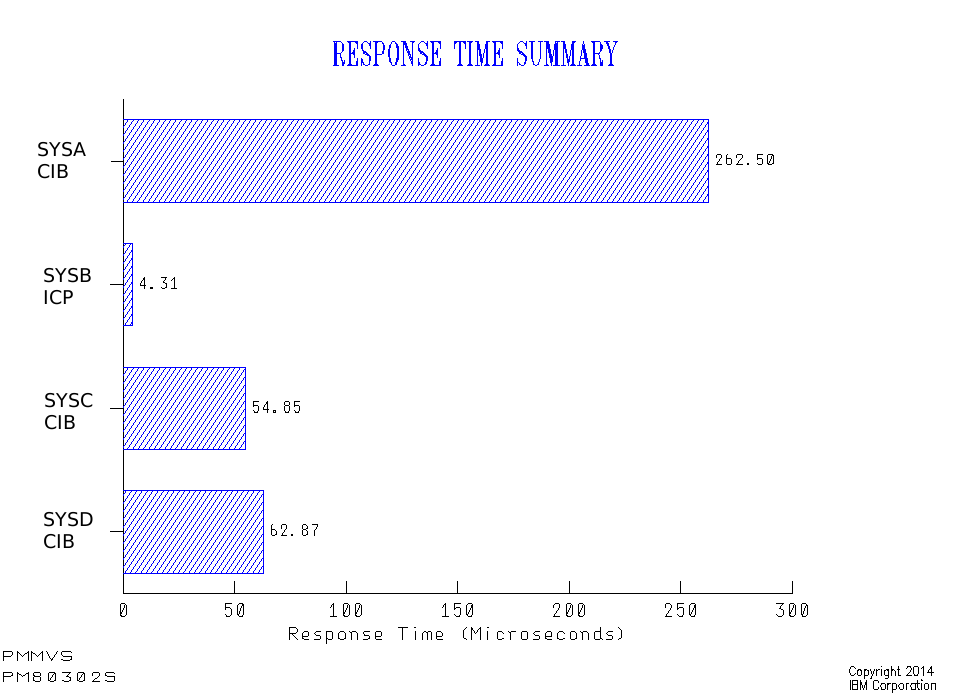
Now let’s look at the response times:

Here the local system (SYSB) using IC Peer (ICP) links shows a very nice response time under 5Β΅s.

The remote systems (using Infiniband (CIB) links) show response times between 55 and 270Β΅s.

A reasonable question to ask is “how come SYSC has so much better response times than SYSA and SYSD as they’re on the same footprint?”

You might think it’s because it has some kind of Practice Effect; You drive a higher request rate and the service time improves (which XCF’s Coupling Facility structures often appear to exhibit).

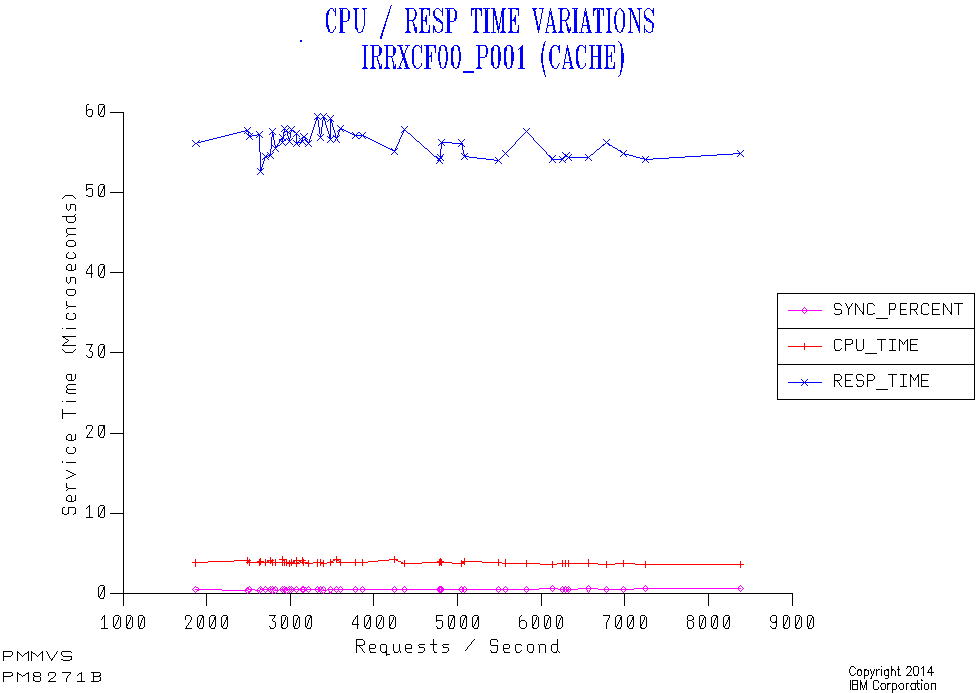
But here’s a graph – just for SYSC – which disproves this:

I’ve sequenced 30-minute data points not by time of day but by request rate. Here are the highlights:

  • The response time stays level at 50-60&us. regardless of the request rate. So it’s not a Practice Effect.

  • The percent of requests that are Sync stays very low – so conversion is almost always happening. (At least it’s consistent.)

  • The Coupling Facility CPU per request (not Coupled (z/OS) CPU) is around 5&percent. of the response time; The rest is the effect of going Async as well as the link time.

Now SYSA has a much lower LPAR weight than SYSD, which in turn has a lower LPAR weight than SYSC. The response times are the opposite: SYSC lowest, then SYSD, then SYSA.

So we have (negative) correlation. But what about causation?

Well, I’ve seen this before:

When a request is Async (whether converted or not) the request completes by the caller being tapped on the shoulder. In a PR/SM environment this can’t happen until the coupled (z/OS) LPAR’s logical engine is dispatched on a physical engine. If the weight for the LPAR (or vertically for the engine in the Hiperdispatch case) is low it might take a while for the logical to be dispatched on a physical.

The consequence is that lower-weighted LPARs get worse response times for Async because of the time taken to deliver the “completion” signal.

A Happy Ending

My advice to the customer was to move the IRRXCF_P001 structure to the Coupling Facility on the same footprint as the busiest LPAR (SYSC).

They did this and the response time dropped to 4Β΅s, with the vast majority of the requests now being Sync.

This is an unusual case in that normally one LPAR doesn’t dominate the traffic to a structure. So the choice of where to put the structure was unusually easy.

I would add two things related to the applications on SYSC:

  • They are IMS and I don’t know enough about IMS Security to know whether it is possible to tune down the SAF requests to reduce the Coupling Facility request rate, without compromising security.

  • There is no direct correlation between IRRXCF_P001 service time and IMS transaction response times. Such is often the way.

But this has been an interesting and instructive case to work through. And you could consider this blog post penance for mistakenly thinking RACF Coupling Facility requests were always Async. πŸ™‚

In a similar vein you might like:


1 But XES can’t convert Async requests to Sync.

Coupling Facility Memory

(Originally posted 2014-11-23.)

Or “who made all the pies”? πŸ™‚

I’ve written a number of times about Coupling Facility Performance but I don’t think I’ve written about memory for a while.

In any case I’d like to share with you a couple of graphs I’ve taught my code to make. The first isn’t strictly speaking specific to Coupling Facilities. But it’s useful anyway and does help tell the story.

Machine-Level Memory Allocation

This graph is, as I said, applicable to any machine – whether it has Coupling Facility LPARs or not.

LPAR Memory allocation is more or less static, so a pie chart is appropriate. In fact my code averages over a shift. [1]

What z/OS and RMF don’t know is the amount of memory (purchased) on a machine – so the Unallocated memory can’t be depicted without the analyst (me) manually telling the code.[2] Which is why I’m not showing it here.

In this (confected) example memory usage is dominated by two Linux [3] (probably under z/VM) LPARs and MVSA. There are also two Coupling Facility [4] LPARS – PRODCF1 and PRODCF3.

This data is from SMF 70 Partition Data Report data, having avoided double-counting if e.g. zIIPs are present. In my real code I also group together the small LPARs.

Coupling Facility Memory

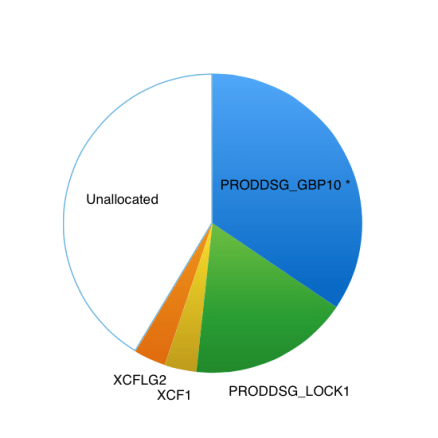
So let’s continue with our fictional example by examining one of these two Coupling Facility LPARs and drilling down:

This is from Coupling Facility Activity (SMF 74–4) data.

In this case I do know the Unallocated memory and so show it on the graph. It’s actually useful because it can help drive some conversations like:

  • What’s your “white space strategy?”
  • Perhaps you could increase the size of, say, GBP 10.

In this example I’ve marked GBP 10 with a *. In my code this denotes the structure is already at its maximum size: When defining a structure you specify its Maximum, Minimum and Initial sizes. Whether by manual intervention or using the AUTOALTER mechanism[5] the structure might grow to the Maximum. RMF documents these sizes so it’s easy to test whether a structure has grown to its limit.

Just because a structure has grown to the limit doesn’t mean you have to increase the size: RMF also documents whether the structure is full and whether this fullness is leading to such things as Directory Entry Reclaims or Data Element Reclaims. The extent to which this matters depends on the structure exploiter.

For example, the two XCF structures have their own instrumentation (SMF 74–2) which could be handy. In this case one could guess that one structure is for standard size (956 byte) messages and the other for large messages – but 74–2 data would confirm this and document the traffic.

“White space” is a complex subject and involves understanding how structures are allocated in Coupling Facilities and are to be recovered. I won’t try and do it justice in this post. But it’s a major reason why memory is left unallocated in Coupling Facility LPARs. Basically you should ask questions like “what happens if this structure fails?” and “how would I recover structures in the event of a failing Coupling Facility LPAR?” White space can be part of the answer.


Making Pies

I generally don’t like pie charts. But for the two cases outlined above they’re OK. The data is relatively static, though occasionally the values and names do change.

In this particular case the pie charts fill a niche in “storytelling”: I needed something to talk about where a machine’s memory is going. And I needed something to talk about the memory inside a Coupling Facility image.

What I wouldn’t like is to flash up these two charts and not dig deeper. Well, the data allows for much deeper digging; And I’m not inclined to stay shallow… πŸ™‚

Other Posts on Coupling Facility You Might Like

I’m reminded by a friend’s question a couple of days ago I’ve written a bunch of posts on Coupling Facility. Here are a few:


  1. A bunch of contiguous hours.  β†©

  2. In some cases I do tell my code how much memory the customer has. I get it from Vital Product Data, which z/OS and RMF don’t have access to.  β†©

  3. I’m increasingly seeing very large Linux LPARs; I’m not sure if it’s lots of small Linux virtual machines under VM or a few large ones.  β†©

  4. And we can tell they are Coupling Facility LPARs by means other than just guessing from their names.  β†©

  5. For those structures that support it.  β†©

After An Indecent Interval

(Originally posted 2014-11-16.)

In After A Decent Interval I talked about the need for frequently-cut SMF Interval records. This post is about bad behaviours (or maybe not so bad, depending on your point of view).

It’s actually an exploration of when interval-related records get cut, which turned into a bit of a “Think Friday” experiment. But I think – quite apart from the interest – it has some usefulness in my “day job”.

I share it with you in the hope you’ll find it interesting and perhaps useful.

And it’s in some ways related to what I wrote about in The End Is Nigh For CICS.

Code To Analyse SMF Timestamps

Let’s start with a simple DFSORT job to analyse the minutes when SMF 30 records are cut – in the hour. It’s restricted to looking at SMF 30 Subtype 2 Interval records. These are the 30’s one would most expect to have cut on a regular interval. (Subtype 3 records are cut when a step ends – to complement the Subtype 2’s.)

In reality the analysis I’m sharing with you uses more complex forms of this basic job. But we’ll get on to the analysis in a minute.

The first step is very simple and deletes a report data set. The second step writes to this data set and, identically, to the SPOOL. [1]

The INCLUDE statement throws away all record types other than SMF 30 Subtype 2.

The INREC statement turns the surviving records into two fields:

  • The record’s time in the form hhmmss, for example ‘084500’ for 8:45AM.
  • A 4-byte field with the value ‘1’ in.

These two fields are used in the SORT statement to sort by the minute portion of the timestamp and the SUM statement to count the number of records with a given minute.

The purpose of the OUTFIL statement is to format the report for two destinations. It produces a two-column report. The first is the minute and the second the number of records whose timestamp is within that minute. For example:

MIN             Records
---             -----------
 00                   49844
 01                      23
 02                      45
 ..                      ..

Here’s the code.

//DELOUT   EXEC PGM=IDCAMS 
//SYSPRINT  DD  SYSOUT=K,HOLD=YES 
//SYSIN     DD  * 
 DELETE <your.report.file> PURGE
    IF MAXCC = 8 THEN SET MAXCC = 0 
/* 
//* 
//HIST     EXEC PGM=ICEMAN 
//SYSPRINT DD SYSOUT=K,HOLD=YES 
//SYSOUT   DD SYSOUT=K,HOLD=YES 
//SYMNOUT  DD SYSOUT=K,HOLD=YES 
//SYMNAMES DD * 
* INPUT RECORD 
POSITION,1 
RDW,*,4,BI 
SKIP,1 
RTY,*,1,BI 
TME,*,4,BI 
SKIP,4 
SID,*,4,CH 
WID,*,4,CH 
STP,*,2,BI 
* 
* AFTER INREC 
POSITION,1 
_RDW,*,4,BI 
_HOUR,*,2,CH 
_MIN,*,2,CH 
_SEC,*,2,CH 
_T30,*,4,BI 
//SYSIN   DD * 
  OPTION VLSCMP 
  INCLUDE COND=(RTY,EQ,+30,AND,STP,EQ,+2) 
  INREC FIELDS=(RDW,TME,TM1,X'00000001') 
  SORT FIELDS=(_MIN,A) 
  SUM FIELDS=(_T30,BI) 
  OUTFIL FNAMES=(SORTOUT,TESTOUT), 
  OUTREC=(_RDW,X,_MIN,X,_T30,EDIT=(IIIIIIIIIT)), 
  HEADER1=('MIN',X,'   RECORDS',/,'---',X,'----------')
//TESTOUT   DD SYSOUT=K,HOLD=YES 
//SORTIN    DD  DISP=SHR, 
//             DSN=<your.input.data.set>
//SORTOUT   DD DISP=(NEW,CATLG),UNIT=PM,RECFM=VBA, 
//            SPACE=(CYL,(1,1),RLSE),DATACLAS=FASTBAT, 
//        DSN=<your.report.file> 

Of course you’ll need to fiddle with things like the DATACLAS parameter and which output class you use. I’m assuming that’s within the skill set of anybody reading this post.

A “Well Behaved” Case

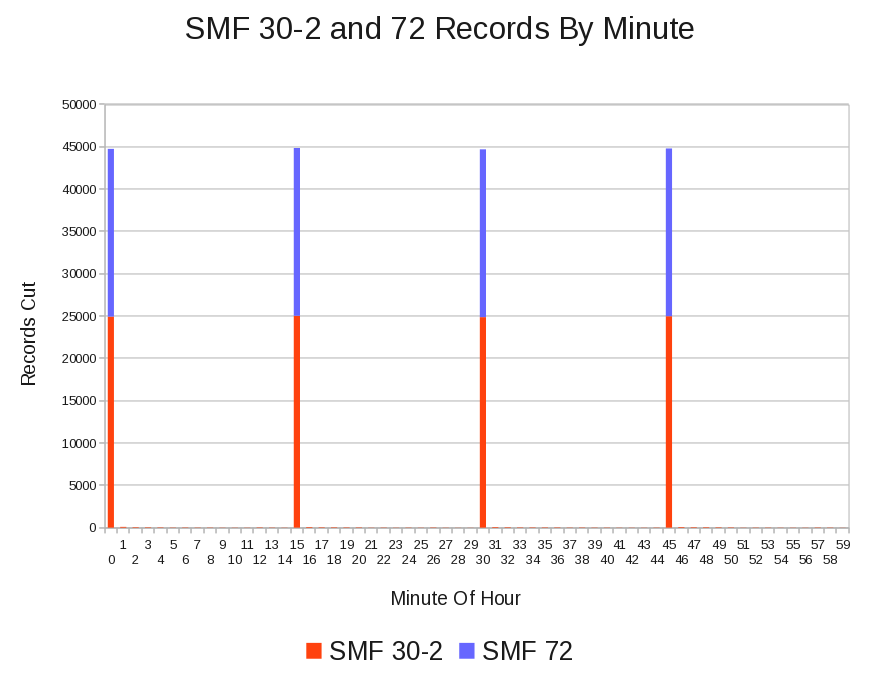
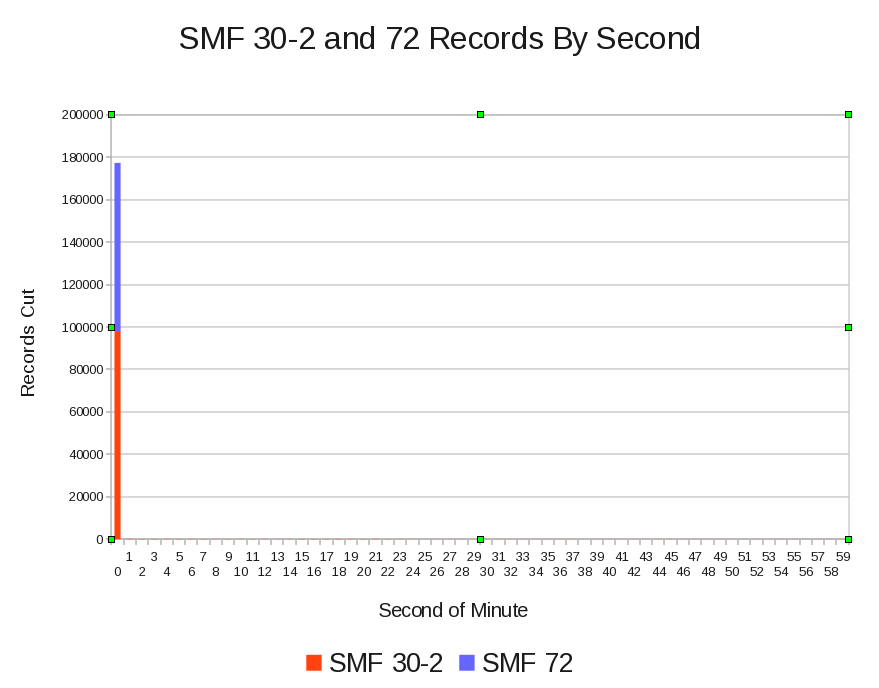
The following graph is from a customer whose SMF 30–2 and RMF records all appear, regular as clockwork, every 15 minutes. I’m showing SMF 72 (Workload Activity) records stacked on SMF 30–2 – as these are of similar volumes. [2]

In reality a few 30–2 records are cut every minute but no RMF records are cut “off the beat”.

Drilling down to seconds, as the next graph shows, almost all the records are cut in the first second of the minute – both SMF 30–2 and 72. [3]

A Less Tidy Case

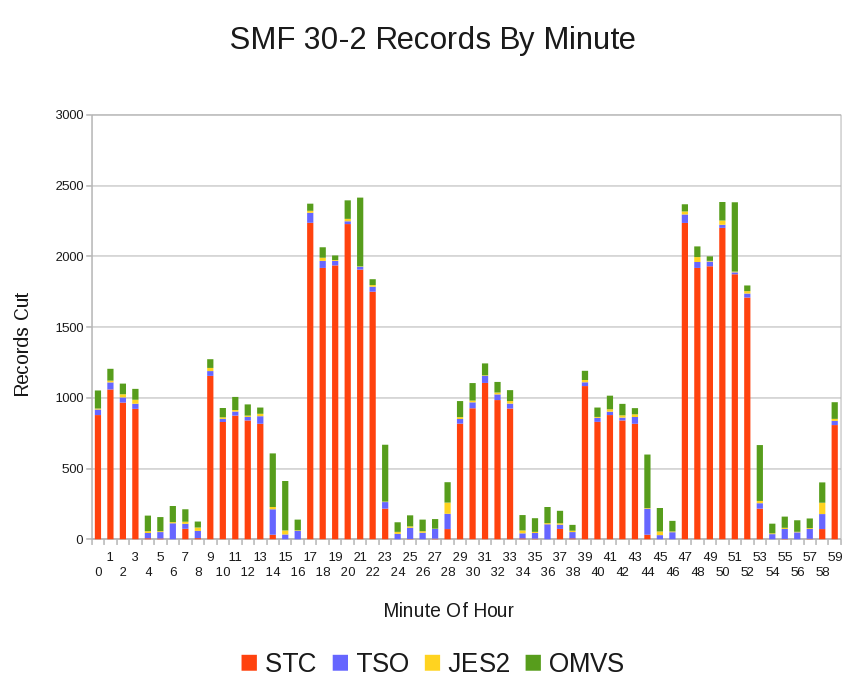
Contrast the above example with another customer, whose data is less well behaved. [4]

In this case the RMF records are all cut “on the beat”; It’s the SMF 30–2 records that aren’t.

In fact this is data from just one system out of many.[5]

In the previous case I surmise Interval Synchronisation was used (SYNCVAL and INTVAL parameters in SMFPRMxx) but in this case my best guess is that it isn’t.

Looking at Reader Start Times (which are in each Interval record, just as they are in Subtypes 4 and 5 for Step- and Job-End recording), the time when an SMF 30 is cut is determined by when the address space started.[6]

Let’s drill down a little, using field SMF30WID in the SMF Header; It gives the subsystem as SMF (and SMFPRMxx in particular) sees it:

Superficially it looks as if the SMF interval is 10 minutes; It isn’t. It’s actually 30 minutes. The high peaks are thirty minutes apart but there is something going on every 10 minutes, affecting STC and probably OMVS. It’s something I’ll want to discuss with the customer.

Conclusion

You might ask why I care about this sort of thing.

Partly it’s curiosity, sparked in this case by occasional glimpses that things aren’t as simple as they appear: If you really want to believe Interval records are tidily cut on interval boundaries that’ fine – but occasionally the fine (or not so fine) structure will up and bite you.

In my case the code I use occasionally produces bad graphs because it summarises records on 15, 30, or whatever minute intervals and records fall into the wrong interval. I’d like to at least be able to explain it.

But more generally, I have to pick a summarisation interval. Understanding how frequently and tidily Interval records are cut enables me to do that. I’m going to put code to do a basic form of this analysis into our process – right after we fetch the raw SMF from where you send it to (ECUREP, probably). This will save no end of time – as rebuilds of our performance databases and reruns of reporting can be reduced.

And, if nothing else it’s prompted me to re-read the SMFPRMxx section in z/OS Initialization And Tuning Reference.

Now that can’t be a bad thing. πŸ™‚


  1. That’s what the OUTFIL FNAMES parameter achieves.  ↩

  2. In my Production code I actually break down by SMFID and by record type in the range 70 to 79.  ↩

  3. In a busier or bigger system it might take more than 1 second on an interval to cut all the records; I look forward to seeing if that’s the case.  ↩

  4. It’s not really a moral judgment, but I expect this sort of data to cause more problems.  ↩

  5. My actual Production code report by system – in order to see the differences at a system level.  ↩

  6. Thanks to Dave Betten and some SMF 30 code of his it’s possible for me to see the Reader Start Time – which isn’t in the SMF Header and so can’t rigorously be processed by a simple DFSORT job.  ↩

What’s The Point Of WLM?

(Originally posted 2014-11-09.)

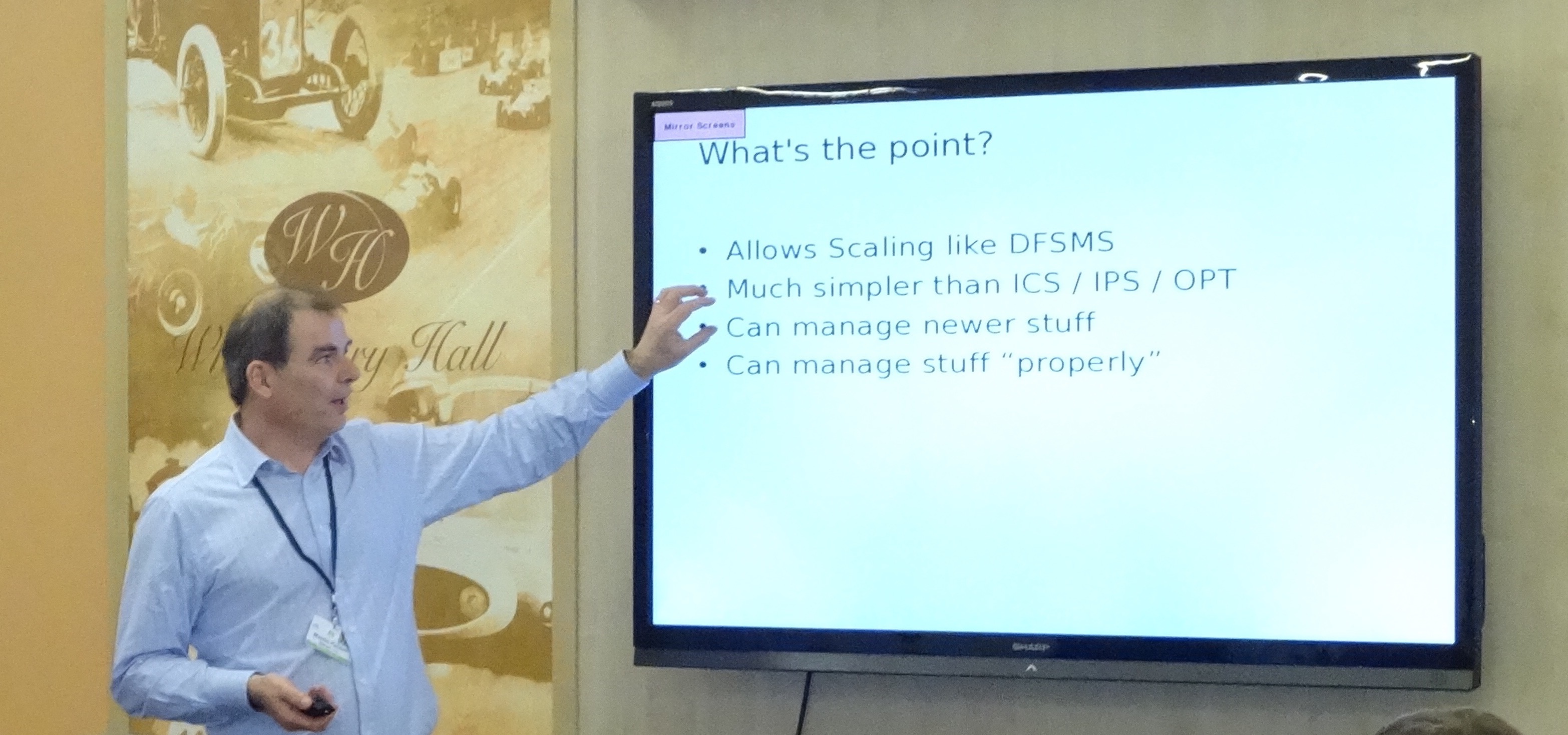
At UK GSE Annual Conference I presented on DB2 and Workload Manager. It occurred to me that one of the slides was a good basis for a blog post, posing the question “what’s the point of WLM?” And this was the slide, with me “for scale purposes”. πŸ™‚

(Thanks to Karen Wilkins for the photograph.)

So let me try to give you a synopsis of my view, expanding on each of the points on the slide.

Allows Scaling Like DFSMS

Back in 1988 I was one of the IBM Systems Engineers (SE’s) who supported a major UK customer in beta’ing DFSMS.[1] So I remember well the improvements in Storage Management that DFSMS brought.

Most notably the growth in data – data sets and volumes – was predicted to become unmanageable with the old ways of doing things. DFSMS, being Policy-Driven, provided constructs that enabled large numbers of volumes and data sets to be managed quickly.

The word “policy” is key to the analogy; WLM is also policy-driven, providing the same kind of leverage.[2] For many customers it would be inconceivable to manage performance with Compatibility Mode – even if it were still supported; The people cost would be too high, with the complexity of modern environments.

Much Simpler Than ICS / IPS / OPT

I’ll confess to never having been entirely comfortable with ICS / IPS / OPT; Sure I understood the mechanics but it was too early in my career to gather much experience of how it actually operated in real customer environments.[3]

There are, of course, people who “grew up” πŸ™‚ with Compat Mode (and probably watched it evolve) and for them I’m sure it makes perfect sense.

For the pedants, yes we still have OPT (IEAOPTxx) but it is much simpler now.[4] And what was got rid of I think we can happily live without.[5]

Can Manage Newer Stuff

It’s been so long now since WLM became the only game in town that I forget the myriad enhancements that assume it’s present. So I’ll take one example area: Server Address Spaces.

There are at least three functions that use some variant of the Server Address Space mechanism:

  • WLM-Managed Initiators.
  • Websphere Application Server address spaces.
  • DB2 Stored Procedure server address spaces.[6]

All three of them rely on WLM to balance system conditions against goal attainment when deciding on whether to start additional address spaces. There was nothing like it in Compat Mode.

As I said, it’s one area and there are numerous others.

Can Manage Stuff “Properly”

I said WLM was policy-driven. From the outset the rhetoric was that you could couch the policy in business terms. For response time goals that’s obviously true. For velocity goals it’s little less clear.

Certainly WLM Importance can be used to separate, with clarity, important work from less important work.

So I think WLM enables you to much more closely align performance specifications with business goals.

Conclusion

This has been a brief synopsis. Much more and “TL;DR”[7] definitely would apply. And because it’s brief it’s had to be selective.

And if you think it egotistical of me to post a photo of myself, consider I look different from my previous avatar; Clearly older, but I probably don’t look wiser. πŸ™‚

One final thought: There’s an enormous amount of Performance Tuning that has nothing to do with WLM; It’s important to be realistic about that; And anyone who talks about WLM like its some panacea – and people do – needs to be reminded of that.


  1. If I tell you I was an IBM SE you are supposed to understand my mindset and “get the hint”. The hint that I’ve been around a while and done interesting things. πŸ™‚  ↩

  2. Both DFSMS (through ISMF) and WLM are panel-driven, wherein you manage the policy. I already take the WLM ISPF TLIB and generate reporting from it. I wonder if the same approach would work with ISMF.  ↩

  3. And the instrumentation – mainly in RMF but also in SMF 30 – is so much better, which really helps.  ↩

  4. And, again for the pedants, what’s been added to OPT is new, rather than reversing the simplification.  ↩

  5. Anyone care to challenge that?  ↩

  6. I wrote the Server Address Space Management chapters of DB2 for z/OS Stored Procedures: Through the CALL and Beyond in 2003.  ↩

  7. Too Long; Didn’t Read  ↩

Not So Much Renaissance Man More Tool-Using Ape :-)

(Originally posted 2014-11-02.)

If you come to my blog only for Performance- or SMF-related topics you’re going to be disappointed in this post. But if, like me, you’re interested in storytelling and web-related technologies then read on.

This post is about HTML5 Canvas – a technology I really like.

Some Of Why I Care About Web Technologies

To try and keep this focused I’m going to talk only about why web technologies are relevant to my “day job”.[1]

The tooling I curate and use was built over many years by many people. Its graphics are built on GDDM, and look like they date from the 1970s. But I’m not so concerned about how they look, so long as they tell the story well. [2]

But there are some stories that require some new methods of depiction, some new diagram types. Perhaps the ones in WLM Velocity – Another Fine Rhetorical Device I’ve Gotten Myself Into are a poor example of that. I don’t think I’ve shown you machine diagrams yet, but plenty of customers this year have seen them. And they’re a much better example of stuff that would require some quite low level GDDM programming.[3]

So I adopted a new approach, one that already yields nicer graphics than (I think) I could do with GDDM.

Step Forward HTML5 Canvas

Web standards, and HTML5 in particular, are slowly evolving. One of the most stable pieces is the “new” <canvas> tag. And it’s the one I find most immediately useful.

With canvas you use javascript to create diagrams. [4]

While many of you probably don’t know javascript a lot of people do and it’s a fine, readily learnable, language. It’s certainly fit for the purpose of manipulating character strings and driving diagram creation. [5]

Today I actually create the HTML and javascript using PHP – which is good for most things, especially parsing XML and HTML and string manipulation.

To use all this you need a modern web browser, of which more anon.

Note: You can build sophisticated, 3D, diagrams using WebGL. WebGL can use Canvas. But today I don’t use WebGL – but I have a book on it so one day I might.

Insufficiently Clever By Half?[6]

HTML5 Canvas is supported by most “modern” web browsers. You could say any browser unable to support Canvas is not a modern browser. But the degree of support varies by browser, and between browser releases. My recent experiences with Firefox Nightly shows it supports some drawing capabilities previous releases don’t – such as dashed lines. [7]

Support for drawing capabilities is one thing; Another is behaviour in the browser:

In Firefox right-clicking on a canvas element brings up a menu with a “View Image” item. This displays the graphic as a PNG. [8] This PNG can be copied or saved in a file.

Three snags:

  1. It would be better workflow if Firefox allowed you to Copy or Save the graphic without having to View Image first.

  2. When I last checked neither Mobile Safari nor Chrome have the same workflow.

  3. Dragging the graphic into Symphony seems to cause the latter to loop. (And you can’t drag from the page with the canvas in.)

A glance at the spec suggests it doesn’t address how a browser should behave with the canvas element. I’m not saying it should but, and this is perhaps my conclusion, it would be really nice to see browsers competing with each other on how they handle canvas.

As it’s an open-source browser I’d quite like to fix it for Firefox, but I simply don’t have the time. 😦

But for now, it’s really satisfying to be able to generate diagrams this way that (to my eyes at least) look decent. And so far I have:

  • Machine diagrams
  • WLM depictions
  • Gantt charts – in colour [9] and with the scale in hours and minutes

And I’ll confess it’s been fun. πŸ™‚


  1. There are plenty of other reasons for liking web technologies, of course.  ↩

  2. One day we might hire a graphics designer – but finding one who knows GDDM is going to be tough.  ↩

  3. Albeit in REXX, probably.  ↩

  4. There are plenty of HTML5 Canvas tutorials on the web; None strikes me as overwhelmingly better than the rest.  ↩

  5. Learn it anyway; As a useful programming language in its own right.  ↩

  6. When people say something is “too clever by half” I think they really mean it’s “insufficiently clever by half”.  ↩

  7. I actually use this in my machine diagram and have to use a kind of polyfill for when I’m running in an older version of Firefox.  ↩

  8. Using a Data URI.  ↩

  9. This is something I haven’t been able to do before – colour – and I’m only just beginning to think of uses for colour coding in Gantt charts.  ↩

The End Is Nigh For CICS

(Originally posted 2014-10-12.)

… and other address spaces, too. πŸ™‚

In Once Upon A Restart I talked about how to detect IPLs and restarts of CICS regions and MQ subsystems (and other long-running address spaces) – from SMF Type 30 Interval records.

It’s easy to see starts but what about stops?[1]

It turns out you can estimate when address spaces stop from the SMF 30 Interval records (Subtypes 2 and 3):

  • When there is no longer a record for the address space (with a given Reader Start Time) the address space has terminated. So the last record for that job name with the given Reader Start Time marks when it came down.
  • When there is again a record with the same job name it will have a new Reader Start Time and the address space has come up again.[2]

This is actually a naive implementation but it gets me very close to when an address space comes down.


So What?


The flippant answer is that I extend what my tooling does because it pleases me to. πŸ™‚


But actually that’s not true: To the extent that it needs a justification I’m more useful the closer I get to how my customers are running things, and to understanding their problems.

Specifically, in the handful of customers I’ve tested this code with, I have quite a good understanding of the relationship between CICS regions [3] and the batch. For example:

  • I see CICS regions come down and not come back up again for hours, sometimes on a timer pop and sometimes event-driven. This is usually overnight and I’m therefore seeing a Batch Window.
  • I see CICS regions come down and immediately restarted – in a way that suggests being put into read-only mode or to flip data sets. [4] Again this can be a sign of a batch window.
  • I see test regions come up for very short periods of time and then go down again. [5]

Actually, being (supposedly) open minded, I don’t know quite what I’ll see. But these are the sorts of things I think I’ll see.

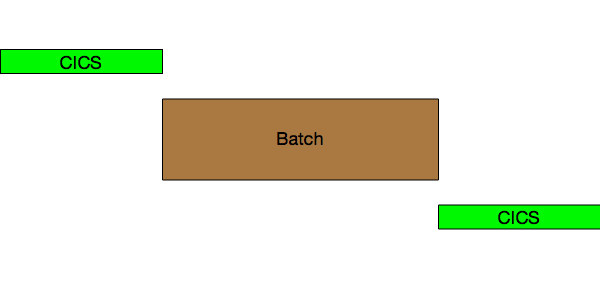
Here’s a depiction of CICS coming down for Batch and restarting after:

CICS Down For Batch

and here’s a conflation of a number of scenarios where CICS gets bounced but is still up alongside batch. In this case it’s in “Read Only” mode:

CICS Read Only


Again, So What?


The answer to why this might be relevant to you is:


  • Many of you are looking after a plethoration [6] of systems and applications. This technique might save you time.
  • If I start talking to you about up and down times this might help you understand where I got it from. The words “see my blog” escape from my lips quite frequently these days.

And I expect I’ll be updating Life And Times Of An Address Space with this.


  1. Yes you can use SMF 30 Subtypes 4 and 5 to get step- and job-end timings but I prefer not to make customers send me these. I might change my mind, one day.  β†©

  2. But I treat this as a new instance of the region / address space.  β†©

  3. It’s really only the CICS regions that get frequently restarted. But I’d notice if others did.  β†©

  4. In one customer case this is to pick up new versions of VSAM data sets the batch has created.  β†©

  5. I probably should pick up termination code to see if they ABENDed. Unfortunately there isn’t one as the Completion Section isn’t created for SMF 30 Subtypes 2 and 3 but only Subtypes 4 and 5.  β†©

  6. It probably should be “plethora” or “proliferation” but I like combining the two into “plethoration”. I hope you do, too. πŸ™‚  β†©


Curiouser And Curiouser, Spike

(Originally posted 2014-09-28.)

As you’ve probably gathered I like to get nosy about how customers run systems. This is probably best and most recently exemplified by this blog post: Once Upon A Restart

So this post is about another piece of curiosity: What spikes can tell us about how people run systems. In a way it’s similar to what restarts tell us, hence the above blog post link.

I like “Think Fridays”. But I’ve been rather busy of late, so what I got to do this past Friday was brief, embryonic and just showing some of the potential of the method. In short it’s a prototype or an experiment. But, in line with the “Fink Thriday” πŸ™‚ idea, it did get me thinking and exploring.

But such things don’t happen in a vacuum: I’ve noticed spikes in CPU and memory usage by address spaces before. Many times before. So that has gradually formed a question in my mind:

"Is there an event that triggers a spike in an address space?

Now, I’m not really thinking of the sorts of anomalies that zAware might learn to detect. I’m thinking of the more mundane “such and such happens every Tuesday night at 8PM” kind of event.

My Prototype

For my experiment / prototype I took a pair of LPARs. Let’s call them PROD and DEVT – for that is the roles these LPARs have.

I took SMF 30 Interval (Subtypes 2 and 3) records for both systems and examined a number of address spaces I’d spotted spiking:

  • DFHSM – on both systems, in STCMD.
  • DFRMM – on both systems, in STCMD.
  • CATALOG – on both systems, in SYSTEM.
  • An address space related to data extraction and transmission – on PROD, in STCMD.

For each of these I wrote code to examine CPU for each of these

  • It computes the Average CPU across the whole set of data for the address space.
  • It detects intervals where the address space uses at least 2x, 4x, 8x, 16x etc. the Average CPU.

Between these two I get spikes – whether broad or narrow, tall or short. Right now I just pump them out in a table – so lots of refinement can happen later on.

DFHSM

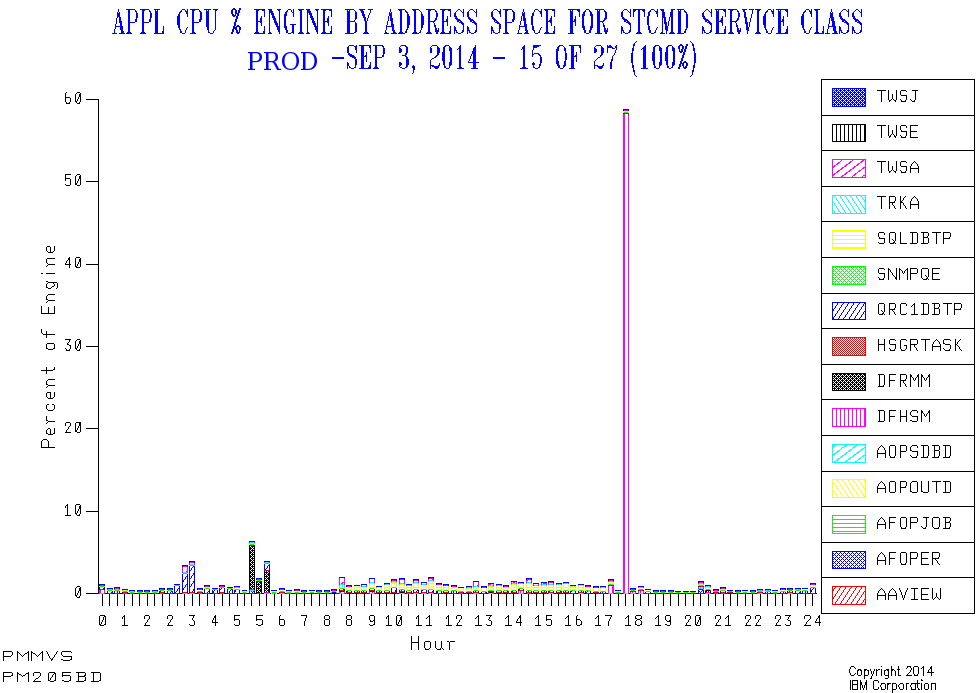
In PROD there’s a daily narrow spike around 5:30PM. And it’s a very substantial spike, CPUwise. So this looks like daily Space Management or similar daily functions. And its timing is regular as clockwork.

Here’s one day’s view of the service class that contains the DFHSM address space, as well as two of the other spiky address spaces.

In DEVT there’s a daily narrow spike around 8PM, but it’s not well-pronounced. But additionally there are lots of other, broader, episodes of well-above-average CPU consumption. The 8PM spike might well be Space Management or similar; It’s hard to tell. I expect Development LPARs will turn out to show this behaviour with DFHSM.

DFRMM

In PROD there are daily broad peaks – of around 45 minutes – just before the working day starts. But their incidence varies by as much as an hour and a half. Quite probably when the overnight Batch ends.

In DEVT there are narrower spikes at around the same time as PROD in the morning. But there are also narrow spikes around 8PM.

CATALOG

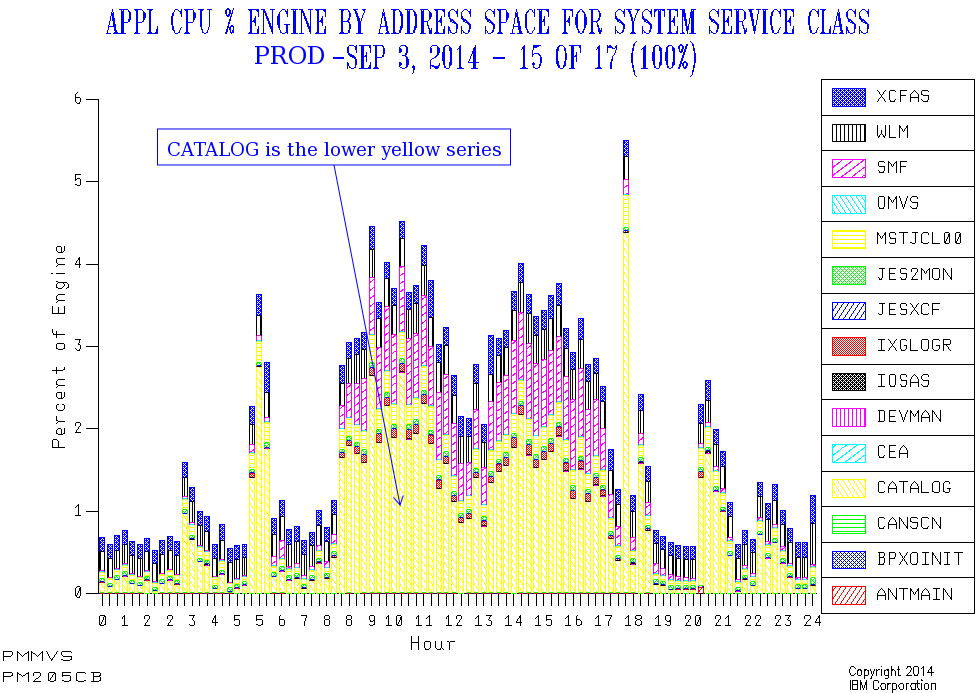
In PROD CATALOG has a number of spikes that line up with the previously-mentioned ones. As well as some in the evening Batch window.

But here the picture is less stark – largely because the general daytime level of CATALOG CPU drives up the overall average.

In DEVT CATALOG CPU usage varies enormously, with no obvious spikes and no clear pattern. That too is probably a feature of Development workloads.

So I won’t claim the “spike” treatment is such a success for CATALOG: You can see the spikes from the graph, but my prototype code doesn’t throw them and their timing into sharp relief. So maybe I just need to work on the code some more.

Data Extract / Transmission Address Space

This only runs in PROD. Every day this spikes for a brief while, regularly each morning around 2:30AM to 3AM.

This doesn’t appear to be on a “timer pop” so much as having prereqs, but I’m not 100% certain of this; That would be something to ask the customer.

SMF Interval Accuracy

Obviously, using interval records, the timing of an event can only be approximated using this method. Most customers I know use 15 or 30 minute intervals, which is fine. And our code picks the midpoint of the interval as a timestamp.

So we’re not going to detect events this way to more than 7.5 – 15 minutes’ accuracy. But I think that’s enough.

Events Dear Boy, Events

Now, having said I’m not really looking for anomalies a la zAware, there is already one case where I do see happenings of the undesirable kind.

In the test data I’m working with I see DUMPSRV (Dump Services) suddenly use more memory at two points in the day. After each of these events memory usage returns to a very low value. CPU doesn’t show the same spikiness.

From my restart code I can see that a CICS region restarts (unusually) right after the second spike. So, based purely on SMF 30 Interval records it’s a reasonable guess that the region ABENDed and dumped at the time of the second spike. Not conclusive, but a reasonable guess. And the relationships between certain spikes and restarts is worth exploring.

Other Address Spaces And Metrics

I made arbitrary choices of job name, based on this set of data. I could equally have roped in such things as Sterling Connect Direct.

And I could look at all sorts of spikes, such as in EXCP rate, Virtual Storage Allocation and zIIP Usage. To do that I might have to make the code more specialised; For example, with DUMPSRV only looking at memory usage (not CPU).

Timer Pops And Movable Feasts

Timing – as with restarts – is interesting to me:

  • If something kicks off bang on, say, 8PM every single day what does that mean?

    Perhaps this is conservatively timed and could be earlier and event-driven.

  • If something kicks off at the same time every day, but not on a timing boundary, what does that mean?

    It might mean the processes in front of it are regularly but take a few minutes to complete. For example: CICS comes down at 8PM exactly but a post-shutdown job always completes at 8:03, allowing the batch to always start at the same time.

  • If something moves around what does that mean?

    Perhaps the chain of events it depends on takes a variable amount of time to complete, which might be a problem. For example backups kicked off when the batch completes.

Conclusion

So I’m not telling the customer what to do about these spikes; There probably is nothing for them to do. But I feel I’m getting closer to how they operate. And maybe I’m seeing some challenges, such as the variability of timing of things that happen just before the online day.

As this was a quick experiment there are obviously some rough edges, and there’s more it could do.

I think I’m edging towards a “Day In The Life” approach to systems, key address spaces and applications. It might include both spikes and restarts. And probably the general “double hump” etc. patterns in workload we usually see. Now that could be useful. The journey continues… πŸ™‚

WLM Velocity – Another Fine Rhetorical Device I’ve Gotten Myself Into

(Originally posted 2014-09-21.)

Back in 2010 I wrote about a graph I’d developed for understanding how a Service Class Period’s velocity behaves. That post is here: WLM Velocity – “Rhetorical Devices Are Us”.

At the time I was concerned not to show up the customer by displaying the graph. I think that was the right decision. But in the presentation I mention here: Workload Manager And DB2 Presentation Abstract I do have an example. And indeed it’s a significant part of my “zIIP Capacity Planning” presentation (you can get from System z Technical University, Budapest 12–16 May 2014, Slides).

I regard that graph as a nice rhetorical device[1] as it has led to many fine discussions with customers (and I’ve tweaked it a little in the process).

But this blog post is about a very new graph I’ve developed on the theme of Velocity. I hope it, too, will lead to lots of interesting discussions with customers.

But the reason for sharing it with you is that you might well want to do something similar.

The primary purpose of the graph is twofold:

  • To show the hierarchy of importances and velocities.
  • To show when too many WLM service class periods are too similar – both in terms of velocities and importances.

As I write this those two bullets look remarkably similar but they’re not.

The Importance Of Importance

Question: Given two service class periods with equal velocities, which will be served first?

Answer: The one with the higher importance.

It’s a fact that importance is the major distinction in that WLM will try to satisfy the goal of a more important service class period before attempting to satisfy the goal of a less important one.

But note that some goals are unattainable and some velocity calculations are dominated by things WLM can do little about.

So this addresses Bullet 1 – the hierarchy.

The Importance Of Being Earnest

Sorry for the gratuitous section heading but it sort of fits: If you have a goal that’s greatly overachieved it’s not protective. For example, if STCHI has a goal of 40% and it always achieves around 80% it’s not protective: If CPU becomes scarce, as just one scenario, the velocity delivered could easily drop down towards the goal 40%.

So set goals that are “in earnest” and protective, unless you really don’t care if service drops off.

Flight Level Separation

But importance isn’t the only, ahem, important πŸ™‚ thing: The difference in goal velocities is also important: Goals that are too close together aren’t really useful.

If possible keep velocities at least 10 apart, or try to merge the service class periods.[2]

So this addresses Bullet 2 – the separation.

And Now To The Graph Itself

The graph I’m describing in this post is also a nice rhetorical device.

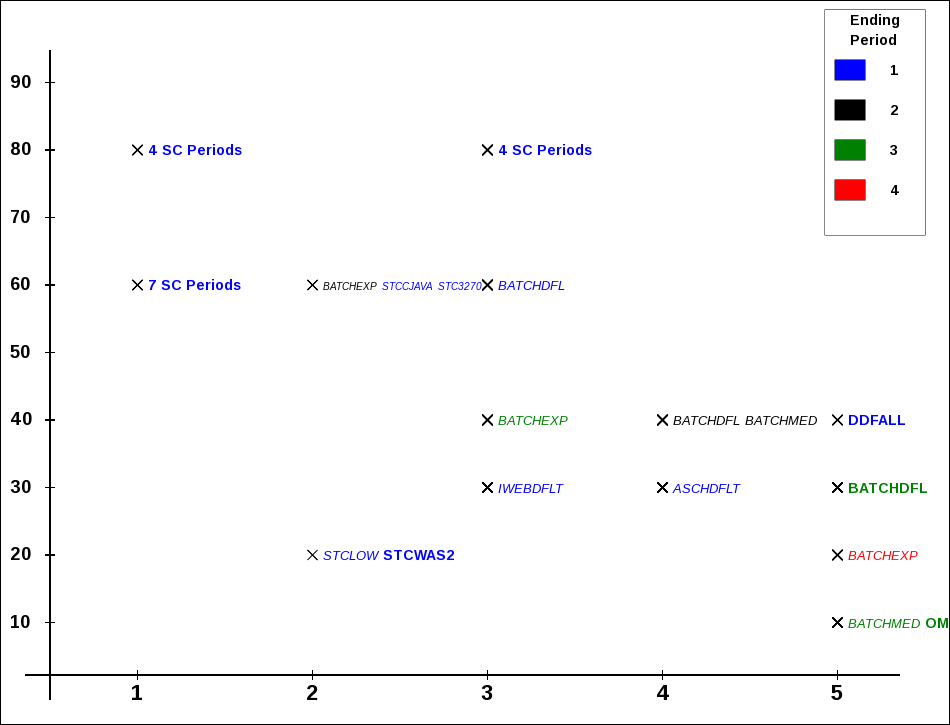
The graph has along the x axis WLM importance. On the y axis is the goal velocity. Each marker is a unique combination of importance and velocity. Next to the marker is a list of service class periods defined with that importance and velocity.

At least that was the first implementation.

Then I refined it (and I’m still fiddling with it):

  • If the service class period consumes significant CPU I bold and enlarge the name. If it doesn’t I draw the name in italics. So there’s a distinction between significant service class periods and insignificant ones – for this shift and this system. “Significant” is a “movable feast” so I expect I’ll tweak this in the future.

  • If there are more than 3 service class periods with the same importance and velocity I don’t list them but the label becomes e.g. “7 SC Periods”. It’s significant if many service class periods share the same importance and velocity.

  • I use colour coding for the service class periods – instead of adding e.g. “.1” to denote first period to the label. (I’m having to get fancy to manage the label “real estate”.)

OK. So enough prose; Let’s see some pictures. πŸ™‚

Here are some example graphs. I’ve scaled them down to fit into the page column so you’ll find them clearer if you open the picture in a new tab or window.

First a straightforward one.

velocityI

In this example there are four significant service classes: SERVERS, PRDBATHI, STCMD and PRDBATMD. Here SERVERS (assuming it has the right things in it [3]) is sensibly located to the right and above everything else. STCMD and PRDBATHI are together in the middle and PRDBATMD is down and to the right.

This looks like a sensible hierarchy and generally the velocity “flight levels” have good separation.[4].

You’ll also notice a couple of (in black) Period 2 data points. Period 1 for these service classes have response time goals.

Now a case where the flight levels are too close together:

velocityK

Importance 2 and, even more so, Importances 3 and 4 have lots of crowding – with velocity separations down to 2 in some cases. WLM will have a hard time working with this.

Finally a more extreme case:

velocityZ

Here we have several cases where 4 or even 7 service class periods share the same importance and velocity.

Limitations Of The Method

The most obvious limitation is that other goal types – SYSTEM, Response Time and Discretionary – can’t be plotted on the same graph. It would be possible to draw SYSTEM / SYSSTC to the left and Discretionary to the right but it doesn’t add anything.

I’m going to have to think about how to plot Response Time goals – on a separate graph. There isn’t an obvious y axis. By the way, in all three examples there are service classes where the first (or first few) periods have Response Time goals and subsequent ones have Velocity goals. This is often observed – and this graph won’t show these early Response Time periods.

Also this is fairly static – being a “shift” summary.

The real question is “what do I do about flight levels that are too close together?” The ones that are identical might be amenable to combination but you can’t really combine PRDBATHI and STCMD (as in the first example) – unless these service class names are misnomers.

So this is why I consider this graphing technique a “rhetorical device”: I really want customers to think about whether it makes sense to combine service classes. And part of the motivation for this is WLM works better when the work in a service class period is sizeable.

This is also a “single system” graph and the constraints of running in a Parallel Sysplex – where there is only one WLM policy in effect for all members – aren’t reflected here. Again, doing the thinking is the important thing.

One, perhaps subtle, issue is the fact RMF records CPU in the Service Class Period where the work ended. You can see this for BATCHMED in the second example:

  • Periods 1 and 2 have little CPU in them; The name is italicised.
  • Period 3 has CPU in it; The name is in bold. Clearly work accumulates service (which has to include CPU) when it progresses through the periods. But there isn’t a good way to back-calculate the CPU in each period.

Conclusion

So I hope this graph gives you some ideas. Certainly I’ll be using it in customer situations and it’s a very easy graph for me to produce[5]. It will, of course, evolve – in all likelihood. For example you can see cases where the labels are either cut off or overlap something else.


  1. When I use the term “rhetorical device” I mean the graph is useful but not to be taken too seriously: It should usefully contribute to the discussion, warts and all.  β†©

  2. This, as we shall see presently, is easier said than done.  β†©

  3. You can tell (mostly) what’s in a Service Class using SMF 30: Workload, Service Class and Report Class are fields in the record.  β†©

  4. The more I use the term “flight level” the more I like it.  β†©

  5. It’s actually written in PHP which generates javascript. This in turn draws on an HTML5 Canvas element. In most browsers you can readily save the javascript and indeed the drawing as a PNG file. Actually I think browsers have a slightly awkward handling of Canvas elements – but nevermind. (If I, to paraphrase the late great Tony Benn “retire to spend more time doing real computing” πŸ™‚ I fancy I might be working on this.)  β†©

DFSORT JOINKEYS Instrumentation – A Practical Example

(Originally posted 2014-09-08.)

Some technologies show up “in the field” very soon after they’re announced and shipped. Others take a little longer.

Back in 2009[1] I blogged about one technology – DFSORT JOINKEYS. For this post to make much sense you’ll probably want to read that post first. Here it is: DFSORT Does JOIN.

Dave Betten and I have – at last – a set of data from a customer where one of the major jobs does indeed use JOINKEYS. The purpose of this post is to show you what one of these looks like – from the point of view of SMF records.[2] I won’t claim this post highlights all the statistics available to you but I hope it gives you a flavour.

Though the job is repeated this post will concentrate on one such running. As you’ll see from the graphic below it runs from 15:25 to 16:33. There are two steps:

  • A SORT invocation, running from 15:25 to 16:11.
  • A JOINKEYS invocation, running from 16:11 to 16:33.

SORT and JOIN Gantt

SORT Step

While the SORT step is the longer the purpose of this post isn’t to discuss how to speed up the job overall. But it’s a good “warm up”:

  • In this case we can see the Input phase (marked by the timestamps for OPEN and CLOSE of the SORTIN data set): 15:25 to 15:51.
  • We can equally see the Output phase: 15:51 to 16:11 (from the SORTOUT data set OPEN and CLOSE timestamps).
  • We can see 22 SORTWKnn data sets were OPENed and CLOSEd, spanning both input and output phases.[3]
  • We can see no Intermediate Merge phase – the Input and Output phases abutting each other.

From The SORT Step To The JOINKEYS Step

The SORTOUT data set from the SORT step feeds directly into the JOINKEYS step as the SORTJNF1 data set. Note it’s sorted twice – once in the SORT step and again in the JOINKEYS step – which seems rather a pity. It is read by a TSO user later, so maybe the two different sort orders are needed.

What I’ve just used is our Life Of A Data Set Technique (or LOADS for short). Below is the LOADS table for this SORTOUT data set.

SORTOUT LOADS

JOINKEYS Step

This is where – to me – it gets more interesting. In this case we’re joining two data sets – DDs SORTJNF1 and SORTJNF2.

  • As you just saw SORTJNF1 came from the previous SORT step.

  • SORTJNF2 is a relatively small data set.

both data sets are sorted on the same key fields. We know this just because they each have Sort Work File data sets – 5 used in one case and 21 in the other.[4]

You might’ve spotted that everything I’ve said so far is based on SMF 14 and 15 (Non-VSAM CLOSE for Read and Update) records. Now let’s start to dig into the SMF 16 (DFSORT Invocation) records, restricting ourselves to the JOINKEYS step.

We have three SMF 16 records for this step:

  • JNF1 Sort

  • JNF2 Sort

  • Joining Copy

The two sorts are necessary because the programmer told DFSORT to sort both files so the key fields for the Join are in order. As I indicated in DFSORT Does JOIN there are ways of avoiding this if the sorts are unnecessary (and terminating if the sorts are proven necessary).

For a real tuning exercise you’d try to avoid unnecessary sorts.

The following is a schematic of how the three invocations work. JOIN Flow

Let’s look at JNF2 first. The 5 Sort Work File data sets OPEN and CLOSE within the same minute (16:11) according to our Gantt chart. Indeed there are zero EXCPs to them. But the SORTJNF2 data set is held open until the end of the JOINKEYS step (16:33).

Note there’s no output data set from this sort.[5] We’ll come to what happens to the output data in a minute.

Turning to JNF1 the Sort Work File data sets stay open throughout the JOINKEYS step; There’s lots of I/O to them.

Again there’s no output data set from this sort.[5]

The third SMF 16 record relates to the Copy (with an exit) that does the actual join. It has no input data sets but it does have an output data set (DD OUTFILE1).[6]

So let’s turn to what SMF 16 tells us about records and how they flow:

  • JNF1 reads 179 million records from DD SORTJNF1 and passes them to a DFSORT E35 exit, writing none to disk. These records are fixed-length and each 300 bytes. The sort’s key length is 15 bytes.
  • JNF2 reads 5,000,006 records from DD SORTJNF2 and passes them to a DFSORT E35 exit, again writing none to disk. The sort is for 15 bytes again, which is curious as the LRECL appears to be 11 bytes; Some padding must occur – perhaps to match the keys from JNF1.
  • COPY inserts 179 million records, passing that many to OUTFIL.
  • OUTFIL reduces the 179 million records to 30 million; The SMF 16 record says OUTFIL INCLUDE/OMIT/SAVE and OUTFIL OUTREC was used, which begins to explain the reduction. But the LRECL remains 300 bytes; I suspect the JOIN is to decide which records to have OUTFIL throw away, before writing them to DD OUTFILE1, and the OUTREC is to remove the extra bytes from JNF1 used in the record selection.

One other point – from SMF 14 and 15 analysis: In this case I don’t see records for SYMNAMES or SYMNOUT DDs, so either DFSORT symbols aren’t being used or they are SYSIN or SPOOL data sets, respectively. To my mind SYMNAMES data sets are most valuable when they are permanent. I don’t expect SYMNOUT to have permanent value, beyond debugging.

Conclusion

There’s lots of extra detail in the SMF 14, 15, and 16 records of course. But I hope this has given you some idea of how to view the data when JOINKEYS is invoked.

And the reason it’s taken us a while to see JOINKEYS in a customer is quite straightforward: It’s not something you flip a switch to use; Rather you have to write code to use it.

And note that this post hasn’t given any real tuning advice: The previously-mentioned blog post does. And the actual customer situation is a little more complex than this (though the facts I’ve stated are all true).


  1. I would think most customers have the function installed by now, so hopefully if you like JOINKEYS it’s there for you to use.  β†©

  2. To replicate this sort of thing you need SMF 14 and 15 for non-VSAM data sets, 62 and 64 for VSAM, 16 with SMF=FULL for DFSORT, and 30 subtypes 4 and 5 for step- and job-end analysis.  β†©

  3. In preparation for writing this post I took a detour: This Gantt chart used to, rather unhelpfully, have 22 lines for these SORTWKnn data sets, each with the same start and stop times. I now feel I can use this chart in a real customer situation as rolling up the SORTWKnn data sets that indeed have matching timestamps makes it so much punchier.  β†©

  4. Curiously JNF1WK16 is never OPENed. Perhaps I should teach my code to detect “missing” Sort Work File data sets like this.  β†©

  5. Both the absence of output data sets from SMF 15 and the absence of Output Data Set sections in the DFSORT SMF 16 record confirm this.  β†©

  6. You only get Output Data Set sections in SMF 16 if SMF=FULL is in effect for them.  β†©

Workload Manager And DB2 Presentation Abstract

(Originally posted 2014-08-18.)

I’m pleased to be presenting three sessions at UK GSE Annual Conference, Tuesday 4th and Wednesday 5th November in Whittlebury Hall.

Two are on the zCMPA (Performance and Capacity or “UKCMG”) track:

  • Life and Times of an Address Space (Tuesday)
  • zIIP Capacity Planning (Wednesday)

I’ve written about these extensively. Obviously they’re evolved a bit and I have specific reasons to believe my experience will be further evolved between now and then.

But there’s a new one, on the DB2 track:

  • Workload Manager and DB2 (Tuesday)

I can’t be crisp about how this presentation came about πŸ™‚ but I’m pleased to be doing it.

So here’s the abstract:


DB2 people don’t know WLM. WLM people don’t know DB2.


A slightly β€œcartoon” view but with an element of truth.


The point of this presentation is to unite the two perspectives, to give better DB2 performance while ensuring WLM is properly set up.


Over the years a recurrent theme has been enabling conversations between z/OS and DB2 people (and I admit to be more in the former camp than the latter).


By the way, I know it’s been a long time since I last posted. I might’ve totally lost my audience, but somehow I don’t think so. πŸ™‚

I had a lovely holiday in Australia and then got very busy with a number of customer situations (which, personally, is the way I like to be). And, frankly, I had nothing to say. So I didn’t say it. πŸ™‚ But now, while I’ve a heavy caseload, I’m seeing things that make me go “hmmm?” πŸ™‚

I’m also pleased to say that my good friend Dave Betten joined the team I’m in as our Batch expert on 1st August. I’m hoping to coax some “guest posts” out of him, particularly in the area of DFSORT Performance. It’s great to have him onboard! I should also say I’m not giving up Batch and Dave is going to work on the full range of engagements I’m involved in. Two heads, I hope, will be better than one. For completeness, I’m also pleased to have Dave Hauser continue as our DB2 Performance lead.