zBC12 As A Standalone Coupling Facility?

(Originally posted 2014-04-01.)

There’s been some interest recently in whether a zBC12 as a standalone Coupling Facility would be a good idea. Having replied to one such question in email form I can count that as a draft for a blog post on the subject. It’s a complex question as are most about Parallel Sysplex configuration design. So this won’t be a comprehensive answer but I hope it’ll give you food for thought and perhaps a new way of looking at the relevant performance data.

There are two main themes worth exploring:

  • What a stand-alone zBC12 allows you to do
  • Signalling sensitivity to technology options

The second of these is a particularly boundless discussion. So let’s get started: I have a kettle to boil that ocean in. 🙂

A Stand Alone Coupling Facility

Consider the case of a twin-ICF[1] Parallel Sysplex environment where all the members are on the same pair of physical machines as the two ICFs.[2]

There are two design choices:

1) Duplexing [3] key structures across the two ICFs,

2) Not duplexing the structures.

The first choice is, thankfully, far more common than the second. It enables far higher availability and much greater resilience.

Consider the oft-cited case of a 2-way DB2 Data Sharing[4] Group where the LOCK1 structure is unduplexed and on the same footprint as one of the members[5]. Suppose this footprint suffers a hardware failure: Both the LOCK1 and one of the members fails and you’re in for a painful wait while the entire Data Sharing group restarts.

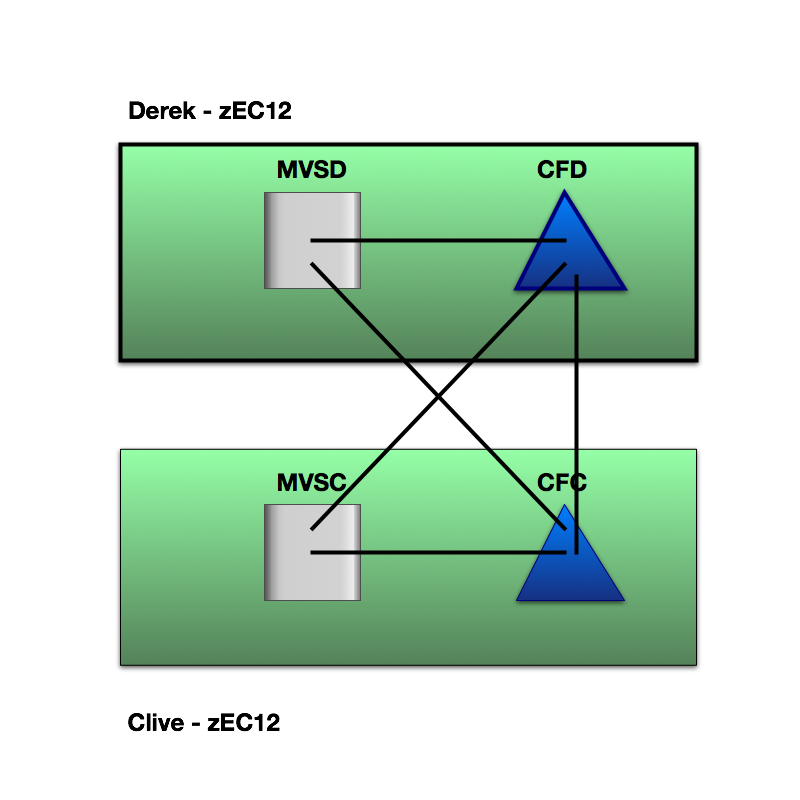
Here’s what a duplexing scheme looks like. It’s symmetrical. Often the two machines are in separate machine rooms some distance apart, but sometimes they’re sat next to each other.[6]

If instead you place the vital structures in a standalone zBC12 you would need both the zBC12 and one of the coupled machines to fail to cause the same group-wide restart.

Here’s what a standalone configuration could look like:

I’ve drawn the zBC12 (“Bairn”) nearer to “Derek” as in practice I don’t tend to see a third data center just to house the standalone CF. “Nearer” usually means shorter request response times, so we no longer have symmetry of outcomes between the two coupled members. This might matter.

There are, of course, other similar designs. One of these is a third footprint’s ICF where the other LPARs on that third footprint are in a totally separate parallel sysplex. To talk about these possibilities further would unnecessarily complicate an already long blog post.

One disadvantage of a stand-alone CF is that all the links between the coupled z/OS LPARs and the coupling facility are external, though this need not be an overwhelming disadvantage.

The rest of this post addresses how moving from a pair of ICFs affects performance.

Signalling Sensitivity

The key question is whether high-volume structures have good performance from the point of view of the coupled applications.[7]

When I examine a Parallel Sysplex environment I like to see data from all the members.[8]

To answer the question “would a slower-engined zBC12 suffice?” it’s necessary to understand what part CF engine speed plays in signalling and what the traffic is.

For a long time now RMF has reported Structure Execution Time (or, informally, structure CPU Time).[9] Assuming requests from one member to a structure take the same amount of CF processing as another we can estimate non-CPU time:[10]

If you subtract the CF CPU time for a request from the response time as seen by the member you get a reasonable view of the time used by queuing and signalling. You can’t really break these two out but they do between them represent the time not represented by the CF engine.

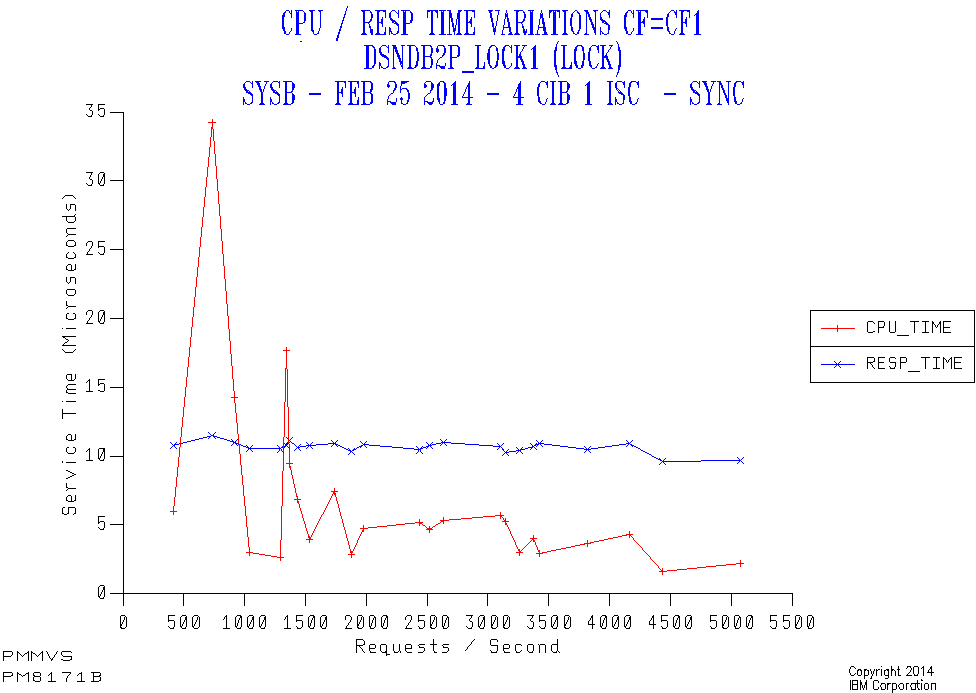
As an example consider the following case of a lock structure (DSNDB2P_LOCK1) in CF1 accessed by a member (SYSB) over a mixture of 4 Infiniband links and 1 ISC link[11]. All the requests are synchronous.

Along the horizontal axis is the request rate from the member to the structure. The red line is the CF CPU time per request, the blue being the response time.

  • While the CPU time per request appears high at low traffic this is really an amortisation effect as there is a certain amount of cost for no traffic. I see this quite often.
  • The response time stays constant – which is a good thing.
  • Generally there’s quite a bit of a difference between the CPU time for a request and the overall response time. So the sensitivity to CF engine speed is not great. In this case the need to use external signalling links is what drives the difference – as the CF Utilisation is very low.

Obviously if the CPU time dominates then a slower processor (such as moving from a zEC12 ICF engine to a zBC12 one) risks delaying requests. Equally if the non-CPU time dominates the zBC12 engine speed isn’t likely to matter much.

In any case moving from a z196 ICF engine to a zBC12 ICF engine isn’t such a drastic drop in speed. A fortiori moving from z10.

I could stop there. But really the discussion should continue with the effects of removing duplexing, request CPU heaviness, queuing and signalling technologies. The queuing aspect might be unimportant but the other three certainly aren’t. But let’s deal with them all – at least briefly.

Queuing

Coupling facilities behave like any other kind of processor from the point of view of CPU Queuing, except their performance is more badly effected when queuing occurs.

For this reason (and for white space reasons) we consider CFs to be full at a much lower utilisation than z/OS LPARs. Multiprocessor CF LPARs are also preferred over single processor ones.

A zBC12 CF would have more processors than the equivalent capacity zEC12. It could offer a better queuing regime within the same capacity.

Removing duplexing

As you probably know there are two types of structure duplexing:

  • System-Managed
  • User-Managed

A good DB2 example of the former would be LOCK1 and the only IBM example of the latter DB2 Group Buffer Pools.

With System-Managed Duplexing every request is duplexed and the request must be completed in both CFs before z/OS sees the request as complete.

With User-Managed Duplexing only the writes are duplexed, which is generally a small subset of the requests to the Primary. But the requests that are duplexed must again complete in both CFs.

Each duplexed request takes at least the time of the slower of the two requests, so duplexing causes a variable amount of delay.

The greater the distance between the two CFs the greater the request elongation, of course.

So a standalone zBC12 could allow you to avoid this elongation and perhaps to design a configuration with machines further apart.

SIgnalling Technology And Distance

Consider the following example from the same customer as the first graph.
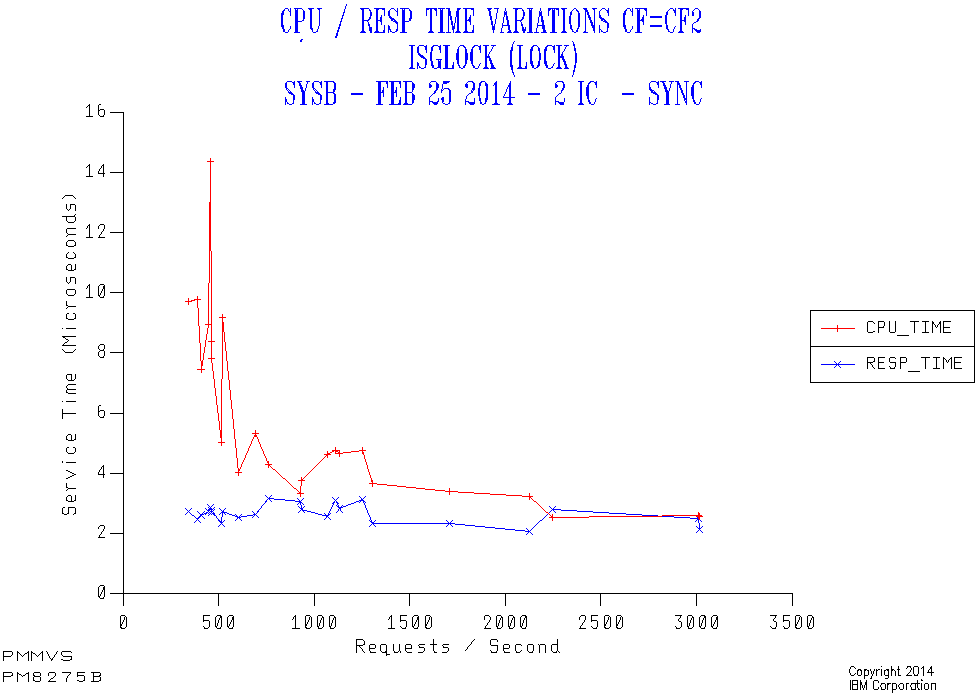
This is another lock structure (GRS Star instead of a DB2 LOCK1 structure). This time it’s in a different coupling facility (CF2) accessed through Internal Coupling (IC) links from the same member (SYSB).

Again all the requests are synchronous. But this time the response time is about 3 microseconds rather than the 10 for the first case. While the responsiveness to applications might not be very different there is an important effect:

Because all the requests are synchronous every request results in a coupled z/OS engine spinning for the entire duration of the request. For this reason the difference between 3 and 10 microseconds might well matter.

Obviously the further the distance and the slower the link technology the bigger the impact on request response times and, potentially the coupled CPU time.

Request CPU Heaviness

The two Lock Structure examples above had about the same CF CPU heaviness – 3 microseconds per request.

Consider the following case. It’s a DB2 Group Buffer Pool structure.

Here the CF CPU per request is variable but in the region of 15 to 20 microseconds, far heavier than for the two lock structures. As this structure is accessed from SYSB using IC links the CF CPU time dominates. So a slower CF engine would lead to longer request response times – under cirumstances like these where there is little CPU queuing in the CF.

(Notice how the Synchronous %[12] varies between 90% and 100% across the range of request rates. This could be a different mix of request types – as is entirely feasible with cache structures – or it could be the Dynamic Request Conversion heuristic converting some from Synchronous to Asynchronous as the response time increases. I prefer the former explanation here, but I’m not sure and no instrumentation will tell me.)

Conclusion

As always “it depends”. I’ve tried to give you a glimpse of on what and how it depends.[13] But usually I would expect a zBC12 stand alone coupling facility to be fine.

I appreciate that, if you’ve got this far, it’s been a very long read. Along the way you’ll’ve seen three graphs that each of them slightly “misbehave”: I consider the complexity and misbehaviour part of the deal when discussing Parallel Sysplex configuration and performance: It’d be hard to boil it down without missing something important.


  1. Integrated Coupling Facility  â†©

  2. This is a particular common and generally good design. The discussion here extends neatly to other configurations WLOG[15].  â†©

  3. For some recentish thoughts on Duplexing start with Coupling Facility Duplexing Reporting Warm-Over  â†©

  4. I prefer the spelling “Data Sharing” to the more-frequently-observed “Datasharing” but I’m not consistent in this.  â†©

  5. I see many two-member Data Sharing groups and about the same number of four-member Data Sharing groups.  â†©

  6. Usually I can tell the difference between the two cases, just from signalling times.  â†©

  7. Many structures have little traffic to them and their response times are rather less important.  â†©

  8. Some of the analysis relies on data for all the systems being collected.  â†©

  9. R744SETM is the field in the SMF 74–4 record. This appears on the RMF Coupling Facility Activity report.  â†©

  10. This isn’t an outrageous assumption but it isn’t 100% valid: For the case where the members are balanced and similar the traffic will be similar from each member – but async-vs-sync and operations like Castout processing could affect this. I suspect if one member is, say, doing completely different DB2 work to another the requests might be lighter or heavier. But I can’t prove this.  â†©

  11. We don’t know how much traffic goes over each link or even link type.  â†©

  12. The other two graphs don’t have this line. Instead they have the word “sync” in the title as all the requests are synchronous always. If the structure had been 100% Async (for example a XCF Signalling list structure) I’d’ve again suppressed the line and replaced it with “async” in the title.  â†©

  13. It’s the duty of anyone who says “it depends” to say on what and how – at least until the audience’s snoring gets too loud. 🙂  â†©


After A Decent Interval

(Originally posted 2014-03-23.)

I’m writing about intervals again.[1]

Two things have occasioned this:

  • I’ve been updating my code for DB2 Versions 10 and 11[2].
  • I’ve dealt recently with customers with unhelpful SMF or RMF intervals.

As I’ve said before it’s important to understand the provenance of the data you’re using. This would be true whether it’s performance data, financial data, health data or anything else.

Most of the time you don’t see raw data: It’s as processed as the food we eat. 🙂 I’m privileged[3] to spend more time than most looking at raw SMF records, though they too aren’t “the horse’s mouth” really.

DB2 Statistics Trace

DB2 Version 10 introduced a significant change in the way its interval-based records are created.[4] As previously noted STATIME governs the frequency with which Statistics Trace records are cut. The default dropped from a useless 30 minutes to 5 in DB2 Version 9. The change in Version 10 was to decouple the frequency of cutting certain types of Statistics Trace records from STATIME: IFCIDs 1, 2, 202, 217, 225 and 230 are always cut every minute. I use most of these IFCIDs (and rarely the ones that aren’t) so this is a good change for me.

But why do we care about the record-cutting interval? Let me take you on a journey from the raw SMF to the numbers I share with you (or which appear in any product’s reporting).

Consider the following spreadsheet and set of three graphs. It’s made up data but is typical of some of the counters in DB2 Statistics Trace.

Top left is the raw spreadsheet data:

  • The first column is the record timestamp. Notice how the table is sorted by timestamp ascending.
  • The second column is the raw field’s value. Notice how it is ever increasing.[5]

The remaining columns aren’t in the record but are derived:

  • The third column is obtained by subtracting this record’s value for the field from the previous record’s. This is the delta in the spreadsheet and represents the activity in the interval.
  • The final column is the delta converted to a rate: The interval here was 10 minutes or 900 seconds.

The result of all this is the graph on the bottom right (labelled (3)).

In reality I tend to summarise DB2 statistics by hour and all the data in the spreadsheet represents a single net data point. Also I take the lowest value in the interval (the first) and subtract from the highest (the last).[5] I suspect everyone else does too – after all a previous record just prior to the reporting period might not exist. But back to the data:

If you examine the time intervals covered 9:01 to 9:51 is only 50 minutes out of the hour. And the delta (19500–10000) covers those 50 minutes only. So the best rate calculation is 9500 / 3000 = 3.2 per second. In fact I do 9500 / 3600 and thus underestimate a fair bit.

It’s probably a little picky to also point out that the rate within the hour might significantly vary from this 3.2 figure because of surges or drops in activity outside the 50 minutes of the hour captured.

Actually a (simulated) STATIME of 10 (as in here) isn’t so bad: Losing some rate doesn’t matter much. But consider the old default of 30 minutes for STATIME: It’s highly likely 50% of the activity isn’t captured and that there is significant variation of rate outside of the 30 mins in the hour that is.

And that’s why I was so glad the default STATIME got dropped in Version 9. And why having these records cut every single minute in Version 10 is even better: Less than 2% of the activity and time is uncaptured – with a 1-minute interval.

RMF Intervals

Recently I’ve seen customers with long RMF intervals (1 hour) and with inconsistent intervals (30 minutes for some systems and 20 for others).

Both of these lead me to have to summarise data at an hourly level. I consider it a form of “enforced squinting”.[6]

Summarising at an hourly level makes the graphs more readable but, and this is a significant “but”, some peaks are shaved off. I’m most worried about underestimating[7] things like peak CPU busy. (Conversely overestimating WLM Service Class Period Velocity.) Both of these can lead to installations having a flawed capacity plan, with the potential for performance crises. Over the years I’ve seen my fair share of these.

It would be a bit much, most of the time, to lower the RMF interval down to, say, 1 minute. Benchmark or test run situations might be an exception but 1440 data points a day per system is excessive. 15 minutes is generally fine.

Of course processors (or engines if you prefer) are rather binary: At any moment an engine is either 100% busy or 0% busy. Zooming right in would yield this rather useless “whiplash” information.

I could, in principle, zoom out from the lowest level of summarisation – the RMF interval – to 1 hour, 2 hours, 4, 8, then 24 – to show how the average CPU Utilisation peaks at lower and lower values. And one day I just might: It’d be a good pedagogical exercise.

In the RMF case there’s no possibility of activity loss with long intervals, but there clearly is one of resolution loss.

It’s also helpful, by the way to synchronise the RMF interval with the SMF interval: Drilling down from the RMF Service Class Period level to the Address Space level works better if you do.

Data Volume Sensitivity

So, dropping the interval with which you cut records is a good thing, in data quality terms. But how is it in terms of quantity?

In the case of DB2 Statistics Trace the amount of data is dwarfed by the amount of Accounting Trace, assuming you’re collecting the latter. So a shorter interval probably doesn’t affect your overall SMF data volume significantly.

In the case of RMF there are some high-volume records, most notably SMF 74–1 (Device Activity), 74–5 and 74–8 (Cache), and 74–4 (Coupling Facility Activity). Unless you disable these types you’ll collect much more data if you drop the RMF interval significantly.

So, I like the current product behaviours – 1 minute for most of DB2 Statistics Trace and RMF’s default interval of 15 minutes – as a good balance between quality and quantity.

But essentially I’m after a decent interval. 🙂


  1. I wrote about SMF intervals in the form of DB2’s STATIME parameter in 2007 in DB2 Version 9 – STATIME Default Decreased to 5.  ↩

  2. I wrote about this in Coping With DB2 Version 10 And Preparing For DB2 Version 11 and And Some More Things On The Way To DB2 Version 11.  ↩

  3. or is it condemned, Prometheus-like? 🙂  ↩

  4. See DB2 Version 10 STATIME Description.  ↩

  5. “Ever increasing” is a strong claim: In Version 10 many fields were widened from 4 bytes to 8 and so are much less likely to overflow. I also use a suddenly decreasing value as evidence of a DB2 restart.  ↩

  6. “Squinting” is a term I use for deliberately defocusing to see the bigger picture.  ↩

  7. This is one case where the term “misunderestimate” might be appropriate. 🙂  ↩

Machines (Back To Humans)

(Originally posted 2014-03-15.)

As you know I mainly deal in SMF data (and other machine-generated instrumentation). While I’m perfectly adept at conducting interviews and handling evidence from real live people there’s much merit in instrumentation.

I’m also not keen on just replaying what you say back at you, with no value added in the process. But I’m making an exception:

I’ve just added to my code the ability to name physical processors or machines as I prefer to call them. That’s part of the origin of the title of this post.[1]

What RMF actually provides to label a physical processor is the plant number (eg “51”)[2] and serial number (eg “12345”). Previously I just printed this. In this example I would print “51–12345”. I think you’ll agree this isn’t a great way to refer to a machine. In fact not many customers are familiar with their machine serial numbers.

So, if you tell me the plant and serial number and what you call the machine I’ll use that information to build a table which my code uses to label graphs and reports. In fact if you say something like ’the System z10 with SYSA on is called “Ewelme A” or some such I can work it out from there.

So I’m reliant on two human factors here:

  • You telling it to me straight.
  • My not getting confused and building the table wrong.

I think I trust you to do your bit right more than me to do mine. 🙂

Actually my bit is fiddly: I wrote very simplistic code that literally takes plant and serial number and a name on a single line. It doesn’t take any other form of identification. So I have to use other means to correlate plant/serial and customer-friendly name.

As I said I’m not wowed at manually inputting anything. But in this limited case I think it’s worth it: I’d far rather use the terms (including pronunciation) you use, rather than an identifier you’ve never heard of. It just seems courteous and friendly. And as if the machine was a real one. 🙂

And of course, as most recently discussed in LPARs – What’s In A Name? I’m somewhat inquisitive about names anyway. 🙂


  1. OK, with such a contorted title it’s actually the name of a very fine Queen song, from The Works  ↩

  2. I’m familiar with 02 (Poughkeepsie), 51 (Montpellier), 83 (Dublin) and 84 (Singapore).  ↩

And Some More Things On The Way To DB2 Version 11

(Originally posted 2014-03-08.)

It’s only fair to warn you this gets technical straight away. And is probably only interesting to a DB2 audience anyway. And as someone who disclaims on his DB2 knowledge anyway you might not want to read this. 🙂

Still with me? Excellent!

As described in Coping With DB2 Version 10 And Preparing For DB2 Version 11 I’ve been revamping my DB2 analysis code.[1] Here are a couple of areas I think you might be interested in:

When Package And Plan Level Accounting Appear To Disagree

While I like to ensure my reporting matches that produced by IDMS products there is another kind of corroboration sensible reporting developers should try: Where possible check two data sources agree: For example DB2 Statistics Trace and DB2 Accounting Trace.[2]

This story relates to two different sections of the same record type:[3] The plan-level timings sections (QWAC and QWAX) appeared to disagree with the package-level[4] timing section (QPAC):

When you read the description of QWACAWTI it appears to be all the synchronous I/O time. A long time ago another field was introduced – QWACAWLG – which is the synchronous Log Write I/O time. This looked like a breakout of QWACAWTI and so I treated it that way.

The QPAC section also has a field like this called QPACAWTI. My DB2 Batch analysis code allows me to compare the plan- and package-level timings. So I discovered that – for specimen jobs – QWACAWTI was much less than the sum of all the QPACAWTI times. This didn’t make sense to me. Adding QWACAWLG to QWACAWTI got me the sum of the QPACAWTI times. Actually this does make sense as there is no package-level equivalent of QWACAWLG.

So now my code works properly – in this one regard.[5]

The byproduct is I know these jobs have substantial issues with logging speed: Either too much logging or too low logging bandwidth. Actually I do know which package has the logging issue in most cases as it’s the one with the big QPACAWTI value.

Row Count Statistics

This is a nicer story as it involves some newish statistics. In DB2 Version 9 Row Count statistics were introduced in the plan-level QXST section of Accounting Trace. In all likelihood you didn’t notice them. I certainly didn’t.

Let’s take one example: A basic statistic that’s been in the record forever is QXFETCH – the number of Fetch statements.[6] But one Fetch statement doesn’t necessarily equate to one row fetched. As someone who’s not in the habit of coding SQL I can immediately think of two scenarios where the two are different:

  • In programs where you open a cursor you Fetch rows until there are no more rows available. The last Fetch statement doesn’t return a row.

  • With the quite old now Multi-Row Fetch statement returns more than one row. This is for efficiency. Even returning two rows at a time is better than one, though changing to it is complex enough that you might want to return, say, 10.[7]

In both these cases the number of rows fetched is different from the number of Fetch statements and the new QXRWSFETCHD field could be compared to QXFETCH.

One possibility that immediately springs to mind is detecting when a program consistently finds no rows: That would seem unfortunate.

Another possible use is comparing the rows fetched by a program with the number of records written to a sequential data set (estimated from SMF Type 15 records).[8] That would help identify cases where the program is extracting records and directly writing them out.

While I’ve only talked about Fetch the same applies to Insert, Update and Delete. This doesn’t get us to omniscience with SMF but does give us some handy clues. While I haven’t finalised my design for reporting using these fields you can see it’s got me thinking.


So, as with all new data (or data I haven’t revisited in a while) I’m learning new tricks. And as I learn more I’ll continue to write about them.


  1. Yes , I agree, that other post was perhaps too long for comfortable reading.  ↩

  2. Sometimes these disagree anyway (and there might be nothing wrong with that) but it’s a useful exercise.  ↩

  3. Internal consistency isn’t necessarily that reassuring either. In this case it was related IFCID 3 and 239 records.  ↩

  4. While to a DB2 specialist it’s a package to an application developer it’s usually a program.  ↩

  5. You have to have some level of trust in your code but not too much.  ↩

  6. For those of you who don’t know SQL this is retrieving rows under a cursor, rather than with a Singleton Select.  ↩

  7. In essence your program is passed back an array of rows, rather than a single row.  ↩

  8. This only works for fixed-length records as otherwise you can’t estimate their number. For. VSAM you always can measure the number of records inserted using SMF Type 64 records.  ↩

Coping With DB2 Version 10 And Preparing For DB2 Version 11

(Originally posted 2014-03-08.)

I’ve said this many times: I’m not a DB2 person but I’ve bluffed my way in DB2 for many a year.[1] Perhaps that’s why I don’t get to use my DB2 analysis code nearly as much as I’d like.

So it’s perhaps not so surprising my code fell behind when it came to new versions. The last big update was for Version 8. That was a big update – mainly because Accounting Trace (SMF 101) was radically changed. This was to enable enhancements to Package-level statistics.

Now, as is so often the way, I’m dealing with a customer’s DB2 batch performance and they’re the first DB2 Version 10 customer I’ve dealt with at this level of detail.[2] And in fact I’d like to get ready for DB2 Version 11 (hence the title of this presentation).

The moral of the tale for customers is to keep current with any analysis tooling – whether you maintain it yourself or rely on software vendors to do it for you: It’s not much use trying to analyse systems or stuff running on them with backlevel tools.

Now to some specifics (and bear in mind I leapt from Version 8 (or possibly Version 9) to Version 10).

Shock 1: DB2 Does SMF Subtypes Properly

I discovered my code was throwing away Statistics Trace records when building the database when it had accepted them before. Specifically it had assumed the SMF subtype was in offset 22 for a single byte. This is slightly odd as the standard calls for two bytes but the code had worked fine up until now.

I remembered MQ had (long ago) had the same problem and fixed it.

And now it turns out somewhere between Version 8 and Version 10 so had DB2. Easily fixed – by expecting 2-byte subtypes at offset 22. – and we don’t throw records away anymore.

Shock 2: DB2 Widened The SQL Statistics Fields

In Accounting Trace the QXST Section contains fields like QXFETCH – the number of SQL fetch requests – and these used to be 4-byte fields.

So I run off my usual DB2 Batch reporting and compare the results with a DB2 Accounting Report (Long) my DB2 colleague created. While many things match the SQL statistics don’t. Not even close.

After he sent me the mapping macro (member DSNDQXST) for the QXST section in Version 11 I twig the fields have all (controversially in my opinion[3]) been widened to 8 bytes. Adjusting my code to expect these wider fields wasn’t hard and doing so yielded the right numbers.

So now I can trust my code again – for now..

Shock 3: Accounting Trace Class 10

APAR PK28561 was introduced in the life of DB2 Version 8. It introduces a new Accounting Trace class: Class 10. Without this turned on you don’t get package-level SQL counts nor package-level Buffer Pool statistics. This means you can’t say things like “In Program FRED10 in Step 5 of Job JIM you opened a cursor and fetched a gazillion rows” with any certainty.

I expect these statistics cost CPU and disk space so it’s reasonable to make them optional.

Actually my code copes with this but I didn’t understand the numbers I was getting in my reports at the package level. My reports needed adjusting to explain what just happened.

Consequences And Considerations

One consequence of these three changes is I’m no longer willing (or able) to process data from DB2 Version 9 or earlier. I could write a lot of code to fix up the relevant issues in a Version 9 compatible manner – but it’s really not worth it as Version 9 is at end of life.

I could give up and rely on someone else maintaining record processing (probably one of the IBM products). I choose not to for a number of reasons:

  • It keeps me close to the data. How my code worked and how Accounting and Statistics Traces fit together came back to me very quickly. I judge expertise in how SMF records work to be valuable, especially when it comes to evolution (as in this case) and quirks.
  • I can integrate my queries into my reporting. Listing scraping is no fun and often want to go beyond what standard reporting does. But actually the reporting design and evolution is the fun bit.
  • Data provenance is important. For example knowing RMF SMF 71’s Available Frame Queue (AFQ) counts are solid is valuable. (See
  • What We Share And What We Have In Common for more on this.)
  • I’m not keen on being spoonfed – perhaps to the point I probably should accept more spoonfeeding.
  • Talking to my DB2 colleague we suspect some of the product code – both DB2 and what I still call “DB2PE” – is faulty.[4]

But I bet you’re glad you don’t have to actively get into the guts of evolving data, like the DB2 stuff. Unless you are a vendor. Or me. 🙂


  1. Real DB2 specialists can attest to the truth of this: DB2 was something I came to long after MVS but knowing the two has made life much more interesting. 🙂  ↩

  2. Actually I’m not the primary DB2 person helping them but processing the DB2 data is important here: It should help them talk in terms of jobsteps – which would be more useful to Operations people and performance folks in the customer. So I’m keen to do a good job with the DB2 data.)  ↩

  3. This is a tough one as adding new 8-byte fields on the end would’ve added about 1KB to each SMF 101 record. Not doing so has meant reusing space in the record and still extending by a few hundred bytes. Either way supporting both old and new would have meant dual-patching code.  ↩

  4. Generally I trust my own code much less than that of products. But occasionally I have to file a bug report.  ↩

What We Share And What We Have In Common

(Originally posted 2014-03-01.)

The subtext of this post is “do try and keep up” – which is directed at me as much as anybody. 🙂 And is a perpetual state of being when you’re dealing with evolving SMF data and enterprise computing environments.

When I look at a system’s memory usage my code produces what I call a “PM2200”[1] chart. The giants on whose shoulders I balance precariously[2] first created PM2200 some time before 1993.

Back before REXX became viable for my reporting graphs were created by running a query against a single table and directly graphing the results. This meant you could only build a graph from a single data source. For example, RMF SMF 72–3 Workload Activity Report data.[3]

The Original PM2200 Chart – Workload Stack Up

The original PM2200 chart used Workload Activity 72–3 [4] data to stack up usage by WLM workload. This is fine but limited for a couple of reasons:

  • It says nothing about non-workload memory, such as CSA. And nothing about what is free.

  • It under-represents swappable workload. Work that is swapped in memory is using memory (obviously) but that isn’t counted in 72–3. This mainly affects Batch but also TSO.

Unity Is Strength

Fixing these two problems required uniting two sources of data:

  • The aforementioned 72–3 Workload data.
  • RMF SMF 71 Paging[5] Activity data.

Let’s start with SMF 71. It allows you to stack up all the private (think “workload”) and common areas and what’s free. These are called queues.[6] While each queue has maxima and minima[7] it’s best – for the stack up – to use averages.

But SMF 71 doesn’t tell you which workload is the big user. Combine SMF 71 and 72–3 memory perspectives by breaking down the overall Private Area storage usage according to the workload-specific information and stack these up together with the system-wide queues.

It also seemed reasonable to me to highlight the free memory by putting it at the top of the stack and ensuring it wasn’t shaded. Call it an “it’s empty” visual gag if you like.

And so PM2200 remained that useful breakdown of what’s free and what’s used for a while.

High Water Mark – Take 1

It seemed reasonable to me if I was going to graph usage by time of day to indicate the minimum memory free. So I put in a horizontal datum line that rests on the top of the “used” series. And I helpfully injected the minimum average free number into the chart title.

High Water Mark – Take 2

But then the events described in Enigma And Variations Of A Memory Kind took place.

For PM2200 this meant I changed the text in the title to use the minimum of the minimum while keeping the datum line unchanged. So now the possibility of surges in usage is catered for in PM2200 and other memory charts.

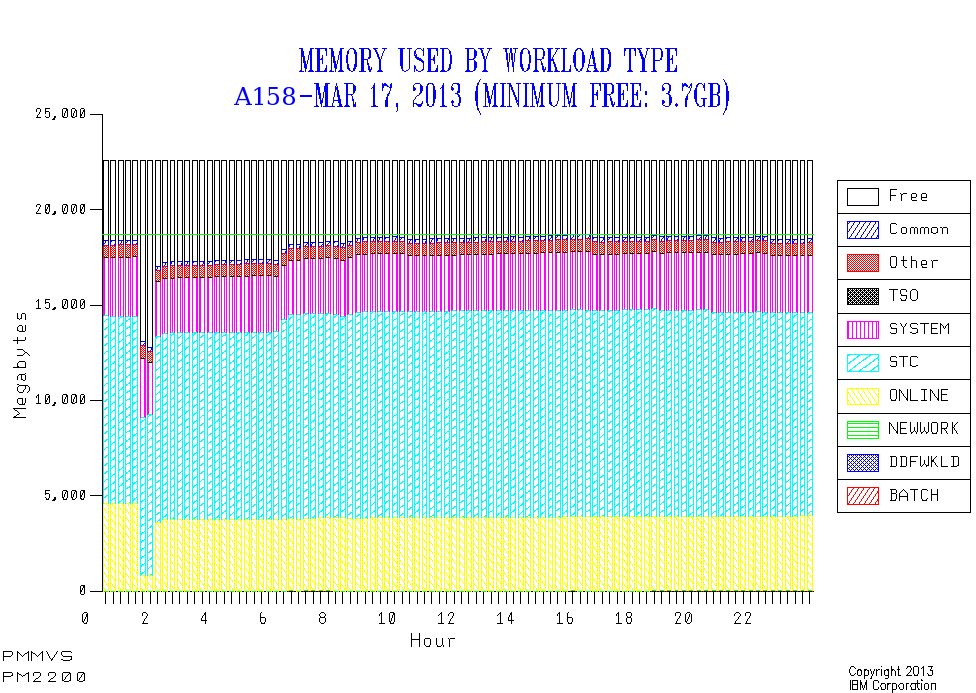
And PM2200 looked like this:

Notice how early in the morning the Online work got bounced. If this happens every day the nosey bit of me says “I’ve learned this customer likes to bounce their Onlines ever night”.

64-Bit Shared And Common

I hadn’t seen much usage of 64-Bit Shared or Common memory usage, despite DB2 V9 introducing a mandatory Shared 64-Bit memory object.

But then, and you probably guessed this one 🙂 , I got a set of customer data…

PM2200 – when first produced – looked simply awful[8]. The main problem with it is that not all the memory was accounted for. Further the supposed total memory was variable – which only really happens if you bring reserved memory[9] online and that’s a one-off event rather than continual variation.

A little guesswork suggested that maybe the discrepancy was 64-Bit Shared memory and 64-Bit Common memory. This turns out to be correct – and is corroborated by these two quantities appearing in the RMF Paging Activity Report.

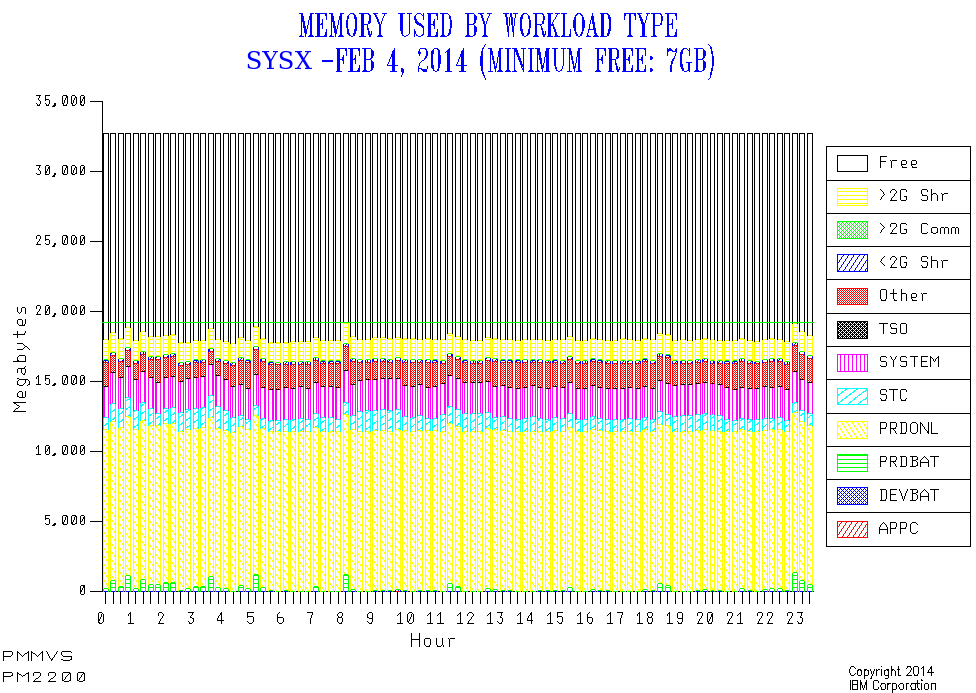
So I adjusted PM2200 to also show 64-Bit Shared and 64-Bit Common. In this case the Shared memory was about 6GB. The Common was small. Adding them in led to a constant total memory as well as that total being the same as the memory online to the LPAR – both of which are goodness.

The latest version looks like this:

Now this is a much less extreme case than the one that made me go “sacre bleu!”

You can extend the analysis for 64 Bit right down to the address space level: SMF 30 has numbers for 64-Bit Private the address space owns and the Shared Memory the address space can see.[10].

You can also work at the WLM Service Class level: SMF 72–3 has the Shared figure in it. I didn’t have SMF 30 for the 6GB case so I used SMF 72–3 to identify one Service Class (“STC”) as owning the shared memory. I also didn’t have useful report classes to work with so couldn’t narrow it down further. What I do know is this probably isn’t DB2 as there are other service classes with “DB2” in their name. But I can’t be certain about this without the 30’s.

In principle I could break down the Shared and Common numbers further – by workload – but I think you’ll agree the chart is already very busy. I have some more design work to do but I think it calls for 1 or more further charts.


You can probably see why I led with “do try and keep up”. This post outlines how one’s reporting has to evolve for two reasons:

  • To wring all the insight you can out of the data.
  • To adapt your reporting to technological changes.

But it’s a continuous struggle and I recognise most people don’t have the time to maintain their reporting too much. Arguably it’s my job.


And just as I thought I was ready to publish this post another piece of information comes up. I had a discussion with the MQ on z/OS Development lead Peter Siddall [11] about whether MQ uses Shared or Common 64-Bit objects. If you’re migrating to MQ 7.1 (perhaps from 7.0.1) you might want to pay attention to this:

MQ 7.1 requires the ability to create 64-Bit Shared memory objects: If you don’t allow that then MQ won’t start. The actual memory usage is generally small and MQ Development recommend a MEMLIMIT of at least 2GB. In any case the usage can be tracked by SMF 30 and so on.


  1. The tooling I now use and develop creates standard charts for, keeping it simple, each system for a specific day. These have standard names.  â†©

  2. You might think that self-deprecating but I don’t.  â†©

  3. In actual fact you could build a view across multiple tables but it was cumbersome.  â†©

  4. Historically it used Performance Group data but the giants quickly adapted the code to cope with WLM Goal Mode. Of course now there is only Goal Mode.  â†©

  5. Yes the record contains information about paging but it also contains other stuff.  â†©

  6. While you might think the term “queue” an odd one (and I did when I got started with MVS in 1985) it refers to lists rather than waiting (in line).  â†©

  7. See Enigma And Variations Of A Memory Kind  â†©

  8. Words considerably stronger than “sacre bleu” escaped my lips, I’m afraid. 🙂  â†©

  9. RMF doesn’t know how much memory an LPAR has reserved. I’d like it to.  â†©

  10. Who owns the shared address space is a different matter. But it’s usually obvious, I think: For example, starting with DB2 V9 the DBM1 address space creates a 64-Bit Large Memory Object it shares with DIST (DDF) address space. That should be obvious to anyone who knows DB2.  â†©

  11. We actually went through Systems Engineering training together – between 1985 and 1987. And I think we were the two most technical SEs on Stream 38. 🙂  â†©

Factorise – For Your Eyes

(Originally posted 2014-02-23.)

As you might know I like maths, particularly algebra. (If you’ve read Another Neat Piece Of Algebra – Series Summation and Hello, I’m Martin And I’m An Algebraic 🙂 you do.)

If there’s one thing I would be doing if I weren’t doing this[1] it might be teaching maths – but it would have to be at a level where algebra and calculus were substantial topics. But I don’t think I’ll really be doing that – at least not for the foreseeable future. [2]

So it occurred to me that I need not be alone in treating some algebraic techniques as puzzles[3] – and with automatic generation of problems people could really get quite good at it. That might be useful – though utility is not my prime motivator in liking algebra: I almost never get to use it.

I won’t claim I was looking for a programming project: The day job gives me enough of those and anyway I have other ideas for fun stuff to create.[4] But anyway, this weekend I created a basic polynomial factorisation page. It’s a single file, containing javascript, HTML and CSS – which makes it quite portable.

After a brief preamble about factorisation and some hints it presents you with a machine-generated second-order[5] polynomial in x to factorise. You type in the factors and press the “Check” button.

The code multiplies the factors together and tells you what the resulting polynomial is. It also compares it to the original and tells you if you’ve got it right.

There’s a “Try another” button or you can just manually reload the page.

Try the code in here. You’ll have to paste it into your own HTML file and pop it in your browser.

It’s a little rough and ready. In particular you have to be little careful in how you type the factors in.

I’ve thought of some ways I could improve it already:

  • I can think of difficulty levels.
  • I could extend it to third- or fourth-order polynomials.
  • I could extend it to polynomials in x and y.
  • I could give tutorial hints.
  • I could graph the resulting polynomial – probably on an HTML5 canvas.
  • I could work on the text some more.
  • I could use the HTML5 Offline Web Applications function to enable you to download it and run it on, let’s say, your smartphone.

But for now I’m enjoying testing it. And I hope you enjoy playing with it too.

And, in case you’re wondering, I have a memory-related “day job” post beginning to take shape in my brain.


  1. The term “this” is, of course, loosely defined. Whether you think I’m a System z advocate, as Principal Systems Investigator (as I seem to be allowed to style myself) 🙂 or as Performance Guy is a matter of personal opinion.  ↩

  2. OK, how far can you foresee the future? Really, that far? 🙂  ↩

  3. As indeed I confess to in Hello, I’m Martin And I’m An Algebraic 🙂  ↩

  4. My creative metier is code. Oh, and true stories.  ↩

  5. A second-order polynomial is one of the form ax2+bx+c.  ↩

Factorise

.variable { font-style:italic; font-size: 125%; } .exponent { font-size: 75%; vertical-align: super; } .equation { background: #ccffcc; padding: 10px; box-shadow: 10px 10px 5px #888888; display: inline-block; } .bracket:before { content:”(“; } .bracket:after { content:”)”; } .wrong { color: #ff0000; } .right { color: #00ff00; } // Create HTML to display polynomial // Assumes: 1) All coefficients in array // 2) Lowest power of x first i.e. zero // 3) No leading-zero coefficients function showPolynomial(c,anchorID){ poly=’‘ for(i=c.length-1;i>=0;i–){ // Suppress 1 multiplier and last coefficient=0 cases if((c[i]==1) && (i>0)){ // Not c[0] and is 1 multiplier coeff=”” }else{ if((c[i]==0) && (i==0)){ // c[0] and 0 is multiplier coeff=”” }else{ // Normal case coeff=c[i] } } // Print term if non-zero coefficient if(c[i]!=”0″){ switch(i){ case 0: term=’‘+coeff+’‘ break case 1: term=’‘+coeff+’x‘ break default: term=’‘+coeff+’x‘+i+’‘ } // Figure out if we want a + before term if((c[i]<0)||(i==c.length-1)){ plusTerm="" }else{ plusTerm='+‘ } poly+=plusTerm+term } } poly=poly+’‘ anchor=document.getElementById(anchorID) anchor.innerHTML=poly } function multiplyPoly(p1,p2){ order=(p1.length-1)+(p2.length-1) var result=Array() for(p=0;p<=order;p++) { result[p]=0 } for(i1=0;i1<p1.length;i1++){ for(i2=0;i2<p2.length;i2++){ result[i1+i2]+=p1[i1]*p2[i2] } } return result } function polysEqual(p1,p2){ // Polynomials need to be of the same order if(p1.length!=p2.length) return false for(i=0;i-1){ poly[0]=parseInt(factorString.substring(plusPos+1)) return poly } // check for mx-n case minusPos=factorString.indexOf(“-“) if(minusPos>-1){ poly[0]=-parseInt(factorString.substring(minusPos+1)) return poly } // check for mx case if (factorString.substring(xpos+2)==””){ poly[0]=0 return poly } // Broken case return null } function checkIt(){ // Check first factor user might’ve typed in f1=parseFactor(“f1”) if(f1==null){ alert(“Type in the first factor – such as 2x+1 or 3x or x-1.”) } // Check second factor user might’ve typed in f2=parseFactor(“f2”) if(f2==null){ alert(“Type in the second factor – such as 2x+1 or 3x or x-1.”) } // If both factors are non-null proceed if((f1!=null) && (f2!=null)){ guessMultiplied=multiplyPoly(f1,f2) showPolynomial(guessMultiplied,”product”) yesno=document.getElementById(“yesno”) if(polysEqual(p12,guessMultiplied)){ yesno.innerHTML=”correct!” yesno.setAttribute(“class”,”right”) }else{ yesno.innerHTML=”wrong.” yesno.setAttribute(“class”,”wrong”) } document.getElementById(“prodDiv”).style.display=”block” } } Factorising Polynomials

Factorising Polynomials

Factorising polynomials is a basic but satisfying exercise in algebra. Try it here, with some random machine-generated examples.

Factorising is the process of turning a polynomial such as:

x2+3x+2

Into simpler factors. In this case they would be x+1 and x+2. If you multiply the two factors together you get the original polynomial.

Notice how the 3 in the polynomial is the sum of the 1 and the 2 in the pair of factors. Also how the 2 in the polynomial is the product of the 1 and the 2 in the two factors.

This actually wouldn’t be the case if the coefficient of the x2 term weren’t 1. But it’s not difficult to extend the thinking to cope with these cases.


And now it’s your turn.

Factorise:

3x2+8x+4

Write the two factors in the form 2x+1 or x or x-3.

Factor 1: Factor 2:

Check

Try another

New zIIP Capacity Planning Presentation

(Originally posted 2014-02-19.)

In zIIP Address Space Instrumentation I discussed the subject of zIIP Capacity Planning.

What I was working on – but wasn’t ready to reveal – was a presentation on zIIP Capacity Planning. But I was also working on my new “zIIP CPU From Type 30” code. And that’s indeed what that post is about.

Now I am in a position to reveal my new presentation. You can get it from here. Usually I present a new set of slides at some conference or other, and then publish on Slideshare. This time I’m doing it the other way round.

Thst does, of course, present a small risk: It’s possible conference organisers will decide they don’t need me to present. I’ll take that risk as:

  • I consider this material to be important to get out there.
  • This is a living presentation.
  • I think people want to hear me anyway. 🙂

The “important” bit is, ahem, important. 🙂 It relates to the fact that DB2 Version 10 changes the rules a bit: As I said in zIIP Address Space Instrumentation it’s the first zIIP exploiter that has especially stringent[1] requirements for access to CPU. This means you need to examine zIIP CPU more critically than ever. This message bears repeating, controversial as it probably is.

The “living presentation” bit relates to the fact that each customer situation teaches me something It’s a fair bet future ones will influence this presentation, without negating its essential thrust. Indeed several situations over the past three months have led to this presentation being better. I also have John Campbell and Kathy Walsh to thank for this being a significantly better presentation now.

Anyhow, feel free to read the slides and tell me what you think. And hopefully I’ll get to present the material a fair few times.[2].


  1. “Stringent” is the best word I’ve come up with so far.
    The only other contender has been “critical” but that’s already taken, as in “CPU Critical”.

  2. When I first drafted this post a few weeks ago I had no opportunities to present lined up. Now, at the time of posting, I have two in the UK:

    • 2 April 2014: Large Systems GSE Working Group, probably IBM Southbank.
    • 9 April 2014: GSE/UKCMG zCapacity Management and zPerformance Analysis Working Group, IBM Bedfont Lakes.

LPARs – What’s In A Name?

(Originally posted 2014-01-15.)

Basic tutorial or advanced nicety? You decide…

Having been told what I thought was a nice high level presentation was “a bit too technical” I’ll confess to a perpetual (slight) anxiety about “level”. 🙂

Anyhow, this post is about inferences from LPAR names, particularly deactivated ones.

(If you catch me saying “inactive LPARs” I apologise. I mean ones that are defined on a machine but not activated, as opposed to those that are just idle.)

You probably know that RMF’s Partition Data Report lists activated LPARs by processor pool. (In some cases this can mean an LPAR appearing twice or thrice – if zIIPs or zAAPs are configured to the LPAR.) What you might not know (or might have ignored) is that the same report contains a list of deactivated LPARs.

As someone who majors on SMF data rather than RMF Reports (though I’m thoroughly conversant with the Partition Data Report) I’ve not reported on deactivated LPARs before. In our reporting we only list ones with some engines and memory defined.

A number of things have led me to believe understanding the defined-but-deactivated LPARs is handy:

  • I see gaps in LPAR numbers I’d quite like to explain.
  • I hear customers talk of recovering LPARs from one machine to another.
  • I’d like to understand how much memory is hypothecated for currently deactivated LPARs.
  • I’d like to understand whether an LPAR might be set up but be going to be activated later.

You could call these “nosiness matters” but I think they help tell the story.

What Do We Have?

In SMF 70 Subtype 1 (CPU Activity) we have two sections that are relevant to PR/SM and LPARs:

  • PR/SM Partition Data Section
  • PR/SM Logical Processor Data Section

The former has one for every LPAR defined on the machine, regardless of whether it’s activated or not. The latter has one for every logical processor, whether online (even if parked) or not. Deactivated LPARs have no logical processors, so no Logical Processor Data sections.

Up until now my code has merged Partition Data sections with Logical Processor Data sections and thrown away data for deactivated LPARs. Not any more.

But what you get in the Partition Data section for a deactivated LPAR is only a small subset of what you get for an activated one: You get the name and the LPAR number. That’s it (and I’m not complaining). You don’t get, for example, memory allocated – as there is none.

So I routinely report on the deactivated LPARs for each machine you send me data for. The table has their names and and numbers.

Nosiness Matters

(I have a presentation called “Memory Matters”. Perhaps I should have one called “Nosiness Matters”. 🙂 )

Back to my list of things I wanted to know about deactivated LPARs:

Missing LPAR Numbers

Unless you can tell me differently I see filling in the gaps in LPAR numbers a matter of tidiness. In any case the deactivated LPARs’ LPAR numbers let me do that.

Recovering LPARs

When I’ve used ERBSCAN and ERBSHOW to look at SMF 70-1 records (which I do as a diagnostic aid sometimes, and when developing new code) I see eerily familiar LPAR names.

For example, I might see CEC1 with an activated MVSA LPAR and CEC2 with a deactivated MVSA LPAR. It’s a reasonable guess that either

  • The LPAR got moved permanently from CEC2 to CEC1 (and the definition was left unchanged).

or

  • The intent is to recover MVSA from CEC1 to CEC2 if necessary.

I’ll admit I don’t know nearly enough about recovery strategies (outside of what Parallel Sysplex and some of its exploiters can do). But this should be a good conversation starter.

Hypothecated Memory For Deactivated LPARs

You don’t get, as I mentioned, memory for deactivated LPARs. This is because they don’t have any: It would be in unallocated memory (a figure RMF also doesn’t have.)

So my approach is to note the deactivated LPARs and enquire how much memory is notionally reserved for them. I can get the purchased memory from the machine’s Vital Product Data (VPD) and do the sums.

LPARs Not (Yet) Present

For some machines I see “aspirational” LPARs – such as ones with “LINUX” or “VM” in their names. Those would be ones the installation hopes to use at some stage. (I’d rather believe that than that the LPAR was the result of an unconvincing experiment.) 🙂

In one set of data I see two pairs of LPARs, one for each of a pair of demerging organisations. Each pair is Prod and Dev. Of these one “DEV” LPAR is deactivated. I guess Development has already moved off, leaving just the counterpart Production LPAR. (The other pair of Prod and Dev remain activated.)

Conclusion

You’ll spot not all my potential lines of enquiry are exhausted. But you”ll see I can make good progress – and ask a whole series of new questions. Hopefully you’ll see value, too.

I’ve also not talked about the panoply of different activated LPAR names. For example, having MVS1, IPO1, SYSA and C158 in the same machine says something about heritage. 🙂